On February 5th, 2026, Kuaishou dropped Kling 3.0, just 3 days before ByteDance dropped Seedance 2.0. This is no coincidence and the AI video generation space is only getting more competitive by the day. This Kling 3.0 review is a deep dive on all the latest features and improvements of the newest iteration of the Kling AI video generator, how its pricing stacks up and if it deserves a spot in your production stacks.
Kling 3.0 is based around a Multi-modal Visual Language (MVL) architecture. Simply put, this means that text, images, audio, and video are all processed in one system. Kling 3.0 has native 4K output, built-in multilingual audio support, and creative tooling that makes it a viable alternative to Seedance 2.0, Sora 2, and Veo 3.1. After two weeks of testing, hundreds of clips created, the free tier stress-tested, and side by side benchmarking against every other major competitor, we can detail where it shines and where it falls short.
See Kling 3.0 in action:
Kling 3.0 at a Glance
- Developer -- Kuaishou
- Release Date -- February 5, 2026
- Model Variants -- Video 3.0, Video 3.0 Omni, Image 3.0, Image 3.0 Omni
- Max Resolution -- Ultra HD (Ultra tier)
- Video Duration -- 5-15 seconds
- Frame Rate -- 30fps (standard), 60fps (Ultra)
- Native Audio -- Yes -- English, Chinese, Japanese, Korean, Spanish
- Input Modes -- Text-to-video, Image-to-video, Reference-based generation
- Free Tier -- 66 daily credits
What Is New in Kling 3.0
Native Multi-Language Audio
Native audio generation is a key feature new to this Kling 3.0 review. Kling 3.0 can generate audio that's lip-synced and language-specific directly from text prompts. There are no separate or separate audio files needed, and Kling 3.0 will create sync audio in five different languages and many dialects. We have tested Spanish-language prompts and the lip-sync accuracy is very good. This compares to Seedance 2.0, which still requires an external audio file to be provided as input. For video creators who need to produce multilingual videos, the Kling AI video generator has a practical edge.
Multi-Shot Storyboard Tool
The Video 3.0 Omni version also has a storyboard tool which gives an unexpectedly high level of control. The duration, size, angle, pacing of the narrative and camera movement per shot can be set by the user and the model weaves these into a complete sequence. Transitions between shots can be a little clunky but as a quick storyboard/ pre-visualiser it is genuinely useful.
4K Ultra-High-Definition Output
4K AI video is here. Image 3.0 model renders out stills at 2K and 4K. The quality is very usable for production work. Texture detail and lighting is a huge step up from the last gen. For production teams needing broadcast or print quality assets, this is a big moment.
Improved Character Consistency
Character coherence has always been Kling's achilles heel, and version 3.0 is a significant improvement. Characters appear much more often in the same form from frame to frame. Testing a single character in five different clips isn't perfect, but it's coherent enough to be able to work in a short story mode. That's progress.
Motion Brush Tool
The Motion Brush lets you draw motion paths on top of frames. Need a dog to run in a specific direction? Need some leaves to blow in a specific way? Draw the path. No other major model that I know of has an equivalent feature, and it gives you a level of creative control that text prompts can't match. One of the standout points from the Kling 3.0 review.
Text Preservation
Kling 3.0 is in the lead, but stealthily, in terms of rendering fidelity of text. Signs, brand logos, and price tags are all still legible in the videos that get generated. Anybody who has ever tried to finagle Sora 2 into keeping readable text in the videos it generates knows how much of a battle that is. For e-commerce and marketing teams, that alone could be reason enough to choose the Kling AI video generator over the competition.
Kling 3.0 Pricing
Kling 3.0 pricing can be tricky to figure out. It's important to know what you're getting into before signing up for a plan. We offer many tiers and API options.
Official Platform (klingai.com)
- Free -- $0 -- 66/day (no rollover) -- 66 daily free -- 720p, watermarked, single queue
- Standard -- $6.99/month -- 660 credits/month -- 66 daily free -- 1080p, no watermark
- Pro -- $29.99/month -- 3,000 credits/month -- 66 daily free -- Priority queue, professional mode
- Ultra -- $59.99/month -- 8,000 credits/month -- 66 daily free -- Ultra HD, all features
Official API Pricing
- Kling Video O1 Pro (with video input) -- $0.168/sec
- Kling Video O1 Pro (without video input) -- $0.112/sec
- Kling Video O1 Standard (with video input) -- $0.126/sec
- Kling Video O1 Standard (without video input) -- $0.084/sec
- Kling v2.6 Pro (5s) -- $0.35/clip
- Kling v2.6 Pro (10s) -- $0.70/clip
- Kling Image O1 -- $0.028/image
Atlas Cloud API Pricing (Recommended)
Kling 3.0 Pricing: The Best Prices On Kling 3.0
Atlas Cloud has some of the best pricing out there on Kling 3.0, and it's recommended for most production workflows:
- Kling v3.0 Pro Text-to-Video -- $0.168/sec -- 30% discount
- Kling v3.0 Pro Image-to-Video -- $0.168/sec -- 30% discount
- Kling v3.0 Std Text-to-Video -- $0.126/sec -- 30% discount
- Kling Video O3 Pro -- $0.168/sec -- 30% discount
- Kling v2.6 Pro -- $0.06/sec -- 15% discount
NOTE: Atlas Cloud offers $1 in free credit upon sign up. That will create about 6-8 standard videos. So you have more than enough credit to see if the Kling 3.0 API will work for your workflow. In most cases the Kling 3.0 pricing through Atlas Cloud is a no-brainer savings over the official API.
Kling 3.0 Free Tier: What Users Actually Get
Sixty-six credits per day is a lot, but here are some limitations of the Kling 3.0 free tier that you should know about before counting on it:
- 5s Standard video -- 10 credits -- 6 videos/day
- 10s Standard video -- 20 credits -- 3 videos/day
- 5s Pro video -- 25 credits -- 2 videos/day
- 10s Pro video -- 50 credits -- 1 video/day
Key Limitations of Kling 3.0 Free:
- Maximum 720p resolution -- 1080p and higher require a paid plan.
- Watermarked output -- renders are unsuitable for client-facing or commercial deliverables.
- Extended queue times -- during peak hours, benchmarks show wait times exceeding 30 minutes, with one Tuesday afternoon session reaching 47 minutes.
- Failed generations still consume credits -- a frustrating aspect of the system that affects free and paid users alike.
- No commercial use permitted on the free plan, which is a dealbreaker for professional teams.
- Single-task queue -- no batch processing is available. Users must wait for each generation to complete before starting another.
- Pro Mode is locked behind the paywall entirely.
Review: While the Kling 3.0 free tier is sufficient for evaluation and low-key playing around, it is not capable of any meaningful production work. If you require guaranteed output and quicker response time you will want to upgrade to a paid tier, or access the Kling 3.0 API via a service such as Atlas Cloud which has no queue time and also makes better use of the $1 free credit than you do on the official platform with their daily credit system.
Kling 3.0 Strengths
1. Natural Motion Quality
The single most notable aspect of this Kling 3.0 test was the quality of motion. Running a clip of a person walking down a rain slicked street showed very compelling results: the natural sway of a coat, the bounce of an umbrella, and the constantly shifting reflections on wet pavement all had a strong sense of realism to them. Walk, run, and gesture animations in general feel very fluid. Sora 2 or Veo 3.1 doesn't consistently hold up in side-by-side benchmarks in terms of realism of motion.
2. Most Generous Free Tier
Kling 3.0 has the most generous free tier out of the major AI video generators with 66 free credits each day, and it doesn't even require a credit card. Seedance 2.0 offers a very limited free tier. Sora 2 is included with a ChatGPT Plus subscription. Veo 3.1 has a very limited free tier.
3. Ultra-High-Definition Support
Subscription to the Ultra tier ($59.99/month) is required to access it, but the Kling AI video generator is a viable choice for production pipelines that need the highest resolution output.
4. Motion Brush
Motion Brush gives you an unprecedented amount of directorial control that no other model offers. Simply draw a custom motion path on a frame and the model follows along it. It's like the missing link between prompt-based generation and intentional creative direction. If you're a filmmaker or animator that needs fine-grained control over movement, this is your main reason to pick Kling 3.0.
5. E-Commerce Ready
Tests were run specifically on product mockups with brand names on shoes, nutrition labels on supplement bottles, and model numbers on tech products. In roughly 8 out of 10 generations, the text was retained and remained readable. The ability to retain product copy this well is a competitive point for teams shooting product ads and eCommerce content.
Kling 3.0 Weaknesses
1. No Rich Multimodal Reference Input
This is also where Seedance 2.0 has a real edge. Seedance accepts up to nine images, three videos, and three audio files as reference input, allowing for unprecedented user control over the output. Kling 3.0 only accepts text and one or two reference images. The limits become apparent when a more complex project requires the model to ingest a specific visual direction through several reference points.
2. Shorter Maximum Duration
Kling 3.0 is maxed out at 10 seconds video generation. Seedance 2.0 is 15. Sora 2 is 12. For anything that needs to have a narrative arc or a sense of rising tension, that's just not enough. Users will often find themselves hitting the limit wanting only a couple more seconds. They're forced to work around creatively, or use multi-clip workflows.
3. Strict Content Moderation
Kling 3.0 is very aggressively filtered. Automatic keyword blacklisting, NLP filtering, and manual moderation. I've found that even innocuous medical visualization prompts will be filtered in testing. Any user working in healthcare, education, or otherwise potentially triggering content areas should expect some friction. Violations may be suspended or permanently banned, use at your own risk.
4. Peak Hour Queuing
Users on free-tier experience significant queue time during peak periods (30+ minutes is not unusual for one generation). This is a particular drag when tinkering with prompts and needing quick turnarounds, as it interferes with the creative flow. Another reason to use the Kling 3.0 API through Atlas Cloud (where queue time is not an issue) if you're planning on doing any serious production work.
Kling 3.0 vs. Competitors
- Kling 3.0 -- Max Resolution: Ultra HD -- Max Duration: 10s -- Reference Input: 1-2 images -- Native Audio: Yes (5 languages) -- Free Tier: 66 daily credits -- API Cost (Atlas Cloud): $0.126/sec -- Best Strength: Resolution + value -- Content Filter: Very strict
- Seedance 2.0 -- Max Resolution: High Definition -- Max Duration: 15s -- Reference Input: 12 files -- Native Audio: Yes -- Free Tier: Limited -- API Cost (Atlas Cloud): $0.022/sec -- Best Strength: Multimodal control -- Content Filter: Strict
- Sora 2 -- Max Resolution: High Definition -- Max Duration: 12s -- Reference Input: 1 image -- Native Audio: Yes -- Free Tier: ChatGPT Plus -- API Cost (Atlas Cloud): $0.15/sec -- Best Strength: Physics realism -- Content Filter: Strict
- Veo 3.1 -- Max Resolution: HD Cinematic -- Max Duration: 8s -- Reference Input: 1-2 images -- Native Audio: Yes -- Free Tier: Limited -- API Cost (Atlas Cloud): $0.03/sec -- Best Strength: Cinematic polish -- Content Filter: Moderate
No model is best in every category. This Kling 3.0 review shows that the model outperforms other models in resolution, free availability, and motion quality, but underperforms Seedance 2.0 in multimodal input flexibility and Sora 2 in physics simulation accuracy.
How to Access Kling 3.0 API
There are two options for developers and development teams who want to use the Kling 3.0 API in their applications.
Option 1: Official Kling API
Kuaishou allows users to register directly on their platform at klingai.com/global/dev/pricing. However, the onboarding process can be tedious, and the documentation is not always clear, especially for overseas developers.
Option 2: Atlas Cloud (Recommended)
Atlas Cloud (https://www.atlascloud.ai?utm_medium=article&utm_source=blog&utm_campaign=kling-review) gives you one API key for access to the Kling 3.0 API and over 300 other models like Seedance 2.0, Sora 2, and Veo 3.1. This means you don't have to manage multiple accounts or API keys, and the Kling 3.0 pricing through Atlas Cloud is 30% cheaper than official pricing.
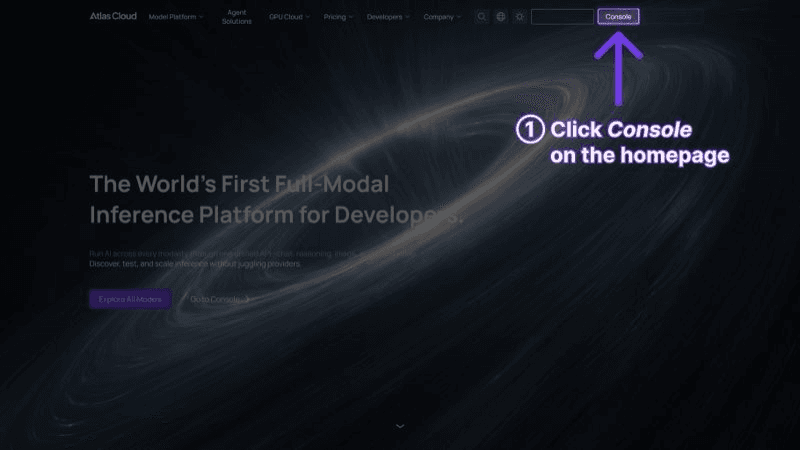
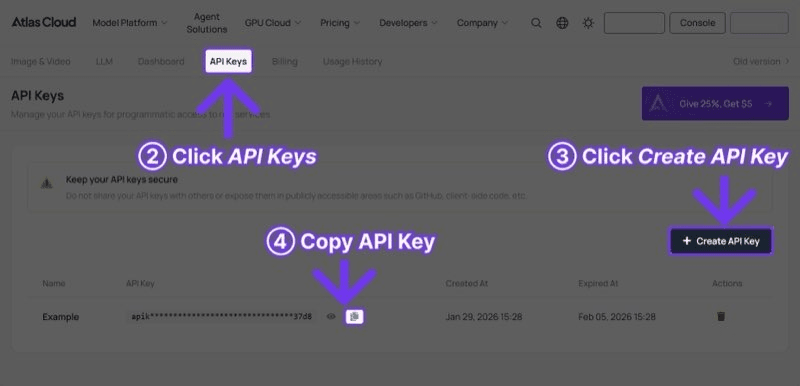
plaintext1```python 2import requests 3import time 4 5 6API_KEY = "your-atlas-cloud-api-key" 7BASE_URL = "https://api.atlascloud.ai/api/v1" 8 9 10# Generate video with Kling 3.0 11response = requests.post( 12 f"{BASE_URL}/model/generateVideo", 13 headers={ 14 "Authorization": f"Bearer {API_KEY}", 15 "Content-Type": "application/json" 16 }, 17 json={ 18 "model": "kwaivgi/kling-v3.0-pro/text-to-video", 19 "prompt": "A golden retriever puppy playing in autumn leaves, " 20 "natural sunlight, slow motion, warm colors", 21 "duration": 10, 22 "resolution": "1080p" 23 } 24) 25 26 27result = response.json() 28 29 30# Poll for results 31while True: 32 status = requests.get( 33 f"{BASE_URL}/model/prediction/{result['request_id']}/get", 34 headers={"Authorization": f"Bearer {API_KEY}"} 35 ).json() 36 if status["status"] == "completed": 37 print(f"Video: {status['output']['video_url']}") 38 break 39 time.sleep(5) 40```
Tests verified the Atlas Cloud integration works more seamlessly than the official Kling 3.0 API with better documentation, faster response, and all models under one billing.
Who Should Use Kling 3.0?
Recommended AI Video Generators By Use-Case (In-Depth Test Results and Kling 3.0 Review)
Choose Kling 3.0 if:
- The most generous free tier available is a priority, and experimentation without upfront cost is needed. The Kling 3.0 free allotment of 66 daily credits remains the best in the industry.
- The workflow demands ultra-high-definition output. The Kling AI video generator offers the highest resolution available among major models.
- The project involves e-commerce or product videos that require crisp, readable text and branding.
- Precise manual animation control over specific elements in a scene is important -- the Motion Brush delivers this.
- Budget constraints make competitive Kling 3.0 pricing tiers attractive.
Choose Seedance 2.0 if:
- Projects require extensive reference material input -- up to nine images, three videos, and three audio files.
- Longer clips at 15 seconds are needed, compared to Kling 3.0's 10-second limit.
- The most affordable API rates available are a priority, at $0.022/second on Atlas Cloud.
- Automated pipelines benefit from rich, multimodal input control.
Choose Sora 2 if:
- Physical accuracy is the top priority -- gravity, collisions, fluid dynamics, and realistic object interactions.
- The project demands a model that excels at simulating real-world physics in generated scenes.
Choose Veo 3.1 if:
- The work demands broadcast-level cinematic effects and professional color grading.
- Strong value at scale matters, with Veo 3.1 priced at $0.03/second on Atlas Cloud.
- Movie-quality visual output is more important than resolution or free-tier access.
Kling 3.0 Prompt Tips
In the course of reviewing the Kling AI video generator I generated a few hundred clips and several prompting strategies seem to do better than others:
- Use text rendering. This is Kling 3.0's most powerful feature. When a video needs to have readable text -- brand names, prices, logos, headlines, etc. -- explicitly describe it in the prompt. Kling's text fidelity far exceeds any other model we've tried.
- Utilize Motion Brush for intricate frames. Create a base still that composes as you would like, and then add motion paths over top of it. The additional step provides a vastly more refined level of control than text prompts by themselves.
- Be specific when you want the camera to move. Kling 3.0 does an excellent job when you direct it with specific camera movement instructions. Instead of using "camera moves," try specific camera directions such as "dolly in," "tracking shot from left to right," or "slow orbit around the subject." Kling 3.0 understands cinematic terms like a champ.
- Limit yourself to 10 seconds. (Seedance 2.0, for instance, is 15 seconds. Sora 2 is 12.) Kling 3.0 is a 10-second structure. One action. One mood. One payoff.
Example prompts that perform well in practice:
Product showcase:
plaintext1``` 2A pair of wireless earbuds rotating slowly on a reflective black surface, 3studio lighting creating elegant highlights, brand logo "ATLAS" clearly 4visible on the case, premium tech commercial style 5```
Social media hook:
plaintext1``` 2Time-lapse of a city skyline transitioning from golden hour to 3sparkling night, car headlights creating light trails on highways, 4dynamic and energetic mood, 9:16 vertical format 5```
Prompt engineering is still one of the most critical tasks when getting good results from the Kling 3.0 API, regardless of the access method you choose.
Frequently Asked Questions
Is Kling 3.0 free to use?
Yes, but Kling 3.0 free access is 66 credits per day, replenished every 24 hours, roughly 3-6 short videos a day (depending on your quality settings). No credit card is needed. This free access is limited to 720p with a watermark, and cannot be used for commercial purposes. To get clean, full-quality outputs, you'll need one of Kling 3.0's paid plans or API access via Atlas Cloud (reviewed below).
What is the difference between Kling 3.0 and Kling 2.6?
This is a major update. Kling 3.0 adds native support for multilingual audio creation, multi-shot storyboarding tools, ultra-HD output, greatly enhanced character consistency and the Motion Brush feature. This is not an incremental version change. 3.0 is a generational improvement over 2.6.
How much does the Kling 3.0 API cost?
Official Kling 3.0 pricing ranges from 0.084/second(standardmode,novideoinput)to0.084/second (standard mode, no video input) to 0.084/second(standardmode,novideoinput)to0.168/second (Pro mode with video input). On Atlas Cloud, those prices are reduced by ~30%, starting at $0.126/second. The savings on Kling 3.0 content at scale are significant for teams using Atlas Cloud.
Can Kling 3.0 generate NSFW content?
No. Kuaishou takes a zero-tolerance approach. Keywords, NLP, and human moderators are used in tandem. Tests show even innocent prompts sometimes get flagged by the filters. Violations may lead to account suspension or permanent bans. Users in need of unfiltered models may consider other options on Atlas Cloud.
Is Kling 3.0 better than Seedance 2.0?
It really depends on your use case. Kling 3.0 has the advantage of resolution and a more flexible free tier (66 credits per day). Seedance 2.0 has the advantage of multimodal input (up to 12 reference files), longer clips (15s vs. 10s), and much more attractive API pricing (Seedance API pricing is 0.022/seconAtlasCloudwhileKlingis0.022/sec on Atlas Cloud while Kling is 0.022/seconAtlasCloudwhileKlingis0.126/sec). Production teams often use both models in parallel -- Kling 3.0 for prototyping and high-res final renders, and Seedance 2.0 for complex scenes and videos with many references and a strong need for creative control. Access to both models through a single Kling 3.0 API key on Atlas Cloud makes it easy to follow this workflow.
Verdict
Kling 3.0 is a robust and feature-complete AI video generator. It offers the most liberal free tier in the industry, the highest resolution output, and the exclusive Motion Brush tool for directorial finesse. However, as is required to keep this Kling 3.0 review fair and objective, we must mention that the competitive playing field has changed. Seedance 2.0's multimodal input is a real menace in complex production workflows, and Veo 3.1's cinematic feel is, for some use cases, unbeatable.
The recommendation to developers and creators is this: don't commit to any one. An all-in-one platform like Atlas Cloud -- one API key, one bill, and the freedom to choose the right model for the job -- is the common-sense solution. Sometimes that will be the Kling 3.0 API. Sometimes it will be Seedance 2.0 or Veo 3.1. The flexibility is ultimately more important than fidelity to a single tool, and Atlas Cloud makes it easy.
────────────────────────────────────────────────────────────