Best AI Image-to-Video Models Compared: I2V Guide for 2026

Image-to-video (I2V) generation has become one of the most practical applications of AI video technology. Instead of describing a scene entirely from text, you start with an existing image -- a product photo, an illustration, a character design, a landscape -- and the AI model animates it into a video clip. The source image provides the visual foundation, and the model generates motion, camera movement, and temporal coherence on top of it.

For developers, content creators, and production teams, I2V offers a level of creative control that text-to-video alone cannot match. You control exactly what the first frame looks like. The model handles everything that happens after. This guide compares the leading I2V-capable models available through the Atlas Cloud API in 2026: Seedance v1.5 Pro, Kling 3.0, Kling O3, Wan 2.6, Hailuo 2.3, and Vidu Q3.

*Last Updated: February 28, 2026*

See I2V capabilities in action:


I2V Models at a Glance  

       
ModelDeveloperMax DurationI2V Price (Atlas Cloud)Style PreservationMotion QualityBest For
Seedance v1.5 ProByteDance15s$0.047/secExcellentExcellentMulti-reference, creative control
Kling 3.0 StdKuaishou15s$0.071/secExcellentExcellentHigh consistency, affordable
Kling 3.0 ProKuaishou15s$0.095/secExcellentExcellentHigh consistency, 1080p output
Kling O3 StdKuaishou15s$0.071/secExcellentExcellentReasoning-driven, standard
Kling O3 ProKuaishou15s$0.095/secExcellentExcellentPremium quality, reasoning-driven
Wan 2.6 FlashAlibaba10s$0.018/secGoodGoodBudget production
Hailuo 2.3MiniMax10s$0.28/secGoodVery GoodBalanced quality/price
Vidu Q3 ProShengshu8s$0.06/secGoodGoodNative audio + I2V
Vidu Q3 TurboShengshu8s$0.034/secGoodGoodBudget I2V with audio


What Is Image-to-Video Generation?

I2V generation takes a static image and produces a video clip that begins from that image. The model analyzes the content of the source image -- objects, characters, lighting, composition, style -- and generates subsequent frames that animate the scene in a visually coherent way.

The key difference between I2V and text-to-video (T2V):

  • T2V: The model interprets a text prompt and generates both the visual content and the motion from scratch. You have no direct control over the initial visual appearance.
  • 2V: You provide the visual starting point. The model inherits colors, composition, style, and subject appearance from your image. You then use a text prompt to direct the motion, camera movement, and action.  

This distinction matters because I2V provides deterministic control over the visual identity of the output. If you have a specific product photo, character illustration, or brand asset, I2V ensures that the video matches your source material precisely.


Why I2V Matters for Production

  • Brand consistency: Product photos, brand assets, and design elements maintain their exact appearance in the generated video.
  • Character animation: Illustrators and animators can take static character art and bring it to life without redrawing frames.
  • Product marketing: E-commerce teams can transform product photography into dynamic video ads without a video shoot.
  • Storyboarding: Take concept art or storyboard frames and generate animated previews for pre-production review.
  • Social media content: Turn any still image into engaging video content for platforms that prioritize video in their algorithms.


Model-by-Model Breakdown

Seedance v1.5 Pro: Multi-Reference Champion

Seedance v1.5 Pro from ByteDance is the standout I2V model for projects requiring complex creative control. While most I2V models accept a single reference image, Seedance v1.5 Pro accepts up to 9 images, 3 videos, and 3 audio files as reference material. This multimodal input capability is unmatched in the current landscape.

I2V Strengths:

  • Accepts up to 9 reference images for comprehensive style and content guidance
  • 15-second maximum duration -- the longest available
  • Excellent style preservation from source images
  • Strong motion quality with natural movement
  • Affordable at $0.047/second


I2V Limitations:

  • Strict content moderation
  • Complex multi-reference setups require more prompt engineering  

Best For: Complex scenes with multiple reference points, character-consistent animations, long-form I2V clips, budget-conscious production.


Kling 3.0: High Consistency and Resolution

Kling 3.0 delivers the strong I2V output, with 1080p support on the Pro tier. Its character consistency technology is particularly strong for I2V -- when you provide a source image of a character, the model maintains facial features, clothing details, and proportions with high fidelity throughout the generated video.


I2V Strengths:

  • 1080p output for maximum visual clarity
  • Excellent character consistency from source images
  • 15-second duration with 30fps
  • Strong text preservation -- brand names and product labels remain readable


I2V Limitations:

  • Std tier at 0.071/second,Protierat0.071/second, Pro tier at 0.071/second,Protierat0.095/second
  • Very strict content filtering
  • Limited to 1-2 reference images


Best For: High-resolution product videos, character animations requiring maximum consistency, e-commerce content with readable text.


Kling O3: Reasoning-Driven I2V


Kling O3 is Kuaishou's premium reasoning model that brings deeper scene understanding to I2V generation. It analyzes source images more thoroughly, understanding spatial relationships, physics, and object interactions before generating motion.


I2V Strengths:

  • Superior scene understanding and physics awareness
  • Intelligent motion decisions based on image content
  • Excellent consistency with source material
  • 15-second duration  

I2V Limitations:

  • Premium pricing -- Std at 0.071/second,Proat0.071/second, Pro at 0.071/second,Proat0.095/second
  • Longer generation times due to reasoning step


Best For: Complex scenes where motion logic matters, product demonstrations with realistic physics, high-budget production.


Wan 2.6 Flash: Budget I2V Workhorse

Wan 2.6 Flash from Alibaba is the budget option for I2V production at scale. At $0.018/second, it is by far the most affordable model on this list. The quality is good -- not best-in-class, but entirely usable for social media, web content, and internal production.


I2V Strengths:

  • Lowest price at $0.018/second
  • Good overall quality for the price point
  • 10-second duration
  • Reliable and consistent output  

I2V Limitations:

  • Style preservation is good but not as precise as Seedance or Kling
  • Motion quality is behind the premium models
  • Lower resolution ceiling


Best For: High-volume I2V production on a budget, social media content, prototyping and testing, internal marketing assets.


Hailuo 2.3: Quality-Price Balance

Hailuo 2.3 from MiniMax delivers notably smooth motion quality, and style preservation from source images is reliable. At $0.28/second, it is positioned as a premium option.


I2V Strengths:

  • Very good motion quality with smooth, natural movement
  • Reliable style preservation
  • 10-second duration
  • Studio-quality output  

I2V Limitations:

  • Does not reach the consistency levels of Seedance or Kling
  • Fewer advanced features compared to premium models

Best For: General-purpose I2V production, marketing content, social media videos, teams wanting quality without premium pricing.


Vidu Q3: I2V with Native Audio

Vidu Q3 is the only model on this list that combines I2V capability with native audio generation. Upload a source image and receive a video clip with contextually appropriate audio -- ambient sounds, environmental noise, or basic speech. Available in Pro (0.06/second)andTurbo(0.06/second) and Turbo (0.06/second)andTurbo(0.034/second) tiers.


I2V Strengths:

  • Native audio generation alongside I2V output
  • Good style preservation
  • Clean, consistent output
  • Turbo tier offers budget-friendly pricing


I2V Limitations:

  • 8-second maximum duration -- the shortest on this list
  • Audio quality adds value but I2V visual quality is behind top models
  • English-centric audio

Best For: Content requiring both animation and audio from a single API call, vlog-style content, quick promotional clips.


I2V Code Examples  

All models use the same Atlas Cloud API with an `image_url` parameter for the source image. Here are working examples for the most popular I2V models.


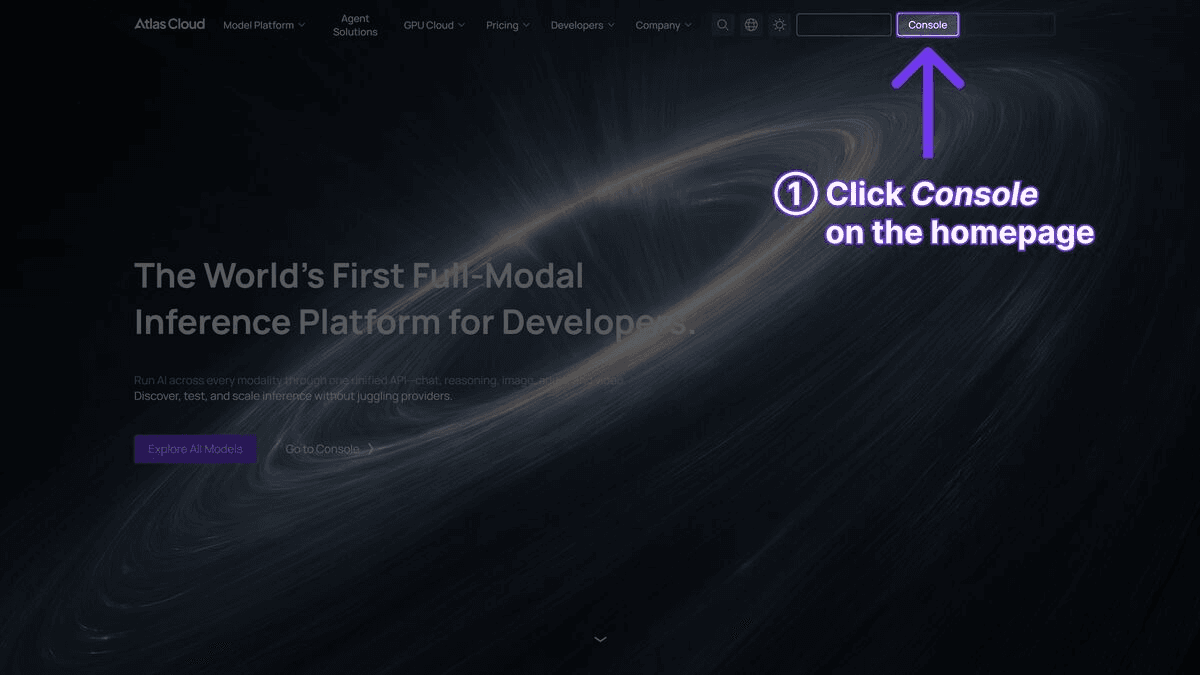
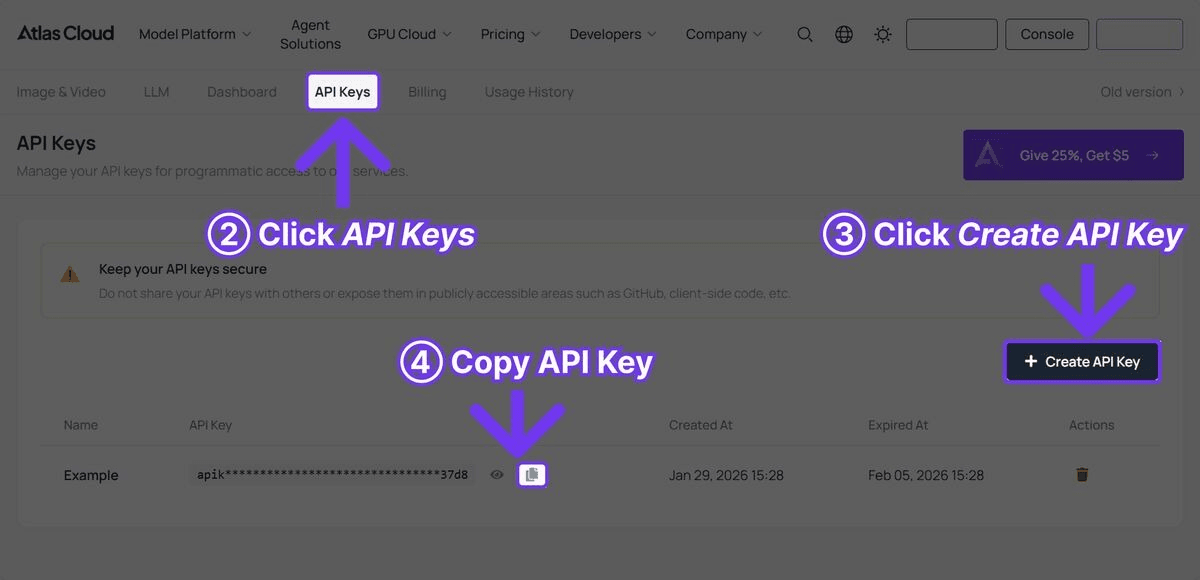
Step 1: Get Your API Key

Register at Atlas Cloud and get your API key from the console. The $1 free credit is applied automatically.

image.png

image.png


Seedance v1.5 Pro I2V

plaintext
1```python
2import requests
3import time
4
5
6API_KEY = "your-atlas-cloud-api-key"
7BASE_URL = "https://api.atlascloud.ai/api/v1"
8
9
10response = requests.post(
11    f"{BASE_URL}/model/generateVideo",
12    headers={
13        "Authorization": f"Bearer {API_KEY}",
14        "Content-Type": "application/json"
15    },
16    json={
17        "model": "bytedance/seedance-v1.5-pro/image-to-video",
18        "prompt": "The character begins walking forward confidently, "
19                  "hair moving naturally in a gentle breeze, "
20                  "cinematic camera slowly tracking alongside",
21        "image_url": "https://example.com/your-source-image.jpg",
22        "duration": 10,
23        "resolution": "1080p"
24    }
25)
26
27
28result = response.json()
29
30
31while True:
32    status = requests.get(
33        f"{BASE_URL}/model/prediction/{result['request_id']}/get",
34        headers={"Authorization": f"Bearer {API_KEY}"}
35    ).json()
36    if status["status"] == "completed":
37        print(f"Video: {status['output']['video_url']}")
38        break
39    time.sleep(5)
40```


Kling 3.0 I2V

plaintext
1```python
2response = requests.post(
3    f"{BASE_URL}/model/generateVideo",
4    headers={
5        "Authorization": f"Bearer {API_KEY}",
6        "Content-Type": "application/json"
7    },
8    json={
9        "model": "kwaivgi/kling-v3.0-pro/image-to-video",
10        "prompt": "The product slowly rotates on the display surface, "
11                  "studio lighting creates dynamic reflections, "
12                  "premium commercial style",
13        "image_url": "https://example.com/product-photo.jpg",
14        "duration": 10,
15        "resolution": "1080p"
16    }
17)
18
19
20result = response.json()
21```


Wan 2.6 Flash I2V (Budget Option)

plaintext
1```python
2response = requests.post(
3    f"{BASE_URL}/model/generateVideo",
4    headers={
5        "Authorization": f"Bearer {API_KEY}",
6        "Content-Type": "application/json"
7    },
8    json={
9        "model": "alibaba/wan-2.6/image-to-video",
10        "prompt": "Gentle motion with natural swaying, soft ambient "
11                  "lighting, peaceful and calm atmosphere",
12        "image_url": "https://example.com/source-image.jpg",
13        "duration": 10,
14        "resolution": "1080p"
15    }
16)
17
18
19result = response.json()
20```

Get $1 Free Credit -- Try All I2V Models


Best Practices for Source Images

The quality of your I2V output depends heavily on the quality and characteristics of your source image. Here are the practices that produce the best results across all models.


Image Quality

  • Use high-resolution source images. 1024x1024 or higher is recommended. Low-resolution inputs lead to blurry or artifact-heavy outputs.
  • Avoid heavily compressed images. JPEG artifacts in the source will be amplified in the video output. Use PNG or high-quality JPEG.
  • Ensure sharp focus. Blurry source images produce blurry video. The model preserves the focus characteristics of the input.  

Composition

  • Center your subject. Models handle centered compositions more reliably than edge-heavy layouts.
  • Leave room for motion. If you want a character to walk, ensure there is space in the frame for movement. Tightly cropped images limit the model's ability to generate convincing motion.
  • Consider the aspect ratio. Match your source image aspect ratio to your desired output. 16:9 for landscape, 9:16 for vertical/mobile, 1:1 for square.  

Style Consistency

  • Consistent lighting. Source images with clear, consistent lighting translate to better video output. Mixed or confusing lighting conditions can produce inconsistent results.
  • Simple backgrounds work best. Clean backgrounds -- solid colors, studio setups, or blurred environments -- produce more consistent results than cluttered, complex backgrounds.
  • Maintain style coherence. If your source image has a specific artistic style (watercolor, illustration, photorealistic), the prompt should reinforce that style rather than contradicting it.  

For Product Photography

  • Use studio-quality product shots. Clean backgrounds, professional lighting, and sharp focus on the product.
  • Include the full product. Cropped or partially visible products lead to inconsistent animation.
  • Remove distracting elements. Props, hands, or other objects in the frame may animate unpredictably.


For Character Animation

  • Use front-facing or three-quarter poses. These translate to animation more naturally than extreme angles.
  • Ensure clear facial features. If the character will be animated with facial movement, clear visibility of eyes, mouth, and expression improves results.
  • Consistent character design. If using multiple images across clips, maintain the same character design for visual continuity.


I2V Use Cases

Animating Illustrations

Artists and illustrators can bring static work to life without frame-by-frame animation. Upload a character illustration, and models like Seedance v1.5 Pro generate smooth, style-preserving animation. This workflow is particularly powerful for:

  • Children's book illustrations becoming animated stories
  • Comic panels becoming short animated clips
  • Concept art becoming animated previews for client presentations


Product Photography to Video

E-commerce teams can convert existing product photography libraries into video content. Instead of organizing video shoots for every product, existing product photos become the source material for dynamic video ads. Kling 3.0's motion controls make this particularly effective -- specify a slow orbit around a product, a dolly-in to highlight details, or a pan across a product lineup.


Character Animation

Game studios, animation houses, and content creators can use I2V to animate character designs. Upload a character sheet or posed illustration, and the model generates animation that maintains the character's visual identity. Seedance v1.5 Pro's multi-reference capability shines here -- provide multiple views of the same character, and the model maintains consistency across generated clips.


Storyboard Animation

Pre-production teams can take storyboard frames and generate rough animated versions for review. This provides directors and stakeholders with a better sense of pacing, motion, and visual flow than static storyboards alone.


Pricing Comparison at Scale

For teams producing I2V content at volume, pricing differences compound quickly:

      
Volume (Monthly)Wan 2.6 FlashVidu Q3 TurboSeedance v1.5 ProKling 3.0 StdHailuo 2.3
50 clips (8s)$7.20$13.60$18.80$28.40$112.00
200 clips (8s)$28.80$54.40$75.20$113.60$448.00
500 clips (8s)$72.00$136.00$188.00$284.00$1,120.00
1,000 clips (8s)$144.00$272.00$376.00$568.00$2,240.00

At 1,000 clips per month, the difference between Wan 2.6 Flash (144)andHailuo2.3(144) and Hailuo 2.3 (144)andHailuo2.3(2,240) is over 15x. The quality difference is real, but so is the budget impact. Many production teams use a tiered approach -- Wan 2.6 for draft iterations and internal content, Seedance v1.5 Pro or Kling 3.0 for final client-facing deliverables.


Frequently Asked Questions

Which I2V model has the best style preservation?

Seedance v1.5 Pro and Kling 3.0 lead in style preservation. Both maintain colors, textures, and visual identity from source images with high fidelity. Seedance v1.5 Pro has a slight edge in complex, multi-reference scenarios due to its ability to ingest up to 9 reference images.


Can I use any image format as input?

JPEG and PNG are universally supported. WebP works with most models. For best results, use high-quality PNG or JPEG at 1024x1024 resolution or higher. The image must be accessible via a public URL for API calls.


What happens if my source image has text in it?

Kling 3.0 is the best at preserving readable text from source images -- brand names, labels, and signage typically remain legible. Other models may distort or blur text during animation. If text preservation is critical, Kling 3.0 is the recommended choice.


Can I combine I2V with native audio?

Yes. Vidu Q3 is the only model that generates native audio alongside I2V output. For other models, you would generate the I2V video first and add audio separately, or use a text-to-video model with native audio capabilities for the final version.


How do I choose between Seedance v1.5 Pro and Kling 3.0 for I2V?

Choose Seedance v1.5 Pro if you need lower cost (0.047/secvs0.047/sec vs 0.047/secvs0.071-0.095/sec) or multi-reference input. Choose Kling 3.0 if you need high-quality 1080p output or text preservation. Both support up to 15 seconds.


Is the $1 free credit enough to test I2V?

Yes. At Wan 2.6 Flash pricing (0.018/sec),the0.018/sec), the 0.018/sec),the1 free credit generates approximately 55 seconds of I2V video -- about 5-6 clips. At Seedance v1.5 Pro pricing ($0.047/sec), it generates about 21 seconds -- roughly 2 clips. This is enough to test multiple models and compare results before committing budget.


Verdict

The I2V landscape in 2026 offers strong options at every price point. Seedance v1.5 Pro is the overall leader in value -- it combines the longest duration, multi-reference input, excellent quality, and competitive per-second pricing. Kling 3.0 is the premium choice for maximum resolution and text preservation. Wan 2.6 Flash is the budget option for teams needing volume over polish. Vidu Q3 adds native audio to I2V, a unique capability no other model offers.


The most effective approach is to use multiple models through a single Atlas Cloud API key. Draft with Wan 2.6 Flash, iterate with Seedance v1.5 Pro, and polish with Kling 3.0 -- all from one account, one balance, and one integration. The flexibility to match the right model to each project's requirements and budget is more valuable than committing to any single tool.

Get Started Free -- Access All I2V Models on Atlas Cloud


────────────────────────────────────────────────────────────


Related Articles

相關模型

300+ 模型,即刻開啟,

探索全部模型