
大多数团队在进行 AI 视频生成时,往往是从零散的 API 调用开始的——生成一个视频,下载,然后继续下一个。这种方式适合初期实验。
上次更新:2026年2月28日
观看这些模型的效果展示:
流水线架构
在编写代码之前,先了解我们要构建的架构概览:
plaintext1``` 2+-------------------+ +--------------------+ +------------------+ 3| 提示词配置 | | Atlas Cloud API | | 输出存储 | 4| (JSON/YAML) | | | | | 5| - prompts +---->+ /generateImage +---->+ /images/ | 6| - models | | /generateVideo | | /videos/ | 7| - parameters | | /prediction/get | | /manifest.json | 8+-------------------+ +--------------------+ +------------------+ 9 | | | 10 v v v 11+-------------------+ +--------------------+ +------------------+ 12| 流水线引擎 | | 轮询与重试 | | 成本追踪 | 13| | | | | | 14| - batch_generate | | - 指数退避 | | - 每次请求 | 15| - 并发控制 | | - 最大重试次数 | | - 累计成本 | 16| - 模型路由 | | | | - 每个模型 | 17+-------------------+ +--------------------+ +------------------+ 18```
流水线遵循以下简单流程:
- 从结构化输入文件读取提示词配置。
- 将每个提示词路由到相应的模型和端点(图像或视频)。
- 以受控的并发数将请求提交给 Atlas Cloud API。
- 使用指数退避和重试逻辑轮询结果。
- 下载生成的成品并保存到对应的文件夹中。
- 追踪成本并生成汇总清单。
快速入门:API 访问
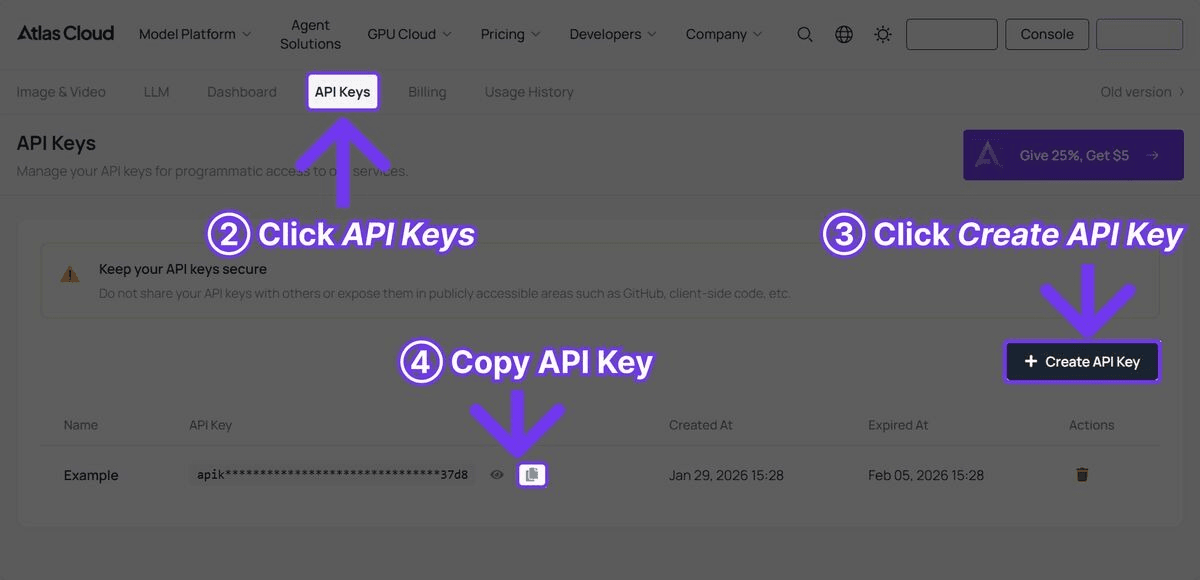
第 1 步:获取 API 密钥
在 Atlas Cloud 注册并从控制面板创建 API 密钥。

第 2 步:安装依赖
plaintext1```bash 2pip install requests pyyaml 3```
无需沉重的框架。该流水线仅使用 requests 进行 HTTP 调用,pyyaml 用于读取配置文件,并使用 Python 标准库模块处理并发和文件操作。
完整的流水线代码
以下是功能完备的流水线代码,代码块后附有详细解释。
plaintext1```python 2import requests 3import time 4import json 5import os 6import logging 7from concurrent.futures import ThreadPoolExecutor, as_completed 8from dataclasses import dataclass, field 9from typing import Optional 10from datetime import datetime 11 12# 配置日志 13logging.basicConfig( 14 level=logging.INFO, 15 format="%(asctime)s [%(levelname)s] %(message)s", 16 datefmt="%Y-%m-%d %H:%M:%S" 17) 18logger = logging.getLogger("atlas_pipeline") 19 20@dataclass 21class GenerationResult: 22 """存储单个生成请求的结果。""" 23 name: str 24 model: str 25 media_type: str # "image" 或 "video" 26 status: str # "success", "failed", "error" 27 output_url: Optional[str] = None 28 local_path: Optional[str] = None 29 cost_estimate: float = 0.0 30 duration_seconds: float = 0.0 31 error_message: Optional[str] = None 32 33class AtlasCloudClient: 34 """Atlas Cloud API 的客户端封装。""" 35 36 BASE_URL = "https://api.atlascloud.ai/api/v1" 37 38 # 模型定价(近似值) 39 PRICING = { 40 "black-forest-labs/flux-2-pro/text-to-image": 0.04, # 单张图片 41 "google/imagen4-ultra/text-to-image": 0.06, # 单张图片 42 "bytedance/seedance-v1.5-pro/text-to-video": 0.022, # 每秒 43 "google/veo3.1/text-to-video": 0.03, # 每秒 44 "openai/sora-v2/text-to-video": 0.15, # 每秒 45 } 46 47 def __init__(self, api_key: str): 48 self.api_key = api_key 49 self.session = requests.Session() 50 self.session.headers.update({ 51 "Authorization": f"Bearer {api_key}", 52 "Content-Type": "application/json" 53 }) 54 55 def generate_image( 56 self, 57 model: str, 58 prompt: str, 59 width: int = 1024, 60 height: int = 1024 61 ) -> dict: 62 """提交图片生成请求。""" 63 response = self.session.post( 64 f"{self.BASE_URL}/model/generateImage", 65 json={ 66 "model": model, 67 "prompt": prompt, 68 "width": width, 69 "height": height 70 } 71 ) 72 response.raise_for_status() 73 return response.json() 74 75 def generate_video( 76 self, 77 model: str, 78 prompt: str, 79 duration: int = 5, 80 resolution: str = "1080p" 81 ) -> dict: 82 """提交视频生成请求。""" 83 response = self.session.post( 84 f"{self.BASE_URL}/model/generateVideo", 85 json={ 86 "model": model, 87 "prompt": prompt, 88 "duration": duration, 89 "resolution": resolution 90 } 91 ) 92 response.raise_for_status() 93 return response.json() 94 95 def poll_result( 96 self, 97 request_id: str, 98 max_wait: int = 300, 99 initial_interval: int = 5, 100 max_interval: int = 30 101 ) -> Optional[dict]: 102 """使用指数退避轮询生成结果。""" 103 start_time = time.time() 104 interval = initial_interval 105 106 while time.time() - start_time < max_wait: 107 try: 108 response = self.session.get( 109 f"{self.BASE_URL}/model/prediction/{request_id}/get" 110 ) 111 data = response.json() 112 113 if data["status"] == "completed": 114 return data 115 elif data["status"] == "failed": 116 logger.error(f"生成失败: {data.get('error', '未知错误')}") 117 return None 118 119 logger.debug(f"状态: {data['status']}, 等待 {interval}秒...") 120 time.sleep(interval) 121 interval = min(interval * 1.5, max_interval) 122 123 except requests.RequestException as e: 124 logger.warning(f"轮询请求失败: {e}, {interval}秒后重试") 125 time.sleep(interval) 126 127 logger.error(f"{max_wait}秒后超时,停止等待 {request_id}") 128 return None 129 130 def estimate_cost(self, model: str, duration: int = 0) -> float: 131 """预估生成请求的成本。""" 132 base_price = self.PRICING.get(model, 0.05) 133 if "text-to-video" in model and duration > 0: 134 return base_price * duration 135 return base_price 136 137class VideoPipeline: 138 """编排图片和视频的批量生成。""" 139 140 def __init__(self, api_key: str, output_dir: str = "pipeline_output"): 141 self.client = AtlasCloudClient(api_key) 142 self.output_dir = output_dir 143 self.results: list[GenerationResult] = [] 144 self.total_cost = 0.0 145 146 # 创建输出目录 147 os.makedirs(os.path.join(output_dir, "images"), exist_ok=True) 148 os.makedirs(os.path.join(output_dir, "videos"), exist_ok=True) 149 150 def _download_file(self, url: str, filepath: str) -> bool: 151 """下载文件到本地。""" 152 try: 153 response = requests.get(url, timeout=60) 154 response.raise_for_status() 155 with open(filepath, "wb") as f: 156 f.write(response.content) 157 return True 158 except Exception as e: 159 logger.error(f"下载 {url} 失败: {e}") 160 return False 161 162 def _safe_filename(self, name: str, extension: str) -> str: 163 """将名称转换为安全的文件名。""" 164 safe = name.lower().replace(" ", "_") 165 safe = "".join(c for c in safe if c.isalnum() or c == "_") 166 return f"{safe}.{extension}" 167 168 def _process_image(self, name: str, model: str, prompt: str, 169 width: int = 1024, height: int = 1024, 170 retries: int = 2) -> GenerationResult: 171 """带重试逻辑的图片生成。""" 172 start = time.time() 173 cost = self.client.estimate_cost(model) 174 175 for attempt in range(retries + 1): 176 try: 177 logger.info(f"[Image] 正在生成 '{name}' (尝试 {attempt + 1})") 178 result = self.client.generate_image(model, prompt, width, height) 179 request_id = result["request_id"] 180 181 data = self.client.poll_result(request_id) 182 if data and data["status"] == "completed": 183 image_url = data["output"]["image_url"] 184 filename = self._safe_filename(name, "png") 185 filepath = os.path.join(self.output_dir, "images", filename) 186 self._download_file(image_url, filepath) 187 188 return GenerationResult( 189 name=name, model=model, media_type="image", 190 status="success", output_url=image_url, 191 local_path=filepath, cost_estimate=cost, 192 duration_seconds=time.time() - start 193 ) 194 except requests.HTTPError as e: 195 if e.response.status_code == 429: 196 wait = 2 ** (attempt + 2) 197 logger.warning(f"触发限流,等待 {wait}秒") 198 time.sleep(wait) 199 continue 200 logger.error(f"生成 '{name}' 时发生HTTP错误: {e}") 201 except Exception as e: 202 logger.error(f"生成 '{name}' 时出错: {e}") 203 204 if attempt < retries: 205 time.sleep(2 ** attempt) 206 207 return GenerationResult( 208 name=name, model=model, media_type="image", 209 status="failed", cost_estimate=0, 210 duration_seconds=time.time() - start, 211 error_message="已达到最大重试次数" 212 ) 213 214 def _process_video(self, name: str, model: str, prompt: str, 215 duration: int = 5, resolution: str = "1080p", 216 retries: int = 2) -> GenerationResult: 217 """带重试逻辑的视频生成。""" 218 start = time.time() 219 cost = self.client.estimate_cost(model, duration) 220 221 for attempt in range(retries + 1): 222 try: 223 logger.info(f"[Video] 正在生成 '{name}' (尝试 {attempt + 1})") 224 result = self.client.generate_video(model, prompt, duration, resolution) 225 request_id = result["request_id"] 226 227 data = self.client.poll_result(request_id, max_wait=600) 228 if data and data["status"] == "completed": 229 video_url = data["output"]["video_url"] 230 filename = self._safe_filename(name, "mp4") 231 filepath = os.path.join(self.output_dir, "videos", filename) 232 self._download_file(video_url, filepath) 233 234 return GenerationResult( 235 name=name, model=model, media_type="video", 236 status="success", output_url=video_url, 237 local_path=filepath, cost_estimate=cost, 238 duration_seconds=time.time() - start 239 ) 240 except requests.HTTPError as e: 241 if e.response.status_code == 429: 242 wait = 2 ** (attempt + 2) 243 logger.warning(f"触发限流,等待 {wait}秒") 244 time.sleep(wait) 245 continue 246 logger.error(f"生成 '{name}' 时发生HTTP错误: {e}") 247 except Exception as e: 248 logger.error(f"生成 '{name}' 时出错: {e}") 249 250 if attempt < retries: 251 time.sleep(2 ** (attempt + 1)) 252 253 return GenerationResult( 254 name=name, model=model, media_type="video", 255 status="failed", cost_estimate=0, 256 duration_seconds=time.time() - start, 257 error_message="已达到最大重试次数" 258 ) 259 260 def batch_generate(self, jobs: list[dict], max_workers: int = 3): 261 """批量并发处理生成任务。""" 262 logger.info(f"开始执行 {len(jobs)} 个任务,使用 {max_workers} 个工作线程") 263 start_time = time.time() 264 265 with ThreadPoolExecutor(max_workers=max_workers) as executor: 266 futures = {} 267 for job in jobs: 268 if job["type"] == "image": 269 future = executor.submit( 270 self._process_image, 271 name=job["name"], 272 model=job["model"], 273 prompt=job["prompt"], 274 width=job.get("width", 1024), 275 height=job.get("height", 1024) 276 ) 277 elif job["type"] == "video": 278 future = executor.submit( 279 self._process_video, 280 name=job["name"], 281 model=job["model"], 282 prompt=job["prompt"], 283 duration=job.get("duration", 5), 284 resolution=job.get("resolution", "1080p") 285 ) 286 else: 287 logger.warning(f"未知任务类型: {job['type']}") 288 continue 289 futures[future] = job["name"] 290 291 for future in as_completed(futures): 292 result = future.result() 293 self.results.append(result) 294 self.total_cost += result.cost_estimate 295 status_icon = "OK" if result.status == "success" else "FAIL" 296 logger.info( 297 f"[{status_icon}] {result.name} -- " 298 f"USD{result.cost_estimate:.3f} -- " 299 f"{result.duration_seconds:.1f}s" 300 ) 301 302 elapsed = time.time() - start_time 303 self._save_manifest() 304 self._print_summary(elapsed) 305 306 def _save_manifest(self): 307 """保存任务结果清单到 JSON。""" 308 manifest = { 309 "generated_at": datetime.now().isoformat(), 310 "total_cost": round(self.total_cost, 4), 311 "total_jobs": len(self.results), 312 "successful": sum(1 for r in self.results if r.status == "success"), 313 "failed": sum(1 for r in self.results if r.status != "success"), 314 "results": [ 315 { 316 "name": r.name, 317 "model": r.model, 318 "type": r.media_type, 319 "status": r.status, 320 "output_url": r.output_url, 321 "local_path": r.local_path, 322 "cost": round(r.cost_estimate, 4), 323 "generation_time": round(r.duration_seconds, 1), 324 "error": r.error_message 325 } 326 for r in self.results 327 ] 328 } 329 manifest_path = os.path.join(self.output_dir, "manifest.json") 330 with open(manifest_path, "w") as f: 331 json.dump(manifest, f, indent=2) 332 logger.info(f"清单已保存至 {manifest_path}") 333 334 def _print_summary(self, elapsed: float): 335 """打印批量运行摘要。""" 336 success = sum(1 for r in self.results if r.status == "success") 337 failed = len(self.results) - success 338 cost_by_model = {} 339 for r in self.results: 340 cost_by_model[r.model] = cost_by_model.get(r.model, 0) + r.cost_estimate 341 342 print("\n" + "=" * 60) 343 print("流水线摘要") 344 print("=" * 60) 345 print(f"总任务数: {len(self.results)}") 346 print(f"成功: {success}") 347 print(f"失败: {failed}") 348 print(f"总成本: USD{self.total_cost:.4f}") 349 print(f"总耗时: {elapsed:.1f}s") 350 print(f"\n按模型统计成本:") 351 for model, cost in sorted(cost_by_model.items()): 352 short_name = model.split("/")[1] 353 print(f" {short_name}: USD{cost:.4f}") 354 print("=" * 60) 355```
使用流水线
定义好 AtlasCloudClient 和 VideoPipeline 类后,以下是典型内容生产工作流的使用方法。
基础用法:缩略图 + 视频
plaintext1```python 2API_KEY = "your-atlas-cloud-api-key" 3 4pipeline = VideoPipeline(api_key=API_KEY, output_dir="weekly_content") 5 6jobs = [ 7 # 使用 Flux 2 Pro 生成缩略图 8 { 9 "name": "产品发布缩略图", 10 "type": "image", 11 "model": "black-forest-labs/flux-2-pro/text-to-image", 12 "prompt": "引人注目的 YouTube 缩略图,粗体文本 'NEW LAUNCH'," 13 "深色渐变背景上的产品聚焦,充满活力的" 14 "点缀色,专业设计,4K" 15 }, 16 { 17 "name": "教程缩略图", 18 "type": "image", 19 "model": "black-forest-labs/flux-2-pro/text-to-image", 20 "prompt": "编程教程的 YouTube 缩略图,分屏展示" 21 "代码编辑器和最终结果,科技美学," 22 "整洁现代的设计,醒目易读的文字" 23 }, 24 25 # 使用 Seedance 2.0 生成视频(高性价比) 26 { 27 "name": "产品展示 Seedance", 28 "type": "video", 29 "model": "bytedance/seedance-v1.5-pro/text-to-video", 30 "prompt": "流畅的产品揭示动画,现代小工具从" 31 "柔光中显现,缓慢旋转以展示所有角度," 32 "极简白色背景,电影级照明", 33 "duration": 10 34 }, 35 { 36 "name": "品牌介绍 Seedance", 37 "type": "video", 38 "model": "bytedance/seedance-v1.5-pro/text-to-video", 39 "prompt": "动态品牌介绍序列,抽象几何" 40 "形状组合成标志,粒子和光迹," 41 "专业的动态图形风格,深色背景", 42 "duration": 5 43 }, 44 45 # 使用 Veo 3.1 生成电影级视频(带音频) 46 { 47 "name": "Hero 视频 Veo", 48 "type": "video", 49 "model": "google/veo3.1/text-to-video", 50 "prompt": "黄金时刻现代城市天际线的电影级航拍镜头," 51 "镜头缓慢前推,夕阳的镜头光晕," 52 "环境城市声音,电影颗粒感," 53 "专业的色彩分级", 54 "duration": 8 55 }, 56] 57 58pipeline.batch_generate(jobs, max_workers=3) 59```
配置驱动方案
对于经常性的流水线任务,建议在 YAML 配置文件中定义:
plaintext1```yaml 2# pipeline_config.yaml 3output_dir: weekly_content 4max_workers: 3 5 6jobs: 7 - name: 产品主图 8 type: image 9 model: google/imagen4-ultra/text-to-image 10 prompt: > 11 无线耳机充电盒的优质产品摄影, 12 深色反光表面,戏剧性照明,豪华科技美学, 13 8K 分辨率,商业级画质 14 width: 2048 15 height: 2048 16 17 - name: 社交媒体视频 18 type: video 19 model: bytedance/seedance-v1.5-pro/text-to-video 20 prompt: > 21 流行的社交媒体内容,人手开箱高端科技产品, 22 满足的揭示瞬间,近距离细节,明亮的自然光, 23 竖屏格式 24 duration: 10 25 resolution: 1080p 26 27 - name: 电影广告 28 type: video 29 model: google/veo3.1/text-to-video 30 prompt: > 31 高端耳机电影广告,人在忙碌的咖啡店中戴上 32 耳机,世界瞬间安静,浅景深, 33 温暖调色,环境咖啡馆声音淡出至寂静 34 duration: 8 35 resolution: 1080p 36```
加载并运行:
plaintext1```python 2import yaml 3 4with open("pipeline_config.yaml") as f: 5 config = yaml.safe_load(f) 6 7pipeline = VideoPipeline( 8 api_key=API_KEY, 9 output_dir=config["output_dir"] 10) 11pipeline.batch_generate( 12 config["jobs"], 13 max_workers=config.get("max_workers", 3) 14) 15```
核心实现细节
指数退避轮询
视频生成耗时从 30 秒到 5 分钟不等。流水线使用指数退避策略进行高效轮询:
plaintext1```python 2interval = initial_interval # 从5秒开始 3while time.time() - start_time < max_wait: 4 # ... 检查状态 ... 5 time.sleep(interval) 6 interval = min(interval * 1.5, max_interval) # 增长至最高30秒 7```
这意味着前几次轮询间隔较短,随着等待时间增加,轮询频率逐渐降低。与固定间隔相比,这可减少约 60% 的不必要 API 调用。
限流处理
当 API 返回 429(限流)状态时,流水线会进行指数退避,而不是直接失败:
plaintext1```python 2except requests.HTTPError as e: 3 if e.response.status_code == 429: 4 wait = 2 ** (attempt + 2) # 4秒, 8秒, 16秒 5 logger.warning(f"触发限流,等待 {wait}秒") 6 time.sleep(wait) 7 continue 8```
并发控制
ThreadPoolExecutor 将并发 API 请求限制在合理范围,防止请求压垮 API 或网络连接:
plaintext1```python 2with ThreadPoolExecutor(max_workers=3) as executor: 3 futures = {executor.submit(process, job): job for job in jobs} 4```
成本追踪
每个生成请求都会根据模型定价表进行预估:
plaintext1```python 2PRICING = { 3 "black-forest-labs/flux-2-pro/text-to-image": 0.04, 4 "bytedance/seedance-v1.5-pro/text-to-video": 0.022, # 每秒 5 "google/veo3.1/text-to-video": 0.03, # 每秒 6} 7```
流水线运行成本预估
| 流水线场景 | 任务量 | 所用模型 | 预估成本 | 预估时间 |
|---|---|---|---|---|
| 每周社交媒体包 | 10图 + 5视频(5s) | Flux 2 Pro + Seedance 2.0 | USD0.95 | ~10分 |
| 产品发布营销 | 20图 + 10视频(10s) | Flux 2 Pro + Imagen 4 Ultra + Seedance 2.0 | USD3.80 | ~25分 |
| 每月内容库 | 50图 + 20视频(8s) | 混合 | USD7.50 | ~45分 |
| 电商目录(500 SKU) | 500图 | Flux 2 Pro | USD20.00 | ~30分 |
| 电影广告系列 | 5图 + 5视频(8s) | Imagen 4 Ultra + Veo 3.1 | USD1.50 | ~20分 |
部署建议
使用 Cron Jobs 定时生成
使用 cron 定时运行流水线:
plaintext1```bash 2# 每周一早上 6 点生成内容 30 6 * * 1 cd /path/to/project && python run_pipeline.py --config weekly.yaml 4```
基于队列的架构
对于大规模部署,请使用 Celery 或 Redis Queue 等任务队列,将作业提交与处理解耦。
环境管理
切勿硬编码 API 密钥,请务必使用环境变量:
plaintext1```python 2import os 3 4API_KEY = os.environ.get("ATLAS_CLOUD_API_KEY") 5```
结论
构建 AI 视频流水线不仅在于编写代码,更在于拥有能够处理 API 集成现实挑战(如限流、超时、故障、成本追踪和并发执行)的可靠基础设施。本指南中提供的流水线正是为了解决这些问题而设计的。
Flux 2 Pro 的高效制图、Seedance 2.0 在高性价比视频生成(USD0.022/秒)方面的表现,以及 Veo 3.1 在原生音频电影级片段上的优势(USD0.03/秒),涵盖了内容生产的各个方面。所有这些模型都可通过同一个 Atlas Cloud API 密钥访问,实现统一管理。







