
AUDIO & VOICE SYNTHESIS
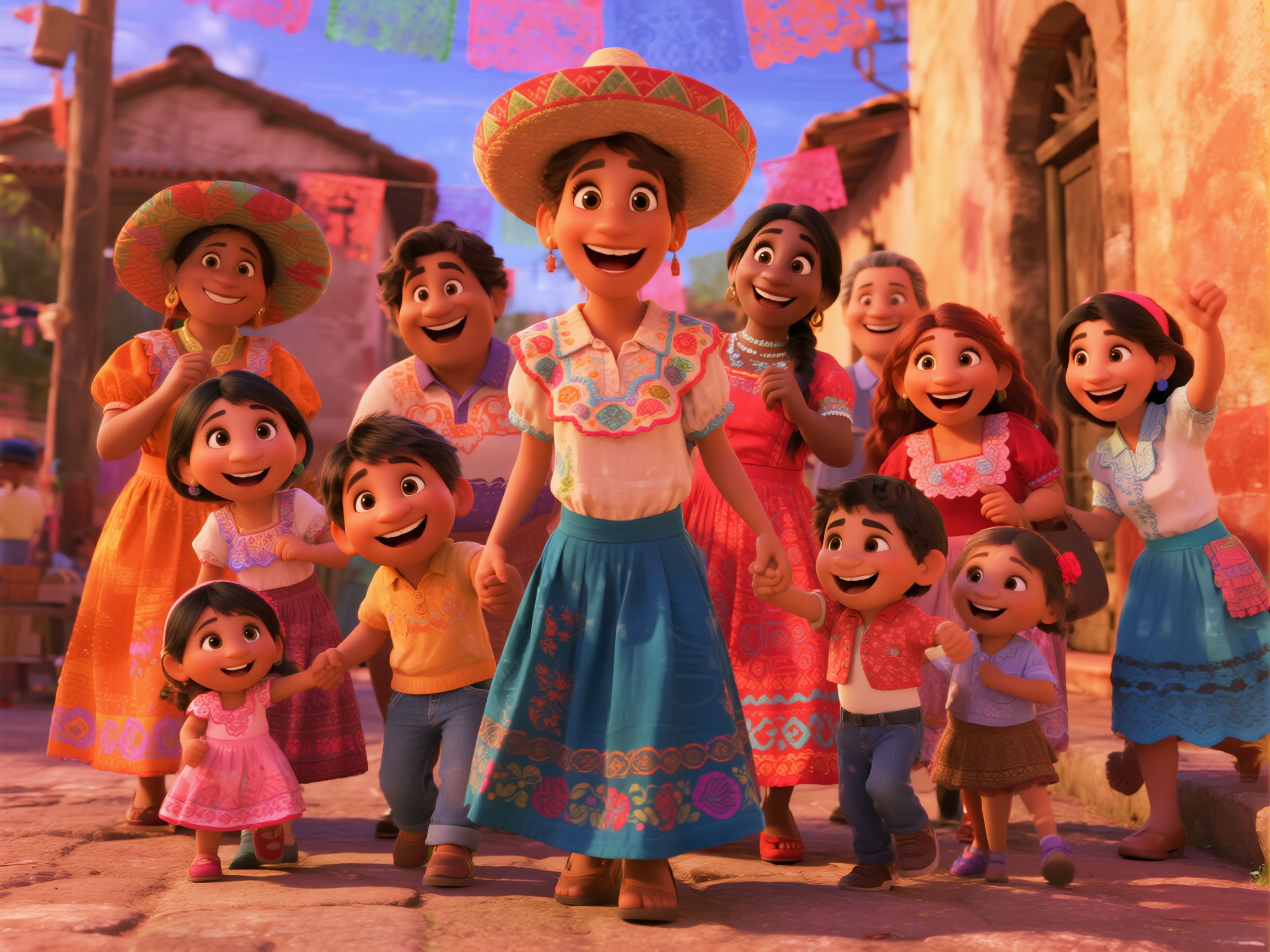
Multicultural Family Celebration
Heartwarming family scene with English dialogue and Latin music.
PROMPT
The girl with a hat in the middle gently sings 'I'm so proud of my family!', then turns to embrace the Black girl in the middle. The Black girl responds emotionally 'My sweetie, you're the heart of our family', hugging her back. The boy in yellow on the left happily says 'Folks, let's dance together to celebrate!' The girl on the far right immediately replies: 'I'll bring the music!', Latin American music plays in the background. The woman in orange dress on the left (Julieta) nods with a smile, the woman with braids on the right (Luisa) clenches her fist and waves her arm. Someone in the crowd starts to step, children clap to the rhythm, the whole family is about to form a circle, accompanied by cheerful music, skirts flying, dancing freely on the colorful street, conveying joy and warmth.
REFERENCE ASSETS
FAQ
What's new in Seedance 2.0 compared to previous versions?
Seedance 2.0 is a major upgrade from ByteDance's Jimeng AI. It supports true multimodal input — combining images (up to 9), videos (up to 3, total 2-15s), audio (up to 3, total up to 15s), and text in a single generation. Key improvements include more realistic physics, smoother motion, more precise instruction following, and more stable style consistency. It also features built-in sound effects and background music generation.
How does the @reference system work?
After uploading your materials, reference them in your prompt using @materialName to specify each asset's role. For example: '@image1 as first frame, @video1 reference camera movement and action, @audio1 for background music rhythm'. You can reference anything — actions, effects, styles, camera angles, characters, scenes, and sounds. The total number of uploaded files is limited to 12 across all modalities.
What are the key capabilities of Seedance 2.0?
Seedance 2.0 excels in: (1) Character and scene consistency — faces, clothing, and details remain stable across frames; (2) Precise camera movement replication from reference videos; (3) Creative template and VFX reproduction — transitions, ad formats, film segments; (4) Video extension — seamlessly extend existing videos up to 15s; (5) Video editing — replace characters, modify scenes, adjust actions in existing videos; (6) Audio-synced generation — beat-matching, voice acting, and music-driven visuals; (7) One-take long shots with coherent continuity.
What file formats and sizes are supported?
Images: jpeg, png, webp, bmp, tiff, gif (up to 9 files, each under 30MB). Videos: mp4, mov (up to 3 files, total duration 2-15s, each under 50MB, resolution between 480p and 720p). Audio: mp3, wav (up to 3 files, total duration up to 15s, each under 15MB). Generated video duration is customizable from 4 to 15 seconds.
What's the difference between All Reference and First & Last Frame modes?
All Reference mode supports full multimodal input (images, videos, audio, text) with the @reference system for maximum creative control. First & Last Frame mode is optimized for image-to-video generation where you only need to upload starting and ending frames. If you only upload a first frame image + prompt, you can use either mode; for multi-modal combinations, use All Reference mode.
Are there any content restrictions?
Due to platform compliance requirements, uploading materials containing realistic human faces (both photos and videos) is currently not supported. The system will automatically block such materials. This applies to both reference images and reference videos. Animated, illustrated, or stylized characters are not affected by this restriction.
Why use Seedance 2.0 on Atlas Cloud?
Atlas Cloud provides unified API access to Seedance 2.0 along with 300+ other AI models including Kling, Wan, Sora, and more. Benefits include: competitive pricing with first top-up +20% bonus, a single API key for all models, comprehensive prompt library with video examples, and reliable global infrastructure. Switch between different video models seamlessly to find the best results for your creative needs.
How can I get started with Seedance 2.0 on Atlas Cloud?
Browse our curated prompt gallery above for inspiration, copy any prompt directly, and try it on Atlas Cloud. Seedance 2.0 API is now available — start generating video today. You can also explore other top video models like Kling v2.6 Pro, Wan 2.6, and Sora 2 — all available through a unified API. Sign up and get bonus credits on your first top-up to start creating.