Seedance 2.0 개요
Atlas Cloud에 강력한 새로운 추가 기능인 Seedance 2.0이 출시될 예정입니다.
- Seedance 2.0이란 무엇인가요? ByteDance가 개발한 Seedance 2.0은 네 가지 입력 모달리티(이미지, 비디오, 오디오, 텍스트)를 통합한 최신 멀티모달 비디오 생성 모델로, 더욱 풍부한 표현과 훨씬 더 제어 가능한 결과를 가능하게 하여 Seedance 비디오 모델 제품군에 강력한 새로운 멤버로 추가되었습니다.
- 핵심 이점: 비디오 생성의 "제어 불가능성"이라는 페인 포인트(pain point)를 해결합니다. 정밀한 구도 복원, 복잡한 동작 복제 및 높은 캐릭터 일관성을 제공합니다.
- 상태: Atlas Cloud 출시 예정 (예정 출시일: 이번 달 말).
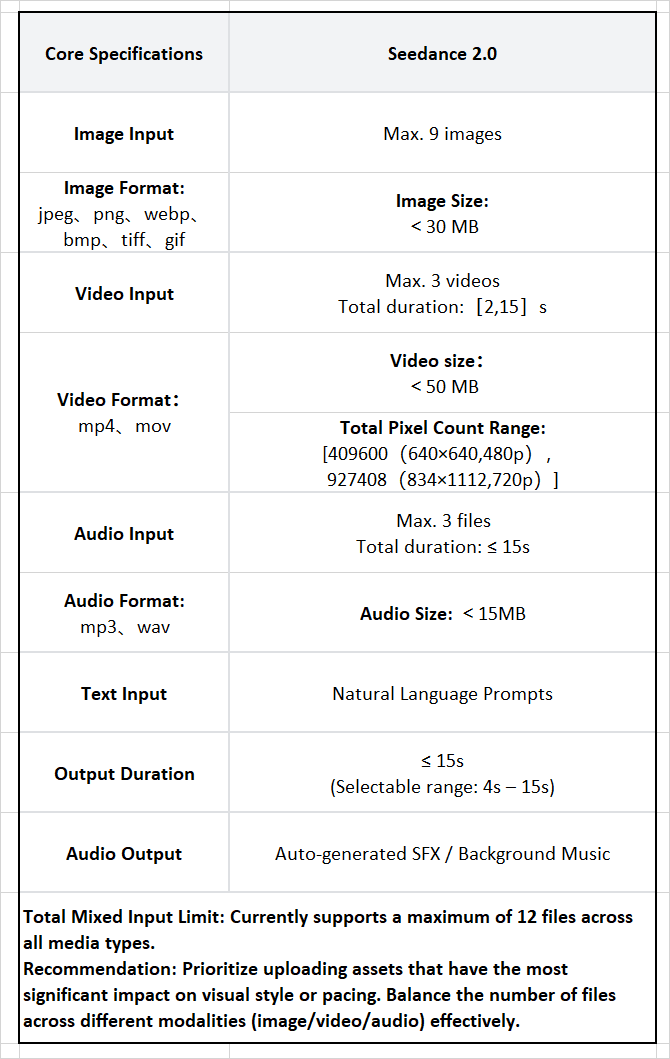
어떻게 이 유례없는 제어력을 달성했을까요? Seedance 2.0을 구동하는 네 가지 핵심 요소를 공개합니다.
핵심 기능: 비디오 제작 워크플로우의 재정의
멀티모달 참조 능력: "프롬프트 추측"에서 "정밀 복제"로
Seedance 2.0의 하이라이트는 "참조 능력(Reference Capability)"입니다. 최대 12개의 파일(이미지, 비디오, 오디오)의 혼합 입력을 지원하며 의도를 정확하게 이해합니다. 이미지를 사용하여 시각적 스타일을 정의하고, 비디오로 캐릭터 동작과 카메라 움직임을 지정하며, 오디오로 리듬을 구동합니다.
제작자에게 이는 더 이상 복잡한 텍스트 프롬프트와 씨름할 필요가 없음을 의미합니다. 단순히 참조 자료를 업로드하기만 하면 모델이 구도, 캐릭터 디테일 및 카메라 언어를 정확하게 복원하여, 진입 장벽을 크게 낮추는 동시에 정밀도를 높여줍니다.
탁월한 일관성 및 안정성: "캐릭터 변형" 문제 해결
비디오 생성에서 일관되지 않은 이목구비와 깜빡이는 장면은 흔한 골칫거리입니다. Seedance 2.0은 물리 법칙과 지침에 대한 이해를 크게 향상시켰습니다. 얼굴 특징, 의상 디테일 또는 전반적인 시각적 스타일 등 클립 전체에서 높은 통일성을 유지합니다.
이는 장편 콘텐츠와 브랜드 스토리텔링에 매우 중요하며, 캐릭터 IP 연속성을 보장하고 AI 비디오가 마침내 진지한 서사와 상업 광고에 사용될 수 있게 합니다.
비디오 편집 및 무한 확장: 단순 생성을 넘어 "계속 촬영하기"
Seedance 2.0은 캐릭터 교체 및 기존 비디오 내 콘텐츠 추가 또는 삭제를 지원하는 강력한 편집 기능을 제공합니다. 또한 프롬프트를 기반으로 한 매끄러운 비디오 확장 및 연결을 지원합니다.
이는 포스트 프로덕션 워크플로우를 최적화합니다. 디자이너는 전체 클립을 재생성하지 않고도 모델 내에서 직접 "재촬영"하거나 "장면을 미세 조정"할 수 있어 렌더링 시간과 컴퓨팅 비용을 크게 절약할 수 있습니다.
시청각 동기화 및 비트 매칭: 리듬 마스터
이 모델은 기본적으로 오디오 입력을 지원하며 리듬에 따라 비주얼을 생성합니다. 비트(BGM)에 맞춘 복잡한 카메라 움직임이나 참조 오디오와 캐릭터 입 모양 및 동작의 동기화 등, Seedance 2.0은 정밀하게 수행합니다.
덕분에 뮤직 비디오(MV) 제작과 리드미컬한 광고 편집이 매우 효율적으로 이루어지며, 시각과 청각의 고도화된 자동 융합을 실현합니다.
사용 사례: 이커머스에서 영화 제작까지의 상업적 응용
이러한 강력한 기술적 기능은 실제 상업 및 크리에이티브 시나리오에서 콘텐츠 제작 워크플로우를 혁신하고 있습니다.
이커머스 및 마케팅: 궁극의 질감 재현 및 제품 디테일
-
컨텍스트: 명확한 브랜딩과 통일된 질감을 가진 다채로운 제품 전시.
-
결과: 비디오는 리본의 실키한 질감과 모델의 착용 효과를 완벽하게 보여줍니다. 브랜드 로고는 선명하게 유지되며, 장면 전환은 배경 오디오와 완벽하게 동기화되어 고급 상업적 품질을 제공합니다.
서사 단편 영화: 감정적 긴장감 및 페이싱의 정밀 제어
-
컨텍스트: 캐릭터의 감정, 상호작용 및 서사적 리듬에 대한 정밀한 제어가 필요한 박진감 넘치는 액션 장면 제작.
-
결과: 모델은 캐릭터의 일관성을 유지하면서 슬로우 모션과 패스트 모션의 페이싱을 정확하게 제어하여 긴박한 분위기를 생생하게 연기합니다.
크리에이티브 VFX: 실사 영상과 CG의 매끄럽고 초현실적인 융합
-
컨텍스트: 소셜 미디어에서 인기 있는 "변신" 효과 제작.
-
결과: 실사에서 CG 캐릭터로의 매끄러운 전환을 달성합니다. 날개짓의 물리 작용이 자연스럽고, 카메라가 미시적 뷰와 거시적 뷰 사이를 유동적으로 이동하며 강력한 시각적 충격을 줍니다.
복잡한 액션 및 카메라 움직임: "원테이크" 영화 스타일 복제
-
컨텍스트: 시리즈 _Severance_의 초장거리 오프닝 트래킹 샷 스타일 모방.
-
결과: 모델은 참조 자료의 기묘하고 유동적인 "원테이크" 스타일을 완벽하게 재현합니다. 카메라는 얼굴의 안정성을 유지하면서 서로 다른 공간과 관점을 가로지릅니다. 궤적은 찢어짐이나 논리적 단절 없이 매끄러우며, 롱테이크와 초현실적 표현에 대한 엄청난 제어력을 보여줍니다.
Atlas Cloud: Seedance 2.0을 마스터하는 가장 좋은 방법
Atlas Cloud의 핵심 장점
비용 효율성 및 탁월한 속도
- 경쟁력 있는 가격: 최적화된 가성비를 통해 가장 비용 효율적인 생성 경험을 제공합니다.
- 하나의 플랫폼, 모든 모델: 플랫폼을 옮겨 다닐 필요 없이 다양한 주류 모델을 경험해 보세요. 지금 등록하고 $1의 무료 크레딧을 받으세요!
워크플로우 통합 및 API 생태계 기술 개발 파이프라인에 원활하게 적합하고 다운스트림 작업을 지원하도록 설계되었습니다.
- 유연한 워크플로우: 동일한 환경 내에서 다른 생성 모델과의 병렬 협업을 지원합니다.
- 실행 가능한 결과물: 생성된 결과는 즉시 후처리 또는 2차 편집이 가능합니다.
- 전체 API 액세스: 비즈니스 프로세스 자동화 및 심층 애플리케이션 통합을 위한 표준 개발자 인터페이스를 제공합니다.
Atlas Cloud에서 Seedance 2.0을 사용하는 방법
Atlas Cloud를 사용하면 모델을 나란히 비교하며 사용할 수 있습니다. 먼저 플레이그라운드에서 확인한 다음, 단일 API를 통해 사용하세요.
방법 1: Atlas Cloud 플레이그라운드에서 직접 사용
방법 2: API를 통한 액세스
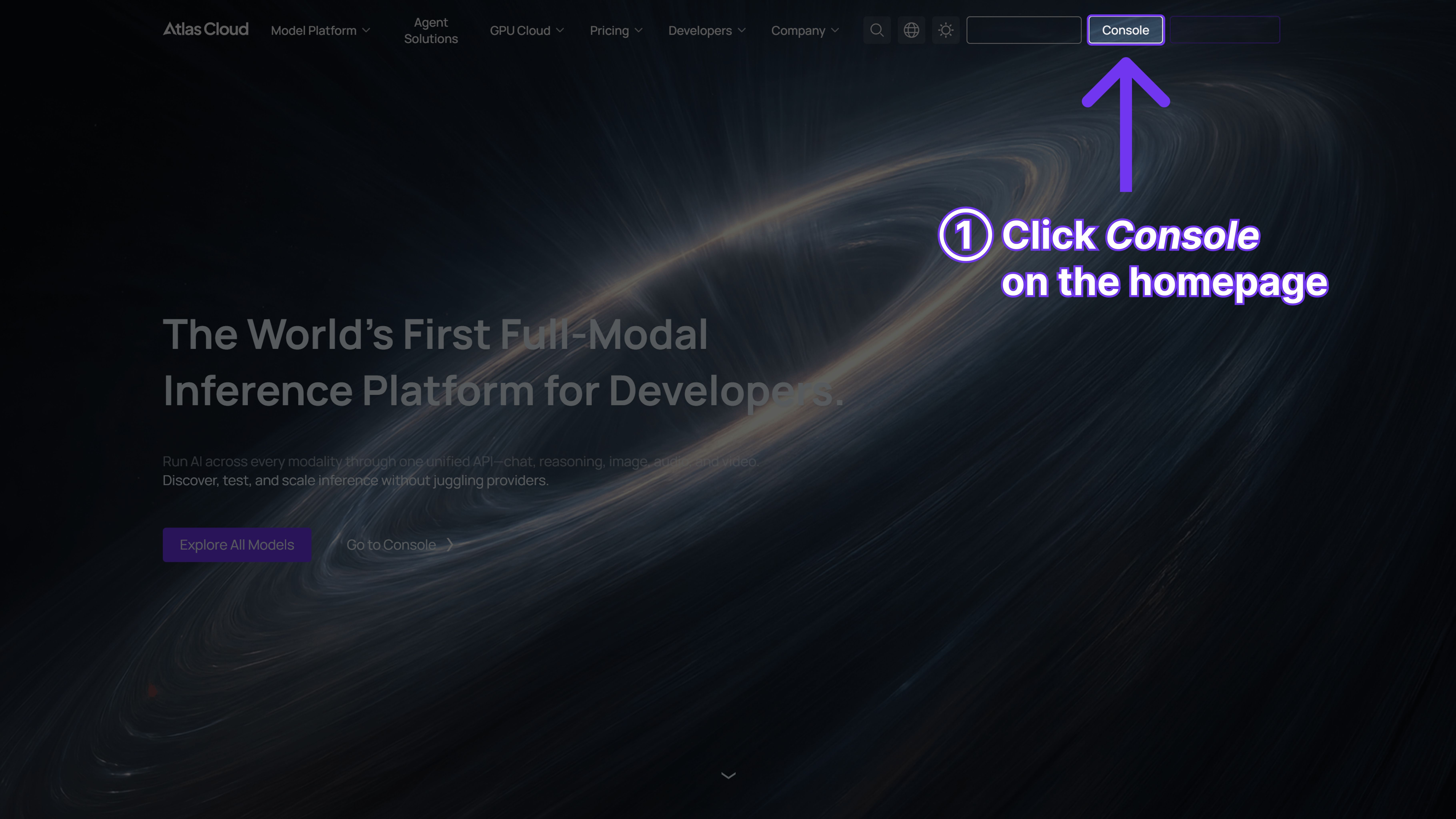
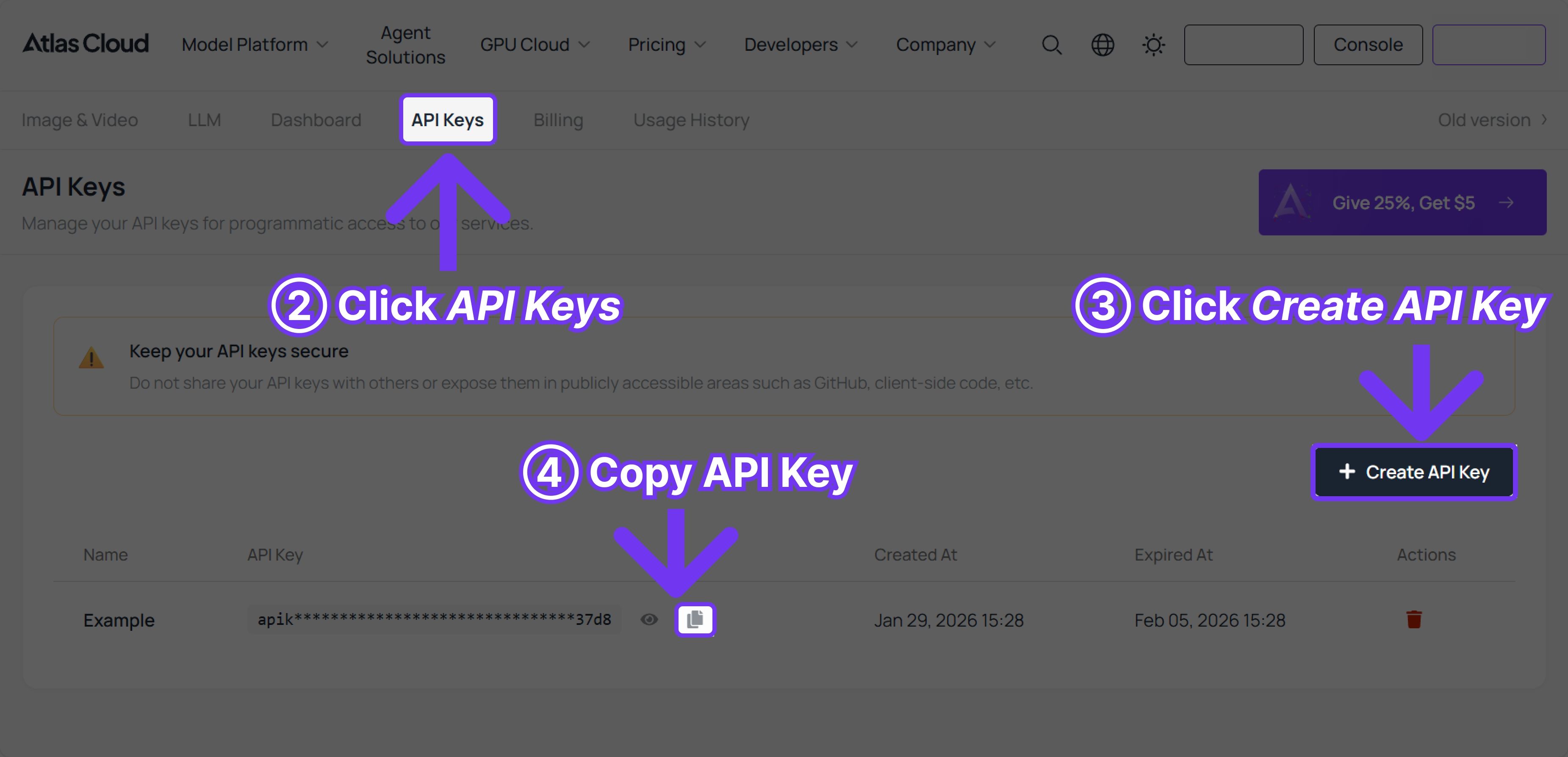
1단계: API 키 받기
콘솔에서 API 키를 생성하고 나중에 사용할 수 있도록 복사해 둡니다.
2단계: API 문서 확인
API 문서에서 엔드포인트, 요청 파라미터 및 인증 방법을 확인하세요.
3단계: 첫 번째 요청 만들기 (Python 예제)
예제: Seedance 1.5 Pro(image-to-video)로 비디오 생성
plaintext1import requests 2import time 3 4# Step 1: Start video generation 5generate_url = "https://api.atlascloud.ai/api/v1/model/generateVideo" 6headers = { 7 "Content-Type": "application/json", 8 "Authorization": "Bearer $ATLASCLOUD_API_KEY" 9} 10data = { 11 "model": "bytedance/seedance-v1.5-pro/image-to-video", 12 "aspect_ratio": "16:9", 13 "camera_fixed": False, 14 "duration": 5, 15 "generate_audio": True, 16 "image": "https://static.atlascloud.ai/media/images/06a309ac0adecd3eaa6eee04213e9c69.png", 17 "last_image": "example_value", 18 "prompt": "Use the provided image as the first frame.\nOn a quiet residential street in a summer afternoon, a young girl in high-quality Japanese anime style slowly walks forward.\nHer steps are natural and light, with her arms gently swinging in rhythm with her walk. Her body movement remains stable and well-balanced.\nAs she walks, her expression gradually softens into a gentle, warm smile. The corners of her mouth lift slightly, and her eyes look calm and bright.\nA soft breeze moves her short hair and headband, with individual strands subtly flowing. Her clothes show slight natural motion from the wind.\nSunlight comes from the upper side, creating soft highlights and natural shadows on her face and body.\nBackground trees sway gently, and distant clouds drift slowly, enhancing the peaceful summer atmosphere.\nThe camera stays at a medium to medium-close distance, smoothly tracking forward with cinematic motion, stable and controlled.\nHigh-quality Japanese hand-drawn animation style, clean linework, warm natural colors, smooth frame rate, consistent character proportions.\nThe mood is calm, youthful, and healing, like a slice-of-life moment from an animated film.", 19 "resolution": "720p", 20 "seed": -1 21} 22 23generate_response = requests.post(generate_url, headers=headers, json=data) 24generate_result = generate_response.json() 25prediction_id = generate_result["data"]["id"] 26 27# Step 2: Poll for result 28poll_url = f"https://api.atlascloud.ai/api/v1/model/prediction/{prediction_id}" 29 30def check_status(): 31 while True: 32 response = requests.get(poll_url, headers={"Authorization": "Bearer $ATLASCLOUD_API_KEY"}) 33 result = response.json() 34 35 if result["data"]["status"] in ["completed", "succeeded"]: 36 print("Generated video:", result["data"]["outputs"][0]) 37 return result["data"]["outputs"][0] 38 elif result["data"]["status"] == "failed": 39 raise Exception(result["data"]["error"] or "Generation failed") 40 else: 41 # Still processing, wait 2 seconds 42 time.sleep(2) 43 44video_url = check_status()





