The definitive guide to fixing sliding feet, floating arms, and morphing hands in your next generation.
AI video has come a long way this past year. You can now generate convincing faces, cinematic lighting, and backgrounds that look nearly photorealistic. But the illusion almost always falls apart the moment the character starts moving. You’ve probably seen it before: arms swinging at the wrong tempo, feet sliding across the floor like there’s no friction, fingers merging together between frames. It pulls you right out of the moment. If you’ve spent much time trying to create realistic AI videos, you’ve definitely run into these glitches. It’s easy to blame the model. But after running a series of motion-focused tests with Kling 3.0, we found that the biggest leaps in quality didn’t come from switching tools—they came from getting better at writing AI video prompts.
If you’ve spent time generating realistic AI videos, you’ve probably seen some version of this.
The instinct is usually to blame the model. But after running more than 60 motion-focused tests with Kling 3.0 to verify complex prompt accuracy for AI, we kept noticing the same pattern: the biggest improvements in motion quality often came from small AI video prompts details.
Not huge changes — just subtle things like:
- Describing how a foot lands.
- Mentioning weight transfer during a step.
- Telling the model how the camera moves.
Those cues give the model much better guidance about how motion should unfold across frames. This is the core of effective AI video prompt engineering.
This article walks through 10 AI video prompts that consistently produced the most natural movement in our tests — from basic walking to complex multi-character interactions. For each one, I’ll explain what it’s testing and why it tends to work, giving you a clear roadmap on how to use Kling 3.0 for professional results.
Why Realistic Human Motion Is Still the Hardest Part of AI Video
Static scenes are mostly solved.
Most modern video models can generate a convincing portrait or landscape without obvious artifacts.
Human motion is a different problem entirely.
A simple walking sequence requires the model to coordinate dozens of joints across multiple frames while keeping:
- Body proportions consistent.
- Weight distribution believable.
- Foot contact with the ground stable.
Add clothing movement, hair motion, or handheld objects, and the complexity increases quickly. This is where advanced AI video motion control becomes critical.
This is one area where Kling 3.0 is noticeably better than earlier versions. Its temporal motion architecture handles frame-to-frame consistency more reliably, especially during longer sequences. Even so, prompt structure still matters a lot. Without precise instructions, even the best model will struggle to create realistic AI videos.
10 AI Video Prompts for More Natural Human Motion
Below are ten prompts that produced the most stable results during testing. They’re not magic formulas — but they consistently performed better than simpler variations.
Prompt #1 — Natural Walking
What this tests: Basic walking mechanics and weight transfer.
Prompt:
plaintext1Twilight on a city street. The pavement's still wet from rain. A woman in a beige trench coat walks through it—nothing special, just walking. Easy pace. Arms loose at her sides. Each step lands heel-first, then rolls forward. Behind her, streetlights and neon signs blur across the wet ground. The camera's low, almost street-level, like someone crouched with a 35mm. No drama. No action. Just her and the city, moving through each other. Feels real because it is.
Negative prompt:
plaintext1sliding feet, moonwalk, floating, stiff legs, robotic movement, gliding, no foot contact, distorted gait, blurry background
Two details make a noticeable difference. The "heel-to-toe" landing description helps prevent the common “gliding walk” artifact. The tracking camera moving at the same speed as the subject also improves stability. When the character stays centered in frame, Kling 3.0 tends to maintain body proportions more consistently across frames.
Prompt #2 — Sprinting Motion
What this tests: High-speed motion and full-body coordination.
Prompt:
plaintext1A man runs fast on a track during golden hour. He takes steps. His legs go forward and his feet hit the ground hard. His arms move up and down in a beat as his muscles get tight and then relax with each step. 2The camera follows him from the side fast with a special lens. The background gets blurry. The runner stays clear in the picture. With a camera snap each movement looks sharp and clear, against the warm light.
The phrase “visible impact” for foot contact is important. Without it, sprinting often degrades into floating motion. Restricting motion blur to the background helps preserve detail in the runner’s body, a crucial tip for advanced AI video motion control.
Prompt #3 — Head Turn Close-Up
What this tests: Facial consistency during rotation.
Prompt:
plaintext1Close. A woman turns her head slowly. Left to right. For a moment there's nothing but her face. Her hair follows just behind, catches the light as it moves. Near the end of the turn, her eyes find the lens. A small smile starts. Not even a smile yet. Just the start of one. The light is soft. You can see her skin, the slight tension in her neck as she moves. 50mm lens. The frame stays with her the whole time. Quiet. Like she just noticed you.
Head turns are tricky because facial geometry changes quickly relative to the camera. Slowing the motion down to four seconds and adding secondary hair movement tends to produce smoother results. This technique is essential for any consistent character AI video workflow where identity must remain stable across cuts.
Prompt #4 — Sitting Down
What this tests: Weight transfer and body-object interaction.
Prompt:
plaintext1Sunlight through big windows. A man in a navy suit walks to a leather chair and sits. Slow. Lets the chair take his weight. He adjusts his jacket, crosses one leg over the other, settles in. The leather gives beneath him. His suit creases. 35mm lens. You see the texture of the chair, the way he holds himself. Nothing more. Just a man in his space. Unguarded.
The cushion compression detail signals that the character should physically interact with the chair rather than hover above it. This level of detail improves complex prompt accuracy for AI regarding object collisions.
Prompt #5 — Hand Interaction
What this tests: Finger stability and object contact.
Prompt:
plaintext1Late afternoon sun. Coming through the window. Warm. Angled. A woman's hand enters the frame. Just her hand. Fingers close around a ceramic cup. Thumb rests on top. She lifts it from the wooden saucer. Slow. Brings it to her mouth. A small sip. Then sets it down. Soft clink when cup meets saucer. The light catches everything. Her fingers. The tea. Dust floating. The lens is close. You see the texture of the ceramic. Her nail catching light. The slight shift in her grip as she lets go. Small moment. Feels full.
Hands are much more stable when they’re anchored to an object rather than moving freely in space. This is a fundamental rule in AI video prompt engineering for avoiding finger deformation.
Prompt #6 — Ballet Spin
What this tests: Rotational motion and cloth dynamics.
Prompt:
plaintext1On a theater stage a pro ballerina does a smooth spin under one spotlight. Her white tutu flares out a bit as she turns one leg out while her arms move nicely from second to position. 2The stage around her is dark so all eyes are, on the dancer and her moves. The shot is taken with a 24mm lens capturing the full spin in one go looking natural and balanced.
Using ballet terminology gives the model clearer body positioning targets. It leverages advanced AI video motion control to handle complex rotational physics without distorting the background.
Prompt #7 — Two-Person Interaction
What this tests: Multi-character spatial consistency.
Prompt:
plaintext1Late afternoon light. Warm. Cutting across the street at an angle. Two people see each other on the sidewalk. Old friends. One puts out a hand to shake. The other opens his arms. They laugh at the mismatch, then go in for the hug. Hands pat each other's backs a couple times. Quick rhythm. Real. They stand there a moment. Easy. The city moves around them. The shot's from a bit back. Handheld. The kind of framing that catches something before it's gone. Every gesture clear. Nothing pushed. Just two people glad to see each other.
Starting with different actions helps the model maintain two separate character tracks. This approach is vital for a consistent character AI video workflow involving multiple subjects.
Prompt #8 — Latte Art
What this tests: Two-hand coordination and fluid motion.
Prompt:
plaintext1Behind the counter. A barista with a pitcher. The café is quiet. Warm. The kind of place you stay awhile. She tilts the metal pitcher over a small cup. Milk flows out. Thin stream. White against dark. Her other hand cradles the cup. Guides it. A pattern starts showing on the surface. Leaf-like. Delicate. Steam rises between them. Light hits the edge of the pitcher. The curve of the cup. Soft. Golden. You can tell she's done this before. Not rushed. Not thinking. Slow. Careful. The milk moves like she knows where it's going before it gets there.
Assigning a specific role to each hand improves stability. This specificity ensures complex prompt accuracy for AIwhen dealing with fluid dynamics and bimanual tasks.
Prompt #9 — Facial Expression Change
What this tests: Gradual emotional transitions.
Prompt:
plaintext1Soft light in the room. Quiet. Even. A man sits with his phone. Looking down at it. His face is still at first. Just waiting. Neutral. Then something catches him. His eyebrows lift. Barely at first. Then more. His eyes widen. Just a little. The way they do when you're not sure you're seeing right. Then the surprise turns into something else. His mouth opens slightly. Curves into a smile. Not big. Real. You watch it move through his face. The muscles shifting. Warmth reaching his eyes. Camera at eye level. Close. Catches every small change. Focus stays on him. On the phone in his hand. On the quiet moment when good news comes and a person sits alone with it. Smiling before they know they're smiling.
Breaking expressions into stages helps avoid sudden facial morphing. This staged approach is a cornerstone of professional AI video prompt engineering.
Prompt #10 — Cinematic Scene
What this tests: AI video scene sequencing and multi-layer motion.
Prompt:
plaintext1The camera looks down as the door opens. Heavy wood. Old. The kind that's been there forever. A man walks in. Long dark coat. Shadows on his face. He stops just inside. Looks around. Then moves forward. Slow. Deliberate. His coat shifts with each step. Behind him, a pianist plays. Sways a little on the bench. Smoke rises through amber light. Warm. The camera pulls back. Slow. Steady. The detective keeps walking. Nothing cuts away. One take. Fifteen seconds maybe. Everything in its own time. His walk. The piano. The light holding it all together. Dark. Quiet. Feels like another time.
Things happening close, mid, far—that's what gives you depth. Keeps it from feeling flat. This one works because the model has to track layers at the same time. Detective in front. Pianist in back. Light and smoke between them. All happening at once. Nothing's fighting for attention. That's what makes it feel like a real scene. Not just things happening one after another.
Test Environment: How to Use Kling 3.0 Globally
All the prompts in this guide were tested using Kling 3.0.
Kling AI is now officially available outside China—the platform has launched a global experience with international access. That said, early on, many creators outside China still ran into friction: sign-up flows that assumed a mainland phone number, payment methods that didn't match, or simply confusion about where to start. If you've been trying to figure out how to use Kling 3.0 from outside China, you're not alone—and the good news is that it's now much easier to just head to the global site, create an account, and start generating.
For testing, we used Atlas Cloud, which provides global access to the same model with an English interface and full feature support. It allows:
- Professional Mode generation
- Negative prompts
- Up to 4K output
- 15-second video clips
Pricing also runs a little lower — starting around 0.153∗∗persecond,comparedtoabout∗∗0.153** per second, compared to about **0.153∗∗persecond,comparedtoabout∗∗0.18 on the official platform.
If you want to try these AI video prompts yourself: Try Kling 3.0 on Atlas Cloud
Four Patterns That Showed Up in Successful Motion Prompts
Ran a bunch of tests. Some patterns kept showing up in the prompts that worked. Simple stuff. The kind you'd think is obvious. Easy to miss.
1. Describe the physics, not just the action
There’s a big difference between telling the model what happens and describing how it happens physically. This distinction is vital for complex prompt accuracy for AI.
Weak prompt:
A man walking
Stronger prompt:
A man walking. Steady pace. Arms loose at his sides. Each foot lands heel-first, rolls forward. Wet pavement under him.
The second version gives the model something to work with—stride, arm rhythm, how the foot meets the ground. Without those details, it just falls back on generic animation. The kind that moves but doesn't feel like anyone's actually walking.
2. Put the motion inside a real environment
Movement rarely happens in a vacuum, and prompts shouldn’t describe it that way.
Environmental details give the model context for lighting, ground interaction, and spatial depth.
Compare:
A woman running
Vs.
A woman jogs through a sunlit park in the morning, her ponytail swinging with each stride, feet landing on a gravel path.
Now the prompt tells the model more than just motion—surface, light, where it's happening.
3. Camera direction matters more than people expect
One of the easiest ways to improve motion quality is simply telling the model how the camera behaves. This is a key aspect of advanced AI video motion control.
Without guidance, most models default to a static wide shot. That often makes movement look flat.
Even basic instructions help:
medium shot, 50mm lens, tracking camera
In many tests, just adding a tracking camera made motion look noticeably more natural.
4. Use negative prompts as guardrails
Negative prompts work best when they target specific failure modes.
For human motion, a short baseline often helps:
blurry limbs, distorted joints, extra fingers, unnatural movement, morphing body parts
The key is not to overload it. Extremely long negative prompts can actually make the animation look stiff, ruining your chances of creating realistic AI videos.
A Simple Motion Prompt Template
If you're building your own AI video prompts, a structure like this often works well:
plaintext1[character description] 2 3performing [action] 4 5motion details: 6stride mechanics / arm movement / weight transfer 7 8environment: 9location / surface / lighting 10 11camera: 12shot type / lens / movement 13 14negative prompt: 15distorted limbs, extra fingers, sliding feet
Quick FAQ: How to Use Kling 3.0 Effectively
Q: Can these prompts work on other models? Yes, the physics principles are universal, though Kling 3.0's specific architecture responds particularly well to these detailed cues.
Q: What resolution should I use? Stick to 1080p for testing speed and iteration. Switch to 4K for final renders when you need maximum detail for realistic AI videos.
Q: My hands still look weird. What should I do? Try anchoring them to an object first (like a cup or a railing). This is the most reliable fix in AI video prompt engineering for hand issues.
Final Thoughts
Realistic human motion in AI video isn’t just about model capability.
Prompt design plays a much larger role than many people expect.
Across dozens of tests, the prompts that performed best consistently did a few simple things:
- They described physical motion, not just actions.
- They placed movement in a clear environment.
- They specified camera behavior.
- They used targeted negative prompts.
Tools like Kling 3.0 provide the rendering engine. The prompt simply gives it better instructions.
Ultimately, mastering these techniques isn't just about fixing glitches; it's about unlocking better storytelling with AI video tools. When your characters move believably, your audience stops looking at the technology and starts feeling the story.
If you'd like to experiment with these prompts yourself, you can run them through Atlas Cloud and see how different motion descriptions affect the result.
How to Use Both Models on Atlas Cloud
Atlas Cloud lets you use models side by side — first in a playground, then via a single API.
Method 1: Use directly in the Atlas Cloud playground
Method 2: Access via API
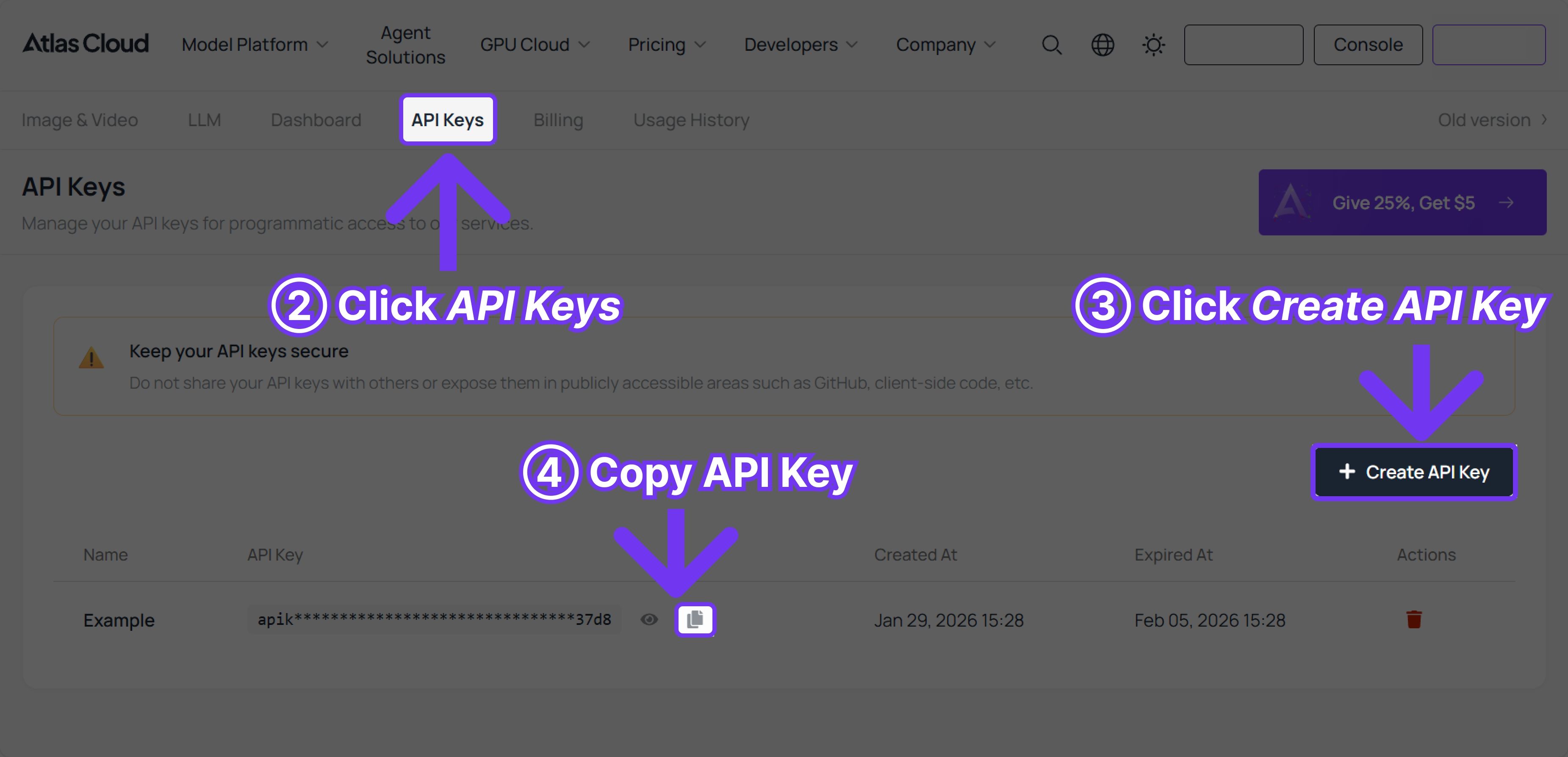
Step 1: Get your API key
Create an API key in your console and copy it for later use.

Step 2: Check the API documentation
Review the endpoint, request parameters, and authentication method in our API docs.
Step 3: Make your first request (Python example)
Example: generate a video with Kling v3.0 Std Text-to-Video.