Alibaba's Wan 2.7 brings the first built-in chain-of-thought reasoning to AI image generation — delivering more accurate compositions, legible text rendering, and 4K output for professional creative workflows.
What Is Wan 2.7?
Wan 2.7 is Alibaba’s latest AI model for image and video generation, built within the Qwen ecosystem. It supports four key functions: text-to-image, image editing, text-to-video, and image-to-video, all accessible through one unified API.
Alibaba designed Wan 2.7 to redefine AI image creation and editing, helping creators make sharp, personalized visuals with professional precision. Unlike earlier Wan versions that focused mostly on image quality and resolution, Wan 2.7 uses improved architecture to better understand and interpret user prompts, rather than just rendering pixels.
Why it matters: Most text-to-image models process prompts in a single pass — fast, but prone to spatial errors and garbled text. Wan 2.7's reasoning layer is the first of its kind in a commercially available image generation model, addressing the most persistent failure modes in AI-generated visual content.
Wan 2.7 is accessible via Atlas Cloud, with no need for local infrastructure. This means teams of all sizes can use it easily, without the hassle of setting up GPUs or managing the model themselves.
Wan 2.7 vs. Competing AI Image Generation Models
| Feature | Wan 2.7 | Midjourney V7 | FLUX.1 | Seedream |
| Built-in reasoning / thinking mode | ✓ | — | — | — |
| Text rendering quality | Excellent | Limited | Good | Moderate |
| Max output resolution | 4K (Pro) | 4K | 4K | 2K |
| API access | ✓ Full REST | ✗ Closed | ✓ | ✓ |
| Multi-reference support (up to 9) | ✓ | — | Partial | — |
| Instruction-based editing | ✓ | Limited | ✓ | ✓ |
| 12-language text rendering | ✓ | — | — | — |
| Integrated video generation | ✓ | — | — | — |
| Seed control | ✓ | ✓ | ✓ | ✓ |
Midjourney continues to lead in artistic aesthetic quality — its distinctive visual style remains a reference point for creative-first workflows. However, its lack of API access limits integration into production pipelines. FLUX performs well on straightforward prompts with fast generation times, but Wan 2.7's reasoning mode gives it a clear advantage on complex multi-element scenes where single-pass generation loses spatial coherence. For teams that need reliable instruction-following, accurate text rendering, API accessibility, and multi-reference support within a single model, Wan 2.7 represents the strongest current option available through Atlas Cloud.
Core Features of Wan 2.7 Text-to-Image
1. Chain-of-Thought Thinking Mode
The most significant technical advancement in Wan 2.7 is its built-in reasoning layer. Unlike traditional text-to-image models that generate images directly from a prompt — often resulting in poor composition, missing elements, or flawed details — Wan 2.7's Thinking Mode allows the model to parse the prompt, plan composition, determine subject placement and lighting direction, verify that the composition logic is sound, and then generate the final image.
This "think before you draw" mechanism produces measurably better results on complex prompts: more coherent spatial relationships, more accurate subject positioning, and fewer visual artifacts on first generation. For teams doing iterative creative work, the practical benefit is fewer regeneration cycles to reach a usable output.
Thinking Mode is enabled by default and can be toggled based on the speed-quality trade-off required for a given task.
2. Superior Text Rendering in AI-Generated Images
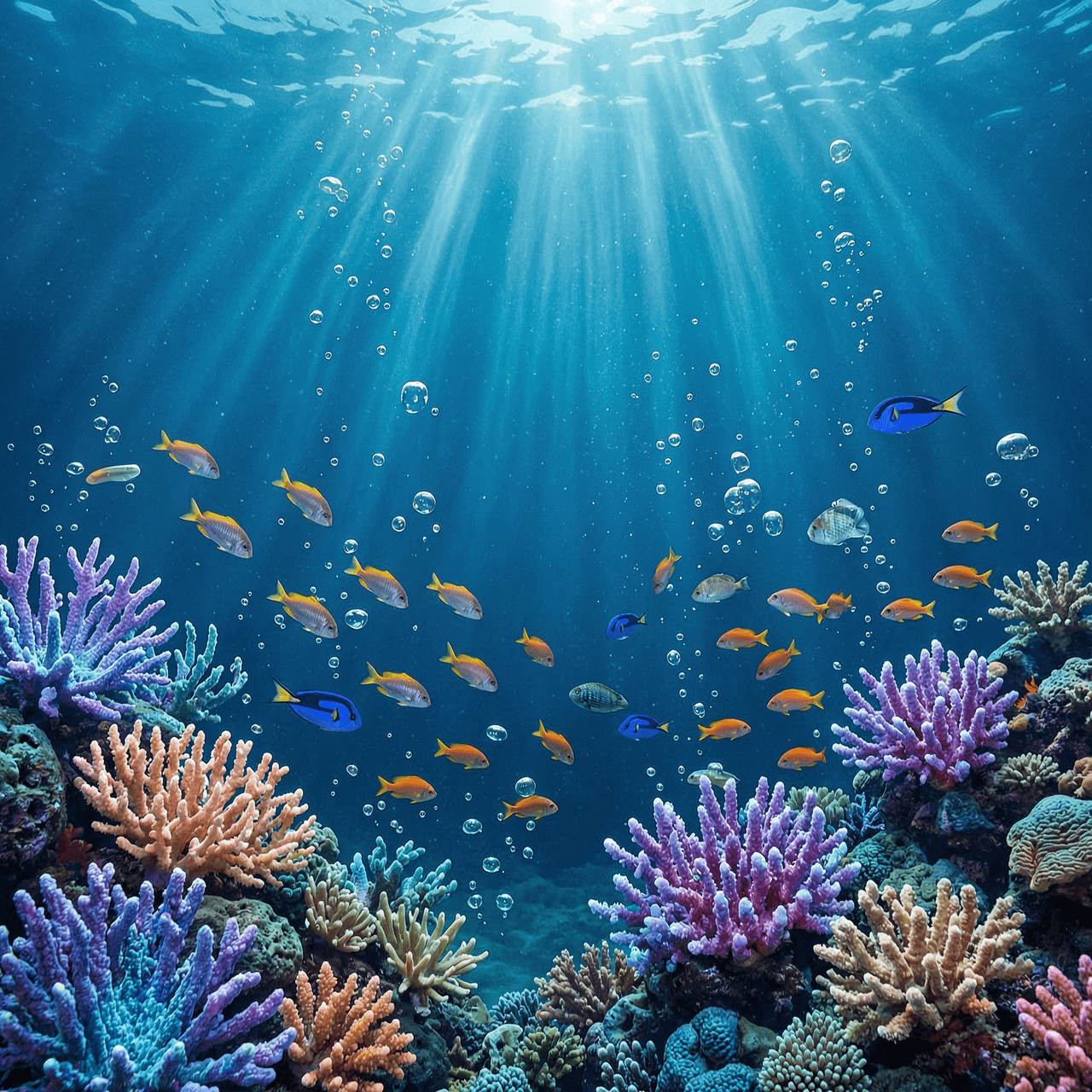
Text rendering has historically been one of the weakest areas across AI image generation tools. Wan 2.7 addresses this through a long-context learning framework.
Wan 2.7 handles text inputs up to 3,000 tokens and delivers a big breakthrough in text rendering, supporting 12 languages like Chinese, English, Japanese, and other major global languages.
In real use, this means generated images have clear, precise text—whether it’s signs, product labels, poster headlines, or typographic details.Unlike most competing models, it doesn’t produce distorted or garbled characters. For marketing teams, product designers, and content creators operating in multilingual markets, this offers a major practical benefit.
3. High‑Resolution Output Capabilities
Wan 2.7 Text-to-Image supports flexible output sizing across three tiers:
- Standard resolution — optimized for fast iteration and everyday creative work
- 2K resolution (up to 2048×2048 pixels) — our recommended default option for most professional workflows
- 4K resolution (up to 4096×4096 pixels, Pro tier) — ideal for print-ready materials and large-format display needs
Wan 2.7-Image-Pro offers more stable image composition, a sharper and more precise understanding of prompts, and high-definition 4K output. For digital content, 2K output provides strong image quality with faster generation times. The 4K Pro tier is best reserved for final hero assets, campaign imagery, and print production work.
4. Multi-Reference Image Support
Wan 2.7 supports uploading up to nine reference images within a single generation or editing request. These reference images can steer the overall style, define the main subject, and shape the background of your edits — opening up possibilities like style transfer, swapping elements between different images, and combining multiple references into one cohesive final piece.
Being able to use up to nine reference images sets Wan 2.7 apart from most competing platforms. It’s especially useful for brand teams needing consistent visuals across their asset libraries, or agencies that regularly create multiple campaign versions from one visual brief.
5. Seed Control and Repeatable Generation
For teams working within defined brand guidelines or producing large volumes of related content, Wan 2.7 includes seed-based generation control. Locking a seed value produces identical outputs from the same prompt, enabling repeatable creative testing and consistent visual identity across campaigns. Varying the seed while keeping the prompt constant generates diverse creative alternatives from the same creative direction.
6. Instruction-Based Image Editing
Beyond generation, Wan 2.7 includes a dedicated image editing endpoint powered by the same reasoning layer. The editing model understands what should change and what should not — for example, changing a portrait's background to a beach sunset while preserving the face, pose, and clothing with pixel-level accuracy. This semantic understanding of edit intent separates Wan 2.7's editing capability from traditional mask-based inpainting tools.
-
Wan2.7‑Image Exclusive Features: Diverse Characters, Precise Colors, and Professional Typesetting
Wan 2.7‑Image excels in solving industry pain points, enabling users to create a "thousand people, thousand faces" girl group and accurately control face details and colors through prompt words. Its key upgrade highlights include:
1⃣ Thousands of Faces: Virtual Character Customization
Wan2.7‑Image has enhanced the virtual image pinching function to bid farewell to the stereotyped "AI face". It supports all‑round customization from bone structure, eyes to facial features, such as changing the face shape (oval face, round face, square face, rectangular face, etc.) and eye features (almond eyes, deep eye sockets, round eyes, phoenix eyes, etc.) in the prompt words, achieving "thousands of faces for thousands of people". This is particularly useful for creating diverse girl groups, virtual idols, or personalized character assets without repetitive facial features.
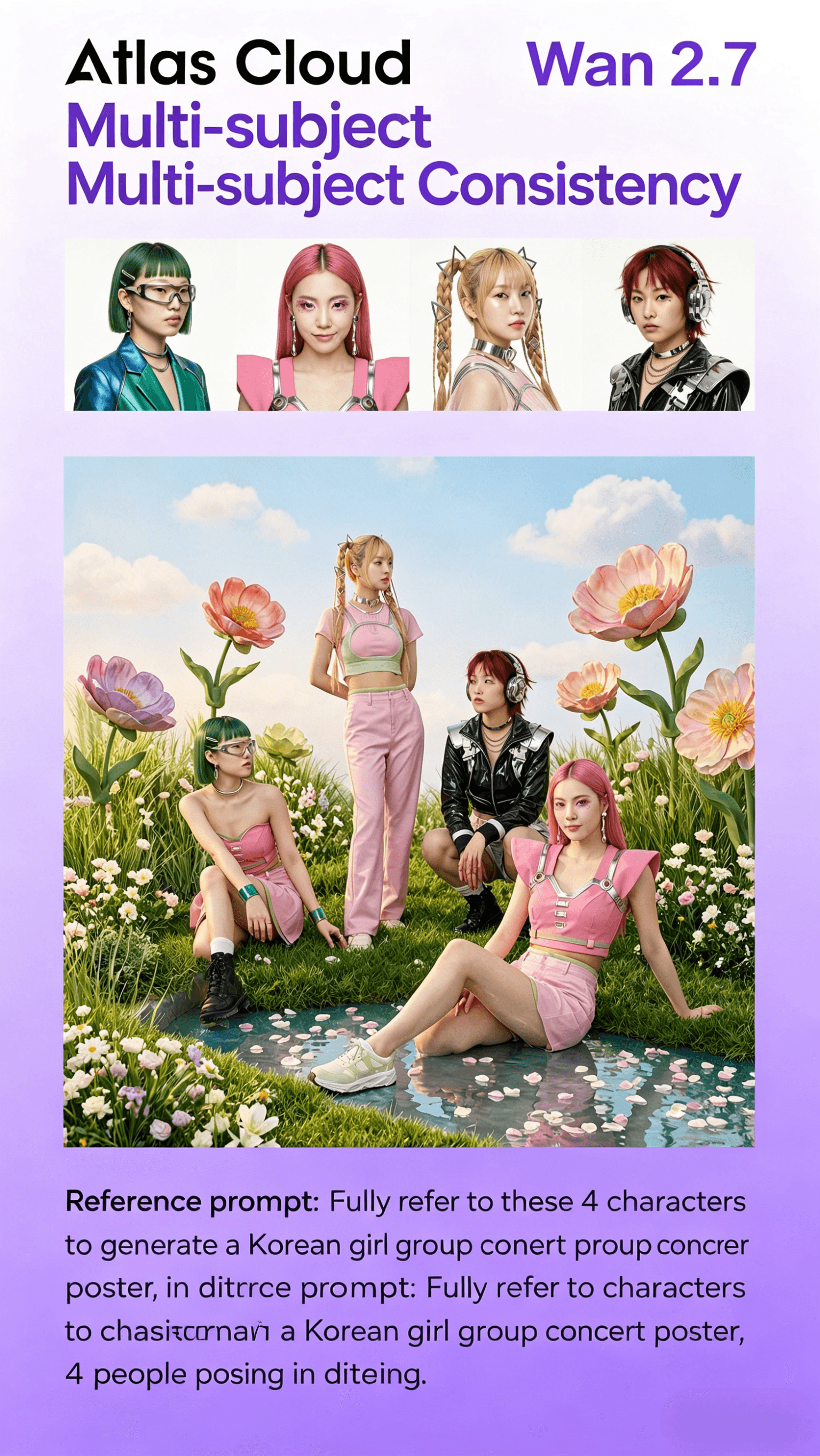
2⃣ Multi‑Agent Consistency: Support for Up to 5 Images
When generating group photos, movie posters, or furniture combinations, Wan2.7‑Image can maintain the unity of style and features across up to 5 images. This ensures that multiple related visuals (such as a series of campaign posters or a group of character portraits) have consistent aesthetic and stylistic coherence, reducing the need for post‑editing adjustments.
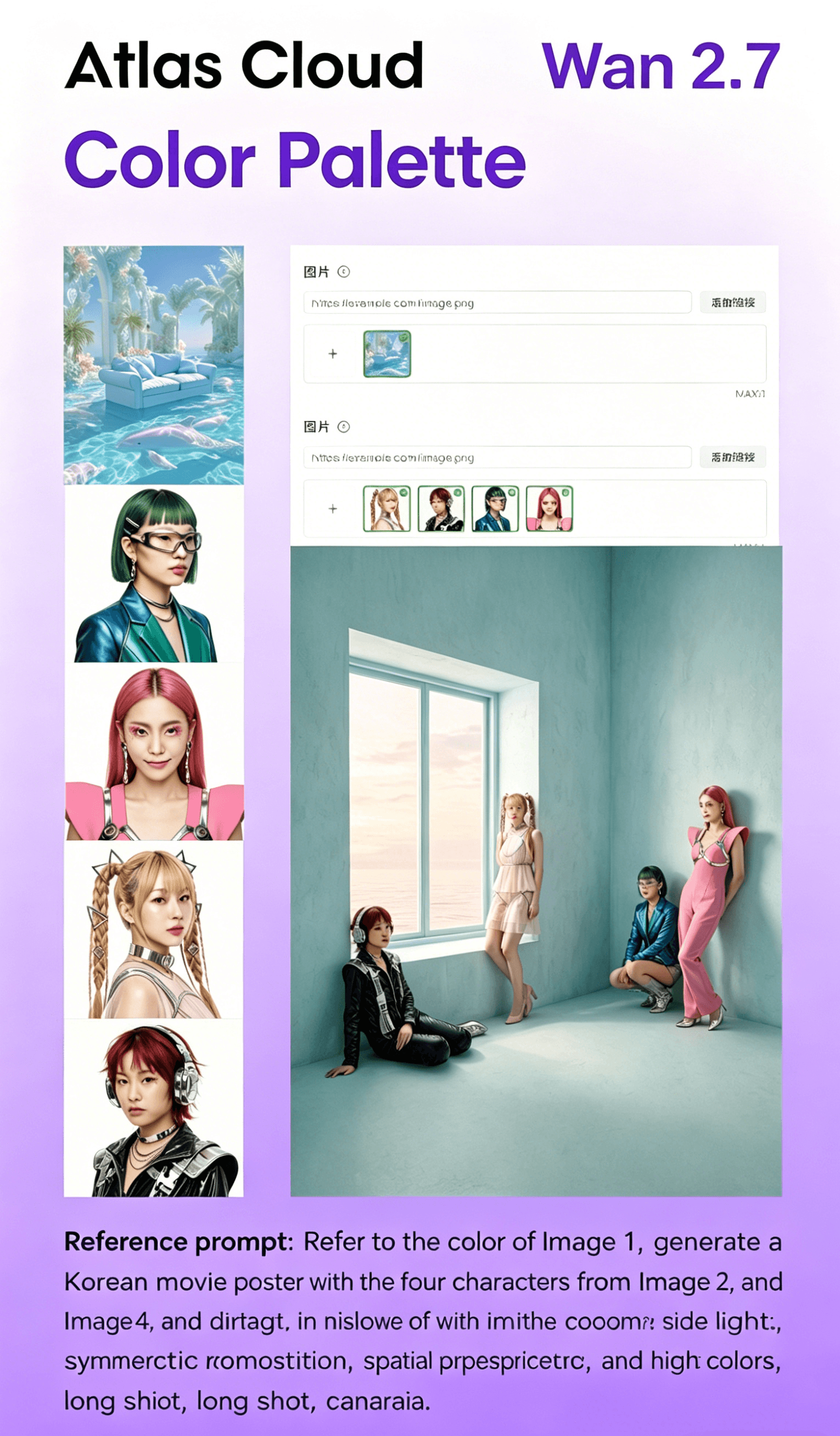
3⃣ Palette: Precise Color Control
Wan2.7‑Image supports the new "color palette" function. Users can extract or input various colors and proportions of reference images with one click. From the rich red of Matisse, the bright yellow of Van Gogh, to the cool blue of Picasso, they can refer to and generate images of the same color scheme. Users can freely adjust the number and proportion of colors and customize the color scheme, solving the "color blind box" problem and ensuring color consistency with brand guidelines or creative visions.
4⃣ All‑Round Typesetting Master: Multidimensional Text Rendering and Efficient Group Graphics
Building on its strong text rendering capabilities, Wan2.7‑Image has powerful text control and batch creation capabilities, supporting long text and complex formula rendering in 12 languages including Chinese and English. It can accurately restore table layout and achieve printing‑level accuracy. Combined with the group image generation function, users can produce a highly unified series of content with one click, making it the ultimate tool for multi‑image visual planning and professional poster design.
Prompting Best Practices for Wan 2.7
Getting the most out of Wan 2.7's reasoning capabilities comes down to how you structure your prompts. The following practices consistently produce stronger outputs:
Structure prompts by element. Describe subject, style, lighting, and composition as distinct descriptors rather than a single run-on sentence. The reasoning layer processes each element more accurately when they are clearly separated within the prompt.
Specify text content precisely. For any text that should appear within the generated image, write it exactly as it should render, using quotation marks within the prompt. This gives the model a clear literal target rather than an interpretation to make.
Use 2K resolution as your baseline. For most professional digital use cases — web, social, presentation, and digital campaign assets — 2K output delivers strong image quality with efficient generation times. Reserve 4K Pro for final production assets and print-ready deliverables.
Apply Thinking Mode selectively. Enable Thinking Mode for prompts that involve multiple interacting subjects, precise spatial relationships, or layered stylistic requirements. For simpler prompts — clean product shots on solid backgrounds, straightforward portrait generations — the standard mode delivers fast results without meaningful quality trade-off.
Leverage multi-reference inputs for brand work. When generating assets that need to reflect specific visual references, upload reference images alongside your prompt. Use separate references to guide color palette, compositional style, and character appearance independently, allowing the model to synthesize rather than copy any single source.
Use color codes for exact brand matching. Wan 2.7 supports direct color code input within prompts, enabling precise brand color matching without iterative prompt adjustment. Entering specific hex values and their proportional distribution ensures generated images align with defined brand standards.
Who Should Use Wan 2.7?
Marketing and brand teams producing campaign assets that require accurate text overlays, precise brand color compliance, and high-volume output at consistent quality will find Wan 2.7's combination of text rendering and seed control directly addresses their production requirements.
Design teams that use AI for creating moodboards, iterating on product concepts, and exploring visual directions will benefit greatly from the model’s ability to follow detailed style prompts and produce well‑structured, multi‑element compositions on the first try.
E‑commerce teams producing large volumes of product lifestyle images, variant visuals, and localized content can use multi‑reference inputs to keep consistent subject appearance across extensive asset libraries, while freely adjusting backgrounds, lighting, and scene environments.
Developers and agencies building AI‑driven content workflows can integrate Wan 2.7 via Atlas Cloud’s unified API alongside other leading models, with no need to handle separate infrastructure, model hosting, or billing arrangements for each platform.
Content creators producing multilingual visual content — across social media, editorial, or brand communication — benefit from Wan 2.7's 12-language text rendering and long-context prompt support, particularly for campaigns targeting Chinese-language and other non-English markets.
Why Run Wan 2.7 on Atlas Cloud?
Running Wan 2.7 through Atlas Cloud provides several practical advantages over self-hosted deployment or alternative API providers:
GPU-accelerated inference ensures consistently low latency across all generation tiers, including 4K Pro outputs and Thinking Mode requests that involve the additional reasoning pass.
The unified API lets teams run Wan 2.7 alongside GPT, Gemini, DeepSeek, and other top models through a single integration point—streamlining architecture and cutting down on integration work for multi-model workflows.
With transparent per-token pricing and serverless options, teams can eliminate idle compute costs, plus get predictable billing whether they’re using the platform for experiments or full-scale production.
Atlas Cloud provides enterprise-level reliability and compliance features—including a 99.99% uptime SLA, SOC 2 Type II certification, HIPAA alignment, role-based access control, and US data sovereignty—to suit regulated industries and large-scale organizational deployments.
Its developer tools—such as SDKs, analytics dashboards, fine-tuning support, and pre-built workflow templates—help teams cut down time-to-production, whether they’re new to AI image generation or switching from another platform.
How to Use Wan 2.7 on Atlas Cloud: Step-by-Step
Step 1 — Create an Atlas Cloud Account
Sign up at atlascloud.ai and complete account verification. New users receive free credits to explore the platform and test Wan 2.7 across different generation modes before committing to a paid plan. This includes testing Wan2.7-Image’s exclusive features like virtual character customization and color palette control.
Step 2 — Navigate to the Wan 2.7 Model
https://www.atlascloud.ai/collections/wan2.7
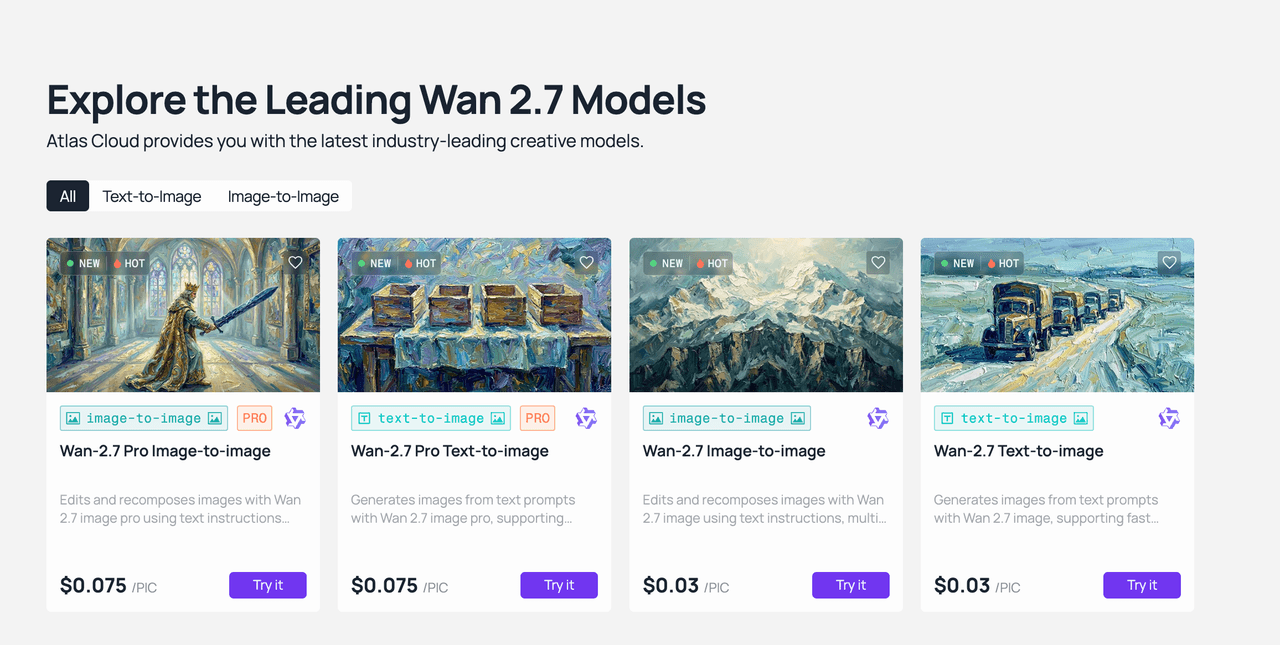
From the Atlas Cloud dashboard, go to the Model Library and search for “Wan 2.7”. Pick the version that matches your needs: standard Text-to-Image (Wan2.7-Image) for static pictures and exclusive features like character customization, Text-to-Image Pro for 4K output, or the Video model for moving content.
Step 3 — Write Your Prompt
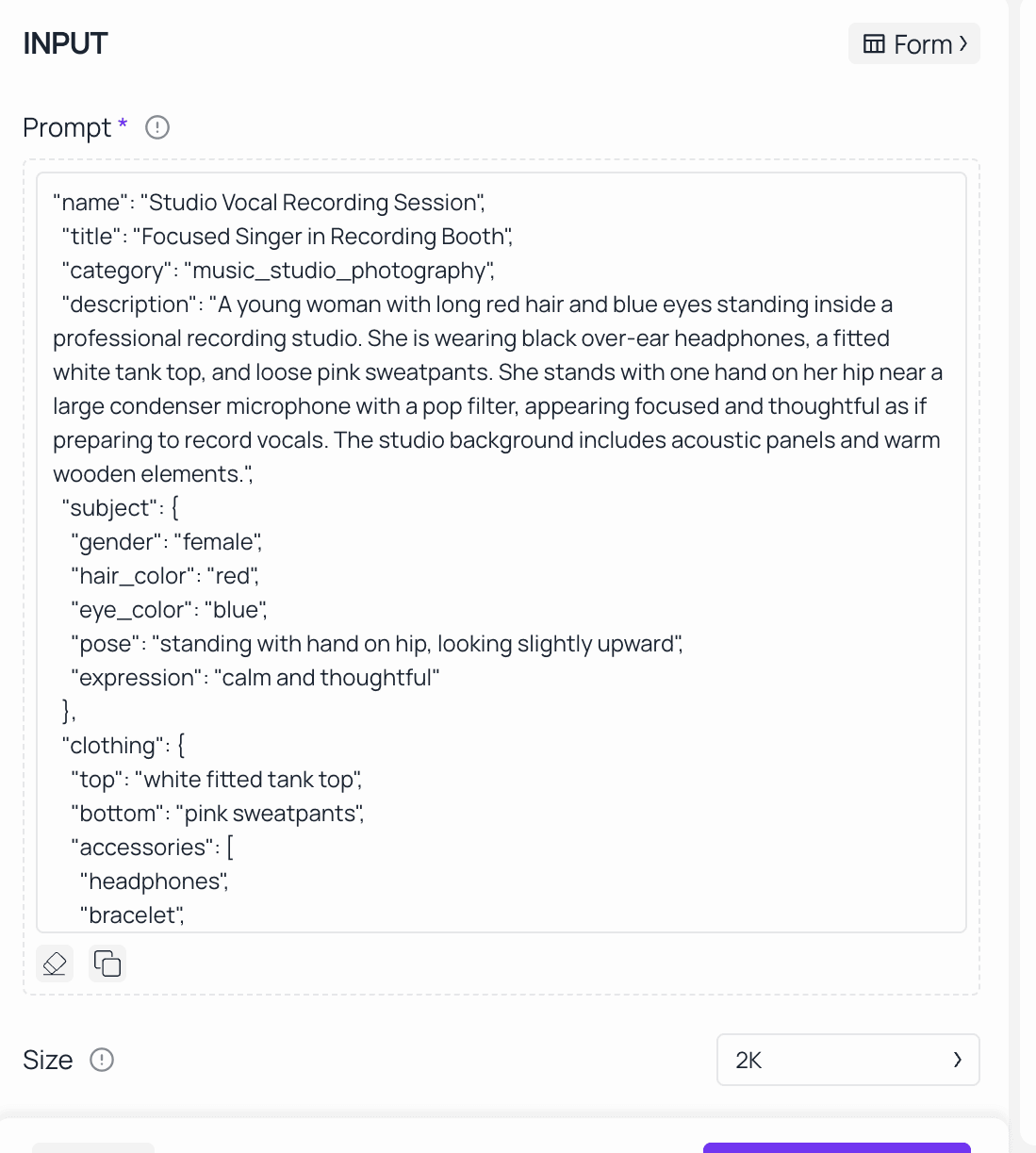
Wan 2.7's reasoning layer handles detailed, multi-element prompts more accurately than most models. Describe your subject, style, lighting and composition clearly. For images with text like product labels, signs or typography, include the exact wording directly in your prompt. For Wan2.7-Image’s character customization, specify facial details (e.g., "oval face, almond eyes, light brown hair") and color requirements (e.g., "use Matisse’s rich red color palette, 60% red, 30% gold, 10% black") to achieve precise results.
Step 4 — Configure Output Settings
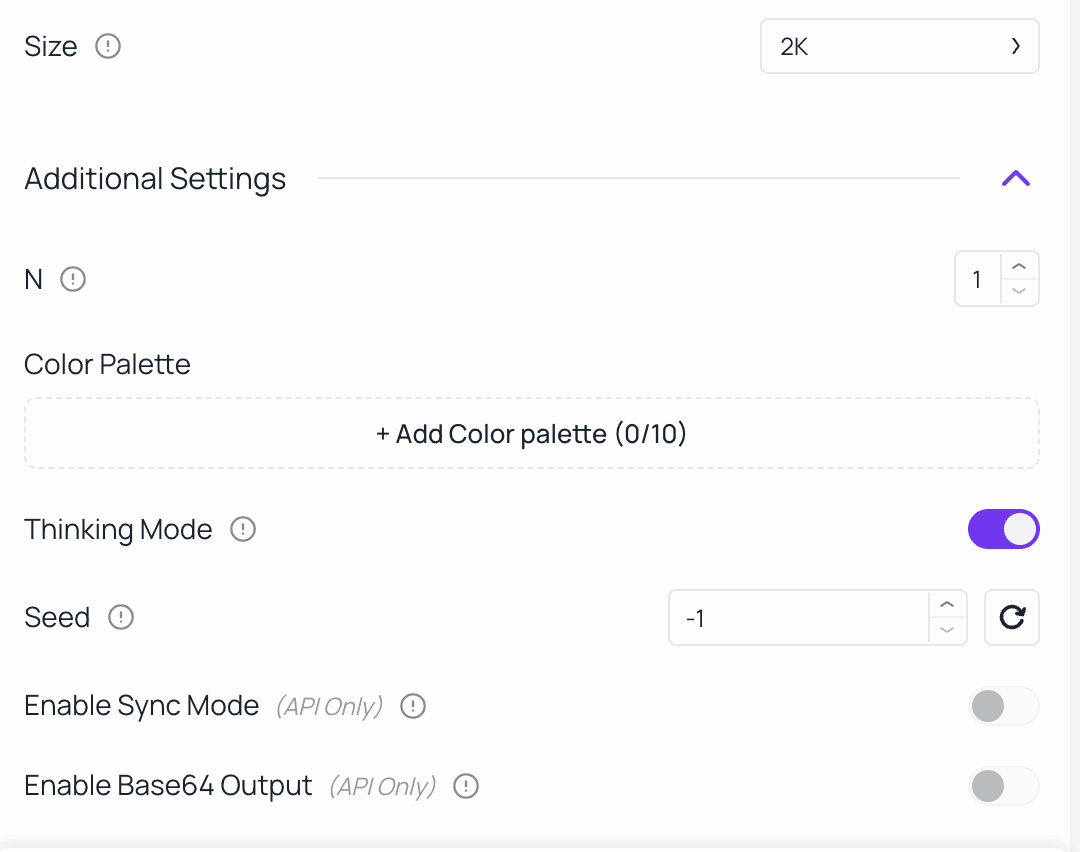
Select your target resolution based on the intended use case. Enable Thinking Mode for complex prompts where accuracy matters more than generation speed. Set a fixed seed value to ensure consistent, repeatable outputs for brand consistency or iterative campaign creation. For Wan2.7-Image, you can also enable the color palette function and upload reference images to extract color schemes.
Step 5 — Generate, Review, and Refine
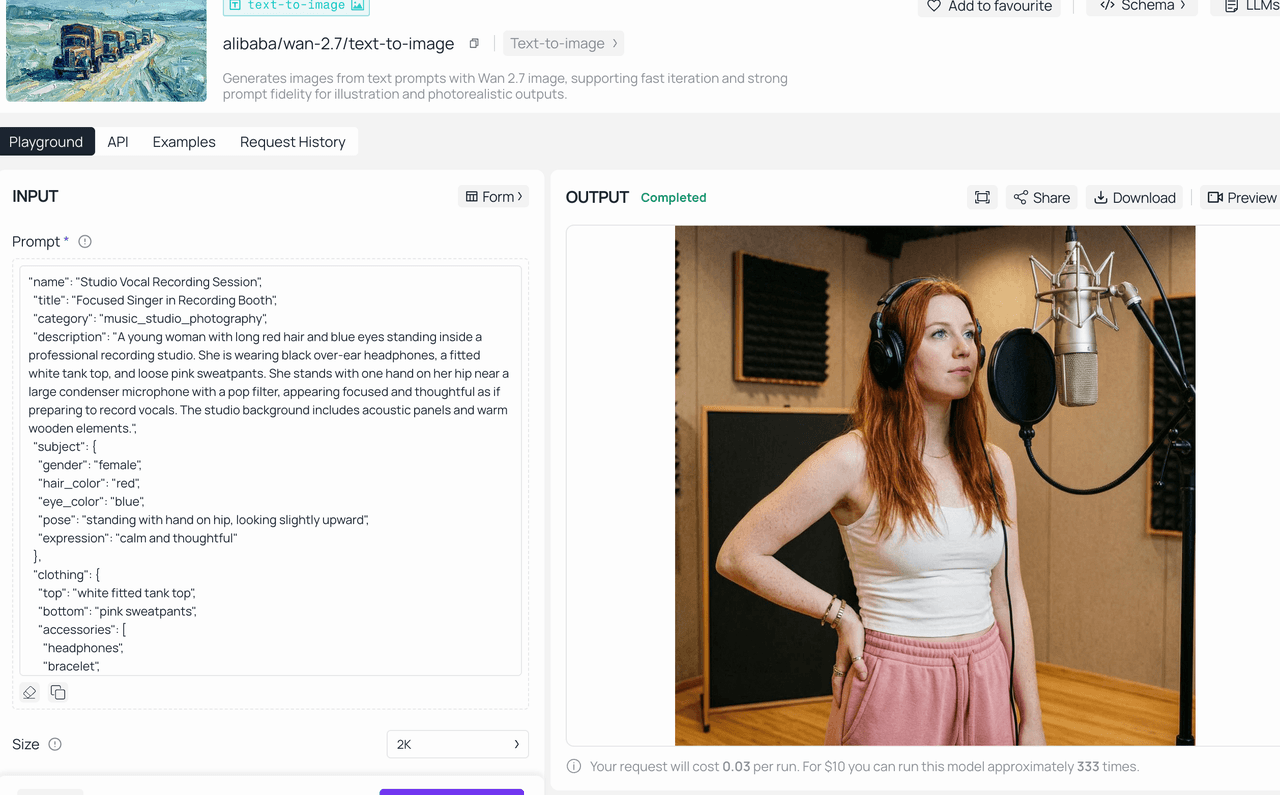
For precise, final‑quality work, run a single generation. If you’re exploring creative options, generate multiple variations instead. Use the Image Edit endpoint to refine specific elements of a selected output without starting from scratch — adjusting backgrounds, lighting, or compositional details through natural language instructions. For Wan2.7-Image, you can refine character facial features or adjust color proportions directly via edit prompts.
Step 6 — Integrate via the Atlas Cloud API
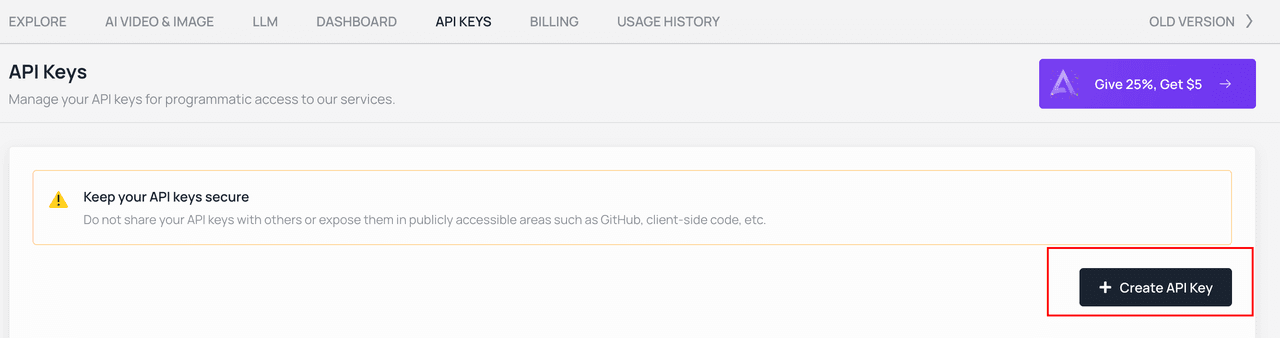
For team-building generation into production pipelines, Atlas Cloud provides a unified REST API that runs Wan 2.7 alongside other leading models — the GPT, Gemini, and DeepSeek — through a single integration. Detailed API documentation, SDK support, and code templates are available in the Atlas Cloud developer portal, including support for Wan2.7-Image’s exclusive features.
Frequently Asked Questions
What is Wan 2.7, and how does it differ from Wan 2.6?
Wan 2.7 is Alibaba’s newest AI image and video generation model. Its biggest upgrade over Wan 2.6 is the built-in chain-of-thought reasoning layer, also known as Thinking Mode. This feature supports far more accurate prompt understanding, stronger compositional structure, and clearer text rendering in generated images.
Does Wan 2.7 support API access?
Yes. Wan 2.7 is fully available through the Atlas Cloud REST API, so it can be integrated smoothly into production content pipelines, CMS platforms, e-commerce systems, and custom-built applications.
What’s the maximum resolution for Wan 2.7 text-to-image generation?
The standard tier supports up to 2K (2048×2048 pixels), while the Pro tier reaches 4K (4096×4096 pixels), perfect for print and large‑screen use.
How does Wan 2.7 manage non-English text rendering?
Wan 2.7 supports text rendering across 12 languages, with particular optimization for Chinese-language prompts and image text given its development within Alibaba's ecosystem.
Can Wan 2.7 generate videos as well as images?
Yes. Wan 2.7 on Atlas Cloud includes text-to-video and image-to-video generation capabilities, supporting outputs up to 15 seconds at 1080P HD, with first-and-last frame control, native audio, and multi-reference video inputs.
Get started with Wan 2.7 on Atlas Cloud today — sign up at atlascloud.ai and receive free credits to begin generating.







