"AI Video Kışı" resmen sona erdi. 2026'da ilerlerken, konuşmalar "AI video yapabilir mi?" sorusundan "hangi AI profesyonel bir 4K iş akışını kaldırabilir?" sorusuna evrildi. Yaratıcılar için arenaya hakim olan iki ağır sıklet Google'ın Veo 3.1'i ve Alibaba'nın Wan 2.6'sı.
Her iki araç da birinci sınıf sinematik kalite sunduğunu iddia ediyor, ancak aslında farklı hedefler için en iyi şekilde çalışıyorlar. Bu vaka çalışmasında, hangisinin 4K video düzeninizde gerçekten yer edineceğini bulmak için onları doğrudan karşılaştırdık.
| Özellik | Google Veo 3.1 | Wan 2.6 |
| Yerel Çözünürlük | 4K'ya kadar (Yükseltilmiş Yeniden Yapılandırma) | 1080p (Yerel) / 4K (Gelişmiş) |
| Maks. Klip Süresi | 8sn (60sn+ uzatılabilir) | 15sn (Tek Geçiş) |
| Ses Yeteneği | Yerel Ortam ve Diyalog Senkronizasyonu | Tam Müzik ve Çoklu Ses Sentezi |
| En Uygun Olduğu | Anlatı Filmleri ve Reklamlar | Sosyal Medya ve Müzik Videoları |
| Fiyatlandırma Modeli | Abonelik ($19.99/ay) | Saniye başına ödeme ($0.05–$0.15/sn) |
Veo 3.1 ve Wan 2.6'yı aynı istemle kendiniz test etmek ister misiniz? Atlas Cloud'un model karşılaştırması onları tek geçişte yan yana çalıştırır - aynı ayarlar, maliyet önceden tahmin edilir - böylece iki test ayırtmadan hareket, fizik ve metni karşılaştırabilirsiniz.
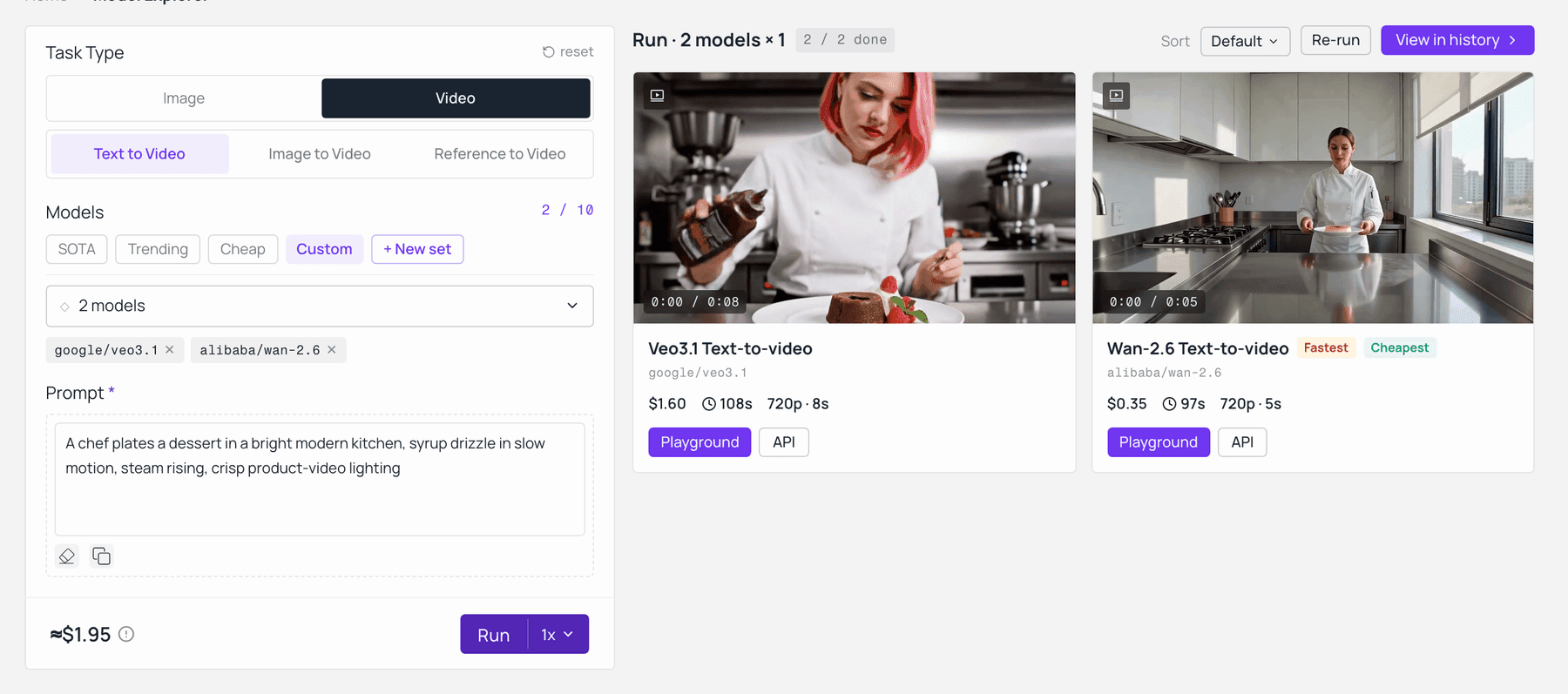
Veo 3.1 ve Wan 2.6, Atlas Cloud'un model karşılaştırmasında aynı istemle — aynı istem, fiyat ve çözünürlük, oluşturmadan önce gösteriliyor. Model-explorer'da canlı olarak yakalandı.
Vaka Çalışması: "Ürün Lansmanı" Zorluğu
Hedef: "Titanyum Kronograf" adlı tek bir 8K statik makro çekimini, lüks bir markanın YouTube yayınına hazır, 10 saniyelik sinematik bir kahraman sekansına dönüştürmek.
Kurulum: "Tek Görüntü, Sıfır Kusur"
Lüks e-ticaret dünyasında, en küçük halüsinasyon bile anlaşmayı bozar. 2026 yayıncılık için AI video'nun birincil engeli, görsel kimlik (ID) tutarlılığı olmaya devam ediyor. Çoğu model, yüksek detaylı geometri ile zorlanır; genellikle saat kadranındaki numaraları "halüsinasyon" olarak görür veya karmaşık kamera hareketleri sırasında mekanik kolları bozar.
Bu Veo 3.1 vs wan 2.6 karşılaştırması için, her iki aracı da karmaşık bir "Geri Çekilme ve Yörünge" kamera hareketi sırasında saatin belirli dişli düzenini, fırçalanmış titanyum dokusunu ve safir cam yansımalarını koruma yetenekleri açısından değerlendirdik. Yapay zekanın, statik bir görüntüyü dinamik, ultra yüksek çözünürlüklü bir hikayeye dönüştürürken fizik ve ışık yasalarına saygı gösterip göstermediğini görmek istedik.
Hazırlık:
Platform: Atlas Cloud
İstem: A5 saniyelik çoklu çekim ürün sekansı. Çekim 1: Yumuşak bokeh ile mermer bir kaide üzerinde titanyum bir saatin keskin yakın çekimi. Çekim 2: Bulanık bir yüksek teknoloji salonunda yürüyen, bileğinde aynı saat görünen, özel dikim takım elbiseli bir adamın geniş çekimine sorunsuz bir eşleşme kesmesi. Stil: Temiz, yüksek kontrastlı, ticari estetik. Ses: Karmaşık, 5 saniyelik neşeli elektronik bir "vuruş" ve mırıldanan profesyonel bir seslendirme: "Hassasiyet yeniden tanımlandı".
Negatif İstem: Tutarsız ürün tasarımı, çekimler arasında değişen saat kadranı, makro çekimde bulanık arka plan, sıçramalı kesmeler, yüzen nesneler, sahneler arasında uyumsuz aydınlatma, modelde 'plastik' cilt dokusu, bozuk parmaklar, üst üste binen uzuvlar, yükseltmeden kaynaklanan pikselleşme, hayalet efekti, sallanan kamera, düşük kaliteli ortam sesi, karakter yüz dönüşümü.
Veo 3.1: "Sinematik Aslına Uygunluk" Rotası
- İş Akışı: Model, bir 4K kaynak görüntüyü 4K Doku Yeniden Yapılandırma hattından geçirdi ve manuel birleştirme olmadan statik bir makro çekimden dinamik bir yaşam tarzı sekansına geçişi başarıyla otomatikleştirdi.
- Performans: Sektör lideri Anlamsal Kimlik Tutarlılığı sergiledi. Saatin mekanik bütünlüğü, "eşleşme kesmesi" geçişi sırasında sabit kaldı. 48kHz Uzamsal Ses Senkronizasyonu, görsel tempoyla doğal olarak uyumlu, profesyonel kalitede bir "Hassasiyet Yeniden Tanımlandı" seslendirmesi sağladı; bu, üst düzey prodüksiyon için önemli bir farklılaştırıcıdır.
- Sonuç: * Metalik dokularda olağanüstü görsel netlik; kutudan çıktığı gibi yayına hazır "film kalitesinde" gren ve aydınlatma. Yaşam tarzı çekimindeki hareket fiziği, geleneksel sinematografiye kıyasla biraz "ağırlıksız" hissettirdi.
- Ticari Çıkarım:Veo 3.1, Yüksek Bütçeli "Kahraman" Reklamlar için kesin seçimdir. Yerel 4K yeniden yapılandırması ve üstün ses senkronizasyonu, lüks marka varlıkları için üretim sonrası "temizlik" süresini önemli ölçüde azaltır.
Wan 2.6: "Anlatı Verimliliği" Rotası
- İş Akışı: I"Çoklu Çekim Anlatı" istem mimarisinden yararlandım. Tek bir klip oluşturmak yerine, Wan 2.6 bir olay dizisini tanımlamanıza olanak tanır.
- Performans: Wan 2.6, tek seferde 15 saniyelik bir klip oluşturarak harika bir iş çıkardı. Sadece şimdi test ettiğim için 5 saniyelik bir video yaptım. Saat dişlilerinin yakın çekiminden, karanlık bir salonda onu takan bir kişinin çekimine yumuşak bir geçiş yaptı. Sahne değişikliğine rağmen saat aynı görünüyordu ve mükemmel bir "Kimlik Kilidi" sağlıyordu.
- Sonuç: İşte püf noktası: Veo 3.1, Google Veo 3.1 4K yerel çıktı sunarken, Wan 2.6 yerel olarak maksimum 1080p/24fps'de çalışıyor. Hareket akıcı ve hikaye tutarlı olsa da, son geçiş sekansı biraz bulanık görünüyor, ancak üretim hızı çok hızlı.
- Ticari Çıkarım: Wan 2.6, TikTok, Reels veya Shorts için hızlı sosyal medya reklamları için en iyi seçimdir. Mükemmel yakın çekim detaylarından ziyade hızlı sonuçlar ve akıcı bir hikaye istediğinizde en iyi şekilde çalışır.
YG Analizi: Maliyet ve Kalite Karşılaştırması
Ajanslar ve serbest çalışanlar için seçim genellikle finansal çizgiye dayanır. Mart 2026 API fiyatlandırması ve işçilik maliyetlerine göre:
| Metrik | Google Veo 3.1 | Alibaba Wan 2.6 |
| Yerel Çözünürlük | ultra HD | 1080p HD |
| Maks. Klip Süresi | 8sn | 15sn |
| İşçilik Çabası | Yüksek: Manuel çoklu geçiş birleştirme | Düşük: Tek geçişli anlatı mantığı |
| Ses Kalitesi | Yerel Senkronizasyon (SES + Diyalog) | Tam Müzik + Ses Kopyalama |
| En Uygun Olduğu | Sinematik Parlaklık ve Gerçekçilik | Çoklu Çekim Hikaye Anlatımı |
| Resmi API Fiyatlandırması | Saniyede $0.40 - $0.75 | Saniyede $0.08 - $0.15 |
| Maliyet Bazı (Atlas Cloud üzerinden) | Saniyede $0.09 (6sn için $0.9) | Saniyede $0.018 (5sn için $0.788) |
Not: Yukarıda Atlas Cloud üzerinden listelenen fiyatlar, kendi pratik operasyonlarım sırasında oluşan gerçek maliyetlere dayanmaktadır.
Hangisini Seçmelisiniz?
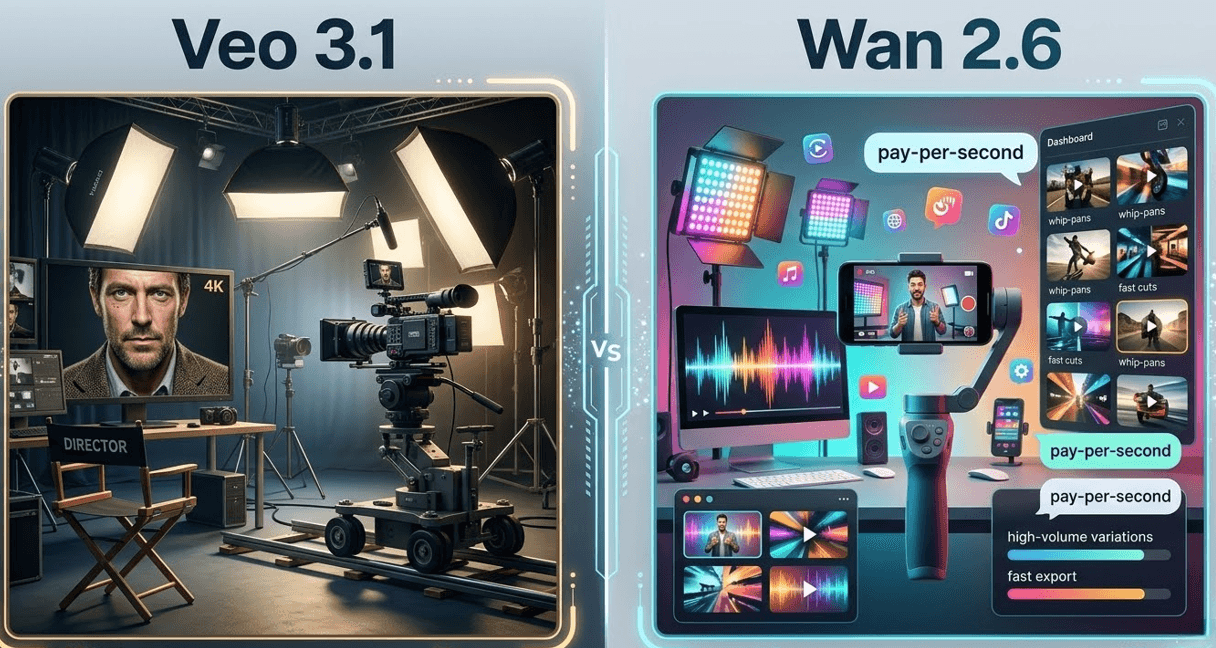
Şu durumda Veo 3.1'i seçin...
Bir film yapımcısı, üst düzey reklam yönetmeni veya profesyonel bir editörseniz. Projeniz mutlak en yüksek aslına uygunluk ve fiziksel gerçekliği taklit eden sinematik aydınlatma gerektiriyorsa, Veo 3.1 üstün seçimdir. Google'ın en son teknik karşılaştırmalarına göre model, zamansal tutarlılık ve karmaşık fizik konularında mükemmeldir.
Google Veo 3.1 4K yerel vs yükseltilmiş iş akışlarını karşılaştırırken, Veo'nun dokuları ultra yüksek çözünürlüklerde yerel olarak yeniden yapılandırma yeteneği, cilt gözenekleri veya kumaş dokuları gibi ince detayların keskin kalmasını sağlar. 2026 yayıncılık için AI video üretenler için bu araç şu anda "teatral" çıktı için altın standarttır ve algoritmik olmaktan ziyade kasıtlı ve sanatsal hissettiren kareler arası geçişler üzerinde ayrıntılı kontrol sağlar.
Şu durumda Wan 2.6'yı seçin...
Bir sosyal medya içerik üreticisi veya hızlı tempolu bir pazarlama ajansıysanız. Wan 2.6, "hepsi bir arada" verimlilik için tasarlanmıştır. Ham detayda bir Veo 3.1 vs wan 2.6 4K karşılaştırması ile eşleşmesi için harici keskinleştirme gerekebilir, ancak anlatı kullanışlılığında kazanır. Wan 2.6, temelde "sosyal medyaya hazır" olan 15 saniyelik klipler üretebilir ve tek bir üretim geçişinde sahne kesmelerini halleden yerleşik müzik senkronizasyonu ve çoklu çekim geçişlerine sahiptir.
Ayrıca, Atlas Cloud API aracılığıyla saniye başına ödeme modeli, yüksek hacimli testler ve yinelemeli kampanyalar için onu önemli ölçüde daha erişilebilir kılar. Bir öğleden sonra bir reklamın 50 varyasyonunu üretmesi gereken ekipler için Wan 2.6 en iyi YG'yi sağlar.
Karşılaştırma Tablosu
| Özellik | Veo 3.1 | Wan 2.6 |
| İdeal Kullanıcı | Film Yapımcıları / Üst Düzey Ajanslar | Sosyal Medya İçerik Üreticileri / Büyüme Korsanları |
| Birincil Güç | Sinematik Dokular ve Aydınlatma | Anlatı Hızı ve Çoklu Çekim Mantığı |
| Maks. Yerel Çöz. | 4K UHD | 1080p (4K Geliştirme ile) |
| En Uygun Olduğu | Yayın ve Sinema | Viral İçerik ve Hızlı Prototipleme |
Sonuç olarak, 2026 için doğru 4K AI video üreteci gerçekten sizin özel kurulumunuza bağlıdır. Mümkün olan en iyi kaliteye ihtiyacınız varsa, Veo ile kalın. Hızlı çalışma ve harika bir hikaye anlatmak sizin için daha önemliyse, Wan 2.6 sizin için daha iyi bir seçimdir.
Modele Özel Uygulama İpuçları
Profesyonel AI video araçlarıyla gerçekten sonuç görmek istiyorsanız, basit bir istem yeterli değildir. Kaba bir fikirden 4K bir bitişe geçmek, bu belirli modellerin nasıl düşündüğünü ve arkasındaki teknolojiyi gerçekten anlamayı gerektirir. Yayın kalitesi seviyesini mi hedefliyorsunuz yoksa sadece gerçekten dönüşüm sağlayan sosyal medya klipleri mi istiyorsunuz fark etmez. İşin içine girmeli ve görüntüden videoya iş akışında kendiniz ustalaşmalısınız.
Google Veo 3.1 için: Sinematik Uzmanı
Veo 3.1, "Yönetmen tarzı" kontrolünde mükemmeldir. Google Veo 3.1 4K yerel vs yükseltilmiş içeriği üstün zamansal tutarlılıkla işlediğinden, istemleriniz kamera fiziğine odaklanmalıdır.
- İstem İpucu: "24fps'de Dolly-in, 4K, sığ alan derinliği, sinematik bokeh" kullanmayı deneyin. Veo 3.1, gerçek kamera terimleriyle en iyi şekilde çalışır. Bu, hareketin rastgele olmaktan ziyade planlı ve profesyonel görünmesini sağlar.
- Profesyonel Seviye Kontrol: Birincil referans olarak yüksek kaliteli bir Figma tasarımı varlığı yükleyerek "İçeriklerden Videoya" özelliğinden yararlanın ve 4K'da marka doğru dokuları koruyun.
Wan 2.6 için: Anlatı Gücü
Wan 2.6, karmaşık, çoklu çekim hikaye anlatımı için üretilmiştir. Güçlü yönlerinden yararlanmak için, betimleyici eyleme ve çevresel evrime odaklanın.
- İstem İpucu: "Dinamik geçiş, 4K, hiper-gerçekçi aydınlatma, 15 saniyelik sekans" kullanın.
- Kararlılık İpucu: Uzun biçimli içerik üretiyorsanız, daha düşük modellerde bulunan yaygın "dönüşüm" sorunlarını önlemek için isteminizde hareketin "son durumunu" tanımlayın.
Profesyonel İş Akışı Entegrasyonu
Yoğun bir prodüksiyon ofisinde, her şeyi elle yapmak sizi yavaşlatır. En iyi 2026 iş akışları, bu araçları doğrudan ana teknoloji yığınına bağlayarak manuel işi atlar:
- Varlık Oluşturma: İlk 4K karelerinizi Figma'da tasarlayarak tam düzen ve tipografi sağlayın.
- API Ölçeklendirme: Ticari ölçekli işlemler için, Wan 2.6 ve Veo 3.1 API'lerine erişmek üzere Atlas Cloud'u kullanın. Bu, bir ürün veritabanından doğrudan toplu kişiselleştirilmiş video reklam üretimine olanak tanır.
- İçerik Yönetimi: Son 4K işlemelerini Strapi'ye yönlendirin. Headless bir CMS kullanarak, AI tarafından oluşturulan videoların web ve mobil platformlarda anında dağıtımını otomatikleştirebilirsiniz.
API aracılığıyla yerel 4K işlemenin entegrasyonu, 2024 yükseltme yöntemlerine kıyasla üretim sonrası zaman çizelgelerini %60 oranında azaltmıştır. Bu AI modellerine kamera ekibinizin özel üyeleri olarak davranarak, geleneksel maliyetin çok altında yayın kalitesinde sonuçlar elde edebilirsiniz.
Sonuç: 4K Sınırı ve Ötesi
2026'da ilerlerken, Veo 3.1 ve Wan 2.6 arasındaki rekabet, profesyonel AI video araçlarında büyük bir değişim gösteriyor. "Eğlenceli AI deneylerinden" ciddi teknik kullanım zamanına geçiş yapıyoruz. Google Veo 3.1 4K yerel ve yükseltilmiş yöntemler arasında karar vermek, sadece piksellerle ilgili değil. AI video'nun yayın standartları için ne kadar güvenilir hale geldiğiyle ilgili.
Gelecek Tahminleri:
- Ölçekte Hiper-Kişiselleştirme: Atlas Cloud gibi platformlarla API entegrasyonu sayesinde, 4K ticari videonun metin kadar dinamik hale geleceğini tahmin ediyoruz. Markalar yakında, Görüntüden Videoya AI'yı kullanarak bireysel kullanıcılar için gerçek zamanlı olarak benzersiz, yüksek kaliteli video reklamlar oluşturacak.
- Büyüyen Dünya Modelleri: Gelecek sürümlerin basit piksellerin ötesine geçip gerçek fiziksel simülasyona doğru ilerlemesini bekleyin. Bu, AI'nın nesnelerin 3B uzayda nasıl ağırlığa ve dirence sahip olduğunu gerçekten kavrayacağı anlamına gelir.
- Birleşen İş Akışları: Tasarlama (Figma), oluşturma (Veo/Wan) ve yayınlama (Strapi) arasındaki boşluk daralmaya devam edecek. Bu, manuel iş yerine hedeflerinize odaklanan tek bir "Yaratıcı Motor" oluşturur.
Sonuçta, Google'ın film benzeri kalitesini mi yoksa Wan'ın hikaye anlatma gücünü mü tercih ettiğiniz fark etmez. Gerçek kazanan, bu araçları tam bir yedek olarak değil, yetenekli bir dijital kamera ekibi gibi kullanan yaratıcıdır.
SSS
Google Veo 3.1, gerçek 4K yerel çıktı mı yoksa sadece yükseltilmiş çözünürlük mü sağlıyor?
Google Veo 3.1 4K yerel vs yükseltilmiş içerik arasındaki ayrım, 2026'daki çekiciliğinin merkezinde yer alır. İşlem sonrası keskinleştirmeye güvenen önceki üretken modellerin aksine, Veo 3.1 yerel bir yüksek çözünürlük gizli alanı kullanır. Google DeepMind'ın teknik dokümantasyonuna göre bu, modelin difüzyon işlemi sırasında cilt gözenekleri veya kumaş dokuları gibi ince dokuları doğrudan işlemesine olanak tanır. Bu, geleneksel yükseltmeye kıyasla önemli ölçüde daha az "halüsinasyon" eserine neden olur ve onu 2026 yayıncılık için AI video standartları için tercih edilen seçenek haline getirir.
Wan 2.6, karmaşık "Görüntüden Videoya AI" geçişlerini nasıl yönetiyor?
Wan 2.6, zorlu Görüntüden Videoya görevlerini temel animasyonun ötesine geçerek çoklu sahne hikaye anlatımı yaklaşımı ile yönetir. 15 saniye boyunca gerçekçi film kesmeleri yapmak için bir LLM tarafından yönlendirilen storyboard kullanarak dağınık dönüşümü önler. Örneğin, sahne değişirken ses senkronize kalır. Kamera sessiz bir odadan gürültülü, kalabalık bir sokağa geçtiğinde arka plan gürültüsünün anında değiştiğini duyacaksınız.
Temel olarak, Wan 2.6 fotoğrafınızı tek bir hızlı hareketli klip yerine bağlantılı bir kısa hikaye için bir "temel" olarak kullanır.
Hangi araç, yüksek hacimli ticari üretim için daha uygun maliyetlidir?
Bu, özel çıktı gereksinimlerinize bağlıdır. Google Veo 3.1, sinematik gerçekçilikte liderdir ve 2026 yayıncılık için AI video standartlarını karşılayan 4K yerel ve yükseltilmiş netlik sunar, ancak saniye başına daha yüksek bir maliyetle. Buna karşılık, Wan 2.6 verimlilik lideridir ve daha erişilebilir bir fiyat noktasında 15 saniyelik anlatı sekansları üretir - yüksek hacimli sosyal medya için mükemmeldir.
Her iki modelin de farklı resmi fiyatlandırma yapıları olsa da, ayrı bulut ekosistemlerini yönetmek bir darboğaz olabilir. Hem zamandan hem de bütçeden tasarruf etmek istiyorsanız, teknik yükü önemli ölçüde azaltan Atlas Cloud gibi bir üçüncü taraf hepsi bir arada API platformunu düşünün.
Bu 4K videoları doğrudan mevcut CMS'me entegre edebilir miyim?
Evet, yapabilirsiniz, ancak gömme yüklemeden daha iyidir.
4K dosyaları çok büyüktür ve genellikle CMS yükleme sınırlarını tetikler ve standart web sunucularında oynatma arabelleğine neden olur. Bunları etkili bir şekilde entegre etmek için:
- En İyi Uygulama: Barındırma için YouTube, Vimeo veya Mux kullanın. Bu hizmetler, hızlı bağlantılara 4K ve mobil kullanıcılara daha küçük dosyalar vererek zor işi yapar.
- Doğrudan Yükleme: Yalnızca CMS'niz bol miktarda depolama sunuyorsa deneyin. Video dosyalarınızı hafif ve hızlı tutmak için HEVC codec'ine bağlı kalın.
- Performans: Bir CDN bağlayın. Bu, 4K kliplerinizin dünya çapında anında yüklenmesine yardımcı olur ve web sitenizin yavaşlamasını önler.
CMS'nizi "çerçeve" ve özel bir video platformunu "motor" olarak düşünün.





