ByteDance's Seedance 2.0 is a powerful AI video generator. Seedance 2.0 has been tested rigorously against all major video models released since mid-2024 -- Kling, Sora, Veo, etc. It is one of the most powerful multi-modal AI video generators in 2026.
Seedance 2.0 takes text, images, video clips, and audio as input and creates 2K videos with native audio in less than a minute. Native audio generation alone differentiates it from the competition and unlocks entirely new workflows for developers and content teams.
This Seedance 2.0 tutorial includes all the ways to reach the model, ready-to-use and tested prompts, and copy-and-paste ready code for production.
See Seedance 2.0 in action:
What Makes Seedance 2.0 Different?
The number of AI video models continues to increase, so I think it's time to take a look at what Seedance 2.0 is that no other model is. From hundreds of generations in direct competition with other models.
| Feature | Seedance 2.0 | Others |
| Multimodal input | 9 images + 3 videos + 3 audio files | 1–2 images max |
| Native audio | Generated with video | Usually separate |
| Max duration | 15 seconds | 8–12 seconds |
| Resolution | Up to 2K | Up to 1080p |
| Usable output rate | 90%+ | Varies |
Arguably the most important metric of all is the usable output rate. In the sea of competing tools, teams are tossing out approximately 50% of all generated videos for being of uneven quality. With Seedance 2.0 video generation, you can expect a usable output 9 times out of 10. For your production pipelines, this means measurable time and cost savings -- less retries, less manual curation, quicker turnaround on your deliverables.
3 Ways to Use Seedance 2.0
Seedance 2.0 offers 3 approaches for accessing its features, with different intended use cases. In this post, we look at how to use Seedance 2.0 in each case, to help you and your team determine which approach to use for your specific workflow needs.
Method 1: Via Jimeng (Official Chinese Platform)
Best for: Casual creators who prefer a visual interface.
- Visit Jimeng and create an account.
- From the create menu, select AI Video.
- Choose Seedance 2.0 as the model.
- Select the desired mode: Text-to-Video or Image-to-Video.
- Enter a prompt and configure settings (duration, aspect ratio).
- Click generate.
Cost: Approximately 0.14USDtrialor0.14 USD trial or 0.14USDtrialor9.50 USD/month subscription.
Please be advised that this website is in Chinese only. If you are an international visitor who prefers a site in English, please check out one of the following alternatives:
Method 2: Via Dreamina (International Platform)
Best for: International users who prefer a browser-based platform.
1. Visit Dreamina and sign up.
2. Navigate to the video generation section.
3. Find Seedance 2.0 in the model dropdown (launching before February 24, 2026).
4. Select the input mode and configure settings.
5. Generate.
Cost: 225 free daily tokens (across both tools) or from 18to18 to 18to84/month.
Dreamina offers a competent browser-based solution, but the shared token pool is quickly exhausted when generating images and videos at the same time. High-throughput teams will find the per-day allotment restrictive.
Method 3: Via Atlas Cloud API (Recommended for Developers)
Best for: Developers, automated processes, and production use.
The following tutorial is the suggested method to use Seedance 2.0 video generation as part of any developer's or team's production workflow. With Atlas Cloud, you can access Seedance 2.0, as well as 300+ other AI models, from a single unified endpoint. One API key, one billing dashboard, no need to maintain multiple vendor accounts. The way to use Seedance 2.0 at scale -- with full programmatic control and the ability to automate generation pipelines.
Step 1: Sign up and get $1 free credit.
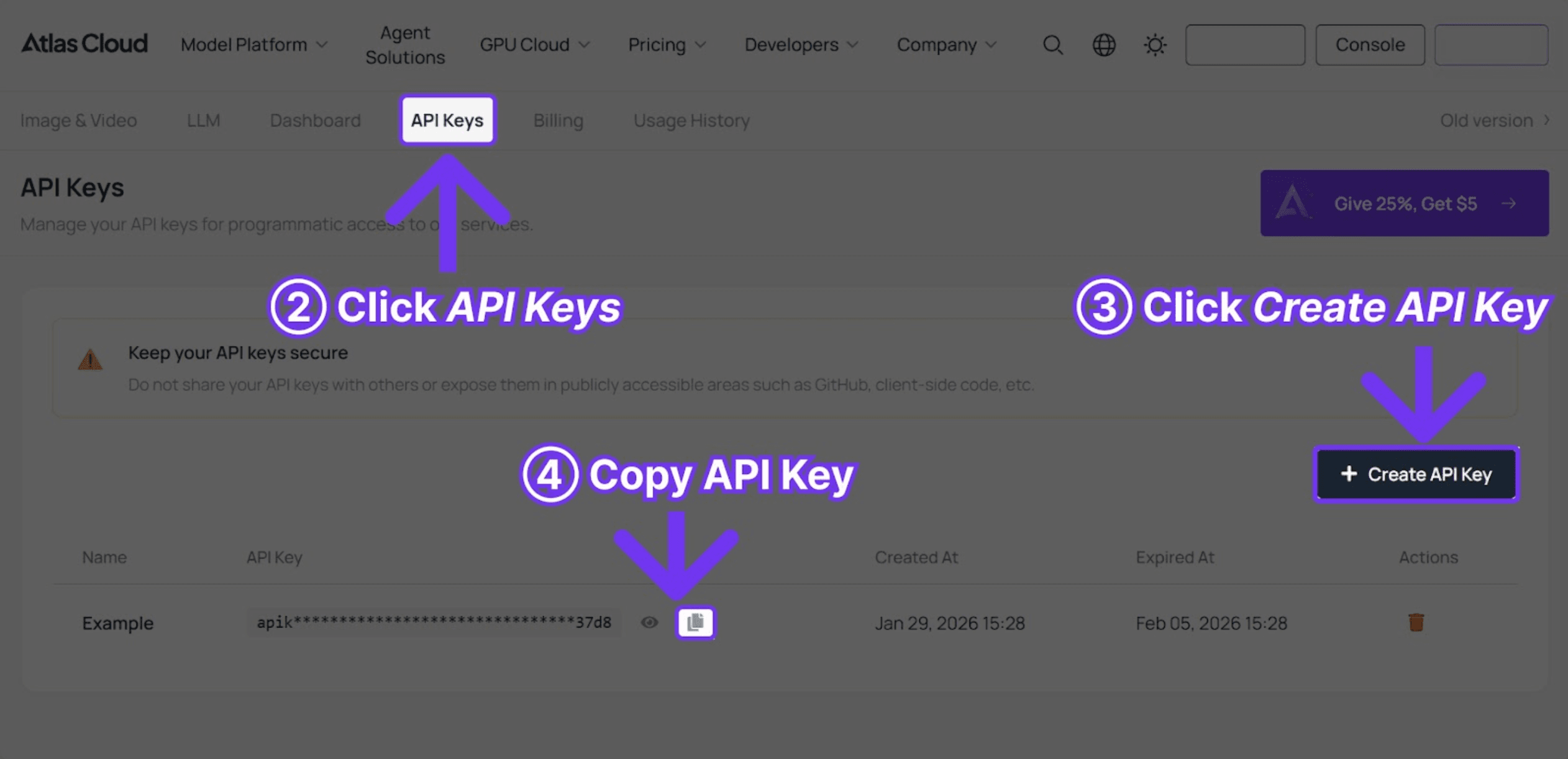
Step 2: Retrieve an API key from the console.
[Image: How to create an API key on Atlas Cloud]
Step 3: Make the first API call:
```python
import requests
import time
API_KEY = "your-atlas-cloud-api-key"
BASE_URL = "https://api.atlascloud.ai/api/v1"
def generate_video(prompt, duration=10, resolution="1080p"):
"""Generate a video with Seedance 2.0 via Atlas Cloud."""
response = requests.post(
f"{BASE_URL}/model/generateVideo",
headers={
"Authorization": f"Bearer {API_KEY}",
"Content-Type": "application/json"
},
json={
"model": "bytedance/seedance-v1.5-pro/text-to-video",
"prompt": prompt,
"duration": duration,
"resolution": resolution
}
)
return response.json()
def poll_result(request_id):
"""Poll until the video is ready."""
while True:
result = requests.get(
f"{BASE_URL}/model/prediction/{request_id}/get",
headers={"Authorization": f"Bearer {API_KEY}"}
).json()
if result["status"] == "completed":
return result["output"]["video_url"]
elif result["status"] == "failed":
raise Exception(f"Generation failed: {result.get('error')}")
time.sleep(5)
# Generate a video
result = generate_video(
"A lone astronaut walking across the surface of Mars, "
"red dust swirling around their boots, Earth visible as a "
"small blue dot in the pink sky, cinematic wide shot"
)
video_url = poll_result(result["request_id"])
print(f"Video URL: {video_url}")
```
Seedance 2.0 Prompt Writing Guide
The most important factor in output quality is the quality of the Seedance 2.0 prompt. Vague, underdeveloped prompts will result in generic, underwhelming output, no matter how advanced the model. With a good Seedance 2.0 prompt, cinematic-quality output is possible on the first try.
Heavy testing has given us a formula for a prompt structure that reliably works well for various types of content. This section of the Seedance 2.0 tutorial will include that formula as well as ten prompts tested in battle.
Prompt Structure Formula
```
[Subject] + [Action] + [Setting/Environment] + [Visual Style] + [Camera/Cinematography] + [Mood/Atmosphere]
```
Seedance 2.0 does not require all six parameters for a prompt, but the more specific the input, the more the output can be controlled and refined. For developers implementing automated pipelines, this structure can be templated into generation logic.
10 Working Seedance 2.0 Prompts
The prompts below have all been run through Seedance 2.0 and have generated stable results. These can be used as team starters and modified for particular uses.
1. Cinematic Nature
```
A majestic eagle soaring over snow-capped mountains at golden hour,
sunlight reflecting off its wings, dramatic aerial tracking shot,
National Geographic style, 4K cinematic quality
```
2. Product Advertisement
```
A sleek wireless headphone floating and rotating against a pure black
background, soft studio lighting creating elegant reflections, smooth
360-degree rotation, premium product commercial style
```
3. Urban Time-lapse
```
Bustling Tokyo street at night transitioning from dusk to full neon
illumination, crowds flowing like rivers of light, time-lapse effect
with smooth motion blur, cyberpunk atmosphere
```
4. Food Commercial
```
Fresh strawberries falling in slow motion into a bowl of cream,
creating a perfect splash, close-up macro shot, warm studio lighting,
high-speed photography style, appetizing and vibrant colors
```
5. Fashion Lookbook
```
A model walking confidently down an empty city street at sunset,
wearing a flowing silk dress that catches the breeze, tracking shot
from the side, warm golden light, editorial fashion photography
```
6. Tech Product Launch
```
A smartphone emerging from swirling particles of light, assembling
piece by piece in mid-air, holographic interface elements appearing
around it, dark background, futuristic tech commercial aesthetic
```
7. Emotional Storytelling
```
An elderly man sitting on a park bench, a gentle smile forming as
he watches children playing in the distance, shallow depth of field,
warm afternoon light filtering through autumn leaves, intimate close-up
```
8. Aerial Landscape
```
Drone shot flying low over a turquoise ocean toward a tropical island,
crystal clear water revealing coral reefs below, smooth forward tracking
motion, travel documentary style, pristine and inviting
```
9. Abstract Art
```
Liquid metal morphing through impossible organic shapes, chrome surface
reflecting rainbow iridescent colors, smooth flowing transformations,
abstract experimental film, mesmerizing loop-ready motion
```
10. E-commerce Product
```
A pair of running shoes on a reflective surface, dynamic angle rotating
slowly, particles of energy emanating from the sole, dramatic rim lighting,
Nike commercial style, powerful and athletic mood
```
Here is a wide collection of Seedance 2.0 prompt examples that can be utilized in different commercial and creative areas. You can use them as a starting point in development within generation pipelines by replacing actual products or brand references.
Using Image-to-Video Mode
Image-to-video is where Seedance 2.0 video generation is arguably at its best. E-commerce teams, marketing departments, and any process which already has product photography to work with all see dramatically improved results over plain text-to-video.
The answer is simple: when the model has a specific visual reference to work with, it doesn't have to imagine or interpret the appearance of the subject. The outcome is truer product representation, more cohesive brand presentation, and output that is often indistinguishable from professional studio captured footage. In this portion of the Seedance 2.0 tutorial we take a look at the API integration of image-to-video mode.
```python
import base64
# Read the source image
with open("product_photo.jpg", "rb") as f:
image_base64 = base64.b64encode(f.read()).decode()
response = requests.post(
f"{BASE_URL}/model/generateVideo",
headers={
"Authorization": f"Bearer {API_KEY}",
"Content-Type": "application/json"
},
json={
"model": "bytedance/seedance-v1.5-pro/image-to-video",
"image": f"data:image/jpeg;base64,{image_base64}",
"prompt": "Smooth camera orbit around the product, studio lighting, "
"clean white background, premium commercial feel",
"duration": 8,
"resolution": "1080p"
}
)
```
Seedance 2.0 Settings Cheat Sheet
The generation settings you choose have a measurable impact on quality and cost. This section of the Seedance 2.0 user guide covers the key configuration options.
Duration
- 4-6 seconds: Ideal for quick social media cuts, attention-grabbing hooks, and product showcases. Short, punchy, and optimized for scroll-stopping content.
- 8-10 seconds: The most versatile range for standard marketing content. Suitable for the majority of commercial applications.
- 12-15 seconds: Best suited for storytelling, cinematic sequences, and narrative scenes that require time to develop.
Aspect Ratios
- 16:9: YouTube, website headers, and landscape content. The standard widescreen format.
- 9:16: TikTok, Instagram Reels, and YouTube Shorts. Vertical video continues to dominate mobile engagement.
- 1:1: Instagram feed posts and thumbnails. A versatile square format.
- 4:3: Presentations and classic broadcast-style content.
- 21:9: Cinematic ultra-widescreen. Delivers a premium, film-like aesthetic.
Resolution
- 720p: Recommended for prototyping and rapid iteration. The most cost-effective option for testing Seedance 2.0 prompts before committing to final renders.
- 1080p: Production-ready for the majority of platforms and use cases. The optimal balance of quality and cost.
- 2K: Maximum quality for large displays, digital signage, and high-end deliverables.
Tips for Best Results
These guidelines are based on hundreds of Seedance 2.0 video generation runs in practice. Adhering to these will help developers and content teams get the most value out of each generation, for the highest quality output and the least wasted credits.
1. Be Specific About Camera Movement: A Seedance 2.0 prompt that specifies "tracking shot from left to right" produces far more predictable results than a vague reference to "camera movement." Ambiguous motion instructions lead to inconsistent, often unusable output.
2. Specify Lighting Conditions: Including lighting details such as "soft golden hour lighting" or "dramatic rim light against a dark background" has a significant impact on visual quality. This is one of the highest-leverage elements in any Seedance 2.0 prompt.
3. Include Style References: Descriptions like "National Geographic style" or "Apple commercial aesthetic" give the model a clear creative direction. Style references serve as powerful shorthand that encodes complex visual expectations into a few words.
4. Clearly Describe Motion: Terms like "slow-motion descent" or "smooth 360-degree rotation" define the animation behavior. Without explicit motion guidance, the model defaults to its own interpretation, which may not align with the intended result.
5. Avoid Conflicting Instructions: Contradictory descriptions such as "fast-paced action in slow motion" produce confused, low-quality output. Each Seedance 2.0 prompt should establish a single, coherent creative direction.
6. Leverage Multi-Modal Input: Seedance 2.0 accepts up to twelve reference files (nine images, three videos, three audio tracks). Uploading reference images alongside text prompts gives developers substantially more control over the output. This multi-modal capability is one of the model's defining strengths.
7. Iterate on the Fast Tier First: The recommended approach is to use the Fast tier ($0.022/sec on Atlas Cloud) for initial experimentation. Running five or six variations at lower cost before committing to a Pro-tier final render is both more efficient and more economical.
Content Moderation: What Developers Should Know
Seedance 2.0 has content moderation built-in. Developers should be aware of this before creating production workflows.
- Blocked: Explicit or indecent content, violence, and public figures
- Blocked: Uploading realistic human faces (an anti-deepfake protection measure)
- Requires verification: Digital avatar creation (requires real-time verification steps)
The face upload restriction is one to consider when it comes to marketing and promotional use cases. Realistic human headshots as input will be immediately rejected. It is a good security precaution, but teams will need to keep this in mind when planning workflows.
If you're looking for creative workflows with minimal content restrictions, Atlas Cloud provides unrestricted content generation for its library of 300+ models, giving developers additional flexibility in production pipelines.
Seedance 2.0 vs. Other AI Video Generators: Which Should Teams Use?
Deciding which model to use will be driven by your individual project needs. The below comparison is based off of production budgets tested in real-world applications. This is a guide section for Seedance 2.0 teams to help with the decision-making process.
Use Seedance 2.0 when the project requires:
- Multiple reference inputs (product photos, style references, audio)
- Longer video clips (up to 15 seconds per generation)
- Native audio generation synced to video
- E-commerce product videos from still images
- Social media content generation at scale
Consider Kling 3.0 when the project requires:
- Ultra-high-definition output for high-end displays
- Motion brush for custom animation paths
- Best free tier (66 credits per day)
- Text preservation in marketing content
Consider Sora 2 when the project requires:
- Physically accurate simulations (gravity, fluids, collisions)
- Scientific or educational visualizations
- Realism in object interactions
Consider Veo 3.1 when the project requires:
- Broadcast-quality cinematic output
- Professional color grading and depth of field
- Previsualization for filmmaking
A big practical benefit is you don't have to pick just one. With Atlas Cloud, you as a developer can access all these models using a single API key. Switching between Seedance 2.0 video generation and Kling for different projects involves no extra configuration -- same key, same billing, same endpoint. That single access model takes care of vendor lock-in and eases infrastructure management.
Seedance 2.0 Tutorial: Common Mistakes to Avoid
Hundreds of generations and analysis of failures and successes, and the following are the most common mistakes that waste your credits and produce less than optimal results. This Seedance 2.0 tutorial will help teams to avoid the most common mistakes.
1. Vague Prompts: A Seedance 2.0 prompt like "a person walking" produces generic, uninspiring output. Effective prompts describe the subject in detail -- clothing, movement style, environment, camera angle, and lighting. Specificity is the single greatest predictor of output quality.
2. Contradictory Instructions: Requesting "slow motion fast-paced action" creates conflicting signals that the model cannot resolve coherently. Each prompt should commit to a single, clear creative direction.
3. Incorrect Aspect Ratio: Always match the aspect ratio to the video's intended platform and purpose. 9:16 for TikTok and Reels, 16:9 for YouTube. Rendering high-quality footage in the wrong format wastes both credits and production time.
4. Overlooking Image-to-Video Mode: For product content, image-to-video consistently outperforms text-to-video because the model works from a concrete visual reference rather than interpreting a text description. Teams producing e-commerce content should default to this mode.
5. Testing on the Wrong Tier: Running experimental iterations on the Pro tier is unnecessarily expensive. The Fast tier on Atlas Cloud ($0.022/second) is purpose-built for rapid prototyping. Teams should reserve Pro-tier credits for final renders only.
6. Underusing Multi-Modal Input: Seedance 2.0 accepts up to twelve reference files. Providing multiple style reference images alongside the text prompt produces noticeably more refined and controlled output. Leaving this capability unused means leaving quality on the table.
Frequently Asked Questions
How do I use Seedance 2.0 for the first time?
The quickest route to developer-ville is the Atlas Cloud API. Sign up as a user, claim your free $1 credit, create an API key and use the Python or curl examples from this Seedance 2.0 tutorial. The majority of developers create their first video in under five minutes.
What is the best Seedance 2.0 prompt for beginners?
A good seed prompt can be built around 4 basic components: subject, action, environment, and mood. For instance, "A cup of coffee on a wooden table, steaming, in the warm light of morning sunshine coming in through a window, close-up, cafe style." Users can then build upon that basic approach to develop more advanced Seedance 2.0 prompt methods by incrementally introducing additional components, such as camera motion, reference styles, and further details of the environment.
Can Seedance 2.0 be used for commercial video generation?
Yes, Seedance 2.0 content generated using both Jimeng paid subscription and via API access through Atlas Cloud can be used for commercial purposes. Atlas Cloud, in particular, is ideal for commercial workflows since it bills based on usage and does not have any restrictive licensing terms.
How long does Seedance 2.0 video generation take?
Average generation time for a 10 second 1080p video is between 30-60 seconds. With Atlas Cloud Fast tier, wait times can be reduced by as much as 30% which can accumulate significantly during batch generation processes or at scale during high volume production runs.
Is there a Seedance 2.0 tutorial for beginners?
Seedance 2.0 Tutorial: Navigate effortlessly between the web (Jimeng, Dreamina) and API (Atlas Cloud) access to Seedance 2.0 in this step-by-step Seedance 2.0 Tutorial. For more Seedance 2.0 prompts and tips, check out our 15 Best Seedance 2.0 Prompts Guide.
Start Creating with Seedance 2.0
Developers who wish to embed Seedance 2.0 video generation in their applications can begin in minutes. Sign up to Atlas Cloud for an API key, and use the prompt examples in this document with the included $1 free credit (that's enough to do a few test generations in various modes and settings).
Related Articles