Google DeepMind's Veo 3.1 is a new AI video generation model from Google AI. It provides broadcast-level cinematic quality with native audio in one pass. If you are a developer or content creator who wants to use the Veo 3.1 API, Veo 3.1 has the right balance of polish and affordability that differentiates it from today's other options.
The guide on Veo 3.1 has been created to help teams with everything they would need: detailed technical specifications, a guide to the Google Veo 3.1 pricing on different platforms, how to integrate Veo 3.1 API with Python code examples, prompt optimization tips, and a direct model comparison with Seedance 2.0, Kling 3.0, and Sora 2. Whether considering Veo 3.1 for your next project or switching from a different model, it is the one-stop guide you need.
*Last Updated: February 20, 2026*
See Veo 3.1 in action:
Veo 3.1 at a Glance
- Developer: Google DeepMind
- API Model ID: `google/veo3.1/text-to-video`
- Max Resolution: HD Cinematic
- Max Duration: 8 seconds
- Native Audio: Yes -- generated alongside video
- Atlas Cloud Price: $0.03/sec
- Best Strength: Cinematic polish, broadcast-quality output
- Input Modes: Text-to-video
- Color Grading: Professional-grade, built-in
- Depth of Field: Native shallow DOF support
Key Features of Veo 3.1
Broadcast-Quality Cinematic Output
The key feature of Veo 3.1 is the quality of its output images. The model's footage features a degree of color grading, lighting continuity and compositional awareness that is on par with that of cinematographers. Skin tones are natural. Indoor environments exhibit realistic ambient lighting. Exterior environments have realistic atmospheric perspective and haze. For teams working on brand films, commercials or film pre-viz, this degree of cinematic polish minimizes or eliminates the need for post-production color correction.
Native Audio Generation
Whereas other models generate silent video and require a separate audio workflow, Veo 3.1 natively generates synchronized audio as part of the generation process. Ambient sound, environmental audio, and contextual soundscapes are created alongside the visual content. A prompt that describes waves crashing against a cliff will result in an output that contains both the visual elements as well as the sounds. This removes an entire step in the post-production process and begins with audio-visual sync on the source media.
Professional Depth of Field
Veo 3.1's treatment of depth of field is also unexpected. Natural shallow DOF effects -- foreground blur, bokeh, rack focus transitions -- are all simulated based on the context of the scene in the prompt. If the user has specified "shallow depth of field," "bokeh," or "focus pull" in their prompt, for example, the model will produce a result that looks like a real cinema lens with that characteristic would have photographed. This is one area in which Veo 3.1 often appears to outclass other models.
Color Science and Grading
The model's internal color science renders professionally graded looking output straight out of the box. Warm golden-hour tones, cool blue-hour palettes, high-contrast noir aesthetics - all of these are rendered with precision. Brand content teams with specific color requirements will be happy to find that Veo 3.1 heeds color direction in prompts accurately, minimizing iteration cycles.
Consistent Scene Coherence
Temporal coherence is good for the entire 8-second generation window with Veo 3.1. Camera motion is fluid. Objects don't pop physically from frame to frame. Lighting changes -- a cloud drifting across the sun or a fluorescent flicker in an office -- progress smoothly. This continuity is especially important for any content intended to be seen in full resolution on large displays.
Veo 3.1 Pricing
Google Veo 3.1 Pricing (Official)
Google makes this Google AI video model available in Vertex AI and Google AI Studio. Official Google Veo 3.1 pricing is tiered based on usage volume, with enterprise customers generally negotiating custom rates. For most independent developers and small teams, official pricing tiers can be non-transparent and hard to predict at scale.
Atlas Cloud API Pricing (Recommended)
The Veo 3.1 Atlas Cloud offers a clean and simple way to buy Veo 3.1 with no hidden costs and no complicated tiers.
- Veo 3.1 (Text-to-Video): Atlas Cloud Price 0.03/sec,Per8sVideo0.03/sec, Per 8s Video 0.03/sec,Per8sVideo0.24
Background, a 8-second Veo 3.1 generation is only $.24. Less than a quarter for broadcast-quality AI video, native audio.
Why developers choose Atlas Cloud for Veo 3.1:
- $1 free credit on signup -- enough to generate approximately 40 seconds of Veo 3.1 video (5+ clips), no credit card required.
- Single API key for Veo 3.1 alongside 300+ other AI models -- video, image, text, and multimodal. One integration, one bill.
- No queue delays -- production-grade infrastructure with consistent generation times.
- Transparent pricing -- $0.03 per second, calculated precisely. No credit packs, no subscription tiers, no expiring tokens.
Cost Comparison: Veo 3.1 at Scale
- Light: 50 videos, 400s total, Atlas Cloud Cost $12.00
- Medium: 200 videos, 1,600s total, Atlas Cloud Cost $48.00
- Heavy: 500 videos, 4,000s total, Atlas Cloud Cost $120.00
- Enterprise: 2,000 videos, 16,000s total, Atlas Cloud Cost $480.00
For 0.03/second,Veo3.1onAtlasCloudisoneofthelowestpricesforproduction−qualityAIvideo.Thetotalcostatenterprisescale(2,000videos/month)isstillunder0.03/second, Veo 3.1 on Atlas Cloud is one of the lowest prices for production-quality AI video. The total cost at enterprise scale (2,000 videos / month) is still under 0.03/second,Veo3.1onAtlasCloudisoneofthelowestpricesforproduction−qualityAIvideo.Thetotalcostatenterprisescale(2,000videos/month)isstillunder500. That's 500for2,000videosthatcanotherwiseeasilycost500 for 2,000 videos that can otherwise easily cost 500for2,000videosthatcanotherwiseeasilycost500-$2,000 apiece from a traditional video production house. Even 8 seconds of that.
How to Access Veo 3.1 API
You can get up and running with the Veo 3.1 API via Veo 3.1 Atlas Cloud in less than five minutes. This Veo 3.1 tutorial will take you through a full working example using Python.
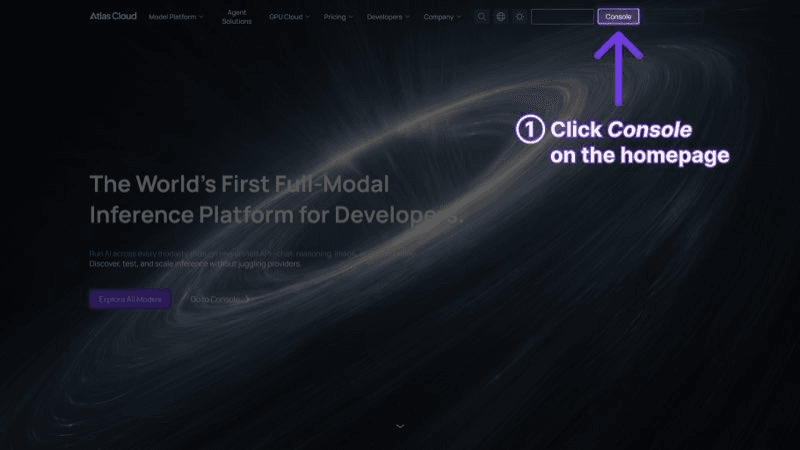
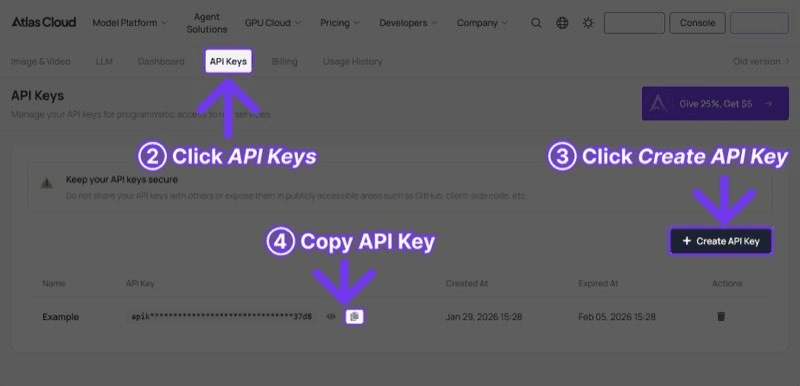
Step 1: Get Your API Key
Register an account at Atlas Cloud and go to the API Keys tab in the console. The $1 free credit will be automatically added to your account after registration.
Step 2: Generate Video
plaintext1```python 2import requests 3import time 4 5 6API_KEY = "your-atlas-cloud-api-key" 7BASE_URL = "https://api.atlascloud.ai/api/v1" 8 9 10response = requests.post( 11 f"{BASE_URL}/model/generateVideo", 12 headers={ 13 "Authorization": f"Bearer {API_KEY}", 14 "Content-Type": "application/json" 15 }, 16 json={ 17 "model": "google/veo3.1/text-to-video", 18 "prompt": "Aerial drone shot over a misty Norwegian fjord at sunrise, cinematic color grading, shallow depth of field on foreground wildflowers, 4K broadcast quality", 19 "duration": 8, 20 "resolution": "1080p" 21 } 22) 23 24 25result = response.json() 26 27 28while True: 29 status = requests.get( 30 f"{BASE_URL}/model/prediction/{result['request_id']}/get", 31 headers={"Authorization": f"Bearer {API_KEY}"} 32 ).json() 33 if status["status"] == "completed": 34 print(f"Video: {status['output']['video_url']}") 35 break 36 time.sleep(5) 37```
Step 3: Retrieve and Use
The response will contain a `video_url` field with a link to the generated video file, as well as metadata about the generation. Downloading of the generated video is available immediately after the video is generated. Native audio is included in the output file by default -- no additional API call or parameters are necessary.
Veo 3.1 Prompt Tips
We've done a lot of testing for this Veo 3.1 tutorial. There are some prompting patterns that work significantly better with the Veo 3.1 API. The model is very cinematic in nature. So the more you prompt with language from film, the better your Google AI video results.
1. Use Cinematic Vocabulary
Veo 3.1 is particularly good at handling cinematographic terms used in the industry. When it comes to camera movement, try to be specific with the language, and the model will generate with higher fidelity.
- Effective: "Dolly-in on a weathered leather journal, shallow depth of field, warm tungsten key light"
- Less effective: “Camera zooms in on a book on a table”
2. Specify Color and Lighting Direction
Color science is one of the strongest points of this model. Leverage that by being more explicit with the visual mood.
- Reference specific lighting conditions: "golden hour backlight," "overcast diffused light," "neon-lit rain-slicked street"
- Reference color palettes: "desaturated teal and orange," "high-contrast noir," “pastel morning light”
3. Include Depth of Field Instructions
Veo 3.1 has a better DOF than its competition. For best cinematic results, use explicit DOF direction in your prompts.
- "Shallow depth of field isolating the subject against a blurred city background"
- "Rack focus from foreground flowers to a distant mountain range"
- "Deep focus landscape, everything sharp from foreground to horizon"
4. Design for 8 Seconds
The maximum length is 8 seconds. Each prompt should focus on one distinct visual moment. Try not to fit multiple actions or scene shifts in one generation. One subject, one action, one mood - keep it simple and you'll get the highest quality.
5. Leverage Audio Context
Because Veo 3.1 is a native audio generator, prompt for audio cues for better quality generated soundscape.
- "Ocean waves crashing against rocky cliffs, seagulls calling in the distance"
- "Quiet coffee shop ambiance, soft jazz, espresso machine steaming"
- “Forest trail at dawn, birdsong, crunching leaves underfoot”
Example Prompts That Perform Well
Brand commercial:
plaintext1``` 2Close-up of artisan coffee being poured into a ceramic cup in slow motion, 3steam rising through warm morning light, shallow depth of field, café 4background softly blurred, premium product commercial style 5```
Cinematic landscape:
plaintext1``` 2Aerial drone shot over a misty Norwegian fjord at sunrise, cinematic color 3grading, shallow depth of field on foreground wildflowers, 4K broadcast quality 4```
Product showcase:
plaintext1``` 2A luxury watch rotating slowly on a dark marble surface, dramatic rim lighting, 3reflections catching polished steel, macro lens detail, premium advertising style 4```
Veo 3.1 vs Competitors
The Google AI video generation landscape in 2026 has many great options. Here's a direct comparison of the Veo 3.1 API to the other leading models. (All 3 are accessible using a single Veo 3.1 Atlas Cloud API key.)
- Veo 3.1: Max Resolution HD Cinematic, Max Duration 8s, API Cost $0.03/sec, Native Audio Yes, Best Strength Cinematic polish, Reference Input 1-2 images, Color Grading Professional-grade, Depth of Field Best-in-class, Content Filter Moderate
- Seedance 2.0: Max Resolution High Definition, Max Duration 15s, API Cost $0.022/sec, Native Audio Yes, Best Strength Multimodal control, Reference Input 12 files, Color Grading Good, Depth of Field Standard, Content Filter Strict
- Kling 3.0: Max Resolution Ultra HD, Max Duration 10s, API Cost $0.126/sec, Native Audio Yes (5 languages), Best Strength Resolution + value, Reference Input 1-2 images, Color Grading Good, Depth of Field Standard, Content Filter Very strict
- Sora 2: Max Resolution High Definition, Max Duration 12s, API Cost $0.15/sec, Native Audio Yes, Best Strength Physics realism, Reference Input 1 image, Color Grading Good, Depth of Field Good, Content Filter Strict
Where Veo 3.1 Wins
- Cinematic quality: No other model matches the out-of-the-box visual polish. Color grading, lighting, and composition consistently look professionally produced.
- Price-to-quality ratio: At 0.03/second,Veo3.1deliversbroadcast−qualityoutputatafractionofthecostofKling3.0(0.03/second, Veo 3.1 delivers broadcast-quality output at a fraction of the cost of Kling 3.0 (0.03/second,Veo3.1deliversbroadcast−qualityoutputatafractionofthecostofKling3.0(0.126/sec) or Sora 2 ($0.15/sec).
- Native audio: While several models now support audio, Veo 3.1's audio generation is tightly integrated and contextually accurate.
- Depth of field: Shallow DOF, bokeh, and focus transitions are handled with a sophistication that other models do not yet match.
Where Competitors Have the Edge
- Resolution: Kling 3.0 supports ultra-high-definition output, compared to Veo 3.1's high-definition cinematic ceiling. For teams requiring the highest resolution deliverables, Kling remains the leader.
- Duration: Veo 3.1's 8-second maximum is the shortest among the top models. Seedance 2.0 offers 15 seconds, Sora 2 provides 12, and Kling 3.0 delivers 10.
- Multimodal input: Seedance 2.0 accepts up to 9 images, 3 videos, and 3 audio files as reference material. Veo 3.1's reference input is more limited.
- Physics simulation: Sora 2 remains the leader in realistic physics -- gravity, fluid dynamics, collisions, and object interactions.
The bottom line: there is no single model that works for all scenarios. Those who are producing slick, brand-compliant content and cinematic passages will get the most results for their dollar with Veo 3.1. Teams that require the highest resolution, the longest clips, or more complex multi-reference workflows should consider the alternatives.
Who Should Use Veo 3.1?
Choose Veo 3.1 If:
- You produce brand content, advertisements, or marketing videos. The cinematic quality and professional color grading reduce post-production time significantly. Output looks ready for broadcast or social media without additional editing.
- Budget efficiency matters. Google Veo 3.1 pricing at $0.03/second makes it 76% cheaper than Kling 3.0 and 80% cheaper than Sora 2 on Atlas Cloud. For teams generating hundreds of clips monthly, the savings are substantial.
- You need native audio. Eliminating the separate audio generation or sourcing step simplifies workflows and ensures synchronization.
- Cinematic depth of field is important. For product showcases, lifestyle content, and anything requiring that "camera lens" look, Veo 3.1 is the strongest option available.
- You value visual consistency. The model maintains coherent lighting, color, and motion across the full generation window, which is critical for professional deliverables.
Consider Alternatives If:
- You need ultra-high-definition output. Kling 3.0 currently offers the highest resolution available, making it the clear choice for ultra-high-resolution requirements.
- You need clips longer than 8 seconds. Seedance 2.0 (15s), Sora 2 (12s), and Kling 3.0 (10s) all offer longer maximum durations.
- You need complex multi-reference input. Seedance 2.0's ability to ingest 12 reference files provides unmatched creative control for complex projects.
- Physics accuracy is the priority. Sora 2's physics simulation remains ahead of the competition for scenes involving realistic physical interactions.
Ideal Use Cases for Veo 3.1
- Social media ads and branded content -- cinematic quality at scale, under $0.25 per clip
- Product demonstration videos -- professional lighting and DOF for e-commerce and marketing
- Film pre-visualization -- rapid generation of cinematic-quality concept footage
- Music video prototyping -- native audio generation paired with visual storytelling
- Real estate and travel content -- atmospheric, broadcast-quality environmental footage
- Corporate presentations -- polished video assets without production house costs
Frequently Asked Questions
How much does Veo 3.1 cost on Atlas Cloud?
Google Veo 3.1 costs 0.03 per second on [Atlas Cloud](https://www.atlascloud.ai?utm_medium=article&utm_source=blog&utm_campaign=veo-3-guide). This comes to 0.24 for 8 seconds, a full generation. New users get $1 of free credit when they sign up. This is enough for around 5 full-length Veo 3.1 clips to test the model before spending any of your own money.
Is Veo 3.1 free to use?
Users can create multiple Veo 3.1 videos for free with the $1 free credit offered on Atlas Cloud signup. Google also allows for limited free use through AI Studio for experimentation purposes. API credits are required for continued production usage.
What resolution and frame rate does Veo 3.1 support?
Veo 3.1 can render out video at a maximum resolution of 1080p at 24fps. The 24fps frame rate is the industry standard for film, and is the reason Veo 3.1 models have a distinctly cinematic appearance. For teams who need to render at a higher resolution, Kling 3.0 (which can output in ultra-high definition) is a great alternative.
Does Veo 3.1 generate audio automatically?
Yes. Veo 3.1 natively produces synced audio at the time of video generation. There is no separate audio API call or post-render audio syncing required. Audio is contextually aware -- it will include waves if it's a beach scene or traffic if it's a city scene -- based on the prompt.
How does Veo 3.1 compare to Sora 2?
Veo 3.1, a Google AI video model, outperforms Atlas Cloud at a lower price, scoring higher in cinematic visual quality, color grading and depth of field (0.03/secvs.0.03/sec vs. 0.03/secvs.0.15/sec). Sora 2 outperforms in physics simulation accuracy and longer max duration (12 seconds vs. 8 seconds). Veo 3.1 generally yields more refined results for brand content and visual storytelling. Sora 2 is better for scenes with realistic physical interactions.
Can I use Veo 3.1 for commercial projects?
Yes. Atlas Cloud API generated video can be used for commercial purposes. As with any AI-generated content, we recommend that teams review the specific terms of service for their use case, and comply with all applicable regulations related to disclosure of AI-generated media.
Verdict
Where Veo 3.1 fits into the grand scheme of AI video generation models is unique. It's not the highest resolution (Kling 3.0), longest clips (Seedance 2.0) or most realistic physics (Sora 2). It does, however, provide the most reliably cinematic results for one of the lowest prices on the market. For teams where polish, professional color grading, and broadcast-ready quality is the top priority and the primary factors for success, Veo 3.1 is achieving results that used to necessitate far higher priced models or very heavy post-production work.
At $.03/second through Atlas Cloud, the price is not an issue. Five full-length clips with no charge to signup, a simple API integration, and access to 300+ other models with the same API key makes it a good candidate for both testing and production.
As suggested in this Veo 3.1 tutorial: Evaluate the Veo 3.1 API head to head with competing models using just one Atlas Cloud account. Choose Veo 3.1 for your cinematic and branded content. Choose Seedance 2.0 for projects with multiple references where you want the greatest creative control. Choose Kling 3.0 when 4K resolution is a hard requirement. Choose Sora 2 when physics fidelity is your top priority. One API key, one balance, and the freedom to pick the best tool for every project.
Get Started Free on Atlas Cloud | View All Video Models | Read the API Docs
────────────────────────────────────────────────────────────