API Keys
Create and manage API keys for Atlas Cloud API authentication
API keys are used to authenticate your requests to Atlas Cloud APIs. Every API call requires a valid API key.
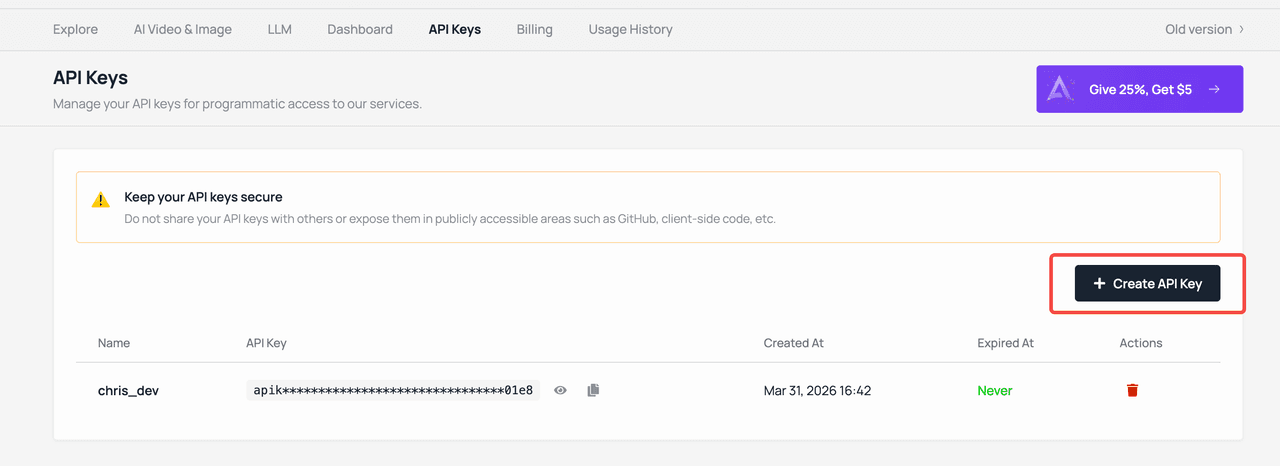
Create an API Key
- Go to API Keys
- Click Create API Key
- Copy your new API key and store it securely
Your API key will only be shown once when created. If you lose it, you'll need to create a new one.
Using Your API Key
Include your API key in the Authorization header of every API request:
Authorization: Bearer your-api-keyLLM / Chat Completions (OpenAI-Compatible)
Base URL: https://api.atlascloud.ai/v1
from openai import OpenAI

client = OpenAI(
    api_key="your-api-key",
    base_url="https://api.atlascloud.ai/v1"
)

response = client.chat.completions.create(
    model="deepseek-v3",
    messages=[{"role": "user", "content": "Hello!"}]
)
Image / Video Generation
Base URL: https://api.atlascloud.ai/api/v1
import requests

response = requests.post(
    "https://api.atlascloud.ai/api/v1/model/generateImage",
    headers={"Authorization": "Bearer your-api-key"},
    json={
        "model": "seedream-3.0",
        "prompt": "A cat sitting on a rainbow"
    }
)
Upload Media
import requests

response = requests.post(
    "https://api.atlascloud.ai/api/v1/model/uploadMedia",
    headers={"Authorization": "Bearer your-api-key"},
    files={"file": open("photo.jpg", "rb")}
)

# Returns a temporary URL for use with generation tasks
print(response.json())
Third-Party Tool Integration
You can use your Atlas Cloud API key with any OpenAI-compatible tool or application. Popular options include:
| Tool | Type | Configuration |
|---|---|---|
| Chatbox | Desktop App | Set API Host to https://api.atlascloud.ai/v1 |
| Cherry Studio | Desktop App | Add as custom OpenAI provider |
| OpenWebUI | Web UI | Configure OpenAI-compatible endpoint |
| Cursor | IDE | Use via MCP Server |
| Claude Code | CLI | Use via MCP Server or Skills |
When configuring third-party tools:
- API Host / Base URL:
https://api.atlascloud.ai/v1(the/v1suffix is required) - API Key: Your Atlas Cloud API key
- Model Name: Any model from the Model Library
Security Best Practices
- Never share your API key or commit it to version control
- Use environment variables to store your API key:
export ATLASCLOUD_API_KEY="your-api-key" - Rotate keys regularly — delete old keys and create new ones
- Use separate keys for development and production environments
- Monitor usage in the Console to detect unauthorized usage
Key Management
You can manage your API keys in Account Settings:
- Create — Generate new API keys as needed
- Delete — Revoke API keys that are no longer needed or may have been compromised
- View usage — Monitor API usage and costs associated with each key
Rate Limits
API rate limits vary by account tier and model type. If you encounter rate limit errors (429 Too Many Requests), consider:
- Adding a small delay between requests
- Using exponential backoff for retries
- Contacting [email protected] for higher limits
Last updated on