What’s the hottest gossip in tech town right now? You guessed it—rumor has it that both MiniMax and Zhipu AI (GLM) are gearing up for an IPO.
The media is buzzing about valuations, verticals, and venture capital. But as a Content Operator (and self-proclaimed "Accidental Designer") at Atlas Cloud, I only care about one thing: Can your multi-billion dollar valuations actually help me write two fewer lines of code and let me slack off for an extra 30 minutes?
Since both are vying to be the "First Stock of Chinese AI," let’s hold our own "Pre-IPO Roadshow." I’ve selected the newly released MiniMax 2.1 and the widely acknowledged logic powerhouse, GLM-4.7, for a head-to-head battle.
Today, we skip the fluff and go straight to the code. Three rounds. Fight. 🥊
🥊 Round 1: The Vibe Check
Who truly understands "Colorful Black"?
🔈 The Challenge
- Focus: Visual Aesthetics
- Task: [Cyberpunk 2027 New Year Countdown Page]
- Prompt:
-
plaintext
1Please generate a single-file HTML webpage with the theme [2027 Cyberpunk New Year Countdown]. 2Visual Style: Combine "Cyberpunk" with "Oriental Aesthetics". The background should be a deep night scene with dynamic Purple/Cyan Neon Glow effects. 3Core Elements: 4Place a massive countdown timer in the center of the screen. The font must have a "Glitch Effect". 5The background should feature floating "Electronic Lanterns" or a "Data Particle Rain". Please render this entirely using CSS Animations or Canvas; do not use any external image links. 6Color Scheme: Cyber Cyan (#00f3ff) combined with Magenta (#ff00aa), and Warm Gold for the lanterns. 7Interaction: Implement a slight parallax effect where the background light and shadows shift based on mouse movement. 8Ensure the code is complete and runnable, demonstrating a high-end "Future Tech Company" aesthetic.
⏱️ Time to Generate: MiniMax 2.1: 1 min | GLM-4.7: 2 min
Click here to see the video of their outputs.
👨🏻💻 Examiner’s Verdict:
- 👀 Aesthetics & Atmosphere:
- MiniMax 2.1: Aesthetically On Point. The page loads with a slow, elegant gradient fill. The background character flow is superb—dynamic yet orderly, like a digital waterfall. The countdown animation is satisfying; it’s not just code, it’s art. It feels like a session of "Cyber-Meditation."
- GLM-4.7: While it achieved the glitch style and depth, the elements feel cluttered. The yellow "plus signs" floating upward like jellyfish are... confusing. The moving border around the time container is too distracting, breaking the immersion.
- 🐛 Bugs & Flaws:
- MiniMax 2.1: Visual completion is extremely high. No obvious flaws.
- GLM-4.7: Made a rookie mistake: The title says "2077" instead of "2027". (Sure, it fits the Cyberpunk lore, but let’s try to live in the present, shall we?)
- 🏁 Winner: MiniMax. If you want visual wow-factor, this is your pick.
🥊 Round 2: The Logic Game
Who is the real Zero-Bug Hero?
🔈 The Challenge
- Focus: Game Logic & Single-File Delivery
- Task: [Snake Game] (Atlas Cloud Special Edition)
- Prompt:
-
plaintext
1Please develop a web-based mini-game titled [Atlas Cloud Compute Snake] in a single HTML file. 2Game Settings: 3The player controls a "Data Snake". The snake's body color must be Atlas Cloud's Brand Purple (#7036F0). 4The food is not an apple, but a "Cloud Icon" (use a Cloud Emoji ☁️ or draw a simple white cloud with CSS). 5When the snake eats a cloud, it grows longer, and the score increases. 6UI Design: 7The game area should have a Glassmorphism border. 8Display the real-time score in the top-left corner and a "Redeploy" button (Reset Game) in the top-right corner. 9Logic Requirements: 10The snake cannot hit the walls. If it hits a wall or itself, the game ends, and a "Compute Overload" alert window pops up. 11Movement must be smooth, controlled by the arrow keys. 12Please focus not only on the code logic but also ensure the UI looks clean and modern, avoiding a retro 90s look.
⏱️ Time to Generate: MiniMax 2.1: 2 min | GLM-4.7: 3 min
Click here to see the video of their outputs.
👨🏻💻 Examiner’s Verdict:
- 🧠 Code & Logic:
- GLM-4.7: Rock Solid. The logic is watertight. The reset mechanism is snappy. This is industrial-grade delivery—"run it, and it just works."
- MiniMax 2.1: Not bad. Code ran on the first try with zero bugs. Basic requirements met.
- 🎮 Interface & UX:
- GLM-4.7: Clean, restrained design.
- MiniMax 2.1: More polished. It even included a dynamic "Computer Overload" effect for the Game Over screen. However, the game board touches the absolute bottom of the browser window. When the "Cloud" appears at the bottom, it creates an illusion that there's more space below, leading to accidental crashes.
- ✨ The Easter Eggs:
- Both models added "Soft Light Filters."
- GLM-4.7: Made the snake's head glow. (Is it a lightbulb?)
- MiniMax 2.1: Made the cloud food glow. (This makes way more sense.)
- 🏁 Winner: Draw. MiniMax has flashier effects, but for interaction comfort and code structure, GLM remains the reliable logic powerhouse.
🥊 Round 3: The Heavy Lifting
Who carries the flag for "Productivity"?
🔈 The Challenge
- Focus: Functional Dashboard & Complex Data
- Task: [Atlas Cloud Compute Monitor]
- Prompt:
-
plaintext
1Act as a Product Manager for Atlas Cloud. Please generate a UI Demo for a [GPU Compute Resource Monitor Dashboard]. 2Layout Structure: A dark sidebar navigation on the left, with the main content area on the right. 3Card Design (Main Content): 4Card 1: Real-time Compute Load. Draw a dynamic waveform graph using SVG or Canvas, simulating GPU load fluctuating between 80%-99%. 5Card 2: VRAM Usage. A ring chart displaying "22GB / 24GB". 6Card 3: Current Task Queue. List 3 active training tasks (e.g., "Llama-3-Training", "Stable-Diffusion-Gen") with a green "Running" status tag. 7Style Requirements: 8Dark Mode. 9Cards should have a very subtle glow effect on the borders to emphasize a high-tech feel. 10Use "Inter" or system sans-serif fonts for a professional and compact look. 11Code Requirement: Write HTML/CSS/JS in a single file. The simulated data must be dynamic (e.g., the waveform graph should be moving).
⏱️ Time to Generate: MiniMax 2.1: 3 min | GLM-4.7: 5 min
Click here to see the video of their outputs.
👨🏻💻 Examiner’s Verdict:
- 📊 Data Visualization:
- GLM-4.7: Precise. Used the "/" symbol for usage rates in the top-right card—clean, clear, and follows Dashboard standards.
- MiniMax 2.1: Missed the mark. Failed to implement the "Real-time Waveform" requirement in the top-left card. The top-right card used text to describe data, which isn't intuitive.
- 🎨 UI Completeness:
- GLM-4.7: Detail Oriented. Included side-bar icons, Logo, and User Avatar. It looks like a mature, commercial B-end interface.
- MiniMax 2.1: A bit bare-bones.
- 🏁 Winner: GLM-4.7. For B-side business scenarios, the veteran player’s logical advantage is undeniable.
📝 The Final Score
After three rounds of defense, there is no absolute winner, but the personalities of the two models are clear:
- Are you a Designer / PM / Founder? Need a demo that stuns the room instantly? 👉 All in on MiniMax 2.1 (Its aesthetics justify the valuation!).
- Are you a Hardcore Developer? Need to handle complex logic and production-ready code? 👉 GLM-4.7 is your reliable old friend.
As for who rings the IPO bell first? I don't know. But I do know that using them effectively will let your project go live before anyone else's.
(The End——
——Wait a minute!!!
You say you don’t want to choose? You want both?
Conveniently, I know a platform that breaks down the barriers between models:
"Atlas Cloud: The Compute Engine for Every AI Idea."
At Atlas Cloud, you don’t need to toggle between different platforms. You can:
- Run Prompts on multiple models simultaneously.
- Visually compare "Generation Quality vs. Cost" side-by-side.
- Spend the least money to generate the perfect output.
How to use these models on Atlas Cloud?
Method 1: Use directly in Atlas Cloud playground
Method 2: Integrate via API
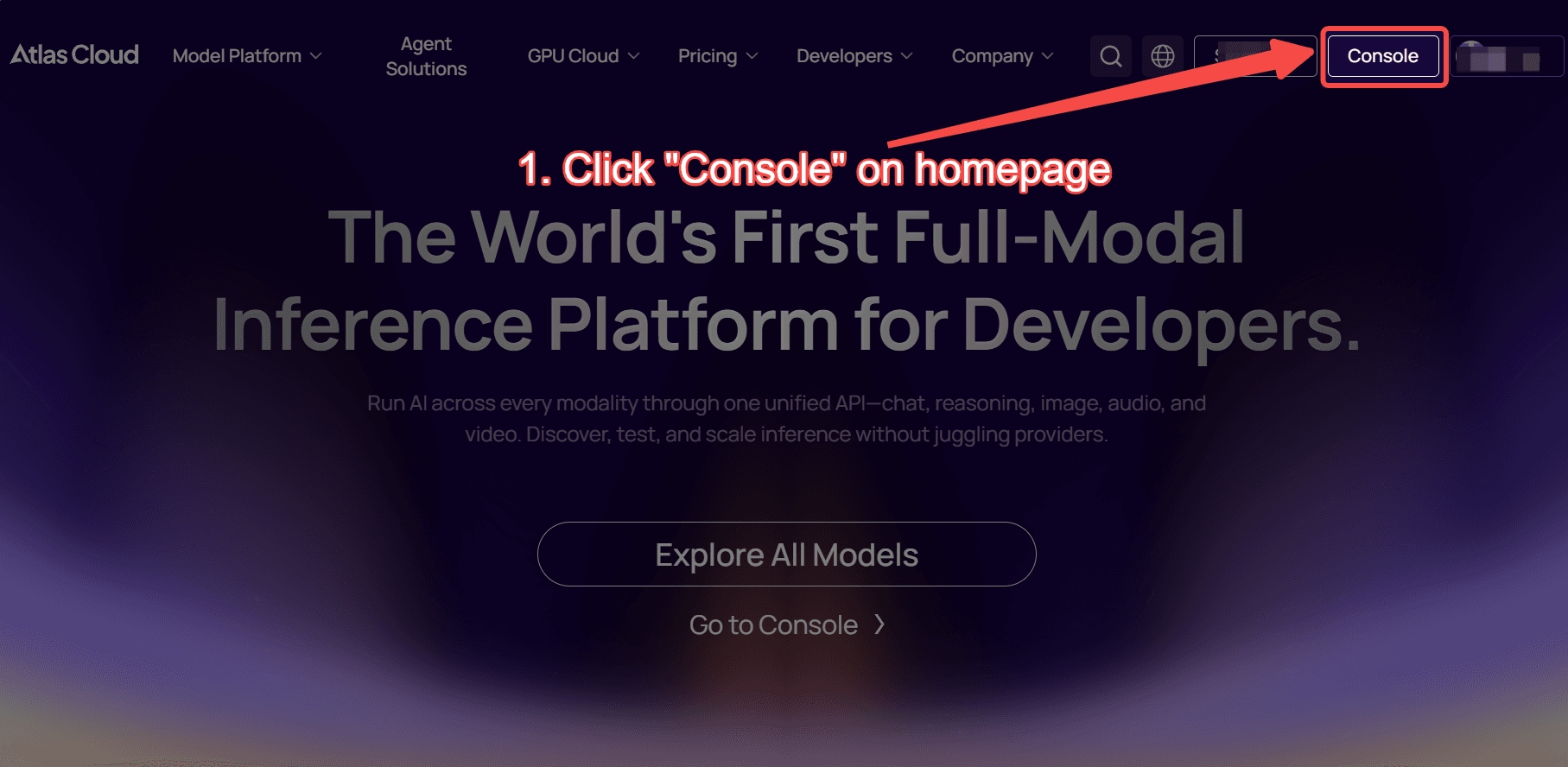
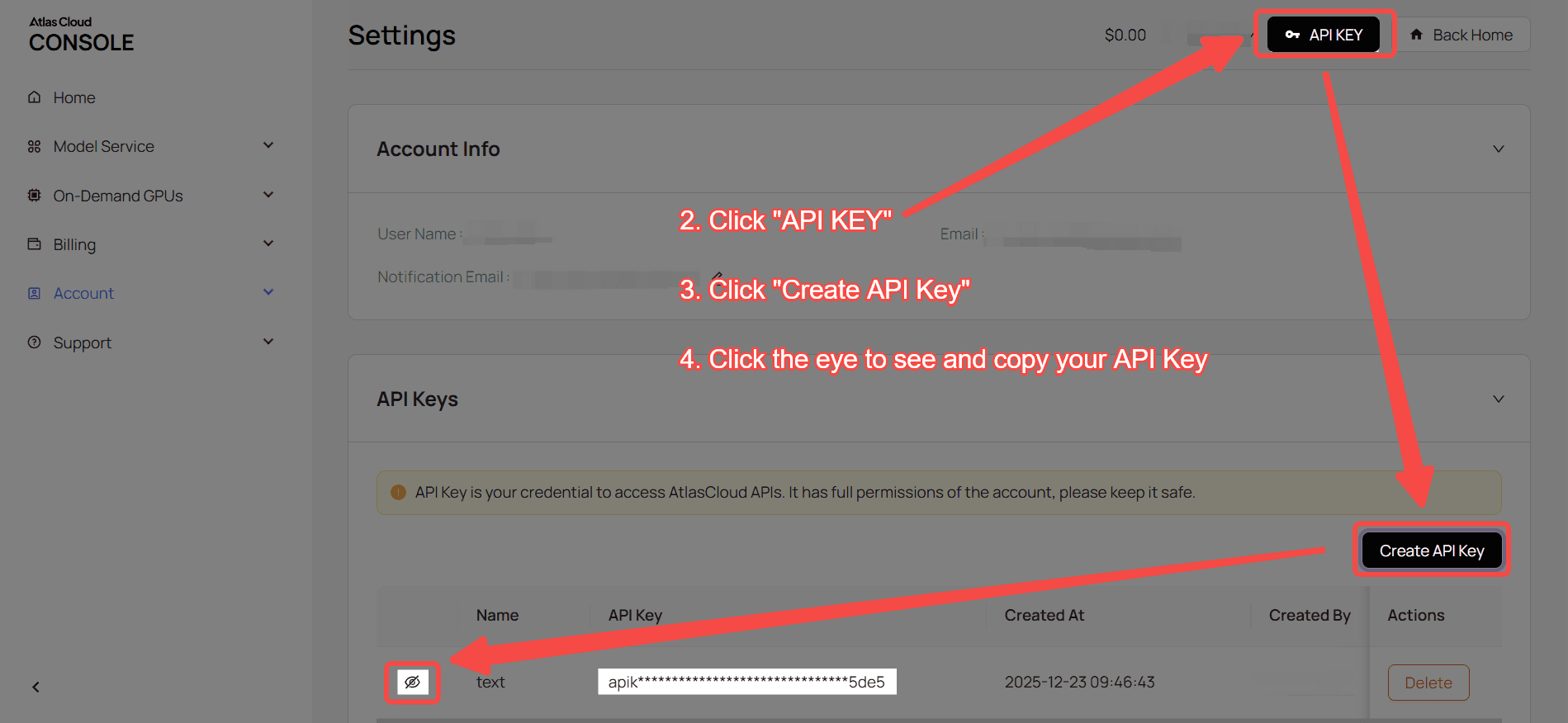
Step 1: Get your API Key Create and copy your key in the console
Step 2: Check the Docs View endpoints, parameters, and auth methods in our API Documentation
Step 3: Make your first request (Python Example) Using MiniMax 2.1 as an example:
plaintext1import requests 2 3url = "https://api.atlascloud.ai/v1/chat/completions" 4headers = { 5 "Content-Type": "application/json", 6 "Authorization": "Bearer $ATLASCLOUD_API_KEY" 7} 8data = { 9 "model": "minimaxai/minimax-m2.1", 10 "messages": [ 11 { 12 "role": "user", 13 "content": "what is difference between http and https" 14 } 15 ], 16 "max_tokens": 32768, 17 "temperature": 1, 18 "stream": True 19} 20 21response = requests.post(url, headers=headers, json=data) 22print(response.json())