Disclosure: This guide was published by Atlas Cloud. We’ve created a detailed, honest comparison. While we think our platform stands out for certain workloads, we encourage you to try several options before deciding what works best for you.
Quick Comparison Overview
| Platform | Pricing Model | 700+ Models | Custom Model Deploy | Training + Inference | Enterprise Security | Private/On-Prem | Global Regions | Best For |
|---|---|---|---|---|---|---|---|---|
| Wavespeed AI | Per-image/second/token | ✅ | ⚠️ Limited | ❌ Inference only | ⚠️ Basic enterprise tier | ❌ | ⚠️ Limited regions | Quick API access, content creators |
| Atlas Cloud | Token / Hourly / Reserved / Lease-to-own | ✅ 350+ models | ✅ Full SSH access | ✅ Same platform | ✅ SOC 2, HIPAA | ✅ VPC/Colo/Hybrid | ✅ 3 continents, 20K+ GPUs | Scale, cost optimization, enterprise |
| Replicate | Per-prediction | ✅ Large library | ⚠️ Cog containers | ❌ Inference only | ⚠️ Basic | ❌ | ✅ Good | Prototyping, open-source exploration |
| RunPod | Per-GPU-hour | ⚠️ Community templates | ✅ | ⚠️ Mostly inference | ⚠️ Limited | ⚠️ Custom deals | ✅ Good | Indie developers, quick deployments |
| Fal.ai | Per-request | ⚠️ Focused on image | ⚠️ Limited | ❌ Inference only | ⚠️ Basic | ❌ | ✅ Good | Fast image generation |
| AWS/Azure/GCP | Complex (instance + storage + egress) | ⚠️ Via services | ✅ | ✅ | ✅ Full compliance | ✅ | ✅ Global | Existing cloud customers, max control |
1. Why Users Search for Wavespeed AI Alternatives

Wavespeed AI has positioned itself as a unified AI platform offering 700+ models for image generation, video creation, audio synthesis, and more—all through a single API. It supports popular models like FLUX, Kling, Veo, Sora, Stable Diffusion, and provides multiple integration options (REST API, Python/JS SDK, ComfyUI, N8N, Desktop App).
When Wavespeed AI works well, it's great for:
- Developers who want a quick API to access many models without managing infrastructure
- Content creators who need a browser-based UI for image/video generation
- Low-frequency users who benefit from pay-per-use pricing
However, users increasingly search for alternatives due to several pain points:
| Pain Point | What Users Say | Your Opportunity |
|---|---|---|
| Access & Availability Issues | Some regions experience connectivity problems; API availability can be inconsistent | Global platforms with multi-region infrastructure |
| Cost Escalation at Scale | Per-image/per-second pricing becomes expensive at high volumes. Bronze tier only allows 10 images/min, 3 concurrent tasks | Reserved capacity & GPU-hour pricing for predictable costs |
| Limited customization | As a model-as-a-service platform, it offers less flexibility for custom fine-tuned model deployments and complex workflow builds. | Full GPU infrastructure with SSH access & custom deployments |
| API Reliability Concerns | User reports mention Gemini model call failures, system crashes | Backed by enterprise-grade SLAs, with full SOC 2 and HIPAA compliance. |
| Documentation Gaps | Missing security threshold parameters, incomplete API docs | Comprehensive documentation & dedicated support |
| Enterprise Features | Basic enterprise tier exists but lacks SOC 2/HIPAA, private deployment options | Full compliance stack & on-prem/VPC deployment |
| Content Restrictions | Some models have strict content policies that limit creative use cases | 100% uncensored AI options for legitimate creative work |
Based on our research across Reddit, Discord, Twitter/X, and developer forums, users searching for "Wavespeed AI alternative" typically fall into these categories:
- Access-blocked users – Can't reliably connect from their region
- Scale-conscious teams – Costs are growing faster than value at high volumes
- Customization seekers – Need to deploy custom models or complex workflows
- Enterprise buyers – Require SOC 2, HIPAA, or private deployment
- Reliability-focused developers – Need consistent API uptime and SLA guarantees
3. Top 5 Wavespeed AI Alternatives
3.1 Atlas Cloud – Best Overall for Scale, Cost & Global Access
One-line summary: A vertically-integrated, AI-first GPU cloud and inference platform offering the market's lowest prices, enterprise-grade security, and global availability—designed specifically for AI-native teams.
Why Atlas Cloud for Wavespeed AI Users
Solving Access Issues:
- Over 20,000 GPUs deployed across 3 continents: North America (US, Canada), Europe (Germany, France, Nordic countries), and Asia (Singapore, Hong Kong, Taiwan region of China)
- Our global infrastructure ensures low-latency performance wherever you operate.
- No regional restrictions on availability
Solving Cost Issues:
- 70% savings vs. AWS/Azure/GCP on GPU costs
- 140% improved inference cost-efficiency vs. hyperscalers
- Multiple pricing options: Serverless (pay-per-token), hourly GPU, reserved clusters, lease-to-own
- DeepSeek R1 costs 30% less than comparable direct services; Flux images start at $0.02 per image
Solving Customization Issues:
- Full SSH access and root permissions on GPU instances
- Custom environments: bare metal, VM, K8s, Slurm
- Deploy any model—including your fine-tuned models—exactly how you want
- Training + inference on the same platform
Solving Enterprise Needs:
- SOC 2 & HIPAA certified environments
- Private deployment in your VPC, Colo, or hybrid setup
- Complete IP and data control
- Enterprise migration services and support
Solving Reliability Issues:
- Team with 50,000+ GPU cluster management experience
- Enterprise-grade SLA guarantees
- Industry-leading inference optimized with vLLM, TensorRT, Triton
Core Features
| Feature | Details |
| Model Access | 350+ models including DeepSeek, Qwen, FLUX, Recraft; Day 0-1 support for new releases |
| GPU Options | H100, H200, B200, A100, L40S, and more—available instantly |
| Deployment Modes | Serverless API, on-demand instances, reserved clusters, private deployment |
| Integration | Intuitive API, multi-language SDKs, and 1-line integration for real-time performance |
| Security | SOC 2 Type II and HIPAA compliant, backed by zero-trust architecture. |
| Support | Expert AI engineering, enterprise migration services, and dedicated customer success support |
Pricing Comparison
Scenario: 10,000 Flux images per day (300,000 monthly)
| Platform | Pricing | Monthly Cost | Savings vs. Wavespeed |
|---|---|---|---|
| Wavespeed AI | ~$0.04-0.14/image (varies by model) | ~$12,000-42,000 | Baseline |
| Atlas Cloud | $0.02/image or dedicated GPU | ~$6,000-15,000 | 50-65% savings |
Note: Exact pricing varies by model and volume. Contact Atlas for custom quotes.
Honest Limitations
- More choices = slight learning curve: Atlas offers serverless, VM, bare metal, K8s, Slurm options. If you just want "one API, don't make me think," Wavespeed's single serverless model is simpler for quick tests.
- Geared toward technical teams: Best suited for developers and AI engineers. Non-technical creators may prefer Wavespeed's browser UI or Desktop App.
Best For
✅ Teams whose Wavespeed costs are growing faster than value
✅ Users who can't reliably access Wavespeed from their region
✅ Developers who need custom model deployment (fine-tuned models, LoRAs, complex pipelines)
✅ Enterprises requiring SOC 2/HIPAA compliance or private deployment
✅ Anyone migrating from hyperscalers to reduce GPU costs by 70%
3.2 Replicate – Great for Exploring Open-Source Models
One-line summary: A developer-friendly platform for running open-source models via simple API calls, ideal for prototyping and testing.
Strengths
- Extensive model library: Easy access to thousands of open-source models.
- Simple deployment: Push models as Cog containers
- Active community: New models added quickly by the community
- Good for prototyping: Test different models before committing
Limitations
- Per-prediction pricing scales poorly: Like Wavespeed, costs grow linearly with usage
- Limited enterprise capabilities: No SOC 2/HIPAA compliance or private deployment options.
- Inference only: No training capabilities on the platform
- Less control: Can't SSH into machines or customize infrastructure
Pricing
Pay-per-prediction, varies by model. Can become expensive at scale—similar economics to Wavespeed.
Best For
Developers exploring which open-source models work best for their use case; hackathon projects; early-stage prototyping.
3.3 RunPod – Community Templates & Affordable GPU Rentals
One-line summary: A GPU cloud platform with community-driven templates for one-click model deployment, plus budget-friendly hourly pricing.
Strengths
- Community-driven templates: Deploy popular models like Stable Diffusion and LLMs in just one click.
- Transparent GPU pricing: Pay by the hour, not per request.
- Developer-friendly: SSH access, custom containers supported
- Serverless option: For inference workloads
Limitations
- DIY operations: More self-service than fully-managed
- Limited enterprise features: Fewer compliance certifications available, with no private deployment option
- Smaller scale: Suited for individual developers, but less reliable for large‑scale enterprise deployments
- Less comprehensive model library: Depends mostly on community templates rather than pre‑hosted models
Pricing
Competitive market-rate GPU hourly pricing (A100 ~$1.5–2/hr). No reserved instances or lease-to-own plans like Atlas offers.
Best For
Perfect for indie developers and small teams running Stable Diffusion or open-source LLMs — anyone who needs accessible GPU power, without the complexity of big cloud providers.
3.4 Fal.ai – Fast Serverless for Image Generation

One-line summary: A fast serverless platform built mainly for image generation models, with competitive pay‑per‑request pricing.
Strengths
- Speed-optimized for fast image generation.
- Simple API: Easy integration for image use cases
- Serverless: No infrastructure management
Limitations
- Narrow focus: Primarily image generation, less comprehensive than Wavespeed's 700+ models
- Scale economics: Pay‑per‑request pricing has similar scaling limitations as Wavespeed
- Limited enterprise features: No SOC 2/HIPAA compliance or private deployment options
- Narrower model support: Fewer choices for video, audio, and 3D models
Best For
Ideal for developers focused on fast image generation, looking for a Wavespeed alternative for this specific use case.
3.5 Hyperscalers (AWS/Azure/GCP) – Maximum Control, Maximum Complexity
One-line summary: Traditional cloud providers offer a full suite of services, but GPUs come at a premium, and AI is an add-on rather than their core focus.
Strengths
- Full ecosystem: Storage, networking, security, and monitoring — all integrated in one platform
- Comprehensive compliance: SOC 2, HIPAA, FedRAMP, and complete certification coverage
- Global infrastructure: Data centers across the world
- Established partnerships: Most enterprises already use these cloud platforms
Limitations
- Costly: Atlas Cloud can cut your GPU costs by 70% compared to traditional hyperscalers.
- Not built for AI: AI features are add‑ons, not the core of a general‑purpose cloud platform.
- Complicated pricing: Instance hours, storage, egress, and data transfer all add up to hard‑to‑predict bills.
- Slow to update: Official services often fall behind the latest open‑source models.
- Overkill: Most AI teams don't need 200+ services, just good GPUs and inference
Pricing
Significantly higher than specialized AI clouds. Example: H100 instances on AWS can run $30+/hour vs. competitive rates on AI-focused platforms.
Best For
Enterprises deeply embedded in hyperscaler ecosystems and able to bear the premium; teams requiring unique compliance certifications only hyperscalers provide; and workloads needing tight integration with other cloud services.
4. Detailed Comparison: Atlas Cloud vs Wavespeed AI
4.1 Model Access & Speed
| Aspect | Wavespeed AI | Atlas Cloud |
| Model Count | 700+ (image, video, audio, 3D, LLM) | 350+ (focused on production-ready models) |
| New Model Access | Varies by category | Day 0-1 support for popular new releases |
| Image Generation Speed | <2 seconds (claimed) | Industry-leading inference optimization |
| Video Generation Speed | <2 minutes (claimed) | Optimized via vLLM, TensorRT, Triton |
| Custom Models | Limited LoRA support | Full custom deployment (any model, any framework) |
Verdict: Wavespeed has more models available, but customization options are fairly limited. Atlas offers fewer pre-hosted models but lets you deploy anything you want with full infrastructure control.
4.2 Pricing Structure
| Aspect | Wavespeed AI | Atlas Cloud |
| Pricing Model | Per-image, per-second, per-token | Token, hourly, reserved, lease-to-own |
| Example: Flux image | $0.005–$0.14 (model-dependent) | From $0.02 per image |
| Example: LLM (DeepSeek R1) | Standard pricing | 30% cheaper than direct |
| Scale Discounts | Tiered pricing: $100, $1,000, and $10,000 deposit options | Reserved clusters, bulk discounts, and lease-to-own plans |
| Cost Predictability | Variable (depends on usage) | Predictable with reserved options |
Verdict: Wavespeed's per-unit pricing is simple but expensive at scale. Atlas offers multiple pricing models to optimize costs as you grow.
4.3 Concurrency & Throughput
| Tier | Wavespeed AI (Images/min) | Wavespeed AI (Videos/min) | Wavespeed AI (Max Concurrent) |
| Bronze –Free | 10 | 5 | 3 |
| Silver – $100 | 500 | 60 | 100 |
| Gold – $1,000 | 3,000 | 600 | 2,000 |
| Extreme – $10,000 | 5,000 | 5,000 | 5,000 |
Atlas Cloud: Scales with your GPU allocation. No artificial tier limits—your throughput is determined by your infrastructure, not account level.
Verdict: Wavespeed gates throughput behind payment tiers. Atlas gives you direct infrastructure control.
4.4 Enterprise Features
| Feature | Wavespeed AI | Atlas Cloud |
| SOC 2 Certification | ❌ Not mentioned | ✅ SOC 2 Type II |
| HIPAA Compliance | ❌ Not mentioned | ✅ HIPAA compliant |
| Private Deployment | ❌ Not available | ✅ VPC, Colo, hybrid |
| Data Residency | ❌ Limited options | ✅ Multi-region (US, EU, Asia) |
| Enterprise SLA | ⚠️ "Performance SLA" mentioned | ✅ Enterprise-grade |
| Dedicated Support | ⚠️ "Priority support" for enterprise | ✅ Dedicated customer success |
| Migration Support | ❌ Not mentioned | ✅ Enterprise migration services |
Verdict: Atlas Cloud is purpose-built for enterprise requirements that Wavespeed doesn't address.
4.5 Infrastructure Control
| Capability | Wavespeed AI | Atlas Cloud |
| SSH Access | ❌ | ✅ Full root access |
| Custom Containers | ⚠️ Limited | ✅ Any Docker image |
| GPU Selection | ⚠️ Abstracted (serverless GPU option) | ✅ Choose from H100, H200, B200, A100, and more. |
| Environment Options | Serverless only | Serverless, VM, bare metal, K8s, Slurm |
| Training Capabilities | ❌ LoRA training only | ✅ Full training + inference |
| Networking Control | ❌ | ✅ Custom networking, VPC peering |
Verdict: Wavespeed abstracts infrastructure (pro for simplicity, con for control). Atlas gives full infrastructure ownership.
5. How to Migrate from Wavespeed AI to Atlas Cloud
If you’re hitting the limits of Wavespeed AI, migrating to Atlas Cloud is straightforward.
Step 1: Identify your use case (5 min)
Using Wavespeed's hosted models (FLUX, DeepSeek, etc.)?
→ Use Atlas Cloud's hosted inference API—same models, better pricing, global availability
Running custom workflows or fine-tuned models?
→ Deploy on Atlas GPU instances with full environment control
Need enterprise compliance?
→ Start with Atlas's SOC 2/HIPAA compliant environment or private deployment
Step 2: Create Atlas Cloud Account (2 min)
- Sign up at atlascloud.ai
- Get your API key
- Add payment method (no minimum commitment)
Step 3: Update integration (5–15 min)
For API-based inference:
plaintext1# Before (Wavespeed) 2response = wavespeed.images.generate(model="flux-dev", prompt="...") 3 4# After (Atlas Cloud) 5response = atlas.images.generate(model="flux-dev", prompt="...")
Most models use OpenAI-compatible endpoints, making migration a simple endpoint swap.
For custom models:
- Spin up a GPU instance (H100, A100, etc.)
- SSH in and deploy your model
- Point your application to your Atlas endpoint
Step 4: Test & Validate (10 minutes)
- Run your existing test suite against Atlas endpoints
- Compare latency and output quality
- Verify cost savings meet expectations
Step 5: Gradual Traffic Migration (Ongoing)
- Start with 10% of traffic
- Monitor performance and costs
- Scale to 100% as confidence builds
Total migration time: ~30 minutes for basic API usage; 1-2 hours for custom deployments.
For complex enterprise migrations, Atlas provides dedicated migration support services.
6. FAQ
Q: Is Atlas Cloud faster than Wavespeed AI?
Atlas Cloud uses industry-leading inference optimization (vLLM, TensorRT, Triton) on dedicated GPU infrastructure. For the same model, performance is typically comparable or better than serverless platforms—with significantly lower latency variance since you're not sharing resources.
Q: How much can I save by switching from Wavespeed AI to Atlas Cloud?
Savings depend on your usage pattern:
- LLM inference: DeepSeek R1 is ~30% cheaper on Atlas vs. direct API
- Image generation: Flux images from 0.02onAtlasvs.0.02 on Atlas vs. 0.02onAtlasvs.0.04-0.14 on Wavespeed
- High-volume users: Reserved clusters can reduce costs by 50-70% vs. pay-per-request
- vs. Hyperscalers: 70% GPU cost savings vs. AWS/Azure/GCP
Q: Can I access the same models on Atlas Cloud as Wavespeed AI?
Atlas hosts 350+ production-ready models including FLUX, DeepSeek, Qwen, Recraft, and more. For models not pre-hosted, you can deploy any model yourself on Atlas GPU instances. The Day 0-1 new model support means popular releases are available immediately.
Q: Does Atlas Cloud work globally?
Yes. Atlas has 20,000+ GPUs across 3 continents:
- Americas: US, Canada
- Europe: Germany, France, Nordics
- Asia: Singapore, Hong Kong, Taiwan, and more
This global presence ensures reliable access regardless of your location—a key advantage if you're experiencing Wavespeed access issues.
Q: Can I use Atlas Cloud for uncensored AI content?
Yes. Atlas Cloud supports 100% uncensored AI for legitimate creative and business use cases, whereas some platforms impose strict content restrictions.
Q: What about enterprise compliance?
Atlas Cloud offers:
- SOC 2 Type II certification
- HIPAA compliance
- Zero-trust architecture
- Private deployment (VPC, Colo, hybrid)
- Complete IP and data control
This is a significant advantage over Wavespeed AI, which lacks these enterprise features.
Q: Do I need to manage infrastructure on Atlas Cloud?
It's your choice:
- Serverless API: Zero infrastructure management, just API calls
- On-demand GPU: Spin up instances when needed
- Managed private deployment: Atlas manages hardware, networking, and software in your environment
7. Conclusion
Wavespeed AI offers a convenient unified API for 700+ AI models, making it a solid choice for quick experiments, content creators, and low-volume users. However, users increasingly seek alternatives when they encounter:
- Access issues from certain regions
- Escalating costs at higher volumes
- Customization limits for fine-tuned models and complex workflows
- Missing enterprise features like SOC 2, HIPAA, and private deployment
- Reliability concerns with API stability
If you're experiencing any of these pain points, Atlas Cloud offers a compelling alternative:
| Your Need | Atlas Cloud Solution |
| Global access issues | 20,000+ GPUs across 3 continents |
| Cost optimization | 70% savings vs. hyperscalers, flexible pricing models |
| Custom model deployment | Full SSH access, any framework, training + inference |
| Enterprise compliance | SOC 2, HIPAA, private deployment |
| Reliability | 50K+ GPU experience team, enterprise SLA |
Ready to explore?
Atlas Cloud offers instant access to H100, H200, and B200 GPUs with no minimum commitment. Start with the serverless API to test migration from Wavespeed, or contact the team for a custom demo and migration plan.
📧 Contact: [email protected]
🚀 Get started: atlascloud.ai
For a personalized cost analysis comparing your current Wavespeed AI usage to Atlas Cloud, reach out to our team. We'll help you calculate potential savings and create a migration roadmap tailored to your specific use case.
How to Use Both Models on Atlas Cloud
Atlas Cloud lets you use models side by side — first in a playground, then via a single API.
Method 1: Use directly in the Atlas Cloud playground
Method 2: Access via API
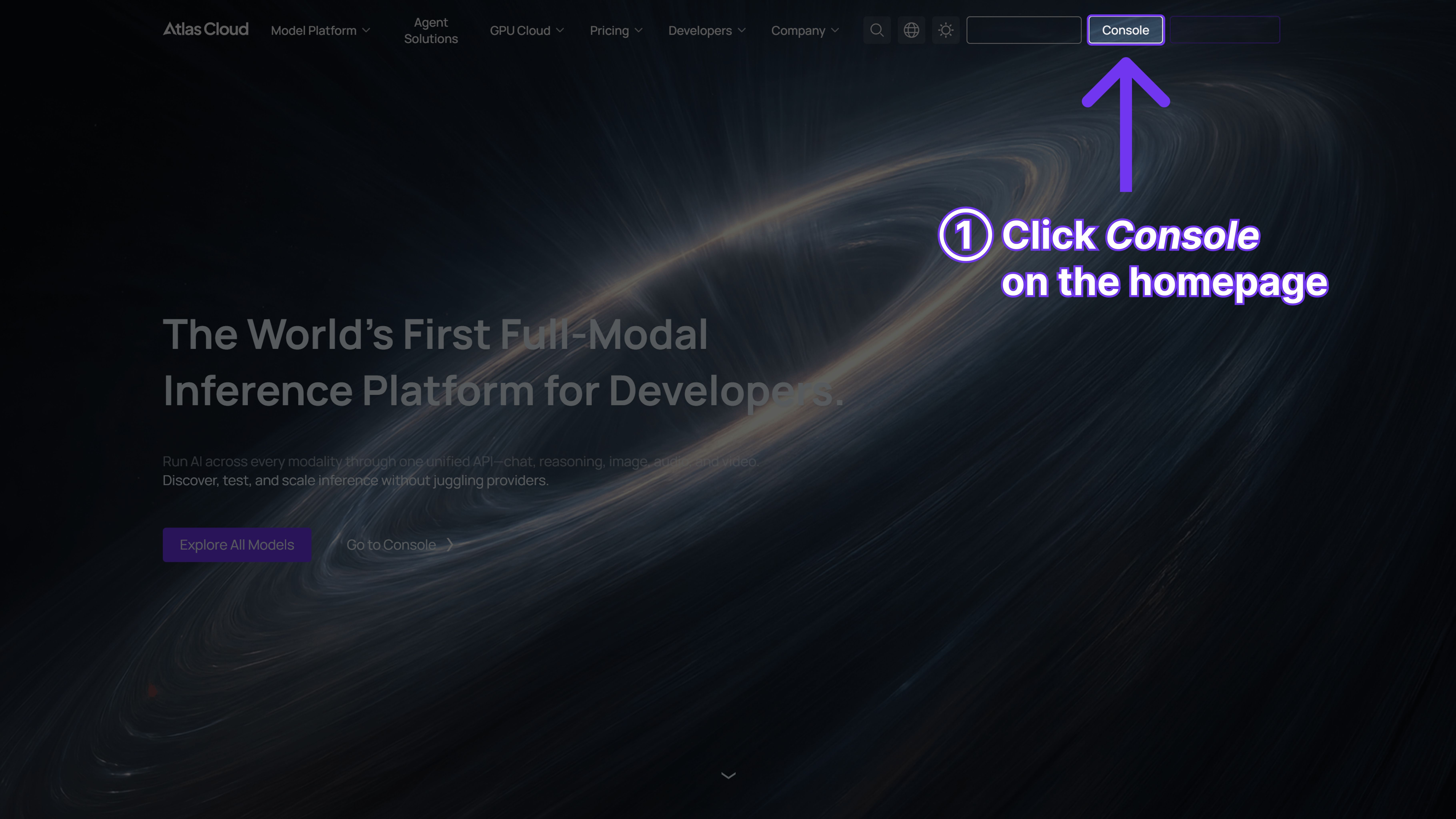
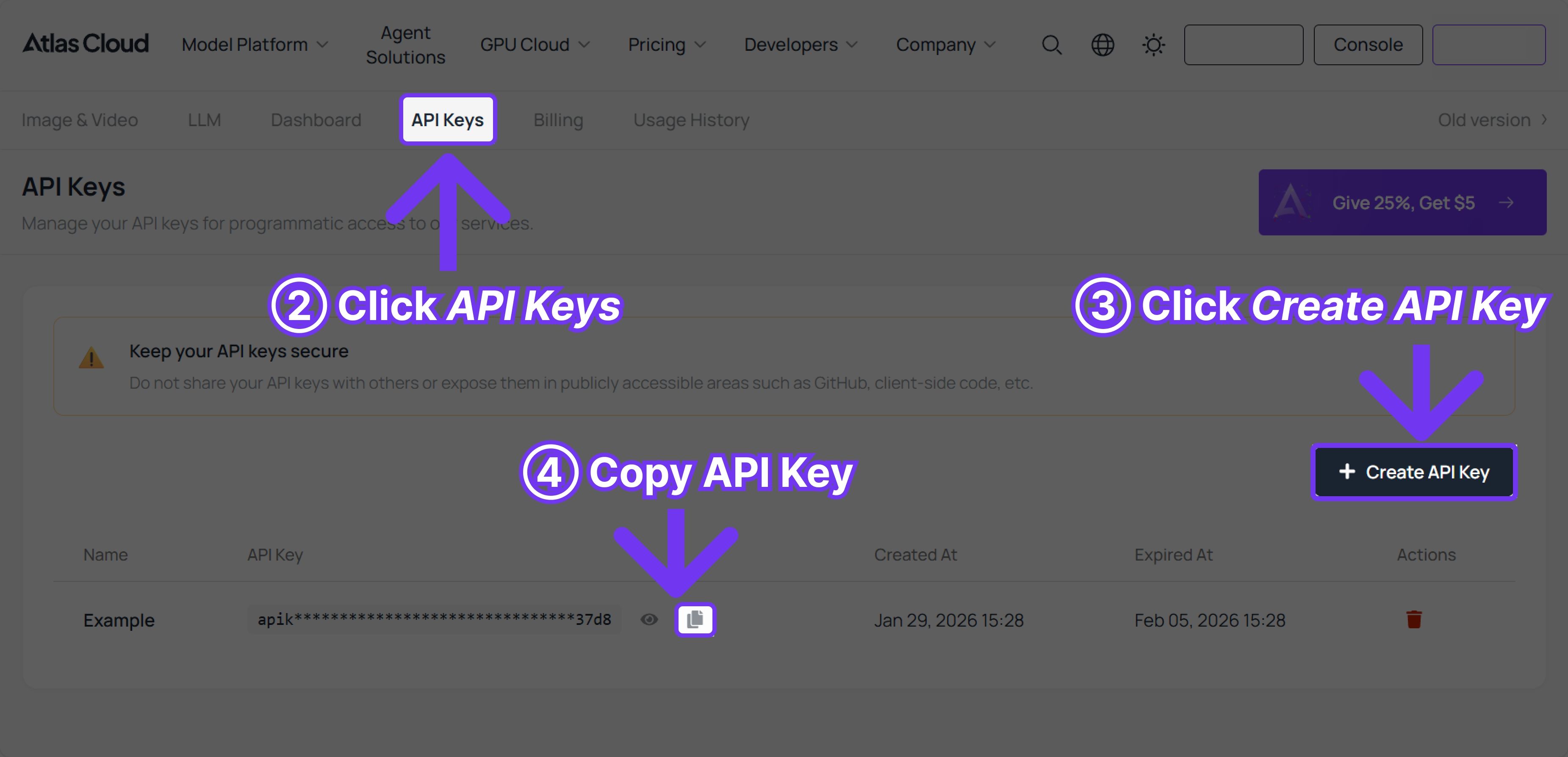
Step 1: Get your API key
Create an API key in your console and copy it for later use.
Step 2: Check the API documentation
Review the endpoint, request parameters, and authentication method in our API docs.
Step 3: Make your first request (Python example)
Example: generate a video with Kling 3.0.




