By 2026 the field of AI image generation APIs has become more consolidated. Images can now be generated without the AI models getting basic composition or anatomy wrong. Choices come down to speed, photorealism, text rendering accuracy, and API accessibility. For product development teams looking to include a programmatic AI image generation API in their product the question isn't if AI can generate usable images, but which model -- the Flux API, Imagen 4 API, or Ideogram API -- works best with a given workflow.
Atlas Cloud image generation offers seamless API access to three of today's most powerful models: Flux 2 Pro through the Flux API, Imagen 4 Ultra through the Imagen 4 API, and Ideogram v3 through the Ideogram API. Each has a unique use case, and knowing the tradeoffs between them is important for any team that needs to make architectural decisions about their visual content pipelines. In this guide, we'll go over each model's capabilities, pricing, code samples, and practical advice for working with it.
Image Models at a Glance
- Flux 2 Pro -- Developer: Black Forest Labs. Model ID: `black-forest-labs/flux-2-pro/text-to-image`. Max Resolution: 2048x2048. Speed: Fast (~3s). Text Rendering: Good. Photorealism: Strong. Price Range: $0.03-0.05. Best For: Speed + versatility.
- Imagen 4 Ultra -- Developer: Google DeepMind. Model ID: `google/imagen4-ultra/text-to-image`. Max Resolution: 2048x2048. Speed: Medium (~8s). Text Rendering: Good. Photorealism: Excellent. Price Range: $0.04-0.08. Best For: Quality + realism.
- Ideogram v3 -- Developer: Ideogram. Model ID: `ideogram/ideogram-v3/text-to-image`. Max Resolution: 2048x2048. Speed: Fast (~4s). Text Rendering: Excellent. Photorealism: Good. Price Range: $0.03-0.05. Best For: Typography + design.
All three models are available under one Atlas Cloud API key. You don't need to maintain separate accounts, billing and payment infrastructure, or authentication flows for each provider. Switch between models by simply adjusting a single parameter in your API call.
Flux 2 Pro by Black Forest Labs
Flux 2 Pro is the engine that drives the Flux API. It's the workhorse of the three. Produces images rapidly, has decent range of styles, and good-enough text rendering. The pragmatic default for teams requiring high-throughput and reliable performance for a variety of prompt types.
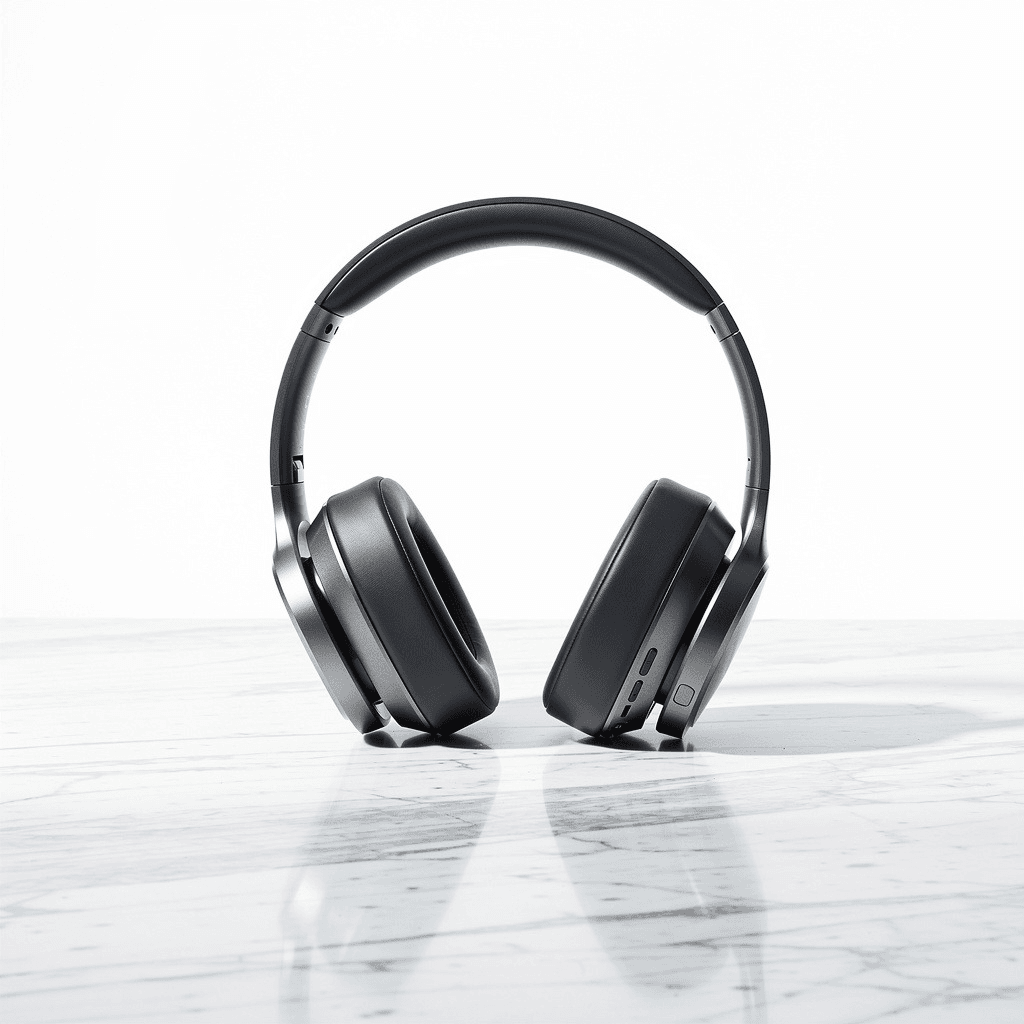
Created by Flux 2 Pro. API via Atlas Cloud. Prompt: “Professional product photo of wireless headphones on marble surface, studio lighting, clean white background”
Key Strengths
- Speed: Average generation time of approximately 3 seconds at 1024x1024. This makes it viable for real-time or near-real-time applications where users are waiting for results.
- Versatility: Performs well across product photography, illustrations, concept art, UI mockups, and social media assets. It does not specialize narrowly, which is precisely its advantage for teams with varied content needs.
- Text rendering: Handles text-in-image prompts with good accuracy. Brand names, short captions, and signage are rendered legibly in most generations. While not quite at Ideogram v3's level, it is sufficient for many production use cases.
- Consistency: Repeated generations from similar prompts yield reliably consistent quality. This predictability matters when building automated pipelines where manual review of every output is impractical.
Best Use Cases
- E-commerce product imagery: Generating product photos with clean backgrounds and studio-style lighting at scale.
- Marketing assets: Social media images, ad creatives, and blog illustrations where turnaround speed matters more than absolute photorealism.
- Rapid prototyping: UI/UX teams generating visual mockups and placeholder assets during the design phase.
- Batch generation: Any workflow requiring hundreds or thousands of images per day where cost-per-image and speed are the primary constraints.
Limitations
Flux 2 Pro yields impressive outputs, yet it falls short of Imagen 4 Ultra's photorealistic standards. Textural nuances in skin, intricate reflections, and delicate light interplay are examples where the disparity becomes evident. Hero imagery and high-end visual assets might prompt teams to opt for Imagen 4 Ultra.
Imagen 4 Ultra by Google DeepMind
The Imagen 4 API provides access to Imagen 4 Ultra, Google DeepMind's premier image generation model, and it shows. The photorealism of this model is the best of any currently offered through a public AI image generation API. If fidelity is your top priority and a slightly longer generation time is no concern, Imagen 4 Ultra is the way to go.
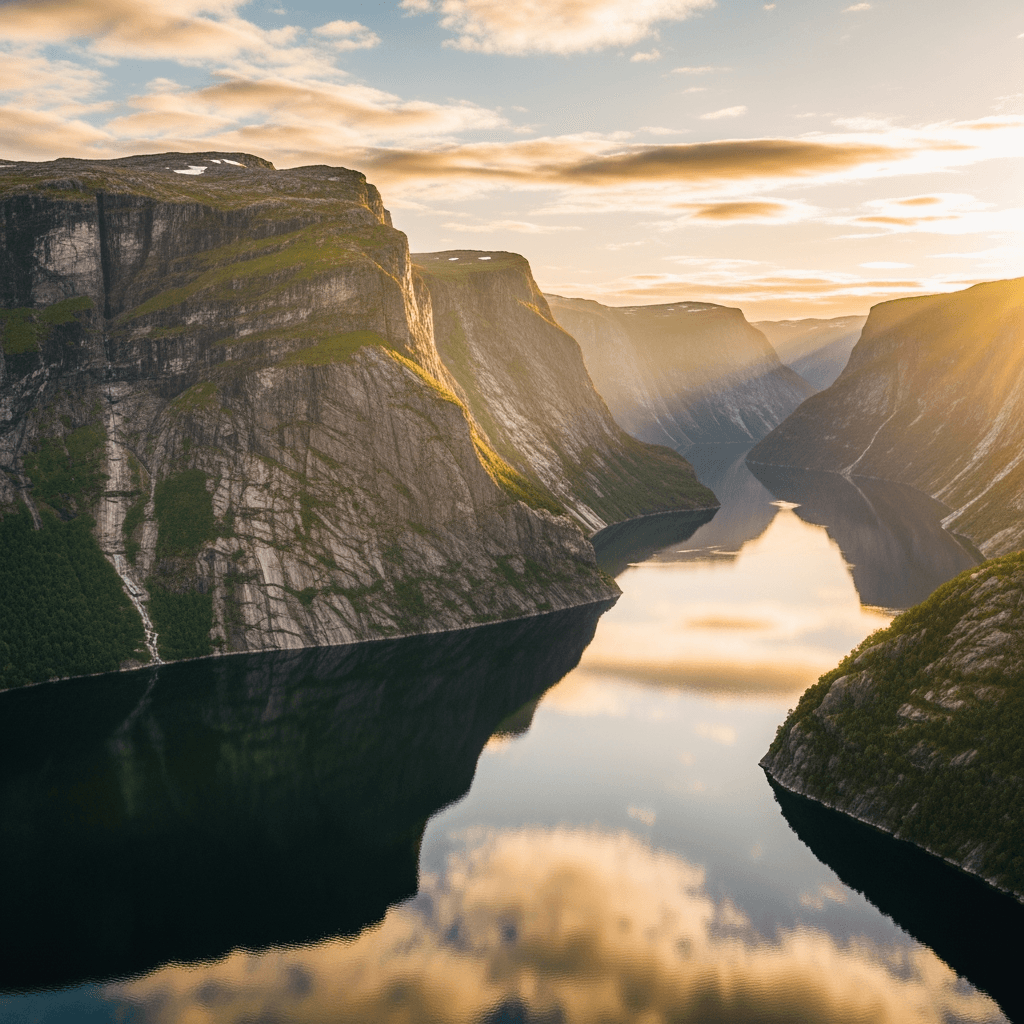
Generated with Imagen 4 Ultra using the Atlas Cloud API. Prompt: “Photorealistic aerial view of a Norwegian fjord at golden hour, dramatic cliffs, mirror-still water reflecting mountains”
Key Strengths
- Photorealism: This is where Imagen 4 Ultra genuinely excels. Skin textures, fabric draping, water reflections, atmospheric haze, and natural lighting are rendered with a level of detail that other models have not yet matched. In side-by-side comparisons, the difference is immediately apparent.
- Color accuracy: Color reproduction is notably faithful to prompt descriptions. When a prompt specifies "warm golden hour lighting," the output delivers exactly that, not an approximation.
- Complex scenes: Handles multi-subject compositions, intricate backgrounds, and layered depth-of-field effects with greater coherence than competing models.
- Detail preservation at high resolution: At 2048x2048, fine details remain sharp. There is minimal artifacting or quality degradation at the upper resolution limit.
Best Use Cases
- Hero images and editorial content: Landing pages, magazine-style visuals, and any context where the image is the centerpiece and will be scrutinized closely.
- Architectural and interior visualization: Generating photorealistic renderings of spaces, furniture layouts, and design concepts.
- Nature and landscape content: Travel, tourism, and outdoor-related visuals where natural lighting and environmental detail are critical.
- Premium brand assets: Luxury goods, automotive, real estate, and other categories where visual quality directly correlates with perceived brand value.
Limitations
The main tradeoff is speed. At around 8 seconds/generation, Imagen 4 Ultra is 2-3x slower than Flux 2 Pro. For bulk processing thousands of images, that latency accumulates. The higher per-image cost also makes it ill-suited to high-volume, lower-value use cases. Teams should only use Imagen 4 Ultra for outputs where the quality premium justifies its use.
Ideogram v3 by Ideogram
The Ideogram API is what runs Ideogram v3, and it's in a category of its own in the image generation space. Text rendering is the killer app here. That's not hyperbole. Ideogram v3 creates the most precise, clear, and naturally-styled text-in-image output of any model we know of today. If you have a design-driven workflow with lots of typography, posters, logos, or branded assets, it's the specialist you need.

Created with Ideogram v3 using the Atlas Cloud API. Prompt: “Modern minimalist poster with text DREAM BIG in bold geometric typography, gradient blue to purple background, clean design”
Key Strengths
- Text rendering: This is the defining feature. Ideogram v3 handles complex typography with remarkable precision: multi-line text, varied font styles, curved text, and text integrated into scenes. Where other models frequently garble letters or produce illegible output, Ideogram v3 maintains clarity and accuracy.
- Design composition: Beyond text, the model demonstrates strong understanding of layout principles. Generated images exhibit balanced composition, appropriate use of negative space, and visually appealing color palettes.
- Speed: At approximately 4 seconds per generation, it sits comfortably between Flux 2 Pro and Imagen 4 Ultra. Fast enough for iterative workflows, with no significant latency penalty.
- Style diversity: Handles requests ranging from minimalist corporate design to vibrant poster art, vintage aesthetics, and modern flat design with consistent quality.
Best Use Cases
- Poster and banner design: Event posters, promotional banners, and social media graphics where text is a primary element.
- Logo concepts and branding exploration: Generating initial logo variations and brand identity explorations during the creative process.
- Typography-heavy content: Quotes, motivational graphics, infographics, and any visual format where readable text is essential.
- Marketing collateral: Flyers, digital ads, and presentation slides where design polish and accurate text rendering both matter.
Limitations
Ideogram v3 isn't quite on the same level of pure photorealism as Imagen 4 Ultra. Portraits and landscapes look decent but are missing some of the fine-grained detail and lighting realism of Imagen 4 Ultra. For highly photo-realistic content that doesn't need text, I would probably go with Flux 2 Pro or Imagen 4 Ultra instead.
Pricing Comparison
All prices below are Atlas Cloud image generation API prices. There are no platform markups or subscription fees. These are some of the most competitive image API prices around.
- Flux 2 Pro -- Price per Image: 0.03−0.05.0.03-0.05. 0.03−0.05.1 Free Credit Yields: ~20-30 images. Speed: ~3s. Quality Tier: Production-ready.
- Imagen 4 Ultra -- Price per Image: 0.04−0.08.0.04-0.08. 0.04−0.08.1 Free Credit Yields: ~12-25 images. Speed: ~8s. Quality Tier: Premium.
- Ideogram v3 -- Price per Image: 0.03−0.05.0.03-0.05. 0.03−0.05.1 Free Credit Yields: ~20-30 images. Speed: ~4s. Quality Tier: Production-ready.
Atlas Cloud gives you $1 in free credit when you register. This equates to around 20-30 images, depending on the model and the resolution. This should allow you to test out all three models with a few prompts and see which produces output quality that you'd like to use before setting up a production workflow.
Cost at Scale
As a first approximation, this can be justified for teams that are producing images at scale:
- 1,000 images/month with Flux 2 Pro: ~$30-50
- 1,000 images/month with Imagen 4 Ultra: ~$40-80
- 1,000 images/month with Ideogram v3: ~$30-50
- Mixed workflow (500 Flux + 300 Ideogram + 200 Imagen): ~$35-55
The pricing on these rates are at or below the direct pricing provided by each individual model provider, but come with the convenience of consolidated billing and a single API call.
How to Generate Images via Atlas Cloud API
All 3 models use the same AI image generation API endpoint and are authenticated through Atlas Cloud image generation. The only thing that varies between the Flux API, Imagen 4 API, and Ideogram API is the `model` field. Here are full working Python examples of each:
Setup
Register at Atlas Cloud and get an API key from the console. $1 free credit is auto-applied on sign up.
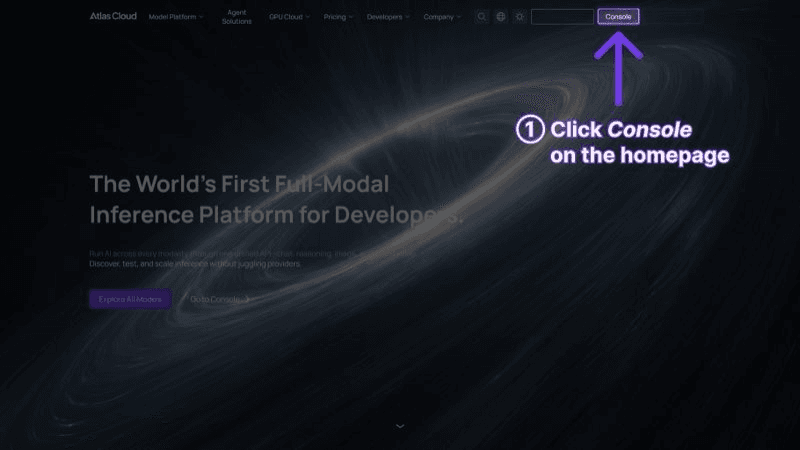
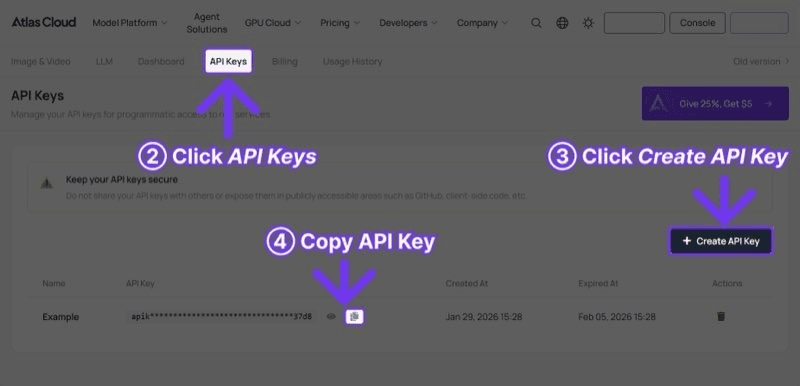
plaintext1```python 2import requests 3 4 5API_KEY = "your-atlas-cloud-api-key" 6BASE_URL = "https://api.atlascloud.ai/api/v1" 7HEADERS = { 8 "Authorization": f"Bearer {API_KEY}", 9 "Content-Type": "application/json" 10} 11```
Flux 2 Pro: Fast, Versatile Generation
plaintext1```python 2# Flux 2 Pro - Fast, versatile 3flux_response = requests.post( 4 f"{BASE_URL}/model/generateImage", 5 headers=HEADERS, 6 json={ 7 "model": "black-forest-labs/flux-2-pro/text-to-image", 8 "prompt": "Professional product photo of wireless headphones on marble surface, studio lighting", 9 "width": 1024, 10 "height": 1024 11 } 12) 13 14 15result = flux_response.json() 16print(f"Image URL: {result['output']['image_url']}") 17```
Imagen 4 Ultra: Maximum Quality
plaintext1```python 2# Imagen 4 Ultra - Highest quality 3imagen_response = requests.post( 4 f"{BASE_URL}/model/generateImage", 5 headers=HEADERS, 6 json={ 7 "model": "google/imagen4-ultra/text-to-image", 8 "prompt": "Photorealistic aerial view of a Norwegian fjord at golden hour, 8K quality", 9 "width": 1024, 10 "height": 1024 11 } 12) 13 14 15result = imagen_response.json() 16print(f"Image URL: {result['output']['image_url']}") 17```
Ideogram v3: Typography and Design
plaintext1```python 2# Ideogram v3 - Best text rendering 3ideogram_response = requests.post( 4 f"{BASE_URL}/model/generateImage", 5 headers=HEADERS, 6 json={ 7 "model": "ideogram/ideogram-v3/text-to-image", 8 "prompt": "Modern poster design with text 'ATLAS CLOUD' in bold typography, gradient background", 9 "width": 1024, 10 "height": 1024 11 } 12) 13 14 15result = ideogram_response.json() 16print(f"Image URL: {result['output']['image_url']}") 17```
Polling for Results
For async models, use the prediction endpoint to poll for status:
plaintext1```python 2import time 3 4 5request_id = result["request_id"] 6 7 8while True: 9 status = requests.get( 10 f"{BASE_URL}/model/prediction/{request_id}/get", 11 headers={"Authorization": f"Bearer {API_KEY}"} 12 ).json() 13 14 15 if status["status"] == "completed": 16 print(f"Image URL: {status['output']['image_url']}") 17 break 18 elif status["status"] == "failed": 19 print(f"Generation failed: {status.get('error', 'Unknown error')}") 20 break 21 22 23 time.sleep(2) 24```
Or users can interactively try all three models on the Atlas Cloud Models page before writing code.
Which Model Should Teams Choose?
Selecting the most appropriate image API for your project can be challenging, as each one has its own set of strengths and weaknesses. Here is a simple decision tree to help you make the right choice.
Choose Flux 2 Pro if:
- Speed is the top priority and images need to be generated in under 5 seconds.
- The workflow involves high-volume batch generation where cost-per-image matters most.
- The content spans multiple visual styles and no single specialty dominates.
- The application requires near-real-time image generation for user-facing features.
Choose Imagen 4 Ultra if:
- Photorealistic quality is the primary requirement and the image will be scrutinized closely.
- The content involves nature, architecture, portraits, or any subject where lighting and texture detail are critical.
- The brand or product demands premium visual quality and the per-image cost is justified.
- Generation speed of 8 seconds is acceptable for the given use case.
Choose Ideogram v3 if:
- The image must contain readable, accurate text, whether logos, captions, titles, or signage.
- The project is design-centric, involving posters, banners, infographics, or brand materials.
- Typography quality is a non-negotiable requirement that other models cannot reliably deliver.
- The workflow blends visual design with textual elements in a single image.
Use multiple models if:
- Different content types within the same project have different quality requirements. Many teams use the Flux API for bulk content, the Imagen 4 API for hero visuals, and the Ideogram API for anything involving text. Atlas Cloud image generation makes switching between models trivial through the best image API platform available.
Frequently Asked Questions
Do I need separate API keys for each model?
No. Each Atlas Cloud API key has access to all three image generation models, as well as to over 300 other AI models including video generation (Seedance 2.0, Sora 2, Kling 3.0, Veo 3.1), language models, and more. You do not need to have multiple provider accounts.
What resolution should I use?
1024x1024 is the most versatile for typical web and social media use cases and offers the best quality/cost ratio. 2048x2048 is available for all three models and can be used for print-quality/large format display. Resolution above this increases generation time and cost linearly.
How does the $1 free credit work?
When you sign up for an Atlas Cloud account, you get 1worthoffreecreditrightaway.Thiscreditisvalidforanymodelontheplatform.Forimagegeneration,1 worth of free credit right away. This credit is valid for any model on the platform. For image generation, 1worthoffreecreditrightaway.Thiscreditisvalidforanymodelontheplatform.Forimagegeneration,1 will get you 20-30 images, so you have plenty of credit to test out all three models.
Can I use generated images commercially?
Commercial use rights vary by model, as per each model's license. Atlas Cloud has no additional restrictions beyond the model provider's. Please see each model's usage policies in Flux 2 Pro, Imagen 4 Ultra, and Ideogram v3 for details relevant to your use case.
What aspect ratios are supported?
The three models all accept width and height parameters. Typical values are 1024x1024 (1:1), 1024x768 (4:3), 768x1024 (3:4), 1024x576 (16:9), 576x1024 (9:16). The maximum resolution of 2048x2048 can be any aspect ratio that fits within that pixel budget.
How do these models compare to DALL-E and Midjourney?
Flux 2 Pro, Imagen 4 Ultra, and Ideogram v3 are all among the leading-edge, API-accessible image generation models available today. Unlike Midjourney, which interfaces primarily through a Discord bot, all three of these models are accessible through a standard REST API, and are well-suited for automation and product integrations. These models typically offer higher resolutions, faster generation, and more competitive pricing than DALL-E 3.
Get Started
Atlas Cloud image generation offers two routes to help you get started with the AI image generation API:
- Models: Test all three models interactively in the browser. No code required. Useful for prompt experimentation and quality comparison before committing to a specific model.
- API Access: Sign up, grab an API key, and start generating images programmatically. The $1 free credit applies immediately, and there are no minimum commitments or subscription requirements.
────────────────────────────────────────────────────────────