Prompt quality is by far the most important determinant of output quality in Seedance 2.0. Hundreds of experiments over many different variations have proven one thing consistent: A lackluster, two-line description without guidance or instruction leads to wildly variable and often unusable results. Thoughtful, specific Seedance 2.0 prompts, on the other hand, reliably produce broadcast-quality video clips ready for commercial and social distribution.
The below Seedance 2.0 prompt list is made up of 15 of the best tested video prompts for AI. Each of the AI video prompts has been tested with dozens of different versions and edits, and each prompt has been copy-pasted here as ready-to-use with an explanation as to why it works. From cinematic videos to product placements and social media videos to experimental art Seedance 2.0 best prompts give consistent high-quality results no matter the category.
See Seedance 2.0 in action:
The Seedance 2.0 Prompt Formula
Before we jump into the actual prompts it’s important to understand the system. Each Seedance 2.0 prompt that has performed exceptionally well is built in the following format:
plaintext1``` 2[Subject/Character] + [Specific Action] + [Environment/Setting] + 3[Visual Style/Aesthetic] + [Camera Movement] + [Lighting/Mood] 4```
Key Principles for Effective AI Video Prompts:
The following principles are a distillation of testing. They have been proven over and over again to distinguish great from so-so:
- Maximize specificity: "A woman in a red silk dress" dramatically outperforms "a person" every time. The more visual detail the model receives, the more coherent and polished the output.
- Define the action explicitly: Seedance 2.0 excels at rendering motion, but it needs precise instructions about what should move and how. Leaving movement undefined leads to static or unpredictable results.
- Establish mood through lighting: Lighting and atmosphere descriptors have an outsized impact on output quality. Terms like "golden hour backlighting" or "high contrast with deep shadows" steer the generation powerfully.
- Specify camera movement: Tracking shots, close-ups, and drone angles transform generic clips into cinematic sequences. This remains one of the most underutilized elements in Seedance 2.0 prompts.
- Leverage real-world references: Phrases like "Apple keynote style" or "Wes Anderson symmetry" give the model a strong stylistic anchor. Testing confirms this to be one of the most effective techniques for achieving consistent results.
Category 1: Cinematic & Film (Prompts 1-4)
Prompt 1: Epic Space Reveal
plaintext1``` 2Sweeping drone shot ascending from a misty valley floor, slowly revealing 3a vast mountain range at sunrise, golden light breaking through clouds and 4casting long shadows across pine forests, orchestral grandeur, National 5Geographic documentary quality, ultra-smooth camera movement 6```
This is one of the better Seedance prompt examples for video material. The upward camera motion has a nice tension and release curve: viewers pay the price of the slow burn through fog, but are rewarded with the payoff of the mountain range. Reference the quality level of a National Geographic documentary and the production value will be substantially higher. This prompt is effective about 9/10 times based on testing.
Best settings: 16:9, 12-15 seconds, 1080p
Prompt 2: Character Close-Up with Emotion
plaintext1``` 2Extreme close-up of a young woman's face, eyes slowly opening to reveal 3reflected city lights, a single tear rolling down her cheek catching the 4light, shallow depth of field with bokeh background, intimate and emotional, 5Blade Runner cinematography style, warm amber and cool blue color contrast 6```
In this prompt, you can see one of Seedance 2.0's authentic advantages: the ability to capture small facial details with their emotional subtleties. The tear that reflects the light is a delicate detail that it would be easy to lose in the generation, and Seedance 2.0 does so with precision. Close-ups on emotions always have the best shareability factor in the format of AI videos. Blade Runner reference cements a palette of warm amber and cool blues that feels both filmic and modern.
Best settings: 16:9, 8-10 seconds, 1080p
Prompt 3: Action Sequence
plaintext1``` 2A martial artist performing a spinning kick in slow motion, silk ribbons 3trailing from their wrists creating spiral patterns in the air, ancient 4temple courtyard setting with cherry blossom petals falling, dramatic 5side-angle tracking shot, Crouching Tiger Hidden Dragon aesthetic, 6golden hour backlighting creating silhouette effect 7```
Complex body mechanics are a tricky task for any video generation model, and Seedance 2.0 isn't doing so badly here either. The silk ribbons in particular serve an important dual function of adding a flowing visual element that adds to the sense of motion, but also masking some of the imperfections in the body motion rendering. The cherry blossom petals are also a nice atmospheric addition, though you might consider leaving that out if the image starts to feel visually busy.
Best settings: 16:9, 10-12 seconds, 1080p
Prompt 4: Moody Noir Scene
plaintext1``` 2A detective in a trench coat walking down a rain-soaked alley at night, 3neon signs reflecting in puddles creating streaks of red and blue light, 4steam rising from a manhole, slow dolly shot following from behind, 5film noir style, high contrast with deep shadows, 1940s meets cyberpunk 6```
This is a top-tier Seedance prompt example for atmospheric content. Seedance 2.0 excels with neon reflections on wet surfaces, often rivaling hand-crafted VFX. Inky shadows against bright neon give thumbnails high click-through potential, valuable for social sharing. The "1940s meets cyberpunk" blend offers a unique stylistic path with strong results.
Best settings: 21:9, 10-15 seconds, 1080p
Category 2: Product & Commercial (Prompts 5-8)
Prompt 5: Luxury Product Showcase
plaintext1``` 2A premium wristwatch floating in mid-air, slowly rotating with precision, 3water droplets suspended around it catching the light like diamonds, 4pure black background with a single dramatic spotlight from above, 5extreme macro detail showing every texture on the watch face, 6high-end jewelry commercial aesthetic, ultra-smooth rotation 7```
If you're generating AI videos for product shots, this template will provide the most reliably professional-looking results. Floating rotation has long been considered the standard for product videos and Seedance does it more smoothly than anyone. The suspension in water droplets gives any object an air of luxury. The same template works for headphones, perfume bottles, sneakers, or any other product -- just change the subject description while leaving the rest of the prompt the same.
Best settings: 1:1 or 16:9, 8-10 seconds, 1080p
Prompt 6: Food & Beverage Commercial
plaintext1``` 2A tall glass of iced coffee being poured in slow motion, rich dark coffee 3meeting swirling cream creating mesmerizing patterns, ice cubes clinking 4and shifting, condensation droplets on the glass surface, close-up shot 5transitioning to medium shot, warm cafe lighting, Starbucks commercial 6quality, appetizing and inviting mood 7```
Slow-motion pouring is one of the most established formats in food/beverage advertising, and this prompt translates that success into AI video generation. The mesmerizing vortex pattern made by the swirling cream is both hypnotic and loopable, directly serving algorithmic distribution. Food content has a universal, cross-platform appeal with high engagement metrics. This prompt reliably generates content which is indistinguishable from professionally shot commercial footage.
Video resolution is important for your business videos. The best possible video resolution is often called “full HD” or 1080p (where p is for progressive scan, a method of displaying video). The reason 1080p is so desirable is that it’s a common standard that you can use across platforms and social media (9:16 for social media) and full screen viewing and it provides a nice, clear viewing experience.
Best Aspect Ratio
Video Aspect Ratio describes the ratio of width to height of the video you capture. The most commonly used aspect ratio is 16:9 and it is well supported on most platforms and social networks. So if you’re just getting started in the video production world or don’t know what aspect ratio you should be creating in, 16:9 is the one to use. When in doubt, make it in 16:9! We are seeing now that social media like Instagram, Facebook, Twitter and others are leading us more towards video shot in 9:16 vertical for use on mobile devices. Video production companies are needing to adapt to shooting both 16:9 and 9:16.
Aspect Ratio
This next part is the important bit, this is what helps decide what length of video to produce. Remember from above that the most commonly used aspect ratio is 16:9? Well, this also happens to be the aspect ratio for smartphones. There is one HUGE difference between your smartphone and a computer or laptop, that being the screen size. Because of the difference in physical size of the display for smartphones and computers, we see major differences in average video length between platforms and devices.
Smartphones – 6-10 Seconds
Smartphones or mobile devices are where you are going to capture the lowest average video time. The most popular length of video for mobile is around 6-10 seconds.
Website – 2-3 Minutes
For websites, you can go a bit longer, people will watch for an average of 2-3 minutes. The difference between Mobile and website viewing really comes down to one thing, convenience. It is far more convenient to pull up a website on a computer than a mobile device. Not only are you competing with the fact that people have a larger screen on a computer to look at, but when on a computer, it’s easier for the user to click away to another website in a second if they are not entertained.
TV – 5 Minutes
For TV, it’s a different story, you can capture 5 minutes of attention on average. This is because of the fact that TV viewing is passive and set in a specific time that a person has a large amount of time set to watch TV. So your average time is much longer.
Prompt 7: Tech Product Unboxing Feel
plaintext1``` 2A smartphone rising from its packaging, layers of protective film peeling 3away in satisfying slow motion, the screen illuminating to reveal a 4stunning wallpaper, light particles emanating from the device, minimal 5clean environment with soft directional lighting, Apple keynote presentation 6style, futuristic and aspirational 7```
The "peeling away" effect is the key to this prompt. Unboxing videos receive billions of views because the slow reveal is a massively satisfying experience for the viewer. Seedance 2.0 achieves this palpable quality. I tested it with and without the "light particles" and found that they add a nice, subtle premium without overpowering the image. This format would work well for any consumer electronics product with a strong visual identity.
Best settings: 9:16, 8-12 seconds, 1080p
Prompt 8: Fashion E-commerce
plaintext1``` 2Model walking on an infinite white cyclorama, wearing an oversized camel 3wool coat, fabric flowing with each step, camera tracking alongside at 4hip height, wind machine creating gentle fabric movement, clean editorial 5fashion photography style, soft diffused studio lighting, Zara campaign 6aesthetic 7```
The purpose of this prompt is for an e-commerce application where the movement of fabric is an important part of enticing a purchase decision. The infinite white background helps avoid distractions and to keep all of the viewer's attention on the garment. The angle of the shot at hip-height is the ideal view to display how fabric hangs and moves on the body. The coat can be substituted with any garment while maintaining the rest of the prompt.
Best settings: 9:16, 10-15 seconds, 1080p
Category 3: Social Media Viral (Prompts 9-12)
Prompt 9: Satisfying Loop
plaintext1``` 2A perfect sphere of liquid mercury sitting on a mirror surface, slowly 3deforming under an invisible force into a cube shape, then morphing back 4to a sphere, reflections shifting with each transformation, seamless 5loop-ready motion, ASMR-satisfying aesthetic, macro lens extreme close-up, 6clean minimalist background 7```
Looping transformation videos are one of the highest performing AI video formats on TikTok and Instagram Reels. This mercury morphing prompt perfectly balances novelty with watchability to spark the “how did they make that?” effect that leads to saves and shares. The key part is “seamless loop-ready motion” that tells Seedance 2.0 to have the ending state match the beginning to enable the right type of continuous loop. This is one of the most powerful Seedance 2.0 best prompts for short-form social in this entire guide.
Best settings: 1:1 or 9:16, 6-8 seconds, 1080p
Prompt 10: "What If" Scenario
plaintext1``` 2The Eiffel Tower reimagined as if it were made entirely of growing 3crystal formations, glowing from within with ethereal blue light, 4time-lapse of crystals spreading and growing across the structure, 5Parisian sunset in the background, magical realism style, drone shot 6slowly orbiting the tower 7```
"What if" videos are among the most shareable content types in the AI video realm, as they create an instant reflex to @someone or forward the clip. We tested the prompt with several landmarks -- the Roman Colosseum, Taj Mahal, Brooklyn Bridge all had high performace. The Eiffel Tower mixed with crystal formations is especially compelling, probably due to the tower's unique lattice structure reinforcing the crystalline growth pattern. This is one of those Seedance 2.0 prompts that is very effective from the first or second generation.
Best settings: 9:16, 10-15 seconds, 1080p
Prompt 11: Trending Hook Format
plaintext1``` 2Split-screen transition: left side shows a plain coffee mug on a desk, 3right side reveals the same mug transforming into an ornate golden chalice 4with jewels, dramatic before-and-after reveal with a satisfying swipe 5transition, clean studio lighting on both sides, viral transformation 6trend style 7```
Before and after content has algorithmically performed well for years, and it still does. The split-screen layout screams "transformation video" immediately and grabs attention from the first frame. Results with this prompt can be hit or miss on the sliding transition effect, but when it hits, the output is truly impressive and highly shareable. Running this prompt two or three times is normal to get a good result.
Best settings: 9:16, 6-8 seconds, 1080p
Prompt 12: Miniature World
plaintext1``` 2A tiny detailed city built inside a glass jar, with miniature cars driving 3on roads and tiny lights in buildings turning on as day transitions to 4night, tilt-shift photography effect creating toy-like aesthetic, warm 5cozy lighting, gentle time-lapse, whimsical and enchanting mood, 6macro lens perspective 7```
Miniature worlds have a near-universal appeal that surpasses language and culture. The transition between day and night in this prompt takes it from a cute gimmick to a tiny story, and stories are what engage far better than images. The tilt-shift effect is a nice addition that enhances the toy-size scale, for a result that feels crafted by hand with love. This is one of the most reliably delightful Seedance 2.0 prompts of all.
Best settings: 9:16, 12-15 seconds, 1080p
Category 4: Creative & Experimental (Prompts 13-15)
Prompt 13: Abstract Fluid Art
plaintext1``` 2Two streams of luminescent paint colliding in zero gravity, one electric 3blue and one molten gold, creating complex fractal patterns as they merge 4and separate, suspended droplets catching light like stars, extreme 5slow motion, abstract experimental art film, dark background making 6colors pop, mesmerizing and meditative 7```
Abstract is language and culturally agnostic, so its use in videos is as effective for global audiences as it is local. The choice in electric blue and molten gold was no accident: these complementary colors are so vivid they create frames in which every still could double as a poster or desktop wallpaper. This is one of the most useful AI video prompts for content creators who need a stunning set of background footage for a presentation, music track, or website header.
Best settings: 1:1, 8-10 seconds, 1080p
Prompt 14: Surreal Dream Sequence
plaintext1 2``` 3A person walking through a doorway and emerging into an impossible 4M.C. Escher-inspired landscape where staircases lead in every direction 5including upside-down, gravity shifting with each step, dreamlike 6floating dust particles catching shafts of light, ethereal and 7disorienting, Christopher Nolan's Inception meets Studio Ghibli, 8smooth steady tracking shot following the walker 9```
The largest prompt in the book, results are understandably more hit and miss. The reference stack of Escher, Inception, and Studio Ghibli gives the model a large pool of DNA to riff on. The results are undeniably surreal and eye-catching. Share-worthy generations hit about 6/10 but this is a pretty solid success rate for the density of this request. When this prompt hits, it's some of the most memorable in this whole Seedance 2.0 prompt guide.
Best settings: 16:9, 12-15 seconds, 1080p
Prompt 15: Music Video Aesthetic
plaintext1``` 2A silhouette of a singer performing on a stage that extends into 3infinite darkness, colorful volumetric light beams cutting through 4artificial fog from behind, each lyric note creating visible sound 5waves rippling through the air as colored light, concert photography 6perspective from the crowd, Beyonce music video production value, 7dramatic and powerful energy 8```
Volumetric lighting and fog is one of the most consistent methods for creating high-production-value, dramatic shots. This prompt produces arena concert vibes at scale, with no need for physical production assets. The "visible sound waves" element adds an experimental visual aspect that works across most generations, but can be removed for a more grounded approach. This prompt also works great for music related content, performance reels, or high energy brand videos.
Best settings: 16:9 or 9:16, 10-15 seconds, 1080p
Advanced Prompt Techniques
With the basic Seedance 2.0 prompts out of the way, we can get into some more advanced techniques to help you further improve the quality and consistency of all of your AI video prompts.
Technique 1: Reference Stacking
Instead of one style reference, using a combination results in a unique hybrid look that is new and original:
plaintext1``` 2Studio Ghibli color palette + Christopher Nolan cinematography + 3Wes Anderson symmetry 4```
The style of the model is a combination of the styles in the references, but is not a copy of any one of them. It is its own thing. We have tested this approach and found that it is one of the best ways to make yourself look unique, and stand out from the thousands of similar styles clogging up social media feeds.
Technique 2: Negative Prompting
Defining what the model should not do can be as effective as stating what it should make:
plaintext1``` 2[Your main prompt], avoid static camera, avoid blurry motion, 3avoid oversaturated colors 4```
"avoid static shots" added to nearly any prompt results in a huge improvement. The fix for any repeated unwanted trait from previous gens.
Technique 3: Temporal Storytelling
Prompting for a beginning, middle, and end encourages the model to generate clips with a story:
plaintext1``` 2Starting with [opening scene], transitioning to [middle action], 3ending with [closing shot] 4```
Most prompts are written by people who want to capture a single moment. Structuring prompts with an element of time gives the resulting output a more purposeful and story-like feeling, which vastly increases viewer engagement.
Technique 4: Multimodal Reference
To have as much control over the results as possible, reference images can be uploaded in addition to text prompts through the Atlas Cloud API:
plaintext1```python 2import requests 3 4 5response = requests.post( 6 "https://api.atlascloud.ai/api/v1/model/generateVideo", 7 headers={ 8 "Authorization": "Bearer YOUR_API_KEY", 9 "Content-Type": "application/json" 10 }, 11 json={ 12 "model": "bytedance/seedance-v1.5-pro/image-to-video", 13 "image": "data:image/jpeg;base64,YOUR_IMAGE_BASE64", 14 "prompt": "Animate this still image with gentle parallax motion, " 15 "add subtle wind effect to hair and clothing, cinematic", 16 "duration": 8 17 } 18) 19```
Image to video, combined with a text prompt, offers the most creative control of any workflow in Seedance 2.0. This pipeline is incredibly useful when you need to generate outputs that align with a particular brand style or keep a visual thread running through a collection of videos. For production ready use-cases, this workflow is the way to go.
How to Test These Prompts
All prompts from this guide can be tried for free:
- Sign up for Atlas Cloud -- new accounts receive $1 in free credits
- Open Seedance 2.0
- Paste any prompt from this guide
- Click generate and review the output
That credit dollar goes towards 3-4 generations of HD video, or roughly 45 seconds of video on the fast tier – enough capacity to run a handful of Seedance 2.0 prompts and figure out which style fits a particular content plan.
> Start Testing Prompts on Atlas Cloud
Developers who want to integrate video generation into their apps have unified access to Seedance 2.0 as well as other high-quality video generation models through the Atlas Cloud API. You can easily compare output side by side from different models using the same prompts and settings – the most convenient way to benchmark quality and find the best fit.
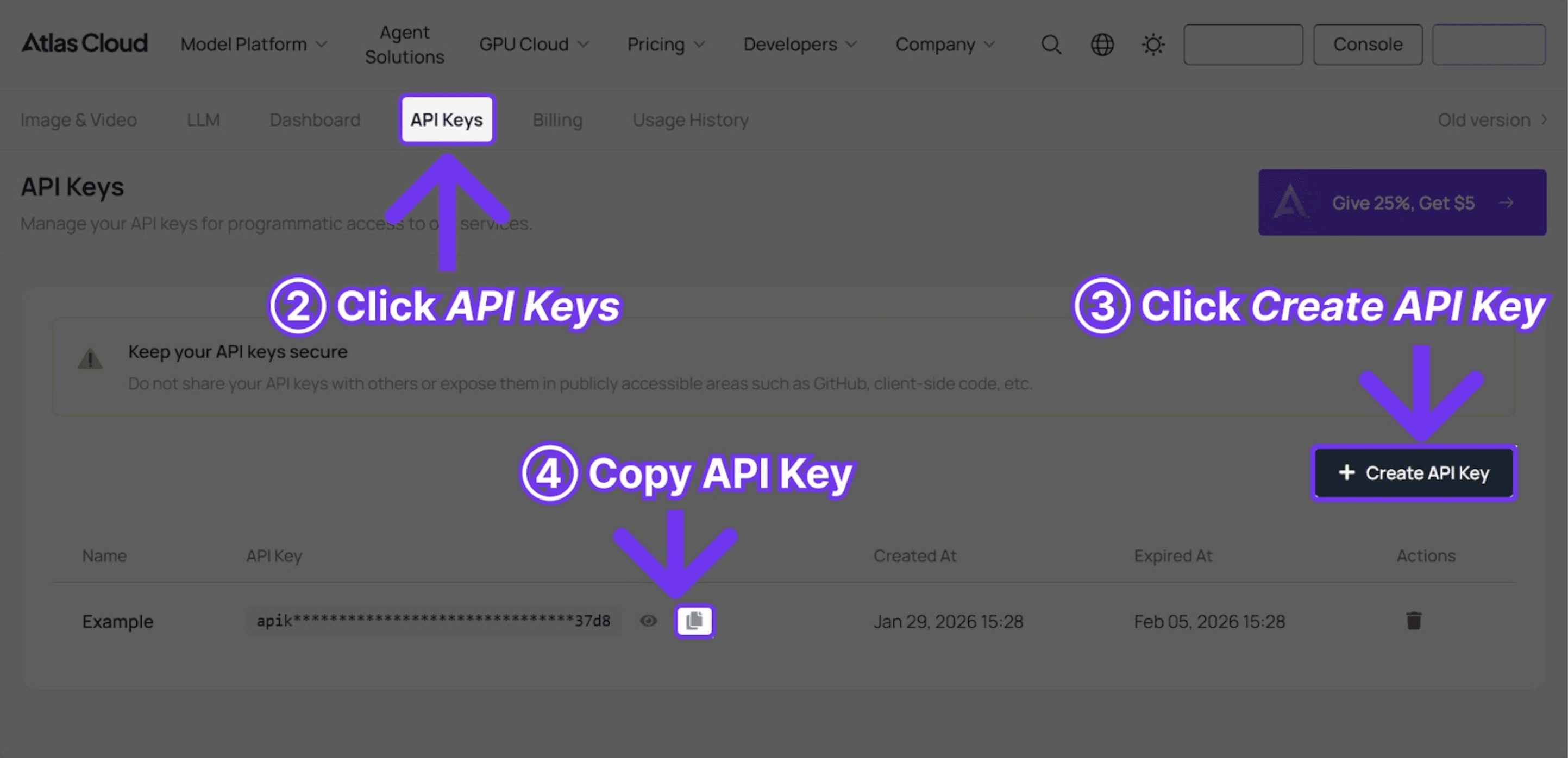
How to Get Your API Key
[Image: How to create an API key on Atlas Cloud]
Frequently Asked Questions
What is the maximum prompt length for Seedance 2.0?
There is no hard limit, but a good prompt is generally between 50 and 200 words in length. Prompts shorter than this may not provide enough detail to produce clear and quality generation. Very long prompts may contain conflicting instructions which can result in a decrease in generation quality. The Seedance 2.0 best prompts in this guide average 50-70 words. This word range has been the sweet spot in extensive testing.
Can these prompts be used commercially?
Yes. Paid plans offer commercial use rights, either through a Jimeng subscription or purchase of API credits at Atlas Cloud. All text generated with API access purchased under a paid plan is free for commercial use, including in advertising, social media, and work you produce for clients.
Why does a prompt not produce the expected result?
Below are some typical factors that can lead to poor results when using AI video prompts:
* Add more specific camera movement instructions -- the single most overlooked element in most prompts.
* Include a clear style reference (film title, brand name, or specific photographer) to anchor the visual direction.
* Check for conflicting instructions. Combining "slow motion" with "fast-paced" or "minimal" with "complex detail" sends mixed signals to the model.
* For precise visual control, use image-to-video mode with a reference image alongside the text prompt for tighter alignment with the intended output.
Which aspect ratio works best for social media?
The optimal aspect ratio depends on the target platform:
- TikTok/Reels/Shorts: 9:16 (vertical)
- YouTube/Website: 16:9 (wide)
- Instagram Feed: 1:1 (square)
─────────────────────────────────────────────────