Anyone who has made a product promo video knows how difficult it is to achieve that Apple-level silky texture. You need to be proficient in After Effects, you need to adjust Bézier curves to simulate physical damping, and you need to spend thousands of dollars hiring a professional Motion Designer.
But the emergence of Seedance 2.0 is breaking this industry barrier.
Expected to launch on Atlas Cloud on February 24, Seedance 2.0 is no longer an AI that only generates "bizarre dreams," but a multi-modal director that understands "design language." Today, we will test how to use it to directly generate high-end UI demo videos.
Core Breakthrough: Multi-modal Input, Redefining "Controllability"
Most models like Sora 2 or VEO 3.1 on the market are mostly "Text-to-Video" or "Image-to-Video." Seedance 2.0's killer feature is multi-modal input.
What does this mean? When producing a product promo, you can truly act as a "director," controlling every detail:
- Image (Visual): You upload a high-fidelity UI design draft.
- Video (Motion Reference): You upload a screen recording of a mouse trajectory or an existing Apple ad clip.
- Audio (Auditory): You upload keyboard typing sounds or BGM.
- Text (Instruction): You tell it to "keep the UI pixel-perfect and have the cursor follow the mouse path to click the button."
Using the multi-image reference capability, we threw 6 static webpage screenshots of Atlas Cloud into the model. The next second, the originally static interface turned into an "Apple-level" quality SaaS product promo.
Cinematic SaaS product launch video with premium Apple-style UI aesthetics. Multi-camera angles, interactive animations, and seamless multi-shot transitions.
(0-2s) Scene 1: Starts with a solid black background, showing the white "Atlas Cloud" logo. The camera moves in slowly, and the logo dissolves into light particles to complete the transition.
(2-5s) Scene 2: Enters the Hero area. The background features a subtle, shimmering aurora effect (slow motion). The text "Seedance 2.0 is Coming" appears letter by letter with a crisp typewriter animation. The mouse cursor slides in smoothly with a premium sense of damping, clicks the "Join the waitlist" button, triggering a subtle glass ripple interaction effect.
(5-8s) Scene 3: Transitions to the "Playground" interface. Clean white UI. The cursor drags an image into the upload box, clicks "Generate," and the center logo transforms into a fluid pulse loading animation.
(8-11s) Scene 4: Cuts/transitions to the API code interface. The camera moves down, and lines of code scroll up. Syntax highlighting (neon blue and green) emits a soft glow. Clicking the "copy" icon displays a "Copied" tooltip bubble.
(11-13s) Scene 5: Feature grid emerges. Key data executes a "number scroll" animation: counting from 0 and quickly scrolling to the final number. Icons have a slight floating breathing effect.
(13-15s) Scene 6: Final cut to the "Atlas Cloud" ending screen. The text "Live on Feb 24" fades in elegantly with a soft halo.
Style: High-end motion graphics, glassmorphism, 60fps smoothness, depth of field, sharp text rendering, commercial advertisement lighting.
Visual Aesthetics: One Image, One Sentence, Generate "Apple-Style" High-End UI Motion
Why do Apple's videos look premium? The core lies in materials and UI motion.
Seedance 2.0's understanding of ray tracing and UI motion has reached an astonishing height. You only need to upload a flat design image and enter a prompt:
Create a motion graphics style advertisement based on this image, using multi-camera angles—for example, close-up shots highlighting glass reflections, various click interaction animations, and a focus on this sleek "glassmorphism" design language. End with the logo: Atlas Cloud._
The AI automatically identifies UI layers, adds a frosted glass translucency effect to your cards, adds a faint inner glow to buttons, and can even simulate the streamer effect as a light source sweeps across the screen edge. What used to take hours to render in OC is now a one-click output for APP promos.
Zero-Material Start: Creating Something from Nothing
What if you don't even have a UI design and only have a "world-changing" idea? Seedance 2.0 has deeply studied the world's top UI design languages. It "understands" what glassmorphism is, what damping is, and what minimalism is.
You don't need a sketch; you just need to enter a prompt, and it can generate a high-quality "Apple-style" concept video out of thin air.
A 15-second high-end motion graphics ad showcasing the "Atlas Cloud" SaaS dashboard. The style is premium dark mode glassmorphism with vibrant purple accents. The video uses multiple camera angles and seamless transitions.
(0-3s) Extreme close-up shot: The camera slowly sweeps across the polished beveled edge of a translucent glass card. We can see realistic, shimmering refractions and reflections created by the purple and blue gradient environment light on the smooth surface.
(3-8s) Medium shot, dynamic interaction: The complete dashboard UI assembles smoothly with a bouncy damping feel. A stylish cursor clicks the purple "Top Up" button; the button presses inward, creating a satisfying physical ripple effect and sending a soft light wave to adjacent glass elements.
(8-12s) Data close-up: Focuses on the "API Usage" spline chart. The purple curve animates upward rapidly with a glowing trail, while a semi-transparent globe icon nearby rotates slowly, emitting subtle data particle streams.
(12-15s) Final transition: All UI elements morph and merge toward the center, dissolving into a beam of light that forms the clean white "Atlas Cloud" logo on a deep purple background.
AI directly generated a high-definition UI motion video. The cursor is moving, the data is jumping, and there is real light refraction at the glass edges. This is not just video generation; it is a revolution in Generative UI.
How to Use Seedance 2.0 on Atlas Cloud
Method 1: Use Directly on the Platform
Method 2: Use via API
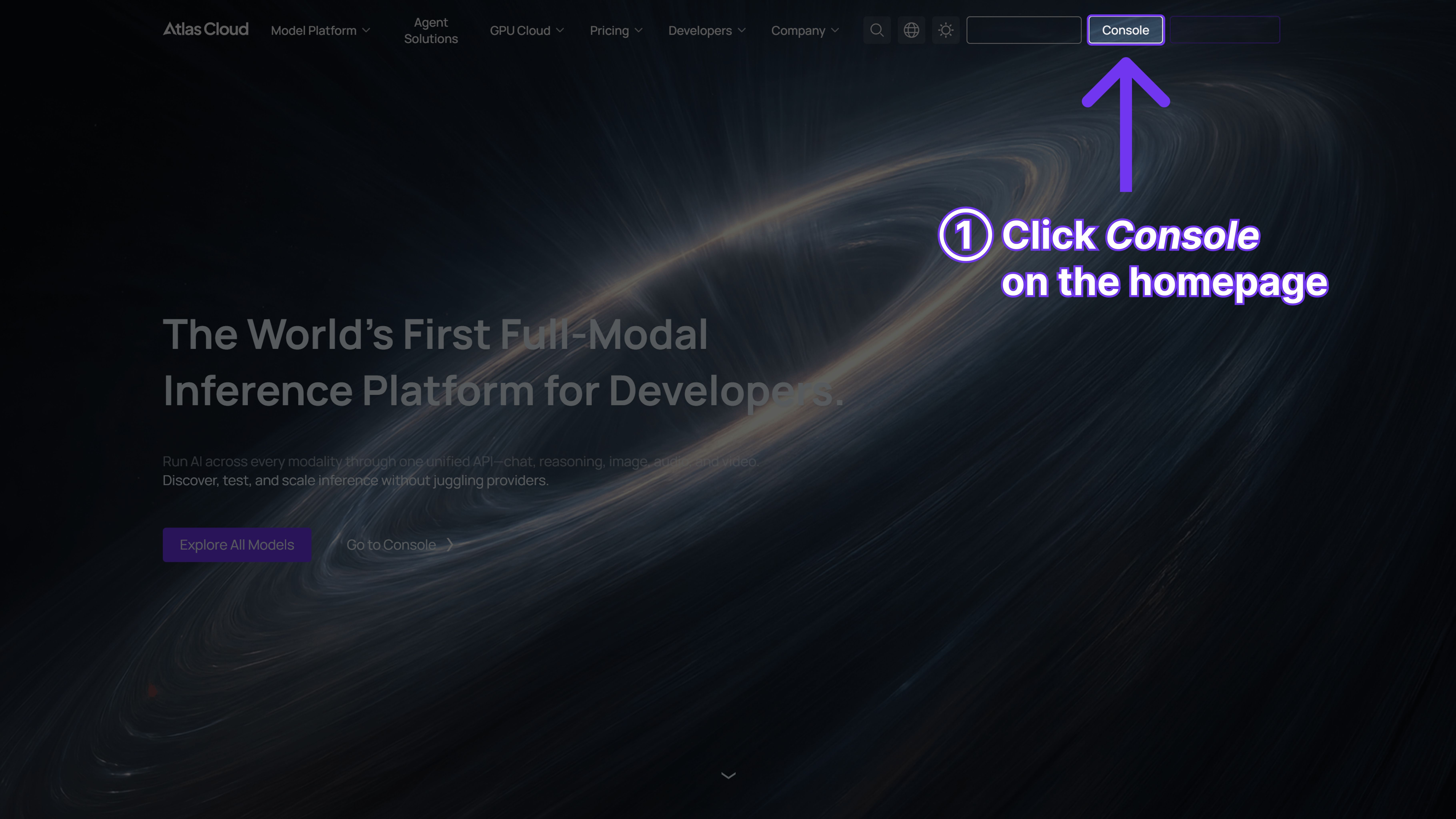
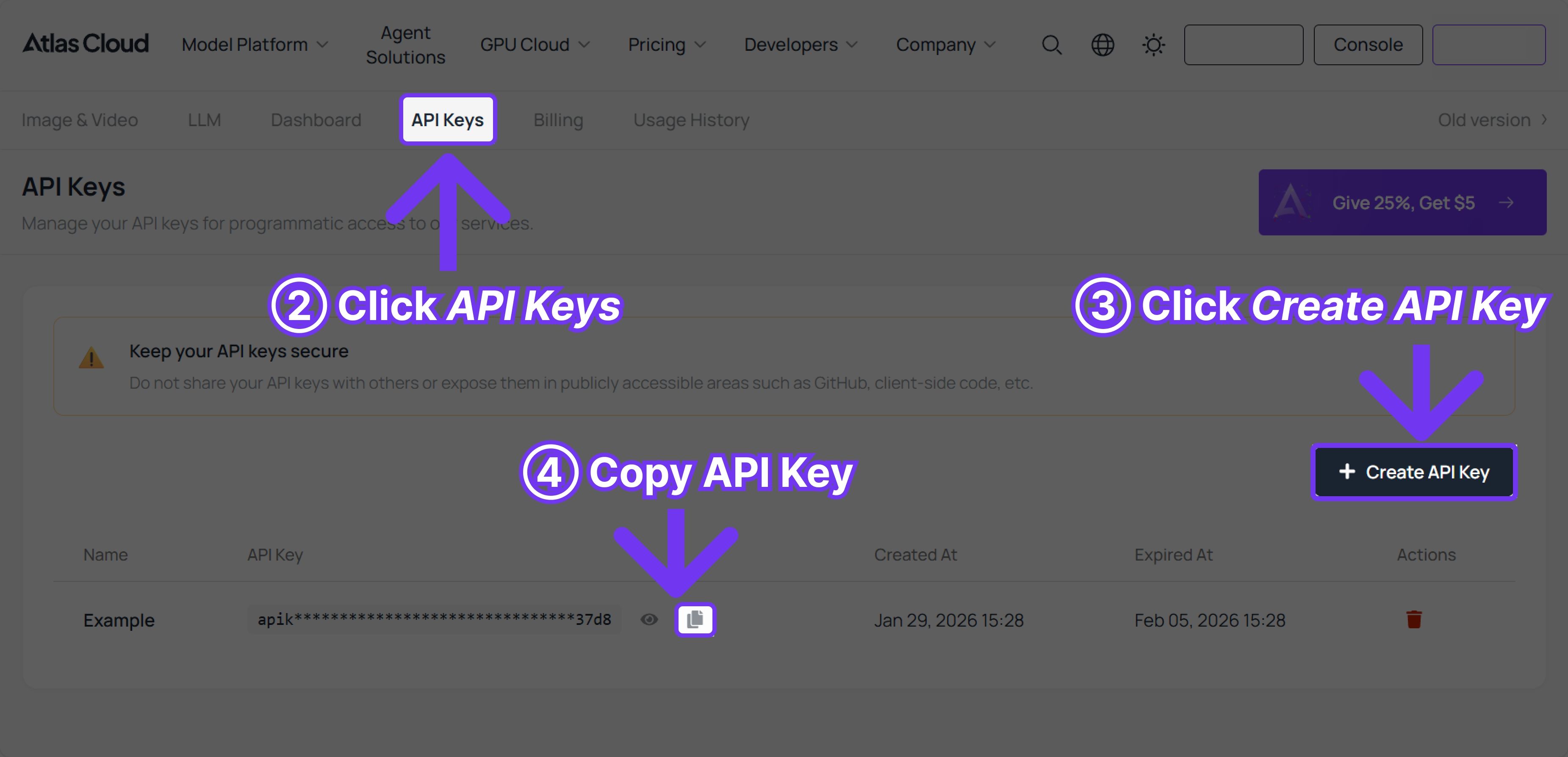
Step 1: Get Your API Key
Create and paste your API key in the Console
Step 2: Consult API Documentation
Please check the endpoint, request parameters, and authentication methods in our API Docs.
Step 3: Make Your First Request (Python Example)
Taking Seedance 1.5 Pro (image-to-video) as an example:
plaintext1import requests 2import time 3 4# Step 1: Start video generation 5generate_url = "https://api.atlascloud.ai/api/v1/model/generateVideo" 6headers = { 7 "Content-Type": "application/json", 8 "Authorization": "Bearer $ATLASCLOUD_API_KEY" 9} 10data = { 11 "model": "bytedance/seedance-v1.5-pro/image-to-video", 12 "aspect_ratio": "16:9", 13 "camera_fixed": False, 14 "duration": 5, 15 "generate_audio": True, 16 "image": "https://static.atlascloud.ai/media/images/06a309ac0adecd3eaa6eee04213e9c69.png", 17 "last_image": "example_value", 18 "prompt": "Use the provided image as the first frame.\nOn a quiet residential street in a summer afternoon, a young girl in high-quality Japanese anime style slowly walks forward.\nHer steps are natural and light, with her arms gently swinging in rhythm with her walk. Her body movement remains stable and well-balanced.\nAs she walks, her expression gradually softens into a gentle, warm smile. The corners of her mouth lift slightly, and her eyes look calm and bright.\nA soft breeze moves her short hair and headband, with individual strands subtly flowing. Her clothes show slight natural motion from the wind.\nSunlight comes from the upper side, creating soft highlights and natural shadows on her face and body.\nBackground trees sway gently, and distant clouds drift slowly, enhancing the peaceful summer atmosphere.\nThe camera stays at a medium to medium-close distance, smoothly tracking forward with cinematic motion, stable and controlled.\nHigh-quality Japanese hand-drawn animation style, clean linework, warm natural colors, smooth frame rate, consistent character proportions.\nThe mood is calm, youthful, and healing, like a slice-of-life moment from an animated film.", 19 "resolution": "720p", 20 "seed": -1 21} 22 23generate_response = requests.post(generate_url, headers=headers, json=data) 24generate_result = generate_response.json() 25prediction_id = generate_result["data"]["id"] 26 27# Step 2: Poll for result 28poll_url = f"https://api.atlascloud.ai/api/v1/model/prediction/{prediction_id}" 29 30def check_status(): 31 while True: 32 response = requests.get(poll_url, headers={"Authorization": "Bearer $ATLASCLOUD_API_KEY"}) 33 result = response.json() 34 35 if result["data"]["status"] in ["completed", "succeeded"]: 36 print("Generated video:", result["data"]["outputs"][0]) 37 return result["data"]["outputs"][0] 38 elif result["data"]["status"] == "failed": 39 raise Exception(result["data"]["error"] or "Generation failed") 40 else: 41 # Still processing, wait 2 seconds 42 time.sleep(2) 43 44video_url = check_status()





