Disclosure: This article is published by Atlas Cloud. We’ve tried our best to give you an honest, real-world comparison—pulling from Fal AI’s official docs, conversations we’ve seen on Reddit, Trustpilot, and Discord, plus our own experience with the platform. At the end of the day, we’d say go check out both for yourself and see which one feels right for you.
1. Quick Comparison: Atlas Cloud vs Fal AI
| Feature | Atlas Cloud | Fal AI |
| Model Library | 350+ production-ready models | 600–1,000+ models |
| Modalities | Text, Image, Video, Audio (full multimodal) | Image, Video, Audio (no native LLM chat) |
| New Model Access | ✅ Day 0–1 support | ⚠️ Varies by model |
| Pricing Model | Token / Hourly / Reserved / Lease-to-own | Per-output / Per-GPU-hour |
| Pricing Transparency | ✅ Clear, predictable | ⚠️ Complex, pixel-based billing |
| Cost vs. Fal | Up to 30–50% lower total cost | Baseline |
| Deployment Options | Serverless, on-demand, reserved, bare metal, VPC, hybrid | Serverless, shared clusters, custom clusters |
| Private Deployment | ✅ VPC / Colo / Hybrid | ❌ Not available |
| Custom Model Deploy | ✅ Full SSH + any framework | ⚠️ Limited (LoRA fine-tuning only) |
| Training | ✅ Training + Inference on same platform | ⚠️ LoRA fine-tuning only |
| Security | ✅ SOC 2 Type I & II + HIPAA | ✅ SOC 2 only |
| Data Privacy | ✅ Complete data control | ⚠️ Images persist after "deletion" (reported) |
| Enterprise Support | ✅ Dedicated team, SLA, migration services | ⚠️ 24/7 claimed; users report poor responsiveness |
| Integration | REST API, Python/JS SDK, n8n, ComfyUI | REST API, Python/JS/Swift SDK, n8n, ComfyUI |
| Best For | Enterprise teams, regulated industries, scale optimization | Developers wanting fast access to diffusion models |
2. What’s the deal with Fal AI—and why are people starting to check out other options?

Put simply, Fal AI is a generative media platform built for developers—it gives you API access to a huge library of models, somewhere between 600 and 1,000+, covering image, video, audio, and 3D generation. What makes it stand out is its serverless inference engine, which Fal claims runs 4 to 10 times faster than other platforms, especially for diffusion models. And they’ve got some serious names on their client list too—Canva, Adobe, Shopify, and Perplexity are all using it.
On paper, Fal AI looks compelling: fast inference, a large model library, flexible GPU options, and multi-language SDK support (Python, JavaScript, Swift). It's valued at over $4 billion and has attracted significant enterprise adoption.
So why are developers searching for alternatives?
But if you dig into what people are actually saying on Reddit, Trustpilot, Discord, and other dev forums, the story feels a little different. One Reddit user in the r/n8n community put it like this:
"Fal's front end is very confusing for beginners… almost no documentation or examples to learn from."
"They charged me 10.66fora2.13−minutevideo.Otherplatformscharge10.66 for a 2.13-minute video. Other platforms charge 10.66fora2.13−minutevideo.Otherplatformscharge0.10/minute."
— Reddit user, r/Freepik_AI
"My API key got compromised, Fal charged me $400, and their support refused any refund saying 'protecting your key is your responsibility.'"
— Trustpilot review, fal.ai
"Charged credits disappeared without explanation. Feels like they just take your money."
— Trustpilot review, fal.ai
That’s not just a few isolated complaints either. From what we’ve seen across reviews, roughly 80% of the feedback on Fal AI leans negative—with recurring themes around confusing billing, spotty customer support, data privacy concerns, and a pretty steep learning curve.
So, if any of that sounds familiar—or if you're just doing your homework before jumping in—this guide is here to help you find an alternative that actually works for you.
3. The Real User Pain Points Behind Fal AI
Before getting into alternatives, it helps to know what's actually bothering you. Because the best swap really depends on what broke down in the first place.
Pain Point 1: Pricing Can Be Hard to Estimate
Fal AI charges based on what you use. Images might be billed per image or per megapixel; video usually goes by the second.
Simple enough, until you're actually trying to budget a project. Resolution matters. So does frame count. Model choice too. None of that is always clear before you hit run—so you sometimes don't know what something cost until it's done.
Small tests? Usually fine. But once you're pushing longer videos or higher volumes through, costs have a way of surprising you.
Pain Point 2: Support Experiences Are Mixed
Support is honestly a mixed bag. Some developers have had no issues at all. Others have posted on forums about billing questions sitting unresolved for longer than expected, or account problems taking a while to sort out.
Hard to say how common it is—but if you're relying on the platform for anything serious, slow support at the wrong moment can cause real headaches.
Pain Point 3: Not the Easiest Platform for Beginners
Fal AI assumes you know your way around an API. There's a lot of configuration involved, and the docs don't always spell out what each setting actually does to your output—or your bill.
Experienced developers usually figure it out after some trial and error. But if you're newer to this space, expect to spend some time just getting oriented before you're actually productive.
Pain Point 4: Enterprise Options Aren't Highly Visible
Fal AI has SOC 2 certification, so there's a security baseline in place.
That said, if your team needs things like private cluster deployments or VPC configurations, you won't find much about that in the public documentation. Companies in regulated industries—healthcare, financial services—often need those specifics before they can even evaluate a platform, and right now that information isn't easy to find.
Pain Point 5: Strong Focus on Media Generation
This is genuinely where Fal AI stands out. Image, video, audio—solid model coverage across the board, and it shows.
What it's not is a full LLM platform. Text generation, chat, that kind of thing—you'll likely need to pull in something else. For media-focused projects it's rarely a dealbreaker, but it's worth knowing going in.
4. Atlas Cloud — Best Fal AI Alternative Overall
Our Pick | Teams that need clear pricing, enterprise-grade compliance, full multimodal support, and scalable GPU infrastructure.
Atlas Cloud is a vertically integrated GPU platform built for AI-native teams. Unlike Fal AI—which is mostly focused on hosted inference for generative media—Atlas gives you the full stack: serverless inference, dedicated GPU clusters, and everything from training to production. Whether you're starting with APIs or need a private enterprise environment, it’s built to scale with you.
Where Atlas Cloud Solves Fal AI's Core Problems
On Pricing: Transparent, Predictable, and More Efficient
Frustrated by Fal AI's complex per-pixel, per-second billing that makes cost estimation nearly impossible before running jobs?
Atlas Cloud offers multiple pricing models you can choose based on your workload:
- Serverless / token-based — pay per API call with clear per-unit rates
- Reserved clusters — commit for volume, reduce per-unit cost significantly
- Lease-to-own — long-term cost optimization for high-volume teams
Across comparable workloads, Atlas Cloud's total cost is estimated at 30–50% lower than Fal AI — driven not just by lower list prices, but by efficient caching, zero idle waste, and pricing models that reward scale.
Note: Exact savings depend on model, output type, and usage volume. Contact Atlas for a custom cost comparison.
On Security and Compliance: SOC 2 + HIPAA, Not Just SOC 2
Fal AI holds SOC 2 certification. Atlas Cloud goes further:
- SOC 2 Type I & II certified
- HIPAA compliant
- Zero-trust architecture
- Private deployment in your VPC, colocation facility, or hybrid environment
- Complete IP and data control — your data never lives in a shared environment unless you choose it
For teams in healthcare, finance, legal, or any regulated industry, this difference is decisive. It's also the answer to Fal's reported data privacy gap: with Atlas Cloud's private deployment, your uploaded data stays in your own environment.
On Model Coverage: True Full-Modal Platform
Fal AI covers generative media well. Atlas Cloud covers the full AI stack:
| Modality | Fal AI | Atlas Cloud |
| Text-to-Image | ✅ | ✅ |
| Image-to-Video | ✅ | ✅ |
| Text-to-Video | ✅ | ✅ |
| Audio / Speech | ✅ | ✅ |
| Text / LLM (Chat) | ❌ | ✅ |
| Custom Fine-tuned Models | ⚠️ LoRA only | ✅ Any model |
Atlas Cloud's 350+ model library includes DeepSeek, Qwen, FLUX, Recraft, and others — with Day 0–1 support for new model releases. Whether you need generative media or conversational AI, you access it through one API key.
On Documentation and Developer Experience
Where Fal has been criticized for confusing documentation and a steep learning curve, Atlas Cloud invests in:
- Clear, step-by-step guides to get you started
- API docs that don’t leave you guessing
- Native SDK support (Python, JavaScript)
- Pre-built integrations with n8n, ComfyUI, and other automation platforms
- A support team that actually responds
Integration is designed to be simple by default:
plaintext1# One-line API integration example 2response = atlas.images.generate( 3 model="flux-dev", 4 prompt="your prompt here" 5)
Most teams complete their initial integration in under 15 minutes.
On Customer Support: Enterprise-Grade, Not Community-Dependent
Unlike Fal AI's support — which Trustpilot reviewers describe as unresponsive to billing disputes and technical issues — Atlas Cloud provides:
- Dedicated customer success team
- Enterprise SLA with uptime guarantees
- Expert AI engineering and MLOps support
- Enterprise migration services for teams moving from existing platforms
- Real escalation paths for billing and technical issues
Atlas Cloud: Honest Limitations
We believe in fair comparisons. Here's where Atlas Cloud is not the right choice:
- If you want the absolute largest pre-hosted model catalog: Fal AI offers 600–1,000+ hosted models including many niche and community models. Atlas focuses on 350+ flagship production-ready models. If you specifically need a long-tail diffusion model that's only available on Fal, Fal may still be the right tool for that specific workflow.
- If you're a solo developer with very small, occasional workloads: The infrastructure flexibility of Atlas Cloud is most valuable when you're thinking about scale, compliance, or cost optimization. For someone running 10 images a week, simplicity matters more than infrastructure depth.
Who Should Choose Atlas Cloud Over Fal AI?
✅ Development teams where billing predictability matters
✅ Companies handling sensitive data that require HIPAA or private deployment
✅ Teams building full-stack AI products that need both generative media and LLM capabilities
✅ Organizations that have experienced Fal AI billing issues and need a platform with stronger financial controls
✅ Enterprises requiring proper SLA, migration support, and dedicated account management
✅ Teams at production scale who want to optimize cost through reserved capacity
→ Start exploring Atlas Cloud: Contact us at [email protected] for a cost comparison against your current Fal AI usage.
5. Atlas Cloud vs Fal AI: Deep Dive Comparison
5.1 Pricing and Cost Efficiency
| Scenario | Fal AI Cost | Atlas Cloud Cost | Savings |
| H100 GPU (hourly) | $1.89/hr | Available with flexible models | Up to 30–50% total |
| H200 GPU (hourly) | $2.10/hr | Competitive rates | — |
| DeepSeek R1 inference | Standard pricing | 30% cheaper than direct | 30%+ |
| Flux image generation | Variable (per-pixel) | From $0.02/image | Predictable |
| High-volume production | Scales linearly | Reserved clusters reduce cost significantly | 40–70% at scale |
The key difference is not just the rate card — it's the pricing model.
Fal's per-pixel, per-second billing is difficult to forecast. One job might cost 0.05,thenextmightcost0.05, the next might cost 0.05,thenextmightcost10 depending on resolution and duration. Atlas Cloud's multiple pricing models — including reserved capacity and lease-to-own — allow teams to match their pricing structure to their usage pattern and dramatically reduce costs as they scale.
5.2 Security and Compliance
| Requirement | Fal AI | Atlas Cloud |
| SOC 2 | ✅ | ✅ (Type I & II) |
| HIPAA | ❌ | ✅ |
| Zero-trust architecture | ⚠️ Not stated | ✅ |
| Private / VPC deployment | ❌ | ✅ |
| On-premises option | ❌ | ✅ |
| Complete data deletion guarantee | ⚠️ Issues reported | ✅ |
| IP and data control | ⚠️ Shared environment | ✅ Full control |
Bottom line: If you're handling regulated data—health records, financial info, legal docs, or user PII—Atlas Cloud is built for that. Fal AI isn't.
5.3 Deployment Flexibility
| Deployment Option | Fal AI | Atlas Cloud |
| Serverless API | ✅ | ✅ |
| Reserved clusters | ✅ Custom quotes | ✅ Self-serve + custom |
| Bare metal | ❌ | ✅ |
| Kubernetes | ❌ | ✅ |
| Slurm | ❌ | ✅ |
| Private VPC deployment | ❌ | ✅ |
| Hybrid / on-prem | ❌ | ✅ |
Fal AI is primarily a serverless inference platform. Atlas Cloud spans the full infrastructure spectrum — from a simple serverless API call to dedicated bare metal for complex training and inference pipelines.
5.4 Model Access and Coverage
| Aspect | Fal AI | Atlas Cloud |
| Total models | 600–1,000+ | 350+ |
| Image generation | ✅ Extensive | ✅ |
| Video generation | ✅ | ✅ |
| Audio / speech | ✅ | ✅ |
| LLM / text | ❌ | ✅ (DeepSeek, Qwen, etc.) |
| Custom model deployment | ⚠️ LoRA fine-tuning | ✅ Any model, any framework |
| New model speed | Varies | Day 0–1 support |
| Training + inference | ⚠️ LoRA only | ✅ Full training pipeline |
The key question to ask: Do you need access to every niche community model ever published, or do you need a curated set of production-grade models plus the ability to deploy your own?
If you're building production AI products — not just experimenting — Atlas Cloud's focused 350+ model library combined with full custom deployment capability is more practical than Fal's sprawling catalog.
5.5 Developer Experience
| Aspect | Fal AI | Atlas Cloud |
| API style | REST + SDK | REST + SDK |
| SDK languages | Python, JS, Swift | Python, JS |
| Documentation quality | ⚠️ "Confusing for beginners" (Reddit) | ✅ Comprehensive |
| Getting started time | ⚠️ Steep learning curve reported | ✅ Under 15 minutes |
| n8n integration | ✅ | ✅ |
| ComfyUI integration | ✅ | ✅ |
| Playground / UI | ✅ Web Playground | ✅ |
| Async / WebSocket support | ✅ | ✅ |
5.6 Enterprise Support
| Support Aspect | Fal AI | Atlas Cloud |
| 24/7 support | ✅ Claimed | ✅ |
| Billing dispute resolution | ⚠️ Multiple negative reports | ✅ Dedicated support |
| Enterprise SLA | ✅ Performance SLA mentioned | ✅ Formal SLA |
| Migration support | ❌ | ✅ Enterprise migration services |
| Dedicated account manager | ⚠️ Enterprise tier | ✅ |
| MLOps engineering support | ❌ | ✅ |
| AI advisory services | ❌ | ✅ |
6. How to Switch from Fal AI to Atlas Cloud
One of the most common reasons developers stay on a platform they're unhappy with is switching anxiety. Here's the reality: migrating from Fal AI to Atlas Cloud is straightforward, especially for API-based inference workloads.
Step 1: Map Your Current Fal Usage (30 minutes)
Before migrating, understand what you're actually using:
- Which models are you calling? (e.g., FLUX, Seedream, Kling, video models)
- Are you using serverless inference or GPU instances?
- What's your average monthly spend and request volume?
- Do you have any custom models or LoRA fine-tunes deployed?
This shapes which Atlas Cloud deployment option is right for you.
Step 2: Create Your Atlas Cloud Account (2 minutes)
- Sign up at atlascloud.ai
- Grab your API key from the dashboard
- No minimum spend or commitment required to start
Step 3: Test Your Primary Workflows (15–30 minutes)
Atlas Cloud's API follows REST conventions compatible with common AI API patterns. For most models, migration is an endpoint swap:
plaintext1# Before — Fal AI 2import fal_client 3 4result = fal_client.subscribe( 5 "fal-ai/flux/dev", 6 arguments={"prompt": "a photograph of a mountain lake"} 7) 8 9# After — Atlas Cloud 10import atlas_client 11 12result = atlas_client.images.generate( 13 model="flux-dev", 14 prompt="a photograph of a mountain lake" 15)
For GPU instances (if you were using Fal's serverless GPU):
- Start an Atlas GPU instance (H100, H200, A100, etc.) to match your workload
- SSH in and configure your environment exactly as needed
- Deploy your model with the same framework you used on Fal
Step 4: Validate Cost and Performance (1 day)
Run your standard test suite against Atlas endpoints. Compare:
- Output quality (for same models, quality should be equivalent)
- Latency (Atlas's optimized inference often matches or exceeds Fal's claimed 4x speed)
- Cost (verify against your Fal baseline — Atlas's pricing model may require you to think about it differently)
Step 5: Migrate Production Traffic Gradually
- Start with 10–20% of traffic on Atlas
- Monitor for 48–72 hours
- Scale to 100% once confident
For complex migrations — especially if you have custom models, enterprise compliance requirements, or want private deployment — Atlas Cloud's migration support team will work with you directly.
📧 Contact: support@atlascloud.ai
8. Which Platform Is Right for You?
| Your Situation | Best Choice |
| Frustrated by Fal AI billing surprises | Atlas Cloud |
| Need HIPAA compliance or private deployment | Atlas Cloud |
| Building a product that needs LLM + image/video in one API | Atlas Cloud |
| Scaling to production and want to optimize costs | Atlas Cloud |
| Need training + inference on the same platform | Atlas Cloud |
| Team in finance, healthcare, or regulated industry | Atlas Cloud |
| Data privacy concerns with shared infrastructure | Atlas Cloud |
| Exploring niche open-source community models | Fal AI or Replicate |
| Non-technical creator wanting a simple web UI | Fal AI (with caution) |
| Indie developer with very small occasional workloads | Replicate or RunPod |
| Already embedded in AWS/Azure/GCP ecosystem | Hyperscaler AI services |
9. FAQ
Is Atlas Cloud actually cheaper than Fal AI?
In most production scenarios, yes. The comparison is not straightforward because Fal and Atlas use different pricing structures. Fal bills per output (per pixel for images, per second for video), while Atlas offers multiple models including hourly GPU billing and reserved capacity.
For small-scale experimentation with a few requests, the difference may be minimal. But at production volumes — thousands of images, hours of video, millions of tokens — Atlas Cloud's pricing models deliver estimated savings of 30–50% compared to Fal AI's per-output billing.
Additionally, Fal's complex billing has generated real user reports of unexpected charges far above expected costs. Atlas Cloud's transparent pricing models eliminate that uncertainty.
Can I access the same models on Atlas Cloud as on Fal AI?
Atlas Cloud offers 350+ production-grade models with Day 0–1 support for new releases, covering text, image, video, and audio. This includes the most widely-used models from Fal's catalog.
For niche or community models that are exclusively available on Fal's platform, you may need to maintain that specific integration. However, for the vast majority of production use cases, Atlas's model library covers your needs — and additionally provides LLM/text capabilities that Fal doesn't offer.
How does Atlas Cloud handle data privacy differently from Fal AI?
Atlas Cloud offers private deployment options (VPC, colocation, hybrid) where your data never leaves your own infrastructure. This eliminates the category of problem reported by Fal AI users, where uploaded images persisted after deletion.
For teams on Atlas's shared infrastructure, data handling follows strict SOC 2 Type I/II and HIPAA-compliant protocols. For maximum control, private deployment gives you complete ownership of your data environment.
Does Atlas Cloud support HIPAA compliance for healthcare teams?
Yes. Atlas Cloud holds both SOC 2 certification and HIPAA compliance — a combination that Fal AI does not offer. This makes Atlas Cloud appropriate for healthcare AI applications involving protected health information, clinical imaging, or patient data.
How long does migration from Fal AI to Atlas Cloud take?
For API-based inference using pre-hosted models: 15–30 minutes for initial integration.
For GPU instances with custom models: 1–4 hours depending on complexity.
For enterprise migrations with compliance requirements, custom infrastructure, or large-scale production traffic: Atlas Cloud provides dedicated migration support services. Timeline varies by scope but is typically measured in days, not weeks.
What if I need a model that's on Fal but not on Atlas Cloud?
Atlas Cloud supports full custom model deployment via SSH access and any framework of your choice. If a model is available publicly (on Hugging Face, GitHub, or elsewhere), you can deploy it on Atlas GPU infrastructure yourself — with full environment control and no limitations on which framework, library, or configuration you use.
This is significantly more flexible than Fal's LoRA-only customization approach.
Atlas Cloud works for both startups and larger teams
There’s no minimum commitment, so you can start with serverless or on-demand instances and scale from there.The enterprise features (private deployment, HIPAA, migration support) become relevant as teams grow — but you don't need to use them on day one.
Many Atlas Cloud customers start on the serverless API, then migrate to reserved clusters as their usage scales and cost optimization becomes important.
Conclusion
Fal AI is a capable platform for developers who need fast API access to a large library of generative media models. Its diffusion model inference engine is genuinely fast, and its model coverage is broad.
But the pattern of user feedback is consistent: billing is unpredictable and opaque, customer support is inadequate for billing disputes, data privacy practices have real gaps, and the learning curve is steeper than it should be.
For teams building production AI products — especially where cost predictability, data privacy, compliance, or multimodal coverage matter — these are not minor friction points. They're structural problems with a platform that wasn't built with enterprise requirements as a priority.
Atlas Cloud was.
From transparent pricing models that reward scale, to SOC 2 + HIPAA compliance, to private VPC deployment, to full multimodal coverage (text + image + video + audio in one API), to a support team that actually responds — Atlas Cloud is built for the teams that need more than a fast diffusion API.
If you're evaluating whether it's time to move on from Fal AI, the best next step is simple: compare your current Fal AI usage pattern against Atlas Cloud's pricing, and run a parallel test on a real workload.
Contact us to get started: [email protected]
How to Use Both Models on Atlas Cloud
Atlas Cloud lets you use models side by side — first in a playground, then via a single API.
Method 1: Use directly in the Atlas Cloud playground
Method 2: Access via API
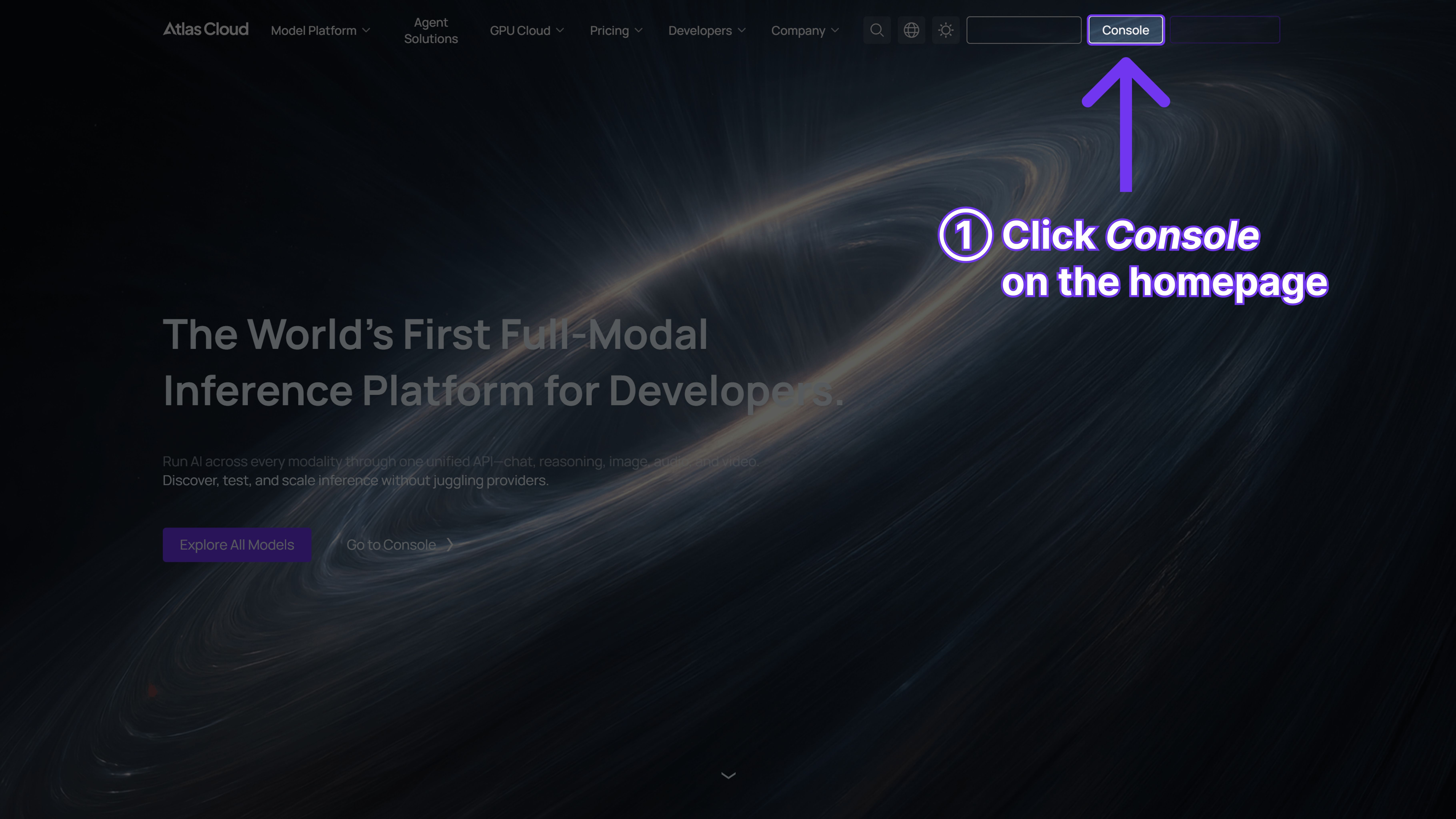
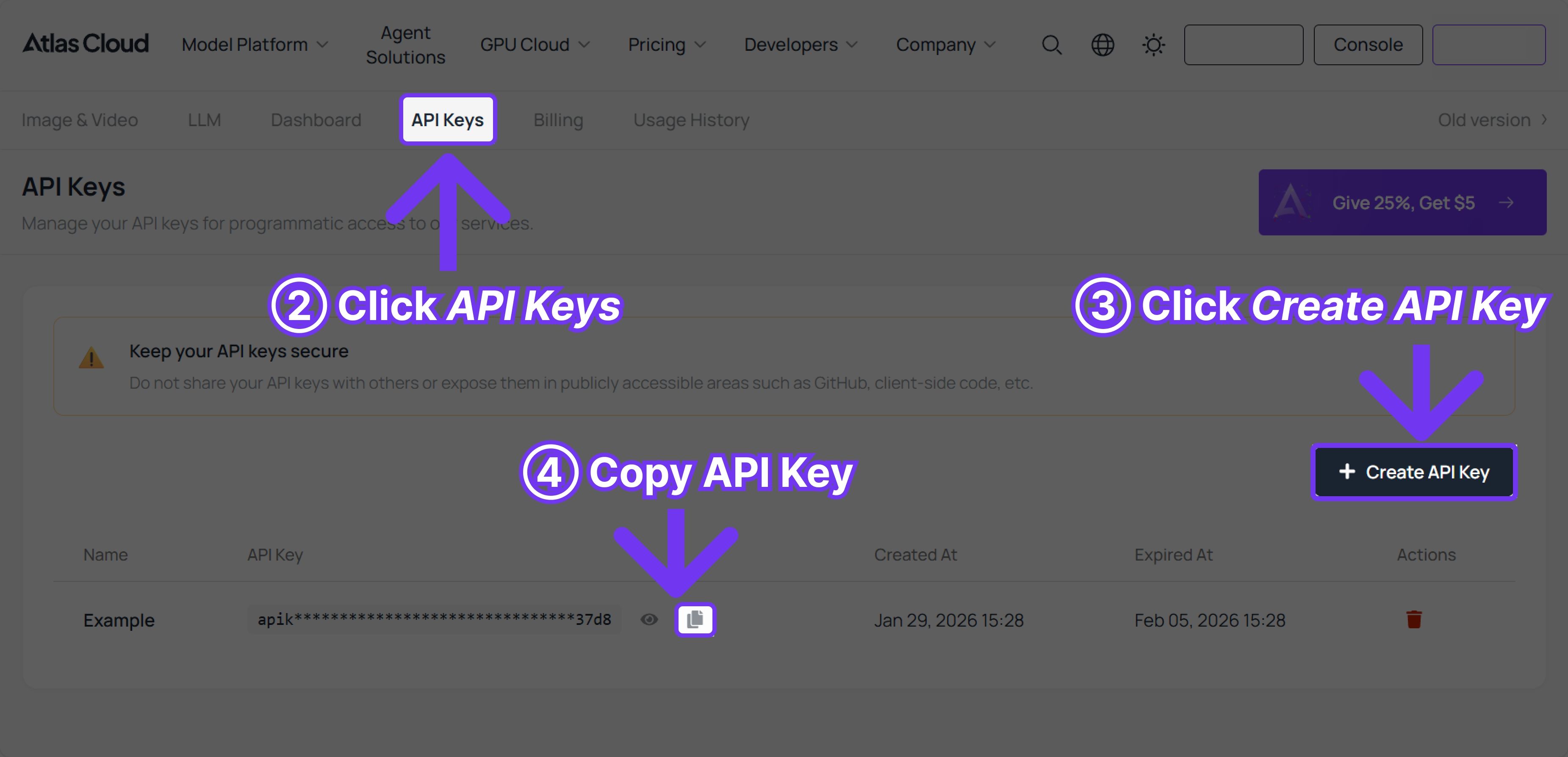
Step 1: Get your API key
Create an API key in your console and copy it for later use.
Step 2: Check the API documentation
Review the endpoint, request parameters, and authentication method in our API docs.
Step 3: Make your first request (Python example)
Example: generate a video with Vidu Q3.




