We are thrilled to announce that the Kling 3.0 Series—comprising both Video 3.0 and Image 3.0—is coming soon to Atlas Cloud. This massive update marks the transition into the "3.0 Era," a unified leap in generative AI that integrates "All in One" video production with "Visual Chain-of-Thought" static imagery. Get ready to experience a new standard of AI storytelling where cinematic narratives, native audio-visual sync, and 4K precision converge on a single platform.
What to Expect - Kling Video 3.0 Series
The "All in One" Filmmaking Engine
- Intelligent Multi-Shot Storytelling (AI Director) Get ready to say goodbye to fragmented clips. Video 3.0 introduces an "AI Director" system that understands script-based scene transitions. It will automatically schedule camera angles (like shot/reverse shot) and generate structured, rhythmic sequences of up to 15 seconds in a single cycle.
- Native Audio-Visual Sync & Omni Consistency The upcoming Kling 3.0 Omni model features "Subject Consistency 3.0," allowing you to upload a 3-8s video to lock character appearance and voice tone perfectly. Plus, native audio support ensures precise lip-syncing for multilingual dialogue (CN, EN, JP, KR, ES) directly within the generation process.
What to Expect - Kling Image 3.0
The "Think Before Render" Visual Powerhouse
- Visual Chain-of-Thought (vCoT) For the first time, an image model will incorporate a "Visual Chain-of-Thought," enabling it to "think" about composition logic and lens language before rendering. This ensures deep adherence to cinematic standards for framing and perspective.
- Series Generation & Native 4K Kling Image 3.0 will introduce a Series Mode for consistent storyboarding, maintaining style and character logic across multiple frames. Combined with Native 4K output, it will deliver "pixel-level" perception for print-ready movie posters and commercial assets without the need for upscaling.
Why Wait for Atlas Cloud?
When the Kling 3.0 Series arrives on Atlas Cloud, you will gain access to:
- Optimized Cost Efficiency: Flexible pricing models designed for high-volume enterprise generation.
- Enterprise-Grade Stability: Accelerated generation speeds and reliable performance for heavy workflows.
- Unified API Integration: Access both Video 3.0 and Image 3.0 capabilities through a single, robust API integration.
The Kling 3.0 Era is arriving soon.
Stay tuned for the official release on Atlas Cloud.
How to use on Atlas Cloud
Atlas Cloud lets you use models side by side — first in a playground, then via a single API.
Method 1: Use directly in the Atlas Cloud playground
Method 2: Access via API
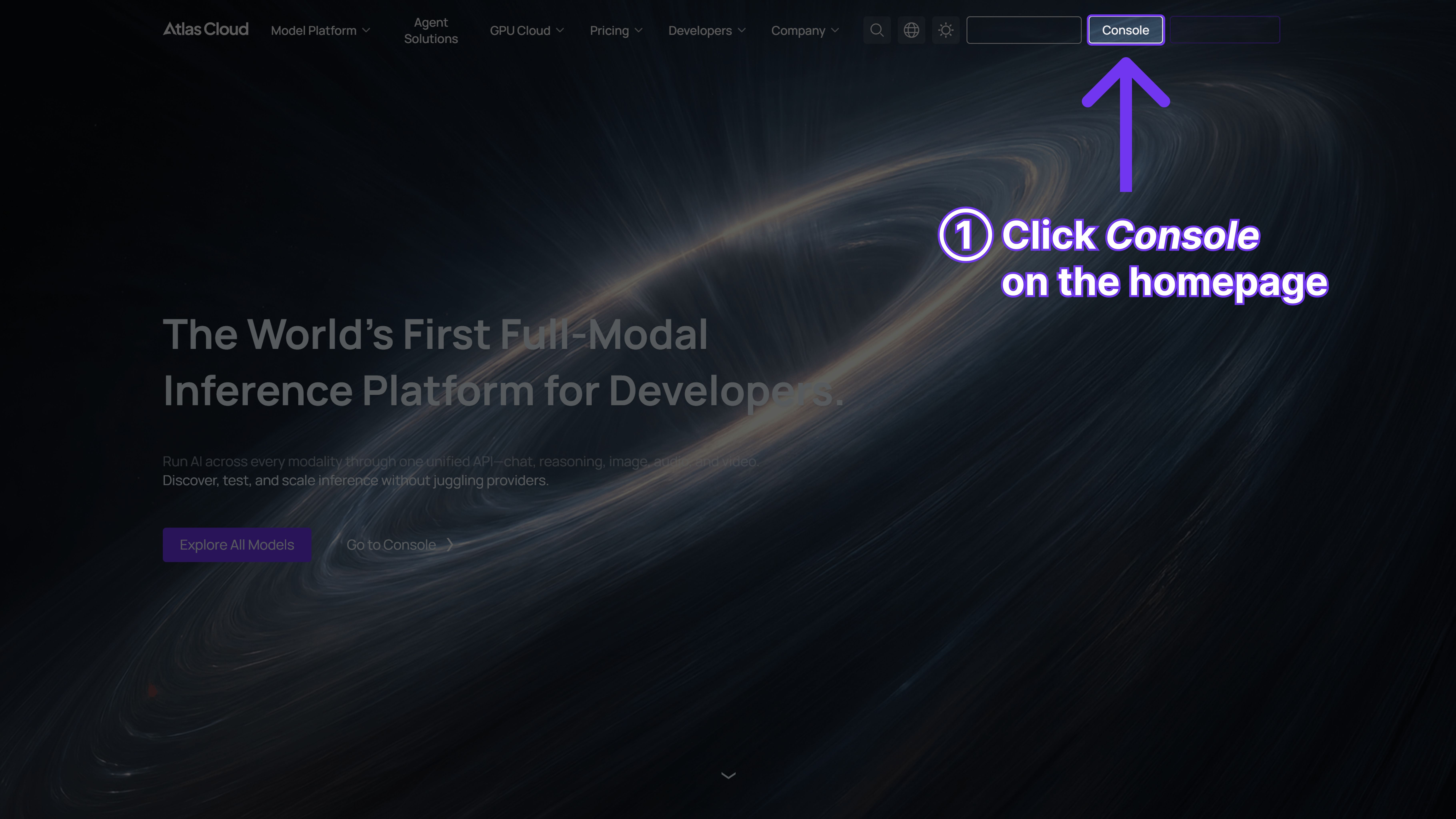
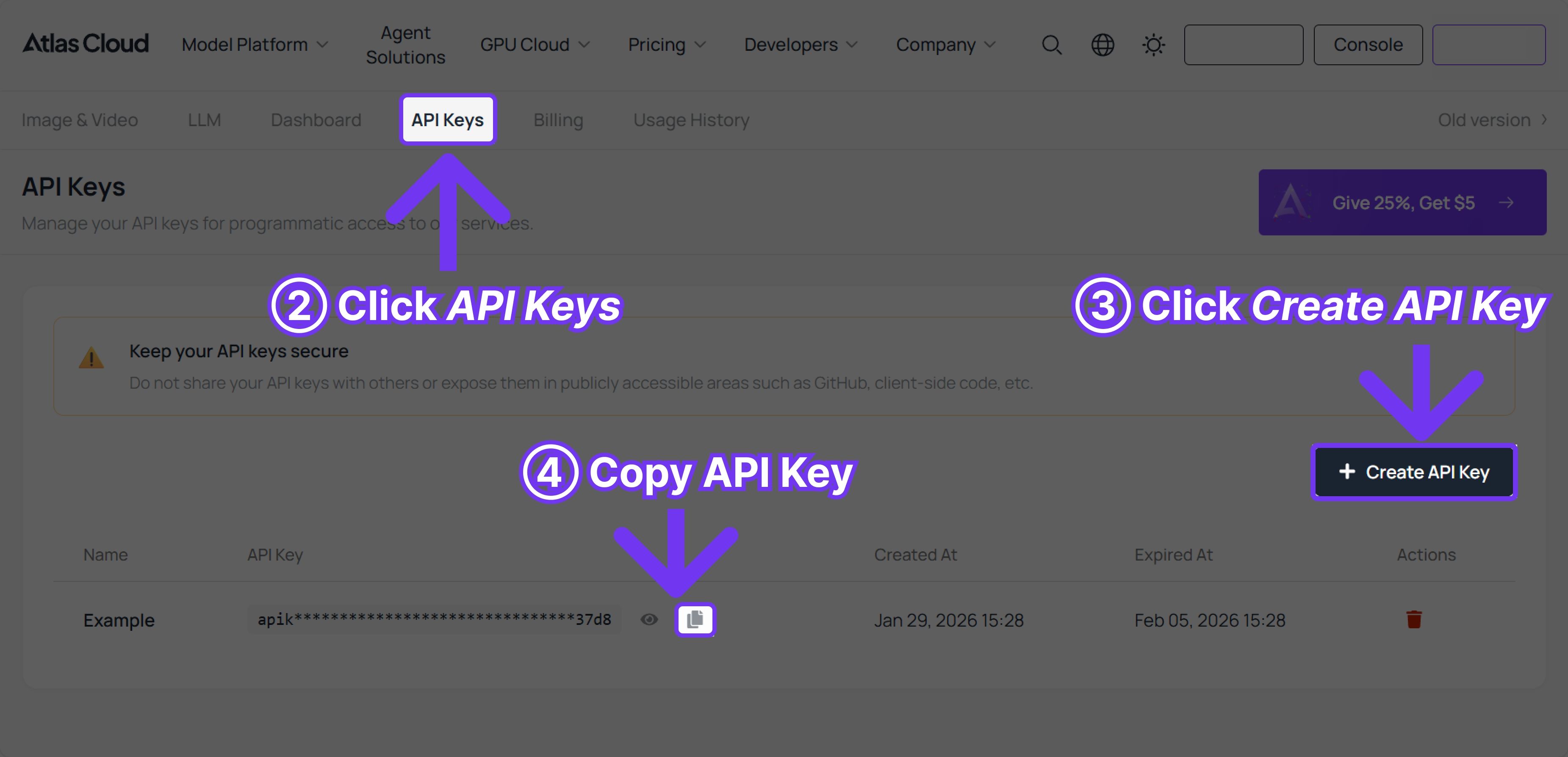
Step 1: Get your API key
Create an API key in your console and copy it for later use.
Step 2: Check the API documentation
Review the endpoint, request parameters, and authentication method in our API docs.
Step 3: Make your first request (Python example)
Example: generate a video with Kling-v2.6-pro/text-to-video
plaintext1import requests 2import time 3 4# Step 1: Start video generation 5generate_url = "https://api.atlascloud.ai/api/v1/model/generateVideo" 6headers = { 7 "Content-Type": "application/json", 8 "Authorization": "Bearer $ATLASCLOUD_API_KEY" 9} 10data = { 11 "model": "kwaivgi/kling-v2.6-pro/text-to-video", 12 "aspect_ratio": "16:9", 13 "cfg_scale": 0.5, 14 "duration": 5, 15 "negative_prompt": "example_value", 16 "prompt": "Create a dynamic transformation sequence where the futuristic sports car in the first frame gradually shifts into a humanoid transforming robot. Show the mechanical parts unfolding, panels splitting and rotating, wheels sliding into the legs.", 17 "sound": True 18} 19 20generate_response = requests.post(generate_url, headers=headers, json=data) 21generate_result = generate_response.json() 22prediction_id = generate_result["data"]["id"] 23 24# Step 2: Poll for result 25poll_url = f"https://api.atlascloud.ai/api/v1/model/prediction/{prediction_id}" 26 27def check_status(): 28 while True: 29 response = requests.get(poll_url, headers={"Authorization": "Bearer $ATLASCLOUD_API_KEY"}) 30 result = response.json() 31 32 if result["data"]["status"] in ["completed", "succeeded"]: 33 print("Generated video:", result["data"]["outputs"][0]) 34 return result["data"]["outputs"][0] 35 elif result["data"]["status"] == "failed": 36 raise Exception(result["data"]["error"] or "Generation failed") 37 else: 38 # Still processing, wait 2 seconds 39 time.sleep(2) 40 41video_url = check_status()





