In 2026, many brands are stuck in a huge "Content Gap." This is the big space between how much video people want to see and the small budgets left for “old-school filming”. Trying to fix this problem by hand just doesn't work anymore.
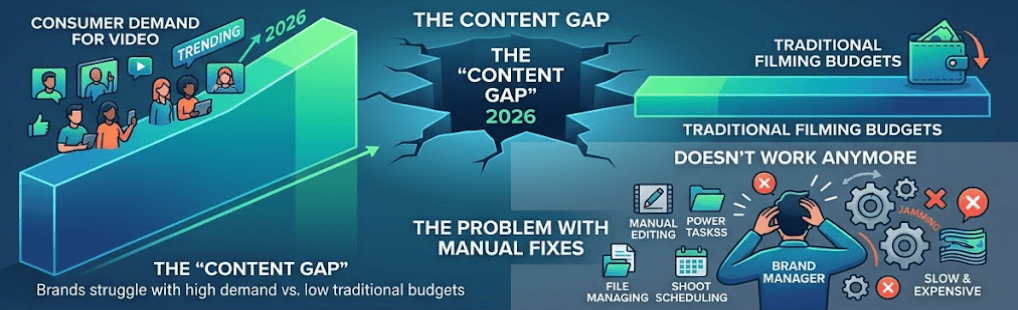
The solution lies in a fundamental shift: moving from GUI-based production (manual editing tools) to AI Video API workflows. This isn't just a technical upgrade; it’s a structural change in how we value content. While traditional production costs scale linearly with every new video, an API allows for programmatic scaling where costs per unit actually drop.
A 70% reduction in costs isn't a marketing exaggeration. It is the direct result of eliminating "Line Item Bloat"—the massive overhead of studios, specialized talent, and logistics—and replacing them with high-fidelity, automated generation.
The Cost Evolution: Traditional vs. API
| Metric | Traditional Production | AI Video API Production |
| Average Cost per Video | $1,000 – $5,000 | $50 – $200 |
| Production Timeline | 2 – 4 Weeks | 1 – 2 Days |
| Scalability | Low (Linear costs) | High (Exponential output) |
| Localization Cost | High (Re-dubbing/filming) | Minimal (Instant generation) |
Using AI for video work can drop costs by 70% compared to the old ways. It also turns weeks of waiting into just a few hours. By using an AI Video API, companies can make 1,000 personal clips for the price of one big ad. This finally lets businesses bridge the content gap and get ahead of the competition.
Breaking Down the 70% Cost Reduction
The transition to an AI Video API workflow is often framed as a technical convenience, but the underlying driver is a radical shift in economics. By decoupling video creation from the physical constraints of cameras, studios, and manual editing, organizations are realizing a 70% reduction in total cost of ownership. This "ROI Framework" is built on four distinct pillars of efficiency.
Collapsing Production Costs: From $2,000 to $0.50
In the traditional model, video production is priced by the human hour. A high-quality corporate or product video typically requires a director, editor, and often on-camera talent, pushing costs toward an average of $2,000 per finished minute.
With an AI Video API, you pay for what you use instead of paying for hours of work. Costs for making AI video have dropped a lot in 2026. Simple AI clips can cost only $0.50 to $2.00 per minute. Top-tier tools like Google’s Veo 3.1 or Sora 2 cost between $10 and $30 per minute. Even at those prices, you still save 90% to 99% compared to hiring an agency.
| Production Method | Cost Per Minute | Scaling Capacity |
| Traditional Agency | $15,000 – $50,000 | Very Low |
| Freelance Editor | $1,000 – $5,000 | Low |
| AI Video API (Enterprise) | $10.00 – $30.00 | Unlimited |
| AI Video API (Standard) | $0.50 – $2.00 | Unlimited |
AI tools can reduce base production costs by over 90% for high-volume use cases like social media and training.
Operational Velocity: The "Seconds, Not Days" Rule
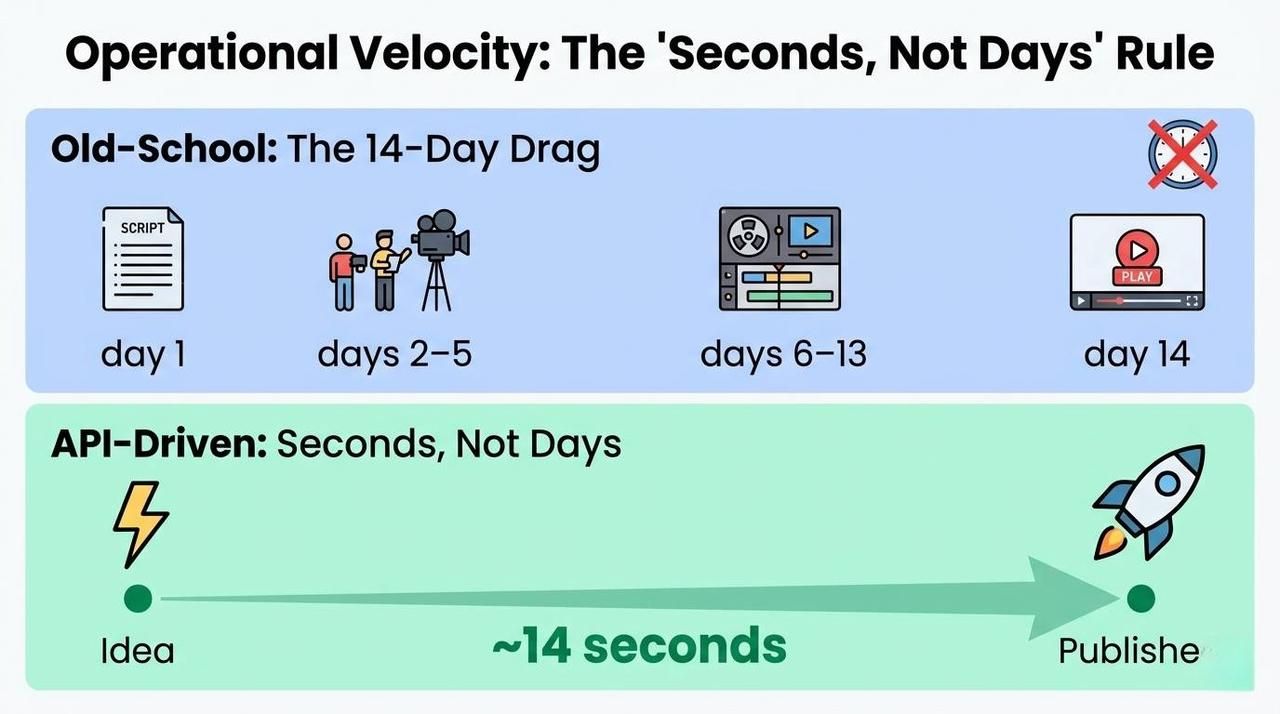
“Old-school” video making gets stuck in "The 14-Day Drag." This is the usual time it takes to go from a finished script to a live video. It happens because you have to plan shots, film everything, and then spend a long time editing.
API-driven workflows operate at the speed of compute. By sending a request to an endpoint, teams can reduce the "Idea-to-Published" cycle to roughly 14 seconds of generation time. This allows marketing teams to react to trending news or customer data in real-time, a feat previously impossible without a 24/7 in-house studio.
Maintenance & Updates: The One-Line-of-Code Fix
One of the most significant "hidden costs" in video is maintenance. When a software UI changes or a product feature is updated, traditional videos become obsolete immediately, requiring a full reshoot or expensive manual motion graphics work.
In a world run by APIs, videos work just like code. If you need to fix a series of 50 tutorial clips, you just change a bit of data in your system and hit a button.
- The Old Way: You had to hire an editor, open old files, wait for renders, and upload again. This cost over $500 for every single update.
- New Way: Edit one line of text; the API regenerates the asset automatically, $0.50 per update.
Localization: The Multiplier Effect
For global brands, localization is the ultimate budget killer. Hiring 20 voice actors and 20 translators to reach 20 markets is a linear cost that few can sustain.
AI dubbing and localization can cut costs by up to 90%. An AI Video API allows you to generate localized versions simultaneously. By injecting different language tracks into the same generation request, you can produce a global campaign in dozens of languages for nearly the same cost as the original.
Localization Efficiency Breakdown
- Simultaneous Launch: Reach every global market on day one.
- Consistency: Maintain the same "Brand Voice" across 50+ languages using voice cloning.
- Volume: Localize entire libraries of help docs that were previously "too expensive" to translate.
By addressing these four areas, the 70% cost reduction moves from a hopeful estimate to a predictable financial outcome for any organization willing to automate.
Building a System That Scales
To cut your costs by 70%, you have to move from hand-editing to a setup that runs itself. You need a solid tech plan that treats video like data, not just a frozen file. Three key parts make up this process: how you handle the data, how you connect things, and how you keep high quality.
The Integration Layer: Connecting Your Stack
The backbone of automated production is the AI Video API. Instead of an editor manually uploading assets, a headless CMS like Contentful or a product database is connected directly to the API endpoint.
For example, when using high-fidelity models like veo or Kling, a developer can set up a "webhook" that triggers a video generation request whenever a new product is added to the database. Taking Atlas cloud as an example, these APIs allow for seamless integration into existing CI/CD workflows, enabling the "Video-as-Code" model. A simple Python request can trigger a production-grade video generation:
plaintext1import requests 2 3url = "https://api.atlascloud.ai/api/v1/model/generateVideo" 4headers = { 5 "Authorization": "Bearer YOUR_ATLASCLOUD_API_KEY", 6 "Content-Type": "application/json" 7} 8 9data = { 10 "model": "vidu/q3-mix/reference-to-video", 11 "input": { 12 "prompt": "Cinematic product showcase of a sleek smart watch, neon lighting, 4k resolution.", 13 "image_url": "https://your-cms.com/assets/product-photo.jpg" 14 } 15} 16 17response = requests.post(url, headers=headers, json=data) 18print(response.json())
Batch Processing vs. Real-time Generation
The way you process video depends on your goals and what your users need.
- Batch Processing: This works great for online stores that need 5,000 product clips fast. Running these in the background can help companies get cheaper "off-peak" prices from the API.
- Real-time Generation: This is best for personal touches, like a welcome video that says a user's name right after they join.
| Feature | Batch Processing | Real-time Generation |
| Primary Use Case | Catalog-wide updates | User-specific personalization |
| Volume | High (Thousands) | Low (Individual) |
| Latency | Not critical (Minutes/Hours) | High priority (Seconds) |
| Cost Efficiency | High (Bulk discounts) | Standard API rates |
Standardizing Quality with Prompt Templates
To keep things looking the same across 10,000 videos, engineers use Prompt Templates. Instead of typing a new prompt for each clip, they make one "Master Template" with blank spots for names, colors, and features.
Benefits of these templates:
- Steady Look: It makes sure every video has the same lights, shots, and colors.
- Fewer Mistakes: It stops the AI from making things up by locking brand rules right into the code.
- Scale: Allows a single marketing manager to oversee the production of an entire library without reviewing every second of footage.
By implementing this architecture, the production process becomes a scalable software service rather than a labor-intensive craft.
Managing the “Hallucination Gap”: Balancing Automation with Brand Safety
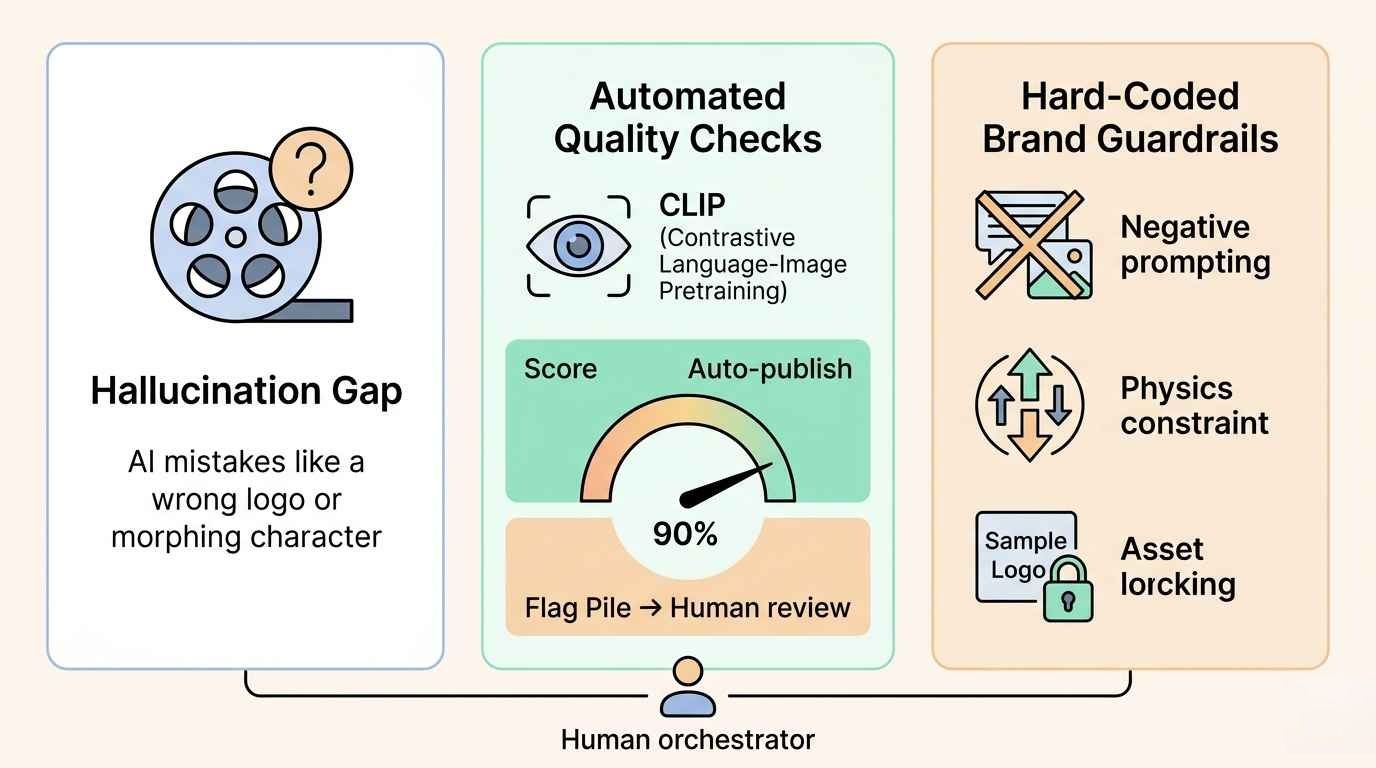
Saving 70% in costs is a huge win, but the real roadblock for big firms is the "Hallucination Gap." This is when AI messes up a look or ignores brand rules. Without a plan, producing 10,000 videos might result in 10,000 mistakes.
These two safety checks are needed for your API setup if you want to go from testing to running a real business:
Automated Quality Checks: Keeping Humans Involved
High-efficiency systems use AI to check other AI instead of just cutting people out. By adding smart vision tools like CLIP, the system scans every frame the API makes. This ensures the video actually matches the real product info every time.
- The 90% Rule: Any video that hits a 90% or higher score for brand-consistency gets sent straight to the web.
- The Flag Pile: Clips with lower scores go to a quick human check. This lets creative staff focus on optimizing outliers instead of watching thousands of successful videos.
Hard-Coding "Brand Guardrails"
Seedance 2.0 and other advanced APIs allow for Negative Prompting and Reference Constraint layers. This ensures that the AI stays within "Visual Red Lines":
- Physics-Informed Consistency: Leveraging the World Model to prevent gravity-defying artifacts or "character morphing" that once plagued early generative models.
- Asset Locking: Hard-coding high-resolution textures of logos and key product features via "Reference Everything" inputs, preventing the AI from "re-imagining" your brand identity.
By shifting the focus from "Human-led Production" to "Human-led Orchestration," organizations can maintain 100% brand safety while still capturing the exponential cost-savings of an automated pipeline.
Case Study: Automated Short-Form Content for Global Traffic Acquisition
The Context:
A global marketing team couldn't keep up with TikTok, Instagram Reels, and YouTube Shorts. Their old way of turning long videos into short clips cost too much at $45 each. They also dealt with "character morphing," where the people in the AI videos looked different from one shot to the next.
The Solution:
The firm deployed Atlas Cloud Seedance 2.0, leveraging its Dual-Branch Diffusion Transformer (DB-DiT) architecture and Physics-Informed World Model to create high-fidelity, synchronized social content. The workflow utilized:
- Multimodal "Reference Everything": By uploading up to 12 reference files (images of products, character action videos, and rhythmic audio), the team ensured 100% consistency in branding and character IP.
- Pulse-Sync Native Audio: Seedance 2.0's native audio generation enabled phoneme-level lip synchronization and beat-matching, ensuring visual cuts perfectly aligned with the background music and voiceovers.
- Cinematic Motion Control: Using the Seedance 2.0 Fast variant for rapid prototyping and the Standard variant for 2K cinematic renders with complex camera movements like dolly zooms and tracking shots.
Comparative Performance Analysis:
The implementation of Atlas Cloud Seedance 2.0 fundamentally shifted the production economics:
| Metric | Pre-Seedance 2.0 (Manual) | Post-Seedance 2.0 (Automated) | Improvement |
| Weekly Video Output | 8 videos | 150+ videos | ~19x Increase |
| Production Cost (per clip) | $45.00 | $1.65 (Avg. across variants) | 96% Reduction |
| Time Spent (per clip) | 180 Minutes | < 1 Minute (Generation time) | 99% Faster |
| Usable Output Rate | ~20% (Requiring retakes) | 90%+ (High-fidelity first pass) | 4.5x Reliability |
The Results:
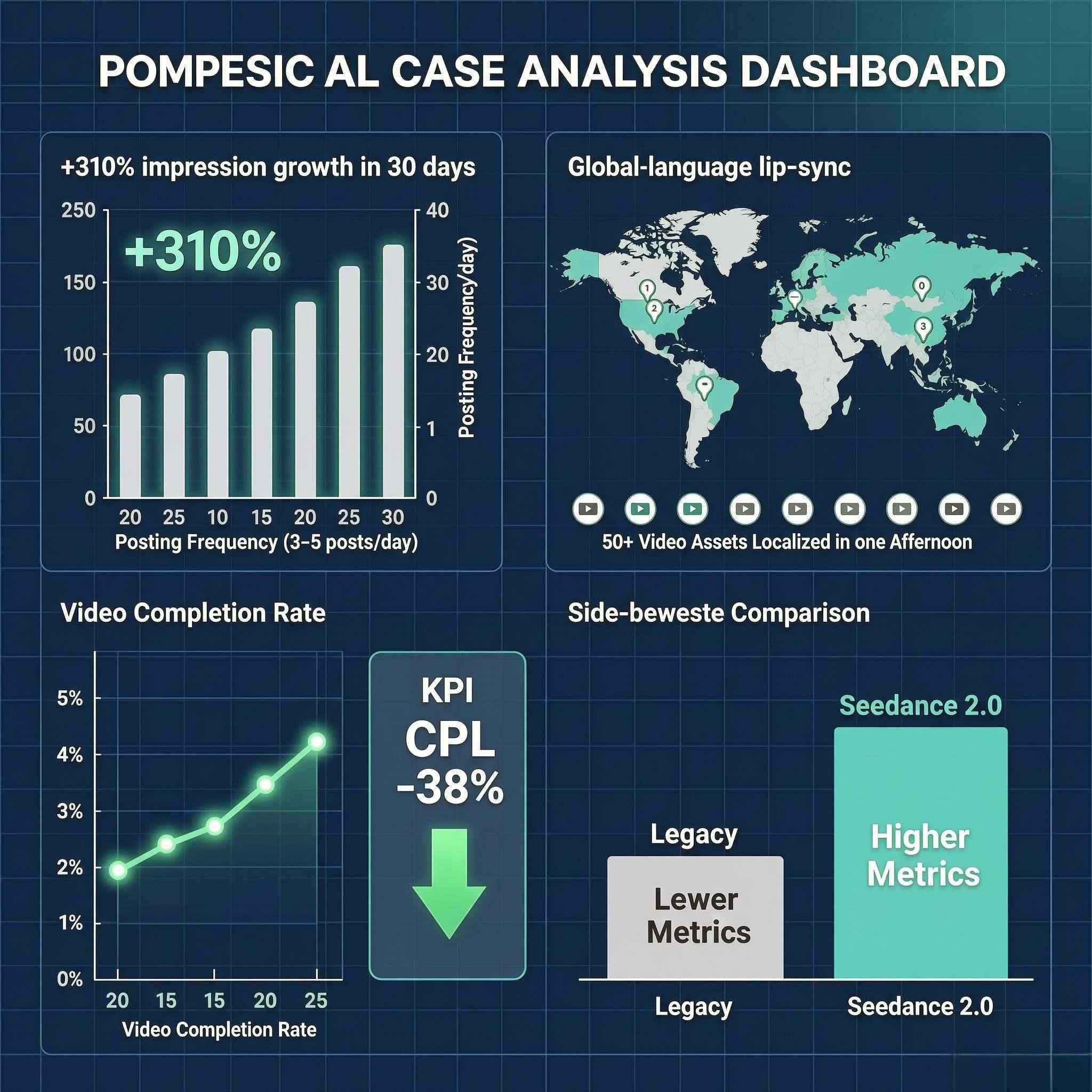
- Algorithmic Growth: Total impressions surged by 310% within 30 days. The high "Usable Output Rate" allowed the team to post 3-5 times daily, satisfying the frequency requirements of social algorithms.
- Global Scalability: Using Seedance 2.0’s multi-language lip-sync, the firm localized 50+ video assets for 8 different regions in a single afternoon.
- Conversion Efficiency: The ability to maintain strict Character IP and Brand Continuity across dozens of clips led to a 28% increase in video completion rates, significantly lowering the Cost Per Lead (CPL) by 38%.
How to Choose the Right AI Video API
Selecting an AI Video API is no longer just about finding the "best" model; it is about finding the right balance between technical performance and business logic. As production costs drop by 70%, the "savings" are only realized if your chosen infrastructure aligns with your specific operational needs.
Fast vs. Perfect: What Is Your Priority?
First, pick what matters most: speed, getting the video fast or detail, making it look perfect.
- Best Quality (4K Videos): If you need 4K clips for a big website, use models like Kling 3.0 or Seedance 2.0. These tools focus on great lighting and smooth action rather than quick delivery.
- Low-Latency (Real-time/Chat): For interactive applications or AI agents, you need "Fast Mode" APIs. Google’s Veo 3.1, for instance, offers a dual-tier pricing system where "Fast Mode" delivers content in seconds at a significantly lower cost point.
Model Capabilities & Developer Experience
Don't just look at the output; look at the SDK and documentation. High-quality Developer Experience includes robust sandboxes and clear support for:
- Text-to-Video: Direct generation from prompts.
- Image-to-Video: Animating static product shots.
- Video-to-Video: Transforming the style of existing footage while maintaining motion structure.
Cost Structure: Subscriptions vs. Usage-Based
The way you pay dictates how you scale. Pay-per-use is generally superior for "70% cost reduction" goals because it eliminates idle costs during non-peak periods.
| Model | Best For | Typical Pricing |
| Subscription-Based | Predictable, steady production | $200 – $500 / month |
| Pay-as-you-go (Usage) | High-volume, seasonal scaling | $0.15 – $0.50 / second |
Safety & Compliance: Protecting Your Reputation
In 2026, safety is the law. Make sure your provider has:
- Digital Provenance (SynthID & C2PA): Full support for cryptographic watermarking and C2PA metadata. This isn't just for transparency; it’s a prerequisite for distribution on major social platforms and compliance with the EU AI Act.
- Copyright Indemnification: A critical factor for 2026. Top-tier providers now offer intellectual property protection, effectively acting as a legal shield if the AI's output is ever challenged on copyright grounds.
- Zero-Retention Privacy (Enterprise Isolation): Ensure the API operates on a SOC2-compliant infrastructure where your prompts and proprietary assets (like product prototypes) are never used to retrain the public model. Your data must remain in your private tenant.
- Real-time Safety & Stress Tests: You need more than basic filters. Look for teams that run "Red Teaming" to act like hackers and find weak spots. This stops deepfakes and makes sure your videos follow the local laws and customs in every country you target.
By checking these four areas, you can make sure your move to an AI Video API works well and saves you money.
Final Thoughts & Next Steps
Moving to an AI Video API setup isn't a dream for the future; it is something you need to do right now to stay ahead. By letting software handle the hardest parts of making videos, your company can finally create enough content while cutting costs by 70%.
The "API-First" Audit
Before committing to a provider, decision-makers should perform a brief internal audit to ensure technical alignment:
- Capacity: Can the API manage all your videos at once during your busiest times?
- Compatibility: Does it have the right tools to work with your current code, like Python or Node.js?
- Origin: Does the model use SynthID or other watermarks to follow the rules?
In the rapidly evolving landscape of 2026, waiting for "perfect" AI output is a strategic risk. Organizations that integrate early benefit from a compounding efficiency curve. The path to scaling starts with a single API call—don't let the efficiency curve pass you by.
FAQ
What are the minimum requirements for AI video?
The "minimums" depend on whether you are using a cloud-based API or running models locally. For most scaling businesses, the cloud-based AI Video API is preferred because it offloads the massive compute requirements to the provider.
| Component | Local Hardware Minimum (2026) | API-Based Minimum |
| GPU | 12GB - 16GB VRAM (e.g., RTX 4070 Ti) | Any internet-connected device |
| System RAM | 32GB - 64GB | 4GB - 8GB |
| Storage | 1TB+ NVMe SSD | Standard cloud storage |
| Bandwidth | N/A | High-speed fiber (for 4K uploads/downloads) |
Is creating AI videos legal?
Yes, making AI videos is legal. All you have to do is to avoid using someone's private likeness, copyrights, or protected trademarks without permission. A human using these tools to produce still qualifies as a protected creative act, even if an AI cannot own a copyright on its own.
Can I use AI videos for my business?
You can use AI videos for commercial work, but keep two points in mind:
- Licensing: Check that your AI provider gives you full commercial rights in your plan.
- Disclosure: New 2026 laws, like the Ethical AI Reporting Act, say you must label videos with AI actors. This keeps things honest for your customers.
Keep these in mind, your brand can use AI to save on costs while staying on the right side of the law.







