
多くのチームは、AI動画生成の利用にあたり、まずは単発のAPIコール(1本の動画を生成してダウンロードし、次の作業へ移る)から始めます。これは実験段階では有効です。
*最終更新日:2026年2月28日*
各モデルのデモ動画:
パイプライン・アーキテクチャ
コードを書き始める前に、構築するシステムの高レベルアーキテクチャを確認しましょう。
plaintext1``` 2+-------------------+ +--------------------+ +------------------+ 3| プロンプト設定 | | Atlas Cloud API | | 出力保存先 | 4| (JSON/YAML) | | | | | 5| - prompts +---->+ /generateImage +---->+ /images/ | 6| - models | | /generateVideo | | /videos/ | 7| - parameters | | /prediction/get | | /manifest.json | 8+-------------------+ +--------------------+ +------------------+ 9 | | | 10 v v v 11+-------------------+ +--------------------+ +------------------+ 12| パイプライン | | ポーリング& | | コスト管理 | 13| エンジン | | リトライ処理 | | | 14| | | | | - リクエスト毎 | 15| - batch_generate | | - 指数バックオフ | | - 合計算出 | 16| - 同時実行制御 | | - 最大リトライ回数| | - モデル毎 | 17| - モデルルーティング| | | | | 18+-------------------+ +--------------------+ +------------------+ 19```
このパイプラインのフローは以下の通りです:
- 構造化された入力ファイルからプロンプト設定を読み込む。
- 各プロンプトを適切なモデルとエンドポイント(画像または動画)に振り分ける。
- 制御された並列数でAtlas Cloud APIにリクエストを送信する。
- 指数バックオフ(待機時間の漸増)とリトライロジックを用いて結果をポーリング(確認)する。
- 生成された成果物をダウンロードし、整理されたディレクトリに保存する。
- コストを集計し、概要マニフェストファイルを生成する。
はじめに:APIアクセス
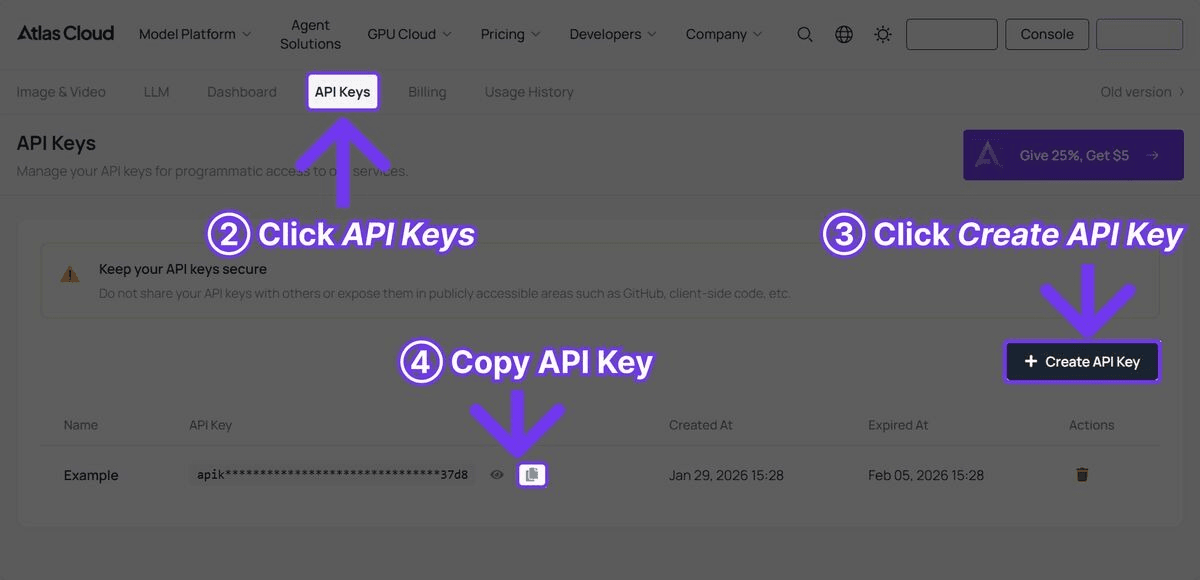
ステップ1:APIキーの取得
Atlas Cloudに登録し、ダッシュボードからAPIキーを作成します。

ステップ2:依存パッケージのインストール
plaintext1```bash 2pip install requests pyyaml 3```
重いフレームワークは不要です。このパイプラインは、HTTP呼び出しにrequests、設定ファイルにpyyamlを使用し、並列処理とファイル操作にはPythonの標準ライブラリのみを使用しています。
パイプラインの全コード
以下が完全に動作するパイプラインのコードです。各セクションの解説はコードブロックの後に続きます。
plaintext1```python 2import requests 3import time 4import json 5import os 6import logging 7from concurrent.futures import ThreadPoolExecutor, as_completed 8from dataclasses import dataclass, field 9from typing import Optional 10from datetime import datetime 11 12# ログの設定 13logging.basicConfig( 14 level=logging.INFO, 15 format="%(asctime)s [%(levelname)s] %(message)s", 16 datefmt="%Y-%m-%d %H:%M:%S" 17) 18logger = logging.getLogger("atlas_pipeline") 19 20@dataclass 21class GenerationResult: 22 """単一の生成リクエストの結果を格納します。""" 23 name: str 24 model: str 25 media_type: str # "image" または "video" 26 status: str # "success", "failed", "error" 27 output_url: Optional[str] = None 28 local_path: Optional[str] = None 29 cost_estimate: float = 0.0 30 duration_seconds: float = 0.0 31 error_message: Optional[str] = None 32 33class AtlasCloudClient: 34 """Atlas Cloud API用のクライアントラッパー""" 35 36 BASE_URL = "https://api.atlascloud.ai/api/v1" 37 38 # モデルごとの価格(概算) 39 PRICING = { 40 "black-forest-labs/flux-2-pro/text-to-image": 0.04, # 1画像あたり 41 "google/imagen4-ultra/text-to-image": 0.06, # 1画像あたり 42 "bytedance/seedance-v1.5-pro/text-to-video": 0.022, # 1秒あたり 43 "google/veo3.1/text-to-video": 0.03, # 1秒あたり 44 "openai/sora-v2/text-to-video": 0.15, # 1秒あたり 45 } 46 47 def __init__(self, api_key: str): 48 self.api_key = api_key 49 self.session = requests.Session() 50 self.session.headers.update({ 51 "Authorization": f"Bearer {api_key}", 52 "Content-Type": "application/json" 53 }) 54 55 def generate_image( 56 self, 57 model: str, 58 prompt: str, 59 width: int = 1024, 60 height: int = 1024 61 ) -> dict: 62 """画像生成リクエストを送信""" 63 response = self.session.post( 64 f"{self.BASE_URL}/model/generateImage", 65 json={ 66 "model": model, 67 "prompt": prompt, 68 "width": width, 69 "height": height 70 } 71 ) 72 response.raise_for_status() 73 return response.json() 74 75 def generate_video( 76 self, 77 model: str, 78 prompt: str, 79 duration: int = 5, 80 resolution: str = "1080p" 81 ) -> dict: 82 """動画生成リクエストを送信""" 83 response = self.session.post( 84 f"{self.BASE_URL}/model/generateVideo", 85 json={ 86 "model": model, 87 "prompt": prompt, 88 "duration": duration, 89 "resolution": resolution 90 } 91 ) 92 response.raise_for_status() 93 return response.json() 94 95 def poll_result( 96 self, 97 request_id: str, 98 max_wait: int = 300, 99 initial_interval: int = 5, 100 max_interval: int = 30 101 ) -> Optional[dict]: 102 """指数バックオフで結果をポーリング""" 103 start_time = time.time() 104 interval = initial_interval 105 106 while time.time() - start_time < max_wait: 107 try: 108 response = self.session.get( 109 f"{self.BASE_URL}/model/prediction/{request_id}/get" 110 ) 111 data = response.json() 112 113 if data["status"] == "completed": 114 return data 115 elif data["status"] == "failed": 116 logger.error(f"生成失敗: {data.get('error', '不明なエラー')}") 117 return None 118 119 logger.debug(f"ステータス: {data['status']}, {interval}秒待機中...") 120 time.sleep(interval) 121 interval = min(interval * 1.5, max_interval) 122 123 except requests.RequestException as e: 124 logger.warning(f"ポーリング失敗: {e}, {interval}秒後に再試行") 125 time.sleep(interval) 126 127 logger.error(f"{max_wait}秒経過しても{request_id}が完了しませんでした") 128 return None 129 130 def estimate_cost(self, model: str, duration: int = 0) -> float: 131 """生成リクエストの概算コストを算出""" 132 base_price = self.PRICING.get(model, 0.05) 133 if "text-to-video" in model and duration > 0: 134 return base_price * duration 135 return base_price 136 137class VideoPipeline: 138 """画像と動画のバッチ生成を管理""" 139 140 def __init__(self, api_key: str, output_dir: str = "pipeline_output"): 141 self.client = AtlasCloudClient(api_key) 142 self.output_dir = output_dir 143 self.results: list[GenerationResult] = [] 144 self.total_cost = 0.0 145 146 os.makedirs(os.path.join(output_dir, "images"), exist_ok=True) 147 os.makedirs(os.path.join(output_dir, "videos"), exist_ok=True) 148 149 def _download_file(self, url: str, filepath: str) -> bool: 150 try: 151 response = requests.get(url, timeout=60) 152 response.raise_for_status() 153 with open(filepath, "wb") as f: 154 f.write(response.content) 155 return True 156 except Exception as e: 157 logger.error(f"ダウンロード失敗 {url}: {e}") 158 return False 159 160 def _safe_filename(self, name: str, extension: str) -> str: 161 safe = name.lower().replace(" ", "_") 162 safe = "".join(c for c in safe if c.isalnum() or c == "_") 163 return f"{safe}.{extension}" 164 165 def _process_image(self, name: str, model: str, prompt: str, 166 width: int = 1024, height: int = 1024, 167 retries: int = 2) -> GenerationResult: 168 start = time.time() 169 cost = self.client.estimate_cost(model) 170 171 for attempt in range(retries + 1): 172 try: 173 logger.info(f"[画像] 生成中 '{name}' (試行 {attempt + 1})") 174 result = self.client.generate_image(model, prompt, width, height) 175 request_id = result["request_id"] 176 177 data = self.client.poll_result(request_id) 178 if data and data["status"] == "completed": 179 image_url = data["output"]["image_url"] 180 filename = self._safe_filename(name, "png") 181 filepath = os.path.join(self.output_dir, "images", filename) 182 self._download_file(image_url, filepath) 183 184 return GenerationResult( 185 name=name, model=model, media_type="image", 186 status="success", output_url=image_url, 187 local_path=filepath, cost_estimate=cost, 188 duration_seconds=time.time() - start 189 ) 190 except requests.HTTPError as e: 191 if e.response.status_code == 429: 192 wait = 2 ** (attempt + 2) 193 logger.warning(f"レート制限超過, {wait}秒待機") 194 time.sleep(wait) 195 continue 196 logger.error(f"HTTPエラー '{name}': {e}") 197 except Exception as e: 198 logger.error(f"生成エラー '{name}': {e}") 199 200 if attempt < retries: 201 time.sleep(2 ** attempt) 202 203 return GenerationResult( 204 name=name, model=model, media_type="image", 205 status="failed", cost_estimate=0, 206 duration_seconds=time.time() - start, 207 error_message="最大リトライ回数超過" 208 ) 209 210 def _process_video(self, name: str, model: str, prompt: str, 211 duration: int = 5, resolution: str = "1080p", 212 retries: int = 2) -> GenerationResult: 213 start = time.time() 214 cost = self.client.estimate_cost(model, duration) 215 216 for attempt in range(retries + 1): 217 try: 218 logger.info(f"[動画] 生成中 '{name}' (試行 {attempt + 1})") 219 result = self.client.generate_video(model, prompt, duration, resolution) 220 request_id = result["request_id"] 221 222 data = self.client.poll_result(request_id, max_wait=600) 223 if data and data["status"] == "completed": 224 video_url = data["output"]["video_url"] 225 filename = self._safe_filename(name, "mp4") 226 filepath = os.path.join(self.output_dir, "videos", filename) 227 self._download_file(video_url, filepath) 228 229 return GenerationResult( 230 name=name, model=model, media_type="video", 231 status="success", output_url=video_url, 232 local_path=filepath, cost_estimate=cost, 233 duration_seconds=time.time() - start 234 ) 235 except requests.HTTPError as e: 236 if e.response.status_code == 429: 237 wait = 2 ** (attempt + 2) 238 logger.warning(f"レート制限超過, {wait}秒待機") 239 time.sleep(wait) 240 continue 241 logger.error(f"HTTPエラー '{name}': {e}") 242 except Exception as e: 243 logger.error(f"生成エラー '{name}': {e}") 244 245 if attempt < retries: 246 time.sleep(2 ** (attempt + 1)) 247 248 return GenerationResult( 249 name=name, model=model, media_type="video", 250 status="failed", cost_estimate=0, 251 duration_seconds=time.time() - start, 252 error_message="最大リトライ回数超過" 253 ) 254 255 def batch_generate(self, jobs: list[dict], max_workers: int = 3): 256 logger.info(f"{len(jobs)}個のジョブを{max_workers}並列で開始") 257 start_time = time.time() 258 259 with ThreadPoolExecutor(max_workers=max_workers) as executor: 260 futures = {} 261 for job in jobs: 262 if job["type"] == "image": 263 future = executor.submit( 264 self._process_image, 265 name=job["name"], 266 model=job["model"], 267 prompt=job["prompt"], 268 width=job.get("width", 1024), 269 height=job.get("height", 1024) 270 ) 271 elif job["type"] == "video": 272 future = executor.submit( 273 self._process_video, 274 name=job["name"], 275 model=job["model"], 276 prompt=job["prompt"], 277 duration=job.get("duration", 5), 278 resolution=job.get("resolution", "1080p") 279 ) 280 else: 281 logger.warning(f"不明なジョブタイプ: {job['type']}") 282 continue 283 futures[future] = job["name"] 284 285 for future in as_completed(futures): 286 result = future.result() 287 self.results.append(result) 288 self.total_cost += result.cost_estimate 289 status_icon = "OK" if result.status == "success" else "FAIL" 290 logger.info( 291 f"[{status_icon}] {result.name} -- " 292 f"USD{result.cost_estimate:.3f} -- " 293 f"{result.duration_seconds:.1f}s" 294 ) 295 296 elapsed = time.time() - start_time 297 self._save_manifest() 298 self._print_summary(elapsed) 299 300 def _save_manifest(self): 301 manifest = { 302 "generated_at": datetime.now().isoformat(), 303 "total_cost": round(self.total_cost, 4), 304 "total_jobs": len(self.results), 305 "successful": sum(1 for r in self.results if r.status == "success"), 306 "failed": sum(1 for r in self.results if r.status != "success"), 307 "results": [ 308 { 309 "name": r.name, 310 "model": r.model, 311 "type": r.media_type, 312 "status": r.status, 313 "output_url": r.output_url, 314 "local_path": r.local_path, 315 "cost": round(r.cost_estimate, 4), 316 "generation_time": round(r.duration_seconds, 1), 317 "error": r.error_message 318 } 319 for r in self.results 320 ] 321 } 322 manifest_path = os.path.join(self.output_dir, "manifest.json") 323 with open(manifest_path, "w") as f: 324 json.dump(manifest, f, indent=2) 325 logger.info(f"マニフェストを{manifest_path}に保存しました") 326 327 def _print_summary(self, elapsed: float): 328 success = sum(1 for r in self.results if r.status == "success") 329 failed = len(self.results) - success 330 cost_by_model = {} 331 for r in self.results: 332 cost_by_model[r.model] = cost_by_model.get(r.model, 0) + r.cost_estimate 333 334 print("\n" + "=" * 60) 335 print("パイプライン実行サマリー") 336 print("=" * 60) 337 print(f"合計ジョブ数: {len(self.results)}") 338 print(f"成功数: {success}") 339 print(f"失敗数: {failed}") 340 print(f"合計コスト: USD{self.total_cost:.4f}") 341 print(f"実行時間: {elapsed:.1f}s") 342 print(f"\nモデル別コスト:") 343 for model, cost in sorted(cost_by_model.items()): 344 short_name = model.split("/")[1] 345 print(f" {short_name}: USD{cost:.4f}") 346 print("=" * 60) 347```
パイプラインの使い方
AtlasCloudClientとVideoPipelineクラスを使用し、典型的なコンテンツ制作ワークフローで活用する方法は以下の通りです。
基本的な使用方法:サムネイル+動画
plaintext1```python 2API_KEY = "your-atlas-cloud-api-key" 3 4pipeline = VideoPipeline(api_key=API_KEY, output_dir="weekly_content") 5 6jobs = [ 7 # Flux 2 Proでサムネイル生成 8 { 9 "name": "Product Launch Thumbnail", 10 "type": "image", 11 "model": "black-forest-labs/flux-2-pro/text-to-image", 12 "prompt": "Eye-catching YouTube thumbnail, bold text 'NEW LAUNCH', " 13 "product spotlight on dark gradient background, vibrant " 14 "accent colors, professional design, 4K" 15 }, 16 { 17 "name": "Tutorial Thumbnail", 18 "type": "image", 19 "model": "black-forest-labs/flux-2-pro/text-to-image", 20 "prompt": "YouTube thumbnail for coding tutorial, split screen " 21 "showing code editor and final result, tech aesthetic, " 22 "clean modern design, bold readable text" 23 }, 24 25 # Seedance 2.0で動画生成(コスト効率重視) 26 { 27 "name": "Product Showcase Seedance", 28 "type": "video", 29 "model": "bytedance/seedance-v1.5-pro/text-to-video", 30 "prompt": "Sleek product reveal animation, modern gadget emerging " 31 "from soft light, rotating slowly to show all angles, " 32 "minimalist white background, cinematic lighting", 33 "duration": 10 34 }, 35 { 36 "name": "Brand Intro Seedance", 37 "type": "video", 38 "model": "bytedance/seedance-v1.5-pro/text-to-video", 39 "prompt": "Dynamic brand introduction sequence, abstract geometric " 40 "shapes assembling into a logo, particles and light trails, " 41 "professional motion graphics style, dark background", 42 "duration": 5 43 }, 44 45 # Veo 3.1でシネマティック動画生成(音声付) 46 { 47 "name": "Hero Video Veo", 48 "type": "video", 49 "model": "google/veo3.1/text-to-video", 50 "prompt": "Cinematic aerial shot of a modern city skyline at golden " 51 "hour, camera slowly pushing forward, lens flare from " 52 "setting sun, ambient city sounds, film grain, " 53 "professional color grading", 54 "duration": 8 55 }, 56] 57 58pipeline.batch_generate(jobs, max_workers=3) 59```
設定主導型のアプローチ
繰り返しのパイプライン処理には、YAML設定ファイルでジョブを定義するのがおすすめです:
plaintext1```yaml 2# pipeline_config.yaml 3output_dir: weekly_content 4max_workers: 3 5 6jobs: 7 - name: Product Hero Image 8 type: image 9 model: google/imagen4-ultra/text-to-image 10 prompt: > 11 Premium product photography of wireless earbuds in charging case, 12 dark reflective surface, dramatic lighting, luxury tech aesthetic, 13 8K resolution, commercial quality 14 width: 2048 15 height: 2048 16 17 - name: Social Media Video 18 type: video 19 model: bytedance/seedance-v1.5-pro/text-to-video 20 prompt: > 21 Trendy social media content, hands unboxing a premium tech product, 22 satisfying reveal moment, close-up details, bright natural lighting, 23 vertical format 24 duration: 10 25 resolution: 1080p 26 27 - name: Cinematic Ad 28 type: video 29 model: google/veo3.1/text-to-video 30 prompt: > 31 Cinematic commercial for premium headphones, person putting on 32 headphones in a busy coffee shop, world goes quiet, shallow depth 33 of field, warm color palette, ambient cafe sounds fading to silence 34 duration: 8 35 resolution: 1080p 36```
読み込んで実行:
plaintext1```python 2import yaml 3 4with open("pipeline_config.yaml") as f: 5 config = yaml.safe_load(f) 6 7pipeline = VideoPipeline( 8 api_key=API_KEY, 9 output_dir=config["output_dir"] 10) 11pipeline.batch_generate( 12 config["jobs"], 13 max_workers=config.get("max_workers", 3) 14) 15```
実装の重要ポイント
指数バックオフによるポーリング
動画生成は、モデルや長さによって30秒から5分ほどかかります。パイプラインでは指数バックオフを採用し、APIに過度な負荷をかけずに効率よく確認を行っています:
plaintext1```python 2interval = initial_interval # 5秒から開始 3while time.time() - start_time < max_wait: 4 # ... ステータス確認 ... 5 time.sleep(interval) 6 interval = min(interval * 1.5, max_interval) # 最大30秒まで増加 7```
これにより、最初の数回は5秒間隔でチェックし(即時完了可能な場合に備える)、長い生成タスクについては段階的にチェック間隔を30秒まで広げます。固定間隔のポーリングと比較して、不要なAPI呼び出しを約60%削減できます。
レート制限への対応
APIから429(レート制限)エラーが返された場合、即座に失敗させるのではなく、指数的に待機時間を延ばして再試行します:
plaintext1```python 2except requests.HTTPError as e: 3 if e.response.status_code == 429: 4 wait = 2 ** (attempt + 2) # 4秒, 8秒, 16秒... 5 logger.warning(f"レート制限超過、{wait}秒待機") 6 time.sleep(wait) 7 continue 8```
これは、多くの同時リクエストが一時的にレート制限を超える可能性があるバッチ処理において不可欠です。
並列実行の制御
ThreadPoolExecutorは、APIやネットワークへの過負荷を防ぐため、同時リクエスト数を制限しています:
plaintext1```python 2with ThreadPoolExecutor(max_workers=3) as executor: 3 futures = {executor.submit(process, job): job for job in jobs} 4```
最初はmax_workers=3から開始し、Atlas Cloudアカウントのプランに応じて5〜8程度まで増やしてみてください。10リクエストを超えると、レート制限のリスクが高まる割に得られる効率は鈍化する傾向にあります。
コスト追跡
すべての生成リクエストには、モデル別の価格表に基づいた概算コストが計算されます:
plaintext1```python 2PRICING = { 3 "black-forest-labs/flux-2-pro/text-to-image": 0.04, 4 "bytedance/seedance-v1.5-pro/text-to-video": 0.022, # 1秒あたり 5 "google/veo3.1/text-to-video": 0.03, # 1秒あたり 6} 7```
動画モデルの場合、コストは生成秒数に応じて変動します。Seedance 2.0の10秒動画はUSD0.22、Veo 3.1の10秒動画はUSD0.30となります。マニフェストファイルにはリクエストごとおよび累積コストが記録されるため、予算管理に役立ちます。
パイプライン実行の概算コスト
典型的なパイプライン実行のコスト例:
| パイプラインシナリオ | ジョブ数 | 使用モデル | 推定コスト | 推定時間 |
|---|---|---|---|---|
| 週次SNSパック | 画像10 + 動画5(各5s) | Flux 2 Pro + Seedance 2.0 | USD0.95 | 約10分 |
| 製品発売キャンペーン | 画像20 + 動画10(各10s) | Flux 2 Pro + Imagen 4 Ultra + Seedance 2.0 | USD3.80 | 約25分 |
| 月次コンテンツライブラリ | 画像50 + 動画20(各8s) | 混在 | USD7.50 | 約45分 |
| ECカタログ(500 SKUs) | 画像500 | Flux 2 Pro | USD20.00 | 約30分 |
| シネマティック広告シリーズ | 画像5 + 動画5(各8s) | Imagen 4 Ultra + Veo 3.1 | USD1.50 | 約20分 |
Seedance 2.0とVeo 3.1のコスト比較(同じ動画の場合):
| モデル | 5秒動画 | 10秒動画 | 15秒動画 |
|---|---|---|---|
| Seedance 2.0 (高速) | USD0.11 | USD0.22 | USD0.33 |
| Veo 3.1 | USD0.45 | USD0.30 | N/A (8秒まで) |
| Sora 2 | USD0.5 | USD1.50 | USD2.25 |
Seedance 2.0は、大量の動画を生成する際に最もコスト効率に優れた選択肢です。Veo 3.1は、短いシネマティック映像で品質とコストの優れたバランスを提供します。Sora 2は高コストですが、他に類を見ない物理シミュレーションを実現します。
デプロイ時のヒント
cronジョブによるスケジュール生成
cronを使用してスケジュール実行する例:
plaintext1```bash 2# 毎週月曜午前6時に週次コンテンツを生成 30 6 * * 1 cd /path/to/project && python run_pipeline.py --config weekly.yaml 4```
簡単な実行スクリプトを用意します:
plaintext1```python 2# run_pipeline.py 3import os 4import argparse 5import yaml 6from pipeline import VideoPipeline 7 8parser = argparse.ArgumentParser() 9parser.add_argument("--config", required=True) 10args = parser.parse_args() 11 12with open(args.config) as f: 13 config = yaml.safe_load(f) 14 15API_KEY = os.environ["ATLAS_CLOUD_API_KEY"] 16pipeline = VideoPipeline(api_key=API_KEY, output_dir=config["output_dir"]) 17pipeline.batch_generate(config["jobs"], max_workers=config.get("max_workers", 3)) 18```
キューベースのアーキテクチャ
大規模なシステムでは、CeleryやRedis Queueなどのタスクキューを使用して、ジョブ投入と処理を分離します:
plaintext1```python 2# tasks.py (Celeryの例) 3import os 4from celery import Celery 5from pipeline import AtlasCloudClient 6 7app = Celery("video_tasks", broker="redis://localhost:6379") 8client = AtlasCloudClient(os.environ["ATLAS_CLOUD_API_KEY"]) 9 10@app.task(bind=True, max_retries=3) 11def generate_video_task(self, prompt, model, duration): 12 try: 13 result = client.generate_video(model, prompt, duration) 14 data = client.poll_result(result["request_id"]) 15 if data and data["status"] == "completed": 16 return {"url": data["output"]["video_url"], "status": "success"} 17 return {"status": "failed"} 18 except Exception as e: 19 self.retry(countdown=60, exc=e) 20```
これは、WebアプリやAPIから動画生成リクエストが発生し、結果をWebhookなどで非同期に返す必要があるシステムに適しています。
環境変数の管理
APIキーをハードコードしてはいけません。環境変数を使用しましょう:
plaintext1```python 2import os 3 4API_KEY = os.environ.get("ATLAS_CLOUD_API_KEY") 5if not API_KEY: 6 raise ValueError("環境変数 ATLAS_CLOUD_API_KEY が設定されていません") 7```
ローカル開発では、python-dotenvを使用して.envファイルを管理します:
plaintext1```bash 2# .env 3ATLAS_CLOUD_API_KEY=あなたのAPIキー 4```
plaintext1```python 2from dotenv import load_dotenv 3load_dotenv() 4```
エラー監視
本番環境のパイプラインでは、エラー監視サービスと統合しましょう。ログ出力は解析しやすいように構成されています:
plaintext1```python 2logger.info(f"[OK] {result.name} -- USD{result.cost_estimate:.3f} -- {result.duration_seconds:.1f}s") 3logger.error(f"[FAIL] {result.name} -- {result.error_message}") 4```
これらのログを監視スタック(Datadog, CloudWatch, Grafanaなど)にルーティングし、成功率、コスト、生成時間の推移を把握してください。
パイプラインの拡張
画像から動画生成(Image-to-Video)への対応
生成した画像を動画生成の入力として使用するモデルもあります。パイプラインを拡張してチェーン処理を行います:
plaintext1```python 2def generate_image_then_video(self, name, image_prompt, video_prompt, 3 image_model, video_model, duration=5): 4 """画像を生成し、それを入力として動画を生成""" 5 # ステップ1:ベース画像を生成 6 image_result = self._process_image( 7 f"{name}_base", image_model, image_prompt 8 ) 9 if image_result.status != "success": 10 return image_result 11 12 # ステップ2:画像URLを入力として動画を生成 13 response = self.client.session.post( 14 f"{self.client.BASE_URL}/model/generateVideo", 15 json={ 16 "model": video_model, 17 "prompt": video_prompt, 18 "image_url": image_result.output_url, 19 "duration": duration 20 } 21 ) 22 # ... ポーリングとダウンロードを実行 23```
Webhook通知の追加
長時間実行されるバッチ処理では、ジョブ完了時にWebhook通知を送信するようにします:
plaintext1```python 2def _notify_webhook(self, result: GenerationResult, webhook_url: str): 3 """完了通知を送信""" 4 requests.post(webhook_url, json={ 5 "name": result.name, 6 "status": result.status, 7 "url": result.output_url, 8 "cost": result.cost_estimate 9 }) 10```
よくある質問
同時リクエストは何回まで可能ですか?
Atlas CloudはAPIキーごとに複数の同時リクエストをサポートしています。まずは3並列で開始し、アカウントのティアに応じて5〜8まで増やしてください。制限を超えた場合は、パイプラインが指数バックオフで自動的に再試行します。
画像ジョブと動画ジョブを同一バッチで混在できますか?
はい。パイプラインはtypeフィールドに基づいてジョブを適切なエンドポイントに自動ルーティングします。画像と動画のジョブは同一スレッドプール内で同時実行されます。
動画生成にはどれくらい時間がかかりますか?
モデルによって異なります。Seedance 2.0は通常30〜90秒、Veo 3.1は60〜120秒、Sora 2は60〜180秒かかります。パイプラインのポーリングメカニズムがこれらの差異を自動的に管理します。
バッチの途中で生成が失敗した場合はどうなりますか?
失敗したジョブはログに記録され、マニフェストファイルにエラーメッセージ付きで含められます。パイプライン自体は残りのジョブを続行します。実行後にマニフェストを確認し、必要に応じて失敗したジョブを個別に再実行してください。
新しいモデルを追加するにはどうすればよいですか?
AtlasCloudClient内のPRICING辞書にモデルIDと価格を追加し、ジョブ設定でそれを指定するだけです。他のコード変更は不要で、すべてのモデルは同じAPIエンドポイントを通じて処理されます。
結論
AI動画パイプラインの構築において重要なのは、洗練されたコードを書くことではなく、API統合に伴う現実的な課題(レート制限、タイムアウト、失敗、コスト追跡、同時実行など)に確実に対応するインフラを持つことです。本ガイドで紹介したパイプラインは、これらの課題すべてに対処しています。コピーして用途に合わせてプロンプトやモデルをカスタマイズし、スケジュール実行やキュー経由での運用を行ってください。
Flux 2 Proによる高速な画像生成、Seedance 2.0によるUSD0.022/秒の低コスト動画生成、そしてVeo 3.1によるUSD0.03/秒のフィルムグレード動画生成を組み合わせることで、コンテンツ制作におけるあらゆるニーズをカバーできます。これらすべてのモデルは1つのAtlas Cloud APIキーでアクセス可能なため、統合や課金管理、認証情報の管理が非常にシンプルになります。
────────────────────────────────────────────────────────────







