Quick Summary:
Transforming a single static photo into a viral, cinematic social media asset takes less than 3 minutes using the Kling AI image to video workflow. Leveraging the Video 3.0 framework, creators can generate up to 15 seconds of continuous motion while maintaining absolute character consistency.
- Core Technology: 3D face subject mesh binding and real-world physics simulation.
- Key Capabilities: 4K resolution at 60fps, native lip-sync talking avatar generation, and 100% commercial licensing rights for paid subscribers.
Spending hours tweaking keyframes in traditional editing software only to have your character's face distort by frame ten is a massive drain on creative energy. But the shortcut to scale your views is already here: a single photo can now match the engagement of a high-production shoot. By leveraging kling ai image to video capabilities, creators can generate viral, platform-ready content directly from an existing asset without rebuilding scenes from scratch.
This shift is powered by Kling’s advanced physics engine, which accurately simulates real-world motion—like natural hair movement and precise clothing folds—finally solving the character consistency crisis that legacy software platforms often create. Backed by deep identity-locking logic to ensure your subject remains identical from the first frame to the last, turning a static image into a cinematic loop takes less than three minutes. For creators pushing an aggressive posting schedule, this streamlined workflow is the ultimate tool for transforming flat photography into hyper-engaging feed-stoppers.
The Mechanics of Virality: Why Kling AI Image to Video Dominates Social Feeds
Platforms prioritize watch time and loop completion over static aesthetics, making it nearly impossible for flat photography to compete. The solution lies in strategic animation that forces viewers to pause. Utilizing a kling ai image to video workflow addresses this directly by converting a single file into a high-retention video designed to trigger platform distribution metrics.
Take the recent explosion of AI cat dancing videos and "Pet CCTV" memes dominating YouTube Shorts and TikTok as a prime example. Watching a wild, realistic cat do a synchronized dance from just one photo hooks viewers instantly. Short, energetic videos are a huge hit with social media algorithms. People watch them through to the end and often rewatch them. That pushes watch times through the roof. If you use this exact trick, you can stop making low-view posts and start riding the viral wave to real money.
Architectural Precision and Real-World Physics
Unlike legacy tools that merely apply superficial, fluid-like warp filters across your canvas, this platform leverages advanced structural understanding. Its core processing engine analyzes spatial depth, texture boundaries, and lighting vectors within your upload. When you start an AI motion transfer, the system views the subject as a real 3D object, not just flat pixels. Clothes hang naturally over moving arms and legs. Hair blows in the simulated wind, and backgrounds move properly behind the main subject. This adherence to real-world physical boundaries prevents the visual uncanny valley effect, retaining viewers longer and driving up engagement signals.
Capability Breakdown: Extended Continuous Generation
A common question among creators migrating away from static media is: How long can these viral clips be?
| Metric | Specification |
| Maximum Clip Duration | 15 seconds per generation |
| Minimum Clip Duration | 3 seconds per generation |
| Supported Formats | 9:16 (Vertical Shorts/Reels), 16:9 (Horizontal), 1:1 (Square) |
| Resolution Output | Up to Native 4K at 60fps |
The latest Kling Video 3.0 model framework expands the standard generation window, allowing creators to produce up to 15 seconds of continuous, unbroken movement from a single source image. This gives you plenty of room to tell a short story. You can make smooth camera cuts or create a perfect video loop. The motion stays stable for a long time. This helps creators make great viral clips that keep people watching from start to finish.
Master Kling AI Motion Control: Locking Character Consistency From a Single Photo
Bad AI video renders love to mess up characters. Your main character might suddenly grow an extra ear or look like a total stranger when they turn around. This weird glitch ruins your story completely. It forces creators to throw away about 70% of their video clips. Maintaining strict character consistency across different frames has historically been the biggest barrier to professional production. A strategic kling ai image to video workflow solves this problem by treating facial geometry as a rigid, non-negotiable anchor point.
Advanced Face Subject Binding Technology
The platform tackles this issue through its dedicated face binding technology. When you upload a reference photo, the system builds an immutable 3D mesh of the subject's skull structure, tracking proportional distances between the eyes, nose, mouth, and jawline. This structural map allows the engine to eliminate AI morphing entirely, keeping the subject recognizable throughout complex camera movements.
Identity Stability Performance Under Stress
The engine preserves facial consistency even when pushing the boundaries of automated motion control. The tracking architecture handles visual obstacles by calculating the following parameters:
- High-Angle Tracking: The 3D map shifts perspective perfectly during sharp top-down or bottom-up camera movements.
- Extreme Close-Ups: Skin texture, tiny face muscles, and eyes stay sharp. They do not blur out when the camera zooms in tight.
- Partial Occlusions: When a hand or a shadow covers the face, the tech remembers what is hidden. It shows those features correctly when they pop back out.
By locking in these shapes, you can switch from basic pans to wild movie shots. Your character looks exactly the same in every single frame.
Case Study: Multi-Subject Rigid Consistency
By initializing the generation with precise structural reference photos of two distinct desktop AI companions—a humanoid robot in a grey hoodie and a smaller orange companion—we forced the engine to handle a complex multi-shot narrative sequence.
This video highlights how the tracking architecture solves the three major pain points of AI video generation simultaneously:
- Multi-Subject Interaction Logic (0:02): Having the hoodie robot extend its mechanical hand to pet the secondary orange robot is an industry-level failure point for legacy software. Kling successfully processes the contact point without blending the distinct metallic and fabric meshes together.
- Complex Partial Occlusion (0:05): As the larger robot's arm passes completely over the orange robot's head, the underlying engine remembers the hidden geometric features of the secondary subject, rendering them back sharply without any pixel warping or texture bleeding once the hand moves away.
- Rigid Material Consistency: Unlike fluid organic subjects, robots require mathematical straight lines and static LED matrices. Throughout the panning cuts and behavioral changes, the digital eyes, screen glare, and jacket drawstrings maintain absolute spatial alignment.
By utilizing multi-angle image references within the Kling framework, creators can move past basic breathing loops and orchestrate fully realized, cinematic multi-character interactions ready for high-retention commercial distribution.
Step-by-Step Guide to Transforming Your First Photo into a Cinematic Sequence
Staring at a empty text box is incredibly annoying. You just sit there guessing words to keep your uploaded picture from melting into ugly pixels. Too many creators burn through their video credits typing basic things like "make it move." That just leaves you with messy, useless clips. Learning how to animate an image systematically requires a structured approach that balances asset preparation, camera direction, and backend engine selection.
Step 1: Upload Your Base Asset
Log into your workspace to access the creation dashboard. If you want to test the platform, you can use the kling ai image to video free tier, 66 credits per month. Click the "Image-to-Video" tab and drag your source photo into the upload frame. Ensure your photo is clean and free of heavy motion blur, as the engine reads sharp edge contrasts to map depth.
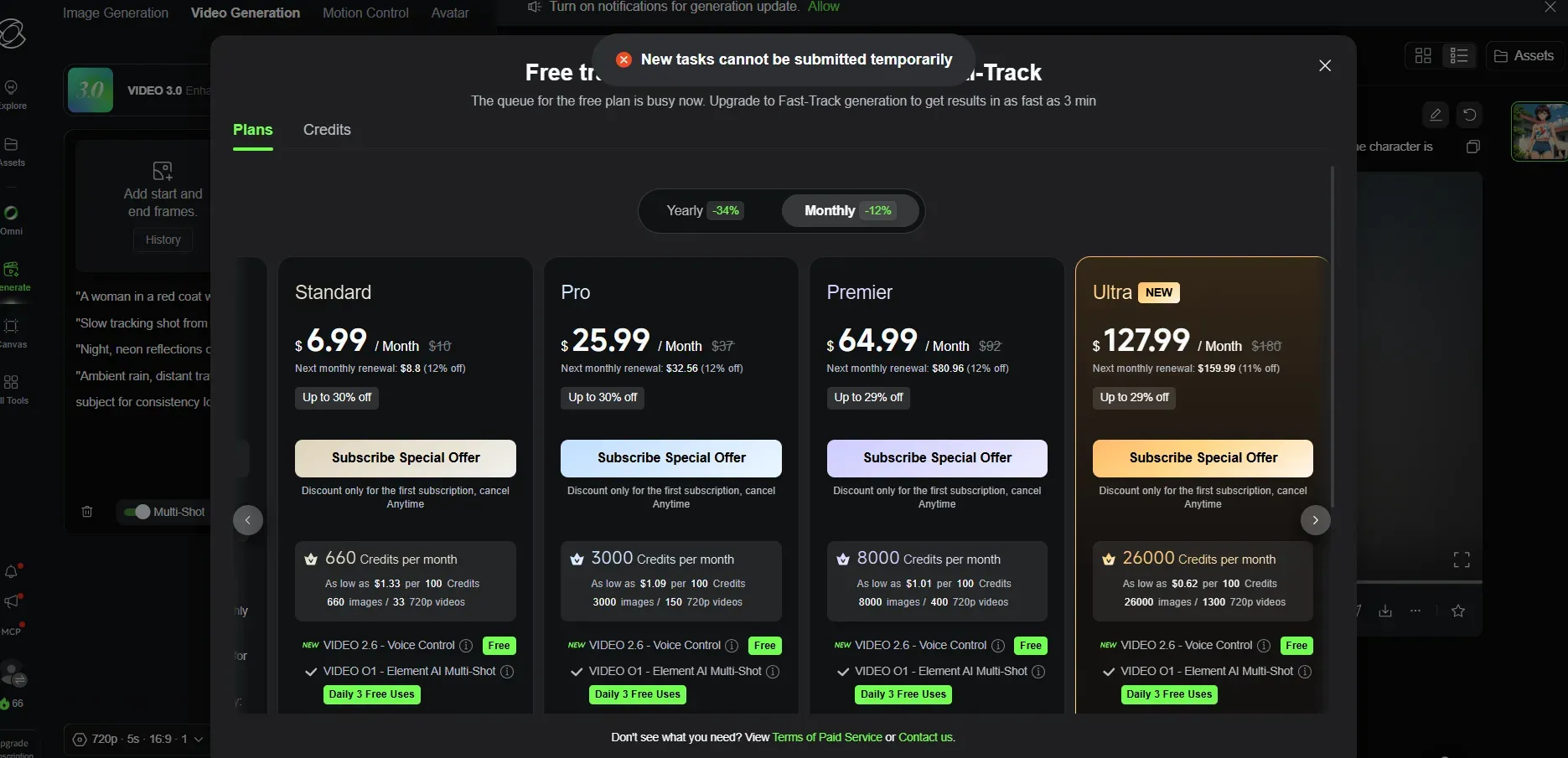
It is worth noting that using free credits often fails, which is the most frustrating part for me. I generally access the Kling AI model via Atlas Cloud. For content agencies, growth hackers, and software developers looking to transition from manual dashboard rendering to high-volume asset production, relying on a standard browser tab is a bottleneck. To build a true, automated media factory, integration with an upstream infrastructure layer is required. By leveraging Atlas Cloud’s enterprise-grade infrastructure layer, developers can plug directly into the underlying Kling AI image-to-video API channels.
Step 2: Configure Your Generation Engine
Before typing your prompt, select your rendering infrastructure based on your production timeline and project budget.
-
Select the Architecture: Choose Turbo or Pro.
Toggle between the standard high-fidelity model and the accelerated video 3.0 turbo engine depending on your speed requirements.
-
Define Camera Motion: Set parameters manually.
Use the manual camera control sliders to input precise horizontal panning, vertical tilts, or zoom scales before adding text modifiers.
-
Adjust Resolution and Aspect Ratio: Match target platform.
Match your aspect ratio to your destination feed and toggle the upscale parameters to prepare your timeline for final 4k rendering output.
Step 3: Structure Your Camera Prompts
Avoid describing the entire image from scratch. The engine already understands what is in your photo. Instead, design your text to dictate explicit camera physics and focus changes.
| Prompt Component | Purpose | Example |
| Action Anchor | Defines the main subject's physical movement | "The subject slowly turns their head toward the camera and smiles." |
| Camera Modifier | Dictates the lens movement and path | "Slow cinematic push-in shot, depth of field shifts, tracking focus." |
| Environmental Change | Dictates background or atmospheric behavior | "Soft golden hour sunlight shifts, dust motes float through the air." |
Combine these three components into a single paragraph inside the text box. For example, structuring your camera prompts as "Slow tracking pan left as the subject turns their head, shallow depth of field with background lights blurring into bokeh" gives the system a clear mathematical path to execute. Hit generate to process the clip.
Bringing It to Life: Deploying Native Audio and Perfect Lip-Sync for Talking Avatars
Exporting a video render only to spend the next hour inside separate audio software trying to stretch a voice track so it matches your character's mouth movements is a clunky, inefficient way to build content. If your audio sync misses by even two frames, viewers immediately spot the mismatch and scroll away. Managing voiceovers manually destroys production speed. Transitioning your workflow to a unified kling ai image to video online dashboard eliminates this friction by binding sound directly to visual generation.
All-in-One Voice and Motion Synchronization
The built-in native audio generation engine eliminates the need for external speech tools or third-party vocal synthetic applications. By utilizing the integrated talking avatar creator features, users can dictate speech directly inside the primary prompt window. Placing your target dialogue inside standard quotation marks triggers the system's vocal synthesis architecture, matching the spoken words to the character's physical appearance.
Voice Performance Metrics
The processing engine interprets text strings to configure physical and auditory outputs simultaneously across several key parameters:
- Lip-Sync AI Accuracy: The tool matches mouth shapes to exact speech sounds. It moves the jaw and cheek muscles instantly as the audio plays.
- Dialect and Accent Accuracy: The system reads your text to speak different languages or regional accents. The voice sounds clean and never sounds distorted.
- Expression Tracking: The engine handles tiny face movements. It matches eyebrow raises and blinks to the exact mood of the spoken words.
- Complex Multi-Character Speech: When processing groups, the system isolates individual faces to assign distinct audio profiles across the scene.
This synchronized approach ensures that facial muscles move naturally with the audio, providing a cohesive output file that is ready for immediate distribution.
Case study: A viral Zootopia Judy Hopps AI Makeup Trend Video
To understand how these algorithmic metrics function in the wild, look no further than the viral Zootopia Judy Hopps AI Makeup and Color-Mixing trend currently dominating short-form feeds. This exact video style easily gets millions of views overnight. How does the tech work, and why is it so popular?Three technological and psychological factors can be linked to the asset's viral success by analyzing it:
The "Pattern Interruption" Hook (0-3 Seconds)
Social media users are heavily desensitized to generic AI avatars. But seeing a famous movie character like Disney’s Judy Hopps do a trendy makeup vlog totally breaks the mold. It stops people from scrolling right past. That immediately saves your first-three-second watch rate, which is the exact metric short-form video algorithms care about most.
Advanced Interaction Logic: Breaking the Hand-to-Face Barrier
Historically, AI image-to-video tools could only animate static portraits with simple breathing loops. Having a character bring their hands to their face usually resulted in horrifying visual artifacts, blending fingers into cheeks.
As demonstrated in the video, Kling's architecture successfully maps a temporary hand-to-face coordinate track. Judy can mix red and white pigments on her hands and wipe them across her facial structure without the fingers clipping through her mesh or altering her core character design.
Delayed Gratification and Loop Completion
The structural progression of the video is engineered for loop completion:
- The Setup: You watch the character mix colors and apply them messily. It gets people asking, "What is she doing?"
- The Climax: A fast, smooth jump cut snaps the character into a perfect, stylish final look.
Because the payoff happens in the final frames, viewers are forced to stay through the entire duration. The clean look and fast pace make viewers replay the loop just to spot the edit. This sends your video stats through the roof.
Content Monetization: Can You Use Kling AI Image to Video for Commercial Work?
Pouring hours into building a massive library of high-retention content only to receive a sudden copyright strike or a monetization rejection notice is a massive blow to any digital business. For freelance creators, video editors, and growth agencies, understanding the legal framework behind generative assets is just as critical as knowing how to prompt them. Many assume that any content created online exists in a legal gray zone that blocks actual revenue generation, causing them to miss out on scaling their operations.
Resolving the Licensing Question: Built for Business
The core licensing policy on the platform provides complete clarity for professional operations: content generated through a paid Kling AI subscription comes with full commercial use rights. This official authorization eliminates legal friction for creators and enterprises alike, meaning you can deploy your rendered clips across social media ads, paid brand marketing campaigns, and client deliverables without copyright liabilities. While the kling ai image to video free online tier limits outputs to personal, watermarked, non-commercial experimentation, moving to a paid tier transfers complete intellectual property ownership of the output file to you.
High-Yield Pipelines for AI Video Monetization
Once your commercial license is active, you can scale your creative business using three proven revenue models:
- Social Media Ads & E-Commerce: Turn flat product photos into high-converting video ads for TikTok and Instagram. This helps slash your cost-per-click numbers fast.
- B2B Video Creation: Sell your quick workflow as a premium service. Offer local shops or corporate clients super fast turnarounds on short promotional clips.
- Platform Monetization Programs: Make faceless theme channels with high watch times. This lets you pull cash straight from the YouTube Shorts Fund or TikTok Creator rewards.
The segment focused on enterprise-safe, copyright-compliant AI models expanded by 64% over the last year. By leveraging a compliant data pipeline, you ensure your AI video monetization strategies remain stable and protected for long-term growth.
Conclusion
Watching your competitors consistently hit the algorithmic jackpot while your traditional editing pipeline bogs you down for days is a losing battle. The barrier to entry for studio-level, high-retention video production has officially dropped to a single image. By shifting your workflow to the kling ai image to video engine, you stop wasting hours wrestling with frame-by-frame interpolation. Drop your first photo into the Video 3.0 ecosystem, set your physics parameters, and generate high-performance assets before the current feed shifts.






