Introduction: What is Seedance 2.0?
Seedance 2.0 is the anticipated successor to ByteDance's multimodal video generation model.
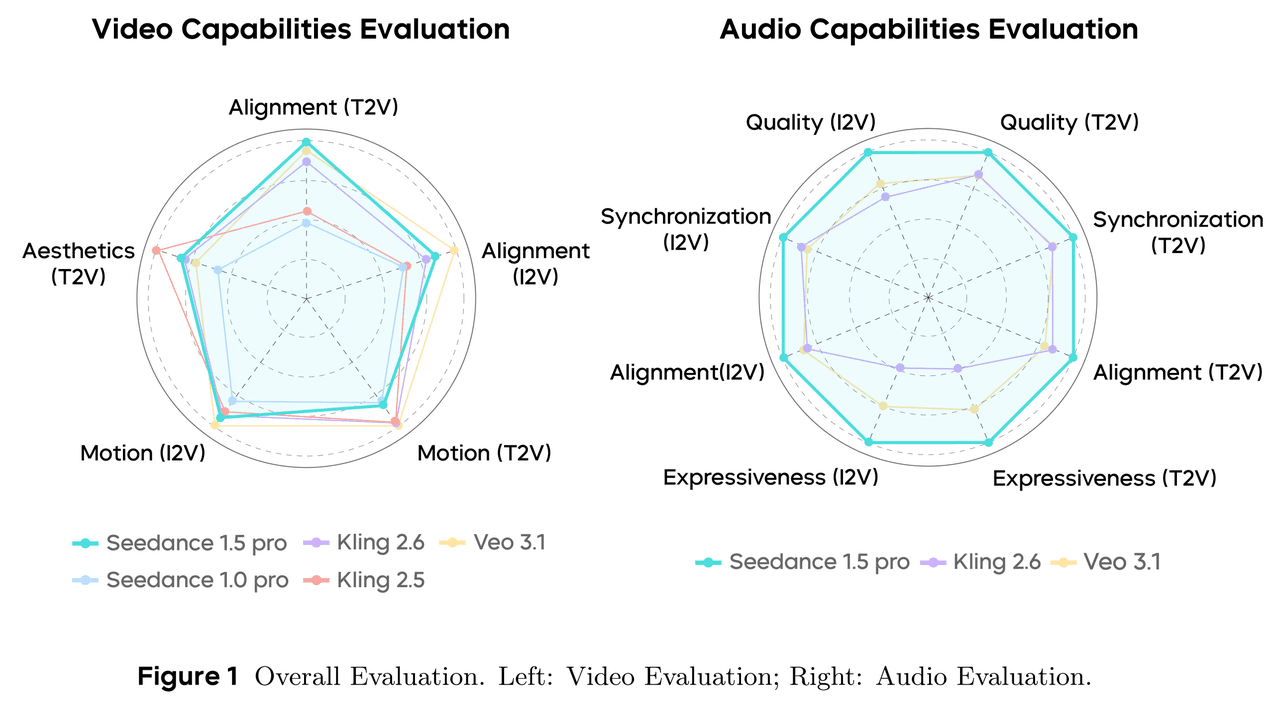
- The Upgrade: While Seedance 1.5 Pro established the foundation for native audio-visual generation, version 2.0 is predicted to introduce "Acoustic Physics Fields" and "World Model Priors".
- The Goal: To bridge the gap between AI generation and physical reality. It aims to act as an all-around director, managing complex audio-visual narratives for videos exceeding 30 seconds.
Key Predictions: 3 Major Upgrades in Seedance 2.0 (Predicted)
1. From Audio Sync to "Acoustic Physics"
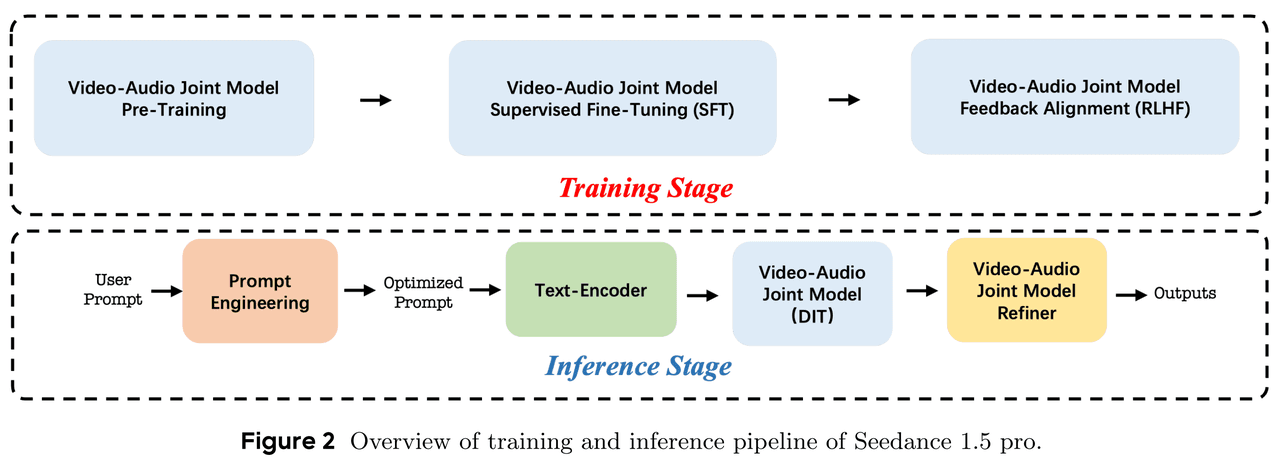
Seedance 1.5 Pro utilized a Dual-branch Diffusion Transformer (MMDiT) to solve lip-syncing issues. However, Seedance 2.0 is expected to simulate a full Acoustic Field.
- True Multimodal Physics: If a glass breaks in the video, the audio generated will not just be a generic sound effect. It will calculate the reverberation based on the floor material (e.g., carpet vs. tile) visible in the frame.
- Latent Priors: This involves adding physical engine priors to the MMDiT architecture, giving sound "weight" and "impact".
2. Battling Wan 2.6: Consistency in Long Videos
- Currently, Wan 2.6 dominates character consistency with its Reference-to-Video feature, which acts like a zero-shot character LoRA. Seedance 2.0 is expected to counter this by locking onto the "World ID".
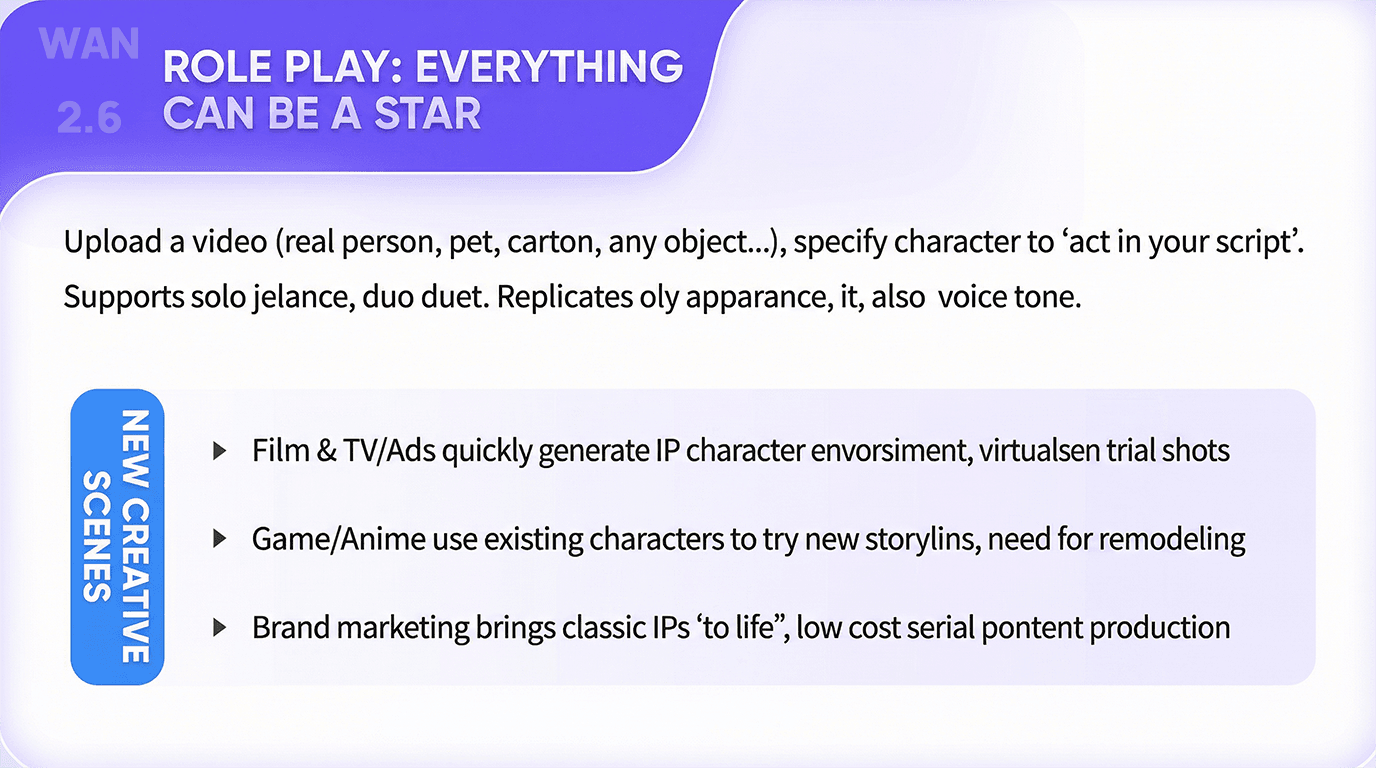
- Longer Generation: Breaking the "12-second curse", Seedance 2.0 targets native coherence for 30-60 second videos.
- Temporal Attention: Enhanced post-training optimization will likely allow the model to "remember" events from the first second and reference them at the end of the clip.
3. Director-Level Control
- Seedance 2.0 is predicted to introduce Node-based Control and Real-time Preview capabilities.
- Partial In-painting & Audio Remixing: Users might be able to select a character and modify their action or dialogue emotion (e.g., from angry to pleading) while keeping the background music and environment unchanged.
Comparison: Seedance 2.0 vs. The Competition
| Feature | Seedance 1.5 Pro | Seedance 2.0 (Predicted) |
| Architecture | MMDiT (Audio-Visual) | World-MMDiT (Physics + AV) |
| Audio | Lip-sync, Emotion Alignment | Physics Simulation, Environment Interaction |
| Duration | Short (~10s) | Long (30s-60s) |
| Compute Load | High | Extremely High |
How to Access Seedance 2.0: The Hardware Challenge
The technical documentation for 1.5 Pro highlights that while optimization increased speed by 10x, the jump to Seedance 2.0's "World Model" capabilities will exponentially increase VRAM and compute requirements.
Running Seedance 2.0 locally—even on an NVIDIA RTX 4090—will likely be impossible for most users due to the massive multimodal processing load.
The Solution: Atlas Cloud
Atlas Cloud is prepared for the launch. We have integrated the entire Seedance model family and will support Seedance 2.0 on Day 0 of its release.
- Zero-Config Deployment: Access Seedance, Kling, and Sora-like models without complex Python or CUDA setup.
- Elastic Computing: Scale your GPU power instantly. Pay by the second for rendering long, complex videos without burning out your local hardware.
- API Access: Developers can integrate Seedance 2.0 capabilities directly into their apps via the Atlas Cloud API immediately upon launch.
Don't let hardware limit your creativity. [Sign up for Atlas Cloud] to secure your priority access for the Seedance 2.0 launch in mid-February.
How to use on Atlas Cloud
Atlas Cloud lets you use models side by side — first in a playground, then via a single API.
Method 1: Use directly in the Atlas Cloud playground
Method 2: Access via API
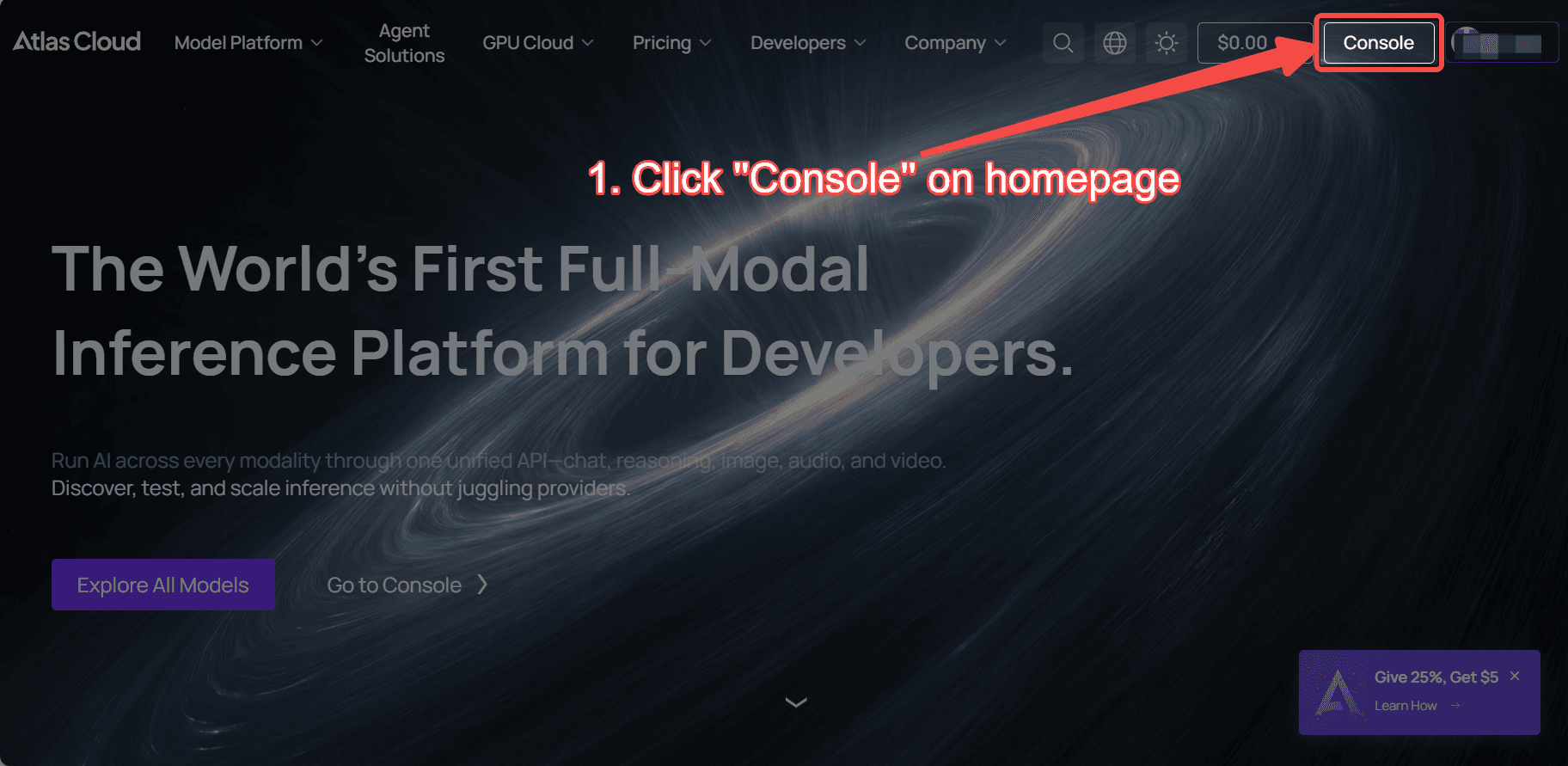
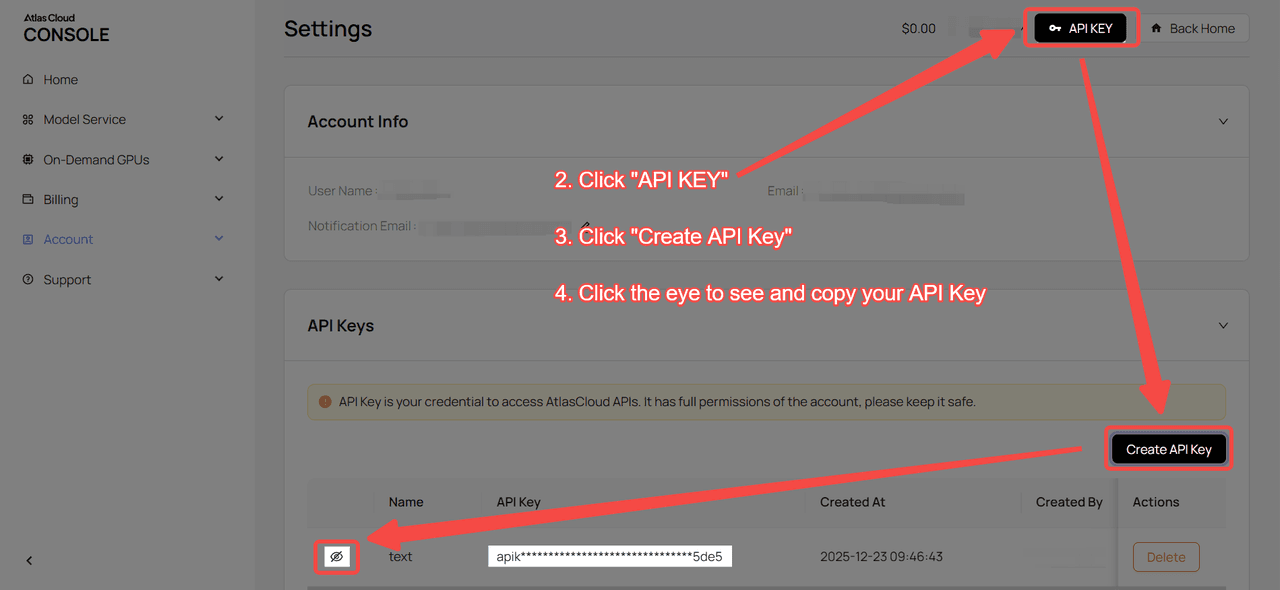
Step 1: Get your API key
Create an API key in your console and copy it for later use.
Step 2: Check the API documentation
Review the endpoint, request parameters, and authentication method in our API docs.
Step 3: Make your first request (Python example)
Example: generate a video with Seedance 1.5 Pro:
plaintext1import requests 2import time 3 4# Step 1: Start video generation 5generate_url = "https://api.atlascloud.ai/api/v1/model/generateVideo" 6headers = { 7 "Content-Type": "application/json", 8 "Authorization": "Bearer $ATLASCLOUD_API_KEY" 9} 10data = { 11 "model": "bytedance/seedance-v1.5-pro/image-to-video-fast", 12 "aspect_ratio": "16:9", 13 "camera_fixed": False, 14 "duration": 5, 15 "generate_audio": True, 16 "image": "https://static.atlascloud.ai/media/images/06a309ac0adecd3eaa6eee04213e9c69.png", 17 "last_image": "example_value", 18 "prompt": "Use the provided image as the first frame.\nOn a quiet residential street in a summer afternoon, a young girl in high-quality Japanese anime style slowly walks forward.\nHer steps are natural and light, with her arms gently swinging in rhythm with her walk. Her body movement remains stable and well-balanced.\nAs she walks, her expression gradually softens into a gentle, warm smile. The corners of her mouth lift slightly, and her eyes look calm and bright.\nA soft breeze moves her short hair and headband, with individual strands subtly flowing. Her clothes show slight natural motion from the wind.\nSunlight comes from the upper side, creating soft highlights and natural shadows on her face and body.\nBackground trees sway gently, and distant clouds drift slowly, enhancing the peaceful summer atmosphere.\nThe camera stays at a medium to medium-close distance, smoothly tracking forward with cinematic motion, stable and controlled.\nHigh-quality Japanese hand-drawn animation style, clean linework, warm natural colors, smooth frame rate, consistent character proportions.\nThe mood is calm, youthful, and healing, like a slice-of-life moment from an animated film.", 19 "resolution": "720p", 20 "seed": -1 21} 22 23generate_response = requests.post(generate_url, headers=headers, json=data) 24generate_result = generate_response.json() 25prediction_id = generate_result["data"]["id"] 26 27# Step 2: Poll for result 28poll_url = f"https://api.atlascloud.ai/api/v1/model/prediction/{prediction_id}" 29 30def check_status(): 31 while True: 32 response = requests.get(poll_url, headers={"Authorization": "Bearer $ATLASCLOUD_API_KEY"}) 33 result = response.json() 34 35 if result["data"]["status"] in ["completed", "succeeded"]: 36 print("Generated video:", result["data"]["outputs"][0]) 37 return result["data"]["outputs"][0] 38 elif result["data"]["status"] == "failed": 39 raise Exception(result["data"]["error"] or "Generation failed") 40 else: 41 # Still processing, wait 2 seconds 42 time.sleep(2) 43 44video_url = check_status()





