
Die meisten Teams beginnen mit der KI-Videogenerierung durch einzelne API-Aufrufe – ein Video generieren, herunterladen, weitermachen. Für Experimente reicht das aus.
Zuletzt aktualisiert: 28. Februar 2026
Sehen Sie diese Modelle in Aktion:
j-qDCyXubyE
Pipeline-Architektur
Bevor Sie Code schreiben, ist hier der grobe Entwurf der Architektur, die wir aufbauen:
plaintext1``` 2+-------------------+ +--------------------+ +------------------+ 3| Prompt Config | | Atlas Cloud API | | Output Storage | 4| (JSON/YAML) | | | | | 5| - prompts +---->+ /generateImage +---->+ /images/ | 6| - models | | /generateVideo | | /videos/ | 7| - parameters | | /prediction/get | | /manifest.json | 8+-------------------+ +--------------------+ +------------------+ 9 | | | 10 v v v 11+-------------------+ +--------------------+ +------------------+ 12| Pipeline Engine | | Polling & Retry | | Cost Tracker | 13| | | | | | 14| - batch_generate | | - exponential | | - per-request | 15| - concurrency | | backoff | | - cumulative | 16| - model routing | | - max retries | | - per-model | 17+-------------------+ +--------------------+ +------------------+ 18```
Die Pipeline folgt einem einfachen Ablauf:
- Einlesen der Prompt-Konfigurationen aus einer strukturierten Datei.
- Weiterleiten jedes Prompts an das entsprechende Modell und den Endpunkt (Bild oder Video).
- Übermitteln aller Anfragen an die Atlas Cloud API mit kontrollierter Parallelität.
- Abfragen (Polling) der Ergebnisse mit exponentiellem Backoff und Retry-Logik.
- Herunterladen der fertigen Ergebnisse und Speichern in organisierten Verzeichnissen.
- Nachverfolgen der Kosten und Erstellen eines zusammenfassenden Manifests.
Erste Schritte: API-Zugriff
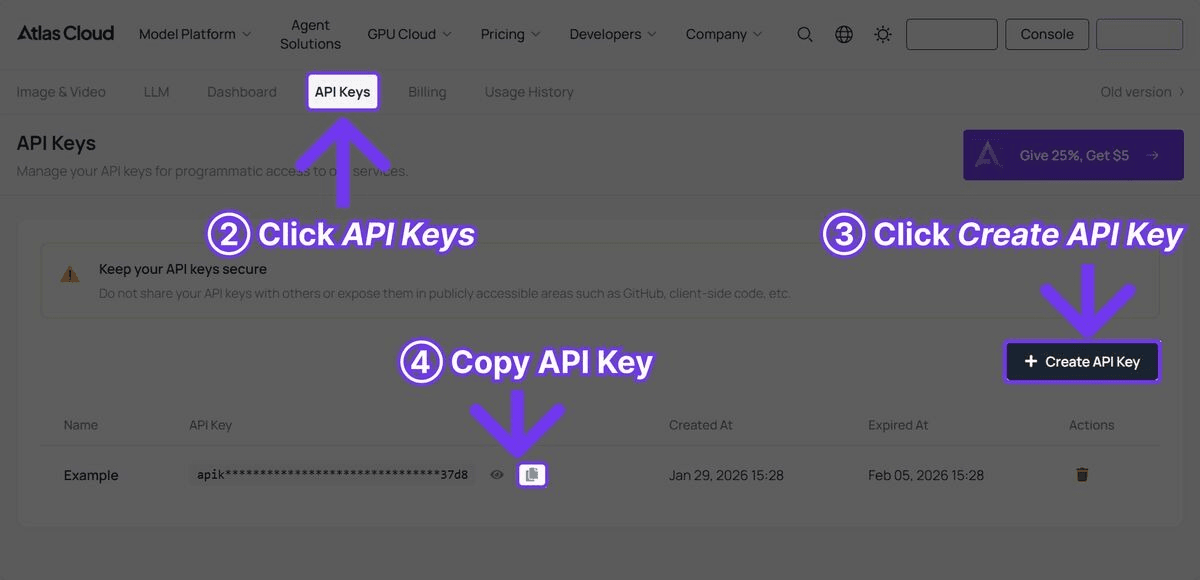
Schritt 1: API-Key abrufen
Registrieren Sie sich bei Atlas Cloud und erstellen Sie über das Dashboard einen API-Key.

Schritt 2: Abhängigkeiten installieren
plaintext1```bash 2pip install requests pyyaml 3```
Es sind keine komplexen Frameworks erforderlich. Die Pipeline verwendet lediglich requests für HTTP-Aufrufe, pyyaml für Konfigurationsdateien sowie Module aus der Python-Standardbibliothek für Parallelität und Dateiverwaltung.
Der vollständige Pipeline-Code
Im Folgenden finden Sie die voll funktionsfähige Pipeline. Jeder Abschnitt wird nach dem Codeblock erläutert.
plaintext1```python 2import requests 3import time 4import json 5import os 6import logging 7from concurrent.futures import ThreadPoolExecutor, as_completed 8from dataclasses import dataclass, field 9from typing import Optional 10from datetime import datetime 11 12# Logging konfigurieren 13logging.basicConfig( 14 level=logging.INFO, 15 format="%(asctime)s [%(levelname)s] %(message)s", 16 datefmt="%Y-%m-%d %H:%M:%S" 17) 18logger = logging.getLogger("atlas_pipeline") 19 20@dataclass 21class GenerationResult: 22 """Speichert das Ergebnis einer einzelnen Generierungsanfrage.""" 23 name: str 24 model: str 25 media_type: str # "image" oder "video" 26 status: str # "success", "failed", "error" 27 output_url: Optional[str] = None 28 local_path: Optional[str] = None 29 cost_estimate: float = 0.0 30 duration_seconds: float = 0.0 31 error_message: Optional[str] = None 32 33class AtlasCloudClient: 34 """Client-Wrapper für die Atlas Cloud API.""" 35 36 BASE_URL = "https://api.atlascloud.ai/api/v1" 37 38 # Preise pro Modell (geschätzt) 39 PRICING = { 40 "black-forest-labs/flux-2-pro/text-to-image": 0.04, # pro Bild 41 "google/imagen4-ultra/text-to-image": 0.06, # pro Bild 42 "bytedance/seedance-v1.5-pro/text-to-video": 0.022, # pro Sekunde 43 "google/veo3.1/text-to-video": 0.03, # pro Sekunde 44 "openai/sora-v2/text-to-video": 0.15, # pro Sekunde 45 } 46 47 def __init__(self, api_key: str): 48 self.api_key = api_key 49 self.session = requests.Session() 50 self.session.headers.update({ 51 "Authorization": f"Bearer {api_key}", 52 "Content-Type": "application/json" 53 }) 54 55 def generate_image( 56 self, 57 model: str, 58 prompt: str, 59 width: int = 1024, 60 height: int = 1024 61 ) -> dict: 62 """Übermittelt eine Bildgenerierungsanfrage.""" 63 response = self.session.post( 64 f"{self.BASE_URL}/model/generateImage", 65 json={ 66 "model": model, 67 "prompt": prompt, 68 "width": width, 69 "height": height 70 } 71 ) 72 response.raise_for_status() 73 return response.json() 74 75 def generate_video( 76 self, 77 model: str, 78 prompt: str, 79 duration: int = 5, 80 resolution: str = "1080p" 81 ) -> dict: 82 """Übermittelt eine Videogenerierungsanfrage.""" 83 response = self.session.post( 84 f"{self.BASE_URL}/model/generateVideo", 85 json={ 86 "model": model, 87 "prompt": prompt, 88 "duration": duration, 89 "resolution": resolution 90 } 91 ) 92 response.raise_for_status() 93 return response.json() 94 95 def poll_result( 96 self, 97 request_id: str, 98 max_wait: int = 300, 99 initial_interval: int = 5, 100 max_interval: int = 30 101 ) -> Optional[dict]: 102 """Abfrage des Ergebnisses mit exponentiellem Backoff.""" 103 start_time = time.time() 104 interval = initial_interval 105 106 while time.time() - start_time < max_wait: 107 try: 108 response = self.session.get( 109 f"{self.BASE_URL}/model/prediction/{request_id}/get" 110 ) 111 data = response.json() 112 113 if data["status"] == "completed": 114 return data 115 elif data["status"] == "failed": 116 logger.error(f"Generierung fehlgeschlagen: {data.get('error', 'Unbekannter Fehler')}") 117 return None 118 119 logger.debug(f"Status: {data['status']}, warte {interval}s...") 120 time.sleep(interval) 121 interval = min(interval * 1.5, max_interval) 122 123 except requests.RequestException as e: 124 logger.warning(f"Abfrage fehlgeschlagen: {e}, versuche es erneut in {interval}s") 125 time.sleep(interval) 126 127 logger.error(f"Zeitüberschreitung nach {max_wait}s für {request_id}") 128 return None 129 130 def estimate_cost(self, model: str, duration: int = 0) -> float: 131 """Schätzt die Kosten einer Anfrage.""" 132 base_price = self.PRICING.get(model, 0.05) 133 if "text-to-video" in model and duration > 0: 134 return base_price * duration 135 return base_price 136 137class VideoPipeline: 138 """Orchestriert die Batch-Generierung von Bildern und Videos.""" 139 140 def __init__(self, api_key: str, output_dir: str = "pipeline_output"): 141 self.client = AtlasCloudClient(api_key) 142 self.output_dir = output_dir 143 self.results: list[GenerationResult] = [] 144 self.total_cost = 0.0 145 146 # Verzeichnisse erstellen 147 os.makedirs(os.path.join(output_dir, "images"), exist_ok=True) 148 os.makedirs(os.path.join(output_dir, "videos"), exist_ok=True) 149 150 def _download_file(self, url: str, filepath: str) -> bool: 151 """Datei herunterladen.""" 152 try: 153 response = requests.get(url, timeout=60) 154 response.raise_for_status() 155 with open(filepath, "wb") as f: 156 f.write(response.content) 157 return True 158 except Exception as e: 159 logger.error(f"Download fehlgeschlagen für {url}: {e}") 160 return False 161 162 def _safe_filename(self, name: str, extension: str) -> str: 163 """Namen in sicheren Dateinamen umwandeln.""" 164 safe = name.lower().replace(" ", "_") 165 safe = "".join(c for c in safe if c.isalnum() or c == "_") 166 return f"{safe}.{extension}" 167 168 def _process_image(self, name: str, model: str, prompt: str, 169 width: int = 1024, height: int = 1024, 170 retries: int = 2) -> GenerationResult: 171 """Bildgenerierung mit Retry-Logik.""" 172 start = time.time() 173 cost = self.client.estimate_cost(model) 174 175 for attempt in range(retries + 1): 176 try: 177 logger.info(f"[Bild] Generiere '{name}' (Versuch {attempt + 1})") 178 result = self.client.generate_image(model, prompt, width, height) 179 request_id = result["request_id"] 180 181 data = self.client.poll_result(request_id) 182 if data and data["status"] == "completed": 183 image_url = data["output"]["image_url"] 184 filename = self._safe_filename(name, "png") 185 filepath = os.path.join(self.output_dir, "images", filename) 186 self._download_file(image_url, filepath) 187 188 return GenerationResult( 189 name=name, model=model, media_type="image", 190 status="success", output_url=image_url, 191 local_path=filepath, cost_estimate=cost, 192 duration_seconds=time.time() - start 193 ) 194 except requests.HTTPError as e: 195 if e.response.status_code == 429: 196 wait = 2 ** (attempt + 2) 197 logger.warning(f"Rate-Limit erreicht, warte {wait}s") 198 time.sleep(wait) 199 continue 200 logger.error(f"HTTP-Fehler bei '{name}': {e}") 201 except Exception as e: 202 logger.error(f"Fehler bei '{name}': {e}") 203 204 if attempt < retries: 205 time.sleep(2 ** attempt) 206 207 return GenerationResult( 208 name=name, model=model, media_type="image", 209 status="failed", cost_estimate=0, 210 duration_seconds=time.time() - start, 211 error_message="Max. Wiederholungen überschritten" 212 ) 213 214 def _process_video(self, name: str, model: str, prompt: str, 215 duration: int = 5, resolution: str = "1080p", 216 retries: int = 2) -> GenerationResult: 217 """Videogenerierung mit Retry-Logik.""" 218 start = time.time() 219 cost = self.client.estimate_cost(model, duration) 220 221 for attempt in range(retries + 1): 222 try: 223 logger.info(f"[Video] Generiere '{name}' (Versuch {attempt + 1})") 224 result = self.client.generate_video(model, prompt, duration, resolution) 225 request_id = result["request_id"] 226 227 data = self.client.poll_result(request_id, max_wait=600) 228 if data and data["status"] == "completed": 229 video_url = data["output"]["video_url"] 230 filename = self._safe_filename(name, "mp4") 231 filepath = os.path.join(self.output_dir, "videos", filename) 232 self._download_file(video_url, filepath) 233 234 return GenerationResult( 235 name=name, model=model, media_type="video", 236 status="success", output_url=video_url, 237 local_path=filepath, cost_estimate=cost, 238 duration_seconds=time.time() - start 239 ) 240 except requests.HTTPError as e: 241 if e.response.status_code == 429: 242 wait = 2 ** (attempt + 2) 243 logger.warning(f"Rate-Limit erreicht, warte {wait}s") 244 time.sleep(wait) 245 continue 246 logger.error(f"HTTP-Fehler bei '{name}': {e}") 247 except Exception as e: 248 logger.error(f"Fehler bei '{name}': {e}") 249 250 if attempt < retries: 251 time.sleep(2 ** (attempt + 1)) 252 253 return GenerationResult( 254 name=name, model=model, media_type="video", 255 status="failed", cost_estimate=0, 256 duration_seconds=time.time() - start, 257 error_message="Max. Wiederholungen überschritten" 258 ) 259 260 def batch_generate(self, jobs: list[dict], max_workers: int = 3): 261 """Batch-Verarbeitung von Jobs mit Parallelität.""" 262 logger.info(f"Starte Batch mit {len(jobs)} Jobs und {max_workers} Workern") 263 start_time = time.time() 264 265 with ThreadPoolExecutor(max_workers=max_workers) as executor: 266 futures = {} 267 for job in jobs: 268 if job["type"] == "image": 269 future = executor.submit( 270 self._process_image, 271 name=job["name"], 272 model=job["model"], 273 prompt=job["prompt"], 274 width=job.get("width", 1024), 275 height=job.get("height", 1024) 276 ) 277 elif job["type"] == "video": 278 future = executor.submit( 279 self._process_video, 280 name=job["name"], 281 model=job["model"], 282 prompt=job["prompt"], 283 duration=job.get("duration", 5), 284 resolution=job.get("resolution", "1080p") 285 ) 286 else: 287 logger.warning(f"Unbekannter Job-Typ: {job['type']}") 288 continue 289 futures[future] = job["name"] 290 291 for future in as_completed(futures): 292 result = future.result() 293 self.results.append(result) 294 self.total_cost += result.cost_estimate 295 status_icon = "OK" if result.status == "success" else "FAIL" 296 logger.info( 297 f"[{status_icon}] {result.name} -- " 298 f"USD{result.cost_estimate:.3f} -- " 299 f"{result.duration_seconds:.1f}s" 300 ) 301 302 elapsed = time.time() - start_time 303 self._save_manifest() 304 self._print_summary(elapsed) 305 306 def _save_manifest(self): 307 """Ergebnis-Manifest als JSON speichern.""" 308 manifest = { 309 "generated_at": datetime.now().isoformat(), 310 "total_cost": round(self.total_cost, 4), 311 "total_jobs": len(self.results), 312 "successful": sum(1 for r in self.results if r.status == "success"), 313 "failed": sum(1 for r in self.results if r.status != "success"), 314 "results": [ 315 { 316 "name": r.name, 317 "model": r.model, 318 "type": r.media_type, 319 "status": r.status, 320 "output_url": r.output_url, 321 "local_path": r.local_path, 322 "cost": round(r.cost_estimate, 4), 323 "generation_time": round(r.duration_seconds, 1), 324 "error": r.error_message 325 } 326 for r in self.results 327 ] 328 } 329 manifest_path = os.path.join(self.output_dir, "manifest.json") 330 with open(manifest_path, "w") as f: 331 json.dump(manifest, f, indent=2) 332 logger.info(f"Manifest gespeichert unter {manifest_path}") 333 334 def _print_summary(self, elapsed: float): 335 """Druckt eine Zusammenfassung des Batch-Laufs.""" 336 success = sum(1 for r in self.results if r.status == "success") 337 failed = len(self.results) - success 338 cost_by_model = {} 339 for r in self.results: 340 cost_by_model[r.model] = cost_by_model.get(r.model, 0) + r.cost_estimate 341 342 print("\n" + "=" * 60) 343 print("PIPELINE ZUSAMMENFASSUNG") 344 print("=" * 60) 345 print(f"Gesamtjobs: {len(self.results)}") 346 print(f"Erfolgreich: {success}") 347 print(f"Fehlgeschlagen: {failed}") 348 print(f"Gesamtkosten: USD{self.total_cost:.4f}") 349 print(f"Dauer: {elapsed:.1f}s") 350 print(f"\nKosten nach Modell:") 351 for model, cost in sorted(cost_by_model.items()): 352 short_name = model.split("/")[1] 353 print(f" {short_name}: USD{cost:.4f}") 354 print("=" * 60) 355```
Verwendung der Pipeline
Nachdem die Klassen AtlasCloudClient und VideoPipeline definiert sind, zeigen wir hier die Nutzung für einen typischen Content-Produktions-Workflow.
Grundlegende Nutzung: Thumbnails + Videos
plaintext1```python 2API_KEY = "ihr-atlas-cloud-api-key" 3 4pipeline = VideoPipeline(api_key=API_KEY, output_dir="weekly_content") 5 6jobs = [ 7 # Thumbnails mit Flux 2 Pro 8 { 9 "name": "Product Launch Thumbnail", 10 "type": "image", 11 "model": "black-forest-labs/flux-2-pro/text-to-image", 12 "prompt": "Eye-catching YouTube thumbnail, bold text 'NEW LAUNCH', " 13 "product spotlight on dark gradient background, vibrant " 14 "accent colors, professional design, 4K" 15 }, 16 { 17 "name": "Tutorial Thumbnail", 18 "type": "image", 19 "model": "black-forest-labs/flux-2-pro/text-to-image", 20 "prompt": "YouTube thumbnail for coding tutorial, split screen " 21 "showing code editor and final result, tech aesthetic, " 22 "clean modern design, bold readable text" 23 }, 24 25 # Videos mit Seedance 2.0 (kosteneffizient) 26 { 27 "name": "Product Showcase Seedance", 28 "type": "video", 29 "model": "bytedance/seedance-v1.5-pro/text-to-video", 30 "prompt": "Sleek product reveal animation, modern gadget emerging " 31 "from soft light, rotating slowly to show all angles, " 32 "minimalist white background, cinematic lighting", 33 "duration": 10 34 }, 35 { 36 "name": "Brand Intro Seedance", 37 "type": "video", 38 "model": "bytedance/seedance-v1.5-pro/text-to-video", 39 "prompt": "Dynamic brand introduction sequence, abstract geometric " 40 "shapes assembling into a logo, particles and light trails, " 41 "professional motion graphics style, dark background", 42 "duration": 5 43 }, 44 45 # Cinematic Video mit Veo 3.1 (mit Audio) 46 { 47 "name": "Hero Video Veo", 48 "type": "video", 49 "model": "google/veo3.1/text-to-video", 50 "prompt": "Cinematic aerial shot of a modern city skyline at golden " 51 "hour, camera slowly pushing forward, lens flare from " 52 "setting sun, ambient city sounds, film grain, " 53 "professional color grading", 54 "duration": 8 55 }, 56] 57 58pipeline.batch_generate(jobs, max_workers=3) 59```
Konfigurationsbasierter Ansatz
Für wiederkehrende Pipelines können Sie Jobs in einer YAML-Konfigurationsdatei definieren:
plaintext1```yaml 2# pipeline_config.yaml 3output_dir: weekly_content 4max_workers: 3 5 6jobs: 7 - name: Product Hero Image 8 type: image 9 model: google/imagen4-ultra/text-to-image 10 prompt: > 11 Premium product photography of wireless earbuds in charging case, 12 dark reflective surface, dramatic lighting, luxury tech aesthetic, 13 8K resolution, commercial quality 14 width: 2048 15 height: 2048 16 17 - name: Social Media Video 18 type: video 19 model: bytedance/seedance-v1.5-pro/text-to-video 20 prompt: > 21 Trendy social media content, hands unboxing a premium tech product, 22 satisfying reveal moment, close-up details, bright natural lighting, 23 vertical format 24 duration: 10 25 resolution: 1080p 26 27 - name: Cinematic Ad 28 type: video 29 model: google/veo3.1/text-to-video 30 prompt: > 31 Cinematic commercial for premium headphones, person putting on 32 headphones in a busy coffee shop, world goes quiet, shallow depth 33 of field, warm color palette, ambient cafe sounds fading to silence 34 duration: 8 35 resolution: 1080p 36```
Laden und ausführen:
plaintext1```python 2import yaml 3 4with open("pipeline_config.yaml") as f: 5 config = yaml.safe_load(f) 6 7pipeline = VideoPipeline( 8 api_key=API_KEY, 9 output_dir=config["output_dir"] 10) 11pipeline.batch_generate( 12 config["jobs"], 13 max_workers=config.get("max_workers", 3) 14) 15```
Wichtige Implementierungsdetails
Exponentielles Backoff beim Polling
Die Videogenerierung dauert je nach Modell und Dauer zwischen 30 Sekunden und 5 Minuten. Die Pipeline nutzt exponentielles Backoff, um effizient abzufragen, ohne die API zu überlasten:
plaintext1```python 2interval = initial_interval # startet bei 5s 3while time.time() - start_time < max_wait: 4 # ... Status prüfen ... 5 time.sleep(interval) 6 interval = min(interval * 1.5, max_interval) # wächst auf max 30s 7```
Das bedeutet, dass die ersten Abfragen im 5-Sekunden-Takt erfolgen, sich dann aber für längere Generierungen schrittweise auf 30 Sekunden ausdehnen. Dies reduziert unnötige API-Aufrufe um etwa 60 % im Vergleich zu festen Intervallen.
Umgang mit Rate Limits
Wenn die API den Status 429 (Rate Limited) zurückgibt, wartet die Pipeline exponentiell ab, anstatt sofort abzubrechen:
plaintext1```python 2except requests.HTTPError as e: 3 if e.response.status_code == 429: 4 wait = 2 ** (attempt + 2) # 4s, 8s, 16s 5 logger.warning(f"Rate-Limit erreicht, warte {wait}s") 6 time.sleep(wait) 7 continue 8```
Dies ist für Batch-Vorgänge unerlässlich, bei denen viele gleichzeitige Anfragen die Limits kurzzeitig überschreiten könnten.
Concurrency Control
Der ThreadPoolExecutor begrenzt gleichzeitige API-Anfragen, um eine Überlastung der API oder Ihrer Netzwerkverbindung zu verhindern:
plaintext1```python 2with ThreadPoolExecutor(max_workers=3) as executor: 3 futures = {executor.submit(process, job): job for job in jobs} 4```
Beginnen Sie mit max_workers=3 und erhöhen Sie den Wert auf 5–8, falls Ihr Atlas Cloud-Account eine höhere Parallelität unterstützt. Mehr als 10 gleichzeitige Anfragen bringen meist kaum Vorteile und erhöhen das Risiko für Rate-Limiting.
Kosten-Tracking
Jede Generierungsanfrage erhält eine Kostenschätzung basierend auf der Preisübersicht:
plaintext1```python 2PRICING = { 3 "black-forest-labs/flux-2-pro/text-to-image": 0.04, 4 "bytedance/seedance-v1.5-pro/text-to-video": 0.022, # pro Sekunde 5 "google/veo3.1/text-to-video": 0.03, # pro Sekunde 6} 7```
Für Videomodelle skalieren die Kosten mit der Dauer. Die Manifest-Datei verfolgt sowohl die Kosten pro Anfrage als auch die Gesamtkosten für die Budgetüberwachung.
Kostenschätzung für Pipeline-Läufe
Hier einige typische Kosten:
| Szenario | Jobs | Genutzte Modelle | Geschätzte Kosten | Geschätzte Zeit |
|---|---|---|---|---|
| Wöchentliches Social Pack | 10 Bilder + 5 Videos | Flux 2 Pro + Seedance 2.0 | USD0.95 | ~10 Min |
| Produkt-Launch | 20 Bilder + 10 Videos | Flux 2 Pro + Imagen 4 + Seedance 2.0 | USD3.80 | ~25 Min |
| Monatliche Bibliothek | 50 Bilder + 20 Videos | Gemischt | USD7.50 | ~45 Min |
| E-Commerce (500 SKUs) | 500 Bilder | Flux 2 Pro | USD20.00 | ~30 Min |
Seedance 2.0 ist die kostengünstigste Option für hochvolumige Videogenerierung. Veo 3.1 bietet eine gute Balance aus Qualität und Kosten für kürzere Clips.
Deployment-Tipps
Cronjobs für geplante Generierung
Führen Sie die Pipeline zeitgesteuert via Cron aus:
plaintext1```bash 2# Wöchentlicher Content jeden Montag um 6 Uhr morgens 30 6 * * 1 cd /pfad/zum/projekt && python run_pipeline.py --config weekly.yaml 4```
Warteschlangen-Architektur
Für größere Deployments sollten Sie eine Task-Queue wie Celery oder Redis Queue verwenden, um das Einreichen der Jobs von der Verarbeitung zu entkoppeln. Dies ermöglicht die asynchrone Bereitstellung von Ergebnissen via Webhooks.
Umgebungsmanagement
Speichern Sie API-Keys niemals hartkodiert. Verwenden Sie Umgebungsvariablen (os.environ) oder .env-Dateien mit python-dotenv.
Fazit
Der Aufbau einer KI-Video-Pipeline besteht nicht aus cleverem Code, sondern aus zuverlässiger Infrastruktur, die mit den Realitäten der API-Integration umgeht: Rate Limits, Timeouts, Ausfälle und Kosten-Monitoring. Die Kombination aus Flux 2 Pro, Seedance 2.0 und Veo 3.1 über eine einzige API-Schnittstelle von Atlas Cloud bietet eine nahtlose Lösung für alle Produktionsanforderungen.







