파인튜닝
DevPod의 기능을 기반으로, 모델 파인튜닝 전용 이미지를 제공하여 사용자가 자신만의 모델을 편리하게 파인튜닝할 수 있도록 합니다.
파인튜닝 작업 생성 프로세스는 기본적으로 DevPod와 동일합니다. DevPod 생성 프로세스를 참조할 수 있습니다. 다음과 같은 몇 가지 차이점이 있습니다:
- 생성 페이지에서 파인튜닝을 위한 기본 모델을 입력해야 합니다. 예: Qwen/Qwen3-8B.
- 모델에 액세스 토큰이 필요한 경우 Hugging Face 토큰도 입력해야 합니다(선택 사항).
- Dataset 필드에 선택한 데이터셋 식별자를 입력하세요. 예: tatsu-lab/alpaca.
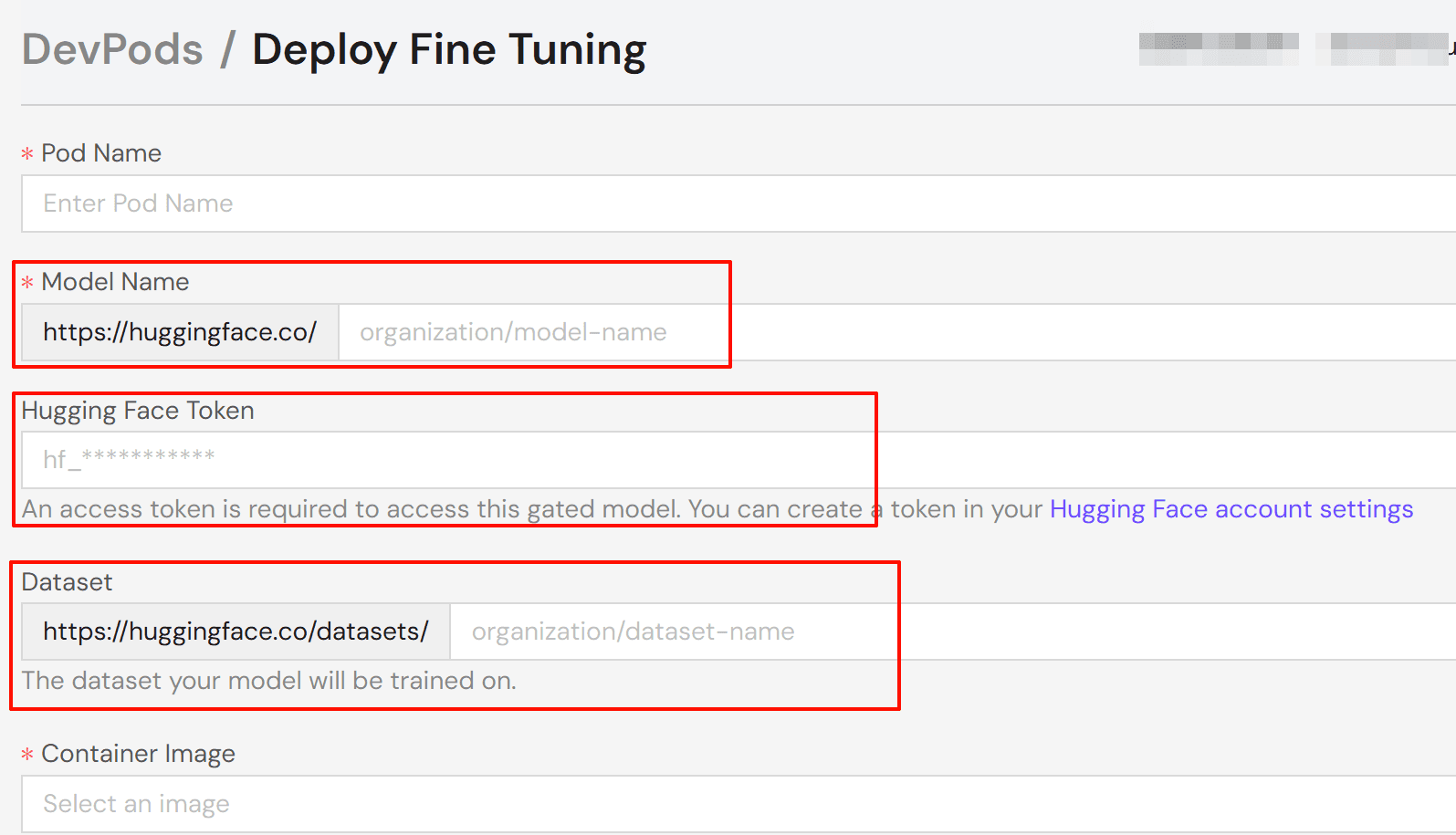
작업 리소스 구성을 선택한 후 pod를 배포하고 작업 상태가 "running"으로 변경될 때까지 기다리세요. 연결을 클릭하고 선호하는 연결 방법을 선택하세요:
- Jupyter Notebook: 브라우저 기반 노트북 인터페이스(권장).
- Web Terminal: 브라우저 기반 터미널.
- SSH: 로컬 머신 터미널 연결.
참고:
SSH를 사용하려면 계정 설정에서 공개 SSH 키를 추가하세요. 시스템이 자동으로 pod의 authorized_keys 파일에 키를 추가합니다.
현재 Axolotl 및 Torchtune을 기반으로 개발된 두 가지 도구 이미지를 신중하게 준비하여 사용자가 모델을 파인튜닝하는 데 편의를 제공합니다. 다음으로 이 두 이미지의 사용 프로세스를 자세히 소개하겠습니다.
Axolotl 기반
환경 구성
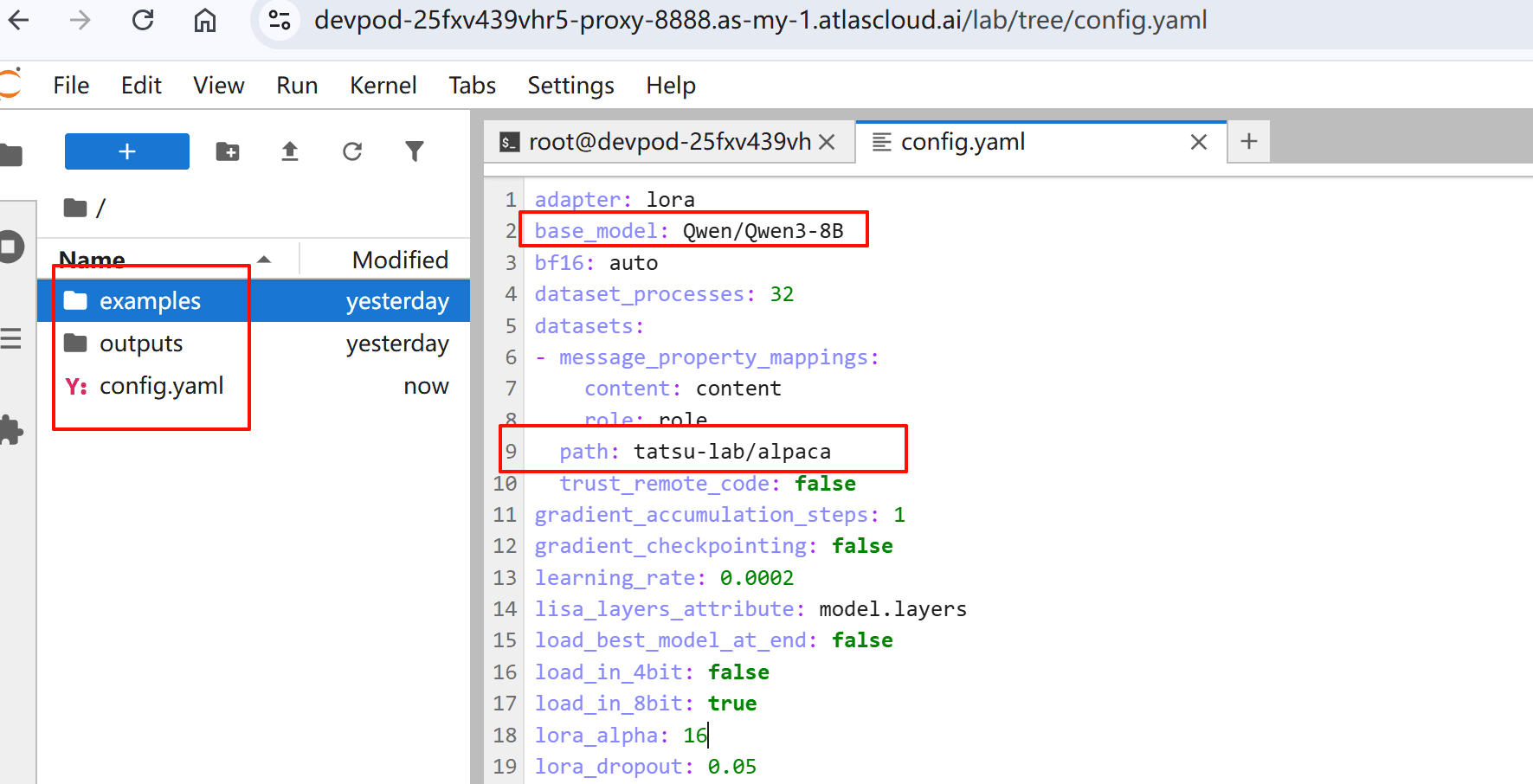
브라우저에서 Jupyter Notebook을 여세요. 작업 디렉터리에 세 개의 파일이 있는 것을 볼 수 있습니다:
- examples/: 샘플 구성 및 스크립트
- outputs/: 학습 결과 및 모델 출력
- config.yaml: 모델을 위한 학습 매개변수
시스템은 선택한 기본 모델 및 데이터셋을 기반으로 초기 config.yaml을 생성합니다.
구성 검토 및 수정
특정 사용 사례에 따라 매개변수를 검토하고 조정하세요. 다음은 일반적인 매개변수가 포함된 예제 구성입니다:
base_model: Qwen/Qwen3-32B
# 체크포인트 및 최종 모델을 HF에 자동 업로드
# hub_model_id: username/custom_model_name

plugins:
  - axolotl.integrations.cut_cross_entropy.CutCrossEntropyPlugin
strict: false

chat_template: qwen3
datasets:
  - path: mlabonne/FineTome-100k
    type: chat_template
    split: train[:20%]
    field_messages: conversations
    message_property_mappings:
      role: from
      content: value
val_set_size: 0.0
output_dir: ./outputs/out
dataset_prepared_path: last_run_prepared

sequence_len: 2048
sample_packing: true
eval_sample_packing: true
pad_to_sequence_len: true

load_in_4bit: true
adapter: qlora
lora_r: 16
lora_alpha: 32
lora_target_modules:
  - q_proj
  - k_proj
  - v_proj
  - o_proj
  - down_proj
  - up_proj
lora_mlp_kernel: true
lora_qkv_kernel: true
lora_o_kernel: true

wandb_project:
wandb_entity:
wandb_watch:
wandb_name:
wandb_log_model:

gradient_accumulation_steps: 2
micro_batch_size: 1
num_epochs: 1
optimizer: adamw_torch_4bit
lr_scheduler: cosine
learning_rate: 0.0002

bf16: auto
tf32: true

gradient_checkpointing: offload
gradient_checkpointing_kwargs:
  use_reentrant: false
resume_from_checkpoint:
logging_steps: 1
flash_attention: true

warmup_steps: 10
evals_per_epoch: 4
saves_per_epoch: 1
weight_decay: 0.0
special_tokens:
더 많은 구성 예제는 Axolotl 예제 리포지토리를 방문하세요.
파인튜닝 프로세스 시작
구성이 준비되면 다음 단계를 따르세요:
- 학습 프로세스 시작:
axolotl train config.yaml- 터미널에서 학습 진행 상황을 모니터링하세요.
Torchtune 기반
환경 구성
브라우저에서 Jupyter Notebook을 여세요. tune ls를 사용하여 torchtune에서 지원하는 전체 파인튜닝 레시피 세트를 나열할 수 있습니다.
RECIPE                                   CONFIG
full_finetune_single_device              llama2/7B_full_low_memory
                                         code_llama2/7B_full_low_memory
                                         llama3/8B_full_single_device
                                         llama3_1/8B_full_single_device
                                         llama3_2/1B_full_single_device
                                         llama3_2/3B_full_single_device
                                         mistral/7B_full_low_memory
                                         phi3/mini_full_low_memory
                                         phi4/14B_full_low_memory
                                         qwen2/7B_full_single_device
                                         qwen2/0.5B_full_single_device
                                         qwen2/1.5B_full_single_device
                                         qwen2_5/0.5B_full_single_device
                                         qwen2_5/1.5B_full_single_device
                                         qwen2_5/3B_full_single_device
                                         qwen2_5/7B_full_single_device
                                         llama3_2_vision/11B_full_single_device
lora_finetune_single_device              llama2/7B_lora_single_device
                                         llama2/7B_qlora_single_device
                                         code_llama2/7B_lora_single_device
                                         ...
구성 검토 및 수정
- 구성 파일을 로컬 장치로 복사하세요. 예:
tune cp qwen2_5/3B_lora_single_device config.yaml- 특정 사용 사례에 따라 매개변수를 수정, 검토 및 조정하세요.
파인튜닝 프로세스 시작
구성이 준비되면 다음 단계를 따르세요:
- 학습 프로세스 시작:
tune run lora_finetune_single_device --config config.yaml- 터미널에서 학습 진행 상황을 모니터링하세요.
관련 문서
Axolotl을 사용한 파인튜닝에 대한 자세한 내용은 다음을 참조하세요:
Torchtune을 사용한 파인튜닝에 대한 자세한 내용은 다음을 참조하세요:
더 자유롭고 유연한 파인튜닝 과정에 대한 자세한 내용은 다음을 참조하세요: