Solíamos pensar que una IA más grande siempre significaba un mejor arte. Pero el lanzamiento de modelos altamente optimizados como Qwen Image 2.0 (con solo 7B de parámetros) desafía a gigantes como Flux.2. Mientras que Flux domina en realismo cinematográfico, Qwen destaca absolutamente en la renderización de texto complejo. Veamos cómo se comparan estos modelos y por qué los desarrolladores inteligentes utilizan ambos en lugar de elegir solo uno.
Qwen Image 2.0 vs. Flux.2 (Tabla comparativa)
| Característica | Qwen Image 2.0 | Flux.2 (Pro/Dev) |
| Creador | Alibaba | Black Forest Labs |
| Parámetros | 7B (Ligero y rápido) | 12B+ (Pesado) |
| Edición de imagen | ✅ Integrada (edición nativa) | ⚠️ Limitada / herramientas separadas |
| Gen + Edición | ✅ Modelo unificado | ⚠️ Flujos de trabajo mayormente separados |
| Ideal para | Imágenes con mucho texto, infografías, precisión en prompts, flujos de edición | Fotorrealismo, visuales cinematográficos, estilos creativos |
| Precio oficial (API) | ~$0.035 por imagen | ~$0.03 - $0.06 por imagen |
| Código abierto | ❌ No claramente abierto | ✅ Parcialmente abierto (variantes Dev / Schnell disponibles) |
| Formato de salida | 2K nativo (2048x2048) | 2K+ nativo |
| Imágenes de referencia | ✅ Soporte para composición multi-imagen | ✅ Fuerte soporte multi-referencia |
| Renderización de texto | ⭐ Líder en la industria Chino + Inglés, diseños complejos. Impecable (maneja prompts de 1000 tokens) | ⚠️ Básico a moderado. Bueno para palabras únicas, falla en párrafos, dificultades con texto largo/complejo |
| Velocidad | Rápida para su tamaño (modelo 7B eficiente) | Algunas variantes muy rápidas, otras más pesadas |
| Calidad de imagen | Alta + fuerte adherencia al prompt + precisión de diseño | Visualmente impresionante, altamente artístico, fidelidad muy alta en fotorrealismo, iluminación y texturas |
Por qué Qwen Image 2.0 supera a los gigantes de la industria
Calidad y precisión de salida inigualables
-
Renderización de texto superior
Qwen ofrece una generación de texto altamente fiable y es menos propenso a problemas de diseño.
-
Infografías
¿Necesitas un diagrama de flujo? Es capaz de dibujar diagramas estructurados y legibles. Este nivel de razonamiento espacial no tiene precedentes para un modelo de este tamaño.
-
Consistencia semántica más fuerte
Sigue prompts complejos a la perfección. Si pides un "perro azul sobre una alfombra roja", no te dará accidentalmente un perro rojo.
-
Datos de entrenamiento filtrados de alta calidad
Alibaba filtró agresivamente sus imágenes de entrenamiento. Datos más limpios simplemente significan resultados mucho más nítidos.
Avances en arquitectura y eficiencia
-
Eficiencia y velocidad 7B
Esta es una IA de alto rendimiento con pocos parámetros. Genera imágenes nítidas a una velocidad fulgurante.
-
Codificador Qwen3-VL – Entendimiento a nivel de LLM
Lee tu prompt como un chatbot inteligente, no como un generador de imágenes básico. Realmente comprende el contexto.
-
Arquitectura de modelo más ligera
Menos peso significa que no necesitas un servidor empresarial masivo de $30,000 para ejecutarlo.
-
Optimización para aplicaciones del mundo real
A los desarrolladores les encanta. Está construido específicamente para aplicaciones que requieren una generación de imágenes por IA rápida y fiable a escala.
Un flujo de trabajo unificado para creadores
-
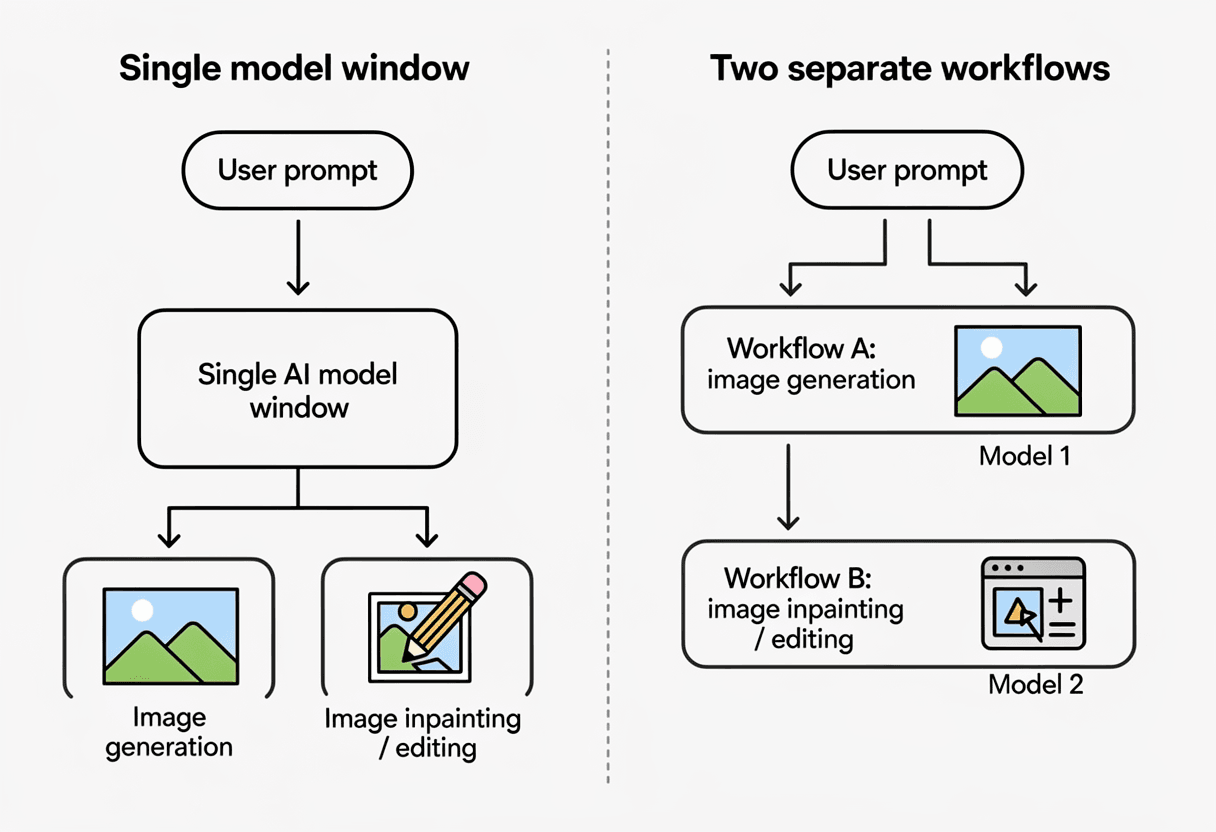
Flujo de trabajo unificado de generación y edición
Ya no tienes que cambiar de herramientas. Genera una imagen y luego edita fácilmente una pequeña parte utilizando exactamente el mismo modelo.
-
Maneja prompts de 1000 tokens
A veces escribo prompts increíblemente detallados y de varios párrafos; Qwen recuerda cada detalle.
Cómo elegir: ¿Qwen Image 2.0 o Flux.2?
Comparar Qwen Image 2.0 frente a Flux.2 no se trata de encontrar una herramienta mágica que lo haga todo perfecto. Se trata de elegir el modelo adecuado para tu tarea específica.
Depende totalmente de lo que estés construyendo.
Mejores casos de uso para Qwen Image 2.0
Si tu proyecto implica algún tipo de texto o estructura, necesitas Qwen.
Observando los últimos benchmarks de Qwen Image 2.0, sobresale aquí. Úsalo para mucho texto, infografías, prototipos de UI y cualquier momento en el que necesites una generación de imágenes por IA a escala increíblemente rápida.
Mejores casos de uso para Flux.2
Cuando necesito un retrato hiperrealista que parezca tomado con una cámara DSLR de $5,000, sigo recurriendo a Flux.2.
Tiene esa increíble y rica calidad cinematográfica. Si estás enviando prompts de arte por IA complejos y altamente creativos a un modelo solo para obtener una impresionante pieza de arte digital, Flux.2 brilla con luz propia. Está construido para artistas que quieren una estética hermosa y cruda en lugar de una estricta precisión de diseño estructural. Puedes ver esto claramente si navegas por comunidades de arte por IA como Civitai, donde los artistas llevan a Flux.2 a sus límites creativos.
Tabla resumen: Caso de uso, modelo ganador, razón
| Caso de uso | Modelo ganador | Razón del triunfo |
|---|---|---|
| Pósteres / Anuncios con texto | Qwen Image 2.0 | Renderización de texto extremadamente precisa, consistencia de diseño, maneja cadenas largas |
| Creatividades para redes sociales | Qwen Image 2.0 | Mejor composición + tipografía + adherencia al prompt |
| Prototipos de UI / pantallas de producto | Qwen Image 2.0 | Diseños estructurados + texto de UI legible |
| Infografías / diagramas | Qwen Image 2.0 | Razonamiento espacial + organización de múltiples elementos |
| Generación de memes | Qwen Image 2.0 | Colocación de texto fiable + alineación con el humor |
| Edición de imágenes existentes | Qwen Image 2.0 | Flujo de edición + generación nativo (inpainting/outpainting funciona mejor) |
| Flujos iterativos (prompt → ajuste → refinar) | Qwen Image 2.0 | Bucle de edición unificado = iteración más rápida |
| Retratos fotorrealistas | Flux.2 | Textura de piel, realismo de iluminación y profundidad superiores |
| Escenas cinematográficas / estilo película | Flux.2 | Mejor corrección de color, iluminación dinámica, composición |
| Fotografía de producto | Flux.2 | Materiales, reflejos y sombras más realistas |
| Fotos de moda / editoriales | Flux.2 | Fuerte coherencia estética + control de estilo |
| Arte conceptual / escenas de fantasía | Flux.2 | Más libertad creativa + riqueza artística |
| Anime / arte estilizado | Flux.2 | Mejor consistencia estilística (varía según el checkpoint) |
| Composición multi-imagen | Flux.2 (ligera ventaja) | Mezcla de referencias más flexible |
| Implementación local / uso offline | Flux.2 | Variantes abiertas + se ejecuta localmente |
| Velocidad (configuraciones ligeras) | Flux.2 (Schnell/Klein) | Variantes rápidas optimizadas disponibles |
| Precisión del prompt (instrucciones complejas) | Qwen Image 2.0 | Fuerte seguimiento de instrucciones |
| Texto en varios idiomas (esp. EN + CN) | Qwen Image 2.0 | Renderización multilingüe líder en la industria |
| Geometría limpia / escenas con mucho diseño | Qwen Image 2.0 | Mejor consistencia espacial |
| Imágenes que "parecen reales a primera vista" | Flux.2 | El fotorrealismo gana |
Exhibición de la verdadera prueba: Qwen Image 2.0 vs. Flux.2
Prompt:
Un prototipo de interfaz de usuario (UI) en resolución 2K nativa de alta fidelidad de un tablero de análisis financiero futurista basado en IA, mostrado en una tableta elegante de borde a borde. La tableta descansa sobre un escritorio de madera moderno. El fondo es una vista fotorrealista con poca profundidad de campo de una oficina corporativa iluminada por el sol, con luz natural reflejándose suavemente en la pantalla de cristal de la tableta sin oscurecer la interfaz.
El diseño de la interfaz es un modo oscuro sofisticado con detalles en cian neón y ámbar. Los requisitos de diseño y texto deben seguirse exactamente:
Barra lateral izquierda: Un panel de navegación glassmorphic que contiene el siguiente texto exacto en una fuente sans-serif limpia, apilado verticalmente: "Overview", "Market Trends", "Risk Analysis", "Export Data", y "Settings".
Encabezado superior: Un título en negrita alineado a la izquierda que dice exactamente: "全球资产表现 Q3 2026". Debajo, un texto secundario más pequeño dice exactamente: "Data synced 2 minutes ago. All neural pathways nominal."
Encabezado superior: Un título en negrita alineado a la izquierda que dice exactamente: "Global Asset Performance Q3 2026". Debajo, un texto secundario más pequeño dice exactamente: "Data synced 2 minutes ago. All neural pathways nominal."
Infografía central: Un gráfico de barras isométrico 3D altamente detallado que compara tres clases de activos. El eje X está claramente etiquetado como "Equities", "Bonds", y "Crypto". El eje Y tiene marcas visibles etiquetadas "0K", "50K", y "100K". Flotando directamente sobre la barra más alta (Crypto) hay una información sobre herramientas (tooltip) de UI brillante que contiene el texto exacto: "+124.2% YTD Growth".
Panel derecho (área de mucho texto): Un cuadro de texto estructurado y distinto que contiene un resumen de mercado de varias líneas. El texto debe ser perfectamente legible, mantener los saltos de línea y decir exactamente:
"MARKET SUMMARY REPORT
Volatility index has dropped by 4.2 points.
Tech sector shows strong resilience.
Projected Q4 growth remains stable at 8.7%.
Recommendation: Hold current positions."
Pie de página: Texto minimalista y perfectamente centrado que dice exactamente: "Confidential & Proprietary | Powered by Qwen Engine V2.0"
La imagen general debe combinar a la perfección los gráficos de interfaz de estilo vectorial, nítidos y con una ortografía perfecta, con la iluminación ambiental fotorrealista.
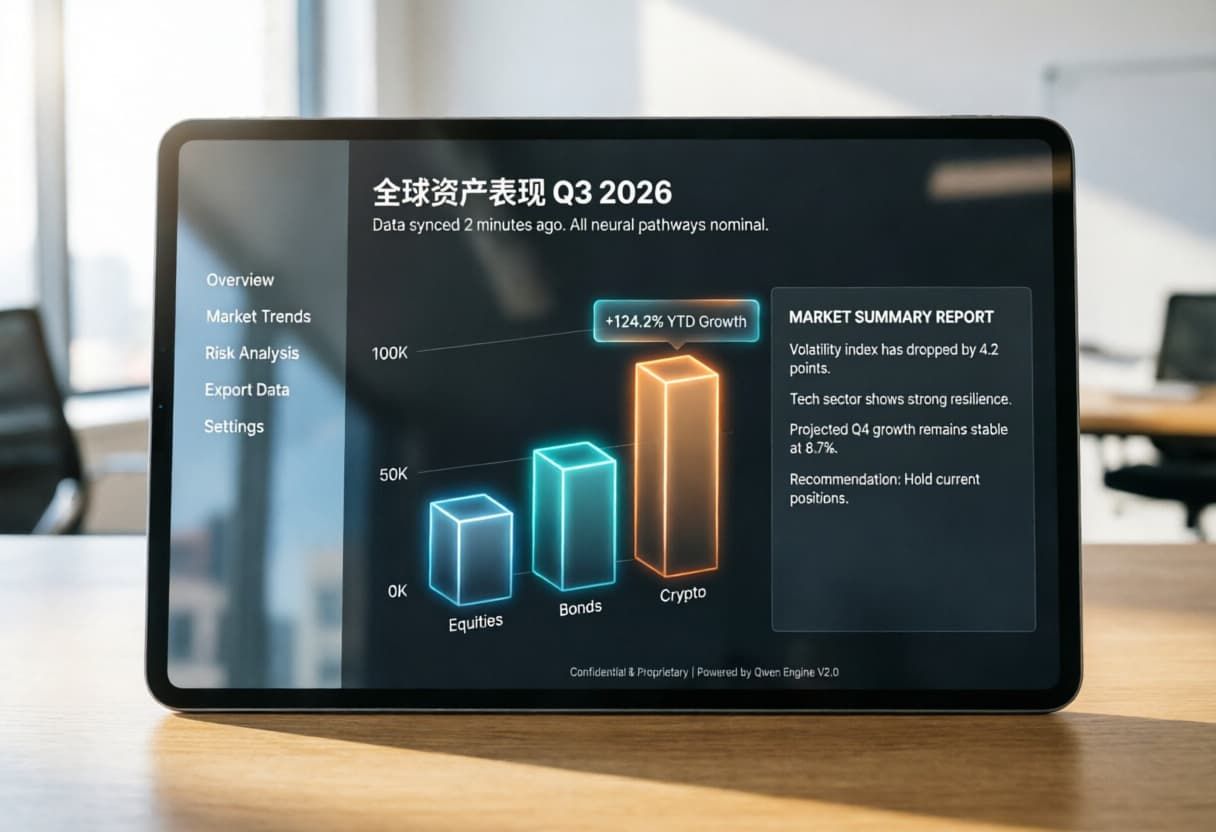
Generado por Qwen Image 2.0
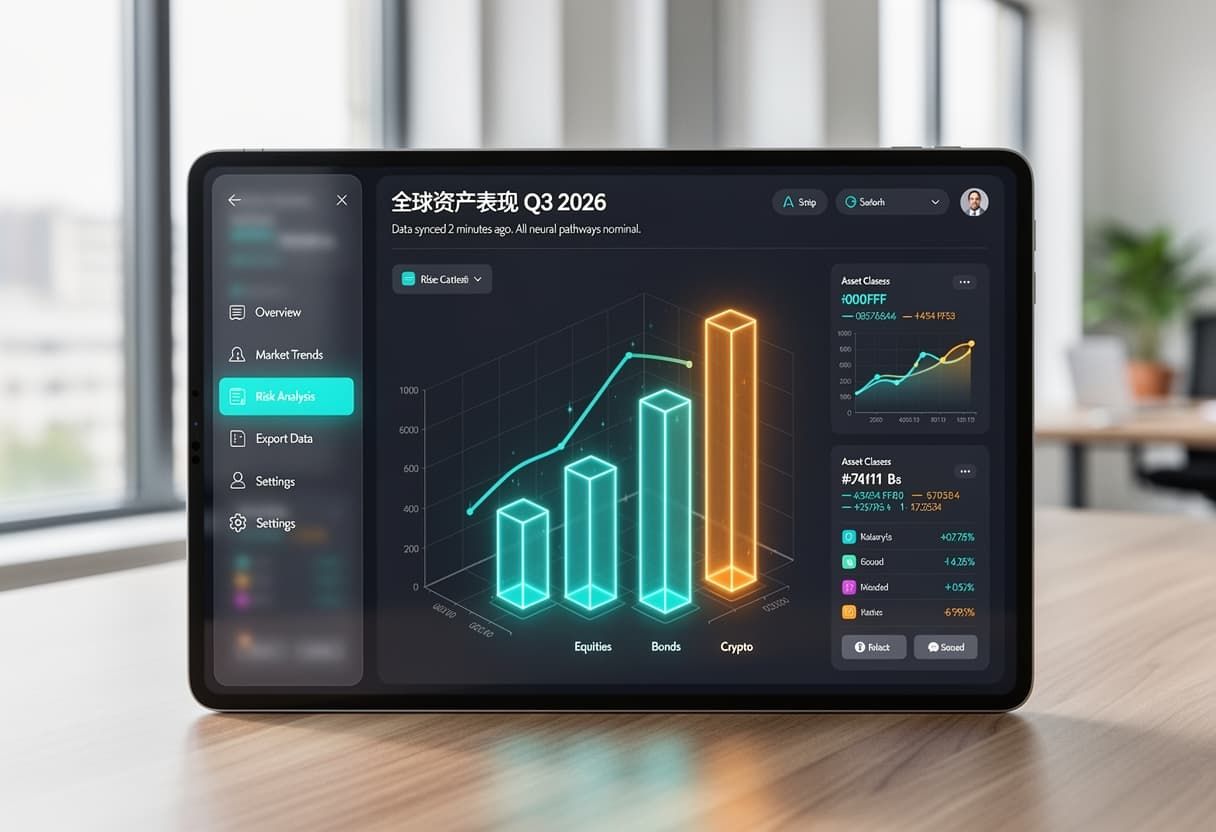
Generado por Flux.2
Informe de evaluación
Generado por Qwen Image 2.0: Fidelidad excelente al prompt, precisión de texto e integración de UI con un entorno fotorrealista. Esto está más cerca de un visual listo para producción.
Generado por Flux.2: Buen intento de estética futurista, neones potentes, pero falla en la alineación exacta del texto y la escala del eje Y. Adecuado para prototipos conceptuales.
Perspectiva empresarial: Por qué la agregación de API es la estrategia ganadora
Veo a desarrolladores estresándose constantemente por qué modelo elegir. Pero, sinceramente, codificar tu aplicación de forma rígida a un único proveedor de IA crea un cuello de botella arquitectónico.
Menor coste + mayor velocidad = mayores márgenes de beneficio
Cuando manejas una generación masiva de imágenes por IA para miles de usuarios al día, la velocidad y los costes de servidor son literalmente la diferencia entre una aplicación rentable y una startup fallida. Puedes leer más sobre cómo los costes pesados de cómputo de IA están acabando con las aplicaciones en sitios como TechCrunch. Mantenerse ligero es obligatorio.
¿Por qué elegir solo uno? Escala a través de múltiples modelos
Deja de tratar el debate Qwen Image 2.0 vs Flux.2 como una guerra. En realidad, no tienes que elegir un bando.
Las empresas inteligentes utilizan plataformas de agregación de API como Atlas Cloud. Se sitúa directamente entre tu aplicación y los modelos de IA, actuando como un gestor de tráfico inteligente.
Si tu usuario te da un prompt complejo de IA pidiendo un folleto altamente legible hecho con Qwen Image 2.0, y un segundo después otro usuario pide una foto cinematográfica muy realista hecha con Flux 2, simplemente puedes cambiar la llamada a la API de Atlas Cloud de Image 2.0 a Flux 2, hacer un ajuste rápido en las instrucciones y completar sin problemas ambas tareas; no más dolores de cabeza por conexiones API de modelos complicadas.
Ejemplo de código de uso de la API de texto a imagen de Atlas Cloud
plaintext1import requests 2 3response = requests.post( 4 "https://api.atlascloud.ai/api/v1/model/generateImage", 5 headers={ 6 "Authorization": "Bearer tu-api-key", 7 "Content-Type": "application/json" 8 }, 9 json={ 10 "model": "Qwen-Image-2.0", 11 "prompt": "A serene Japanese garden with cherry blossoms, watercolor style" 12 } 13) 14 15result = response.json() 16prediction_id = result["data"]["id"] 17print(f"Prediction ID: {prediction_id}")
El precio del modelo Qwen Image 2.0 7B es económico, pero sorprendentemente igual de eficaz. Qwen es increíblemente adecuado para llamadas de API a escala. Sin embargo, combinarlo con otros gigantes a través de una API agregadora es la estrategia de crecimiento definitiva.
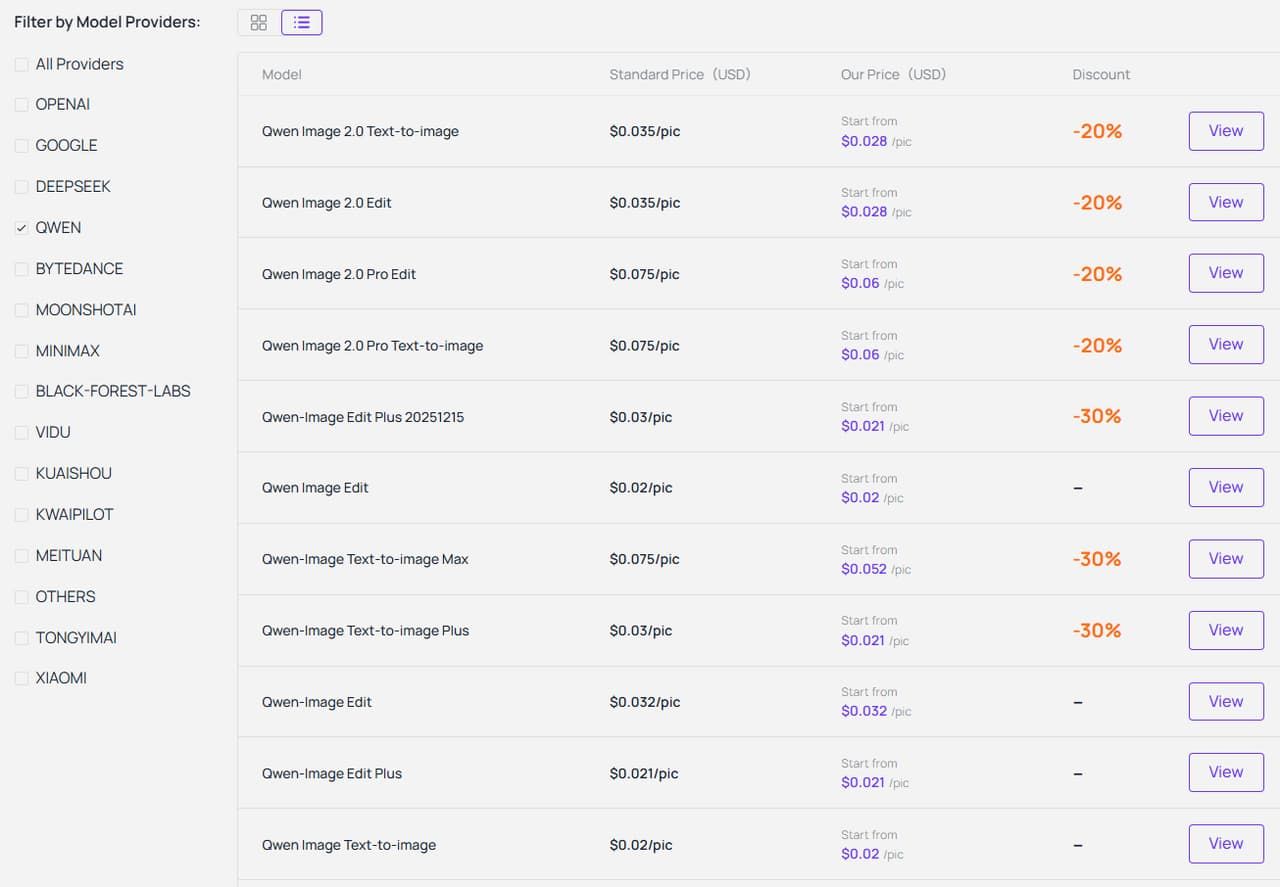
Los precios de Atlas Cloud se basan en el uso sin suscripción obligatoria: pagas por llamada a la API.
*Nota: Los precios mostrados aquí son los precios en el momento en que se escribió el artículo. El precio real está sujeto al precio en el momento de la transacción.
💰 Simulador de costes mensuales
| Imágenes / Mes | Precio oficial ($0.035) | Precio Atlas Cloud ($0.028) | Ahorro (%) |
|---|---|---|---|
| 1,000 imágenes | $35.00 | $28.00 | ~20% |
| 10,000 imágenes | $350.00 | $280.00 | ~20% |
| 100,000 imágenes | $3,500.00 | $2,800.00 | ~20% |
Conclusión – Puntos clave estratégicos
Eficiencia + Sinergia > Escala
La era de "cuanto más grande, mejor" ha terminado. Estamos en una nueva fase. Los modelos rentables como Qwen Image 2.0 ofrecen el mejor ROI absoluto para los desarrolladores. Con una estrategia de múltiples modelos a través de la API agregadora de Atlas Cloud, obtienes el cerebro de Qwen para textos y diseños, además del estilo cinematográfico de Flux.2, sin el dolor de cabeza de gestionar múltiples servidores. Es claramente el futuro de esta industria.
Deja de gestionar múltiples claves API. Regístrate en Atlas Cloud hoy y obtén acceso instantáneo a Qwen, FLUX y docenas de otros modelos de primer nivel con una sola línea de código.
Preguntas frecuentes sobre Qwen Image 2.0 y Flux.2
¿Es Qwen Image 2 de código abierto?
No, Qwen Image 2.0 (Qwen-Image-2.0) no es de código abierto. La etiqueta de su página de anuncio cambió de "Open-Source" a "Release", confirmando que es de código cerrado y actualmente está disponible solo a través de API. Puedes acceder a ella a través de la API de Atlas Cloud para una generación y edición de imágenes cómoda y escalable.
¿Cuánto cuesta Qwen Image 2.0?
Si utilizas una API en la nube oficial, espera pagar aproximadamente $0.035 por imagen. Debido a que es una IA de alto rendimiento con pocos parámetros, es significativamente más barata de ejecutar que sus competidores masivos. Usar la API agregadora de Atlas Cloud puede ayudarte a mantener estos costes lo más bajos posible, espera pagar solo unos $0.028 por imagen.
¿Quién fabrica Flux AI?
Flux.2 es creado por Black Forest Labs. Son una startup alemana de IA muy respetada. Se centran mucho en visuales cinematográficos hiperrealistas impresionantes.
¿Cuánta memoria RAM se necesita para Flux.2?
El modelo masivo y sin comprimir Flux.2 Max exige unos increíbles 90GB de VRAM. La mayoría de los PCs de consumo normales simplemente no pueden manejar eso. Sin embargo, si utilizas cuantización (que básicamente comprime el modelo) o ejecutas su versión más pequeña de 4B, puedes arreglártelas con solo 8GB a 12GB de VRAM. Sinceramente, para evitar dolores de cabeza de hardware por completo, es mucho más fácil ejecutar Flux.2 a través de una API en la nube.





