Watch that clip again, but with sound on. The wind, the broomstick whooshes, the distant bell, two people laughing into the dusk. None of it was added in post, and none of it was generated alongside the picture. Every sound in that shot existed before a single frame did.
That's the inversion this post is about. Most AI video prompts fail for the same boring reason: you're asking one text box to do three jobs at once.
- Describe the scene.
- Choreograph the timing.
- Direct the sound.
The result is a second-by-second mega-prompt that reads like a spreadsheet and still leaves you guessing whether the shot should be four seconds or eight.
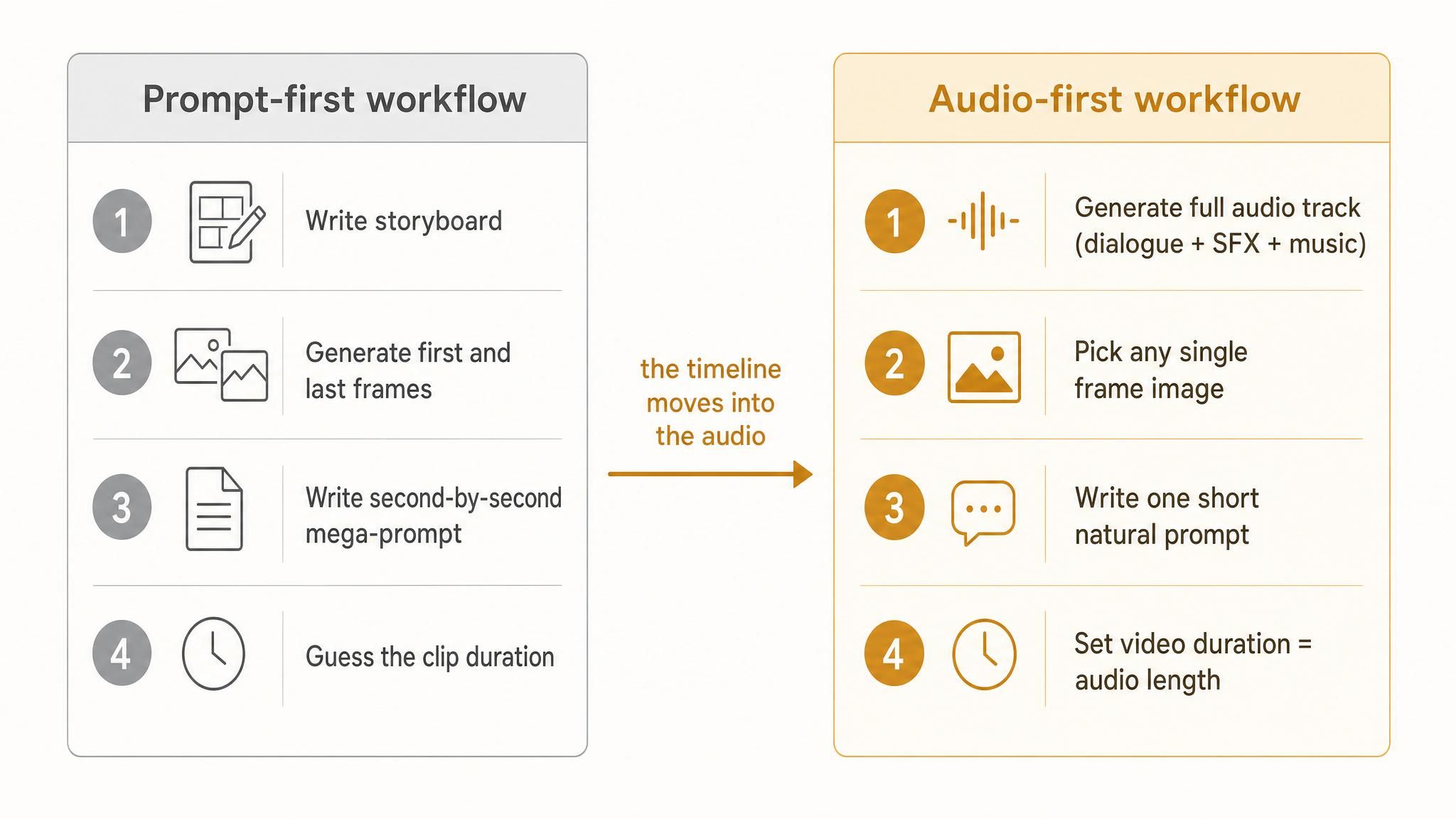
AI filmmaker Kiana Liang recently documented a cleaner way in a detailed workflow breakdown on X, after producing a five-shot short film without writing a single timeline prompt. She generated each shot's complete audio track with Seed-Audio 1.0 first, then handed that track to Seedance 2.0 as a reference asset. The audio became the narrative anchor. The video prompt shrank to one natural paragraph.
This post walks through why that works, the two prompt rules that make it reliable, and how to run the whole pipeline without juggling four different platform accounts. Every clip embedded below comes from that five-shot film.
Key takeaways
- Audio carries the timeline. Once dialogue, sound effects, and music are locked in one track, the video model performs to it, so mega-prompts with "0-3s this, 3-8s that" become unnecessary.
- Two non-obvious prompt rules matter: label background music explicitly, and write simultaneity into the sentence instead of implying it.
- Clip length stops being a guess. Generate the audio first, then set video duration to match it.
Why Does the Prompt-First AI Video Workflow Keep Breaking?
The standard pipeline goes like this. Write a storyboard. Generate a first frame, maybe a last frame too. Then compress the entire timeline into one giant text prompt: what happens at which second, how the camera moves, which line of dialogue comes before which.
Three problems show up every time.
- First, timing lives in prose, and prose is a terrible container for timing. The model has to infer rhythm from sentence order, and it often gets the beats wrong.
- Second, duration is a blind guess. Four seconds feels too short, eight feels wasteful, and you only find out after the render.
- Third, sound is an afterthought. Traditional TTS handles one narrator reading one script. Multi-character dialogue means generating voices separately and stitching them in post, and sound effects and music are someone else's problem entirely.
Every one of these problems traces back to the same root: the picture is being asked to define the timeline, when the sound is far better at it.
What Is Seed-Audio 1.0, and Why Does the Audio-First Workflow Need It?
The reason this workflow only became practical recently is a model release. Seed-Audio 1.0 is ByteDance's universal audio generation model, unveiled in June 2026, and it generates dialogue, sound effects, background music, and ambient sound in a single pass, up to two minutes per request.
That single-pass property is the whole trick. This isn't TTS with extras bolted on. You describe a scene in text, and the model outputs a finished mix: multiple characters with distinct voices, music running under the vocals, effects threaded in between. The laughs, sighs, and hesitations aren't pasted-on samples. The model performs them from your prompt.
It runs in two modes. T2A is pure text-to-audio, where you describe each character's voice in words. TA2A is reference-audio mode, where you feed in up to three clips and tag them @audio1 or @audio2 to assign who speaks with which voice. About thirty seconds of your own recording is enough to work as a usable voice reference.
The model is available with direct API access on Atlas Cloud's Seed-Audio page, alongside the parameter docs and pricing.
The Audio Prompt Is the Timeline of Your AI Video Workflow
The official prompt formula for Seed-Audio reads simply enough: BGM description, then Character A's voice description and line, then a sound effect, then Character B, and so on.
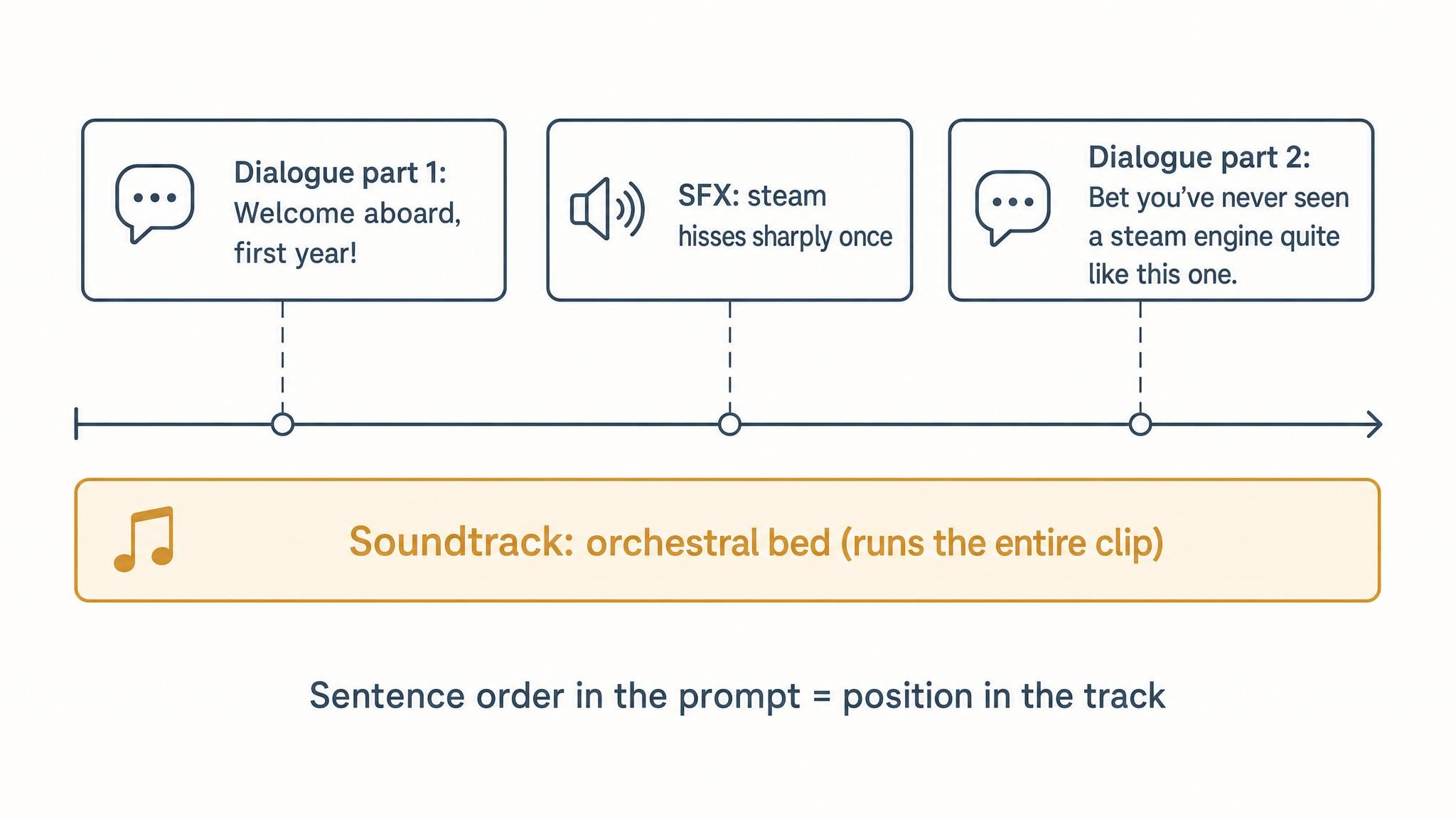
But that formula has one property the docs don't spell out, and it's the key to everything. Write the prompt in narrative order, and the generated audio follows that order. Whoever appears first in the text sounds first in the track.
That turns the audio prompt into a timeline. Every sentence you write lands at a definite position in the mix. Liang's testing surfaced two extra rules that make this reliable, and neither is in the official documentation.
Name the Background Music, or It Disappears
Write only "warm orchestral music rises gently" and the model may treat it as a sound effect that fades after a few seconds. Prefix it with "Soundtrack:" or "background music" and it reliably becomes a bed that runs under the entire clip. Small wording change, completely different behavior.
Write Simultaneity Explicitly, Not by Implication
Here's a concrete failure case. One shot was designed so that mid-sentence, a steam engine behind the speaker lets out a sharp hiss. The first prompt wrote the full line of dialogue, then the steam effect as a separate sentence. The result: he finishes talking, then the steam hisses. Sequential, not synchronized.
The fix is structural. To land an effect inside a line, split the line in two and insert the effect sentence between the halves. Or write "at the same time" explicitly. The model won't infer parallelism from two adjacent sentences. The final working prompt looked like this:
Soundtrack: Warm orchestral theme begins softly, strings and harp weaving a mysterious, wondrous melody.
The man (male, early 20s, warm and clear voice, English accent, sincere and welcoming) says, "Welcome aboard, first year!"
Steam hisses sharply once, then fades into low platform chatter.
"Bet you've never seen a steam engine quite like this one."
Line split in half. Steam hiss in the middle. The hiss lands exactly between the two halves of the sentence, every render.
How Does the Audio-First AI Video Workflow Run, Step by Step?
Seedance 2.0 is ByteDance's video model with a unified multimodal architecture that accepts text, images, audio, and video as reference inputs. Its reference-to-video mode is what receives the audio track. The current input limits: up to 9 images, up to 3 video clips totaling 15 seconds, and up to 3 audio clips totaling 15 seconds per generation (Magic Hour Seedance reference guide, 2026).
The recipe is strict and minimal. Every shot gets exactly three things.
- One image. Any frame works. It doesn't need to be a strict first frame, let alone a first-and-last pair. The timing already lives in the audio, so the image's only job is "here's what things look like."
- One audio track. This replaces the hardest part of the old prompt. All the "0-3s this happens, 3-8s that happens" choreography is now inside the sound. Whichever second a line lands on is the second you design the action for.
- One short prompt. Mood, setting, who's who. One natural paragraph. The rest belongs to the audio and the image.
And there's a side benefit that might be the thing creators feel most: no more guessing clip length. Generate the audio first, set the video duration to match it. Once the sound is locked, everything is locked.
If this sounds familiar, it should. Pixar's feature animation pipeline records dialogue and lays down temp music in a story reel before final frames are drawn, so the whole film stands up in sound first. Sound-first isn't a new invention. The difference is that this assembly line used to require a studio. Now it requires a prompt.
Five Shots That Stress-Test the Audio-First Workflow
The proof is in what the workflow produces. Liang's demo film, a first-person "first day at a school of magic" sequence, used five shots to probe five different capabilities. Each one maps to something practical you might need. Watch them in order below.
Shot 1: pure text control. Voice, steam sync, train whistle, platform chatter, strings-and-harp score. All described in words, zero reference assets. This is the baseline T2A capability.
Notice the guide's turn-and-gesture toward the locomotive. It lands exactly on the steam hiss, and zero timing text was written for it. The move was choreographed by the audio track below, which was generated before the video existed:
Shot 2: voice consistency. Download the guide's voice generated in shot 1, feed it back as @audio1, and his voice is pinned for every following shot. The official name is voice registration. Anyone making audiobooks, podcasts, or long-form series knows exactly how painful voice drift is. This kills it.
Shot 3: two-speaker dialogue. The guide keeps his generated voice, while the second character uses thirty seconds of Liang's own recording, in Chinese. Each voice gets its own @audio lane. Here's the reference recording that went in:
The final cut has her voice saying English lines she never recorded, including a yelp that cracks into laughter mid-breath. The laugh was performed by the model:
Shot 4: dynamic music control. A beat of near-silence, then a single chime and an orchestral accent land at the exact instant the wandlight blooms. Music that reacts to picture, written in text.
Shot 5: no dialogue at all. Two riders on broomsticks over a castle at dusk. Wind, whooshes, one distant bell, an orchestral build, and two people whooping. That's the clip you already watched at the top of this post. Hand a wordless scene to traditional TTS and it has nothing to work with. For a generative audio model, laughter is just vocabulary.
Five audio tracks, five images, five short prompts. Seedance 2.0 delivered the film. Every full prompt is public in the appendix of the original X article, so you can rerun the whole experiment yourself.
A Face-Swap Recipe for Character Consistency
One practical sub-problem came up while building the reference frames: cinematic image quality and character consistency tend to fight each other.
Midjourney's aesthetics still hold up for cinematic base plates. Its officially licensed edition, Youchuan v8.1, handles the film-look texture well. But character consistency is not its strong suit. The same character across five generations came back with five different faces.
The working recipe splits the job in three steps. Generate the cinematic base plate with Midjourney. Then use Nano Banana 2's edit mode to swap in the face from a single character reference image. Then add one line to the edit prompt: "strictly preserve the same lighting."
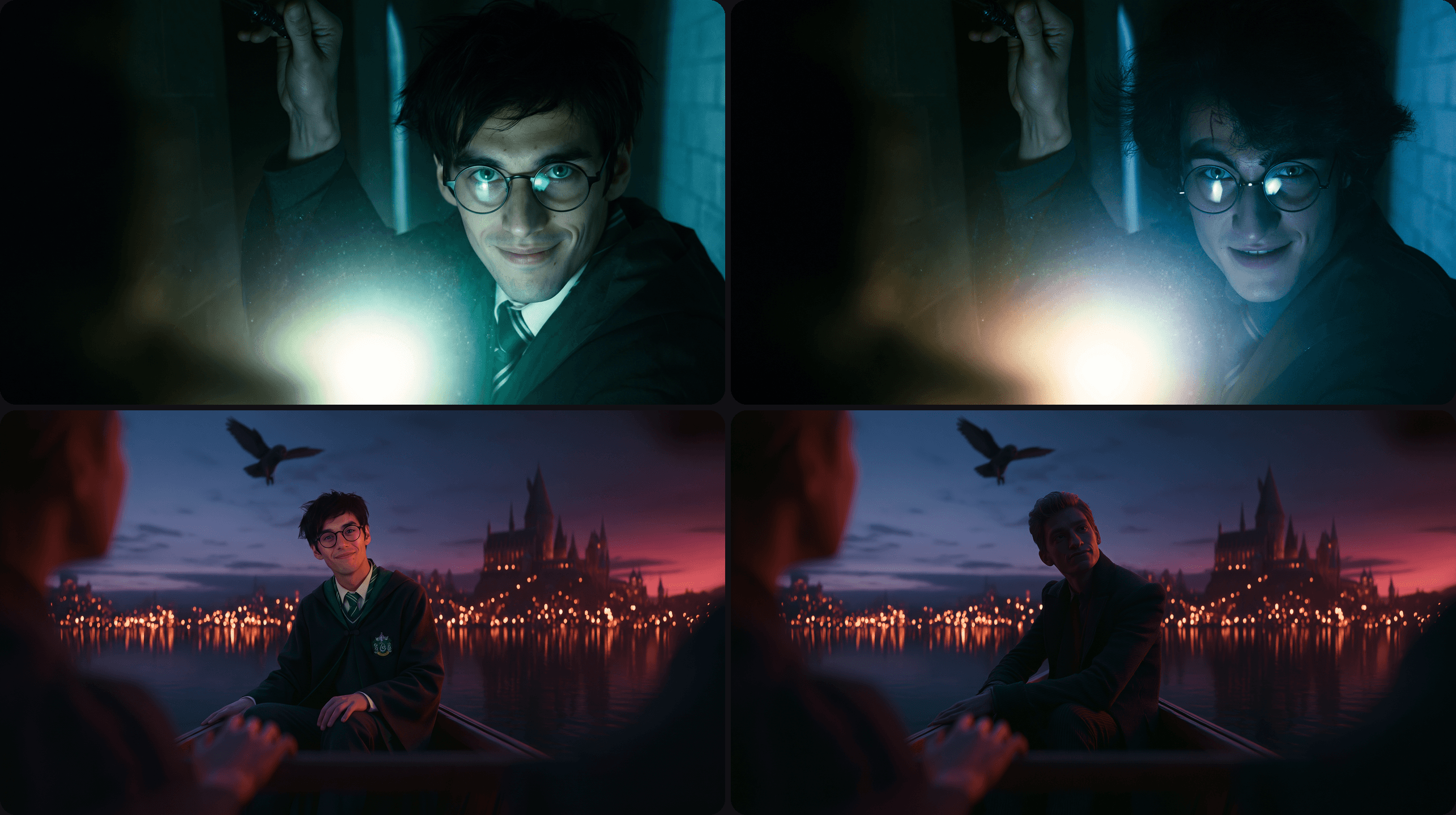
That "strictly preserve the same lighting" line is the difference between a graft that shows and one that doesn't. One recipe, three gaps patched: Midjourney's consistency problem, the edit model's own aesthetic ceiling when generating from scratch, and the over-strict moderation that kept flagging frames on other image tools. Each model does its one job.
Can One API Key Run the Whole Audio-First Pipeline?
Count the models in this workflow: seed-audio-1.0 for the sound, youchuan v8.1 for the base plates, nano-banana-2 for the face swap, seedance-2.0 for the video. Four models across three modalities: audio, image, and video.
Run that on four separate platforms and the friction adds up fast. Four accounts, four billing dashboards, four API key formats, four sets of rate limits. The workflow itself takes minutes per shot. The account juggling can take longer.
This is where consolidated model platforms earn their keep. All four models in this pipeline sit in Atlas Cloud's model pool, so one API key runs the chain end to end, and switching models is editing a model string rather than migrating accounts. Liang credits exactly this for why the audio-anchored workflow runs smoothly in practice: half the pipeline's speed is just not context-switching between vendors.
Whatever platform you use, the architectural point stands. An audio-first workflow is a chain of small model calls, and chains are only as fast as their slowest handoff.
FAQ: The Audio-First AI Video Workflow in Practice
How long can the reference audio be in Seedance 2.0?
Up to 3 audio clips totaling 15 seconds per generation in reference-to-video mode. That's enough for a single shot's dialogue and effects. For longer films, generate audio per shot and assemble the shots in an editor, which is how the five-shot demo was built.
Does the audio-first workflow work for scenes without dialogue?
Yes, and this is where it clearly beats TTS-based pipelines. Seed-Audio treats laughter, whoops, wind, and ambient effects as first-class vocabulary. The broomstick flight at the top of this post contains no words at all, just wind, whooshes, a distant bell, and two people laughing, generated from one text prompt.
Can I use my own voice in an audio-first AI video workflow?
Yes. Roughly thirty seconds of recording works as a reference clip in Seed-Audio's TA2A mode. Tag it @audio1 in the prompt and the model performs new lines in that voice, including lines in a different language and emotional beats like laughing mid-sentence that you never recorded.
Which models do you need to run this end to end?
The documented pipeline uses four: seed-audio-1.0 (audio), youchuan v8.1 (cinematic frames), nano-banana-2 (face-consistency edits), and seedance-2.0 (video). Only the audio and video models are strictly required. The image pair is for cinematic frames with a consistent character.
One closing thought. In the demo film, sliding a steam hiss into the middle of a spoken line was the model's work. Deciding that the guide should turn when the steam hisses was a human's. The audio-first workflow doesn't automate creative judgment. It just moves the timeline into a medium that holds it better, and lowers the execution floor until it sits right at creativity's feet.