Today's AI avatars can hold a real-time conversation and even let you interrupt them mid-sentence — and you can self-host one with an open-source project, keeping all your data local. This post breaks down how a production-ready, real-time digital human actually gets built using OpenTalking, and where it saves money compared to per-minute services like HeyGen.
Here's the moment that got my attention: an avatar on my screen was talking, I cut in mid-sentence, and it stopped to listen — then picked up from what I'd just said. Not a pre-rendered clip playing out. An actual back-and-forth. Subtitles scrolling in sync, latency low enough that it didn't feel like AI.
And the first step of building it cost me nothing and didn't touch a GPU.
Why lead with that? Because when most people hear "digital human," they still picture the stiff, script-reading PPT puppet from two years ago — frozen expression, one-way playback, deaf to whatever you say. So the real question isn't "can a digital human make money." It's:
How far have AI avatars actually come in 2026?
Far enough that they've gone from "a video that moves" to "something that talks back." After the GPT-4o real-time demo, the whole bar moved to real-time, interruptible, can-ask-you-questions. This year the open-source scene shipped a wave of them — SoulX-LiveAct, Alibaba's Mnn3dAvatar, duix.ai, LiveTalking. The one I'm pulling apart here wires the whole pipeline together unusually cleanly: OpenTalking.
No fluff — let's break down three things: what it does, what it's worth, and how a non-developer can build it.
1. What it does: an avatar that actually talks back
OpenTalking is an open-source real-time digital-human conversation orchestration framework. In plain terms: it chains the entire loop — user speaks → speech-to-text (STT) → an LLM thinks up a reply → text-to-speech (TTS) → the avatar speaks and streams to your browser via WebRTC — into one real-time pipeline.
What it can actually do:
- Real-time conversation — it answers you live, not a pre-recorded video
- Interruption — talk over it and it stops to listen (this is the part that feels human)
- Subtitle events — captions render as it speaks
- Cloning — audio/text-driven generation, so you can build your own digital twin
Drop that into a business and the picture gets concrete fast: a livestream host that sells 24/7 without clocking out, or a support agent that's online at 3 a.m. and can be interrupted with a follow-up question.
2. What it's worth: the numbers, laid out
The thing a non-developer actually cares about: does this save or make money. Here's what the public data says:
- A traditional brand livestream with a human team runs ¥150k–250k per month; an AI-avatar livestream is estimated at a few thousand to ¥20k/month — roughly a 90% cost drop (per iResearch's 2026 Digital-Human E-commerce Livestream White Paper).
- A digital-human support agent can deflect 60%+ of high-frequency queries and cut operating costs 30–60%.
Now the other route — an off-the-shelf SaaS like HeyGen. It's genuinely turnkey and the output looks great, but it bills you by the minute: the API runs about $1/minute for standard generation, $4/minute for Avatar IV, $3/minute for Avatar V; and the Creator plan ($29/mo) includes 200 credits — enough for only about 10 minutes of premium avatar video.
Sit with that difference: SaaS means every minute you use, you pay for that minute. A self-hosted open-source setup is build once, then mostly electricity and GPU depreciation. For a business that runs long and at volume (think daily livestreaming), those two cost curves don't end up a little apart — they end up worlds apart.
3. How a non-developer builds it: starting from zero GPU
This is the heart of the breakdown. OpenTalking's smartest design choice is that it doesn't force you to buy a GPU on day one. It gives you three deployment tiers you can climb one at a time:
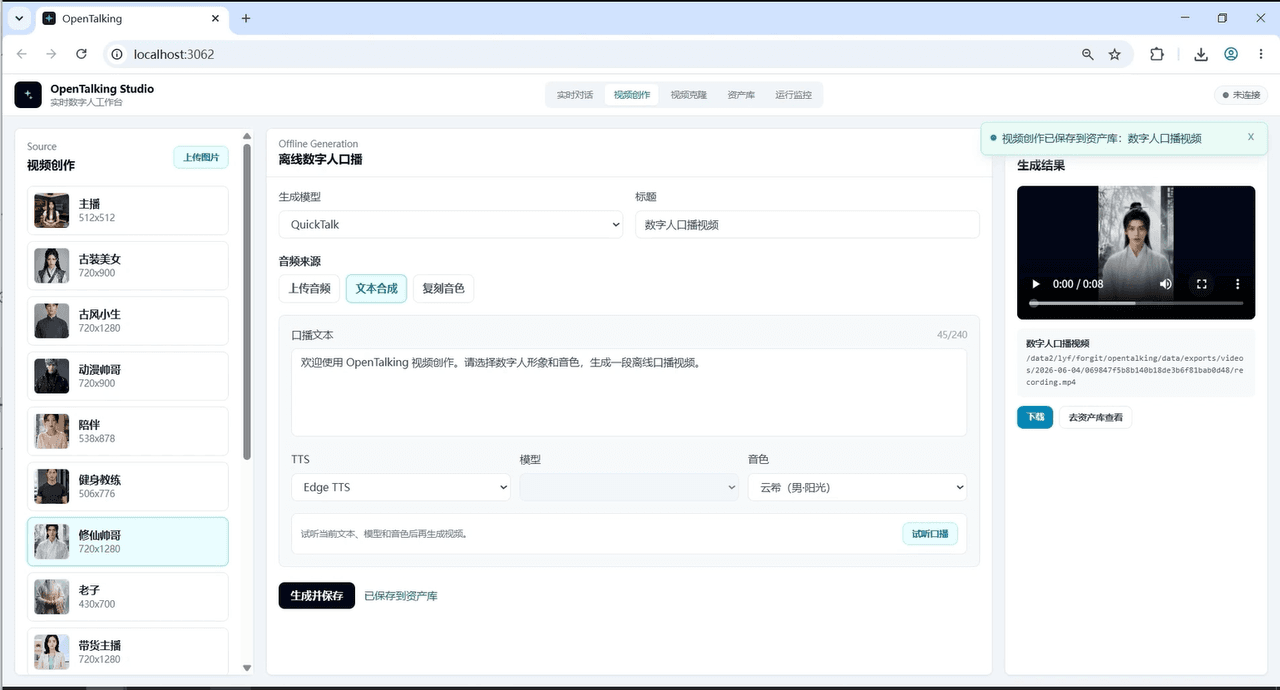
Step 0 — Mock mode (zero GPU, prove the logic first)
Spin up the whole product loop with the mock backend — front-end interaction, session state, the full conversation flow — on an ordinary computer. The point: confirm this product shape is what you actually want before spending a cent on a GPU. Most people stall at "I need to buy a card just to start." Here you can dry-run first.
Step 1 — Give it a brain and a mouth (the LLM)
For the avatar to talk back, you connect an LLM for replies. OpenTalking speaks the OpenAI-compatible API, so you don't touch code — just drop in an endpoint and a key. For this step I grabbed a key on AtlasCloud: one key calls DeepSeek, Seedance, Nano Banana and more, so I skipped registering a pile of separate accounts. Voice/TTS gets picked right in the web UI.
Step 2 — Add a consumer GPU, swap in a real rendering model
Once the logic runs and the model's wired up, drop mock and attach a real rendering backend. Locally, a consumer card like an RTX 3060 (8GB VRAM) is enough to start; it supports QuickTalk, Wav2Lip, MuseTalk, FlashTalk and more — pick by quality vs. speed.
Step 3 — Scale up only when the business does
When you grow, it scales to multi-GPU and even NPUs like Huawei Ascend 910B2. Meaning this thing grows with you from "tinkering on my laptop" all the way to "enterprise private deployment" — no framework swap halfway.
4. So why not just use a SaaS? Where open-source / self-hosting wins
Let's borrow the names everyone knows and do an honest comparison (each has its strengths — no hype, no hate):
td {white-space:nowrap;border:0.5pt solid #dee0e3;font-size:10pt;font-style:normal;font-weight:normal;vertical-align:middle;word-break:normal;word-wrap:normal;}
| Dimension | OpenTalking (open-source, self-host) | HeyGen / D-ID (SaaS) | ComfyUI avatar workflows |
| Ease of setup | Medium (deploy, but mock cushions it) | Lowest (turnkey, great output) | High (wiring nodes, tuning graphs) |
| Billing | Build once; mostly hardware/electricity | Ongoing per-minute / per-credit | Free to self-run |
| Data | Local, never leaves your domain | Uploaded to their servers | Local |
| Real-time + interruptible | Native | Video-gen focused; limited live chat | Mostly offline rendering |
| Customization | High (pluggable backends, editable orchestration) | Low (standardized product) | High (flexible node ecosystem) |
Fair's fair: HeyGen-style SaaS really wins on "no hassle" — if you don't want to touch deployment, just want output, and your volume is low, it's the right call. ComfyUI's node ecosystem and control are strong too. OpenTalking's edge isn't "crushing anyone on image quality" — it's two things: data never leaves your machine (a hard requirement for government, finance, healthcare, or any business that won't hand customer conversations to a third party), and no per-minute meter running (which pays off at volume, over the long haul).
Which one's right comes down to whether your business is "occasional clips" or "running hot every day," and whether you mind handing your data over.
Closing
Back to the opening question — how far have AI avatars come? Far enough that one can chat with you in real time, let you cut in, and run on your own machine. The barrier is lower than you'd think: prove it out in zero-cost mock mode first, confirm it's what you want, then spend. For a non-developer stepping into this space, that order might be the safest way in.
❓ FAQ
Q: What GPU do I need to build this?
A: To run a real rendering model locally, a consumer card around an RTX 3060 (8GB VRAM) is enough to start; scale to multi-GPU or an Ascend NPU later. But note — Step 0 (mock mode) needs zero GPU, so an ordinary computer can prove out the logic first.
Q: I don't have a GPU. Can I still try it?
A: Yes. Mock mode validates the entire conversation flow with no GPU; if you want a real model but have no card, route to cloud/remote inference and offload rendering to the cloud.
Q: How much does it actually save vs. HeyGen?
A: Structurally, it removes per-minute billing. HeyGen's API runs ~$1–4/minute and its plan credits cover only ~10 minutes/month; self-hosting is a one-time build plus hardware and electricity. The more you run, the longer you run, the more self-hosting wins — for a handful of occasional clips, SaaS is actually less hassle.
Q: Can I use this commercially?
A: Technically it covers what commercial use needs — real-time conversation, support, livestream twins — with private deployment and data that stays in your domain. But before going live, confirm the licensing/compliance of the rendering models, voices, and likenesses you use. Avatars involve someone's face and voice — get the rights cleared first.
Q: I'm a total beginner. Where do I start?
A: ① Run the project in mock mode and experience the conversation flow in your browser; ② connect an OpenAI-compatible LLM key (for simplicity, grab one on AtlasCloud — multiple models, one key); ③ pick a voice; ④ add a GPU and swap in a real rendering model last. Prove it out, then pay.






