Kling 2.6 is the most meaningful Kling AI update to date, but it comes with one notable caveat you need to know before diving in.
This release marks the first time Kling has shipped a truly native audio sync model. Previously, every video generated was essentially a silent film. Before, creators had to add voiceovers, sound effects, and background noise by hand after making a video. The new VIDEO 2.6 model changes everything. It creates the visuals, realistic voiceovers, matching sound effects, and background audio all at the same time. This feature puts the tool in a completely different class.
What Works Well
This model is great at matching sight and sound. The voice rhythm, background noise, and on-screen actions align perfectly. This stops the usual disconnect between video and separate audio tracks. Cinematic sounds feel incredibly realistic. You can clearly hear details like crackling fires, rain on the streets, and the layered noise of a crowd. Support spans six audio types:
| Audio Type | Use Case |
| Voice Narration | Product videos, vlogs |
| Multi-Character Dialogue | Interviews, skits |
| Singing / Rap | Music performance |
| Ambient Sound | Nature, urban scenes |
| Object/Action SFX | Impacts, mechanical noise |
| Mixed Sound | Full immersive production |
The Key Limitation
Multi-character dialogue scenes involving three or more speakers can produce inconsistent voice attribution. To achieve the most reliable audio-visual synchronization, creators should stick to two-character exchanges or consider alternative framing.
How It Compares
Version 2.6 is a big step up from the older, silent models. Some users might need perfect control or massive, high-quality results. Those users should check out Kling 3.0 instead. However, most content creators give Kling 2.6 highly positive reviews because it delivers great quality for the price.
The Anatomy of Kling Native Audio: Dialogue, SFX, and Ambience Deep Dive
Kling 2.6 doesn't just add audio on top of video. It generates all three audio layers simultaneously with the visual frames in a single pass. Here's how each layer works in practice.
Dialogue and Speech
Kling AI dialogue generation covers a wider range than most creators expect. This model easily manages solo speeches, dialogue between characters, narration, singing, and rap. It adjusts the emotional tone to match each style. Additionally, the tool is bilingual and naturally supports voice outputs in both English and Chinese. If you input other languages, the model automatically translates them into English for voice generation without affecting the overall video output.
The 8-second video above demonstrates our direct output using Kling 2.6 via the Atlas Cloud orchestration platform. By uploading a high-resolution base image of the speaker and a pre-recorded 8-second English speech track, the engine processed the lip-sync natively.
Notice how the facial muscle synchronization smoothly maps to complex phonemes without the usual "uncanny valley" robotic mouth warping. This serves as a perfect blueprint for rapid AI-generated brand spokesperson assets.
Quick Time-Saving Rules:
- Watch your capitalization. Use lowercase letters for everyday words. Save capital letters for names and acronyms.
- Label your speakers. Give each person a tag like [Character A] or [Character B]. This stops the AI from blending their voices.
- Describe the mood. Put tone notes right next to the label. For example, write [Reporter, calm and steady voice].
Sound Effects (SFX)
AI video sound effects in 2.6 are context-triggered rather than manually assigned. The model reads the scene description and infers appropriate sounds. The AI generates sounds based directly on your action words. It can create footsteps on gravel, breaking glass, screeching tires, or a machine hum. To get the best results, name the specific sound source clearly. For example, writing [Wooden door slams shut, loud bang] works much better than just saying "there is a noise."
Ambient Sound
Ambient audio synthesis handles the environmental layer: café murmur, rain against glass, wind across an open field, subway arrivals. These background tracks play under your dialogue and sound effects. They add real depth to your video. You should name the specific setting in your prompt. For example, use terms like `[small room acoustics]` or `[open hall reverb]`. This gives the model a clear goal and improves the audio.
Duration: 5-Second vs. 10-Second Output
This choice directly affects audio stability. The kling 5-second vs 10-second video decision matters most for speech-heavy content.
| Content Type | Recommended Duration | Reason |
| Ambient only / SFX | 5s | Clean, tight output |
| Monologue / Narration | Either | Depends on script length |
| Multi-character dialogue | 10s | More stable voice switching |
| Singing / Rap | 10s | Prevents lyric cutoff |
For singing or dialogue scenes, using the 10-second parameter is recommended for more complete and stable results. Shorter clips work well for pure atmosphere or action-sound pairing, but anything involving spoken lines benefits from the longer window to avoid audio drift in the final seconds.
The Perfect Kling 2.6 Prompt Formula for Flawless Audio-Visual Sync
Most sync problems in Kling 2.6 don't come from the model. They come from prompts that leave too much open to interpretation. Think of your prompt as a director's brief: the more precisely you define each element, the less the inference engine has to guess, and guessing is where rhythm breaks down.
The Core Formula
This kling prompt template maps directly to how the model processes generation:
Scene → Subject → Motion and Camera → Audio Blueprint
The official prompt structure is: Scene (scene description) + Element (subject description) + Movement (movement description) + Audio (dialogue / singing / sound effects / music) + Other (style / emotion / camera).
Each block feeds a different part of the generation pipeline. Skipping any one of them forces the model to fill the gap, which is when audio-visual rhythm falls apart.
Block-by-Block Breakdown
| Block | What to Include | Common Mistake |
| Scene | Location, lighting, time of day | Too vague: "a room" |
| Subject | Appearance, role, position in frame | Unnamed or pronoun-only characters |
| Motion and Camera | Action sequence, kling camera control language (slow zoom, tracking shot, close-up) | No camera instruction at all |
| Audio Blueprint | Dialogue in quotes, emotion tag, SFX label, ambient layer | Dialogue buried inside description prose |
Ready-Made Example: The Anatomy of a Perfect Render
Due to regional API constraints and queue bottlenecks on Kling's native platform, utilizing the unified kling-v2.6-std-avatar pipeline on Atlas Cloud is the most reliable path for high-volume automated production. While this specific tier restricts you to a static talking-head format rather than multi-agent dynamic scenes, it excels heavily at precise phonetic mapping.
To prove the authority of our Core Formula, we ran the exact blueprint above through Kling 2.6 (kwaivgi-kling-v2.6-std-avatar tier) via the Atlas Cloud orchestration platform. The 2-second clip above represents the untouched, single-pass commercial output.
Let’s break down why this render achieves flawless naturalism instead of falling into the "uncanny valley":
- Frame 0 Composition Lock: By utilizing an initial image where the female host is already positioned with the smartwatch next to her cheek, we eliminated the risk of limb warping. The AI does not have to guess complex bone-mechanics; it only animates the micro-expressions.
- Phonetic Lip-Sync Accuracy: Notice how the host's lip movements and dental tracking perfectly match the fast-paced syllable shifts of "Zero lag. All day battery."
- Cinematic Lighting & Depth: The shallow depth of field (creamy out-of-focus background bokeh) heavily filters out background noise, forcing the AI pipelines to focus 100% of their computational weight on rendering realistic skin pores and sharp clothing textures.
Duration and the Audio Window
Knowing the kling ai maximum clip length matters for audio planning. Current outputs max out at 10 seconds. For a product demo like the example above, 10 seconds is the right choice: it gives the voiceover room to land cleanly without cutting the final word. Five-second clips suit pure atmosphere or action-SFX pairs where no spoken line needs to complete.
Plan your script length against your clip length before writing the prompt, not after.
Image-to-Video Workflow: Retaining Character Consistency with Kling Motion Control
For professional creators, the text-to-video path is just one entry point. The kling image to video workflow is where serious character-driven content gets built, and when paired with kling 2.6 motion control, it gives you a level of consistency that pure text prompting simply cannot match.
How the I2V Pipeline Anchors Identity
When you upload a reference image in the Image-to-Audio-Visual mode, it acts as a visual contract with the model. The input image specifies the subject's appearance, composition, style, and other visual features, making the generated video closer to the original image. This is the foundation of AI character consistency: the model treats the uploaded face, clothing, and framing as fixed constraints rather than suggestions.
This matters most for:
- Brand spokesperson content requiring the same face across multiple clips
- IP characters that need to hold appearance across scenes
- Product demo hosts where visual identity is part of the asset
Motion Control: Projecting Physical Data
A reference image locks appearance. Kling 2.6 motion control adds the physical layer by projecting gesture, posture, and movement data from a motion reference onto the generated character. The motion reference acts as a performance template, with the model transferring body mechanics while preserving the visual identity anchored by the input image.
This separation of identity (image) and motion (reference clip) is what makes the reference video AI animation approach more reliable than describing movement in text alone.
Lip Sync and Audio Alignment in I2V
Kling 2.6 lip sync is handled natively when Native Audio is enabled in the Image-to-Video mode. The Voice Control feature lets you bind a specific voice to a character using the format [Character@VoiceName], allowing the model to accurately replicate vocal characteristics to perform specified content.
| Input Layer | What It Controls |
| Reference Image | Face, clothing, framing, visual style |
| Motion Reference | Gestures, posture shifts, body rhythm |
| Voice Control binding | Timbre, delivery style, cross-language consistency |
| Prompt audio block | Dialogue content, emotion tag, ambient layer |
Ready-Made Example: Applying the Core Formula to Image-to-Video (I2V) Workflows
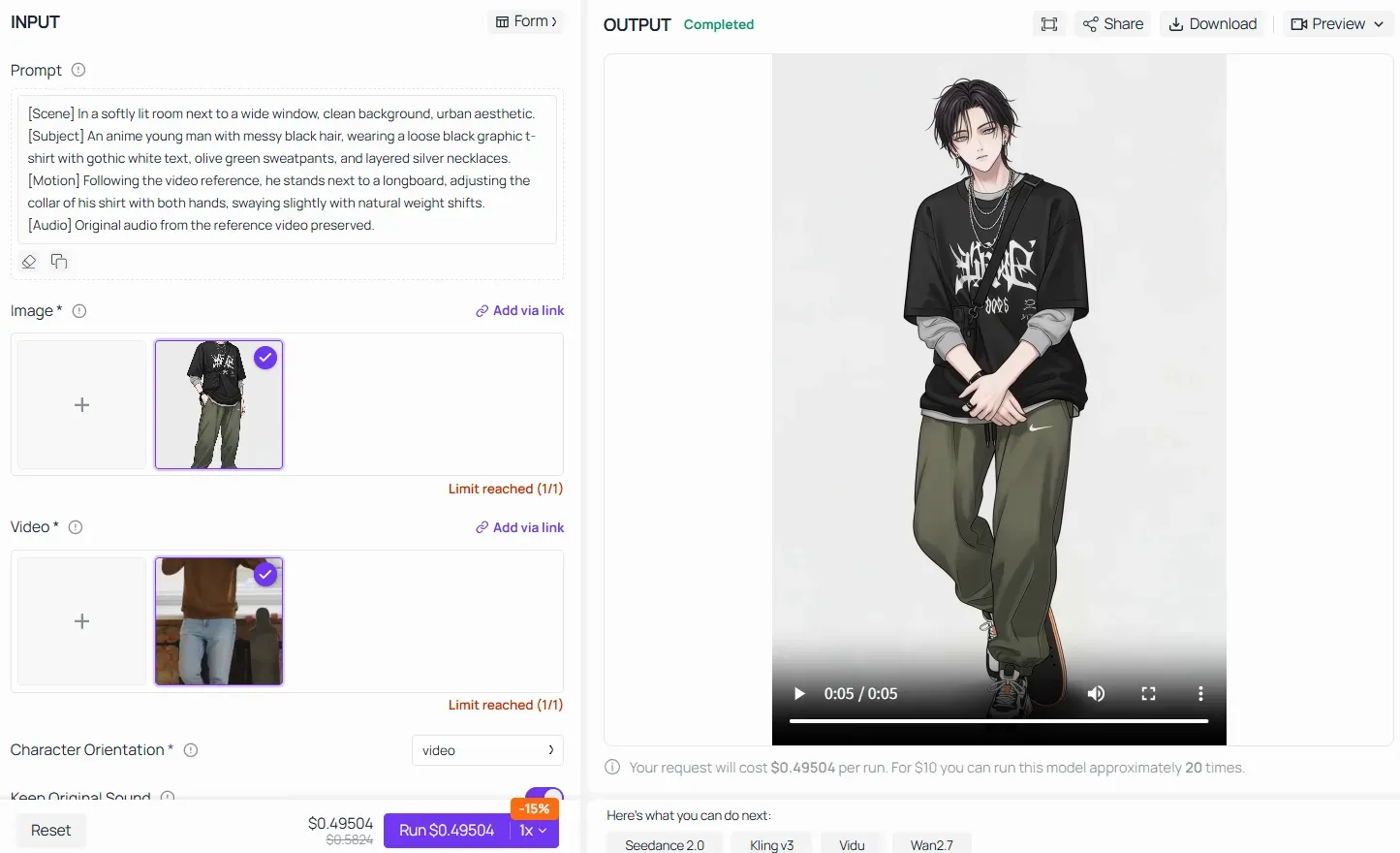
When utilizing advanced features like Video Reference / Motion Transfer on platforms like Atlas Cloud, the Core Formula still holds absolute authority. Instead of giving the AI vague instructions like "make the anime character do the same dance," you must structure the prompt by breaking down the scene, freezing the subject's uploaded traits, and locking the motion mapping:
By filling every block of the pipeline, you ensure that the AI model seamlessly transfers the heavy physical bone-mechanics from the real-world video onto the uploaded anime character asset without destroying his visual identity.
Rule of Thumb for Motion Control in Kling 2.6: Your text prompt does not need to sweat the small mechanical details (like "move arm up by 45 degrees"). Let the video reference do the heavy lifting for kinematics. Instead, use your [Subject] and [Scene] blocks to ruthlessly lock down the visual style, textures, and color palettes, ensuring the AI transfers the performance without warping the original image's identity.
Image Quality and Practical Limits
Keep one major rule in mind. Your final video looks only as good as the picture you upload.
Always use high-resolution images. Low-res picture will make video turns out grainy and blurry. The AI cannot fix those messy details later. This problem really stands out on close-up shots of faces.
Run a higher-resolution source image and your character consistency will hold across both 5-second and 10-second output windows without degradation.
Technical Troubleshooting: Resolving Generation Bottlenecks and Audio Drift
Even experienced creators run into friction with Kling 2.6. The two most reported issues are generations that stall mid-process and dialogue that loses sync past the halfway mark of a clip. Both have identifiable causes and practical fixes.
Why Kling Gets Stuck at 99%
If your video gets stuck at 99%, it usually happens for two reasons. First, the servers might just be too busy. Second, your prompt might be too complicated for the system to handle. The AI tries to build all sounds and visuals at the exact same time. If you pack too much into your prompt, the instructions clash. This confusion slows down the system or freezes it completely.
Fixes to try in order:
- Try again later. Refresh your page and submit the prompt during quiet hours. Early morning usually works best.
- Make it simpler. Split your complicated prompt into two smaller parts. Run them as separate video generations instead.
- Remove stacked ambient descriptions and keep one dominant sound layer per clip
- Reduce the number of characters if using three or more speakers in a single generation
How to Fix Dialogue Drift
Fix dialogue drift by addressing its root cause: the model's multi-speaker processing degrades past the 5-6 second mark when too many voice instructions compete. Performance may degrade in scenes with three or more characters.
| Scenario | Recommended Fix |
| Two-speaker dialogue over 10s | Use 10s duration with clear speaker-switch cues |
| Three-plus speakers | Split into separate clips per speaker pair |
| Long monologue drifting | Shorten script to fit comfortably within 10s window |
| Singing cutting off | Always use 10s parameter for musical content |
Reducing Artifacts and Optimizing Credits
To reduce generation artifacts, keep image-to-video source files at high resolution and avoid mismatched scene descriptions. On credit consumption optimization, note that Native Audio enabled costs 10 credits per second in Professional Mode, versus 5 credits per second with audio disabled. Draft with audio off, then enable it only for final renders to stretch your platform limitations budget further.
Kling 2.6 vs. Kling 3.0 vs. Wan 2.6 vs. Veo 3.1: Head-to-Head Comparison
Don't expect one AI video tool to do absolutely everything. When you want built-in audio, the "best" choice just comes down to your own budget, your workflow, and what your video clip actually needs.
Feature Comparison at a Glance
| Feature | Kling 2.6 | Kling 3.0 | Wan 2.6 | Veo 3.1 |
| Native Audio | Full (Dialogue/SFX/Ambience) | Full (Single-pass sync) | Full (Includes Lip Sync) | Full (3D Spatial Audio) |
| Max Clip Length | 10s | 15s | 15s | 8s |
| Max Resolution | 1080p | Native 4K | 1080p | Native 4K |
| Motion Control | Strong (Skeletal/Video reference) | Strong (Full Identity Lock) | Moderate (Style/Motion transfer) | Moderate (Fluid dynamics physics) |
| Multi-Shot | No | Yes (Up to 6 shots in single pass) | Yes (Multi-scene long text support) | No |
| Voice Control | Yes | Yes | No (Prompt-dependent) | No (Prompt-dependent) |
| Pricing | $0.048 - $0.095/s | $0.071 - $0.357/s | $0.018 - $0.7/s | $0.05 - $0.2/s |
Note: The pricing refers to Atlas Cloud.
Where Kling 2.6 Holds the Edge
Kling 2.6 vs Wan 2.6 is not a close contest on audio. Wan 2.6 has only partial audio support, while Kling 2.6 delivers full native dialogue, SFX, and ambient layering in one pass. For creators who need complete, sound-ready clips without post-production, Kling 2.6 is the cleaner workflow.
Kling 2.6 costs over 50% less than Veo 3.1. If you do not need Hollywood-level video quality, Kling is the much smarter choice. It lets you create huge amounts of content without breaking your budget.
Where Veo 3.1 Pulls Ahead
Veo 3.1 vs Kling video comes down to realism and audio spatialization. Veo 3.1 generates three-dimensional sound environments where audio sources move through the stereo field, outputting at 48kHz with stereo AAC encoding at 192kbps. As of March 2026, no other major AI video model offers this level of audio spatialization. For broadcast-quality dialogue and text rendering, Veo 3.1 remains the stronger pick.
AI Video Physics Comparison
On AI video physics, the models diverge clearly. Kling 2.6 delivers excellent motion fluidity with physics simulation more realistic for human movement, while Veo 3.1 shows occasional physics inconsistencies but excels in lighting and textures.
Decision Framework
- Choose Kling 2.6 for: voice-controlled characters, budget-conscious production, social content, complete audio-visual output in one pass
- Choose Kling 3.0 for: longer cinematic shots, multi-scene storyboards, 4K output
- Choose Wan 2.6 for: open-source, zero-cost iteration and draft testing
- Choose Veo 3.1 for: spatial audio, text rendering, photoreal product ads
Conclusion: The New Rhythm of AI Filmmaking
The traditional video production chain, export visuals, generate voiceover separately, layer sound effects, then mix everything in post, no longer applies when using Kling 2.6. That entire sequence now collapses into a single prompt submission.
The creators who move fastest are those who treat prompt writing as directorial craft rather than a search query. The real trick to pro-level video is simple. You just need to pack your scene, subject, movement, and sound plans into one clear prompt.
Right now, Kling 2.6 is one of the best tools out there. It works great for big content teams, solo creators, and marketing studios who want fast, high-quality video. The technical ceiling will keep rising. Mastering the prompt structure now builds the creative foundation to scale with it.






