Se você tem buscado um guia claro e prático sobre como usar o Seedance 2.0, você chegou ao lugar certo. Antigamente, um vídeo de marketing de 60 segundos levava 13 dias para ser produzido. Com ferramentas de vídeo por IA como o Seedance 2.0, o mesmo trabalho agora leva 27 minutos, uma redução de 99,7% no tempo de produção (Zebracat via AutoFaceless, 2026). A ByteDance lançou o Seedance 2.0 em 12 de fevereiro de 2026, e atualmente ele ocupa o 2º lugar globalmente no Artificial Analysis Video Arena, com um ELO de 1.271.
Este guia cobre todos os principais métodos de acesso sobre como usar o Seedance 2.0 nos EUA, Índia ou outros países fora da China.
Principais Pontos
- O Seedance 2.0 está disponível globalmente via Dreamina e CapCut. Não é necessário VPN ou número de telefone chinês.
- O plano gratuito no Dreamina oferece 225 tokens diários (com marca d'água). Planos pagos começam em USD18/mês.
- Para desenvolvedores nos EUA e internacionalmente, o Atlas Cloud oferece o acesso via API mais acessível, a USD0.081/seg.
- O modelo aceita texto, imagens, áudio e vídeo em uma única passagem multimodal usando a sintaxe @AssetName.
- 91% das empresas usam marketing de vídeo em 2026 (Wyzowl via Ngram, 2026). A produção por IA reduz os custos em até 91% em comparação com vídeos tradicionais.
Como usar o Seedance 2.0 gratuitamente - Tutoriais passo a passo
Saber como usar o Seedance 2.0 gratuitamente é a primeira pergunta que a maioria dos usuários faz. O Dreamina oferece 225 tokens diários compartilhados sem custo, o que é suficiente para gerar aproximadamente 10–15 clipes curtos por dia.
Opção Gratuita 1: Dreamina (Recomendado)
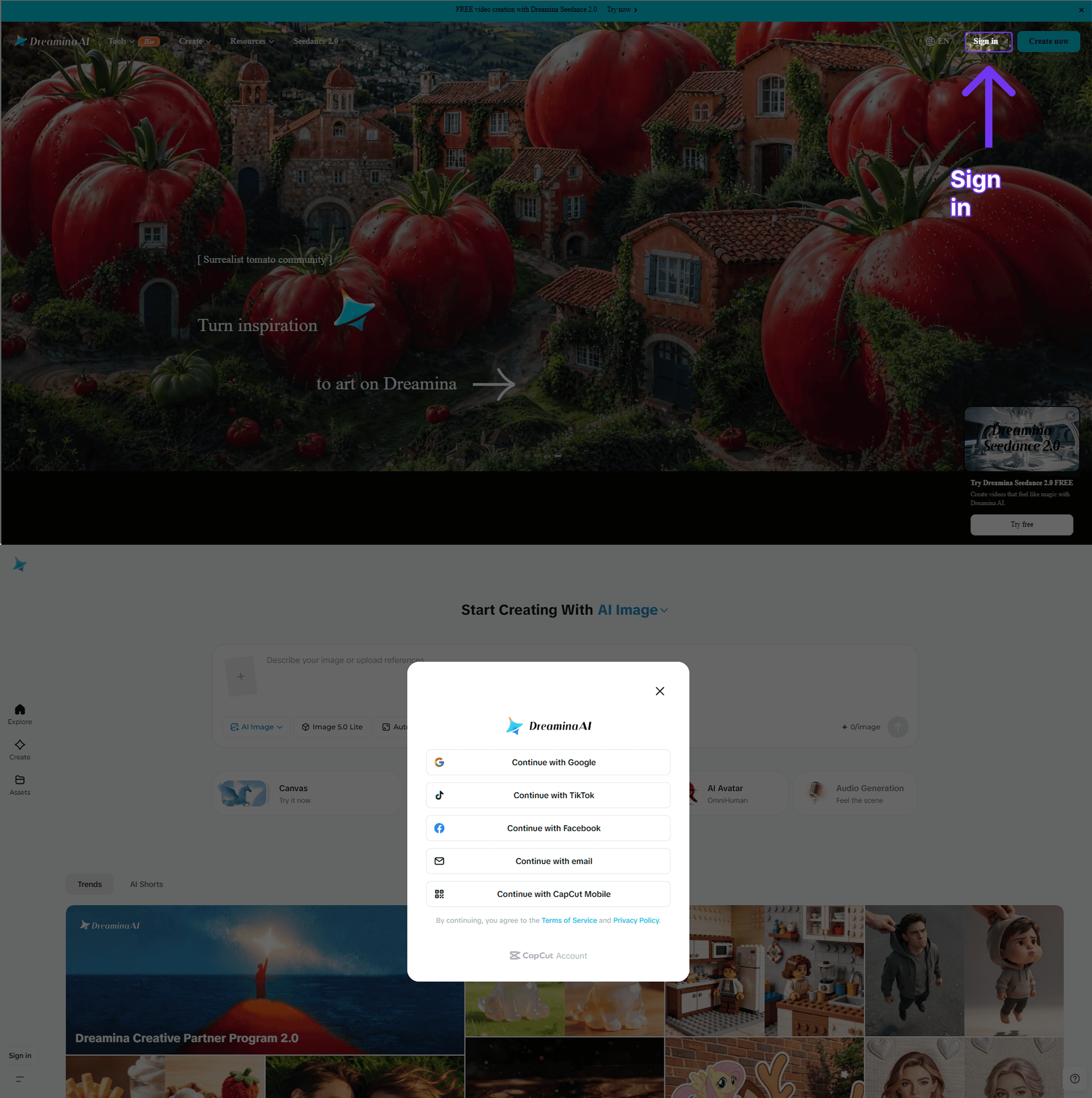
Passo 1: Acesse dreamina.capcut.com em qualquer navegador. Não é necessário fazer download. A plataforma está disponível globalmente. Inscreva-se gratuitamente usando sua conta Google, Apple ID ou e-mail. Não é necessário cartão de crédito.
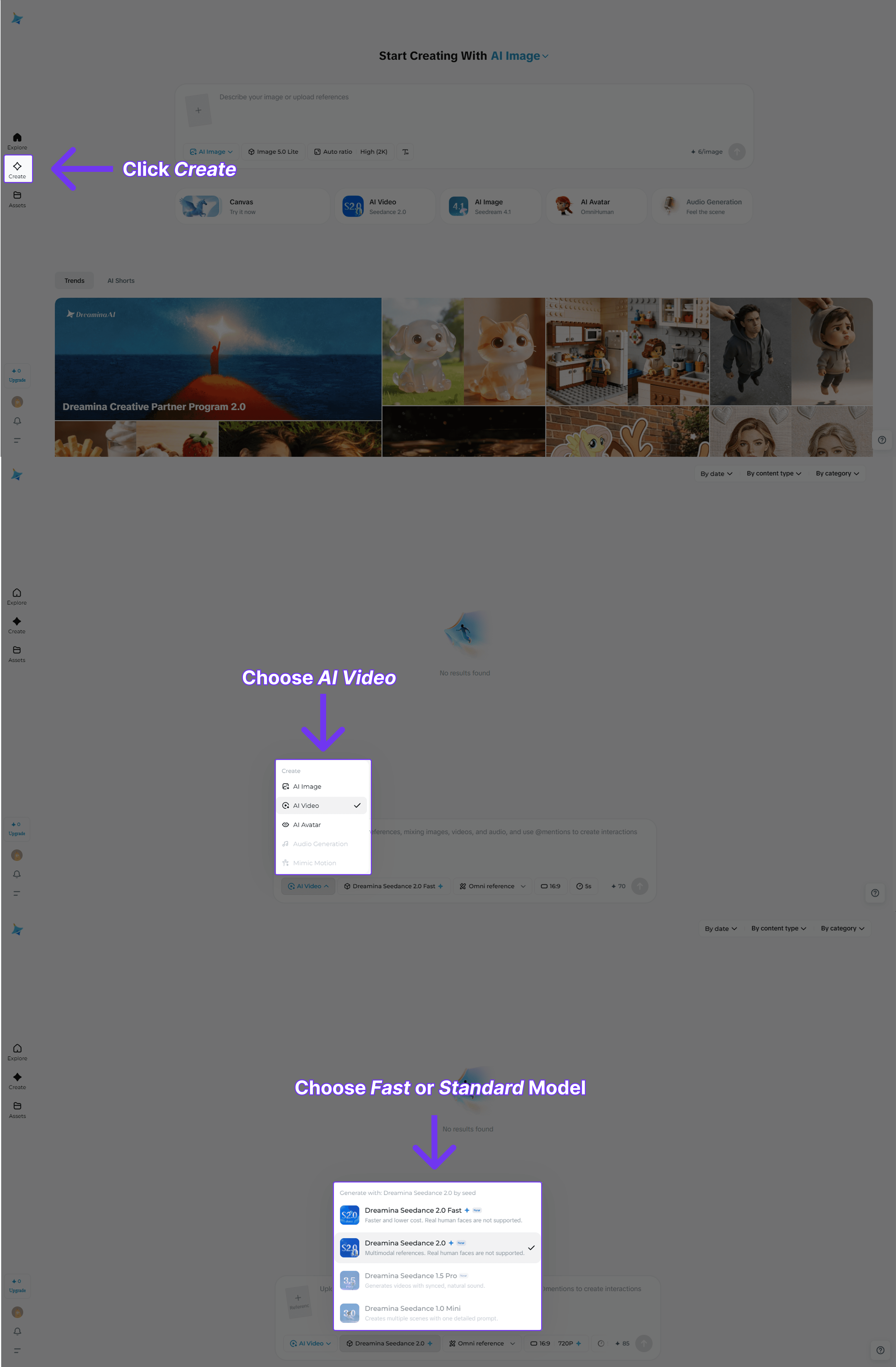
Passo 2: Clique em "Create" na barra lateral esquerda para abrir o painel de geração de vídeo. Selecione o Seedance 2.0 no menu suspenso de modelos na parte superior do painel. Você verá as variantes Standard e Fast.
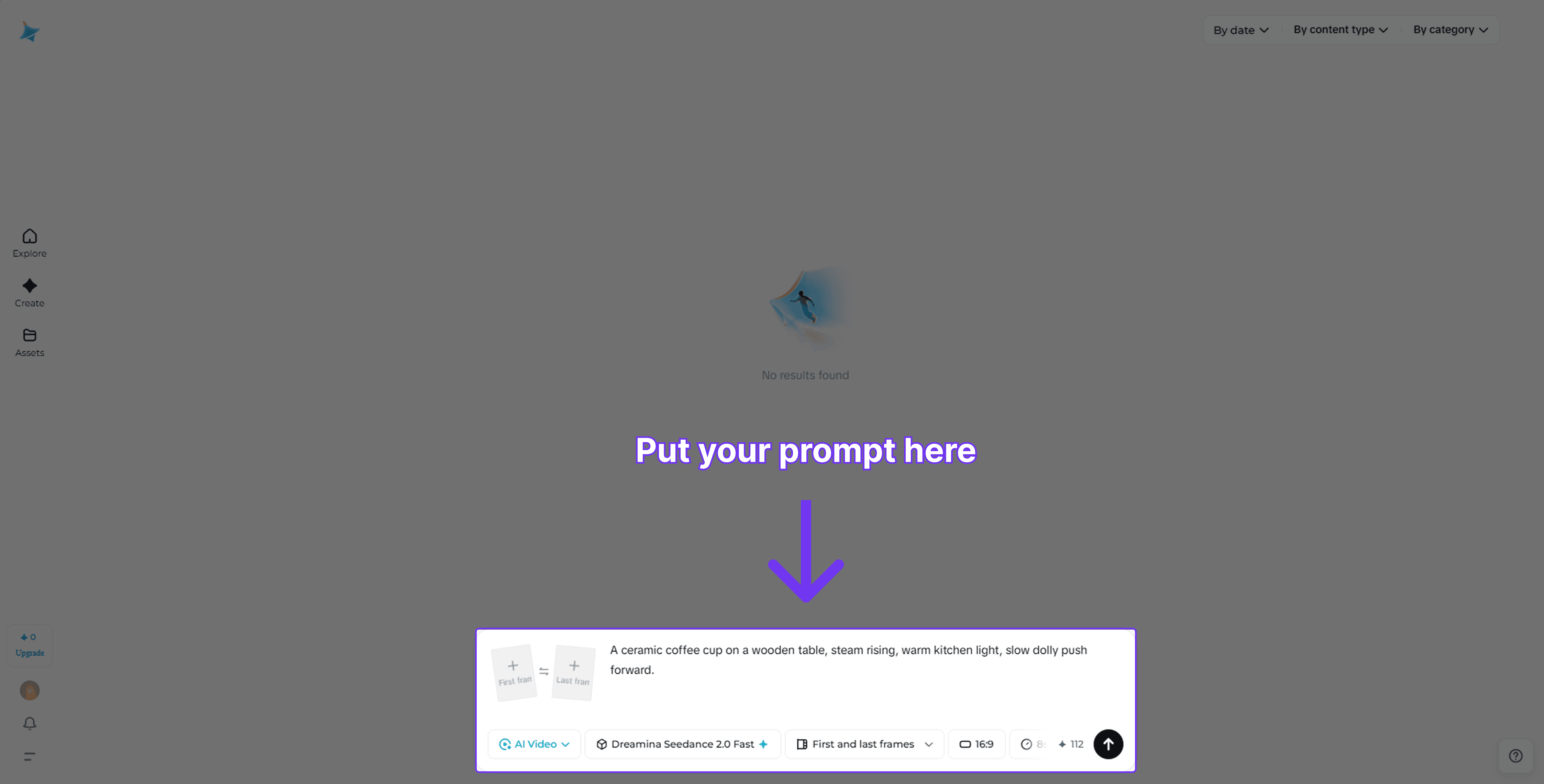
Passo 3: Escreva seu prompt usando a fórmula de cinco partes: Sujeito + Ação + Cenário + Humor + Direção de Câmera. Exemplo: "Uma xícara de café de cerâmica em uma mesa de madeira, fumaça subindo, luz quente de cozinha, movimento lento de câmera dolly push forward." Defina a duração (4–8 segundos recomendados para o nível gratuito) e a proporção (16:9 para widescreen, 9:16 para redes sociais verticais).
Passo 4: Clique em "Generate". Cada clipe usa aproximadamente 56 créditos. Seus 225 créditos diários são renovados a cada 24 horas. Baixe seu vídeo. As saídas do nível gratuito incluem uma marca d'água. Faça o upgrade para o plano Standard de USD18/mês para removê-la.
Opção Gratuita 2: Aplicativo CapCut
O CapCut compartilha um pool de tokens com o Dreamina na mesma conta ByteDance. Baixe o CapCut na App Store ou Play Store, entre com a mesma conta e toque em "AI Video" para acessar o Seedance 2.0. Os tokens são compartilhados; gastá-los no CapCut reduz seu saldo no Dreamina e vice-versa.
API do Seedance 2.0 para Desenvolvedores
Para desenvolvedores e empresas, a rota da API via Atlas Cloud é o caminho de integração mais rápido e econômico.
O Atlas Cloud é uma plataforma de agregação de API de IA que oferece a desenvolvedores e empresas acesso unificado a mais de 300 modelos de IA, incluindo todas as seis variantes do Seedance 2.0. Funciona por meio de uma única chave de API, um único painel de faturamento e uma única URL base. É a maneira mais rápida de integrar o Seedance 2.0 a qualquer aplicativo, pipeline ou produto, sem lidar com contratos corporativos diretos da ByteDance.
Principais recursos do Atlas Cloud
- Mais de 300 modelos de IA (vídeo, imagem, LLM, áudio) via uma chave de API
- Todas as 6 variantes do Seedance 2.0: texto-para-vídeo, imagem-para-vídeo, referência-para-vídeo (Standard e Fast)
- Seedance 2.0 Fast a USD0.081/seg. O custo mais baixo entre as principais plataformas
- Endpoints de LLM compatíveis com o SDK da OpenAI (substituição direta)
- Pagamento conforme o uso, sem assinaturas mensais
- SLA de 99,9% de disponibilidade com conformidade de dados internacional
- Integração de servidor MCP para mais de 100 clientes IDE
- Aceita cartão de crédito, PayPal, criptomoedas, WeChat Pay, Alipay
Método 1: Usar diretamente no Atlas Cloud Playground
Sem necessidade de código. Acesse atlascloud.ai, inscreva-se, navegue até a página Models, encontre o Seedance 2.0 e clique em "Try in Playground". Digite seu prompt, escolha suas configurações e gere direto no navegador. É a maneira mais rápida de validar uma ideia antes de configurar a API.
Método 2: Acesso via API
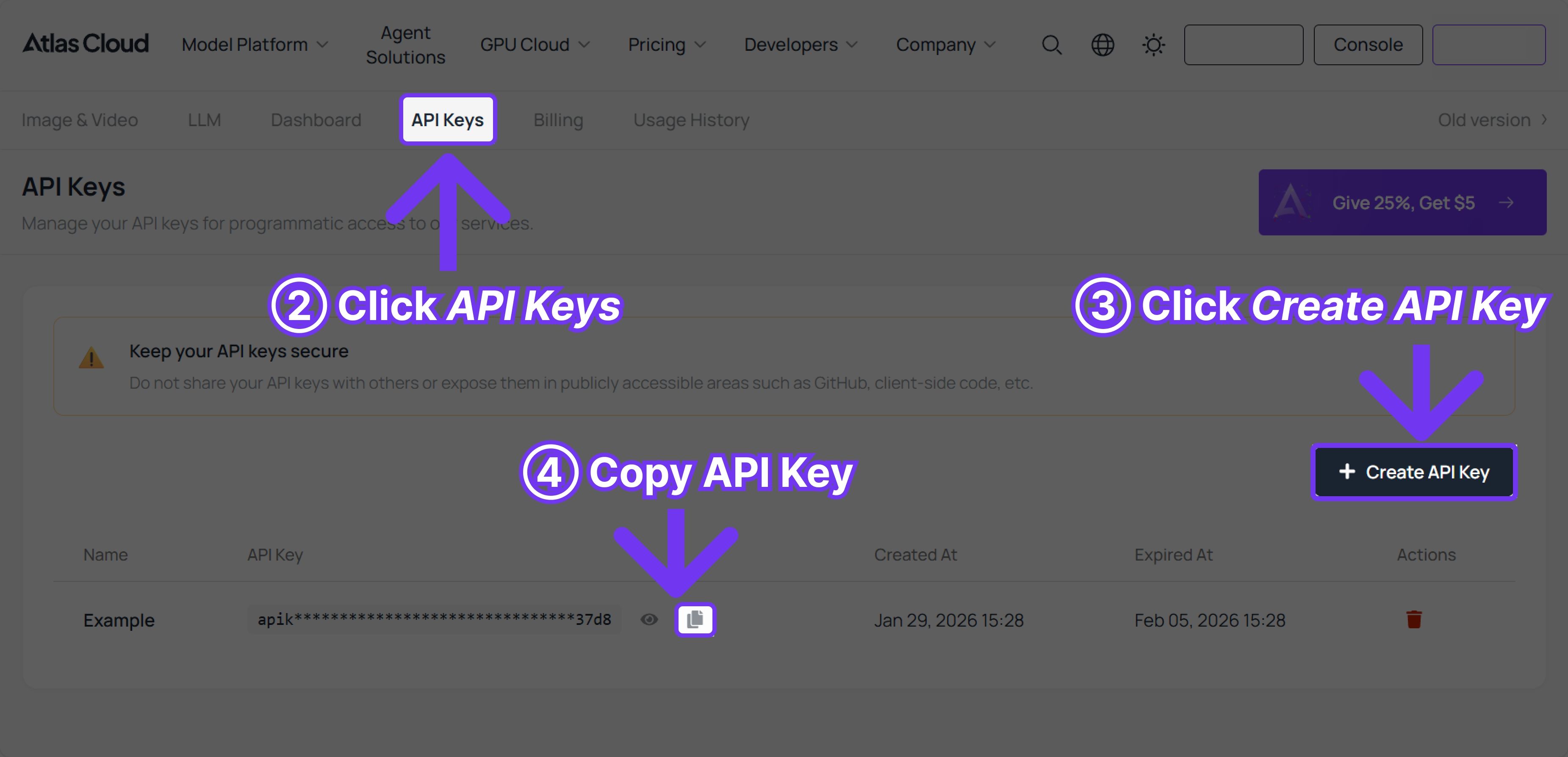
Passo 1: Obtenha sua chave de API
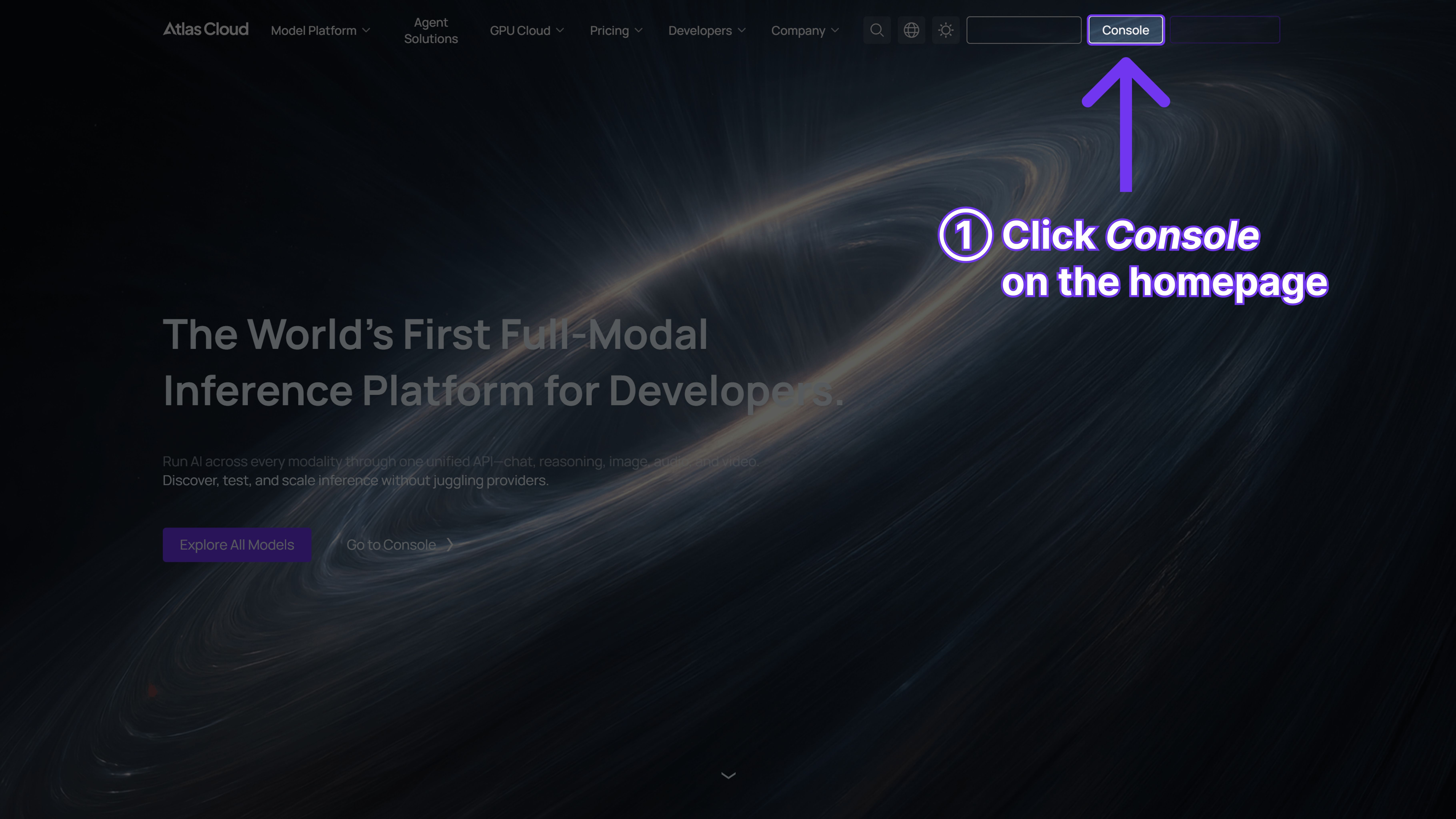
Vá para o Console. Clique em Create API Key, dê um nome a ela e copie-a imediatamente — ela só é exibida uma vez. Adicione-a ao seu ambiente como ATLASCLOUD_API_KEY.
Passo 2: Verifique a documentação da API
A referência completa está em atlascloud.ai/docs. Você encontrará todos os parâmetros, IDs de modelos, o endpoint de upload para arquivos de referência e o ciclo de vida de polling. Vale a pena uma leitura de 5 minutos antes de começar.
Passo 3: Faça sua primeira solicitação
O fluxo é sempre o mesmo: enviar um trabalho de geração → obter um ID de previsão → fazer o polling até concluir → obter a URL do vídeo. Aqui está um exemplo funcional em Python para começar:
python1import requests 2import time 3 4# Passo 1: Iniciar a geração de vídeo 5generate_url = "https://api.atlascloud.ai/api/v1/model/generateVideo" 6headers = { 7 "Content-Type": "application/json", 8 "Authorization": "Bearer $ATLASCLOUD_API_KEY" 9} 10data = { 11 "model": "bytedance/seedance-2.0/text-to-video", # Obrigatório. Nome do modelo 12 "prompt": "Uma visão cinematográfica do oceano infinito ao nascer do sol, luz solar dourada se espalhando " 13 "pelo mar azul profundo, ondas poderosas subindo e quebrando com espuma branca. " 14 "A câmera voa baixo sobre a superfície da água, gotas de água e névoa brilhando " 15 "na luz. Atmosfera cinematográfica épica, 4K.", 16 "duration": 5, # Duração do vídeo em segundos (4–15), ou -1 para automático 17 "resolution": "720p", # opções: 480p | 720p 18 "ratio": "adaptive", # 9:16 | 16:9 | 1:1 | 4:3 | adaptive 19 "generate_audio": True, # Gerar voz, efeitos sonoros e música de fundo sincronizados 20 "watermark": False, 21} 22 23generate_response = requests.post(generate_url, headers=headers, json=data) 24prediction_id = generate_response.json()["data"]["id"] 25 26# Passo 2: Fazer o polling pelo resultado 27poll_url = f"https://api.atlascloud.ai/api/v1/model/prediction/{prediction_id}" 28 29def check_status(): 30 while True: 31 response = requests.get( 32 poll_url, 33 headers={"Authorization": "Bearer $ATLASCLOUD_API_KEY"} 34 ) 35 result = response.json() 36 status = result["data"]["status"] 37 38 if status in ["completed", "succeeded"]: 39 video_url = result["data"]["outputs"][0] 40 print("Vídeo gerado:", video_url) 41 return video_url 42 elif status == "failed": 43 raise Exception(result["data"].get("error", "A geração falhou")) 44 else: 45 time.sleep(2) # Ainda processando — verifique novamente em 2 segundos 46 47video_url = check_status()
O nível Seedance 2.0 Fast do Atlas Cloud custa USD 0.081 por segundo, contra USD 0.153/seg do Kling 3.0. Uploads de arquivos de referência não contam para o faturamento — você só paga pela duração do vídeo gerado.
ixJNktvb1Ro
O que é o Seedance 2.0 e por que ele é importante?
Em abril de 2026, o Seedance 2.0 obteve uma pontuação ELO de 1.271 no Artificial Analysis Video Arena, colocando-o em 2º lugar globalmente e em 1º lugar entre todos os modelos com capacidade de áudio, com 1.221. Esse ranking reflete algo real: é um dos poucos modelos que processa texto, imagens, clipes de vídeo e áudio em uma única passagem unificada, em vez de encadear ferramentas separadas.
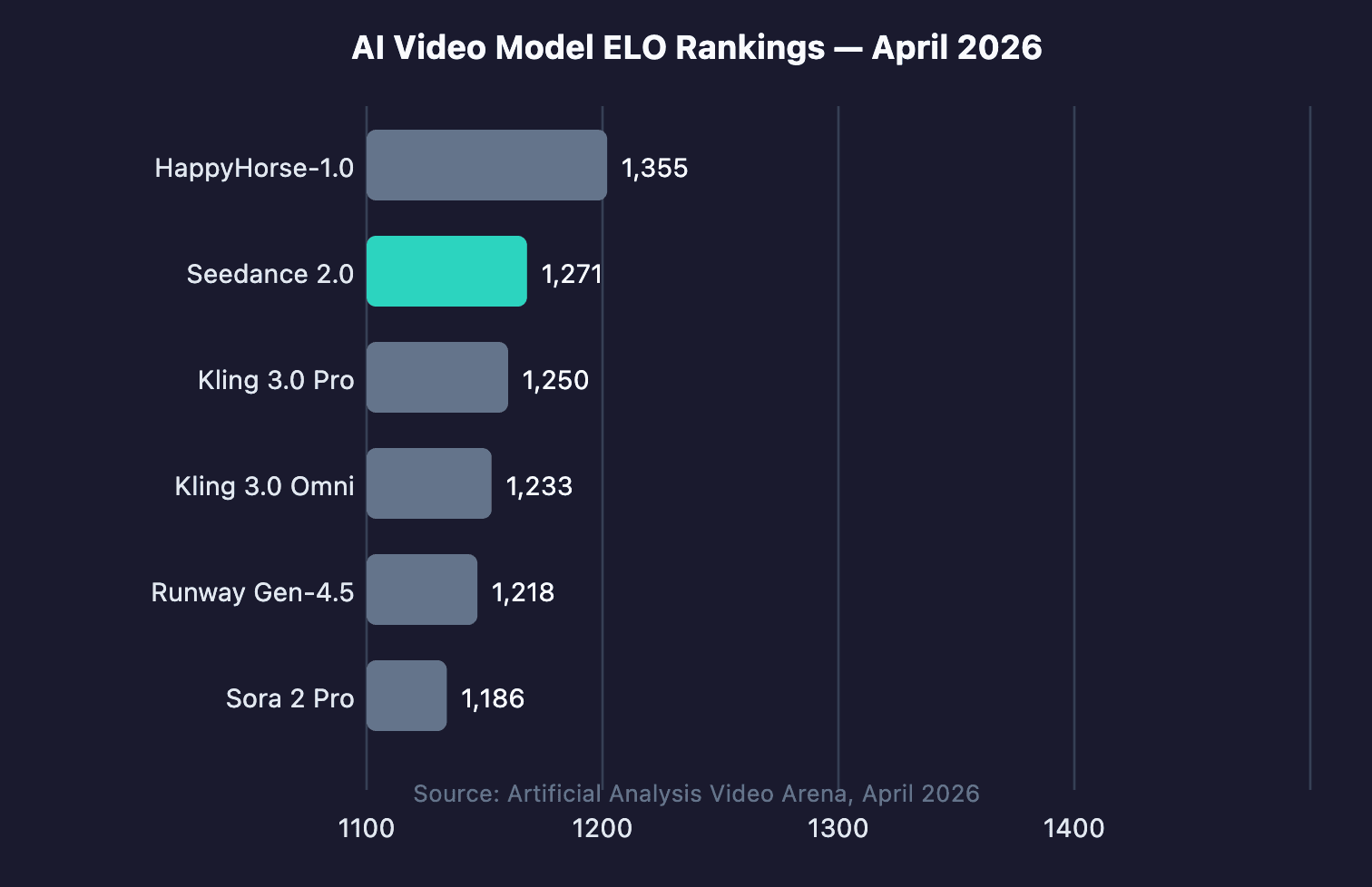
A ByteDance construiu o Seedance 2.0 dentro de seu laboratório SEED e o lançou publicamente em 12 de fevereiro de 2026. A arquitetura é chamada de geração conjunta multimodal de áudio e vídeo unificada. Na prática, isso significa que você fornece um prompt, imagens de referência opcionais, um clipe de vídeo e um arquivo de áudio, e o modelo processa tudo junto. Sem etapas separadas de sincronização de áudio. Sem pipeline manual de sincronização labial.
A resolução de saída vai até 1080p através da interface do Dreamina e 720p através da API. Você pode gerar clipes entre 4 e 15 segundos em seis proporções: 21:9, 16:9, 4:3, 1:1, 3:4 e 9:16. Essa última é importante para conteúdo social. Cada saída carrega marca d'água de procedência C2PA integrada aos metadados do arquivo.
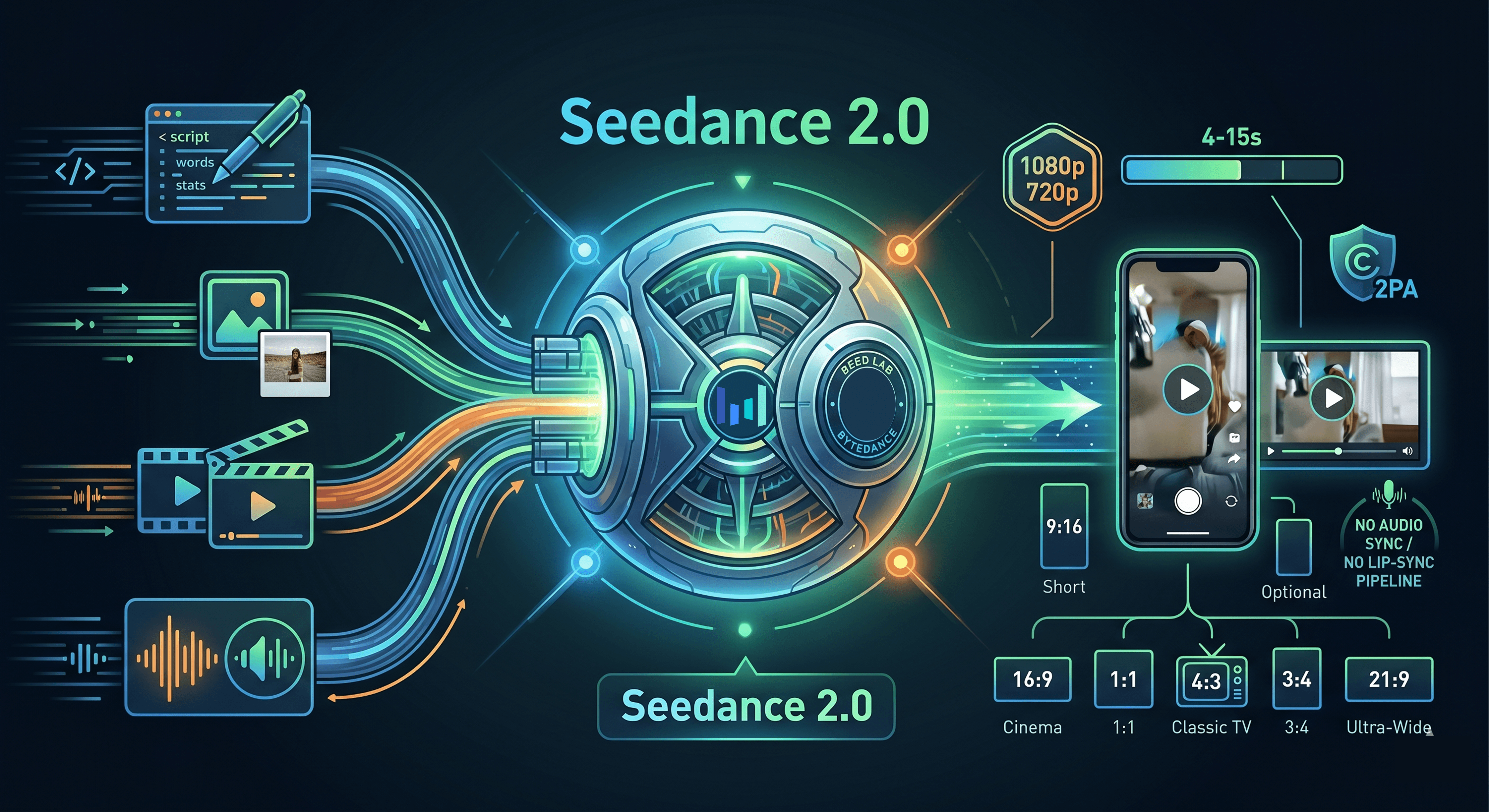
Por que a diferença de ELO importa? O Kling 3.0 Pro pontua 1.250 e o Runway Gen-4.5 pontua 1.218. Essas lacunas de 21 a 53 pontos se traduzem em movimentos visivelmente mais limpos e melhor adesão aos prompts em cenas complexas. Vale a pena executar seu próprio teste A/B no seu caso de uso específico, mas o Seedance 2.0 tende a vencer em movimentos de câmera cinematográficos e áudio multilíngue.
O Seedance 2.0 obteve um ELO de 1.271 no Artificial Analysis Video Arena em abril de 2026, classificando-se em segundo lugar globalmente entre todos os modelos de texto-para-vídeo e em primeiro lugar entre os modelos com capacidade de áudio, que pontuaram 1.221 em um sub-leaderboard paralelo de áudio (Artificial Analysis Video Arena, abril de 2026).
O próprio mercado de vídeo por IA está acelerando rapidamente. A Fortune Business Insights estimou o mercado global de geradores de vídeo por IA em USD 716,8 milhões em 2025, crescendo para USD 847 milhões em 2026, um aumento de 18,8% ano a ano. A Grand View Research, também em 2026, avalia o mercado em USD 946,4 milhões com uma taxa de crescimento anual composta de 20,3% até 2033. Ambos os números confirmam que isso não é um experimento de nicho. É um mercado onde as escolhas de ferramentas feitas agora serão multiplicadas por anos.
Prompts avançados do Seedance 2.0 e Entradas Multimodais
Em 2026, 63% dos profissionais de marketing de vídeo usaram ferramentas de IA para criar ou editar vídeos, de acordo com a Wyzowl via Ngram. A diferença entre resultados médios e resultados de nível profissional reside na precisão do prompt. As entradas multimodais do Seedance 2.0 tornam os prompts fortes ainda mais impactantes, mas também introduzem modos de falha que a maioria dos guias não cobre.
Usando Tags de Referência @AssetName
A sintaxe @AssetName é como você vincula arquivos carregados a papéis específicos na cena. Você pode carregar uma foto de produto, um vídeo de fundo e um arquivo de música de fundo, depois escrever: "@product_front em uma mesa minimalista, órbita lenta, jazz @ambient_track tocando suavemente." O modelo usa a imagem como uma âncora visual, o clipe de vídeo como referência de movimento e o áudio como camada sonora. Essa é a principal vantagem em relação à geração baseada apenas em texto.
Opções de Controle de Câmera
O Seedance 2.0 suporta três movimentos de câmera nomeados: dolly (movimento para frente/trás), pan (rotação esquerda/direita) e push (zoom com movimento). Estes são termos de direção, então trate-os como literais em seu prompt. "Slow dolly push forward" produzirá um resultado diferente de "zoom in". Use um movimento de câmera por clipe. Empilhar dois movimentos em um único clipe de 8 segundos geralmente produz artefatos visuais.
Falhas de Prompt e Correções
Aqui está um padrão que aparece consistentemente. Prompts vagos produzem resultados vagos. Considere a diferença entre estes dois prompts para a mesma foto de produto:
Antes (fraco): "Mostre uma garrafa de água em um ambiente agradável com boa iluminação." Depois (forte): "@bottle Garrafa de água azul translúcida em uma superfície de pedra molhada, gotas de água captando a luz da manhã, fundo da floresta desfocado, dolly push lento, tom cinematográfico frio."
A versão fraca produz um mockup de estúdio genérico. A versão forte gera algo que você poderia realmente usar em um anúncio. O que mudou? Especificidade na textura da superfície, fonte de luz, profundidade do fundo e movimento da câmera. O modelo responde a substantivos concretos e descritores precisos, não a adjetivos como "agradável" ou "bom".
O Seedance 2.0 suporta controle de câmera de nível de direção, incluindo movimentos dolly, pan e push. Trate a direção da câmera como instruções literais em cada prompt. Fonte: Unsplash / Harrison Kugler.
O Seedance 2.0 aceita até 12 arquivos de referência por solicitação — uma mistura de 9 imagens, 3 clipes de vídeo e 3 arquivos de áudio — todos processados em uma única passagem multimodal usando a sintaxe @AssetName para referência direcionada. Nenhum concorrente nos 6 principais rankings de ELO oferece esse nível de controle de entrada combinado (Documentação do laboratório ByteDance SEED, 2026).
Perguntas Frequentes sobre o Seedance 2.0
- O Seedance 2.0 é gratuito para usar?
Sim, até certo ponto. O nível gratuito do Dreamina inclui 225 tokens diários compartilhados e adiciona uma marca d'água a todas as saídas. Os planos pagos começam em USD18/mês para o plano Standard, que remove marcas d'água e aumenta os limites de tokens. Os usuários ativos mensais de plataformas de vídeo por IA atingiram 124 milhões em janeiro de 2026 (Ngram, 2026), portanto, os níveis gratuitos podem ficar congestionados durante os horários de pico.
- Qual é a duração máxima de vídeo que o Seedance 2.0 pode gerar?
A duração máxima de um único clipe é de 15 segundos tanto pela interface do Dreamina quanto pela API. O mínimo é de 4 segundos. Para vídeos mais longos, encadeie vários clipes usando ativos de referência consistentes via tag @AssetName. Isso corresponde a como os fluxos de trabalho profissionais de vídeo por IA são estruturados na maioria dos modelos de alto nível em 2026.
- Como o Seedance 2.0 se compara ao Sora 2 em termos de custo?
No nível da API, o Seedance 2.0 via Atlas Cloud Fast custa USD0,022 por segundo, fazendo um clipe de 10 segundos custar USD0,22. O Sora 2 custa cerca de USD0,15 por segundo, fazendo o mesmo clipe custar USD1,50. Isso representa uma vantagem de custo de aproximadamente 7x para o Seedance 2.0. Dada sua pontuação ELO de 1.271 contra 1.186 do Sora 2 Pro, a relação qualidade-custo claramente favorece o Seedance (Atlas Cloud, março de 2026).
- Posso usar as saídas do Seedance 2.0 comercialmente?
O uso comercial é permitido nos planos pagos do Dreamina e via API, sujeito aos termos de serviço da ByteDance. Cada saída carrega metadados de procedência C2PA incorporados, que algumas plataformas de anúncios e ferramentas de segurança de marca podem detectar. Revise a política de divulgação de conteúdo de IA de cada plataforma antes de executar campanhas pagas. A produção tradicional custa USD4.500/min contra USD400/min da IA (vidBoard.ai, 2026), portanto, garantir a conformidade é importante.
- Quanto tempo leva a geração via API?
O tempo de geração via API do Atlas Cloud varia de 30 a 120 segundos por clipe. Use o padrão assíncrono de enviar-polling-download em vez de uma solicitação bloqueante. Para fluxos de trabalho em lote, envie todos os trabalhos primeiro e, em seguida, faça o polling pelos resultados.
- Como uso o Seedance 2.0 fora da China sem VPN?
Não é necessária VPN. Como usar o Seedance 2.0 fora da China: visite dreamina.capcut.com diretamente de qualquer país. O Dreamina é a plataforma internacional, totalmente separada do Jimeng (somente China). Está disponível em mais de 130 países, incluindo EUA, Reino Unido, Índia, Japão e a maior parte da Europa. Para acesso à API, o Atlas Cloud é globalmente acessível, sem restrições geográficas.
- Como uso o Seedance 2.0 no CapCut?
Baixe o CapCut na sua loja de aplicativos, entre, toque em "AI Video", selecione o Seedance 2.0 no seletor de modelos, escreva seu prompt, defina a proporção e a duração, e toque em Generate. O CapCut compartilha o mesmo pool de tokens que o Dreamina na mesma conta ByteDance. A ByteDance expandiu o acesso global ao CapCut em abril de 2026 para mais de 150 países.
- Como uso a API do Seedance 2.0 como desenvolvedor?
Como usar a API do Seedance 2.0: inscreva-se em atlascloud.ai, crie uma chave de API, adicione fundos à sua conta (mínimo de USD25). Faça polling pelo status a cada 5 segundos até que o status seja "completed". O Seedance 2.0 Fast custa USD0,022/seg — 7x mais barato que o Sora 2 a ~USD0,15/seg (Atlas Cloud, março de 2026).





