Trang đổi mặt của Pixlr có tiêu đề "Free AI Face Swap Online" (Đổi mặt AI trực tuyến miễn phí), và mọi thứ trên trang đều hành xử như vậy. Hai vùng thả ảnh, một nút chuyển hướng đổi mặt, một nút Run lớn. Không có gì yêu cầu bạn đăng nhập, không có gì hiển thị giá cả, và không có chi phí tín dụng nào xuất hiện trong nội dung.
Sau đó bạn điền cả hai ô và nhấp Run, một hộp thoại đăng ký hiện ra. Đằng sau hộp thoại đó là một lần kiểm tra số dư tín dụng AI của bạn mà không có nội dung nào chuẩn bị cho bạn. Không có điều nào trong số đó thực sự ẩn. Chúng chỉ tồn tại trong mã của công cụ chứ không phải trong phần tiếp thị của nó.
Những điểm chính
- Tiện ích đổi mặt là hai ô tải lên và một nút Run. Nhấp Run khi chưa đăng nhập sẽ mở hộp thoại đăng ký của Pixlr, và khi đã đăng nhập, thao tác chạy sẽ bị chặn trừ khi số dư của bạn có ít nhất 2 tín dụng AI.
- Mỗi lần đổi mặt tốn 2 tín dụng. Khi đã đăng nhập, nút tự hiển thị "Run Face Swap (2c)"; nội dung tiếp thị xung quanh không đề cập đến giá cả, tín dụng hay khoản miễn phí nào.
- Ảnh tải lên của bạn được thu nhỏ xuống cạnh dài nhất 2160 px và chuyển đổi sang JPEG trong trình duyệt trước khi gửi đi. Kết quả trả về là JPEG và được mã hóa lại thành PNG như trang quảng cáo.
- Thỏa thuận cấp phép của Pixlr nhận "giấy phép vĩnh viễn, miễn phí bản quyền và không thể hủy ngang" đối với cả ảnh bạn tải lên và ảnh đã đổi mặt, điều này có vẻ kỳ lạ bên cạnh dòng FAQ hứa hẹn ảnh tải lên sẽ "bị xóa ngay lập tức."
- Atlas Cloud thực hiện cùng công việc từ cả hai hướng: các điểm cuối đo lường cho ảnh và video đổi mặt, và một công cụ đổi mặt AI miễn phí có FAQ trả lời câu hỏi miễn phí một cách rõ ràng, không có giới hạn sử dụng và không có hình mờ.
Những gì Trang Đổi Mặt Pixlr Hứa hẹn
Công cụ là một tiện ích duy nhất. Tải Khuôn mặt lên bên trái, tải Mục tiêu lên bên phải, một nút điều khiển chuyển hướng giữa chúng để đổi vai trò và Run bên dưới. Nút chuyển hướng đó thực sự hữu ích: điền sai thứ tự hai ô là một lỗi dễ mắc phải và Pixlr cho phép bạn sửa mà không cần tải lại bất kỳ thứ gì.
Những gì bao quanh tiện ích là tiếp thị cho sáu trường hợp sử dụng: kiểu tóc mới, ảnh đại diện LinkedIn, thiệp mời tiệc theo chủ đề, khuôn mặt trên tranh cổ điển, hoán đổi giới tính và meme. Bài đăng trên blog của Pixlr giới thiệu công cụ này, có niên đại tháng 4 năm 2024, phân loại chúng thành "Ngôi sao truyền thông xã hội", "Chuyên nghiệp tinh tế" và "Dịp đặc biệt."
Khoảng cách giữa nội dung đó và công cụ bên dưới đáng để xem xét trước khi bạn lên kế hoạch thực hiện bất kỳ công việc nào xung quanh nó.
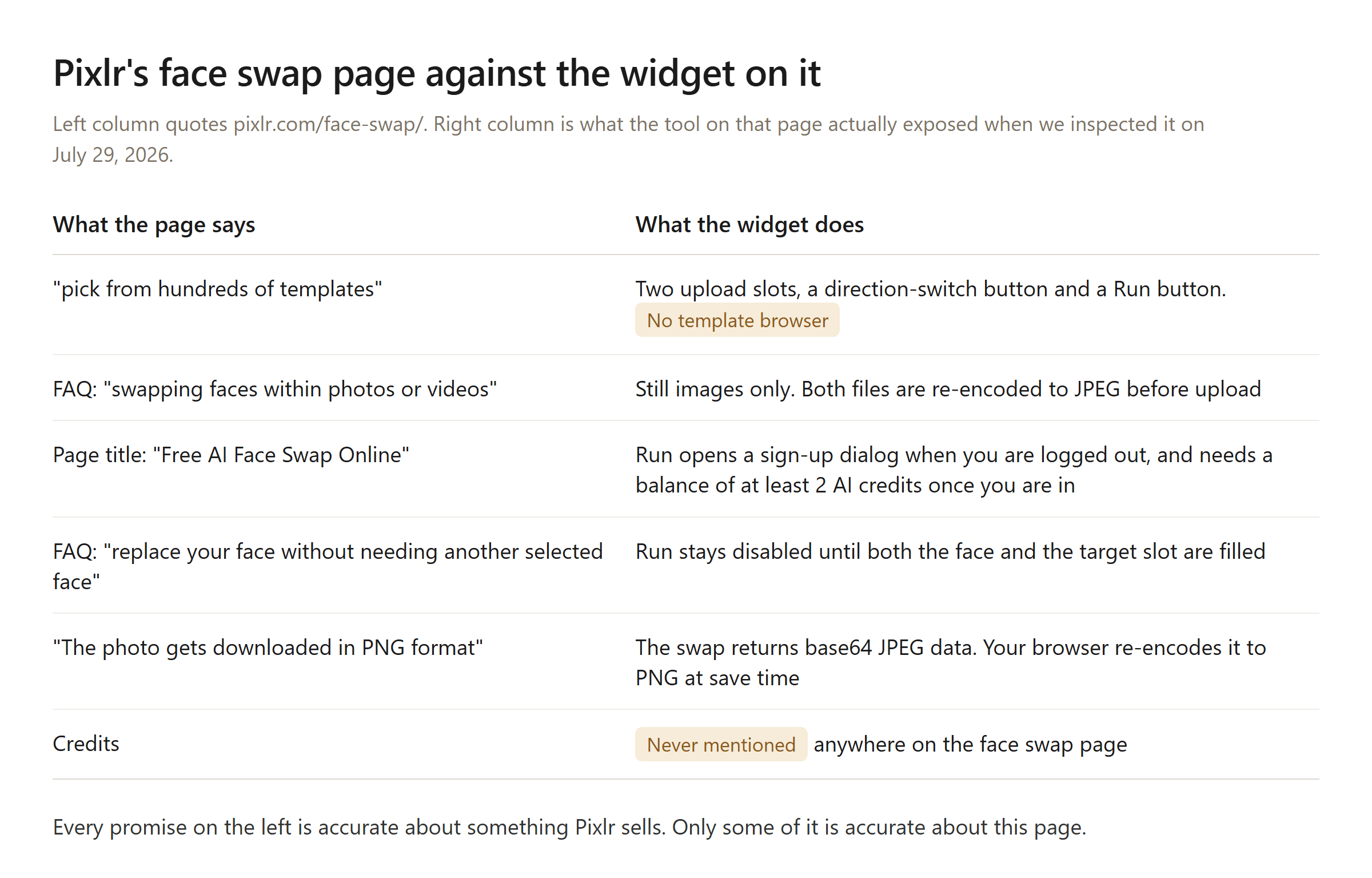
Cột trái trích từ pixlr.com/face-swap/. Cột phải từ trang và tập lệnh máy khách của nó, được kiểm tra vào ngày 29 tháng 7 năm 2026.
Hai hàng trong số đó đáng chú ý. Câu trả lời FAQ mô tả "hoán đổi khuôn mặt trong ảnh hoặc video" nghe như nội dung chung chung về đổi mặt AI và nó nằm trên một trang mà trình xử lý tải lên biến mọi thứ thành ảnh tĩnh. Câu trả lời tuyên bố bạn có thể "thay thế khuôn mặt của mình mà không cần chọn khuôn mặt khác" mô tả một quy trình tải lên một ảnh mà tiện ích này không có; Run vẫn bị mờ cho đến khi cả hai ô được điền.
Cách Đổi Mặt trong Pixlr Từng Bước
Pixlr công bố bốn bước. Dưới đây là chúng cùng với những phần mà trang bỏ qua.
- Mở công cụ. Truy cập trang đổi mặt. Đăng nhập trước nếu có thể, vì làm điều đó sau có nghĩa là nhấp Run và nhận được hộp thoại đăng ký thay vì một lần đổi mặt.
- Tải khuôn mặt lên. Đây là danh tính bạn đang mượn. Lời khuyên của Pixlr từ FAQ: sử dụng "ảnh chất lượng cao cho cả ảnh nguồn và ảnh đích" và chọn những bức ảnh có "biểu cảm khuôn mặt tương tự" để căn chỉnh được chính xác.
- Tải mục tiêu lên. Đây là bức ảnh sẽ được thay đổi. Nếu bạn nhận ra hai ảnh bị sai thứ tự, hãy nhấn nút điều khiển chuyển hướng giữa các ô thay vì bắt đầu lại. Bước 3 trong hướng dẫn của Pixlr cũng cung cấp "một mẫu từ thư viện" như một lựa chọn thay thế ở đây, đó là lời hứa mà chúng tôi không thể tìm thấy điều khiển nào.
- Chạy, sau đó nhấp vào kết quả để lưu. Đầu ra xuất hiện bên dưới biểu mẫu. Nhấp vào đó sẽ tải xuống một tệp PNG.
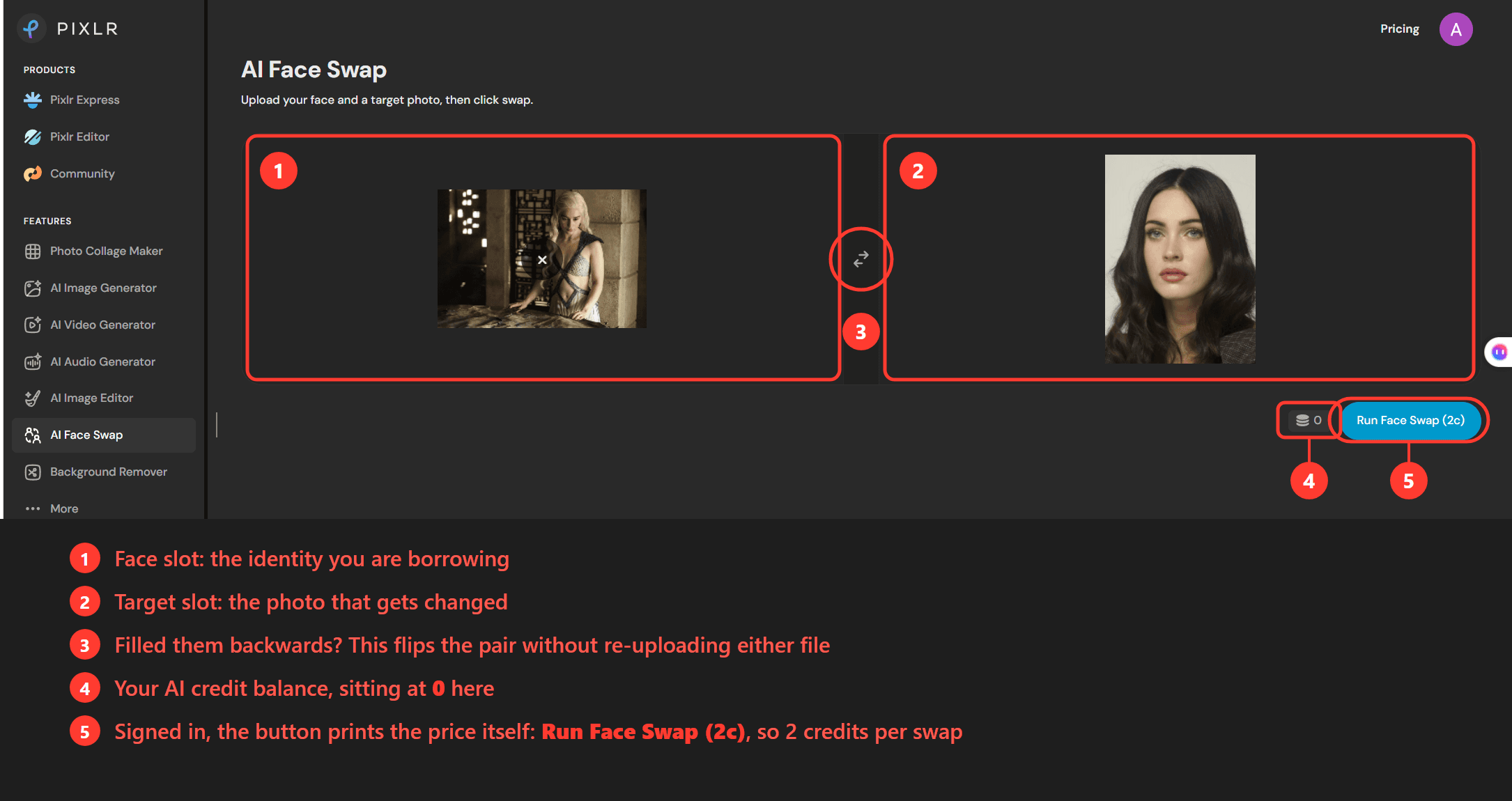
Đăng nhập làm thay đổi giao diện. Một chip tín dụng xuất hiện bên cạnh Run, hiển thị số dư trên tài khoản của bạn và nút tự đổi nhãn thành Run Face Swap (2c). Dấu ngoặc đơn đó là mức giá mà trang tiếp thị không bao giờ đề cập: 2 tín dụng mỗi lần đổi mặt. Với số dư là 0, như trong ảnh chụp màn hình ở trên, nhấn Run sẽ tạo ra một hộp thoại thay vì một hình ảnh; người đăng ký nhận được lời nhắc nạp thêm và những người khác nhận được lời chào nâng cấp. Sau một lần đổi mặt thành công, trang sẽ đọc lại số dư của bạn từ điểm cuối tín dụng của Pixlr để chip luôn cập nhật.
Phần còn lại của giao diện vẫn tối giản. Không có vị trí xếp hàng, không có phần trăm tiến trình, chỉ có nút Run ở trạng thái hoạt động cho đến khi hình ảnh xuất hiện. Mỗi kết quả mới được thêm vào phía trên kết quả trước đó, vì vậy các lần đổi mặt trong một phiên sẽ xếp chồng lên trang và tải lại sẽ xóa sạch tất cả. Không có gì ở đây lưu giữ lịch sử cho bạn.
Một Giải Pháp Thay Thế Đổi Mặt Pixlr Có Đo Lường trên Atlas Cloud
Một nhóm tín dụng được đặt lại hàng tháng phù hợp với việc đổi mặt không thường xuyên. Nó trở nên bất tiện ngay khi việc đổi mặt trở thành một nhiệm vụ có thời hạn, bởi vì giới hạn là bất cứ thứ gì gói của bạn phân bổ cho tháng đó. Atlas Cloud thực hiện cùng công việc từ hai hướng, cả hai đều có thể truy cập từ trung tâm công cụ AI của nó: các điểm cuối đo lường tính phí mỗi lần chạy cho ảnh và video đổi mặt, và một công cụ đổi mặt miễn phí cho các công việc một lần mà hóa đơn không phải là vấn đề.
Hãy xem điểm cuối đo lường trước. Nó đọc một khuôn mặt nguồn và một ảnh mục tiêu, chuyển danh tính khuôn mặt và để nguyên tư thế, quần áo, nền và ánh sáng của mục tiêu. Danh mục liệt kê nó từ $0,09 mỗi ảnh và phí tuân theo kích thước đầu ra ở hai bậc: $0,096 ở cài đặt trước 1.5K, $0,186 ở cài đặt trước 2K. Ở bậc thấp hơn, $10 tương đương với khoảng 104 lần đổi mặt.
Đoạn phim có điểm cuối riêng. Nó lấy một khuôn mặt nguồn cộng với một clip mục tiêu dài hai đến mười giây ở 720P hoặc 1080P, được liệt kê từ $0,2 mỗi giây và giữ danh tính xuyên suốt các khung hình thay vì chỉ một ảnh tĩnh tại một thời điểm.
Ba cách tiếp cận: playground, API và công cụ miễn phí.
Phương pháp 1: Đổi Mặt trong Playground của Atlas Cloud
Không cần mã. Mở trang mô hình và biểu mẫu yêu cầu hai lần tải lên: Source Face (Khuôn mặt nguồn), mà trang chỉ định phải là ảnh rõ ràng, chụp chính diện của khuôn mặt bạn muốn đổi vào, và Target Image (Ảnh mục tiêu), ảnh có khuôn mặt sẽ được thay thế. Kích thước mặc định là auto. Tham số kích thước nếu không sẽ chấp nhận 13 kích thước pixel cụ thể trên các hình dạng vuông, ngang và dọc, từ 1024×1024 đến 2048×2048, với 2720×1530 là rộng nhất. Đầu ra mặc định là JPEG, có sẵn PNG.
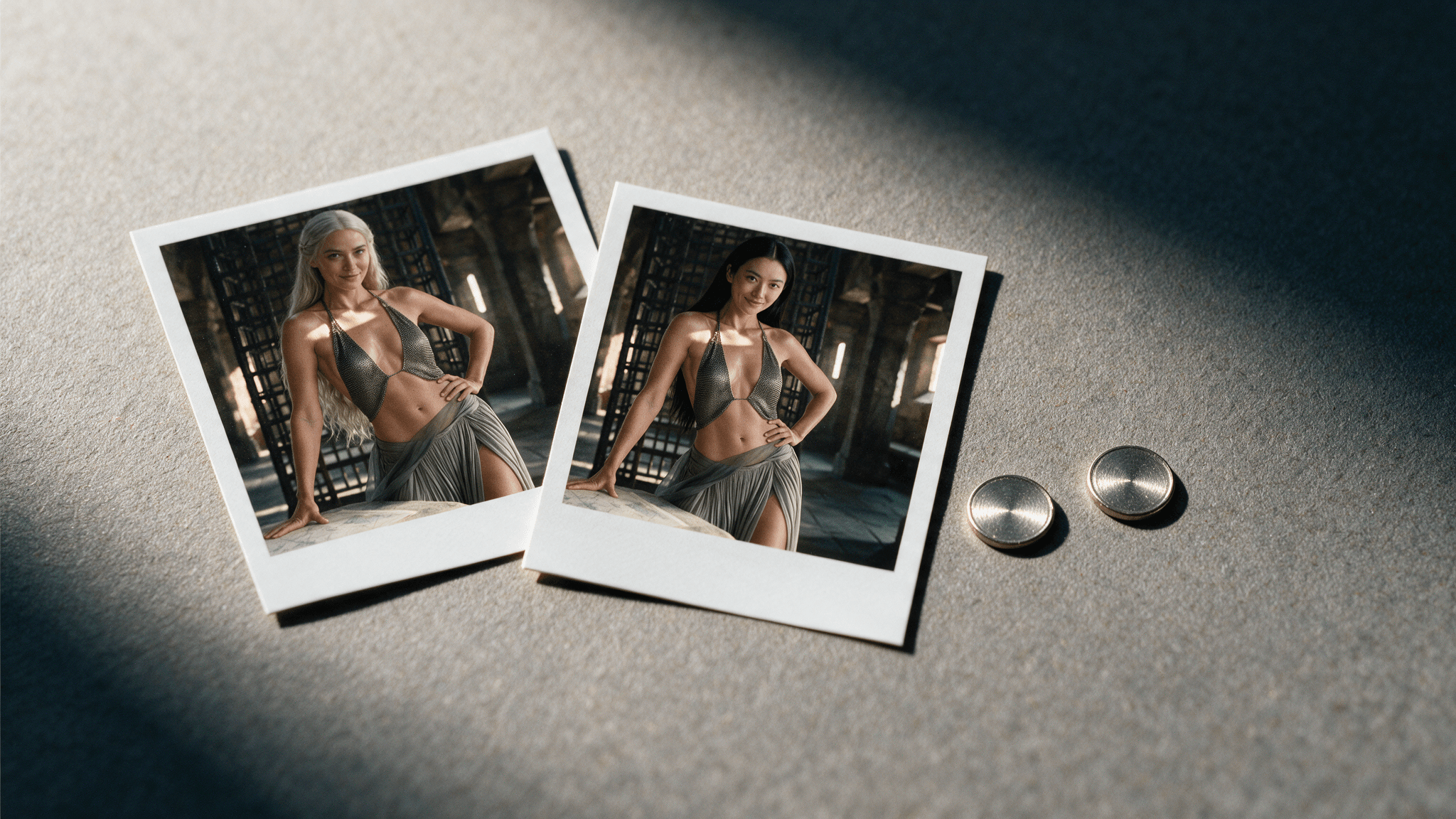
Chúng tôi đặt một ảnh chụp đầu studio đơn giản vào ô nguồn và một cảnh phòng ngai vàng giả tưởng theo phong cách Game of Thrones vào ô mục tiêu, để kích thước là auto và nhấn Run một lần.
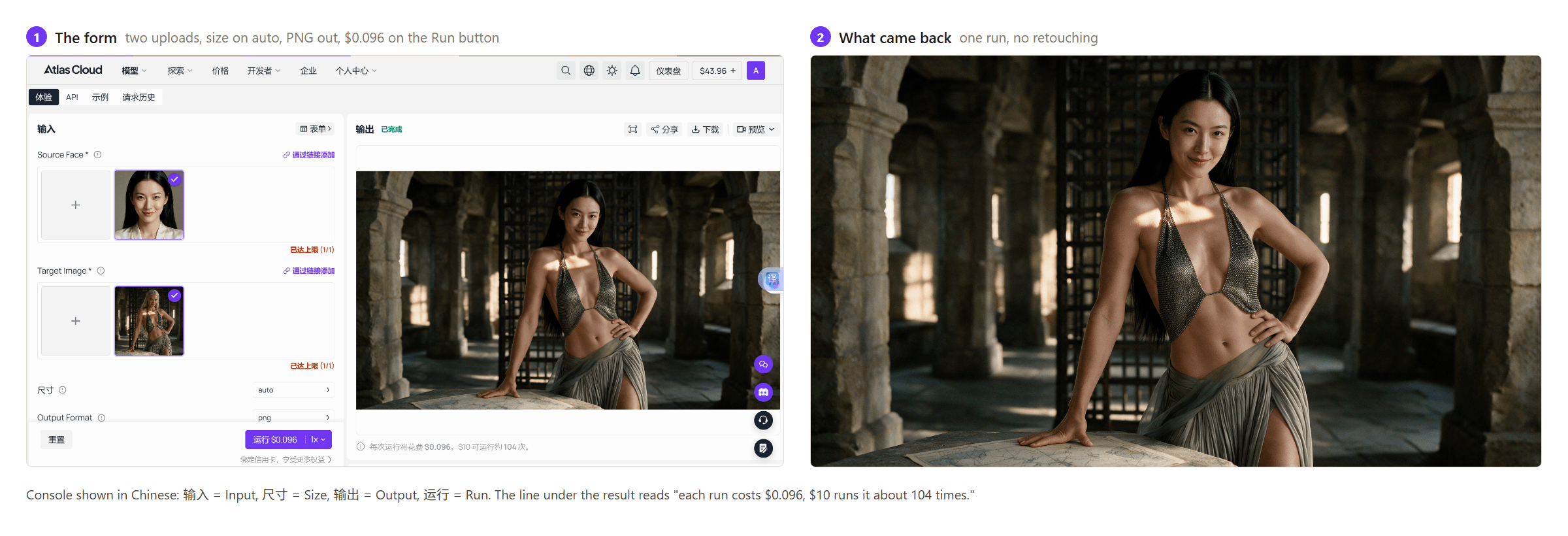
Danh tính là thứ duy nhất di chuyển. Trang phục chuỗi, bàn tay đặt trên bàn bản đồ, các luồng ánh sáng xuyên qua các khối đá: tất cả đều trở lại không thay đổi, đó là hành vi mà trang mô hình mô tả và là lý do tại sao một điểm cuối đổi mặt chuyên dụng lại vượt trội hơn một trình chỉnh sửa ảnh tổng quát cho công việc này.
Phương pháp 2: Tự động hóa Đổi Mặt Thông qua API của Atlas Cloud
Ba bước đưa bạn từ con số không đến một tập lệnh đổi mặt.
Bước 1: Tạo khóa API trong bảng điều khiển của Atlas Cloud và sao chép nó.
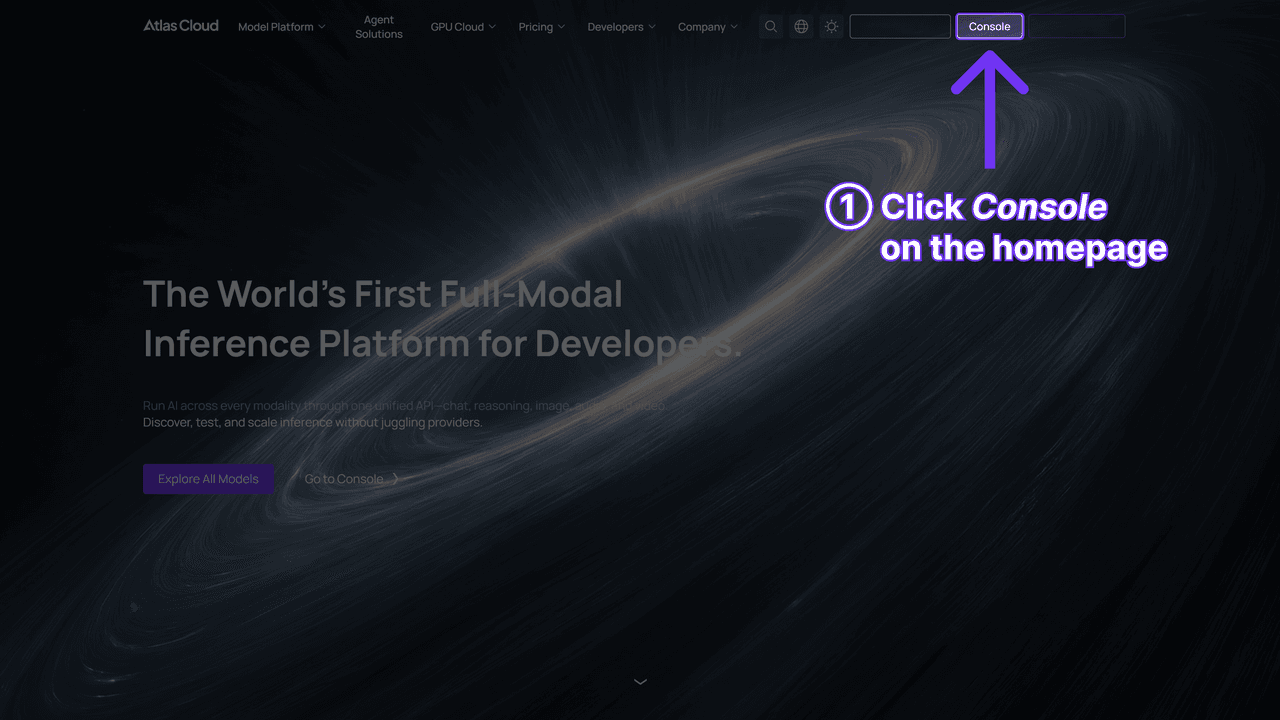
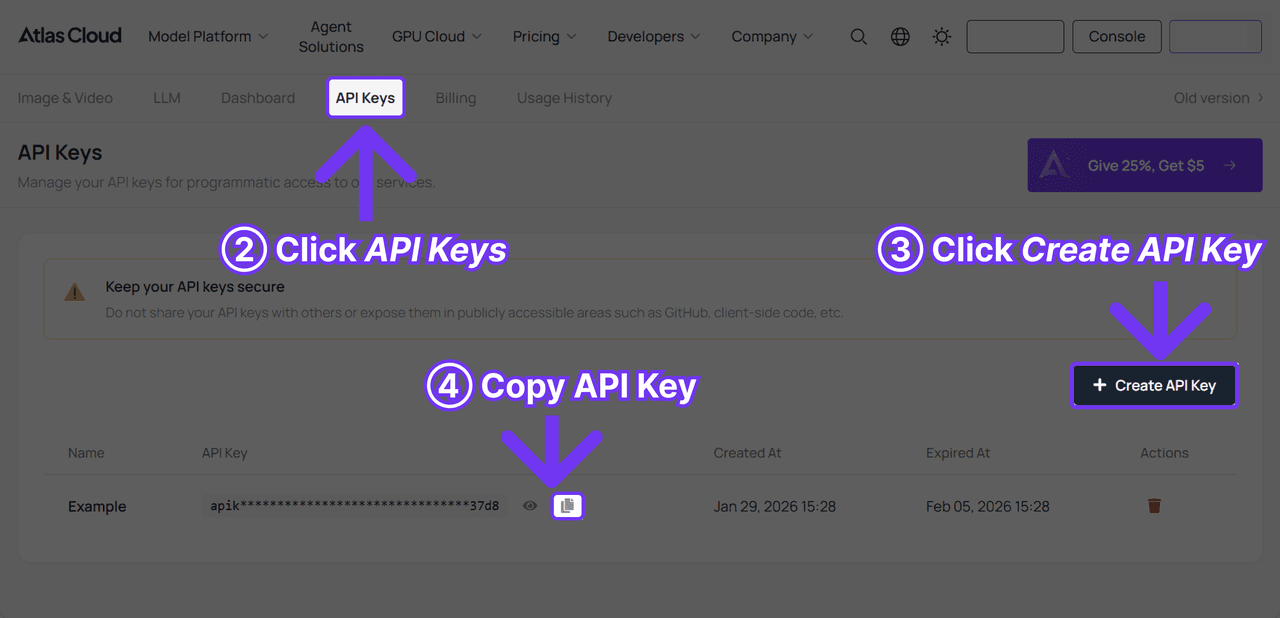
Bước 2: Kiểm tra tài liệu API để biết xác thực và điểm cuối chia sẻ ảnh.
Bước 3: Gửi yêu cầu. Đổi mặt được thực hiện thông qua điểm cuối generateImage chung của nền tảng, với chuỗi mô hình thực hiện định tuyến:
plaintext1curl -X POST https://api.atlascloud.ai/api/v1/model/generateImage \ 2 -H "Authorization: Bearer $ATLASCLOUD_API_KEY" \ 3 -H "Content-Type: application/json" \ 4 -d '{ 5 "model": "atlascloud/face-swap-image", 6 "image": "https://your-cdn.com/source-face.jpg", 7 "Image": "https://your-cdn.com/target-photo.jpg", 8 "output_format": "jpeg", 9 "size": "auto" 10 }'
Chú ý việc viết hoa trong payload đó. image viết thường là khuôn mặt nguồn, Image viết hoa là ảnh mục tiêu và đổi chúng sẽ đảo ngược đầu vào của bạn giống hệt như cách điền sai hai ô của Pixlr. Pixlr ít nhất cung cấp cho bạn một nút để sửa lỗi đó.
Quá trình tạo là không đồng bộ, vì vậy phản hồi mang một ID dự đoán mà bạn phải hỏi cho đến khi trạng thái chuyển sang completed:
plaintext1curl https://api.atlascloud.ai/api/v1/model/prediction/<prediction_id> \ 2 -H "Authorization: Bearer $ATLASCLOUD_API_KEY"
Hình ảnh hoàn chỉnh đến dưới dạng URL trong mảng outputs. Đổi mặt video sử dụng generateVideo với image cho khuôn mặt nguồn, video cho clip mục tiêu và resolution được đặt thành 720P hoặc 1080P, vì vậy việc thêm cảnh phim vào mã ảnh hiện có gần như chỉ là thay đổi chuỗi mô hình.
Phương pháp 3: Một Công Cụ Đổi Mặt Miễn Phí Bỏ Qua Phép Tính Tín Dụng
Cả hai phương pháp trên đều tính phí mỗi lần chạy, đó là cùng một dạng câu hỏi mà Pixlr đặt ra với tín dụng. Công cụ đổi mặt AI miễn phí của Atlas Cloud không yêu cầu gì: FAQ của nó trả lời câu hỏi miễn phí một cách rõ ràng, không có giới hạn sử dụng và không có hình mờ trên ảnh hoàn chỉnh. Tải khuôn mặt nguồn, tải ảnh mục tiêu và khoảng 8 giây sau, ảnh đã đổi mặt xuất hiện bên cạnh hai ảnh gốc, chỉ một cú nhấp chuột để có PNG.
Các điều khiển là hai thanh trượt, Blend (Trộn) và Feather (Làm mềm), đó gần như là cặp quyết định mà tiện ích Pixlr thực hiện cho bạn và không bao giờ hiển thị. Công cụ ánh xạ 468 điểm trên cả hai khuôn mặt, căn chỉnh mắt và miệng, sau đó khớp khuôn mặt mới với mục tiêu.
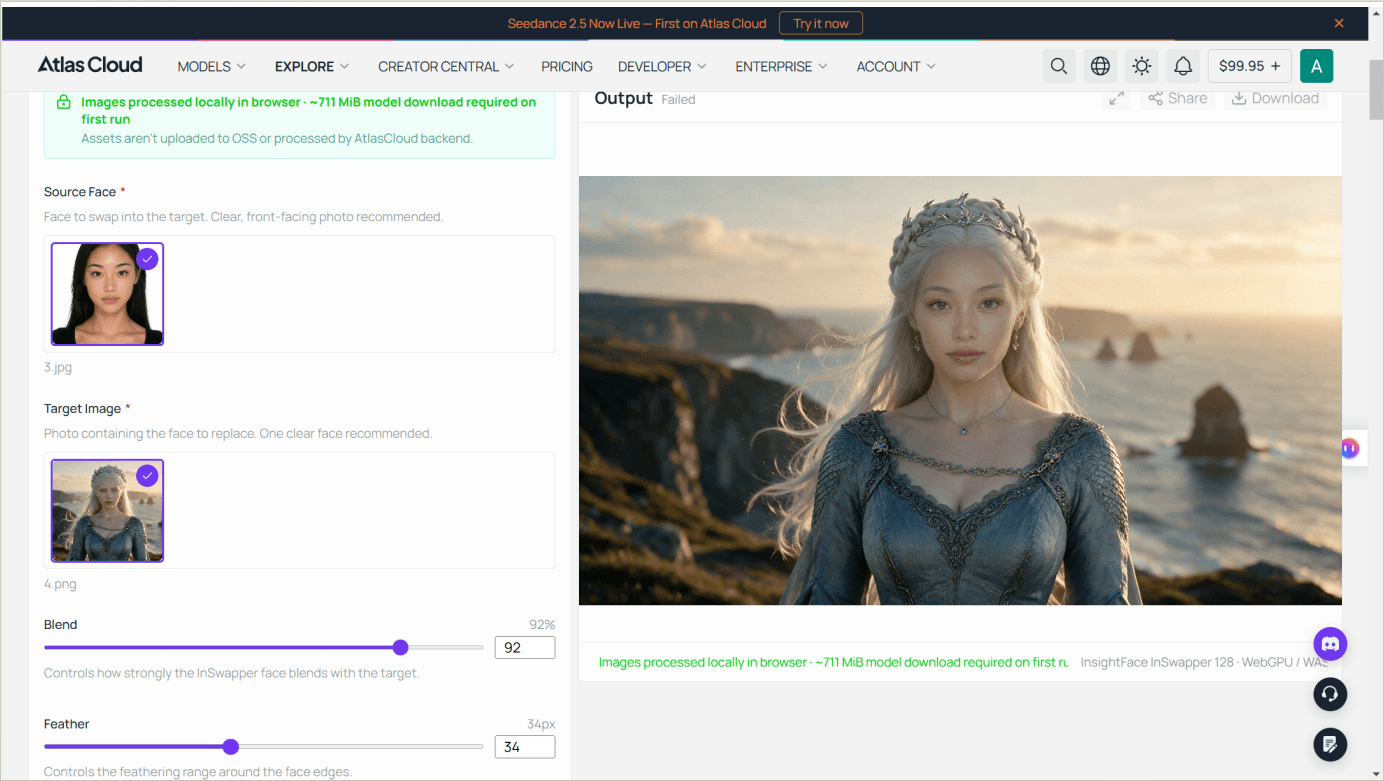
Đối với bức ảnh giả tưởng trong bài viết này, đó là toàn bộ công việc được thực hiện hai lần: cùng một cặp trước và sau mà điểm cuối đo lường tạo ra, miễn phí. Công cụ miễn phí dừng ở đâu là điều đáng biết trước khi bạn lên kế hoạch xung quanh nó. Đầu ra tối đa là 1280 pixel ở cạnh dài nhất, so với cài đặt trước 2K của điểm cuối. Nó xử lý một ảnh mỗi lần, không có xử lý hàng loạt. Và lần truy cập đầu tiên tải xuống khoảng 711 MiB tệp mô hình trước khi lần đổi mặt đầu tiên chạy.
Lưu ý sử dụng của nó là một dòng mà hầu hết các công cụ đổi mặt bỏ qua và nó đề cập đến cùng một điểm mà FAQ của Pixlr ám chỉ: "Chỉ cần đảm bảo bạn có quyền sử dụng cả hai ảnh, đặc biệt khi khuôn mặt của người khác có liên quan."
Một Lần Đổi Mặt Pixlr Tốn Bao Nhiêu Tín Dụng
Hai tín dụng mỗi lần đổi mặt chỉ cho bạn biết một lần đổi mặt tốn bao nhiêu khi bạn biết một tín dụng có giá bao nhiêu, và để biết điều đó bạn cần giá của Pixlr, nơi bốn gói bán vào một nhóm tín dụng dùng chung cho các công cụ AI của Pixlr. Không có bảng tín dụng cho từng công cụ ở bất kỳ đâu; nhãn nút và trang giá là hai nửa bạn phải tự nhân lên.
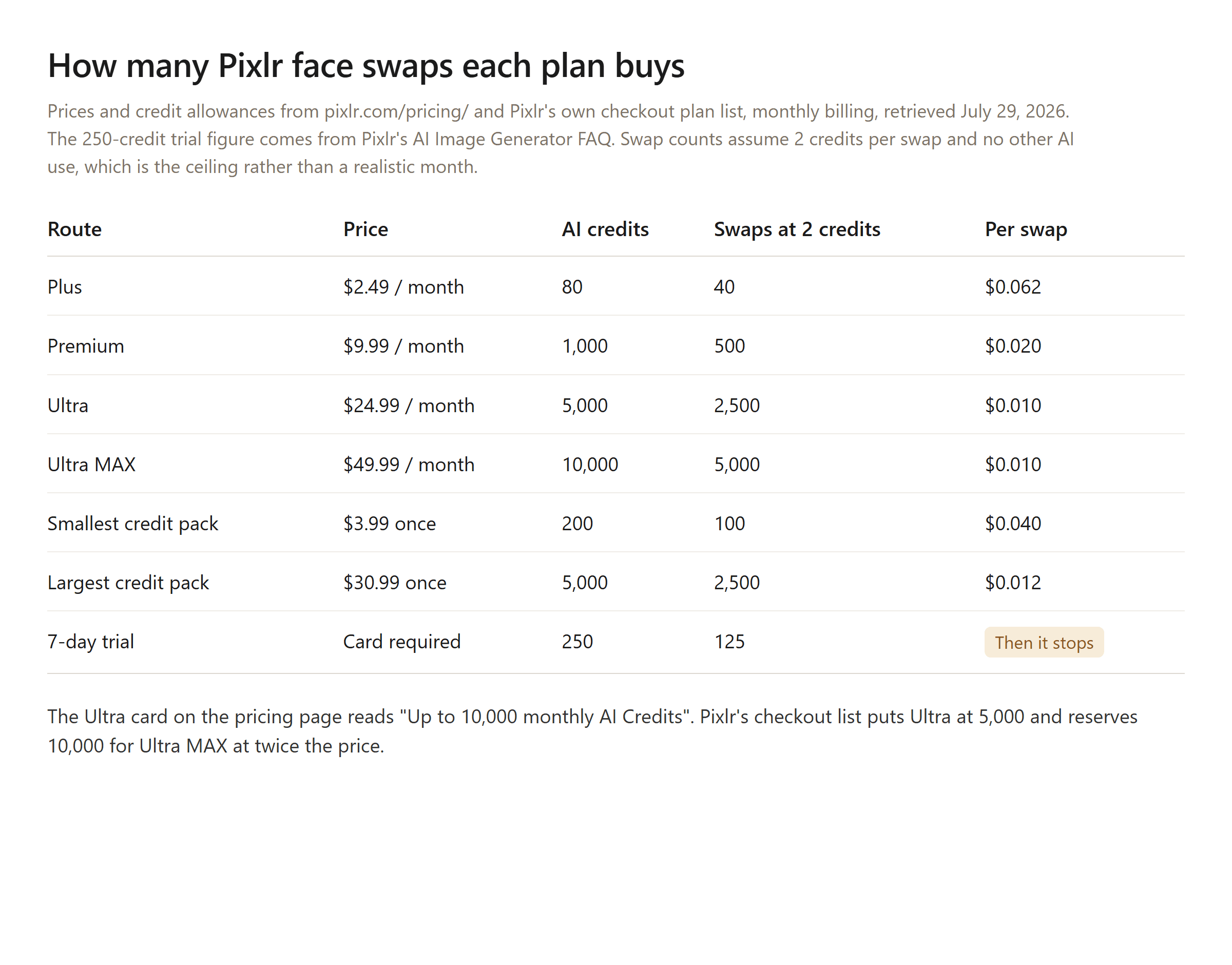
Giá từ pixlr.com/pricing/ và danh sách gói thanh toán của Pixlr, thanh toán hàng tháng, ngày 29 tháng 7 năm 2026. Số liệu dùng thử từ FAQ của Pixlr về AI Image Generator.
Không có khoản phụ cấp miễn phí hàng tháng trên trang giá đó và chúng tôi không tìm thấy trang nào của Pixlr đặt tên cho nó. Các đánh giá của bên thứ ba lấp đầy sự im lặng bằng những con số của riêng họ: một số bắt đầu tài khoản miễn phí với 10 tín dụng và tính phí 2 mỗi lần đổi mặt, một số khác bắt đầu với 50 và tính phí 1. Về nửa mỗi lần đổi mặt, nút xác nhận là 2. Về số dư miễn phí, cả hai đều là phỏng đoán. Những gì Pixlr công bố trên trang trình tạo ảnh của mình là bản dùng thử: "Trong thời gian dùng thử miễn phí 7 ngày, người dùng mới nhận được 250 tín dụng AI miễn phí." Ở ngưỡng đổi mặt, đó là 125 lần đổi mặt, nếu bản dùng thử không dùng gì khác và nó yêu cầu thẻ tín dụng trước.
Hai nếp nhăn nữa trong sổ cái tín dụng. Thẻ Ultra quảng cáo "Lên đến 10.000 tín dụng AI hàng tháng" trong khi danh sách thanh toán của Pixlr đặt Ultra ở mức 5.000 và Ultra MAX ở mức 10.000, điều này làm cho con số của thẻ Ultra trở thành mô tả của gói cao hơn nó. Và FAQ về giá nói rằng tín dụng mua theo gói "sẽ không bao giờ hết hạn" [sic], trong khi điều khoản sử dụng cho tín dụng đã mua "thời hạn một (1) năm kể từ ngày mua." Tín dụng gói rõ ràng hơn khi so sánh: chúng được đặt lại khi gia hạn, không được chuyển tiếp, hủy bỏ sẽ xóa chúng và các khoản thanh toán không được hoàn lại. Nếu bạn giữ cả hai loại, cùng một FAQ nói rằng tín dụng đăng ký được sử dụng trước và tín dụng gói chỉ bắt đầu cạn sau khi những tín dụng đó hết.
Giới Hạn Đổi Mặt Pixlr Không Bao Giờ Xuất Hiện Trên Trang
Trang công cụ không nêu giới hạn kích thước tệp, không có con số độ phân giải và không có danh sách định dạng. Tập lệnh máy khách mà nó tải trả lời cả ba câu hỏi và một câu trả lời sẽ quan trọng đối với bất kỳ ai làm việc in ấn hoặc chỉnh sửa ảnh.
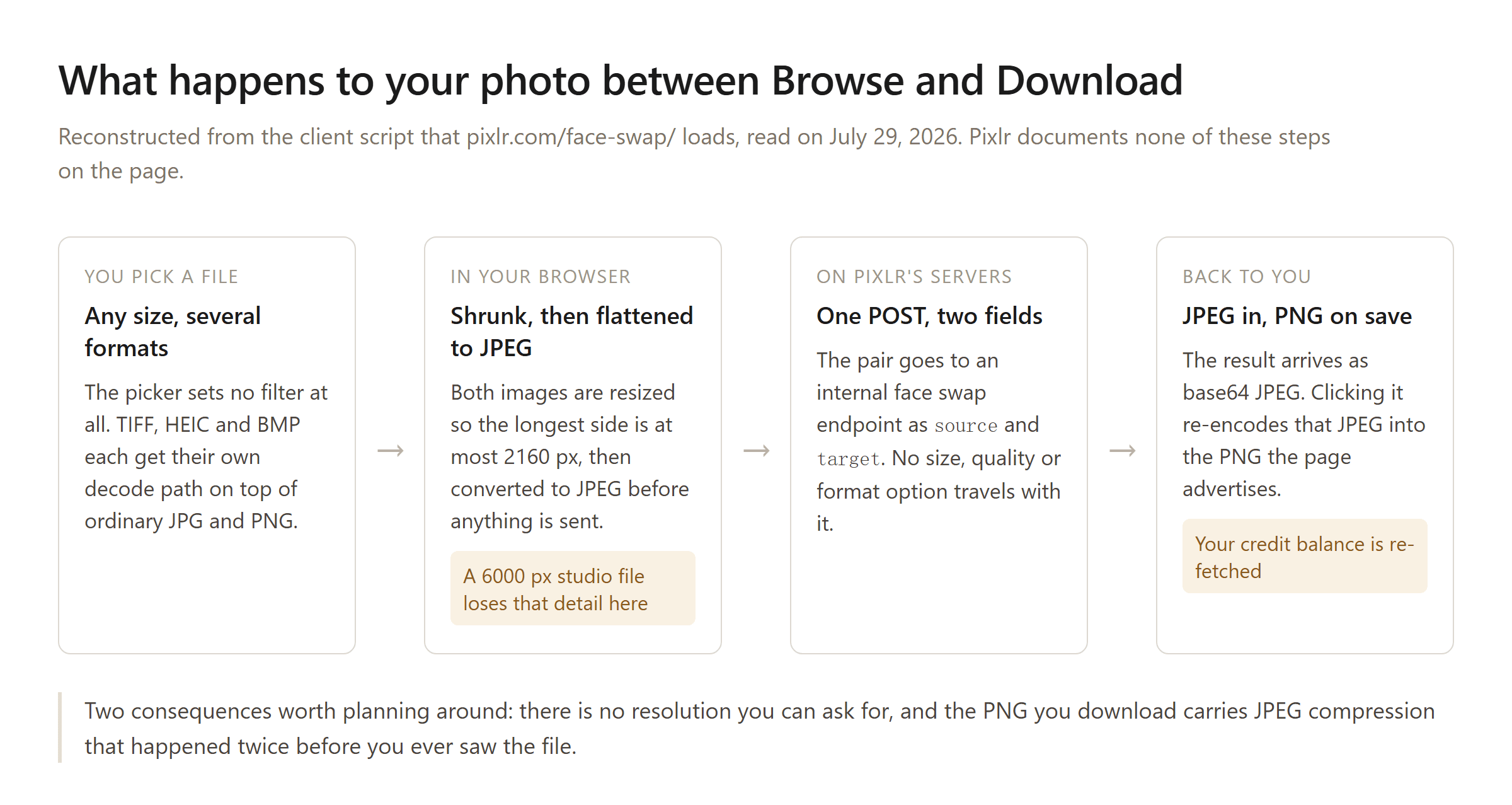
Được tái tạo từ tập lệnh máy khách mà pixlr.com/face-swap/ tải, đọc ngày 29 tháng 7 năm 2026.
Vì vậy, PNG bạn tải xuống là một vỏ bọc PNG xung quanh một JPEG, được tạo từ đầu vào JPEG. Đối với một meme, điều đó không liên quan. Đối với một bức ảnh chụp đầu được đưa vào bố cục in ấn, hoặc một lần đổi mặt mà bạn định chỉnh sửa sau đó, giới hạn 2160 px và quá trình JPEG hai lần là hai sự thật mà bạn muốn biết trước.
Phần còn lại của danh sách giới hạn rất ngắn. Một khuôn mặt mỗi lần chạy, vì biểu mẫu chỉ nhận chính xác một nguồn và một mục tiêu mà không có điều khiển nhiều khuôn mặt ở bất kỳ đâu. Không có lựa chọn kích thước đầu ra hoặc định dạng, vì không có gì được gửi cùng với yêu cầu. Và không có API công khai. Trang đăng lên một điểm cuối nội bộ trên pixlr.com, trong khi SDK nhà phát triển được xuất bản của Pixlr bao gồm việc nhúng trình chỉnh sửa của nó và di chuyển tệp vào và ra khỏi nó, mà không có tài liệu API AI nào cả. Xử lý hàng loạt có nghĩa là điều khiển trình duyệt.
Một chi tiết nữa từ cùng một tập lệnh, được đưa ra với một lời bảo lưu. Các lỗi từ việc đổi mặt được bắt và ném lại với tên của nhà cung cấp bên thứ ba bị loại bỏ khỏi phía trước, điều này cho thấy việc đổi mặt chạy trên một dịch vụ suy luận bên ngoài chứ không phải là một mô hình mà Pixlr đào tạo. Pixlr không nói rõ theo cách nào trên trang.
Sự Đồng Ý, Nội Dung Người Lớn và Giấy Phép Bạn Chấp Nhận
Đổi mặt đặt khuôn mặt thật của một người vào nơi họ chưa từng đến, vì vậy thủ tục giấy tờ quan trọng hơn ở đây so với công cụ xóa nền. Thủ tục giấy tờ của Pixlr về chủ đề này mỏng hơn so với FAQ của nó gợi ý.
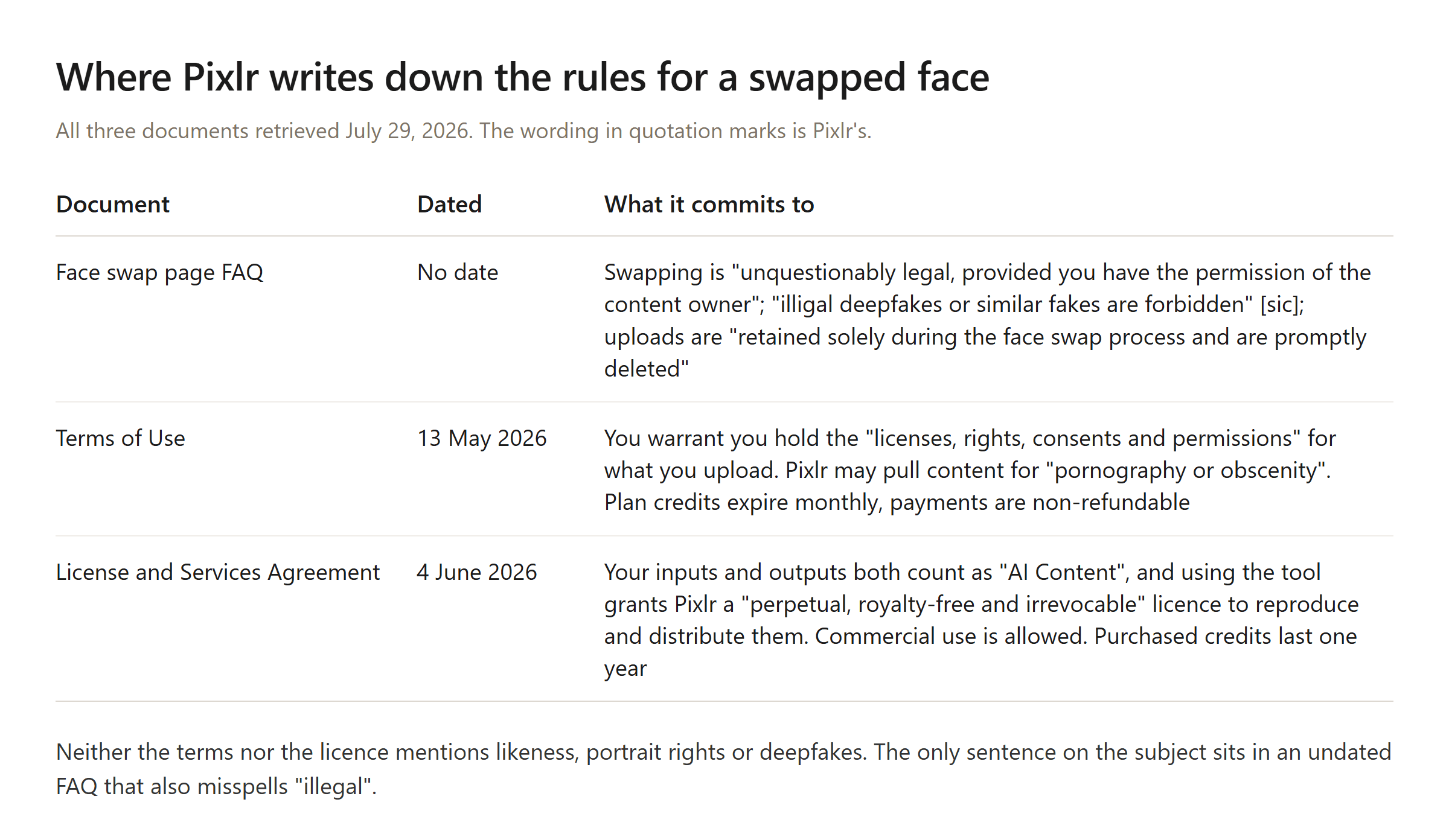
Tất cả được truy xuất ngày 29 tháng 7 năm 2026; cách diễn đạt được trích dẫn là của Pixlr.
Dòng FAQ mà hầu hết mọi người sẽ đọc là an ủi và hơi kỳ lạ: việc đổi mặt "chắc chắn là hợp pháp, miễn là bạn có sự cho phép của chủ sở hữu nội dung" và "deepfake bất hợp pháp hoặc các loại giả mạo tương tự đều bị cấm" [sic]. Chủ sở hữu nội dung là một khái niệm bản quyền. Người có khuôn mặt bạn đang di chuyển có thể không sở hữu bức ảnh và thỏa thuận cấp phép của Pixlr không đề cập đến chân dung, quyền hình ảnh hoặc sự đồng ý từ người được mô tả ở bất kỳ đâu. Điều gần nhất là một bảo đảm trong điều khoản sử dụng rằng bạn có "giấy phép, quyền, sự đồng ý và cho phép" cho bất cứ thứ gì bạn tải lên, điều này đẩy toàn bộ câu hỏi sang cho bạn.
Sau đó là những gì bạn trao đi bằng cách nhấp Run. Thỏa thuận cấp phép phân loại các tệp tải lên và kết quả của bạn cùng nhau là "Nội dung AI" và nhận quyền "không độc quyền, có thể cấp phép lại, trên toàn thế giới, vĩnh viễn, miễn phí bản quyền và không thể hủy ngang" để sao chép, hiển thị và phân phối cả hai, tồn tại sau khi chấm dứt. FAQ về đổi mặt, trên cùng một trang web, nói rằng ảnh tải lên và các đặc điểm khuôn mặt được "giữ lại chỉ trong quá trình đổi mặt và được xóa ngay lập tức." Cả hai tuyên bố có thể đúng về mặt kỹ thuật cùng một lúc, vì giấy phép đối với một thứ không giống như lưu trữ nó. Đọc cùng nhau, chúng vẫn là một cặp kỳ lạ để đặt trước mặt một người sắp tải lên khuôn mặt của họ.
Việc thực thi cũng để lại dấu vân tay trong mã máy khách. Một đường dẫn lỗi mở lời nhắc nâng cấp khi máy chủ từ chối một lần đổi mặt và đề cập đến đăng ký Ultra, phù hợp với việc Ultra là gói rẻ nhất có tính năng bao gồm nội dung người lớn và cùng một mã đánh dấu các hạn chế về nội dung người lớn theo quốc gia. Một đường dẫn riêng chuyển qua thông báo máy chủ về mô tả tình dục trẻ vị thành niên nguyên văn, điều này cho thấy một khối phía máy chủ thay vì cảnh báo phía máy khách. Trang đổi mặt của Atlas Cloud yêu cầu điều tương tự bằng ngôn ngữ đơn giản hơn: chỉ tải lên những gì bạn có quyền sử dụng, nhận được sự đồng ý từ những người được mô tả và không tạo nội dung gây hiểu lầm.
Không có điều nào trong số này là lời khuyên pháp lý và các quy tắc khác nhau tùy theo quốc gia. Cả hai nhà cung cấp đều chỉ theo cùng một hướng: đổi mặt bạn có quyền đổi mặt.
Câu Hỏi Thường Gặp
Công cụ đổi mặt của Pixlr có thực sự miễn phí không?
Mở công cụ và tải hai ảnh lên không tốn gì. Hoàn thành việc đổi mặt cần số dư ít nhất 2 tín dụng AI và cách rẻ nhất để có bất kỳ tín dụng nào là gói Plus $2,49, gói tín dụng $3,99 hoặc bản dùng thử 7 ngày. Không có khoản phụ cấp miễn phí hàng tháng cho công cụ xuất hiện trên trang Pixlr mà chúng tôi có thể tìm thấy.
Một lần đổi mặt Pixlr dùng bao nhiêu tín dụng?
Hai. Khi đã đăng nhập, nút hiển thị rõ "Run Face Swap (2c)" và mã của công cụ từ chối bắt đầu công việc khi số dư dưới 2. Con số đó không xuất hiện ở đâu trong nội dung tiếp thị hoặc bảng giá của Pixlr, chỉ trên nút. Ở mức 2 tín dụng, 80 tín dụng hàng tháng của gói Plus bao phủ khoảng 40 lần đổi mặt và 1.000 tín dụng của Premium bao phủ khoảng 500 lần.
Bạn có cần tài khoản để sử dụng đổi mặt của Pixlr không?
Có, cho chính việc đổi mặt. Cả hai lần tải lên và xem trước đều hoạt động khi chưa đăng nhập và việc chặn xảy ra ở nút Run. Pixlr cũng đặt độ tuổi tối thiểu là 16 cho dịch vụ, với yêu cầu người dùng trẻ hơn phải được giám sát bởi người lớn.
Pixlr có thể đổi mặt trong video không?
Không. Công cụ chỉ nhận ảnh tĩnh và máy khách chuyển đổi cả hai tệp tải lên thành JPEG trước khi gửi đi. Văn bản FAQ của Pixlr đề cập đến ảnh và video cùng nhau, dường như là nội dung chung chung chứ không phải mô tả về công cụ này. Đối với cảnh quay, điểm cuối đổi mặt video của Atlas Cloud xử lý các clip dài hai đến mười giây ở 720P hoặc 1080P, được liệt kê từ $0,2 mỗi giây.
Pixlr có API đổi mặt không?
Không phải là API được lập tài liệu. Trang đăng lên một điểm cuối nội bộ trên pixlr.com và SDK được xuất bản của Pixlr là về việc nhúng trình chỉnh sửa của nó chứ không phải gọi các công cụ AI của nó. Đối với một tập lệnh đổi mặt, điểm cuối của Atlas Cloud nhận một khuôn mặt nguồn và một ảnh mục tiêu thông qua một cuộc gọi REST tiêu chuẩn với giá $0,096 mỗi lần chạy và trả về một URL mà bạn có thể hỏi.
Pixlr có thể đổi hai khuôn mặt trong ảnh nhóm không?
Biểu mẫu cung cấp cho bạn một ô nguồn và một ô mục tiêu, không có điều khiển cho khuôn mặt thứ hai và không có giới hạn nào được nêu theo cách nào. Hãy coi nó như một khuôn mặt mỗi lần chạy và kiểm tra ảnh nhóm trước khi bạn dựa vào nó.
Tại sao ảnh đổi mặt của Pixlr trông mềm hơn ảnh bạn tải lên?
Bởi vì tệp đến máy chủ Pixlr không phải là tệp bạn đã chọn. Bất kỳ thứ gì dài hơn 2160 px ở cạnh dài của nó đều được thu nhỏ trong trình duyệt của bạn trước và các lần chuyển đổi JPEG ở cả hai phía của việc đổi mặt tốn thêm một chút. Không bước nào có thể điều chỉnh được, vì vậy giải pháp là bắt đầu từ một bức ảnh đã gần 2160 px thay vì một bức ảnh lớn.
Kết Luận
Đối với một meme, một lời mời tiệc hoặc một cái nhìn nhanh xem khuôn mặt bạn có hiệu quả trên một bức chân dung Phục hưng không, Pixlr là một nơi tốt để bắt đầu. Tiện ích không bị lộn xộn, hướng đổi mặt có thể sửa chỉ bằng một cú nhấp chuột và không có gì trong giao diện buộc bạn phải đọc tài liệu.
Vấn đề là mọi con số bạn sử dụng để lập kế hoạch xung quanh nó đều nằm ở một nơi khác. Chi phí của một lần đổi mặt được in trên nút và không có trong nội dung, chi phí của một tín dụng nằm trên trang giá, giới hạn độ phân giải nằm trong tập lệnh máy khách và giấy phép bạn cấp cho khuôn mặt của chính mình nằm trong một thỏa thuận riêng có niên đại ba tuần sau các điều khoản sử dụng. Không có điều nào trong số đó là vấn đề đối với một lần đổi mặt. Nó trở nên tốn thời gian khi việc đổi mặt không còn là một lần duy nhất.
Hình dạng của công việc quyết định điều này nhiều hơn giá cả tiêu đề. Nếu bạn đã có tín dụng và đổi vài chục khuôn mặt mỗi tháng, tỷ lệ của Pixlr thấp hơn một cách thoải mái so với tỷ lệ đo lường. Nếu công việc đến theo từng đợt, cần kích thước đầu ra chính xác, phải chạy trong tập lệnh hoặc liên quan đến video, một mức giá công bố cho mỗi lần chạy với một điểm cuối phía sau là thứ tồn tại sau khi tiếp xúc với thời hạn.





