It is Friday afternoon. The candle drop goes live Monday, the product page is half built, and the one designer you know is booked until the week after. You have a phone photo of the candle and a headline you like. That is enough. Many guides on how to generate a poster with AI start with a blank prompt box and a paragraph of style words. This one starts with the photo you already have.
The route below takes three moves: upload the product shot, write one sentence with the headline in quotation marks, download a 1152 × 2048 poster. A run we made for this guide, further down, shows what that sentence produces: a soy candle photo in, a finished poster out. After the steps, we cover how to write the sentence so the design lands, when a text-only route makes more sense than a photo, where a 9:16 file fits, and what to change when a run misses.

Key Takeaways
- Three moves cover the whole job: upload one product photo, write one sentence with the headline in quotation marks, download a 1152 × 2048 poster.
- The quoted words are the copy. Everything else in the sentence is direction: audience, benefit, palette, mood, scene.
- Two routes, two inputs. The free tool designs around your real photo; the API endpoint takes a text brief only. Choose by whether the actual product has to appear.
- A 9:16 file drops into Stories and Reels placements as is. Meta asks advertisers to keep key elements out of the top 14% and bottom 35%, so check where the headline landed before uploading.
- The first run on thefree AI ad generatoris free after sign-in, and the download carries no watermark.
Generate a Poster With AI From One Product Photo
Atlas Cloud built its AI ad generator around one idea: the product in the poster should be the product in your photo. You upload the shot and write a sentence, and the generator composes layout, lighting and typography around the item you sell, with no template to pick and no canvas to fill.
Below is a run we made for this guide with the candle brief from the steps: the uploaded photo on the left, the poster on the right.
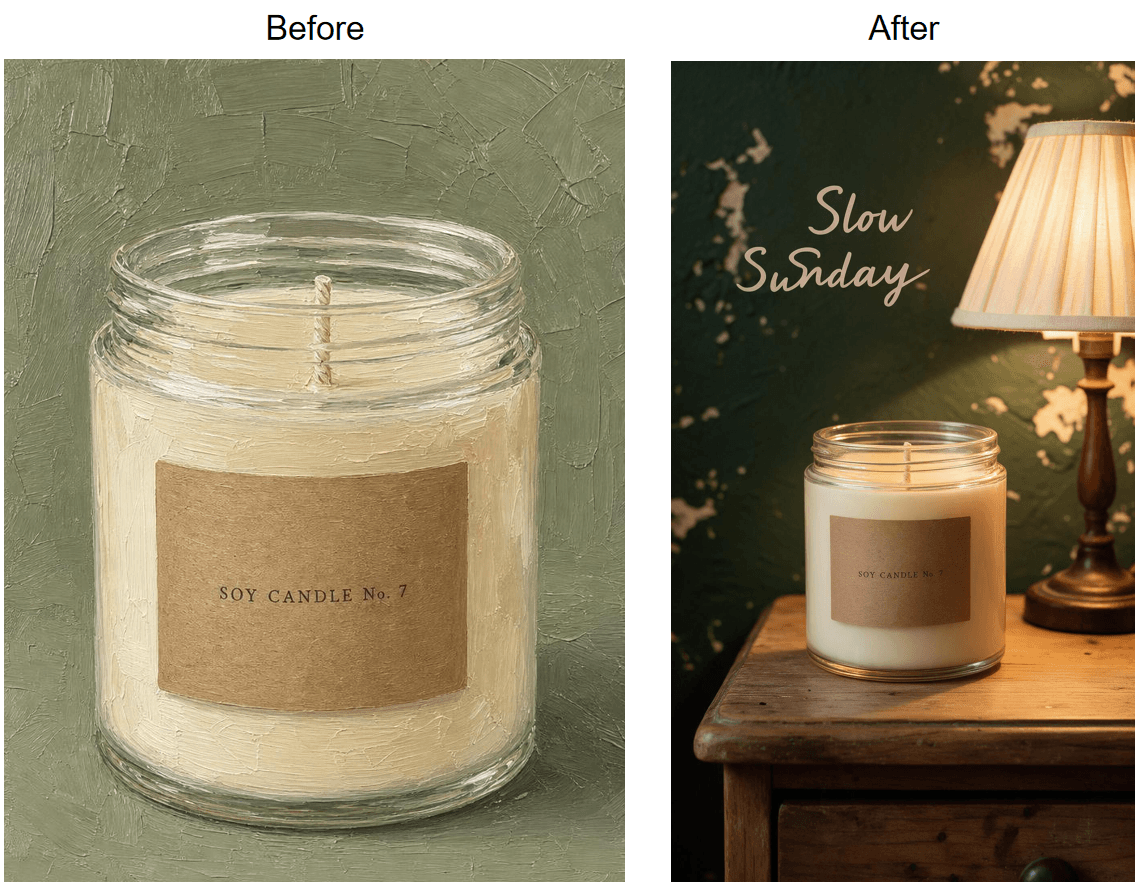
Look at what carried over and what changed. The bottle shape, the silver spray cap and the blue-green liquid survive, and the headline reads "Pure Glow" in two clean capitalized words. The painterly brushstrokes did not survive; the generator rendered the bottle as photoreal glass on a studio gradient.
So read the tool page's "Product Kept Intact" feature as proportions, label text and colors staying faithful,"painted style", while the style gets pulled toward a clean commercial look.
Two more facts from the tool page before the steps. The upload can be any common image format up to 10MB. Every run returns the same 1152 × 2048 vertical canvas, which is why the placement section below matters.
Method 1: Run It in the Free Tool
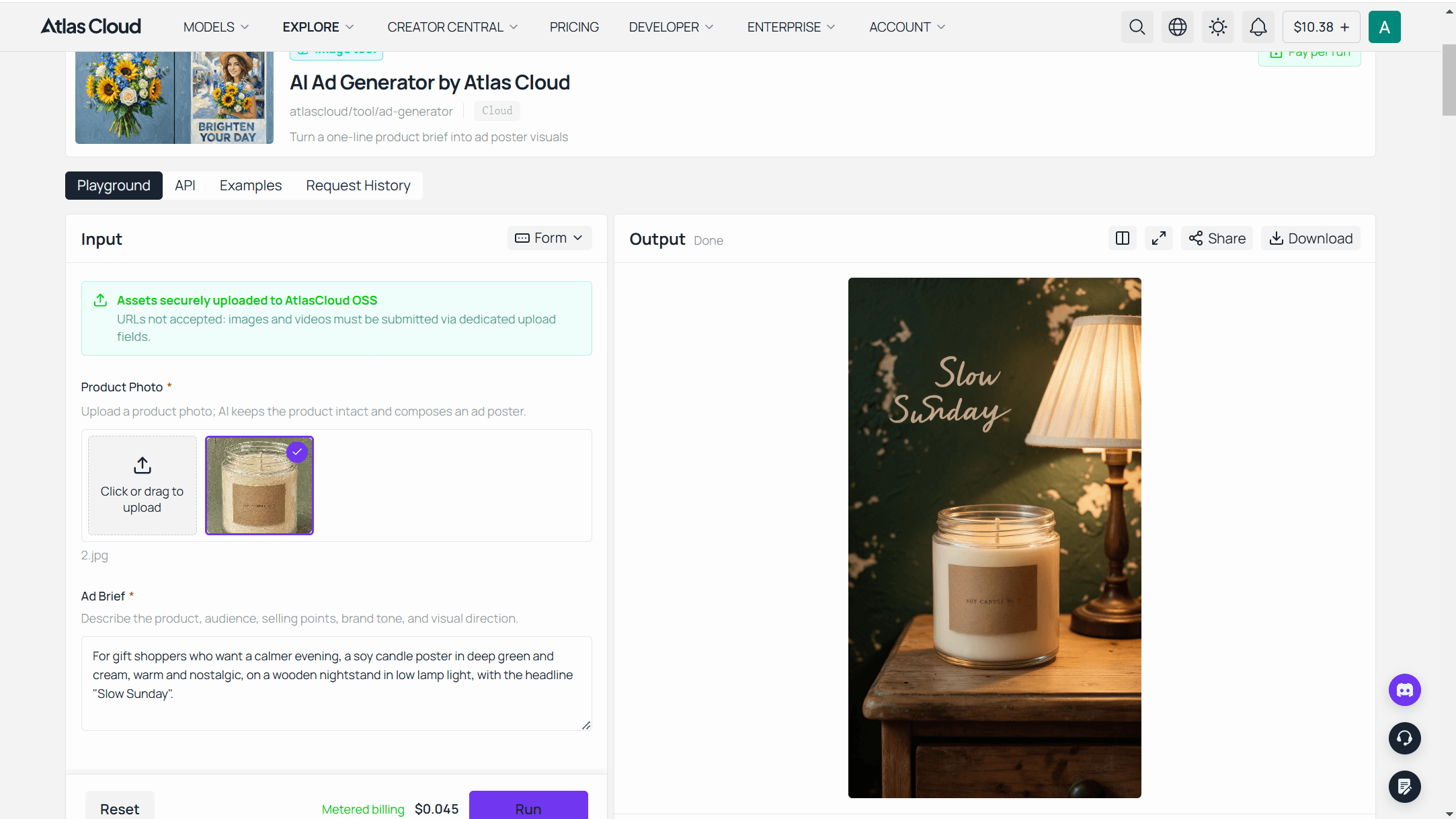
Sign in to Atlas Cloud, open the AI ad poster tool, and you will see the three steps in the tool's own order.
- Add photo and brief. Drop in one clear product shot, or load the official example to see a finished result first. Then write one sentence: who the ad is for, how it should feel, and any exact headline inside quotation marks.
- Run the generator. Click Run. The tool page says a straightforward single-product brief typically lands in under 90 seconds, and it handles composition, colors and headline together.
- Download your poster. Save the finished file and post it to your store, feed or ad account.
Two neighbors in the same hub of free AI tools earn their place in this workflow. The background remover cleans a cluttered packshot before the run. The 2× upscaler enlarges the poster afterwards if print is the destination.
The tool has no text editor. Each run is a finished raster, so a new headline means a new sentence and a new run, which takes about as long as typing it. The fix section below lists which clause to change for which miss.
Method 2: Generate Poster AI Through the API
One poster is a browser job. Forty products before a seasonal sale is an API job, and the same generator is exposed as a model named atlascloud/tool/ad-generator.
One difference matters before you write code. The API version accepts a single input, the text brief, with no image field at the time of writing. That makes the API route the from-text route: the product in the poster is described rather than uploaded.
For batch runs that must keep a real packshot, an image-edit model with reference images is the better fit, and our e-commerce playbooks cover that endpoint.
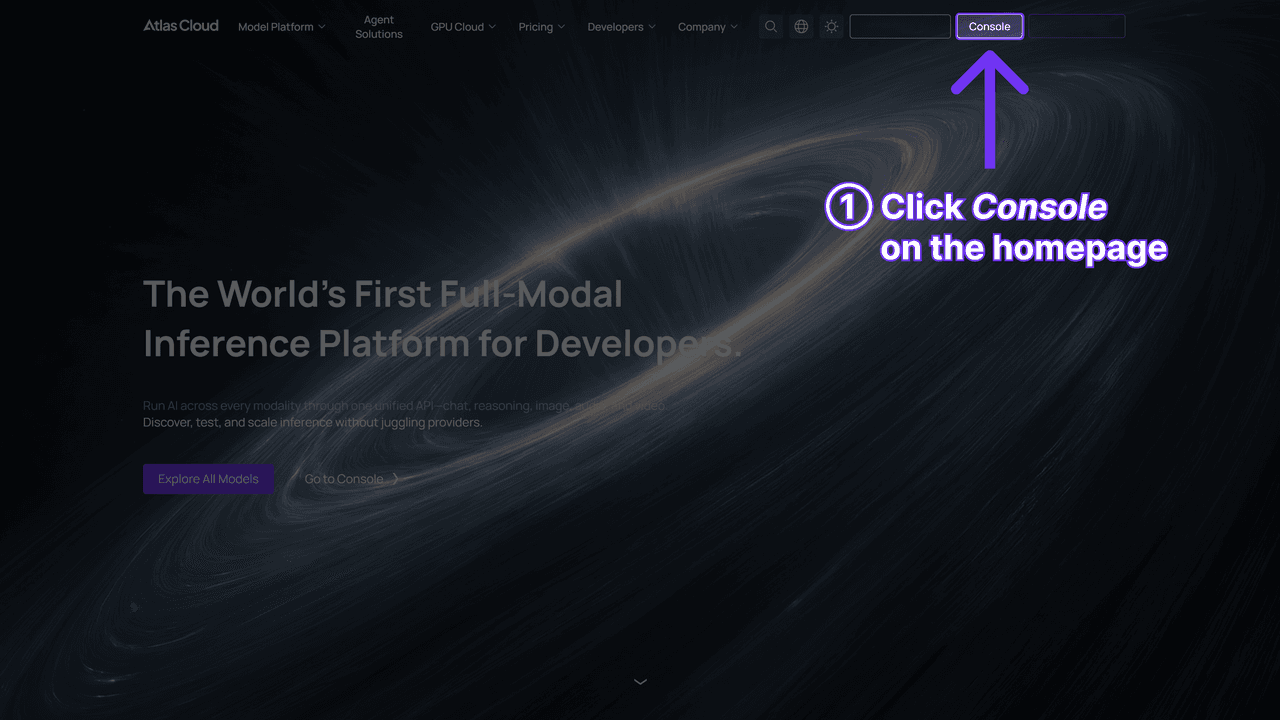
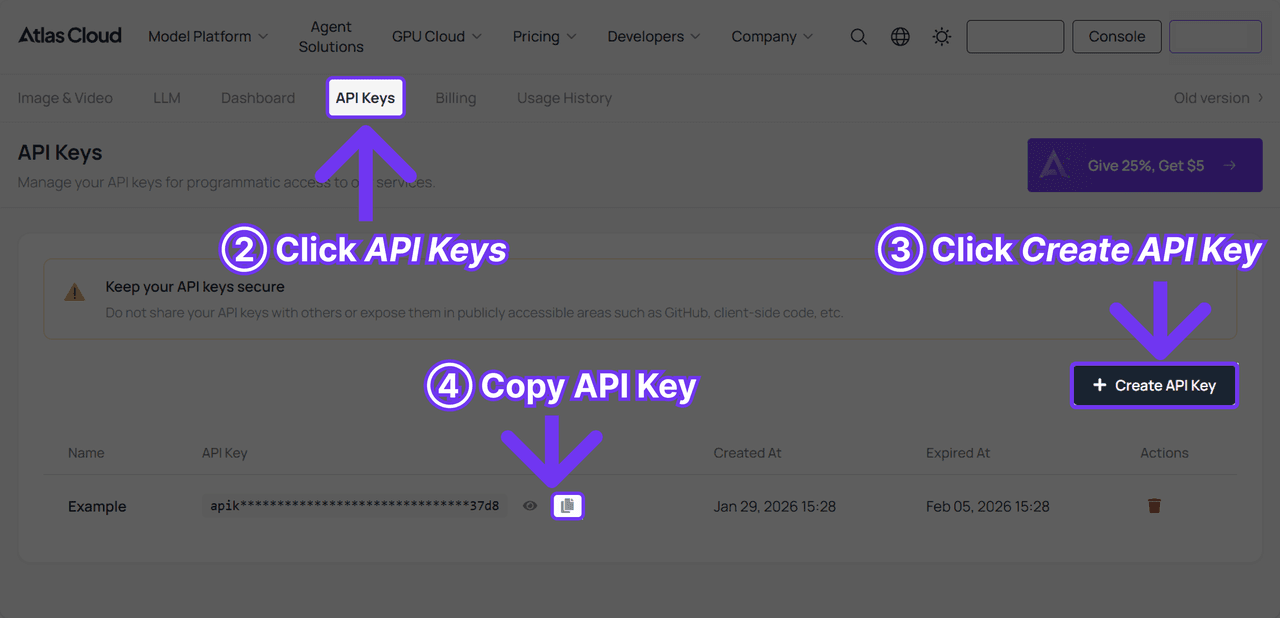
Step 1: Create an API key. Open the Atlas Cloud console, go to API Keys, click Create API Key, and copy it before the value is masked.
Step 2: Check the request format. Authentication, the submit endpoint and the polling contract are in the API documentation. For this model the request body is the model name plus the brief.
Step 3: Send the first request, then poll. Submission returns a prediction ID immediately; the poster URL arrives when the status turns to completed.
plaintext1curl -X POST https://api.atlascloud.ai/api/v1/model/generateImage \ 2 -H "Authorization: Bearer $ATLASCLOUD_API_KEY" \ 3 -H "Content-Type: application/json" \ 4 -d '{ 5 "model": "atlascloud/tool/ad-generator", 6 "prompt": "For gift shoppers who want a calmer evening, a soy candle poster in deep green and cream, warm and nostalgic, on a wooden nightstand in low lamp light, with the headline "Slow Sunday"." 7 }'
plaintext1curl https://api.atlascloud.ai/api/v1/model/prediction/{prediction_id} \ 2 -H "Authorization: Bearer $ATLASCLOUD_API_KEY"
Read the image URL out of outputs once status reads completed. The other image models on Atlas Cloud answer the same endpoint, the same key and the same polling loop. Swap the model string and a general text-to-image model takes the same three calls, which is the point of one API.
How to Write a Brief So AI Generates the Poster Design You Meant
The sentence is the design tool, so it deserves more care than the upload. The tool page publishes six tips for it, and they map onto six clauses. The chart below takes one example brief apart clause by clause.
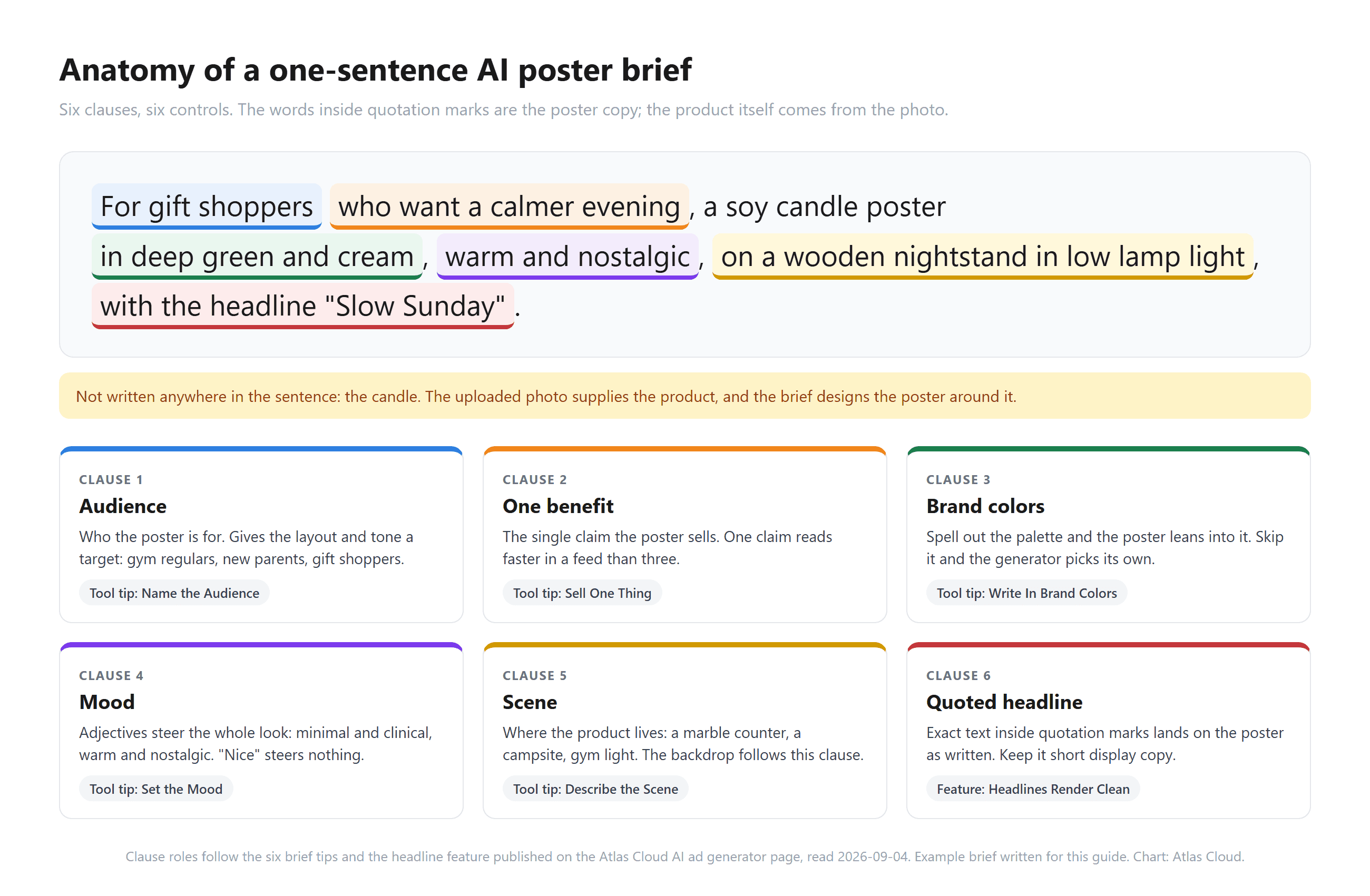
Notice what is missing from that sentence: any description of the candle. The photo supplies the product. Spend the words on the things the photo cannot say, in roughly this order of impact.
The quoted headline is the one clause the tool page makes a direct promise about: text in quotation marks "lands on the poster as written", and the candle run above returned both words, spelled right, with one uneven letterform. Keep it short display copy: a product name, a tagline, a three-word offer. A full sentence in quotes asks the generator to typeset a paragraph, and long strings are where image models tend to drop letters.
Mood adjectives steer the whole look, in the tool page's phrase. "Minimal and clinical" and "warm and nostalgic" call for different lighting, type and props, while "nice" calls for nothing in particular. Palette words work the same way: name two brand colors and the poster leans into them.
Here is how the one sentence flexes across the five jobs the tool page lists for it. Every brief below was written for this guide as a starting point, so swap in your own product, audience and headline.
| Job | Example one-sentence brief |
|---|---|
| Launch day poster | For early adopters who hate cable clutter, a matte black charging pad poster, minimal and confident, on a walnut desk in morning light, with the headline "Drop One" |
| Ecommerce listing ad | For home cooks upgrading their first kitchen, a cast iron skillet poster in charcoal and cream, honest and sturdy, on a scrubbed oak table, with the headline "Built for Sundays" |
| Story creative | For commuters who skip breakfast, a protein bar poster in bright orange and white, energetic and quick, held at arm's length on a train platform, with the headline "Eat on the Move" |
| Seasonal promotion | For last-minute gift shoppers, a ceramic mug poster in forest green and gold, cozy and festive, beside a frosted window, with the headline "Wrap It Up" |
| Concept test | For runners training in the dark, a reflective running vest poster, high-contrast and urban, under street lamps on wet asphalt, with the headline "Be Seen" |
Three briefs in three tones is the concept-test move from the tool page: draft them, run them, compare the directions side by side before any media money is spent.
AI Generate Poster From Text vs From a Photo
Two inputs sit under most AI poster routes, and the choice between them decides what the poster can promise. From a photo, the real product anchors the composition. When you generate a poster using AI from text alone, the model invents the product along with everything else. The two routes answer different questions.
| From a product photo | From text only | |
|---|---|---|
| Where to run it | The free AI ad generator tool page | The same generator's API endpoint, or a general text-to-image model |
| What stays fixed | Shape, label text, proportions and colors | Nothing physical; only the quoted text is pinned |
| What you write | One sentence: audience, benefit, palette, mood, scene, quoted headline | The same sentence plus a description of the product itself |
| Best for | Listings, launch posters and story ads for a product you sell | Concept boards, pitch visuals, posters for a product that does not exist yet |
| Watch out for | A blurry or angled photo gives the generator a poor source to build around | Invented labels, invented packaging, and a product that will not match what ships |
One more property of the from-photo route: you do not choose where the headline sits. The generator decides the layout per run from the brief. If it lands where a platform overlay will cover it, try naming the position in the sentence and run again; the placement section below shows which zones to avoid.
Text-only generation earns its place when the product cannot be photographed yet, or when the poster is the product, as with an event or a pitch board. Exact-text fidelity on that route depends on the model.
Our poster text rendering test covers one such model: a five-string poster prompt came back with all five headlines spelled right, while the model maker's own interface demo showed typos in its small labels. Same lesson as above: quote the short lines, skip the fine print.
Where the Finished 9:16 Poster Fits: Stories, Feeds, Print
A 1152 × 2048 file is a tall phone-screen canvas. That is a deliberate choice, and it fits some placements without any work while others need a crop or an upscale.
| Destination | What it wants | What to do with the 1152 × 2048 file |
|---|---|---|
| Instagram Stories and Facebook Stories image ads | 9:16 ratio; Meta recommends 1440 × 2560, accepts a minimum width of 500 px and files up to 30MB | Upload as is. The width sits above the minimum and below the recommendation, so sharp source photos matter |
| Reels and vertical feeds | 9:16 | Upload as is |
| Square or 4:5 feed posts | 1:1 or 4:5 | Crop the middle of the poster; check that the headline survives the crop, or run a brief that names a central headline |
| Product page hero | Usually landscape or square | Treat the poster as a mobile hero and crop for desktop, or generate a separate concept |
| 300 DPI for close viewing, 150 DPI for a wall poster | 2048 px prints 6.8 inches tall at 300 DPI and 13.7 inches at 150 DPI; upscale first for anything larger |
The Stories row deserves a closer read. Meta's Instagram Stories image ad specs recommend keeping text, logos and key creative out of roughly the top 14% and bottom 35% of the frame, and about 6% in from each side, so the profile icon and the call-to-action button do not cover them. The same guidance appears on Meta's Reels image ad page.
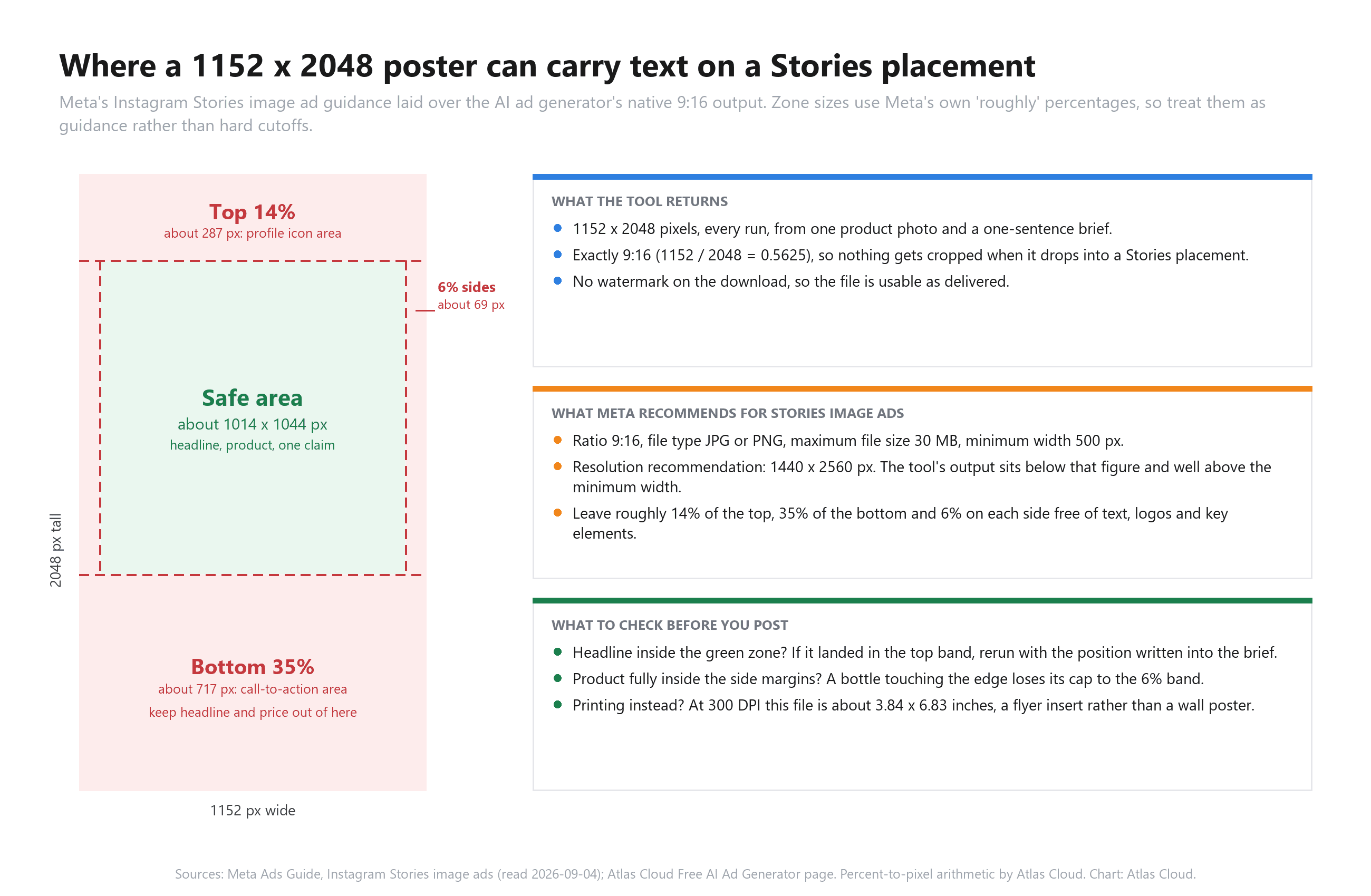
A generated poster does not know any of this. Before you upload, look at where the headline landed. If it sits in the bottom band, run a brief that asks for the headline near the top, or use the crop tools in the ad manager.
The print row is plain division: pixel count over the DPI you need. Run the file through the 2× upscaler in the free tools hub and the long side becomes 4096 px, which prints 13.7 inches tall at 300 DPI.
When the placement wants motion rather than a still, this tool is the wrong one. Our ranking of AI video generators for product ads covers the moving side of the same brief.
Fix a Poster Generation AI Miss Without Regenerating Blind
Most misses trace back to either the photo or one clause of the sentence. Change that one thing and run again; do not rewrite the whole brief and lose what worked.
| What you see | Likely cause | The one change |
|---|---|---|
| Headline misspelled, missing or paraphrased | Headline was not in quotation marks, or was too long | Put the exact words in quotes and cut to a few display words |
| Product looks like a different item | Source photo was blurry, angled or cluttered | Reshoot sharp and head-on; run the background remover first |
| Colors are off-brand | No palette named, so the generator chose one | Add two named brand colors to the sentence |
| Backdrop is generic studio grey | No scene clause | Say where the product lives: a marble counter, a campsite, gym light |
| Poster is trying to say three things | Brief listed several benefits | Keep the single strongest benefit and delete the rest |
| Headline sits under a platform overlay | The generator chose the layout without knowing the placement | Run again with the headline position named in the sentence, or crop in the ad manager |
Each of these is one clause and one run. Keep the clauses that worked, change the one that did not, and compare the two posters side by side before you pick.
Frequently Asked Questions
Can I generate a poster with AI for free?
Yes, for the first run. The Atlas Cloud tool gives every account one free generation after sign-in, and the download has no watermark. From the second run the button switches to metered billing at $0.045 per image, drawn from a prepaid balance, and the platform's price calculator showed no discount on this model as of September 4, 2026. So the free run is a trial, and a ten-poster concept test costs under fifty cents.
Can AI generate a poster from text alone, without a product photo?
Yes. The API endpoint for this generator takes a text brief as its only input, and any general text-to-image model does the same. The trade-off is that the product in the poster is invented, so labels and packaging will not match what you ship. Use text-only AI to generate a poster for concepts and pitches, and the photo route for anything a customer will buy from.
Does an auto generate poster AI keep my product photo unchanged?
Mostly, with one caveat. In the candle run above, the jar shape, wax color and label text carry over while re-rendering the painterly source as clean photoreal glass. Expect proportions, label and colors to carry over and the style to be normalized toward a commercial look. A sharp, head-on, well-lit photo gives it the least to reinterpret.
Can I use the AI poster on Instagram Stories or Facebook?
Yes. The 1152 × 2048 output is 9:16, the ratio Meta recommends for Stories image ads, and it clears the 500 px minimum width. Check that the headline avoids the top and bottom safe zones before you upload, since the profile header and the call-to-action overlay those areas.
Can I print a poster generated this way?
At small sizes, yes. Divide the long side by your DPI: 2048 px is 6.8 inches at 300 DPI or 13.7 inches at 150 DPI. For anything larger, upscale the file first; a 2× pass doubles both figures.
Do I need to sign in, or is there a version without login?
Sign-in is required, including for the free first run, because the free generation is tied to an account. The page checks your login status before it will run. Once signed in, the run, the download and the lack of watermark are the same for free and paid posters.
Conclusion
Three moves, one sentence, a finished 9:16 poster. The photo carries the product, the quoted words carry the copy, and the rest of the sentence carries the design direction. Once that split is clear, the rest of the job is choosing which clause to change when a run misses and which placement the file is headed for.
Start with the free run and your own product photo, then let the results decide how often you come back. If you came here asking how to generate a poster with AI, the shortest honest answer is that you already own the hard part: the product and the headline. The generator supplies the rest.





