Two people sit across a table. One line starts, then both mouths move. A reverse shot arrives and the voice no longer feels attached to the face. That is the failure creators are trying to avoid when they search for a kling 4 dialogue lip sync test.
This article starts with a version check, then runs 3 short, reproducible dialogue tests on the verified Kling 3.0 family: one speaker, 2 speakers taking turns, and a mixed English-Spanish exchange. Each test uses native audio at generation time; the article displays the visual results as GIFs alongside the same 10-point scorecard. These are individual runs, not a universal benchmark.
Key takeaways
- Kuaishou has officially announced Kling 3.0, not a separately specified Kling 4 dialogue model.
- Short, named, turn-based lines give a reviewer a clearer basis for checking speaker assignment.
- GIFs make facial movement and speaker handoff easy to scan, while the source MP4 is still needed to verify sound timing.
- Treat a 10-second run as a script check before investing in a more demanding production version.
- Review the silent listener as closely as the person who speaks.
Kling 4 Dialogue Lip Sync Test: First, the Version Check
The phrase “Kling 4” currently collects several different things in search results: 4K output, Kling 3.0, Kling Video O3, pre-release language, and unverified naming. I could not find an official Kuaishou specification for a released “Kling 4” dialogue model at the time of this test. Calling an unverified label a finished product would make the test less useful.
The verifiable current reference point is Kling AI 3.0. Kuaishou announced the Video 3.0, Video 3.0 Omni, Image 3.0, and Image 3.0 Omni family on February 5, 2026. The announcement describes native audio across languages, dialects, and accents; dialogue scenes with controlled speaking order; multi-shot direction; and video lengths up to 15 seconds (Kuaishou Technology, February 2026).
That product claim sets a useful test target. It does not certify every generated clip. Native audio means the model can generate audio as part of the video job. It does not guarantee that a particular mouth closes on every consonant, that a listener stays still, or that a cut preserves speaker identity. Those are the details this test checks.
The 3 runs below preserve the visual result with the scorecard so a reader can assess the same evidence that informed the written notes.
What We Tested
The protocol deliberately removes excuses. Every scene uses 16:9 framing, a 10-second duration, native audio enabled or set to Auto where the playground exposes that setting, no music, and no post-production lip-sync. Each visible speaker gets one short line. The article GIFs preserve the visual performance; review the original MP4 files separately when judging sound timing.
| Test | Model | Duration | Visible characters | Language | Spoken lines | Main evaluation target |
|---|---|---|---|---|---|---|
| 1 | Kling V3.0 Standard T2V | 10 seconds | 1 | English | 1 | First syllable, closed-lip sounds, ending pause |
| 2 | Kling V3.0 Standard T2V | 10 seconds | 2 | English | 2 | Correct speaker and quiet listener behavior |
| 3 | Kling V3.0 Pro T2V | 10 seconds | 2 | English and Spanish | 2 | Language handoff, attribution, and facial continuity |
The scorecard gives each category 0, 1, or 2 points. A 2 means the behavior is clear enough for the intended 10-second sample. A 1 means it is partly convincing but needs another look. A 0 means a viewer can plainly see the problem. The total is a record of one generated result under one prompt, not a claim about all outputs from the model.
| Category | 0 points | 1 point | 2 points |
|---|---|---|---|
| Mouth-to-word timing | Obvious mismatch | Mostly follows with visible slips | Timing reads naturally throughout |
| Correct speaker assignment | Wrong or shared speaker | One uncertain moment | Every line belongs to the named person |
| Silent listener behavior | Listener speaks or mouths words | Minor stray mouth movement | Listener stays naturally attentive |
| Facial expression continuity | Face visibly breaks or shifts | Small instability | Expression remains coherent |
| Audio continuity across a cut | Voice detaches or changes abruptly | Transition is noticeable | Cut supports the same dialogue beat |
The test design also answers the likely fan-out questions behind this search: is Kling 4 released, which current model can generate dialogue, can 2 people alternate, how can a creator prevent both characters from talking, can mixed-language dialogue work, and what should a small test budget cover?
Kling Dialogue Test #1: One Speaker, One Short Line
A single person saying one short line is the baseline. It isolates the earliest useful checks: the first mouth opening, a closure around a “p” or “b” sound, and the relaxed beat after speech ends. If that baseline looks wrong, adding another character, a camera cut, or another language only makes diagnosis harder.
This run uses a fictional office worker named Maya. The scene has a small hand gesture and a direct eyeline, but no fast camera movement. That leaves the mouth and voice as the main evidence.
Run settings: 16:9, 10 seconds, highest available playground resolution at run time, native audio On or Auto, no background music. Model: Kling V3.0 Standard Text-to-Video.
plaintext1A realistic 10-second medium close-up of Maya, a fictional woman in her early thirties wearing a navy blazer, seated at a bright office desk. She looks directly at her colleague just off camera and says exactly: “The report is ready. Please review the blue chart.” Natural conversational pacing, clear English speech, accurate mouth movements, subtle blinking, small hand gesture, quiet office room tone only. Maya is the only visible person and the only speaker. No subtitles, no background music, no narration.
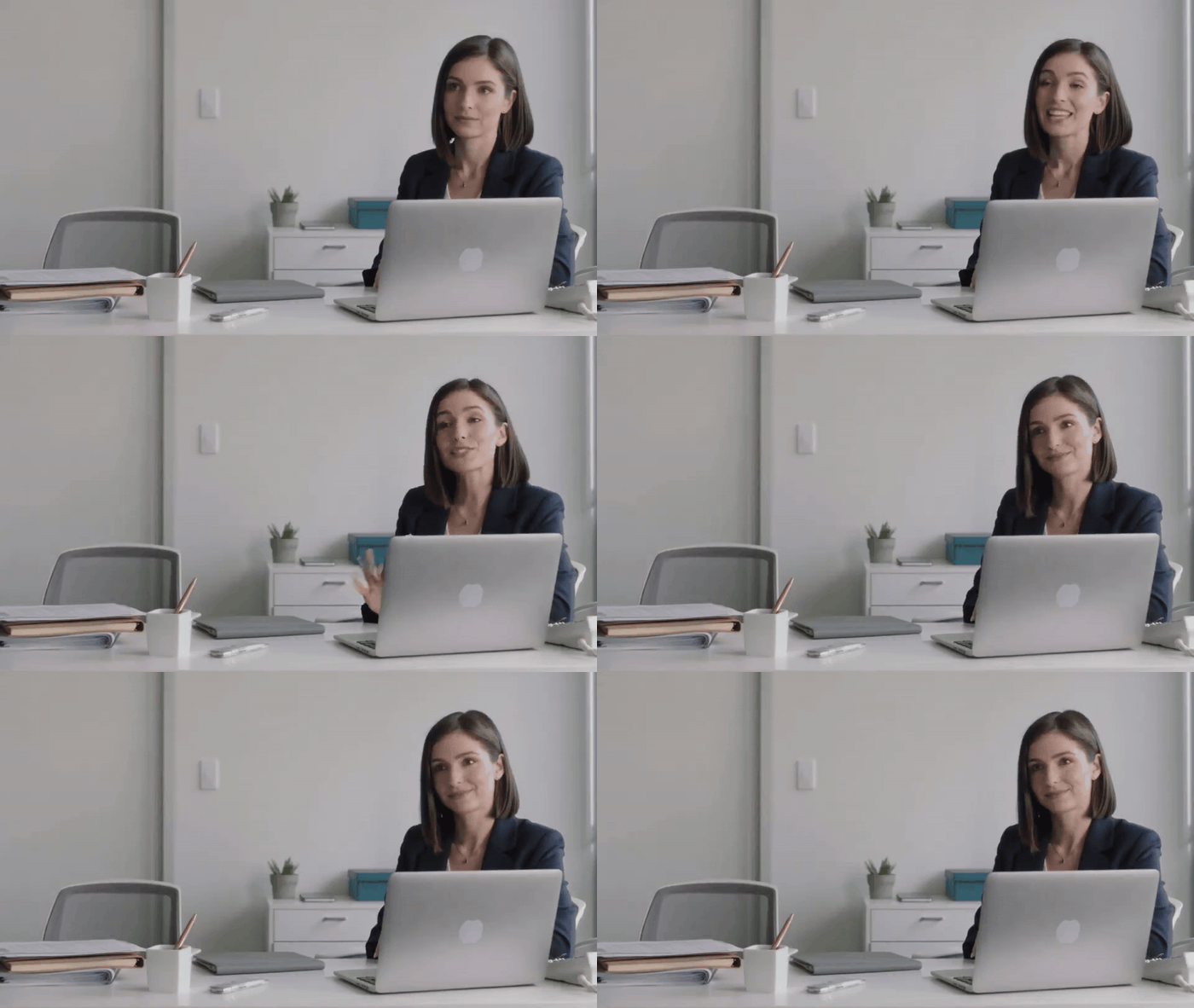
Test 1 visual result: Maya delivers one office line
Test 1 visual result. Watch Maya’s mouth closure during “Please” and the pause after the line; use the source MP4 to judge the audio timing.
Run status: Rendered in the Atlas test playground. The visual GIF is embedded above.
| Test 1 visual result | Status | What the GIF shows |
|---|---|---|
| Single-speaker framing | Clear | Maya is the only visible person throughout the office scene |
| Mouth movement | Visible | The close framing makes the speaking motion easy to inspect |
| Facial continuity | Stable | Blinking, pose, and lighting remain consistent through the clip |
| Listener behavior and cut | Not applicable | This baseline scene has no second speaker or reverse shot |
| Audio timing | Check the source MP4 | The embedded GIF has no sound |
If the line loses clarity, change only 1 variable for a separately labeled rerun. First, shorten the spoken sentence. Second, remove the hand gesture or any unnecessary camera instruction. Avoid changing the character, duration, and language at the same time. That turns a diagnosis into a new experiment.
Kling Dialogue Test #2: Two People Taking Turns
This is where dialogue generation earns scrutiny. A believable scene needs 2 separate actions: Maya must speak while Daniel listens, then Daniel must speak while Maya listens. The silent person is not dead space. Their closed mouth, eye contact, small reaction, and stable face are part of the proof.
The prompt uses 3 anchors for each speaker: a name, a left or right position, and a visible clothing detail. It also states the listener’s expected behavior. These are not magic words. They give the model a more explicit scene contract and give the reviewer clear failure conditions.
plaintext1A realistic 10-second two-person office dialogue in a sunlit meeting room. Maya, wearing a navy blazer, sits on the left. Daniel, wearing a light gray shirt, sits on the right. Shot 1: medium two-shot. Maya looks at Daniel and says exactly: “The report is ready. Please review the blue chart.” Daniel remains silent and listens naturally with his mouth closed. Shot 2: reverse medium shot on Daniel. Daniel says exactly: “Great. I will check it before lunch.” Maya remains silent and listens naturally with her mouth closed. Clear English speech, precise lip sync, one speaker at a time, no overlapping dialogue, no subtitles, no background music, quiet office room tone.
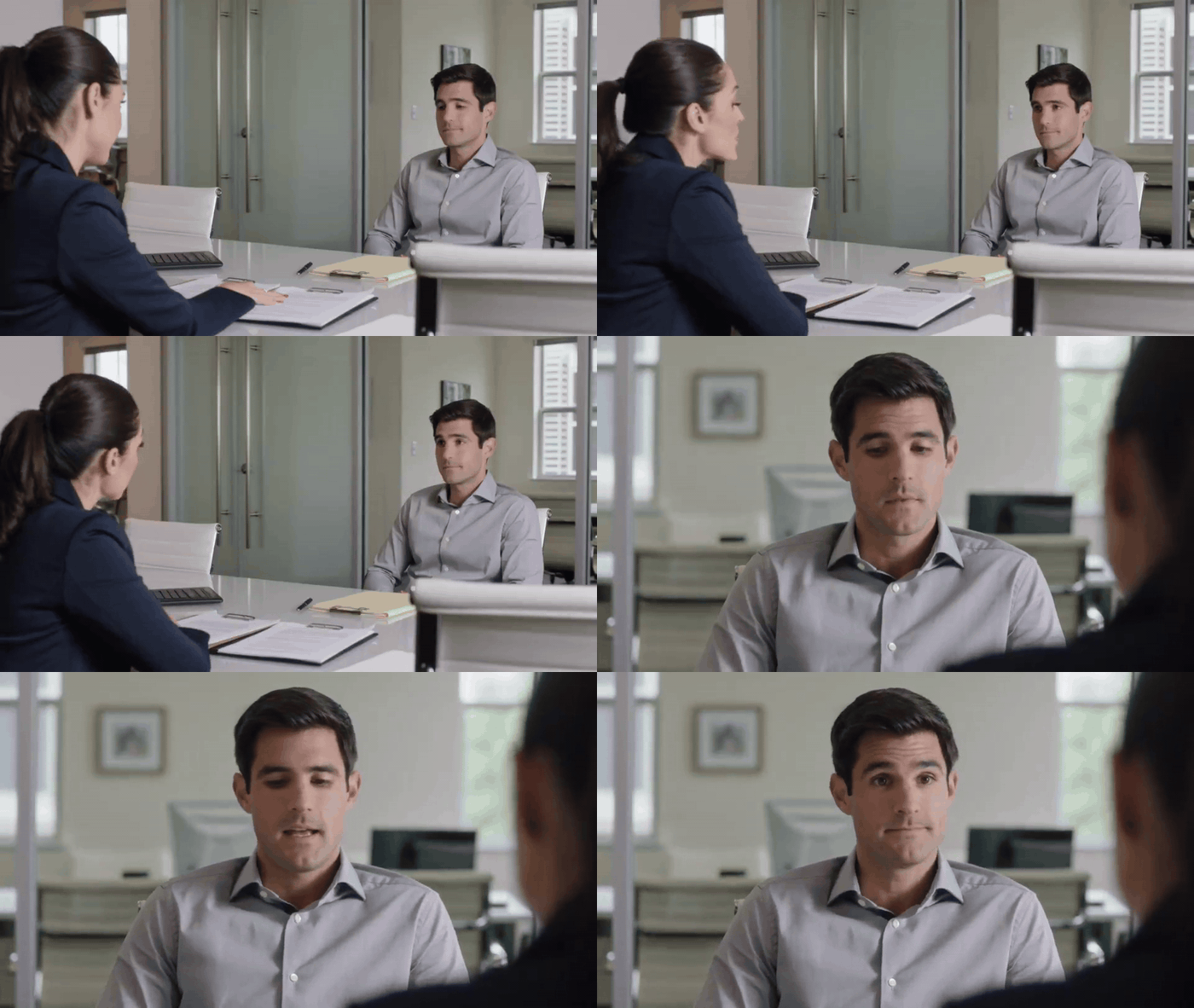
Test 2 visual result: Maya and Daniel take turns in an office conversation
Test 2 visual result. Watch the listener’s mouth during each line and the speaker handoff at the reverse shot; use the source MP4 to judge the audio timing.
Creators regularly describe the opposite problem in community discussions: an intended lip-sync job may lose sync or give unwanted mouth movement to a person who should be quiet. That is anecdotal experience rather than a product specification, but it is a good reason to inspect the listener in every run (r/KLING, September 2026).
Run status: Rendered in the Atlas test playground. The visual GIF is embedded above.
| Test 2 visual result | Status | What the GIF shows |
|---|---|---|
| Two-speaker setup | Clear | Maya and Daniel appear in the same office conversation |
| Speaker handoff | Visible | The scene shifts from Maya’s turn to Daniel’s reverse shot |
| Listener behavior | Inspectable | The GIF keeps the non-speaking person visible for a visual check |
| Facial continuity | Stable | Daniel’s face and office setting remain consistent in the reverse shot |
| Audio timing | Check the source MP4 | The embedded GIF has no sound |
The practical boundary is modest: a 2-person, sequential, 10-second exchange can be tested. It should not be treated as a ready-made template for a long scene with interruptions, group reactions, rapid edits, and several languages. Increase difficulty one dimension at a time.
Kling Dialogue Test #3: Mixed-Language Dialogue
The third run tests a tighter version of the feature Kuaishou describes: one person speaks English, then the other replies in Spanish. The value is not novelty. A mixed-language exchange can reveal a speaker-assignment error that a single-language clip hides, especially when a cut and a different sound pattern arrive together.
The Spanish response is intentionally short. Each person still has one line, the shot order stays explicit, and the listener is told to remain silent. The Pro tier is used here as a separate, more demanding test rather than as a substitute for a clear prompt.
Run settings: 16:9, 10 seconds, highest available resolution and quality at run time, native audio On or Auto, no background music. Model: Kling V3.0 Pro Text-to-Video.
plaintext1A realistic 10-second two-person dialogue at a quiet outdoor café in late afternoon. Maya, wearing a navy blazer, is seated on the left. Daniel, wearing a light gray shirt, is seated on the right. Shot 1: Maya smiles and says exactly in English: “The product demo starts in five minutes.” Daniel remains silent and listens with his mouth closed. Shot 2: Daniel replies exactly in Spanish: “Perfecto, ya tengo las notas listas.” Maya remains silent and listens naturally with her mouth closed. One speaker at a time, accurate lip sync for each spoken language, natural pauses, stable faces, no subtitles, no background music, soft café ambience only.
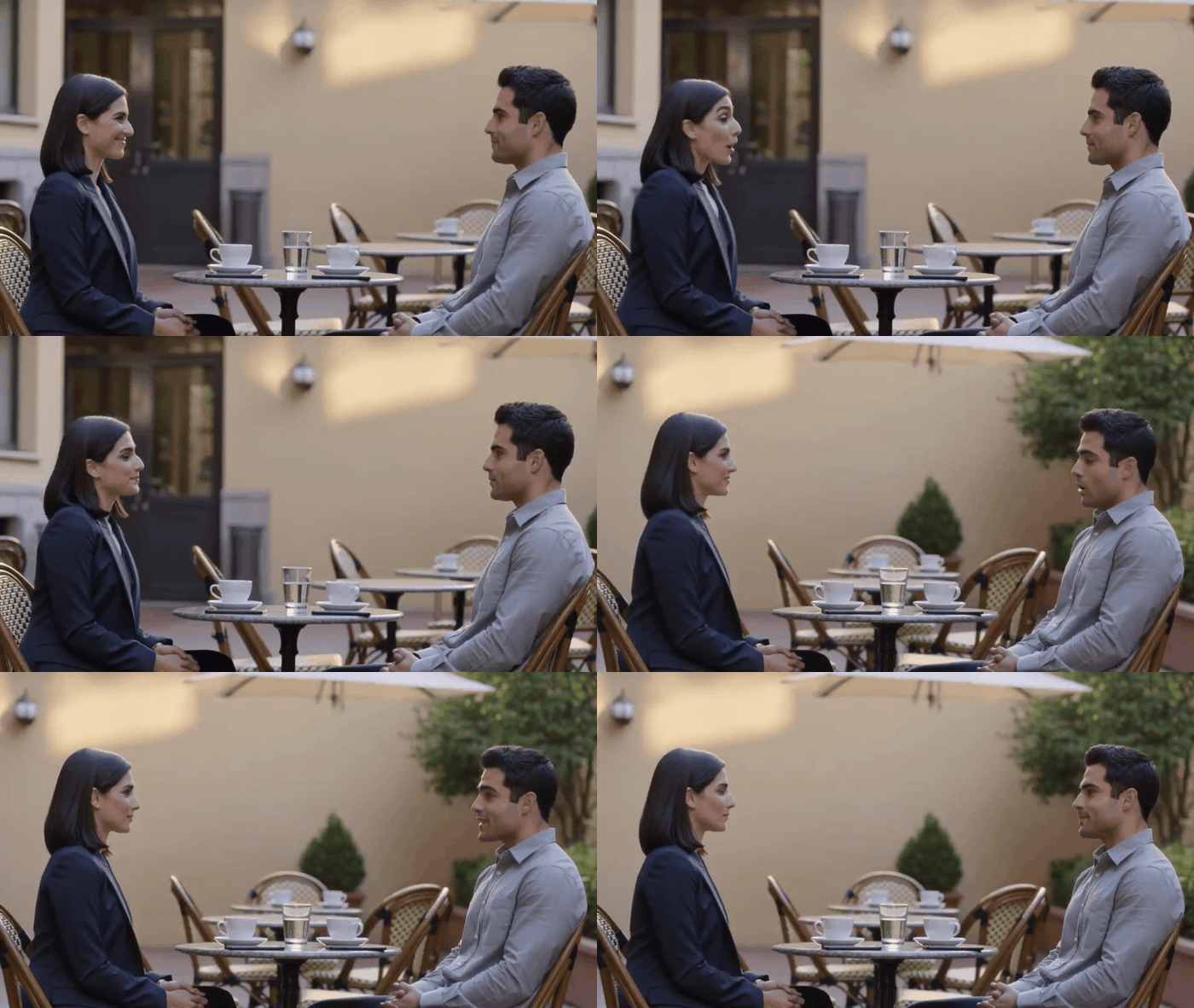
Test 3 visual result: two speakers exchange lines at an outdoor café
Test 3 visual result. Watch which face owns each line through the English-to-Spanish handoff; use the source MP4 to judge the audio timing.
Run status: Rendered in the Atlas test playground. The visual GIF is embedded above.
| Test 3 visual result | Status | What the GIF shows |
|---|---|---|
| Two-person café setup | Clear | Both people remain positioned at the outdoor café table |
| Speaker handoff | Visible | The framing preserves the exchange between the two characters |
| Face and setting continuity | Stable | Wardrobe, seating, and late-afternoon café lighting remain consistent |
Cleaner Kling Lip Sync Results
The 3 prompts share a structure that makes a failure visible and a rerun explainable. Use this checklist before adding more polish.
- Keep no more than 2 visible people in a first dialogue test.
- Give each person 1 sentence per turn.
- Keep English lines near 8 to 12 words when possible.
- Mark the speaker with position, a visible feature, and a name.
- State that the other character listens naturally with their mouth closed.
- Establish the script with a 10-second sample before raising detail settings or duration.
- Inspect lip timing, speaker assignment, listener behavior, facial continuity, and the cut as separate checks.
- Do not combine a long monologue, group scene, rapid cutting, and language switching in the first run.
| Prompt element | Example in the tests | What it helps the reviewer isolate |
|---|---|---|
| Position | “Maya ... on the left” | Which person should speak |
| Appearance anchor | “navy blazer” | Whether identity holds across a cut |
| Exact line | “Great. I will check it before lunch.” | The expected sound and mouth timing |
| Silent-role instruction | “remains silent ... mouth closed” | Unwanted listener lip movement |
| Shot sequence | “Shot 1 ... Shot 2” | Whether the audio stays attached after a cut |
This formatting does not promise perfect results. It gives a small team a way to keep the source prompt, media, and decision together. If a clip needs a rerun, record whether the failure occurred at the first syllable, during a listener reaction, or at the cut. “The lip sync felt off” is too vague to improve a production script.
Budget and Model Choice
Use a lower-cost current tier to validate the script, then reserve the higher-tier test for the version you may actually present. That is the role Standard and Pro play in this article. A creator can run the same prompt structure in a single Atlas Cloud model workspace, preserve the test record, and make a comparison without rewriting the script for a different interface.
The figures below are price context, not a promotion claim. They were checked against the Atlas Cloud model directory and model detail pages on September 28, 2026. The directory showed a 15% reduction at the time of review. Prices and model parameters can change, so recheck the page before setting a client budget.
| Model for this test | Page price per second, checked Sep. 2026 | Estimated 10-second generation | Best use in this protocol |
|---|---|---|---|
| Kling V3.0 Standard T2V | $0.071, down from $0.084 | $0.71 | Validate one-speaker and turn-taking prompt structure |
| Kling V3.0 Pro T2V | $0.095, down from $0.112 | $0.95 | Run the mixed-language or presentation candidate |
The total listed cost for the 3 10-second tests is $2.37 before any reruns. Treat that as a simple planning estimate. It assumes the displayed per-second price, the requested duration is accepted by the live form, and the account’s applicable pricing matches the public page. The real playground schema is the final authority for available aspect ratios, quality choices, and native-audio controls.
Kling Dialogue Lip Sync FAQ
Is Kling 4 officially released?
I could not verify an official Kuaishou specification for a released Kling 4 dialogue model. The official release used here is Kling 3.0. Search pages that attach “4K” or a future-looking label to Kling should not be treated as confirmation of a separate “Kling 4” product.
What model should I use for a Kling dialogue lip sync test today?
For a short script check, use the verified current Kling V3.0 Standard Text-to-Video route. Use Pro for a more demanding follow-up such as the mixed-language scene in this article. Keep the setup stable enough that you can tell whether a result changed because of the prompt or the model tier.
Can Kling make 2 people speak one after another?
Kuaishou says Video 3.0 can generate multi-character dialogue with controlled content and speaking order. In practice, run a short turn-taking sample first. Name each speaker, anchor their positions and clothing, state the shot order, and explicitly direct the listener to stay silent.
Why do both characters move their lips in my Kling video?
The scene may leave speaker attribution too open, or the model may produce unwanted facial movement in that run. Limit the test to 2 people and 1 line each. Then include a direct silent-listener instruction and inspect the result with its audio. If the issue remains, report it as a failed result and rerun only 1 changed variable.
Does Kling support English and Spanish dialogue in 1 clip?
Kuaishou lists both English and Spanish among the languages supported by Video 3.0 native audio. A supported language list is not the same as a guarantee for any dialogue script. The third kling 4 dialogue lip sync test above keeps the exchange short so you can judge language handoff, mouth movement, and speaker attribution in the same file.
Should I use a GIF or video to show a lip sync test?
Use a GIF when the article needs a lightweight, scannable view of facial movement and speaker handoff. Use the original MP4 when reviewing words and sound timing. The 3 embedded results here are GIFs, while their source MP4 files remain in the article asset folder.





