
 Atlas Cloud nay là nhà bán lại được ủy quyền tại Hoa Kỳ của Dreamina Seedance 2.5 và Seedream 5.0 Pro.Atlas Cloud nay là nhà bán lại được ủy quyền tại Hoa Kỳ của Dreamina Seedance 2.5 và Seedream 5.0 Pro.
Gemini Omni là dòng video đa phương thức nguyên bản của Google DeepMind, phục vụ việc tạo và chỉnh sửa video theo hướng dẫn từ prompt. Tạo video từ văn bản, tạo chuyển động cho ảnh tĩnh hoặc chỉnh sửa cảnh quay hiện có bằng các tham chiếu hình ảnh tùy chọn, đồng thời bảo toàn nội dung không bị tác động. Các tùy chọn linh hoạt về độ phân giải, tỷ lệ khung hình và thời lượng đáp ứng nhiều quy trình sản xuất khác nhau. Atlas Cloud hợp nhất quyền truy cập với mức giá trả theo mức sử dụng minh bạch. Bắt đầu xây dựng ngay hôm nay.
Gemini Omni Flash do Google phát triển. Atlas Cloud (vận hành bởi Atlas Cloud AI LLC) cung cấp quyền truy cập vào mô hình này và không sở hữu mô hình. Mọi thương hiệu đều thuộc về chủ sở hữu tương ứng.
Atlas Cloud cung cấp cho bạn các mô hình sáng tạo tiên tiến nhất trong ngành.
So sánh các tuyến đầu vào Gemini Omni, khả năng đầu ra và mục đích sử dụng trong môi trường production trên bảy endpoint video chuyên biệt.
| Phương thức | Mô tả |
|---|---|
| Gemini Omni Flash R2V API (Reference To Video) | Kết hợp một prompt văn bản với từ một đến năm ảnh tham chiếu để tạo video điện ảnh có âm thanh gốc. Chủ thể, bối cảnh và phong cách nhất quán khiến endpoint này phù hợp với các chuỗi cảnh mang nhận diện thương hiệu, nhân vật xuất hiện xuyên suốt và hoạt động kể chuyện bằng hình ảnh đồng bộ. |
| Gemini Omni Flash I2V API (Image To Video) | Bắt đầu từ một ảnh tĩnh và prompt văn bản, endpoint này tạo video điện ảnh có âm thanh đồng thời giữ nguyên chủ thể và bố cục nguồn. Endpoint phù hợp với hoạt ảnh sản phẩm, chuyển động chân dung và phát triển ý tưởng hình ảnh. |
| Gemini Omni Flash Video Edit API | Gửi lên một video hiện có, chỉ dẫn bằng văn bản và ảnh tham chiếu tùy chọn để áp dụng các thay đổi nhất quán với bối cảnh cùng âm thanh gốc. Vì phần cảnh quay không chỉnh sửa vẫn được giữ nguyên, biên tập viên có thể thực hiện các chỉnh sửa tập trung mà không cần dựng lại toàn bộ cảnh. |
| Gemini Omni Flash T2V API (Text To Video) | Chỉ với một prompt văn bản, bạn có thể tạo video điện ảnh với âm thanh gốc được đồng bộ và chuyển động tuân theo vật lý thế giới thực. Khả năng tạo video nhanh và có thể kiểm soát hỗ trợ trực quan hóa ý tưởng, phát triển câu chuyện và tạo nguyên mẫu video nhanh chóng. |
| Gemini Omni Flash R2V Developer API | Để thực hiện các biến đổi có định hướng, hãy kết hợp một đoạn video hiện có với ảnh tham chiếu và prompt văn bản. Endpoint hỗ trợ chuyển phong cách video, chỉnh sửa cảnh và chèn nhân vật cho các ứng dụng sáng tạo cần tạo ra những biến thể theo chỉ đạo từ cảnh quay được cung cấp. |
| Gemini Omni Flash I2V Developer API | Tối đa bảy ảnh tham chiếu có thể định hướng video được tạo từ prompt văn bản, đồng thời duy trì nhận diện hình ảnh xuyên suốt kết quả. Hãy chọn tuyến này cho các nhân vật xuất hiện xuyên suốt, hình ảnh sản phẩm nhất quán hoặc các tài sản đồng bộ trong một chiến dịch. |
| Gemini Omni Flash T2V Developer API | Chọn một prompt văn bản cùng với độ phân giải, tỷ lệ khung hình và thời lượng theo yêu cầu để tạo video điện ảnh có thể kiểm soát. Các tùy chọn đầu ra linh hoạt giúp nhà phát triển tạo nội dung dành riêng cho từng nền tảng, tự động hóa quy trình tạo và thử nghiệm nhiều hướng sáng tạo. |
Mọi yêu cầu gửi đến Gemini Omni Flash API đều có thể nhận bất kỳ tổ hợp nào của văn bản, hình ảnh, video và âm thanh, tạo âm thanh đồng bộ, mô phỏng vật lý thế giới thực và tinh chỉnh kết quả qua hội thoại.
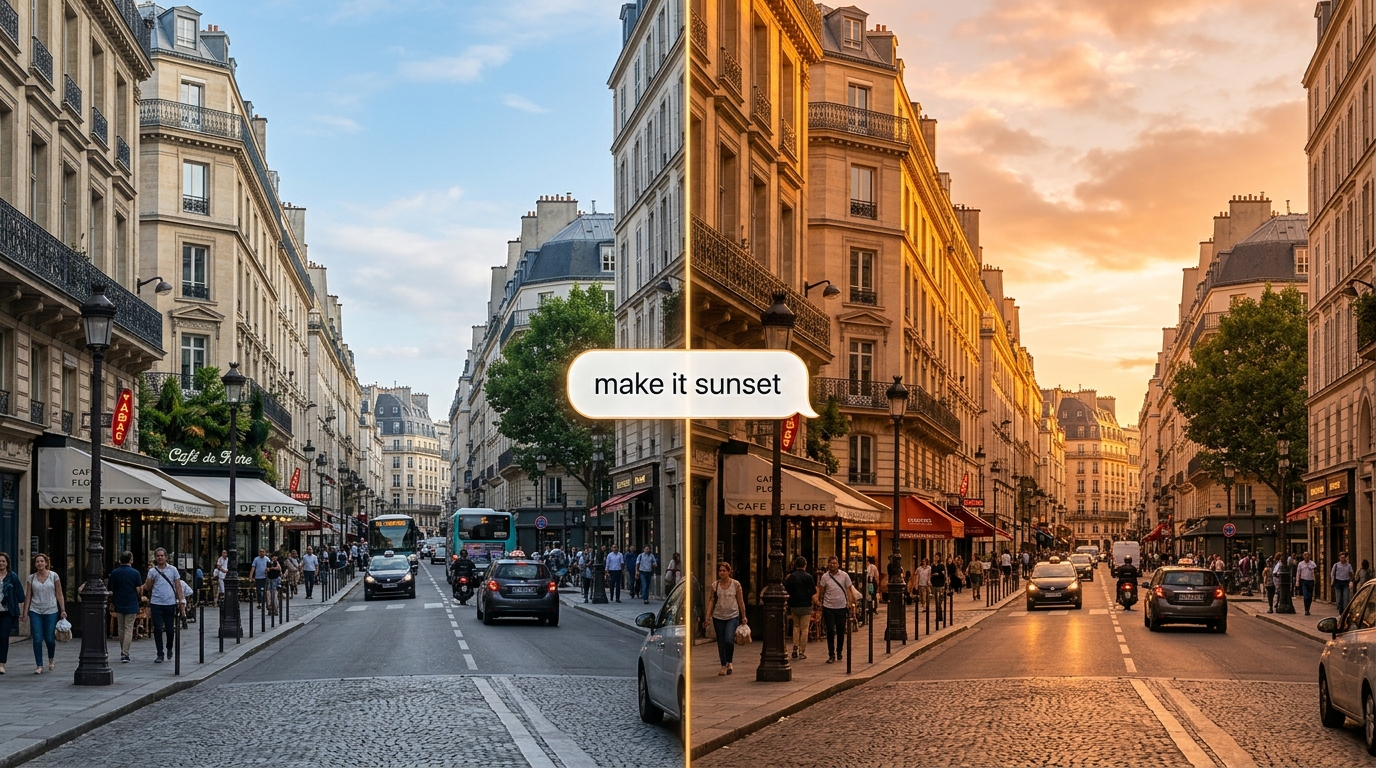
Tinh chỉnh một đoạn clip bằng ngôn ngữ tự nhiên; Gemini Omni Flash API sẽ áp dụng thay đổi mà vẫn giữ nguyên phần còn lại của cảnh. Interactions API có khả năng duy trì trạng thái sẽ ghi nhớ từng lượt trao đổi, để các chỉnh sửa tiếp nối lẫn nhau.
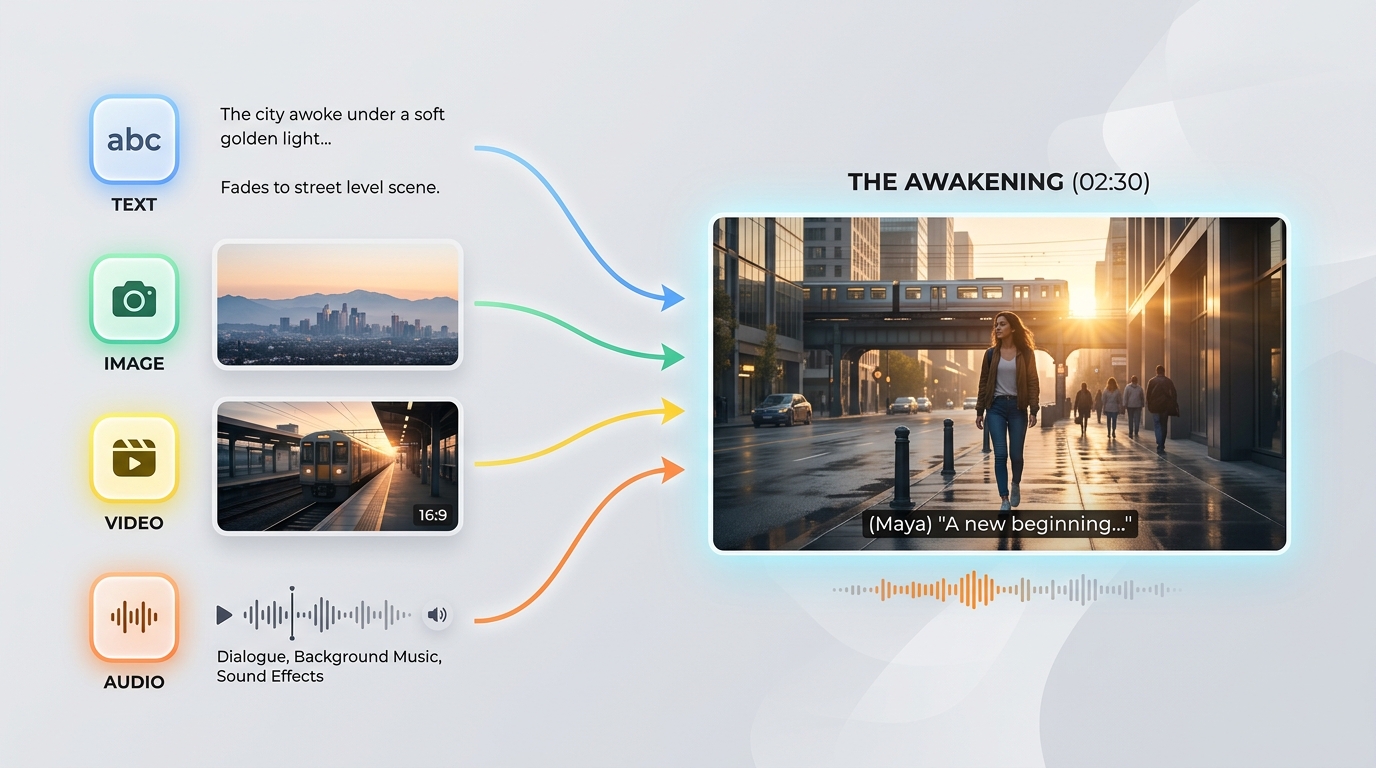
Gemini Omni Flash API chấp nhận mọi tổ hợp văn bản, hình ảnh, video và âm thanh trong một prompt duy nhất. Kiểu đầu vào linh hoạt này cho phép bạn bắt đầu quá trình tạo từ bất kỳ tư liệu nguồn nào sẵn có.
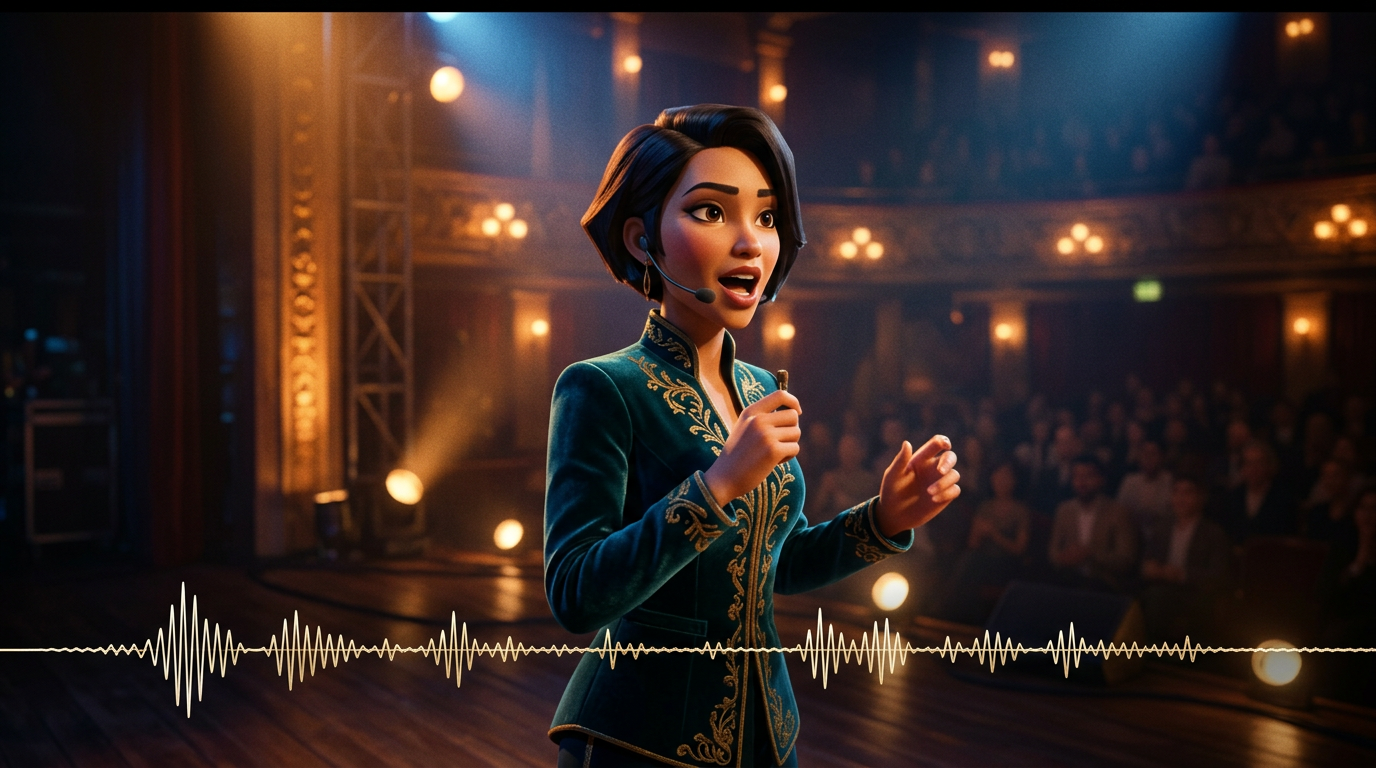
Âm thanh được tạo cùng hình ảnh trong một lượt suy luận, vì vậy lời thoại, hiệu ứng và âm thanh môi trường luôn khớp với hành động. Gemini Omni Flash API không cần thêm bước xử lý âm thanh riêng sau đó.

Dựa trên mô hình vật lý thế giới thực, Gemini Omni Flash API tạo ra hình ảnh phản chiếu, trọng lực, ánh sáng và thời tiết chân thực. Các cảnh vẫn nhất quán về mặt hình ảnh thay vì xuất hiện lỗi, ngay cả trong những cảnh quay chuyển động mạnh.
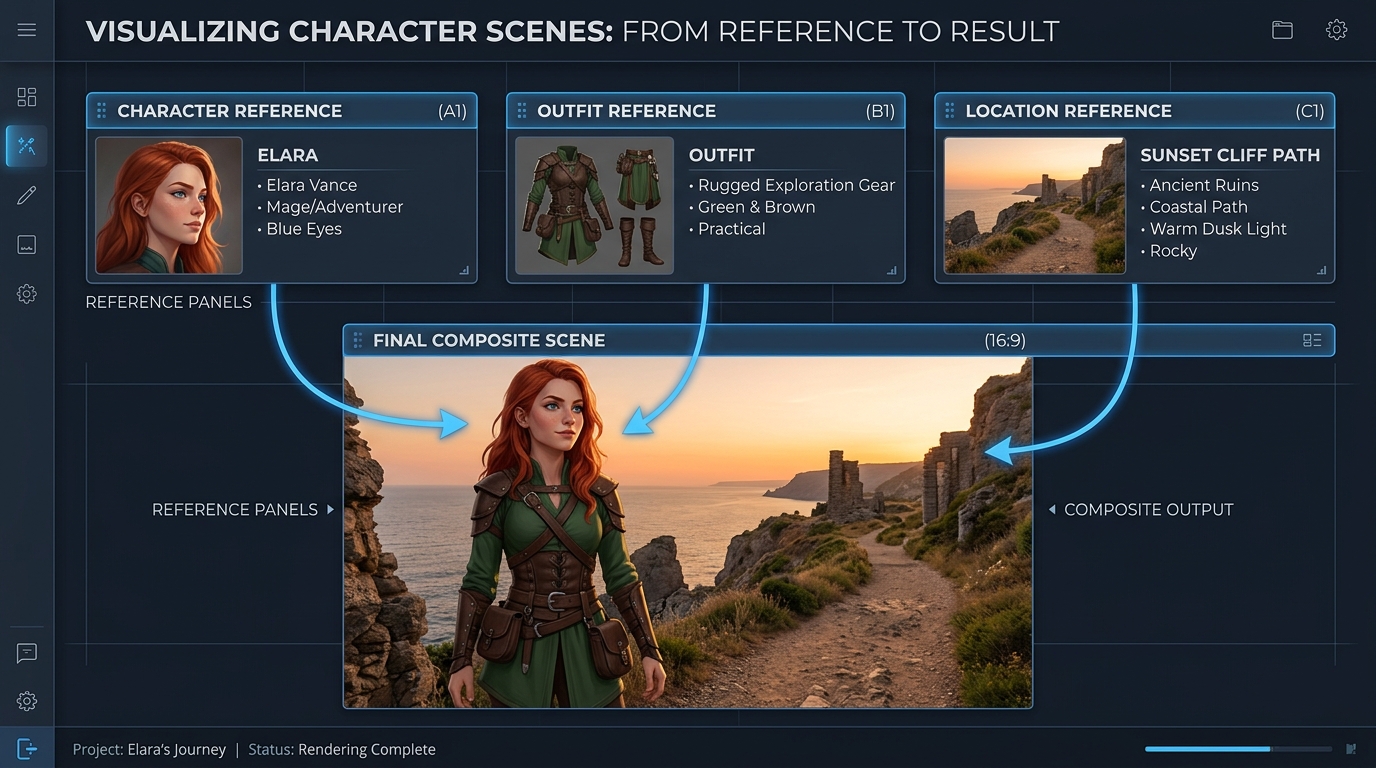
Hướng dẫn quá trình tạo bằng tối đa 7 hình ảnh tham chiếu và 3 đoạn video ngắn; Gemini Omni Flash API sẽ giữ cho chủ thể, phong cách và bối cảnh nhất quán. Điều này giúp duy trì nhận dạng ổn định qua các lần chỉnh sửa và cảnh quay.
Cùng một prompt được Gemini Omni và các mô hình video hàng đầu khác tạo ra: đa cảnh quay và phim quảng cáo cao cấp
Tạo một video liên tục gồm 3 cảnh: Cảnh 1: Người phụ nữ đứng dưới ánh đèn neon trên một con phố mưa ở Tokyo. Mặt đường ướt phản chiếu ánh sáng, độ sâu trường ảnh mang tính điện ảnh, máy quay chuyển động cầm tay. Cảnh 2: Máy quay từ từ chuyển sang một khuôn hình cận hơn. Cô ấy nói khẽ, đồng bộ với giọng nói được cung cấp, chuyển động môi khớp hoàn hảo. Giao thông phía sau vẫn tiếp diễn liền mạch. Cảnh 3: Cô ấy bước vào một ga tàu điện ngầm. Môi trường vẫn nhất quán về ánh sáng, thời tiết và không khí. Máy quay đi theo cô từ phía sau, duy trì tính nhất quán về nhận diện. Ràng buộc: - Duy trì nhận diện khuôn mặt giống hệt nhau trong tất cả các cảnh - Duy trì tính liên tục của ánh sáng (mưa, phản chiếu neon) - Đảm bảo tính chân thực vật lý (tương tác với mưa, bề mặt ướt) - Đảm bảo đồng bộ nghe nhìn với giọng nói đầu vào - Không đặt lại cảnh giữa các lần chuyển tiếp; duy trì trạng thái thế giới liên tục Phong cách: chủ nghĩa hiện thực điện ảnh cao cấp, hạt phim, ống kính anamorphic, độ sâu trường ảnh nông, phong cách phim 4K
Gemini Omni
Wan 2.7
Kling v3.0
Tạo một video liên tục gồm 4 cảnh: Cảnh 1: Một robot nhỏ màu trắng ngồi bất động trên bàn gỗ trong một căn hộ tối vào lúc nửa đêm. Ánh trăng chiếu vào qua cửa sổ. Mắt robot từ từ sáng lên và một tiếng ù cơ khí khe khẽ bắt đầu vang lên. Cảnh 2: Robot cẩn thận trèo xuống khỏi bàn. Những bàn chân kim loại nhỏ tạo ra tiếng lách cách nhẹ trên sàn gỗ. Máy quay bám theo ở góc thấp, giữ cho kích thước và hình dáng của robot nhất quán. Cảnh 3: Robot bước vào bếp. Phản chiếu từ cánh cửa tủ lạnh và sàn lát gạch phản ứng tự nhiên theo chuyển động của nó. Ánh trăng và bầu không khí tĩnh lặng về đêm từ cảnh trước tiếp tục được duy trì. Cảnh 4: Robot dừng lại gần cửa sổ và nhìn ra ánh đèn thành phố. Máy quay từ từ tiến gần từ phía sau, bảo toàn tính nhất quán về nhận diện, vật liệu, tỷ lệ, ánh sáng và âm thanh của robot. Yêu cầu: - Duy trì chính xác cùng một thiết kế robot trong tất cả các cảnh - Bảo toàn một bố cục căn hộ liên tục, không đặt lại cảnh - Giữ ánh sáng nhất quán giữa các phòng - Đồng bộ tiếng bước chân và tiếng ù cơ khí với chuyển động của robot - Sử dụng phản chiếu, bóng đổ và tương tác giữa các vật thể chân thực về mặt vật lý - Chuyển tiếp mượt mà giữa các cảnh, như thể đang quay một thế giới liên tục duy nhất Phong cách: chủ nghĩa hiện thực điện ảnh, không khí khoa học viễn tưởng tĩnh lặng, ánh trăng dịu nhẹ, vật liệu chi tiết, chuyển động máy quay chân thực, độ sâu trường ảnh nông, phong cách phim quảng cáo cao cấp
Gemini Omni
Kling V3.0
Pixverse v6
Gemini Omni đưa quy trình sản xuất chiến dịch, chỉnh sửa bằng hội thoại, tiền kỳ trực quan, học tập trực quan, tính nhất quán thương hiệu và các công cụ sáng tạo tích hợp vào quy trình làm việc với văn bản, hình ảnh, ảnh tham chiếu và chỉnh sửa video, cùng âm thanh gốc được đồng bộ hóa.

Tạo chuyển động mang tính điện ảnh từ một ảnh tĩnh sản phẩm đã được phê duyệt, đồng thời giữ nguyên chủ thể và bố cục. Các đội ngũ tiếp thị có thể tạo teaser ra mắt, quảng cáo trên mạng xã hội và những màn giới thiệu sản phẩm chỉn chu với âm thanh gốc được đồng bộ hóa.

Mô tả một thay đổi cụ thể, Gemini Omni sẽ chỉnh sửa cảnh quay hiện có mà vẫn giữ nguyên nội dung không bị tác động. Biên tập viên có thể tạo các phương án thể hiện thay thế, biến thể bản địa hóa và bản chỉnh sửa theo yêu cầu khách hàng mà không cần dựng lại cảnh đã được phê duyệt.

Định hướng quá trình tạo bằng ảnh tham chiếu để giữ cho sản phẩm, nhân vật và phong cách hình ảnh nhất quán trong suốt đoạn clip. Các studio có thể phát triển tài sản chiến dịch đồng bộ, thế giới thương hiệu xuyên suốt và nội dung theo tập dễ nhận diện trên nhiều kênh.

Bắt đầu từ prompt văn bản và tạo video mang tính điện ảnh với âm thanh đồng bộ, chuyển động dựa trên các quy luật vật lý trong thế giới thực. Đạo diễn và nhà thiết kế có thể khám phá các nhịp truyện, ý tưởng máy quay và định dạng dành riêng cho từng nền tảng trước khi sản xuất.

Biến các khái niệm trừu tượng thành những phần giải thích trực quan ngắn gọn bằng cách mô tả cảnh, hành động và trình tự học tập mong muốn. Các đội ngũ giáo dục có thể tạo minh họa khoa học, hướng dẫn từng bước quy trình và mô-đun đào tạo với âm thanh gốc.

Kết hợp việc tạo văn bản, tạo chuyển động cho ảnh tĩnh, sáng tạo có định hướng bằng ảnh tham chiếu và chỉnh sửa video trong một tích hợp Gemini Omni duy nhất. Các nền tảng dành cho nhà sáng tạo có thể cung cấp các công cụ sản xuất liên thông mà không cần ghép nối các pipeline hình ảnh và âm thanh riêng biệt.
So sánh các mô hình video tham chiếu của API Gemini Omni, bao gồm Gemini Omni 1.1 Flash, với các lựa chọn hàng đầu theo đầu vào được hỗ trợ, dung lượng tham chiếu, khả năng tạo âm thanh và mức giá tiêu chuẩn.
| Mô hình | Đầu vào được chấp nhận | Dung lượng tham chiếu | Tạo âm thanh | Giá tiêu chuẩn | Standard Base Price |
|---|---|---|---|---|---|
| Gemini Omni 1.1 Flash Reference-to-Video | Text, source video, reference images | Conversational additions, removals, replacements, and restyling | 360p, 720p, upscaled 1080p, upscaled 4K | Native synchronized audio | $0.041 |
| Gemini Omni Flash Reference-to-Video | Text, source video, up to 5 reference images | Scene-consistent edits that preserve untouched footage | 720p | Native audio editing | $0.14 |
| Seedance 2.0 Reference-to-Video | Text, source video, up to 5 reference images | Instruction-guided video changes with visual references | 720p, 1080p | Automatic audio or original audio retention | $0.14 |
| Wan-2.7 Reference-to-video | Text, source video, reference images, optional driving audio | Style transfer, scene changes, and element replacement | 720p, 1080p | Original audio retention, regeneration, or driving audio | $0.10 |
Bắt đầu trong vài phút — làm theo các bước đơn giản sau để tích hợp và triển khai mô hình qua nền tảng Atlas Cloud.
Đăng ký tại atlascloud.ai và hoàn tất xác minh. Người dùng mới nhận được tín dụng miễn phí để khám phá nền tảng và thử nghiệm mô hình.
Sự kết hợp của các mô hình tiên tiến của Gemini Omni Flash với nền tảng được tăng tốc GPU của Atlas Cloud mang lại hiệu suất, khả năng mở rộng và trải nghiệm nhà phát triển độc đáo.
Độ Trễ Thấp:
Suy luận được tối ưu hóa GPU cho suy luận thời gian thực.
API Thống nhất:
Chạy Gemini Omni Flash, GPT, Gemini và DeepSeek với một tích hợp duy nhất.
Giá cả Minh bạch:
Thanh toán dựa trên token có thể dự đoán với tùy chọn serverless.
Trải nghiệm Nhà phát triển:
SDK, phân tích, công cụ tinh chỉnh và mẫu.
Độ tin cậy:
99,99% khả dụng, RBAC và ghi nhật ký sẵn sàng cho tuân thủ.
Bảo mật và Tuân thủ:
SOC 2 Type II, tuân thủ HIPAA, chủ quyền dữ liệu tại Hoa Kỳ.
Gemini Omni API cung cấp cho các nhà phát triển quyền truy cập vào dòng công cụ tạo và chỉnh sửa video đa phương thức nguyên bản của Google DeepMind thông qua Atlas Cloud. Tùy endpoint được chọn, API có thể tạo video từ văn bản hoặc hình ảnh, sử dụng phương tiện tham chiếu, chỉnh sửa cảnh quay hiện có và tạo âm thanh nguyên bản đồng bộ.
Gemini Omni 1.1 Flash bổ sung tính năng mở rộng video, nội suy khung hình đầu và cuối, các độ phân giải đầu ra từ 360p đến 4K, cùng khả năng định hướng bằng phương tiện tham chiếu được mở rộng. Biến thể mở rộng thêm 3 đến 10 giây cho mỗi yêu cầu và có thể nối chuỗi để tạo video liền mạch dài tối đa 40 giây.
Hãy tạo tài khoản Atlas Cloud, lưu API key ở phía máy chủ và chọn endpoint mô hình phù hợp với quy trình của bạn. Atlas Cloud cung cấp một key tương thích với OpenAI, còn schema được công bố của từng endpoint xác định prompt, đầu vào phương tiện và các cài đặt tạo nội dung bắt buộc.
Chọn text to video khi bắt đầu từ prompt, image to video khi tạo chuyển động cho ảnh tĩnh hoặc reference to video khi cần định hướng về danh tính và phong cách. Dùng video edit để chỉnh sửa cảnh quay hiện có và endpoint mở rộng video của Gemini Omni 1.1 Flash để tiếp tục một cảnh.
Giới hạn phương tiện tham chiếu thay đổi tùy endpoint và phiên bản mô hình. Gemini Omni 1.1 Flash Reference to Video chấp nhận tối đa 10 ảnh tham chiếu và 3 đoạn video tham chiếu, trong khi các endpoint trước đó có giới hạn khác; vì vậy, hãy kiểm tra schema của endpoint đã chọn trước khi gửi phương tiện.
Gemini Omni 1.1 Flash hỗ trợ đầu ra dài từ 3 đến 10 giây ở 24 FPS, với các tùy chọn độ phân giải 360p, 720p, 1080p nâng cấp và 4K nâng cấp. Các tỷ lệ khung hình được hỗ trợ là 16:9 và 9:16, mặc dù các tùy chọn điều khiển khả dụng có thể khác nhau tùy endpoint Atlas Cloud.
Có. Biến thể video edit tuân theo hướng dẫn bằng văn bản để thêm, xóa, thay thế hoặc thay đổi phong cách của các thành phần, đồng thời giữ nguyên những phần cảnh quay không được prompt đề cập. Để thực hiện các thay đổi lặp, hãy dùng hướng dẫn tập trung và ngữ cảnh tương tác được quy trình đã chọn hỗ trợ.
Để tiếp tục một cảnh, hãy cung cấp một đoạn clip hiện có cho endpoint mở rộng video của Gemini Omni 1.1 Flash và yêu cầu thêm 3 đến 10 giây. Có thể nối chuỗi các đoạn mở rộng với tổng thời lượng tối đa 40 giây, trong khi biến thể image to video có thể nội suy giữa khung hình đầu và cuối được cung cấp.
Mức giá tiêu chuẩn của Atlas Cloud cho Gemini Omni 1.1 Flash là $0.041 mỗi giây đối với text to video, reference to video, chỉnh sửa video và mở rộng video, trong khi image to video có giá $0.043 mỗi giây. Các endpoint Gemini Omni Flash trước đó có giá khởi điểm $0.112 mỗi giây, tính phí theo mức sử dụng và không yêu cầu đăng ký thuê bao.
Mọi video được tạo đều bao gồm watermark SynthID ẩn, có thể được phát hiện bằng lập trình. Bộ lọc an toàn áp dụng cho cả prompt và đầu ra được tạo, trong khi thời gian xử lý thay đổi tùy thời lượng, độ phân giải và tải của dịch vụ. Các tùy chọn điều khiển riêng cho negative prompt, system instruction, temperature, top_p và stop sequence không được hỗ trợ, vì vậy hãy đưa các nội dung cần loại trừ vào prompt chính.
Seedance 2.5 API hiện đã có mặt trên Atlas Cloud! Cung cấp cho các nhà phát triển mô hình video mới nhất của ByteDance. Nó tạo ra tối đa 30 giây video gốc chỉ trong một lần xử lý từ văn bản, một hình ảnh duy nhất hoặc tối đa 50 tài liệu tham khảo đa phương thức, với âm thanh được đồng bộ hóa và văn bản đa ngôn ngữ trong khung hình. Trên Atlas Cloud, bạn có thể truy cập thông qua một khóa duy nhất, với tính nhất quán của chủ thể và vật lý được cải thiện giúp giữ cho các cảnh quay dài luôn mạch lạc.

Wan 3.0 API là thế hệ tiếp theo trong hệ sinh thái video Wan của Alibaba, được xây dựng để đưa khả năng tạo video dài, kiểm soát đa tham chiếu và chất lượng nghe nhìn lên những tầm cao mới. Atlas Cloud đã lưu trữ Wan 2.7, 2.6 và 2.5, và Wan 3.0 hoạt động trên cùng một khóa hợp nhất mà không cần thiết lập riêng. Bắt đầu xây dựng ngay hôm nay. Cuộn xuống phần trưng bày để xem những gì Wan 3.0 có thể tạo ra.
MiniMax H3 là dòng video đa phương thức của MiniMax, hỗ trợ sáng tạo từ văn bản, hình ảnh và nội dung tham chiếu. Trên các route được hỗ trợ, sản phẩm duy trì chủ thể từ nội dung tham chiếu, cung cấp các tỷ lệ khung hình linh hoạt và kết hợp âm thanh được tạo với hình ảnh thông qua H3 Developer, với hồ sơ đầu ra được lựa chọn theo endpoint. Atlas Cloud hợp nhất dòng sản phẩm này dưới một khóa tương thích với OpenAI, cùng mức giá trả theo nhu cầu minh bạch bắt đầu từ mức tiêu chuẩn $0.038 mỗi giây. Hãy bắt đầu xây dựng ngay hôm nay.
Dòng gpt-image-2.5 của OpenAI mang đến cho nhà phát triển lựa chọn giữa Flare và Sunburst cho các quy trình xử lý ảnh trong môi trường production. Kết xuất ở độ phân giải tùy ý lên đến 3840x2160 và chọn một trong năm cấp chất lượng, bao gồm xhigh và max, để đáp ứng các yêu cầu đầu ra cụ thể. Atlas Cloud cung cấp dịch vụ suy luận REST sẵn sàng sử dụng, không cần khởi động nguội, với mức giá tiêu chuẩn từ $0.004 cho mỗi lần tạo. Bắt đầu xây dựng ngay hôm nay.
Seedream 5.0 Pro API cung cấp cho các nhà phát triển mô hình chỉnh sửa hình ảnh có thể kiểm soát của ByteDance trên Atlas Cloud. Nó đặt các chỉnh sửa một cách chính xác bằng các điểm neo và tọa độ, tách hình ảnh thành các lớp có thể chỉnh sửa, kết hợp nhiều tham chiếu và khớp màu sắc cũng như vật liệu chính xác, với văn bản đa ngôn ngữ ở độ phân giải 2K và 3K. Trên Atlas Cloud, bạn có thể truy cập nó chỉ bằng một khóa!
Seedance 2.0 là mô hình video phục vụ môi trường production của ByteDance, giúp tạo cảnh quay chính xác. Biến prompt thành video, tạo chuyển động cho hình ảnh khung hình đầu tiên với tùy chọn hướng dẫn bằng khung hình cuối, hoặc định hình kết quả bằng media tham chiếu và tùy chọn tìm kiếm web. Atlas Cloud hợp nhất các quy trình này trong một API duy nhất, với mức giá pay-as-you-go minh bạch và một key tương thích với OpenAI. Bắt đầu xây dựng ngay hôm nay.
Kling 3.0 API đưa bộ công cụ video hàng đầu của Kuaishou lên Atlas Cloud thông qua một khóa tương thích với OpenAI. Nó bao gồm hai mô hình: Kling 3.0 cho kể chuyện bằng AI Director, đồng bộ khẩu hình đa ngôn ngữ và văn bản trên màn hình chính xác, và Kling 3.0 Omni (O3) để sao chép chủ thể và giọng nói từ một video ngắn hoặc hình ảnh. Cả hai đều tạo ra âm thanh gốc trong cùng một lần xử lý, với đầu ra lên đến 4K. Xây dựng các câu chuyện điện ảnh, tiếp thị toàn cầu, quảng cáo đa ngôn ngữ và nội dung nhân vật theo kỳ trên một cơ sở hạ tầng đáng tin cậy.
Grok Imagine Video cung cấp cho các nhà phát triển quyền truy cập vào dòng sản phẩm video của xAI để tạo, tạo chuyển động, kéo dài và chỉnh sửa các đoạn video. Tạo video dài từ 1 đến 15 giây từ lời nhắc, định hướng nhân vật, vật thể hoặc phong cách bằng tối đa bảy hình ảnh tham chiếu, và làm việc ở độ phân giải 480p hoặc 720p. Atlas Cloud tập hợp các khả năng này thông qua các endpoint tương thích với OpenAI, cùng mức giá minh bạch theo mức sử dụng. Bắt đầu xây dựng ngay hôm nay.
Vidu Q4 là mô hình video chủ lực mới nhất của Vidu, được thiết kế để chuyển hình ảnh thành video và chuyển tham chiếu thành video. Mô hình có thể tạo chuyển động cho một ảnh tĩnh duy nhất và tự động chuyển cảnh, mang đến cho nhà phát triển hai luồng đầu vào phục vụ các quy trình sản phẩm khác nhau. Atlas Cloud cung cấp các API endpoint chuyên dụng với lược đồ tham số được công bố, áp dụng mức giá tiêu chuẩn đã được xác minh là $0.04 mỗi giây. Bắt đầu xây dựng ngay hôm nay.
Gemini Omni 1.1 Flash là dòng mô hình video đa phương thức nguyên bản của Google DeepMind, phục vụ các quy trình sản xuất linh hoạt. Chỉnh sửa cảnh quay hiện có bằng hướng dẫn văn bản, duy trì tính nhất quán hình ảnh với tối đa 10 ảnh tham chiếu và 3 đoạn video, hoặc kéo dài một cảnh thành các phân đoạn có thể nối tiếp, tối đa 40 giây. Truy cập mọi quy trình trên Atlas Cloud với một API key tương thích với OpenAI, mức giá trả theo mức sử dụng và khả dụng ngay từ ngày đầu tiên. Bắt đầu xây dựng ngay hôm nay.
Nano Banana 2.1 là dòng mô hình hình ảnh của Google được xây dựng trên Gemini 3.6 Flash. Mô hình mang đến khả năng tạo và chỉnh sửa ở cấp độ Pro với tốc độ ngang tầm Flash, hỗ trợ chỉnh sửa và kết hợp bằng ngôn ngữ tự nhiên trên 1 đến 14 hình ảnh đầu vào, đồng thời duy trì tính nhất quán cho tối đa 4 nhân vật và 10 vật thể. Thông qua Atlas Cloud, các nhà phát triển có thể truy cập dòng mô hình này bằng một khóa tương thích với OpenAI, thời gian hoạt động ổn định và khả dụng ngay từ Day-0. Bắt đầu xây dựng ngay hôm nay.
Xây dựng bằng Nano Banana 2 API, được hỗ trợ bởi mô hình Gemini 3.1 Flash Image của Google. Nó tạo ra hình ảnh 4K gốc lên đến 4096x2304 với khả năng hiển thị văn bản chính xác và các nhân vật nhất quán trên tối đa 14 hình ảnh tham chiếu cho cả việc tạo và chỉnh sửa. Trên Atlas Cloud, bạn có thể truy cập nó thông qua một API hợp nhất cùng với hơn 300 mô hình, với mức giá từ 0,04 đô la cho mỗi hình ảnh, thời gian hoạt động 99,99% và tín dụng miễn phí để bắt đầu.
Hướng dẫn, bài hướng dẫn và cập nhật sản phẩm giúp bạn khai thác tối đa Atlas Cloud.



