產品攝影一直以來都是經營電子商務業務中最昂貴且耗時的環節之一。根據複雜程度、攝影師資歷以及 SKU(庫存單位)的數量,單次產品拍攝的成本可能從 USD500 到 USD5,000 不等。若將此成本乘以季節性活動、新品發布以及 A/B 測試變體的需求,攝影費用將成為一筆沉重的開銷。AI 產品攝影徹底改變了這一局面。
透過合適的 AI 圖像生成模型和結構化的工作流程,團隊可以在幾秒鐘內(而非幾天)以極低的成本製作出攝影棚等級的產品圖像。本指南將引導您了解使用 Atlas Cloud API 生成專業 AI 產品攝影所需的一切知識——從模型選擇、提示詞工程(Prompt Engineering)到批次自動化及常見陷阱。
*最後更新:2026 年 2 月 28 日*
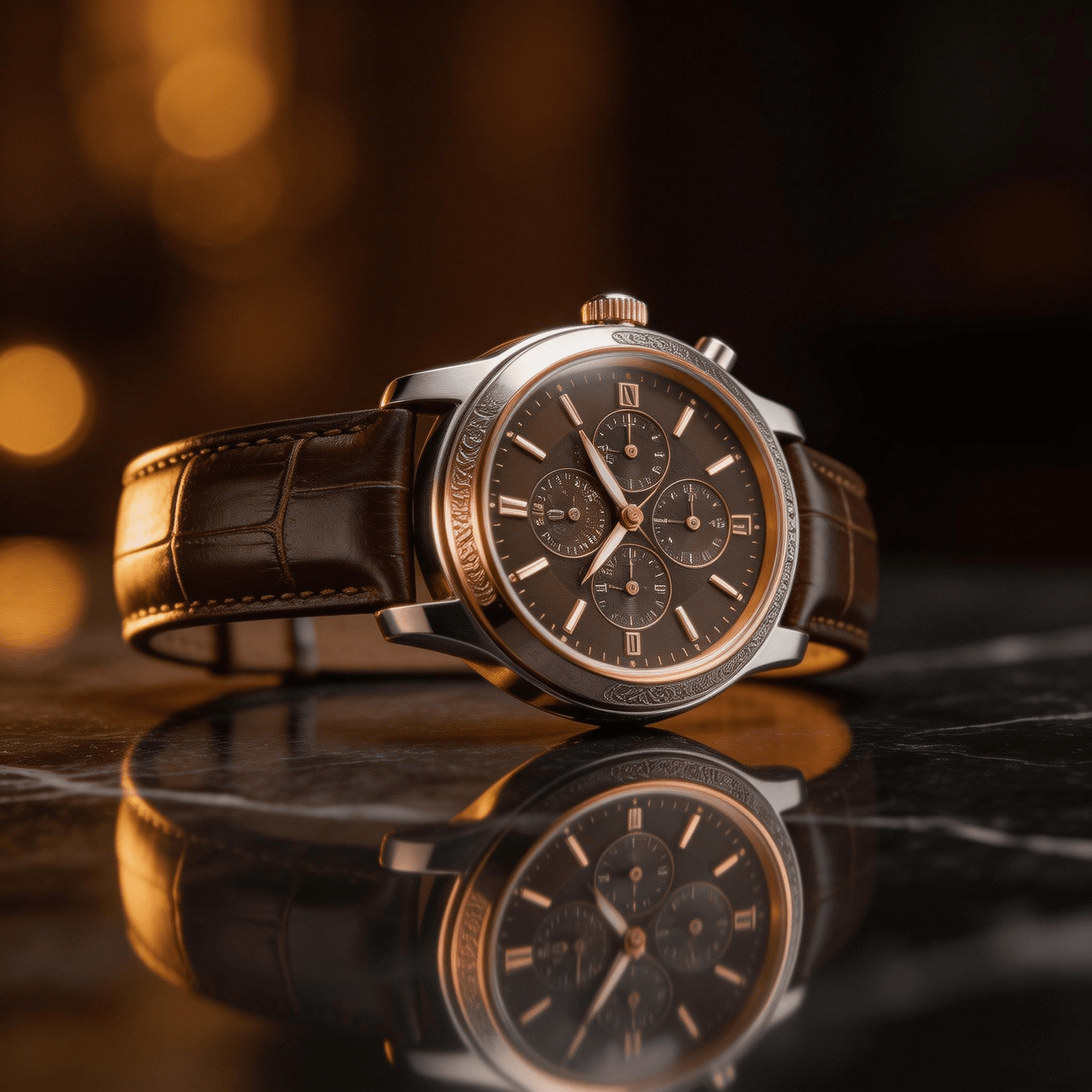
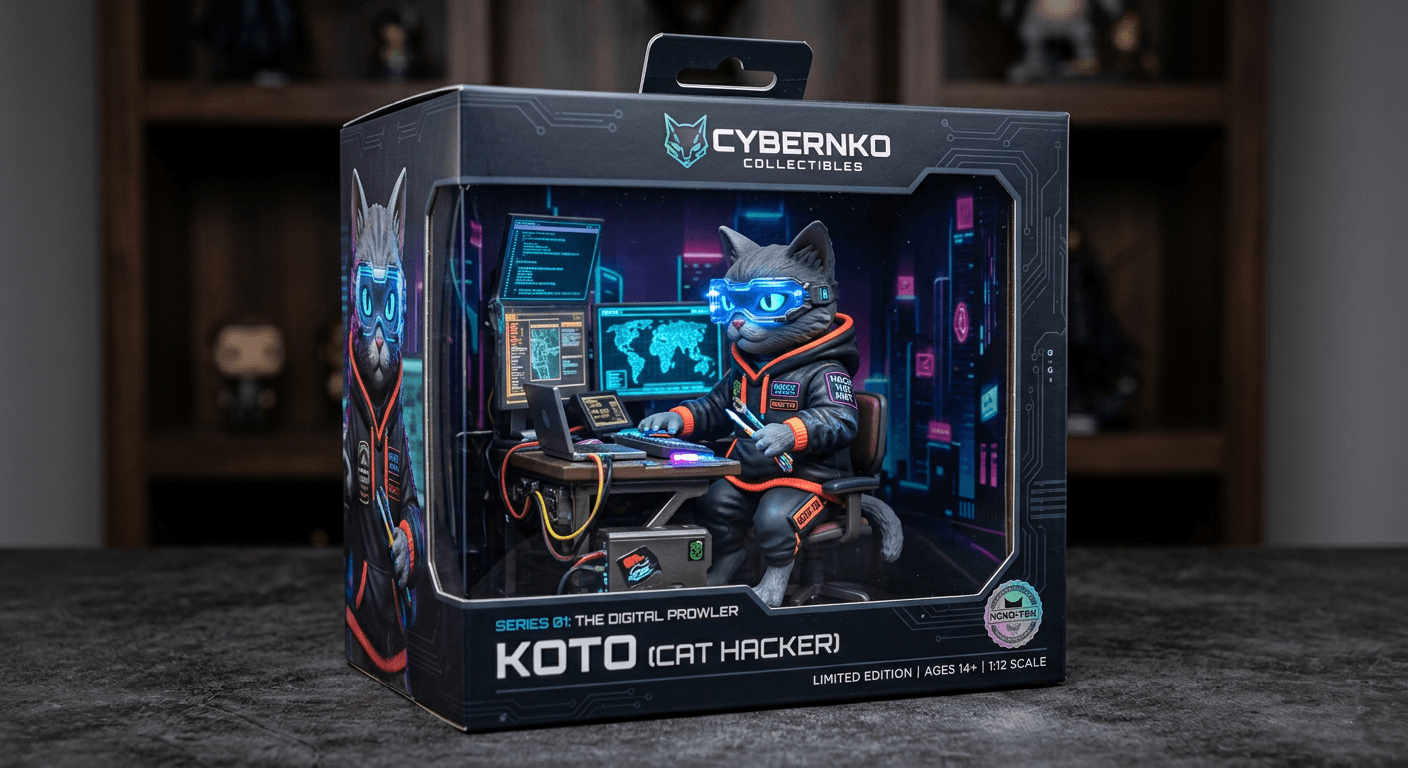
以下是 AI 生成的產品攝影範例:
為何 2026 年選擇 AI 產品攝影是明智之舉
AI 生成產品圖像的必要性已不再是理論。電子商務品牌已將 AI 產品攝影應用於目錄圖像、社群媒體素材和廣告創意中。原因非常直接:
- 速度:每小時可生成數百張產品圖像,無需安排多天的拍攝行程。
- 成本:單張 AI 生成圖像的成本僅為 USD0.01 至 USD0.054。傳統產品攝影在計入攝影棚租金、設備和後期製作後,每張照片成本高達 USD25 至 USD150。
- 一致性:每張圖像都遵循相同的燈光、角度和風格準則,不會因拍攝場次不同而產生差異。
- 迭代:無需重新拍攝即可測試不同的背景、燈光設置和構圖。
- 規模:為數千個 SKU 生成圖像,而無需按比例增加攝影預算。
目前的技術水準已達到大多數電商應用場景中,AI 生成的產品照片與傳統攝影難以區分的程度。剩下的問題是該使用哪些模型以及如何有效地編寫提示詞。
AI 產品攝影的最佳模型
Atlas Cloud 透過單一 API 金鑰提供 300 多種 AI 模型的存取權限。針對產品攝影,有三款模型表現突出,且各有優勢。
Seedream v5.0 Lite -- 寫實攝影主力
| 規格 | 詳情 |
| 開發者 | ByteDance |
| 模型 ID | `bytedance/seedream-v5.0-lite/sequential` |
| 最高解析度 | 4K |
| 速度 | ~3 秒 |
| 價格 | USD0.032/張 |
| 最佳用途 | 純淨產品照、純白背景、攝影棚燈光 |
Seedream v5.0 Lite 是高產量產品攝影的首選。它生成速度快,能可靠地處理攝影棚燈光場景,並能產出構圖乾淨、色彩渲染準確的圖像。當您需要 500 張帶有白色背景且燈光一致的產品照時,Seedream v5.0 Lite 能穩定交付成果。
其速度優勢在規模化時更為顯著。以每張生成 3 秒計算,1,000 張圖像的批次處理可在不到一小時內完成。以每張 USD0.032 的價格計算,該批次總成本僅為 USD32——大約相當於傳統產品攝影一張照片的費用。
Imagen 4 Ultra -- 頂級品質
| 規格 | 詳情 |
| 開發者 | Google DeepMind |
| 模型 ID | `google/imagen-4-ultra/text-to-image` |
| 最高解析度 | 4K |
| 速度 | ~8 秒 |
| 價格 | USD0.054/張 |
| 最佳用途 | 主視覺圖(Hero images)、奢侈品、生活場景 |
Imagen 4 Ultra 可產出目前市面上所有公開圖像生成 API 中最逼真的影像。材質紋理(如皮革紋路、金屬拉絲、玻璃反射)的渲染具有極高的保真度。對於登陸頁面的主視覺圖、高端品牌攝影,以及任何需要以全尺寸檢視並細緻觀察的場景,Imagen 4 Ultra 值得其稍高的成本與較長的生成時間。
該模型在圖像內的文字渲染方面也表現出色。如果您的產品包裝包含需要清晰可見的品牌名稱、標籤或成分表,Imagen 4 Ultra 能以極高的準確度處理。
Nano Banana 2 -- 3D 產品視覺化
| 規格 | 詳情 |
| 開發者 | Nano Banana |
| 模型 ID | `google/nano-banana-2/text-to-image` |
| 最高解析度 | 4K |
| 速度 | ~5 秒 |
| 價格 | USD0.013/張 |
| 最佳用途 | 3D 風格產品渲染、等距視圖、產品爆炸圖 |
Nano Banana 2 為產品攝影帶來了獨特的能力——3D 風格渲染,能產出類似專業 3D 產品視覺化的圖像。這對於電子產品、小工具,以及任何需要展示內部組件、多角度或爆炸圖以增加價值的產品特別有價值。
該模型理解等距視角、產品剖面圖和懸浮組件排列等概念。對於科技產品、家電以及工程細節即賣點的商品,Nano Banana 2 能創造出傳統上需要 3D 建模團隊才能完成的影像。
如何存取 Atlas Cloud 圖像生成 API
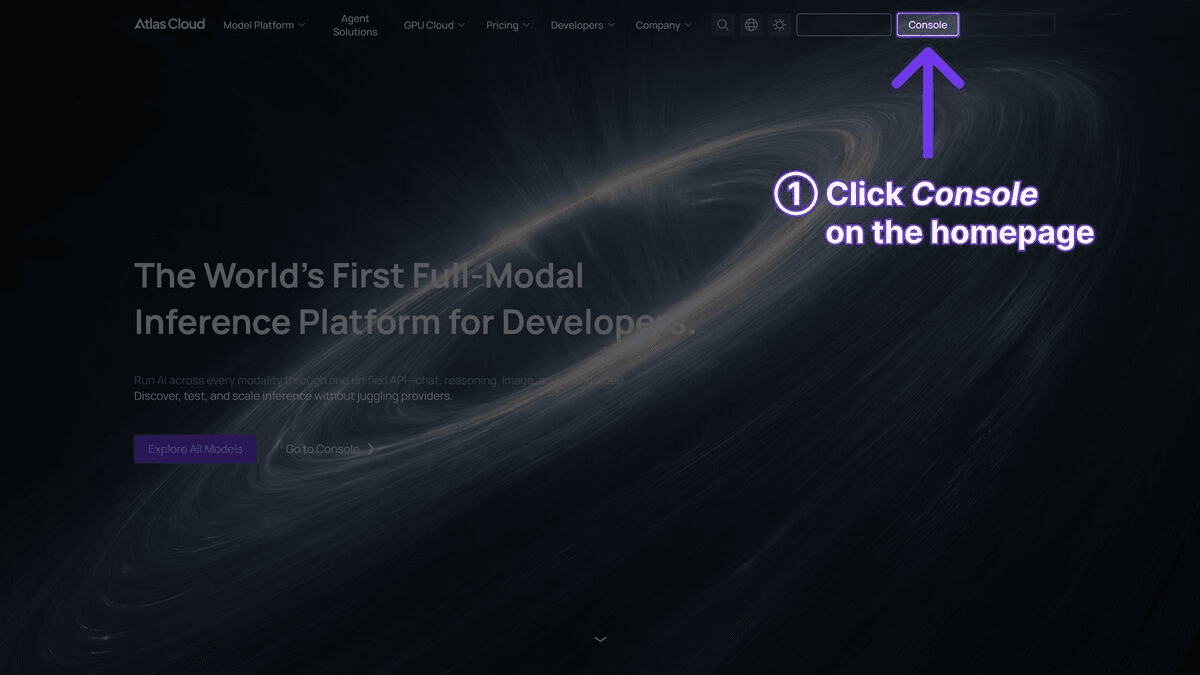
第一步:取得 API 金鑰
在 Atlas Cloud 註冊並從儀表板建立 API 金鑰。
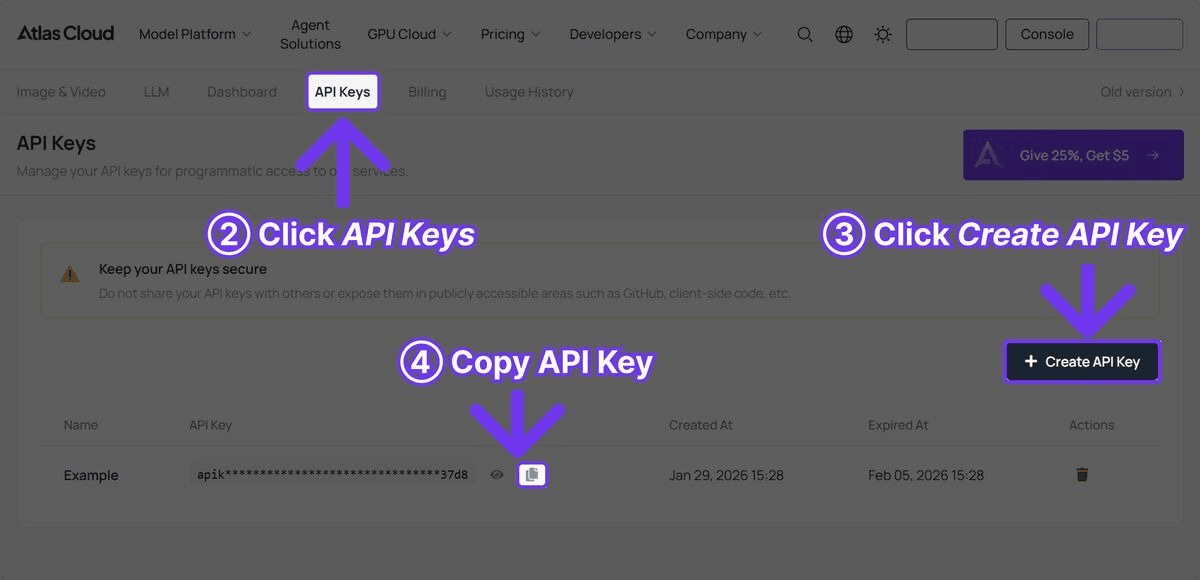
第二步:生成您的第一張產品照片
plaintext1```python 2import requests 3import time 4 5 6API_KEY = "your-atlas-cloud-api-key" 7BASE_URL = "https://api.atlascloud.ai/api/v1" 8 9 10# 使用 Seedream v5.0 Lite 生成產品照片 11response = requests.post( 12 f"{BASE_URL}/model/generateImage", 13 headers={ 14 "Authorization": f"Bearer {API_KEY}", 15 "Content-Type": "application/json" 16 }, 17 json={ 18 "model": "bytedance/seedream-v5.0-lite/sequential", 19 "prompt": "Professional product photo of a minimalist ceramic coffee mug, pure white background, soft studio lighting from upper left, subtle shadow beneath, commercial photography style, 8K detail", 20 "width": 1024, 21 "height": 1024 22 } 23) 24 25 26result = response.json() 27 28 29# 輪詢以獲取完成的圖像 30while True: 31 status = requests.get( 32 f"{BASE_URL}/model/prediction/{result['request_id']}/get", 33 headers={"Authorization": f"Bearer {API_KEY}"} 34 ).json() 35 if status["status"] == "completed": 36 print(f"Image URL: {status['output']['image_url']}") 37 break 38 time.sleep(3) 39```
第三步:API 會立即回傳一個 `request_id`。輪詢預測端點直到狀態為 `completed`,然後從回應中擷取圖像 URL。對於 Seedream v5.0 Lite,生成通常在 3 到 5 秒內完成。
各產品類別的提示詞模板
普通 AI 產品照與專業級作品的區別在於提示詞。以下是按產品類別整理的測試提示詞模板。每個模板都包含產生一致、高品質結果的關鍵要素。
化妝品與美容
plaintext1``` 2Professional product photography of [PRODUCT], placed on [SURFACE], 3[LIGHTING] lighting, [BACKGROUND]. Soft bokeh background with 4[ACCENT ELEMENTS]. Beauty editorial style, high-end magazine quality, 5sharp focus on product, 8K resolution. 6``` 7 8 9範例: 10``` 11Professional product photography of a rose gold lipstick tube with 12cap removed showing deep red shade, placed on a polished marble 13surface, warm golden hour lighting, cream-colored gradient background. 14Soft bokeh background with scattered rose petals. Beauty editorial 15style, high-end magazine quality, sharp focus on product, 8K resolution. 16```
化妝品關鍵要素:指定產品的確切色號。包含表面材質(大理石、玻璃、絲綢)。使用溫暖的燈光描述。提及編輯風格或雜誌風格以觸發高端構圖。
電子產品與科技
plaintext1``` 2Commercial product photo of [PRODUCT], [ANGLE] view, [BACKGROUND], 3[LIGHTING]. Clean minimalist composition, [DETAIL FOCUS]. Technology 4product photography, sharp detail rendering, professional studio setup. 5``` 6 7 8範例: 9``` 10Commercial product photo of wireless noise-canceling headphones in 11matte black finish, three-quarter angle view, pure white seamless 12background, dramatic side lighting with subtle rim light. Clean 13minimalist composition, visible texture on ear cushion leather and 14brushed aluminum headband. Technology product photography, sharp 15detail rendering, professional studio setup. 16```
電子產品關鍵要素:指定材質表面(霧面、亮面、拉絲)。使用戲劇性或方向性燈光來凸顯外形。包含特定紋理和材質的細節。保持乾淨、極簡的背景。
時尚與服飾
plaintext1``` 2Fashion product photography of [ITEM] in [COLOR/PATTERN], [DISPLAY METHOD], 3[BACKGROUND], [LIGHTING]. [FABRIC DETAIL]. Commercial catalog style, 4true-to-life colors, professional fashion photography. 5``` 6 7 8範例: 9``` 10Fashion product photography of a tailored navy blue wool blazer, 11displayed on an invisible mannequin showing natural drape and structure, 12light gray seamless background, soft diffused studio lighting from 13both sides. Visible wool texture and stitching detail on lapel. 14Commercial catalog style, true-to-life colors, professional fashion 15photography. 16```
時尚關鍵要素:指定服裝展示方式(平鋪、人台、衣架)。明確描述布料紋理。使用「true-to-life colors」(真實色彩)以防止 AI 色彩偏移。包含製作細節(縫線、接縫、鈕扣)。
食品與飲料
plaintext1``` 2Food photography of [ITEM], [PLATING/PRESENTATION], [SURFACE], 3[LIGHTING]. [GARNISH/STYLING]. Appetizing commercial food photography, 4[MOOD], shallow depth of field, 8K detail. 5``` 6 7 8範例: 9``` 10Food photography of artisan sourdough bread loaf with golden crust 11and visible scoring pattern, sliced to reveal open crumb structure, 12placed on a rustic wooden cutting board with linen cloth beneath, 13warm natural window lighting from the left. Scattered flour dusting 14and wheat stalks as props. Appetizing commercial food photography, 15warm and inviting mood, shallow depth of field, 8K detail. 16```
食品關鍵要素:務必指定燈光方向(側光或背光效果最佳)。包含表面和道具細節。使用「appetizing」(令人垂涎的)作為風格修飾詞。描述紋理(酥脆、糖霜、蒸氣)。
珠寶
plaintext1``` 2Jewelry product photography of [PIECE] in [METAL/MATERIAL], [DISPLAY], 3[BACKGROUND], [LIGHTING]. [DETAIL FOCUS]. Luxury jewelry commercial, 4precise detail on [SPECIFIC ELEMENTS], high-end advertising quality. 5``` 6 7 8範例: 9``` 10Jewelry product photography of a solitaire diamond engagement ring 11in platinum setting, displayed on a black velvet ring cushion, 12dark gradient background transitioning from charcoal to black, 13precise spot lighting creating brilliant diamond refraction and 14metal highlights. Extreme close-up detail showing diamond facets 15and prong setting. Luxury jewelry commercial, precise detail on 16stone clarity and metal polish, high-end advertising quality. 17```
珠寶關鍵要素:使用深色背景以增強對比和奢華感。指定能創造反射和折射的燈光。包含材質細節(鉑金、黃金、純銀)。要求寶石和鑲嵌處的極致細節。
完整批次生成腳本
對於生產環境,您需要一個能處理多個產品、多個模型、錯誤恢復並組織輸出的腳本。以下 Python 腳本提供了一個完整的批次生成系統。
plaintext1```python 2import requests 3import time 4import json 5import os 6from concurrent.futures import ThreadPoolExecutor, as_completed 7from dataclasses import dataclass 8from typing import Optional 9 10 11API_KEY = "your-atlas-cloud-api-key" 12BASE_URL = "https://api.atlascloud.ai/api/v1" 13OUTPUT_DIR = "product_photos" 14 15 16@dataclass 17class ProductShot: 18 name: str 19 prompt: str 20 model: str = "bytedance/seedream-v5.0-lite/sequential" 21 width: int = 1024 22 height: int = 1024 23 24 25def generate_image(shot: ProductShot) -> dict: 26 """提交圖像生成請求。""" 27 response = requests.post( 28 f"{BASE_URL}/model/generateImage", 29 headers={ 30 "Authorization": f"Bearer {API_KEY}", 31 "Content-Type": "application/json" 32 }, 33 json={ 34 "model": shot.model, 35 "prompt": shot.prompt, 36 "width": shot.width, 37 "height": shot.height 38 } 39 ) 40 response.raise_for_status() 41 return response.json() 42 43 44def poll_result(request_id: str, max_wait: int = 120) -> Optional[str]: 45 """輪詢圖像完成狀態。回傳圖像 URL 或 None。""" 46 start_time = time.time() 47 while time.time() - start_time < max_wait: 48 response = requests.get( 49 f"{BASE_URL}/model/prediction/{request_id}/get", 50 headers={"Authorization": f"Bearer {API_KEY}"} 51 ) 52 data = response.json() 53 if data["status"] == "completed": 54 return data["output"]["image_url"] 55 elif data["status"] == "failed": 56 print(f" Generation failed for {request_id}: {data.get('error', 'Unknown')}") 57 return None 58 time.sleep(3) 59 print(f" Timeout waiting for {request_id}") 60 return None 61 62 63def download_image(url: str, filepath: str): 64 """將生成的圖像下載到磁碟。""" 65 response = requests.get(url) 66 response.raise_for_status() 67 with open(filepath, "wb") as f: 68 f.write(response.content) 69 70 71def process_shot(shot: ProductShot) -> dict: 72 """生成、輪詢並下載單個產品照。""" 73 print(f"Generating: {shot.name}") 74 try: 75 result = generate_image(shot) 76 request_id = result["request_id"] 77 image_url = poll_result(request_id) 78 if image_url: 79 filename = f"{shot.name.replace(' ', '_').lower()}.png" 80 filepath = os.path.join(OUTPUT_DIR, filename) 81 download_image(image_url, filepath) 82 print(f" Saved: {filepath}") 83 return {"name": shot.name, "status": "success", "file": filepath} 84 return {"name": shot.name, "status": "failed", "file": None} 85 except Exception as e: 86 print(f" Error: {e}") 87 return {"name": shot.name, "status": "error", "file": None} 88 89 90def batch_generate(shots: list[ProductShot], max_workers: int = 5): 91 """並發處理多個產品照。""" 92 os.makedirs(OUTPUT_DIR, exist_ok=True) 93 results = [] 94 with ThreadPoolExecutor(max_workers=max_workers) as executor: 95 futures = {executor.submit(process_shot, shot): shot for shot in shots} 96 for future in as_completed(futures): 97 results.append(future.result()) 98 99 100 # 摘要 101 success = sum(1 for r in results if r["status"] == "success") 102 failed = sum(1 for r in results if r["status"] != "success") 103 print(f"\nBatch complete: {success} succeeded, {failed} failed") 104 return results 105 106 107 108# 定義您的產品照 109products = [ 110 ProductShot( 111 name="Coffee Mug White BG", 112 prompt="Professional product photo of a minimalist white ceramic " 113 "coffee mug, pure white seamless background, soft studio " 114 "lighting from upper left, subtle shadow, commercial style, 8K" 115 ), 116 ProductShot( 117 name="Coffee Mug Lifestyle", 118 prompt="Lifestyle product photo of a white ceramic coffee mug filled " 119 "with latte art, placed on a wooden cafe table, morning sunlight " 120 "through window, warm tones, shallow depth of field, editorial", 121 model="google/imagen-4-ultra/text-to-image" 122 ), 123 ProductShot( 124 name="Headphones Hero", 125 prompt="Commercial product photo of premium wireless headphones in " 126 "matte black, floating at slight angle, dark gradient background, " 127 "dramatic rim lighting, technology product photography, 8K detail", 128 model="google/imagen-4-ultra/text-to-image" 129 ), 130 ProductShot( 131 name="Headphones 3D Exploded", 132 prompt="3D product visualization of wireless headphones with exploded " 133 "view showing internal components, drivers, cushions, and frame " 134 "separated and floating, isometric perspective, clean white " 135 "background, technical product render style", 136 model="google/nano-banana-2/text-to-image" 137 ), 138 ProductShot( 139 name="Lipstick Beauty", 140 prompt="Beauty product photography of luxury red lipstick tube with " 141 "cap removed, placed on polished marble surface, warm golden " 142 "lighting, cream gradient background, scattered rose petals, " 143 "high-end magazine editorial quality, 8K resolution" 144 ), 145] 146 147 148if __name__ == "__main__": 149 results = batch_generate(products, max_workers=3) 150 # 儲存結果清單 151 with open(os.path.join(OUTPUT_DIR, "manifest.json"), "w") as f: 152 json.dump(results, f, indent=2) 153```
此腳本處理並發生成、自動輪詢、檔案下載,並產生一個追蹤所有結果的清單檔案。根據您的 Atlas Cloud 速率限制調整 `max_workers` —— 3 到 5 個並發請求是一個安全的起點。
背景生成與場景放置技巧
AI 產品攝影最強大的技術之一是控制背景和場景環境。同一產品在不同背景下拍攝,可服務於完全不同的行銷目的。
白色背景(電商標準)
使用諸如「pure white seamless background」(純白無縫背景)、「white cyclorama studio」(白色攝影棚)或「white infinity cove」(白色無窮弧面)等短語。添加「no shadows」(無陰影)以獲得完全乾淨的去背效果,或「subtle contact shadow」(細微接觸陰影)以獲得在白色背景上看起來依然專業的落地感。
生活場景
詳細描述環境。不要只說「廚房背景」,而應使用「modern Scandinavian kitchen with light oak countertops, brushed brass fixtures, morning light through frosted glass window」(帶有淺橡木檯面、拉絲黃銅裝置、晨光透過磨砂玻璃窗的現代斯堪地那維亞廚房)。場景描述越具體,放置效果就越真實。
季節性與活動背景
AI 生成使季節性變體變得輕而易舉。將同一產品與「autumn foliage backdrop with warm amber lighting」(帶有溫暖琥珀色燈光的秋葉背景)、「snowy winter scene with soft blue tones」(帶有柔和藍色調的雪景)或「tropical beach setting with turquoise water」(帶有綠松石色海水的熱帶海灘場景)進行組合。原本需要多次拍攝的工作,現在只需更改提示詞即可。
色彩協調
透過指定確切色調來匹配品牌色盤。「Background in hex #F5E6D3 warm beige」(十六進位 #F5E6D3 暖米色背景)或「background matching Pantone Classic Blue」(與 Pantone 經典藍匹配的背景)能為模型提供足夠的指導,以持續產出符合品牌的影像。
表面與道具選擇
表面能將產品錨定在現實中。常見的有效組合:
- 化妝品:大理石、玻璃、絲綢布料、玫瑰金托盤
- 電子產品:混凝土、板岩、深色木材、拉絲金屬
- 食品:鄉村木材、亞麻、陶瓷盤、天然石材
- 珠寶:天鵝絨、緞面、鏡面、深色皮革
- 時尚:中性亞麻、風化木、極簡衣架
AI 產品攝影與傳統攝影對比
| 因素 | 傳統攝影 | AI 產品攝影 |
| 單張成本 | USD25-150 | USD0.01-0.054 |
| 設置時間 | 每次拍攝 2-8 小時 | 0(基於提示詞) |
| 周轉時間 | 1-5 個工作日 | 秒至分鐘 |
| 一致性 | 拍攝間存在差異 | 每次參數完全相同 |
| 擴展至 1000 個 SKU | USD25,000-150,000 | USD10-54 |
| 背景變體 | 每個背景需單獨拍攝 | 更改提示詞 |
| 季節性活動 | 每個季節需重新拍攝 | 新提示詞,相同 API 呼叫 |
| 是否需要實體產品 | 是 | 否(根據描述生成) |
| 複雜燈光設置 | 數小時調整 | 在提示詞中描述 |
| 真人模特兒 | 額外成本 + 安排行程 | 不支援產品穿戴於模特兒身上 |
| 後期製作 | 需要(修圖、調色) | 極少或無需 |
傳統攝影仍具優勢之處
AI 產品攝影並非萬能替代品。傳統攝影在特定場景下依然優越:
- 真人模特兒展示產品: 真人穿戴的時尚單品、塗抹在皮膚上的化妝品,以及佩戴在身上的飾品,仍需傳統攝影。AI 模型可以生成人物,但對於近距離商業用途,仍存在「恐怖谷」風險。
- 印刷精確色彩匹配: 當色彩必須精確匹配實體樣本以進行印刷目錄時,使用校準顯示器和打樣流程的傳統攝影更為可靠。
- 複雜的多產品構圖: 在單一畫面中安排 20 個產品並具有特定的空間關係,由造型師指導比使用提示詞更容易。
- 法規合規性: 某些行業(藥品、食品標籤)可能要求產品圖像必須描繪實際產品,而非生成的表現形式。
AI 攝影的主導領域
- 目錄規模: 任何擁有數百或數千個 SKU 的企業都能從 AI 生成中獲得巨大收益。
- 快速迭代: 為廣告創意測試不同的背景、角度和構圖。
- 預生產視覺化: 在實體產品存在之前生成產品圖像,這對眾籌活動和預購非常有用。
- 國際化變體: 生成具有不同區域包裝或在地化文字覆蓋的同一產品。
常見錯誤及其修正方法
錯誤 1:提示詞模糊
問題: 「Photo of a shoe」(鞋子的照片)會產生通用且無法使用的輸出。
修正: 對每個元素都要具體。「Professional product photo of a men's brown leather oxford dress shoe, three-quarter angle from front-left, pure white background, soft diffused studio lighting, visible leather grain texture and stitching detail, commercial catalog photography, 8K resolution.」
錯誤 2:忽略燈光方向
問題: 平淡、無趣的燈光使產品看起來像剪貼畫。
修正: 務必指定燈光方向和類型。「Key light from upper left at 45 degrees, fill light from right, subtle rim light from behind」(左上方 45 度主光,右側補光,後方細微輪廓光)能創造深度和維度。電子產品使用「dramatic side lighting」(戲劇性側光),化妝品使用「soft diffused lighting」(柔和漫射光)。
錯誤 3:選錯模型
問題: 在需要極致寫實的主視覺圖中使用 Seedream v5.0 Lite,或在需要速度的批次目錄照中使用 Imagen 4 Ultra。
修正: 將模型與應用場景匹配。Seedream v5.0 Lite 用於大量生成。Imagen 4 Ultra 用於高端產品。Nano Banana 2 用於 3D 視覺化。使用上述批次腳本,您可以在同一次執行中為不同產品類型分配不同模型。
錯誤 4:長寬比不一致
問題: 在產品目錄中混合使用 1:1、4:3 和 16:9 的圖像會造成不連貫的瀏覽體驗。
修正: 在生成前統一尺寸。電商平台通常使用正方形(1024x1024)進行產品列表。在 API 呼叫中一致地設定寬度和高度,並在批次配置中強制執行。
錯誤 5:過度提示
問題: 在提示詞中塞入 20 個不同的風格修飾詞會產生混亂、模糊的輸出。
修正: 保持提示詞聚焦。產品攝影提示詞需要五個要素:主體描述、背景、燈光、角度/構圖和風格參考。其他都是雜訊。「Professional product photo of [subject], [background], [lighting], [composition], [style], 8K resolution」即為標準模板。
錯誤 6:缺乏後期處理流程
問題: 直接使用 AI 生成的圖像而不進行任何品質檢查或調整。
修正: 即使是 AI 生成的圖像,也受益於基本的後期處理。在您的流程中實施審查步驟,檢查常見偽影,根據品牌準則驗證色彩準確性,並應用一致的裁切。盡可能自動化,但對主視覺圖保留人工審查。
大規模產品攝影成本估算
| 數量 | 模型 | 單張成本 | 總成本 | 時間(並發) |
| 100 張 | Seedream v5.0 Lite | USD0.032 | USD3.20 | ~5 分鐘 |
| 100 張 | Imagen 4 Ultra | USD0.054 | USD5.40 | ~15 分鐘 |
| 500 張 | Seedream v5.0 Lite | USD0.032 | USD16.00 | ~20 分鐘 |
| 500 張 | Imagen 4 Ultra | USD0.054 | USD27.00 | ~60 分鐘 |
| 1,000 張 | Seedream v5.0 Lite | USD0.032 | USD32.00 | ~40 分鐘 |
| 5,000 張 | Seedream v5.0 Lite | USD0.032 | USD160.00 | ~3 小時 |
這些估算假設 3-5 個並發 API 請求。實際成本會根據解析度和提示詞複雜度略有不同。與傳統攝影每張 USD25-150 的成本相比,經濟效益顯而易見——1,000 張傳統產品照成本高達 USD25,000 至 USD150,000,而 AI 生成僅需 USD32。
常見問題解答
我應該為產品攝影使用哪個模型?
對於大多數電商產品照,請從 Seedream v5.0 Lite 開始。它在目錄規模生成的速度、成本和品質之間提供了最佳平衡。對於主視覺圖和高端品牌攝影,請使用 Imagen 4 Ultra。當您需要 3D 風格產品渲染或爆炸圖時,請使用 Nano Banana 2。
我可以在沒有實體產品的情況下生成產品照片嗎?
可以。AI 圖像生成完全基於文字描述。這使其對預生產視覺化、眾籌活動和開發中產品的圖像生成非常有用。詳細描述產品——材質、顏色、尺寸、設計特徵——模型就會生成相應的圖像。
如何保持產品線的一致性?
使用具有固定元素(背景、燈光、角度、風格)的一致提示詞模板,僅更改產品描述。上述批次腳本展示了此模式。將您的模板儲存為配置,並以程式化方式強制執行一致性,而不是依賴手動編寫提示詞。
AI 生成的產品照片可以合法用於商業用途嗎?
透過 Atlas Cloud API 生成的圖像可用於商業用途。但是,請避免生成與商標設計、受版權保護的藝術品或可識別的真實人物過於相似的圖像。當生成帶有品牌名稱或標誌的產品時,請使用您自己的品牌資產,而不是生成競爭對手的品牌。
我應該以什麼解析度生成?
對於電商列表,1024x1024 是標準且足夠的。對於主視覺圖、登陸頁面或印刷材料,請以 4K 解析度生成。較高的解析度成本略高,但為裁切和多格式使用提供了靈活性。
結論
AI 產品攝影已跨越從實驗性到生產就緒的門檻。對於大規模生成目錄影像的電商團隊而言,結合 Seedream v5.0 Lite(用於產量)、Imagen 4 Ultra(用於高端攝影)和 Nano Banana 2(用於 3D 視覺化),幾乎涵蓋了所有產品攝影需求。本指南中的批次生成腳本提供了一個可運作的基礎——根據您的產品類別自訂提示詞模板,設定您偏好的模型,然後開始生成。
投資報酬率(ROI)的計算很簡單。如果您每月在產品攝影上花費超過 USD200,透過 Atlas Cloud 進行 AI 生成將能降低 90% 以上的成本,同時提供更快的周轉速度和更高的一致性。
────────────────────────────────────────────────────────────





