Like everyone else, I was captivated when I first started exploring AI-generated images. However, the conversation entirely changed when I needed to embed image generation into a real product.
Most users see a prompt box. I see an API endpoint, a latency budget, and a monthly invoice.
Choosing the best AI image API for a production pipeline is nothing like picking a favorite web UI. Suddenly, the questions that matter are:
- How does image quality hold up at scale?
- What does API pricing look like after 10,000 requests?
- Are there reliable developer tools for monitoring and retries?
The explosion of Midjourney API alternatives has made this decision harder — and more interesting. Each provider makes bold claims, but claims don't survive contact with a real codebase.
My goal is simple: give developers the honest, side-by-side breakdown I wish I'd had before building.
Let's get into it.
The Deep Dives: A Head-to-Head Comparison
A. GPT Image 2.0: The Intelligent Logic Leader
Of all the Midjourney API alternatives I've tested, GPT Image 2.0 stands out for one reason above all others: it actually thinks about what you're asking.
What Sets It Apart
Where most models pattern-match your prompt to a visual aesthetic, GPT Image 2.0 processes layered, relational instructions with remarkable accuracy. Tell it to place an object behind another, or to the left of a third element — and it largely delivers. That kind of spatial reasoning has historically been a weak point across image generators.
Text rendering is another genuine strength. Logos, labels, signs, UI mockups — this is where my image quality evaluation consistently scored it highest among the five contenders.
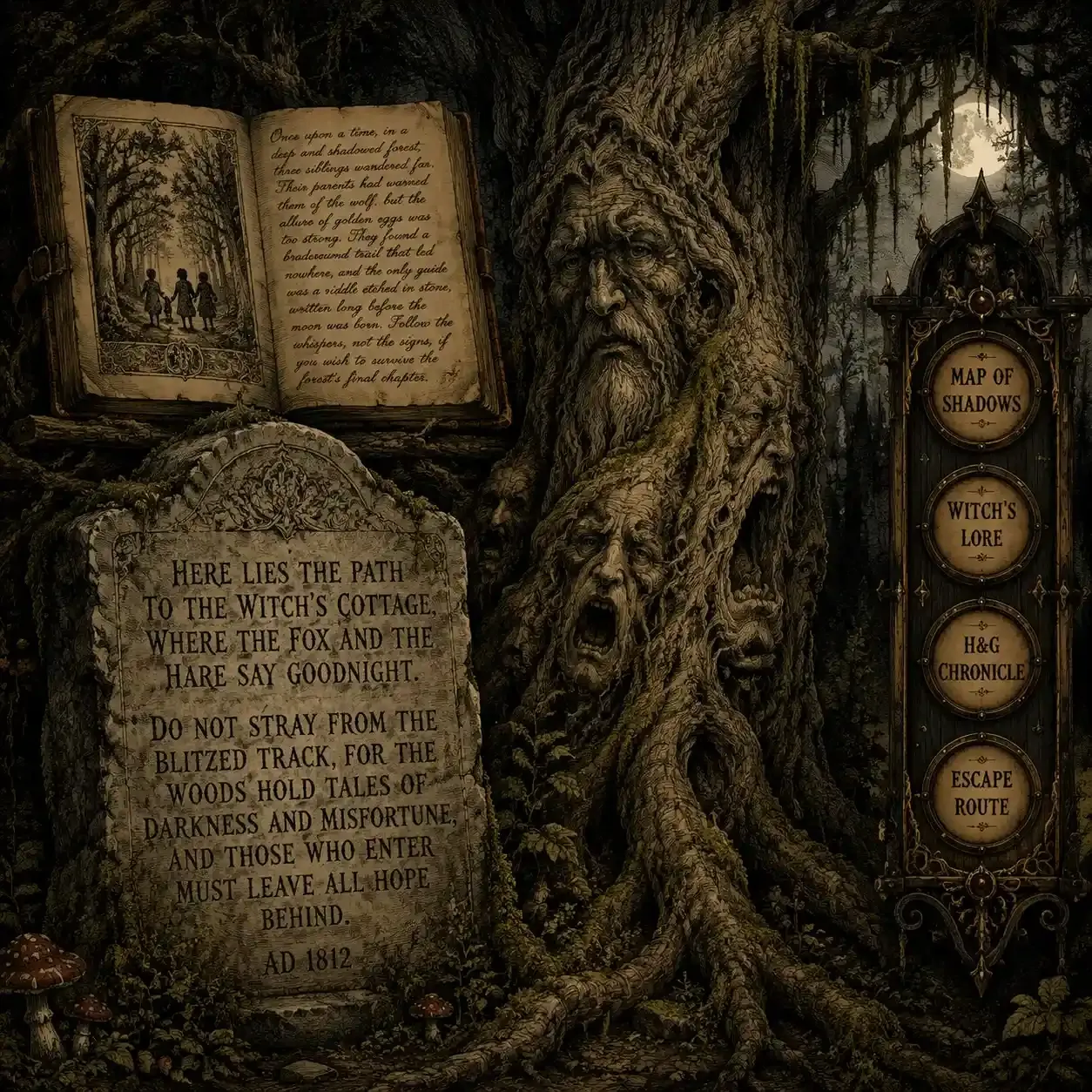
To put GPT Image 2.0 to the test, I built a prompt focused on three main goals. I checked spatial logic with layered objects, tested text quality using long stories in different fonts, and combined modern app designs with old-fashioned woodcut art.
Strengths at a Glance
| Capability | Performance |
| Spatial / relational reasoning | ★★★★★ |
| Text rendering in-image | ★★★★★ |
| Complex multi-element layouts | ★★★★☆ |
| Stylistic flexibility | ★★★☆☆ |
The Trade-offs I Noticed
It's not without friction. As part of my API pricing comparison, I found that high-resolution outputs sit behind stricter usage tiers — meaning costs scale faster than some competing developer tools for AI. Latency at 1024×1024 is also noticeably higher than lighter alternatives.
Best For
- Diagramming tools and technical illustration pipelines
- Any product where text accuracy inside images is non-negotiable
- UI mockup generators or design-assist applications
If precise layout control is your priority, this is a serious candidate for the best AI image API in your stack.
B. Stable Diffusion / Stability AI: The Customizer's Dream
If GPT Image 2.0 is the model that understands your prompt, Stable Diffusion is the model you engineer. For developers who want granular control over every output variable, this ecosystem is in a league of its own among Midjourney API alternatives.
What Makes It Different
The real power here isn't the base model — it's the surrounding tooling. Two features in particular have shaped how I approach developer tools for AI pipelines:
- ControlNet — Locks down composition by feeding reference poses, depth maps, or edge lines. Consistency across generated images becomes genuinely achievable.
- LoRAs (Low-Rank Adaptation) — Fine-tune the model on specific styles, characters, or product aesthetics without full retraining. For brand-consistent outputs, nothing else comes close.
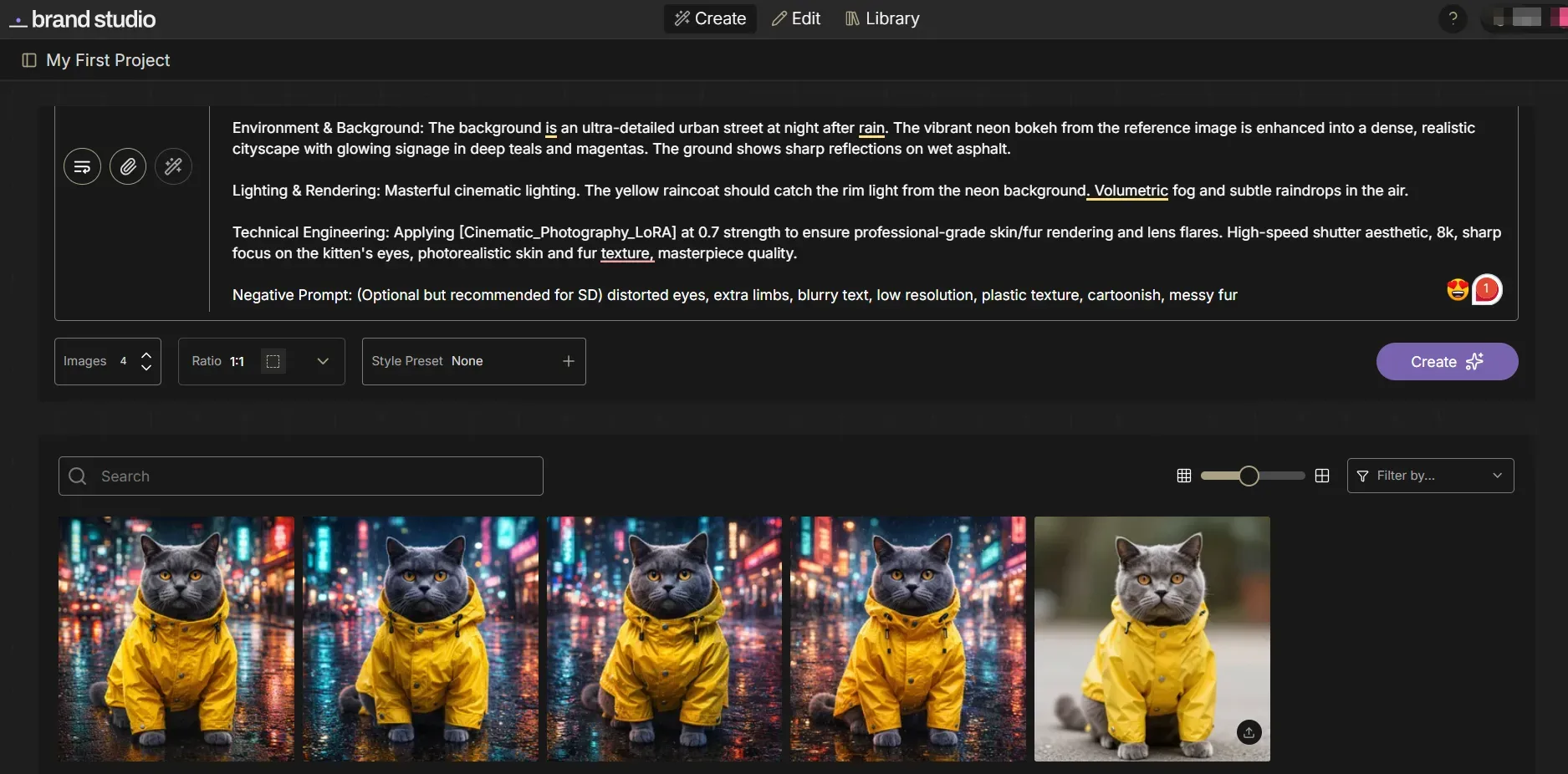
This result demonstrates the precision of Stable Diffusion's engineering workflow. By utilizing ControlNet to lock the original composition and LoRA to enhance the cinematic aesthetic, we transformed a simple reference into a high-fidelity, stylistically consistent series—proving why it is the ultimate tool for granular creative control.
Capability Snapshot
| Feature | SD XL | SD 3 |
| ControlNet support | ✅ Mature | ✅ Expanding |
| LoRA fine-tuning | ✅ Extensive | ✅ Supported |
| API stability | ★★★★☆ | ★★★☆☆ |
| Documentation quality | ★★★☆☆ | ★★★☆☆ |
The Real Gotcha
My honest take after doing this image quality evaluation: the results ceiling is high, but so is the ramp-up cost. Documentation is fragmented — SDXL and SD3 behave differently enough that guides rarely transfer cleanly. Budget more onboarding time than you expect.
When looking at API prices, running your own servers can really lower the cost of every image. It saves money, but your team will have more work to do to keep things running.
Best For
- E-commerce product imagery at scale
- Architecture visualization pipelines
- Any app requiring locked brand aesthetics across thousands of outputs
For teams with technical depth, this remains one of the most powerful candidates for the best AI image API in a custom workflow.
C. Flux.1 (via FAL.ai / Replicate): The New King of Realism
When I'm running a pure image quality evaluation focused on photorealism, Flux.1 consistently lands at the top of my results. Developed by Black Forest Labs and accessible through platforms like FAL.ai and Replicate, it's emerged as one of the most talked-about Midjourney API alternatives for production use.
Where It Genuinely Excels
Two areas stand out clearly in my testing:
- Photorealism — Skin texture, lighting gradients, material surfaces. Flux.1 Pro produces outputs that routinely fool a casual eye.
- In-image text rendering — This is where it separates itself from almost every competitor. Readable, accurately placed text inside a generated image is notoriously hard. Flux.1 handles it better than anything else I've tested.
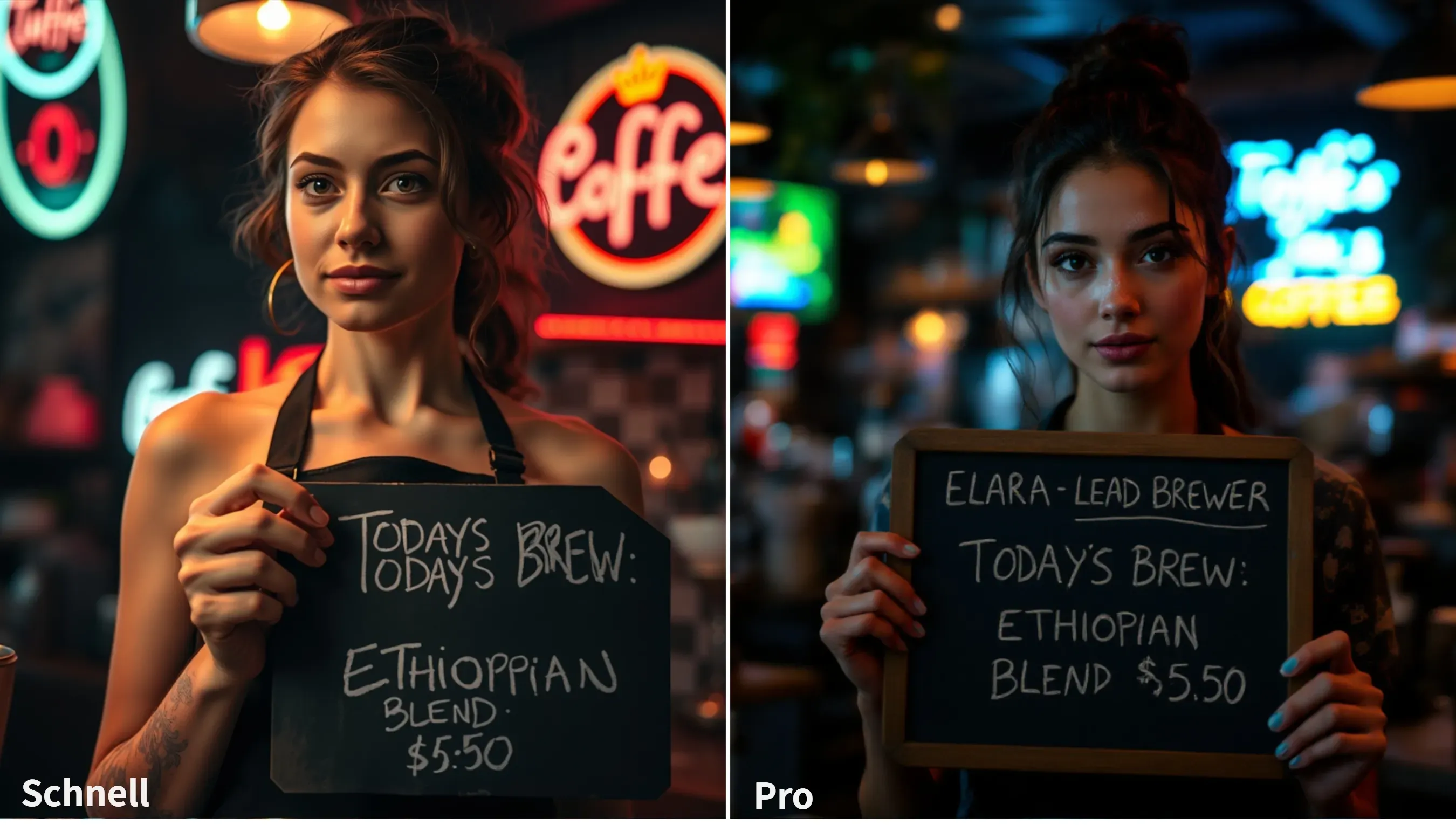
The Pro version (right) demonstrates superior prompt adherence, accurately rendering complex text and realistic skin textures with cinematic bokeh. In contrast, Schnell (left) shows minor spelling errors and a more processed, "AI-style" aesthetic.
Model Tier Comparison
| Model Variant | Speed | Quality | Best Use Case |
| Flux.1 Pro | Slower | ★★★★★ | Marketing assets, hero images |
| Flux.1 Dev | Moderate | ★★★★☆ | Prototyping, iteration |
| Flux.1 Schnell | Fast | ★★★☆☆ | High-volume, speed-first pipelines |
The Honest Trade-offs
From an API pricing comparison perspective, Flux.1 Pro is computationally expensive per image relative to SD-based options. And as a newer ecosystem, it lacks the depth of community LoRAs, workflows, and "recipes" that make Stable Diffusion so plug-and-play for experienced teams.
The developer tools for AI surrounding it are improving rapidly, but maturity still lags behind older ecosystems.
Best For
- Social media automation requiring high-visual-fidelity assets
- Marketing pipelines where text accuracy in images directly impacts output quality
- Teams prioritizing the best AI image API for realism over fine-tuning flexibility
D. Google Imagen (Vertex AI): The Enterprise Workhorse
When the conversation shifts from creative experimentation to regulated, large-scale deployment, Google Imagen on Vertex AI enters the picture differently from every other option on this list. I'd describe it less as a creative tool and more as a compliance-ready infrastructure decision.
What Defines It
Imagen isn't trying to win an artistic flair contest. It's built for organizations where auditability, safety, and platform integration outweigh stylistic range. Two features make it uniquely positioned in this API pricing comparison:
- SynthID — Google's proprietary digital watermarking technology, embedded invisibly into generated images for provenance tracking. For legal and compliance teams, this is a serious differentiator.
- Enterprise safety controls — Content filtering, usage policy enforcement, and access controls that meet the standards regulated industries actually require.
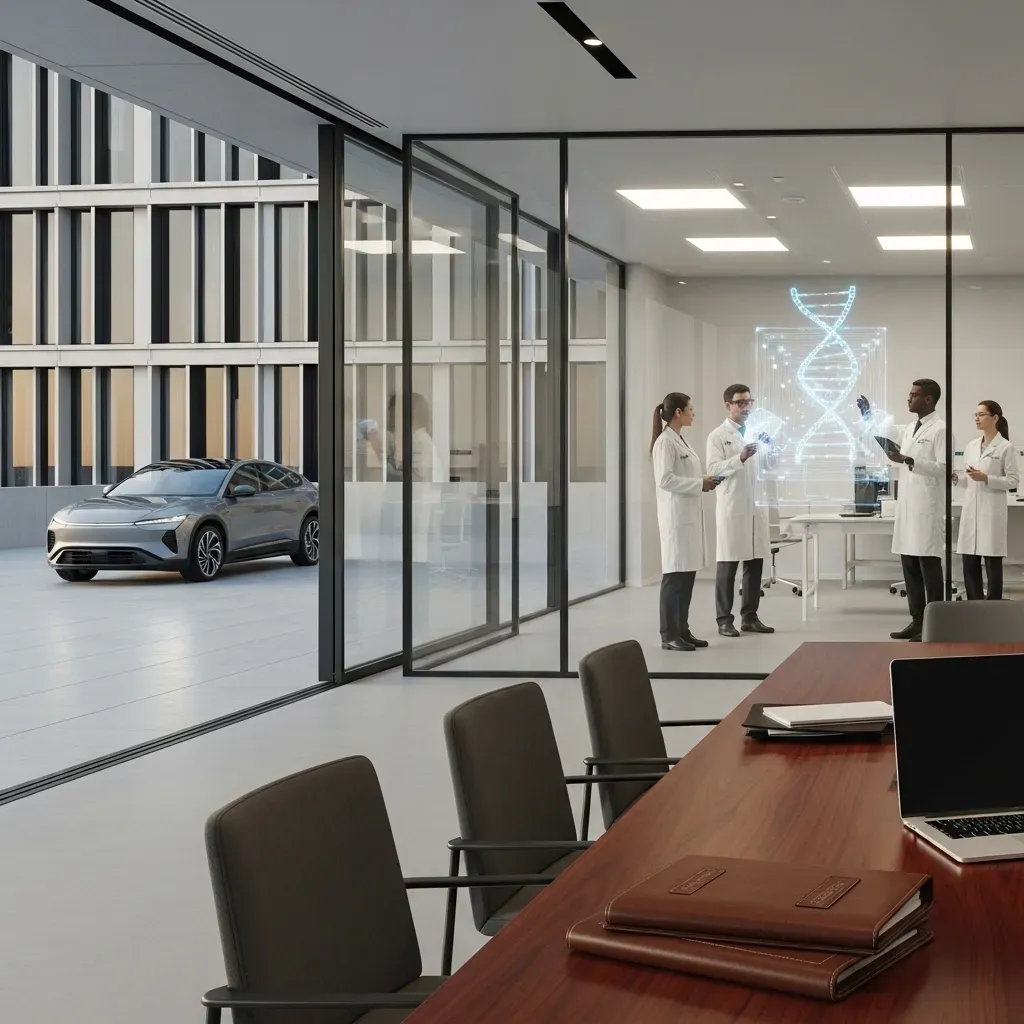
This integrated benchmark image showcases Google Imagen’s enterprise-grade precision. It easily fits three different worlds—law, medical labs, and car ads—into one organized layout. The final look focuses on steady work vibes, plain colors, and lifelike feels. This makes it a safe, solid choice for industries that need to follow strict rules and pass audits.
Enterprise Readiness Scorecard
| Criteria | Google Imagen | Industry Average |
| AI watermarking (SynthID) | ✅ Native | ❌ Rare |
| GCP IAM integration | ✅ Full | ❌ Limited |
| Content safety controls | ★★★★★ | ★★★☆☆ |
| Artistic style range | ★★★☆☆ | ★★★★☆ |
The Real Constraint
From a developer tools for AI standpoint, Imagen lives almost entirely inside the Google Cloud Platform ecosystem. If your stack isn't already GCP-aligned, onboarding friction is real. It's also not where I'd point anyone conducting a pure image quality evaluation for aesthetic or marketing-forward use cases.
Best For
- Internal tooling at Fortune 500 companies requiring image provenance
- Healthcare, finance, and legal platforms needing auditable AI outputs
- Teams already on GCP seeking Midjourney API alternatives with built-in governance
For regulated industries, this may simply be the best AI image API option — not because it's the prettiest, but because it's the most defensible.
E. DALL-E 3 (OpenAI): The "Set It and Forget It" Choice
Of all the options in this comparison, DALL-E 3 is the one I'd most confidently hand to a non-technical product team and walk away from. That's not a backhanded compliment — in certain deployment contexts, low-maintenance reliability is exactly what you need.
The Feature That Changes Everything
DALL-E 3 shines because it uses GPT-4 to rewrite prompts on the fly. It takes your basic ideas and automatically cleans them up before making the image. It fixes messy phrasing, clears up confusion, and adds the missing details for you. For apps where end-user prompts are unpredictable and wildly inconsistent, this is a genuine lifesaver that no other Midjourney API alternative natively replicates at this level.

This test effectively confirms DALL-E 3’s position as the "Set It and Forget It" choice. Even with loosely structured input, it optimizes the logic to produce a well-composed, detailed, and commercially appealing image, making it ideal for consumer-facing apps where prompt quality is unpredictable.
Reliability Snapshot
| Factor | DALL-E 3 | Notes |
| Prompt robustness | ★★★★★ | GPT-4 rewriting smooths bad inputs |
| Safety filtering | ★★★★★ | Sometimes over-sensitive |
| Cost per image | ★★☆☆☆ | Higher than most alternatives |
| Style flexibility | ★★★☆☆ | Solid, not exceptional |
Where It Falls Short
My image quality evaluation finds DALL-E 3 consistently good, but rarely breathtaking. The bigger friction point is its content filtering — it can trip on prompts that are entirely benign, which creates awkward user-facing failures in production. That's a real engineering problem to design around.
From a developer tools for AI standpoint, the OpenAI API is mature, well-documented, and integrates cleanly into most stacks.
Best For
- Chatbots and conversational creative assistants
- Consumer apps where prompt quality from end users is unpredictable
- Teams that want the best AI image API with the least operational babysitting
If your priority is reliability over raw output ceiling, DALL-E 3 earns its place in the stack.
The Stress Test: Same Prompt, Five Models
Reading specs only tells half the story. The real image quality evaluation happens when you run identical prompts across every model and let the outputs speak for themselves. That's exactly what I did — twice, with two very different prompt types.
Test 1: The Photorealism + Spatial Reasoning Challenge
Prompt theme: A futuristic medical lab scene with a doctor, robotic arms, diagnostic displays, and specific readable UI text.

This test targeted spatial composition, lighting realism, and in-image text accuracy simultaneously.
| Model | Photorealism | Spatial Layout | Text Legibility |
| GPT Image 2.0 | ★★★★★ | ★★★★★ | ★★★★★ |
| Stability AI | ★★★★☆ | ★★★★☆ | ★★★☆☆ |
| Flux.1 | ★★★★★ | ★★★★☆ | ★★★★☆ |
| Google Imagen | ★★★★☆ | ★★★☆☆ | ★★★☆☆ |
| DALL-E 3 | ★★★★☆ | ★★★★☆ | ★★★★☆ |
GPT Image 2.0 rendered "SYSTEM-DIAGNOSTICS v0.2" and "SMART CLINIC" with near-perfect clarity. Stability AI's photorealism impressed, but text on the diagnostic screen blurred under scrutiny.
Test 2: The Text Rendering Gauntlet
Prompt theme: A children's fantasy storybook scene with a wooden sign containing four specific lines of text plus a navigation menu.
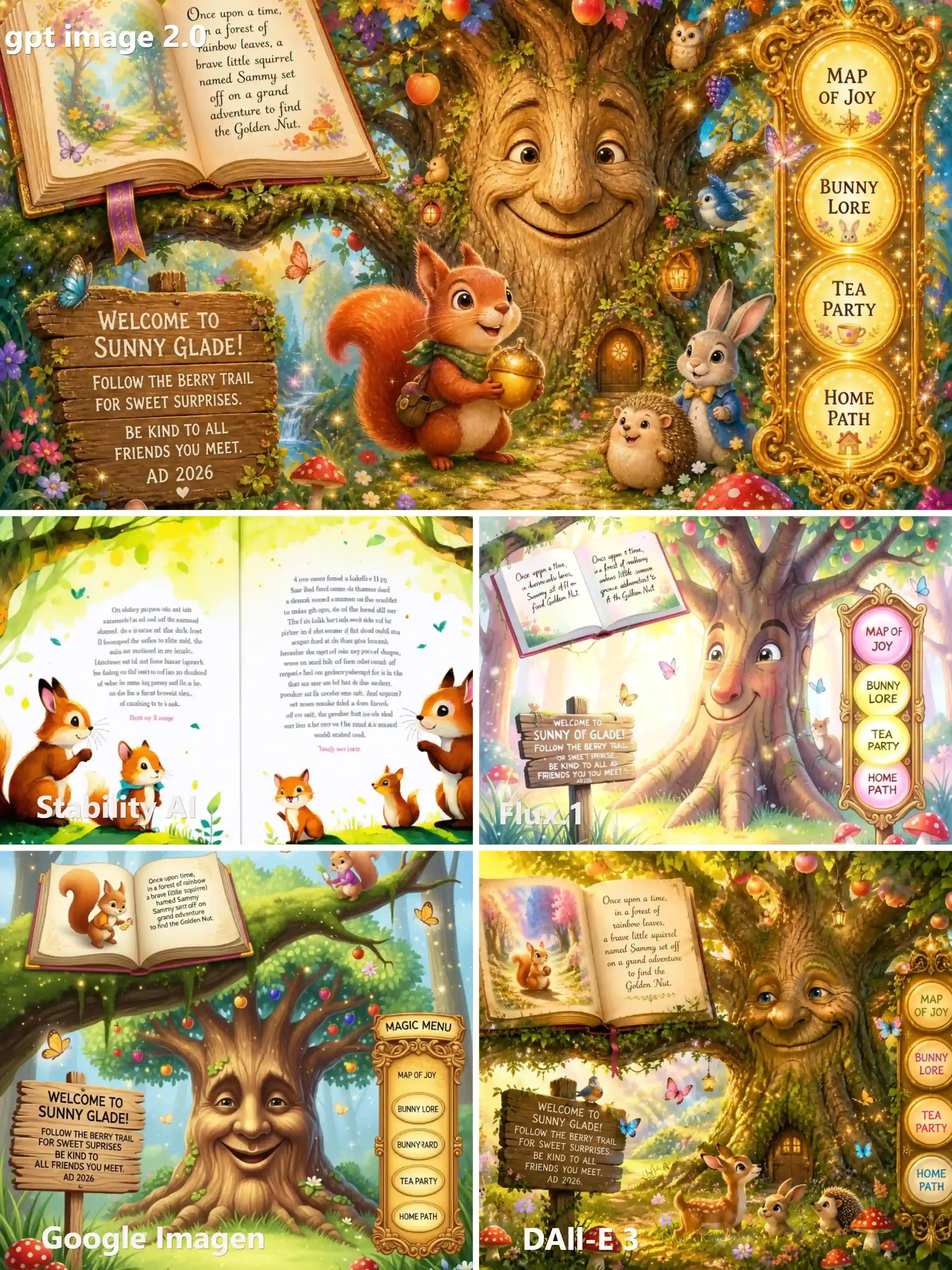
This is where most visibly diverge.
td {white-space:nowrap;border:0.5pt solid #dee0e3;font-size:10pt;font-style:normal;font-weight:normal;vertical-align:middle;word-break:normal;word-wrap:normal;}
| Model | Sign Text Accuracy | Menu Labels | Overall Readability |
| GPT Image 2.0 | ✅ All 4 lines correct | ✅ All 4 correct | ★★★★★ |
| Stability AI | ❌ Garbled body text | ⚠️ Partial | ★★☆☆☆ |
| Flux.1 | ⚠️ Minor errors | ⚠️ Partial | ★★★☆☆ |
| Google Imagen | ⚠️ Some errors | ⚠️ Partial | ★★★☆☆ |
| DALL-E 3 | ✅ Mostly accurate | ✅ Mostly correct | ★★★★☆ |
The gap is stark. GPT Image 2.0 nailed every line — including "AD 2026" — while Stability AI's storybook page devolved into convincing-looking gibberish. For any developer tools for AI pipeline where readable in-image text matters, these results are decisive.
My takeaway: Text rendering remains the single most reliable differentiator when conducting a real-world API comparison against output quality. Paying more per image means nothing if the text is unreadable.
Decision Matrix: Which One Should You Build With?
After running every model through the same prompts and scrutinizing the outputs, I want to cut straight to the practical question: which AI image API should you actually integrate?
The honest answer is that there's no universal winner — only the right fit for a specific use case. Here's how I'd map it.
Quick-Pick Decision Matrix:
| Use Case | Priority | Recommended API | Why |
| High-volume, cost-sensitive pipeline | Price per image | Stable Diffusion | Self-hosting slashes marginal cost dramatically |
| Consumer app with unpredictable user prompts | Zero-friction UX | DALL-E 3 | GPT-4 prompt rewriting handles messy inputs automatically |
| Photorealistic ads with readable text | Visual fidelity | Flux.1 | Best-in-class realism and in-image text accuracy |
| Complex layouts, diagrams, precise text | Spatial reasoning | GPT Image 2.0 | Unmatched instruction-following and text rendering |
| Regulated industry or enterprise GCP stack | Compliance | Google Imagen | SynthID watermarking, enterprise safety controls |
Use Case A: Maximum Volume, Minimum Cost
If you're generating thousands of images daily, per-image cost compounds fast. Stable Diffusion — especially self-hosted via Replicate or your own GPU infrastructure — is the only AI image API on this list where marginal cost can approach near-zero at scale.
Use Case B: Beautiful Art, Zero User Effort
For consumer-facing creative tools where your users aren't prompt engineers, DALL-E 3's automatic prompt improvement removes the biggest failure mode: garbage-in, garbage-out.
Use Case C: Photorealistic Ads With Text
Marketing pipelines live or die on visual quality and brand-accurate copy. Flux.1 Pro is the answer here — it's simply the most reliable model I tested for combining realism with legible, correctly-spelled in-image text.
There's no single AI image API that dominates every dimension. Pick the one that's weakest where you can afford weakness — and strongest where your product actually breaks without it.
Integration Tips for Developers
Picking the right AI image API is only half the job. How you integrate it determines whether your pipeline is robust or a 3 a.m. incident report waiting to happen. Here's what I've learned the hard way.
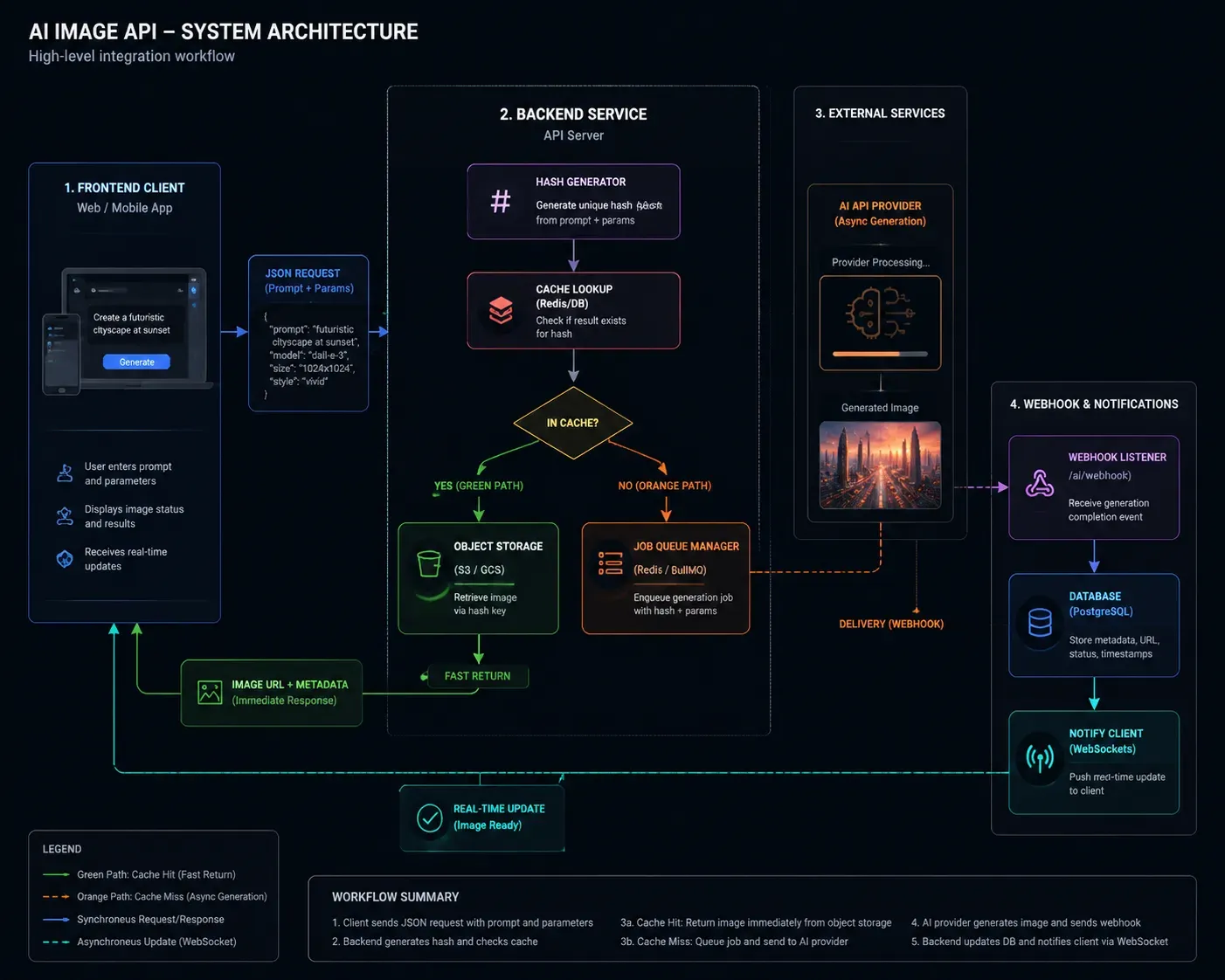
Caching Strategy: Stop Paying for the Same Image Twice
Image generation is expensive and often repetitive. If your app generates product visuals, avatars, or template-based assets, a significant percentage of requests will be semantically identical.
My recommended approach:
- Hash the prompt + parameters (model, resolution, seed) into a cache key
- Store outputs in object storage (S3, GCS) with the hash as the filename
- Check cache before every API call — cache hit rates of 30–40% are common in production template pipelines
- Set TTLs based on content type: evergreen assets (longer), trend-dependent content (shorter)
This single pattern can cut your monthly API bill substantially without touching output quality.
Webhook Handling: Don't Block on Async Generation
Most high-quality models — especially Flux.1 Pro and Stable Diffusion at high resolution — are asynchronous. Generation can take 10–30 seconds. Blocking a user-facing thread on a synchronous poll is a reliability anti-pattern.
Better architecture:
- Submit generation request → receive a job ID
- Store job ID against the user session in your DB
- Handle the webhook callback to update status
- Notify the frontend via WebSocket or SSE when ready
Cost Management: Hard Limits Before You Need Them
Recursive loops — where a failed generation retries infinitely — are the most common source of unexpected API bills. I've seen staging environments rack up four-figure charges overnight.
Implement these before going live:
- Per-user daily generation caps enforced server-side
- Exponential backoff with a max retry ceiling (3 attempts, not infinite)
- Spend alerts at 50%, 80%, and 100% of monthly budget thresholds
The Developer Evaluation Framework
When assessing any AI image API, I score across five dimensions — not just output aesthetics:
| Dimension | What I Actually Measure |
| Latency & Throughput | Time-to-first-byte for a 1024×1024 image under load |
| Prompt Adherence | Does it follow multi-clause, relational instructions accurately? |
| Operational Ease | SDK quality, auth flow complexity, documentation completeness |
| Feature Surface | Inpainting, outpainting, image-to-image, ControlNet support |
| Cost Efficiency | Blended cost per 1,000 usable (non-rejected) images |
The last metric is the one most developers overlook. A cheap API with a 15% content-filter rejection rate is more expensive in practice than a pricier API with near-zero rejections — because you're paying for generations that never reach your users.
Build your evaluation around production realities, not benchmark screenshots.
Conclusion: The Future of the Image API
After running every model through identical prompts, pricing spreadsheets, and production scenarios, one conclusion keeps surfacing: no single AI image API wins everything.
The smartest architecture I'm seeing in mature developer pipelines isn't a single-model commitment — it's a multi-model routing layer:
- Flux.1 for photorealistic marketing assets
- DALL-E 3 for unpredictable consumer prompts
- Stable Diffusion for high-volume, cost-sensitive workloads
- GPT Image 2.0 for precision layout and text-critical outputs
- Google Imagen when compliance is non-negotiable
This isn't over-engineering. It's treating image generation the way mature teams treat databases — the right tool for the right job, abstracted behind a clean internal API.
The models will keep improving. Pricing will keep shifting. What won't change is the value of having tested these yourself rather than trusting a vendor's benchmark page.
That's exactly why the stress tests in this article exist — real prompts, real outputs, real differences. Use them to make a better build decision than I did on my first attempt.






