Wan 2.6 vs Veo 3.1: Is Wan 2.6 the 'Veo Killer' we didn't see coming?
Keeping up with AI video models feels like a full-time job. Just when you mastered one, two more dropped.
Today, we’re cutting through the noise. We have Wan 2.6 (Alibaba's commercial powerhouse) entering the ring against Veo 3.1 (Google's control-obsessed update).
Are you looking for cinematic smoothness or do you just want an AI that follows your instructions without hallucinating extra fingers? Let’s break it down so you can stop scrolling and start rendering.
TL;DR Quick Comparison (Specs & Pricing Profile)
Wan 2.6 vs Veo 3.1 at a Glance
| Wan 2.6 | Veo 3.1 | |
|---|---|---|
| Price | $0.08/sec on Atlas Cloud | $1.12/sec on Atlas Cloud |
| Core focus | Character control & Story creating | Prompt following & Art details |
| Typical duration | 5s; 10s; 15s | 4s; 6s; 8s |
| Input types | Text‑to‑Video; Image‑to‑Video; Video ref | Text‑to‑Video; Image‑to‑Video; Image ref |
| Size | Text-to-video & Video ref: 720*1280; 1280*720; 960*960; 1088*832; 832*1088; 1920*1080; 1080*1920; 1440*1440; 1632*1248; 1248*1632; Image-to-video: According to the size of reference image. | Text‑to‑Video & Image‑to‑Video: Aspect ratio: 16:9, 9:16 |
| Resolution | Image-to-video: 720P, 1080P | Text‑to‑Video & Image‑to‑Video: 720P, 1080P |
| Strength | Multi‑shot narrative, face stability, cinematic camera paths | Texture, lip movements with clear dialogue |
| Audio | Narrative & Dialogue | Immersive background soundscapes |
| Best for | Character Animation, Rapid Ideation | Concept visualization, Social Media Content |
| Semantic Extrapolation | Excels in Cinematic Scenes | Average |
| Shot Composition | Intelligent Prompt Execution | Average |
| Consistency | Character Consistency | Average |
Wan 2.6 in a Nutshell
Wan 2.6 by Alibaba Cloud has groundbreaking multimodal capabilities and native audio sync. This latest Wan 2.6 update empowers creators with advanced text-to-video and image-to-video tools, producing 1080p cinematic content up to 15 seconds long.
Key ideas:
- Smart Segmentation (Multi‑Shot Narrative)
Understands shot boundaries and keeps the same character identity across close‑ups, mediums, and wide shots. Great for ads and storyboards where the hero must stay on‑model.
- 15‑Second High‑Fidelity Clips
Pushes typical video length to ~15 seconds. Enough for a full narrative beat — setup → action → reaction — in a single generation, which maps perfectly to 6–15s ad slots and social hooks.
- High-Fidelity Audio & Stable Multi-Speaker Dialogue
A major leap in native audio generation. Wan 2.6 delivers hyper-realistic vocal timbres and supports stable multi-person dialogue. It creates synchronized, natural-sounding conversations between multiple characters, eliminating the robotic tone often found in AI audio.
- Advanced Video Reference (Ref‑Guided Acting)
You upload a rehearsal video (phone recording), and Wan 2.6 clones timing, blocking, and body language onto a generated character. This gives directors actor‑level control without reshoots.
Overall, Wan 2.6 feels like a comprehensive narrative engine for directors, merging intelligent multi-shot visuals with high-fidelity dialogue to deliver complete, 15-second cinematic storylines.
Veo 3.1 in a Nutshell
Veo 3.1 is a video generation model designed to deliver enhanced output quality and faster processing speeds. It improves content creation through three main technical advancements:
- Visual Fidelity: The model generates videos with sharper details and distinct textures. It renders colors with greater saturation to create realistic imagery.
- Control and Stability: Users can direct camera movements and object trajectories with precision. The system maintains temporal coherence, which ensures motion remains smooth and consistent across all frames.
- Audio Synchronization: The model synthesizes clear dialogue and ambient sounds that align with visual cues. It matches lip movements to speech and generates contextual sound effects.
Veo 3.1 functions as a professional tool that excels at producing stable, high-resolution videos with natively synchronized audio.
Core Differences
Duration and Format
- Wan 2.6 generates videos up to 15 seconds in length. It provides multiple aspect ratio options to suit various platforms.
- Veo 3.1 restricts output to a maximum of 8 seconds. This duration limit constrains the ability to tell complex stories within a single clip.
Content or Production Workflow
- Wan 2.6 works well for specific product advertisements. It handles creative tasks autonomously, such as arranging dialogue and determining shot composition.
- Veo 3.1 targets the visualization of commercial concepts. It functions best when following rigorous scripts to produce professional results.
Conclusion
Wan 2.6 prioritizes creative freedom and extended formats for content that requires narrative development. Veo 3.1 focuses on precision and stability for executing strictly controlled, high-fidelity scenes.
Use Cases: When/Who to Choose Wan 2.6 or Veo 3.1
(Same prompt, different outputs)
A useful way to decide is to imagine running the same creative brief through both models and compare the outputs.
Example 1: Cinematic Fantasy Scene
plaintext1Prompt: 2Shot 1: Heavy rain pouring down, an ancient dilapidated Japanese courtyard with fallen leaves and overgrown moss, a lone samurai in worn armor stands with back to camera, slowly drawing his katana, blade gleaming with reflected lightning, atmospheric fog, cinematic wide shot, Kurosawa film aesthetic 3Shot 2: Close-up on samurai's weathered face, rain streaming down deep wrinkles, intense piercing eyes filled with determination, shallow depth of field, water droplets frozen in motion, dramatic side lighting, portrait composition 4Shot 3: Camera tilts down smoothly to reveal his enemy: a garden completely overtaken by wild weeds and tall grass, the samurai sighs and swings his sword to cut the weeds, wiping sweat from forehead, mundane suburban backyard visible in background, comedic anticlimax, breaking the epic illusion 5--ar 16:9 6--style cinematic 7--quality 4K 8--fps 24
- Wan 2.6 (Click to see the output video)
- Veo 3.1(Click to see the output video)
- Which one is better?
- Shot composition ability: Wan 2.6
- Character consistency: Wan 2.6
- Ability to follow prompts: Veo 3.1
- background soundscapes: Veo 3.1
Example 2: short Product Ad
plaintext1Prompt: A man promoting this AI companion toy of reference image.

- Wan 2.6 (Click to see the output video)
- Veo 3.1 (Click to see the output video)
- Which one is better?
- Reference Image relativity: Wan 2.6
- Semantic Extrapolation: Veo 3.1
Example 3: anime style
Prompt:
"High-quality anime style. A girl wearing a colorful floral Yukata standing on traditional shrine steps at night. She turns back to look at the camera with a gentle smile. Massive, vibrant fireworks explode in the dark sky behind her, illuminating her silhouette. Soft glow from hanging paper lanterns. Fireflies, magical atmosphere."
- Wan 2.6 (Click to see the output video)
- Veo 3.1 (Click to see the output video)
- Which one is better?
- Shot composition ability: Wan 2.6
- Narrative & Dialogue: Wan 2.6
- Ability to follow prompts: Veo 3.1
- background soundscapes: Veo 3.1
- Detail: Veo 3.1
Conclusion: choose Wan 2.6 or Veo 3.1?
- Have specific products / Need creative inspiration / Longer film production→ Wan 2.6
- Only have a concept / Want specific direction / Social media content → Veo 3.1
A better approach: Use Both Models on Atlas Cloud
Instead of locking into “Wan 2.6 vs Veo 3.1,” Atlas Cloud lets you use both models side by side — first in a playground, then via a single API.
Method 1: Use directly in Atlas Cloud platform
| Wan 2.6 family | Veo 3.1 family |
|---|---|
| Wan 2.6 text-to-video | Veo 3.1 text-to-video |
| Wan 2.6 image-to-video | Veo 3.1 image-to-video |
| Wan 2.6 Ref-video | Veo 3.1 Ref-image |
Method 2: Access via API
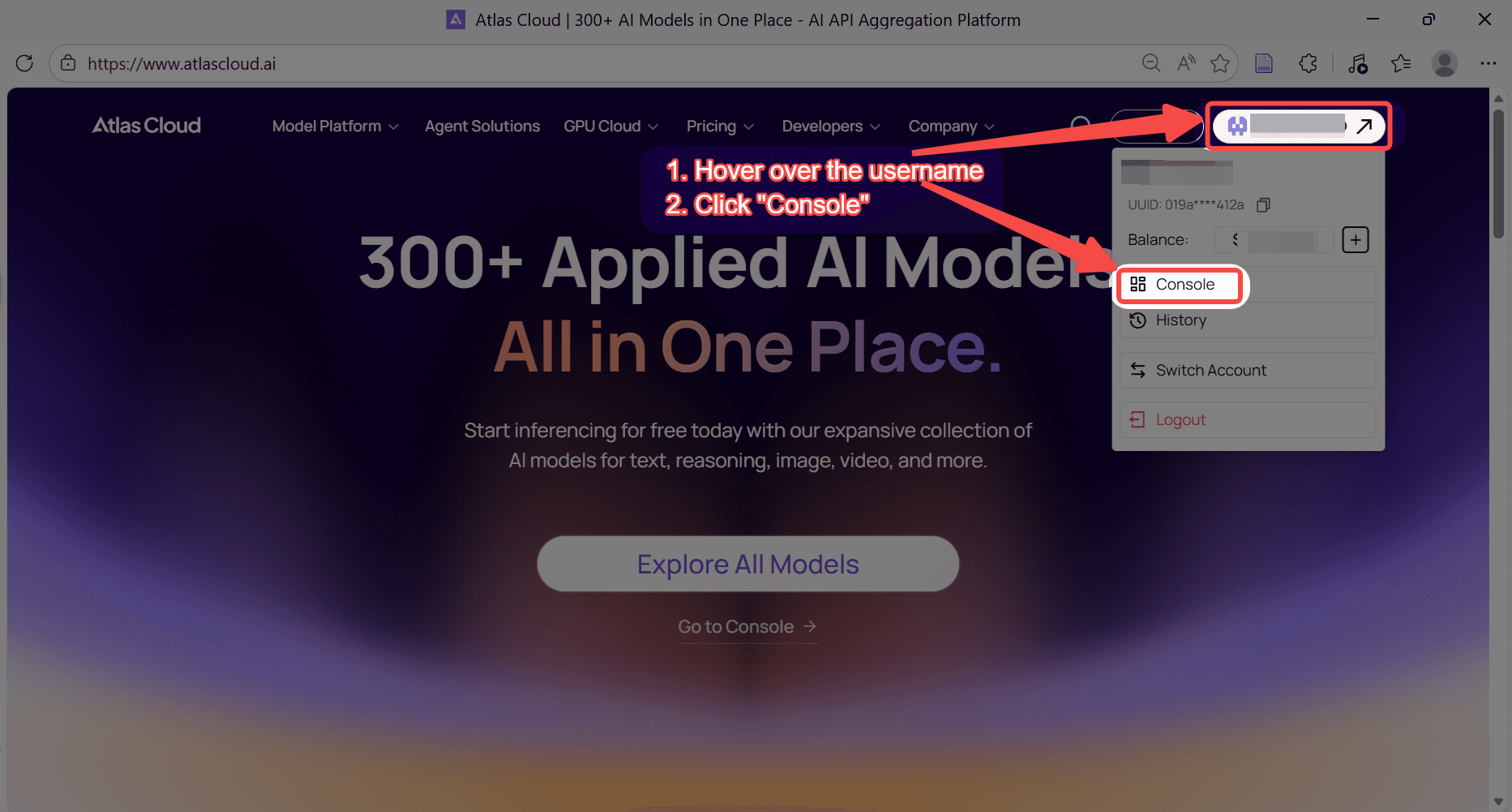
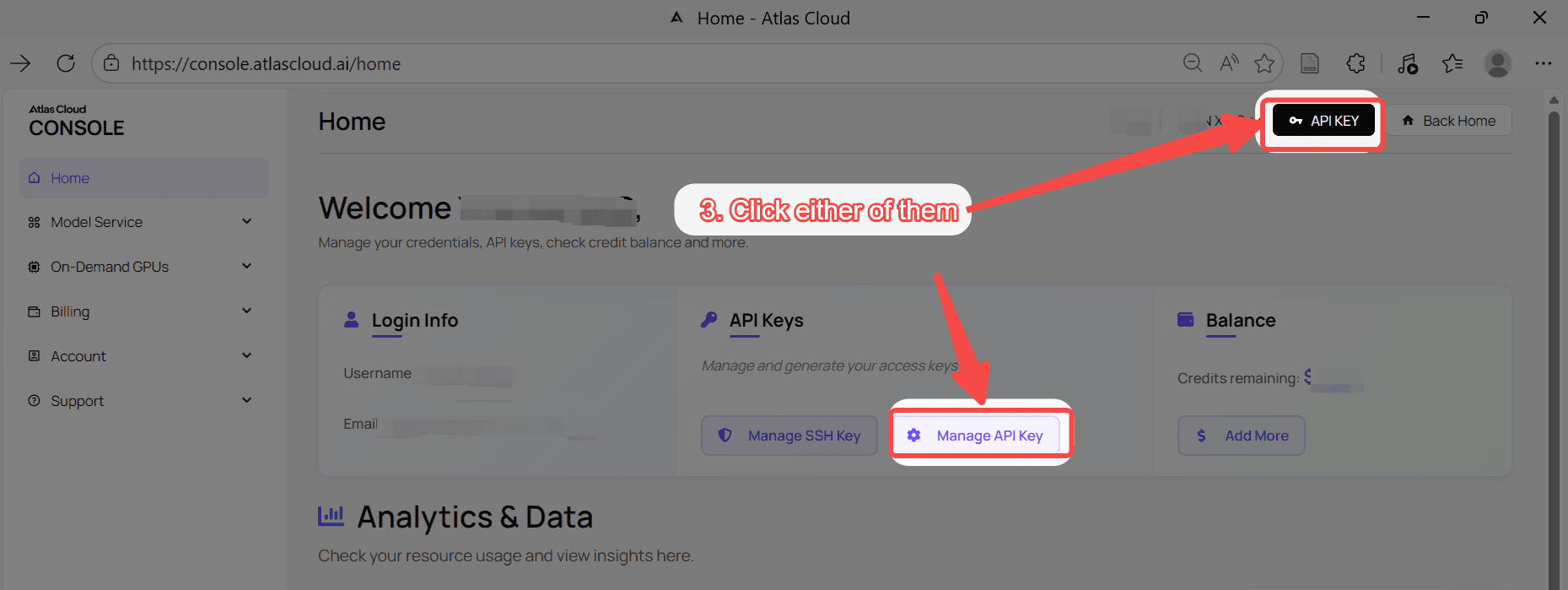
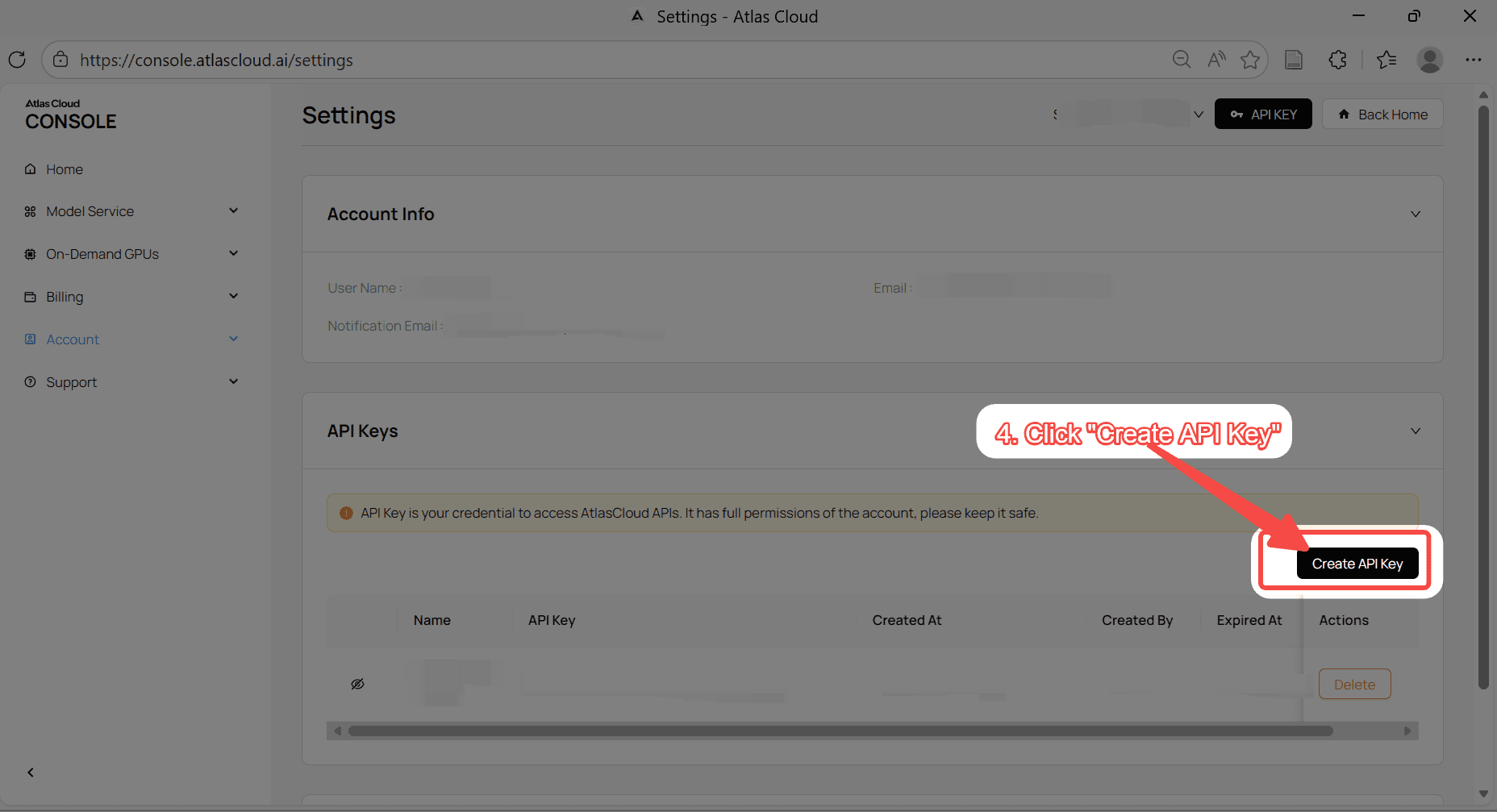
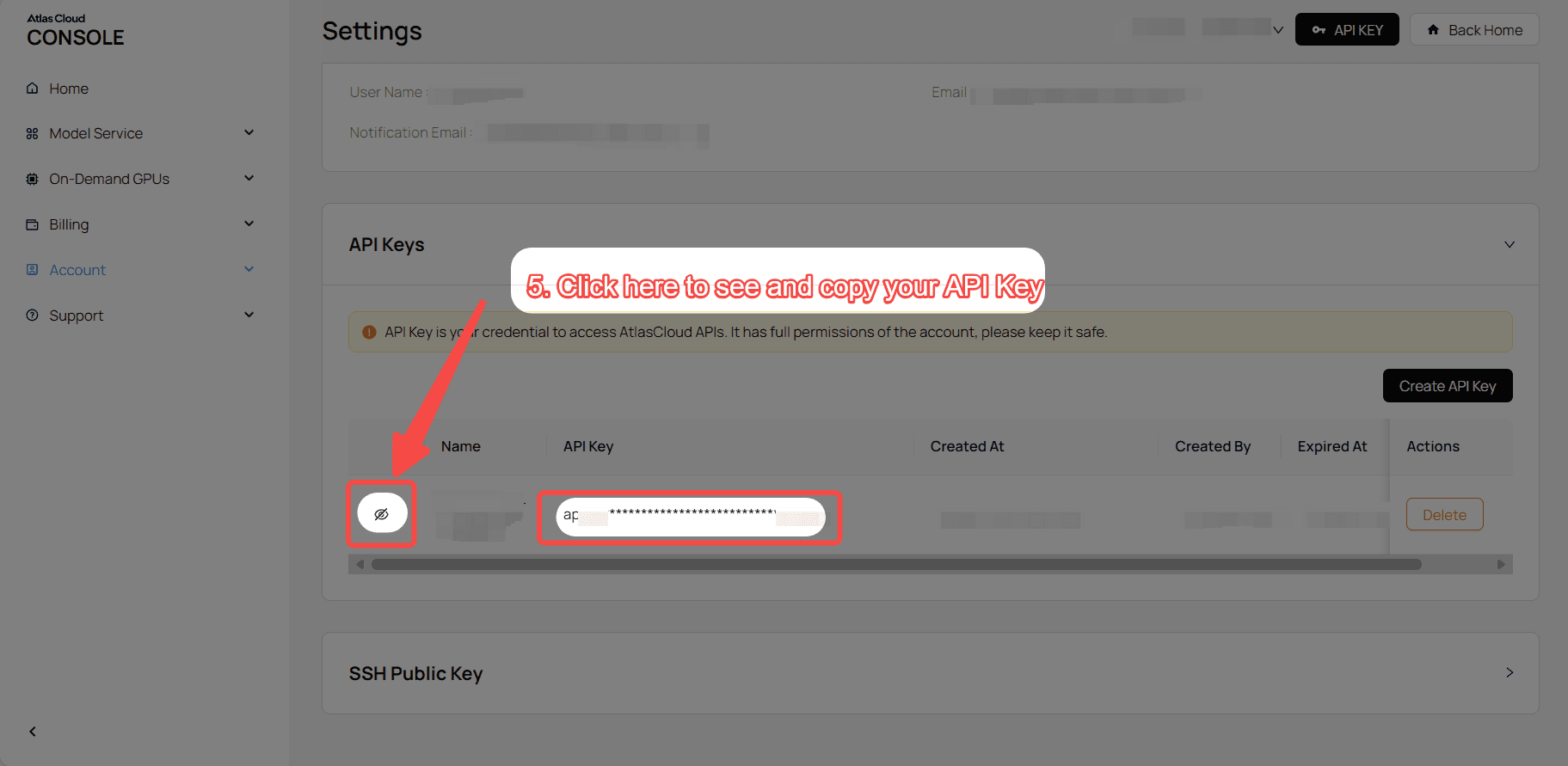
Step 1: Get your API key
Create an API key in your console and copy it for later use.
Step 2: Check the API documentation
Review the endpoint, request parameters, and authentication method in our API docs.
Step 3: Make your first request (Python example)
Example: generate a video with Wan 2.6 (text-to-video).
plaintext1import requests 2import time 3 4# Step 1: Start video generation 5generate_url = "https://api.atlascloud.ai/api/v1/model/generateVideo" 6headers = { 7 "Content-Type": "application/json", 8 "Authorization": "Bearer $ATLASCLOUD_API_KEY" 9} 10data = { 11 "model": "alibaba/wan-2.6/text-to-video", 12 "audio": None, 13 "duration": 15, 14 "enable_prompt_expansion": True, 15 "negative_prompt": "example_value", 16 "prompt": "A cinematic sci-fi trailer. Shot 1: Wide shot, a lonely explorer in a battered spacesuit walking across a desolate red Martian desert, a massive derelict spaceship in the distance. Shot 2: Close-up, the explorer stops and wipes dust off their helmet visor, eyes widening in shock. Shot 3: Over-the-shoulder shot, revealing a glowing, bioluminescent blue flower blooming rapidly in front of them. 8k resolution, highly detailed, consistent character.", 17 "seed": -1, 18 "size": "1920*1080", 19 "shot_type": "multi" 20} 21 22generate_response = requests.post(generate_url, headers=headers, json=data) 23generate_result = generate_response.json() 24prediction_id = generate_result["data"]["id"] 25 26# Step 2: Poll for result 27poll_url = f"https://api.atlascloud.ai/api/v1/model/prediction/{prediction_id}" 28 29def check_status(): 30 while True: 31 response = requests.get(poll_url, headers={"Authorization": "Bearer $ATLASCLOUD_API_KEY"}) 32 result = response.json() 33 34 if result["data"]["status"] in ["completed", "succeeded"]: 35 print("Generated video:", result["data"]["outputs"][0]) 36 return result["data"]["outputs"][0] 37 elif result["data"]["status"] == "failed": 38 raise Exception(result["data"]["error"] or "Generation failed") 39 else: 40 # Still processing, wait 2 seconds 41 time.sleep(2) 42 43video_url = check_status()
FAQ
Which model generates longer videos? Wan 2.6 generates videos up to 15 seconds long, which allows for complete narrative arcs. Veo 3.1 limits output to a maximum of 8 seconds.
How do the audio capabilities differ? Wan 2.6 specializes in stable multi-speaker dialogue and realistic vocal timbres. Veo 3.1 focuses on syncing ambient sounds, contextual effects, and precise lip movements with visual cues.
Which tool is better for character consistency? Wan 2.6 features smart segmentation. This maintains character identity across close-ups, medium shots, and wide shots within a single generation.





