Introduction: Industry Background
Product photography workflows have shifted substantially. AI image generation is now the default for e-commerce visuals, with GPT Image 1.5 establishing itself as the leading solution in this category.
Key stat: Brands using AI product photography tools in 2026 are reducing visual production costs by up to 73% while increasing output volume by 5x or more.
But here's the boundary condition most articles won't tell you: AI image generation isn't replacing photographers — it's changing when and how you use them. Successful brands in 2026 don’t abandon traditional photography altogether. They deploy AI strategically in workflows where it adds clear value, while trusting human photographers for high-stakes work that demands subtlety and nuance.
What Is GPT Image 1.5? A Quick Overview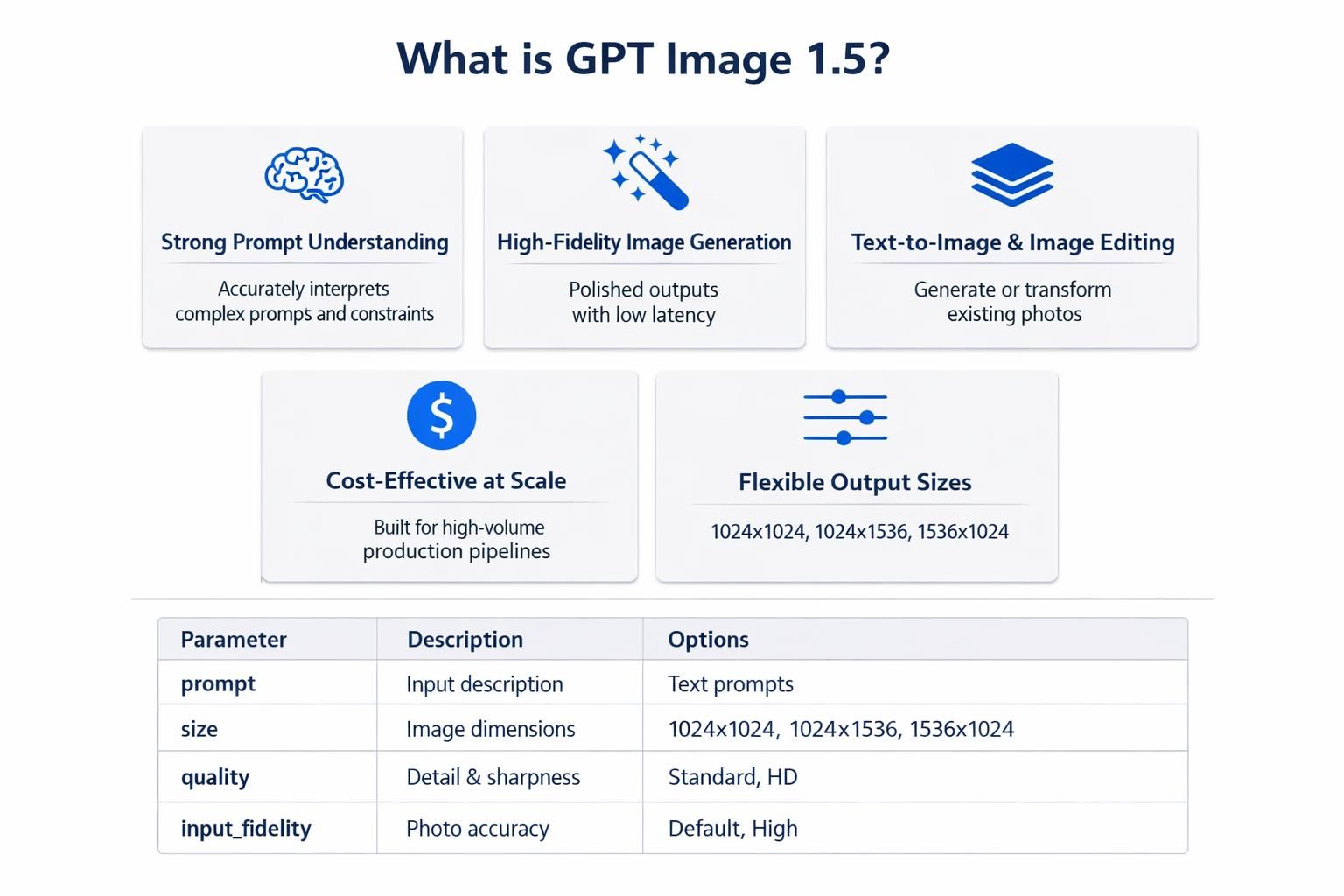
GPT Image 1.5 is OpenAI's cost-efficient multimodal text-to-image and image editing model. It enables:
- Generate: High-fidelity product images from natural language descriptions
- Edit: Transform existing product photos using text instructions
- Scale: Ensure consistent visual style across extensive product catalogs
- Mockup: Create lifestyle scenes, backgrounds and creative variations efficiently at scale
Key difference : Previous AI image tools had limitations in text clarity and brand consistency. GPT Image 1.5 preserves logos, product details, and legible text — enabling professional e-commerce workflows.
Technical specifications:
- Output sizes: 1024×1024, 1024×1536, 1536×1024
- Quality levels: Low (drafts), Medium (standard), High (final assets)
- input_fidelity parameter: Secures brand assets during edits
- Generation speed: 4× faster than previous models (10–30 seconds)
Quick Decision Framework
Before adopting GPT Image 1.5, review your needs using this simple framework:
| Question | If Yes | If No |
| Do you need 100+ product images? | AI is likely cost-effective | Traditional may be simpler |
| Is color accuracy critical to sales? | Requires calibration workflow | AI ready |
| Do you test creative variations? | AI enables systematic testing | You're leaving revenue on the table |
| Do you serve multiple customer segments? | AI enables personalization | One-size-fits-all approaches are holding you back. |
| Is your product highly tactile, like fabrics or textured liquids? | AI may struggle with physics | Consider hybrid approach |
| Do you have regulatory labeling requirements? | Requires human legal review | Proceed with standard QA |
3+ "Yes" answers = GPT Image 1.5 should be in your workflow
2+ "If No" answers = Start with pilot program before scaling
The Strategic Framework: When to Use What
| Use Case | GPT Image 1.5 | Traditional Photography |
| Lifestyle/context shots | Ideal | Expensive, slow |
| Bulk catalog generation | Ideal | Cost-prohibitive |
| Color-accurate product details | Requires workflow | Best choice |
| High-resolution print | Limitations | Best choice |
| Human models using products | Current limitation | Required |
| Complex regulatory labeling | Requires human review | Required |
| A/B test variations | Ideal | Too expensive |
| Segment personalization | Ideal | Impossible at scale |
Way #1: Instant Lifestyle Scene Generation — No Studio Required
The Old Way Was Expensive and Slow
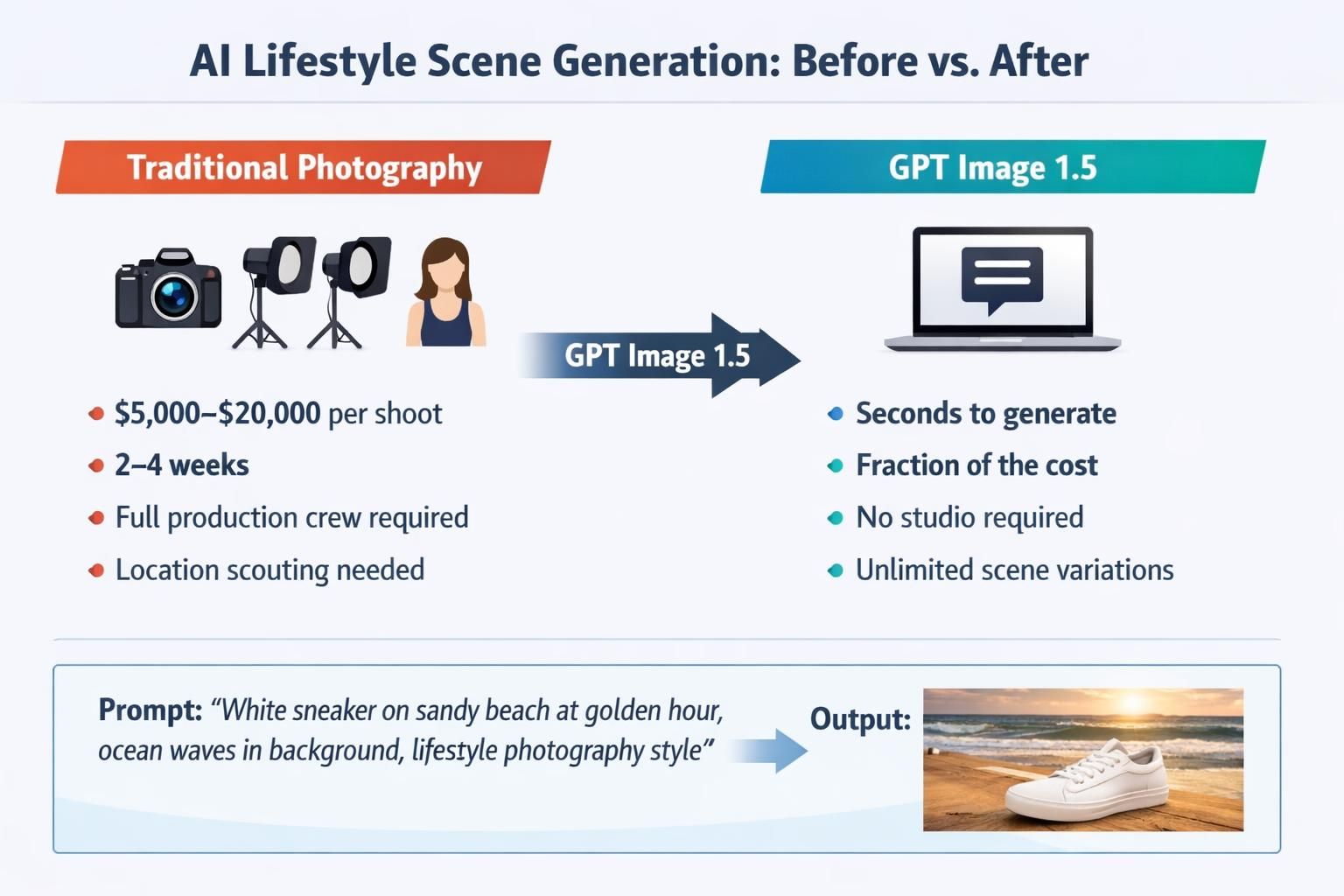
Traditional lifestyle photography (products in real-world settings) requires substantial planning: location scouting, model casting, set design, lighting setup, and a full production crew. A mid-sized brand typically spends $5,000–$20,000 on a single shoot with a 2–4 week turnaround.
How GPT Image 1.5 Changes the Economics
Brands can now describe a lifestyle scene in plain English and receive a photorealistic result in seconds.
Example prompt:
plaintext1A minimalist white sneaker rests on a sandy beach during golden hour; 2with soft natural light and softly blurred ocean waves in the background; 3with a lifestyle photography aesthetic, 1536×1024, high resolution.
Test results: AI-generated lifestyle images outperform traditional photography in A/B testing, matching customer visual preferences rather than technical quality metrics.
Real-World Case Study #1: Sole&Story — DTC Footwear Brand
Background:
A DTC footwear startup based in Austin, set to launch in Q1 2026, offering 24 shoe styles with a $15,000 marketing budget.
The Challenge:
- 24 shoe styles × 4 seasonal themes = 96 lifestyle images required
- Traditional photography quote: $48,000+
- Timeline: 6 weeks before launch
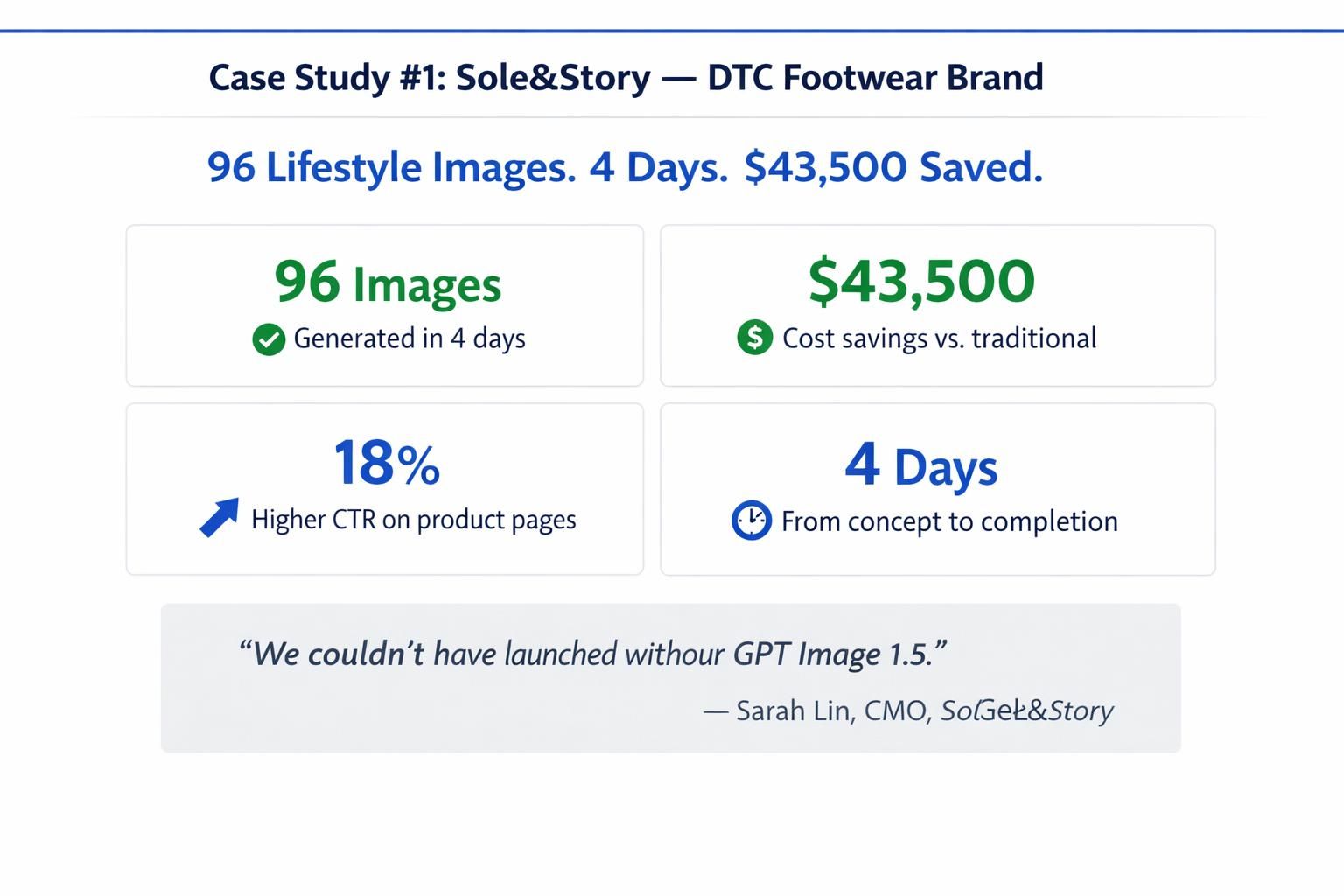
The GPT Image 1.5 Solution: Generated all 96 lifestyle images in 4 days using detailed scene prompts specifying lighting, environments, and seasonal mood.
Input examples:
- "White leather sneaker on autumn leaves, warm lighting, forest setting"
- "Running shoe on urban rooftop at sunrise, city skyline background"
Results:
- 96 lifestyle images produced in 4 days
- $43,500 saved vs. traditional photography
- 18% higher click-through rate on product pages vs. white-background images
- Launch went live on schedule
The unspoken reality: Not all 96 images were perfect. About 12% required regeneration due to lighting inconsistencies or product detail issues. Budget an extra 15–20% time for quality control.
"We couldn't have launched without GPT Image 1.5. It gave us visual storytelling that looked like we had a $200K photography budget." — Sarah Lin, CMO, Sole&Story
Pro Tips for Lifestyle Scene Generation
Lighting specificity matters: "Soft golden hour sunlight" generates different outputs than "bright studio lighting."
Required elements: product, setting, mood, photography style.
Use size parameters strategically:
- 1536×1024 (landscape) → Banner ads, hero images
- 1024×1536 (portrait) → Mobile product pages, Instagram Stories
- 1024×1024 (square) → Social feeds, Amazon listings
Way #2: Bulk AI Image Generation — Scaling Product Catalogs Without Scaling Costs
The Catalog Problem at Scale
Enterprise e-commerce brands face volume challenges beyond quality. A 10,000-SKU retailer requires multiple images per product: white background, lifestyle, detail shots, and color variants. At traditional photography rates, comprehensive coverage is financially impossible.
The result: Many products get "second-tier" visual treatment — a single mediocre photo, inconsistent backgrounds, or images that don't convert.
GPT Image 1.5's Bulk Generation Workflow
GPT Image 1.5's cost-effective architecture enables high-volume production pipelines.
A typical bulk workflow:
- Input: Product name, category, key features, brand style guide
- Prompt Template: Standardized structure with variable fields
- Generation: GPT Image 1.5 API processes batch requests
- Output: Consistent, branded images across all SKUs
- Review: Human QA for final approval
Real-World Case Study #2: HomeNest — Home Décor Marketplace
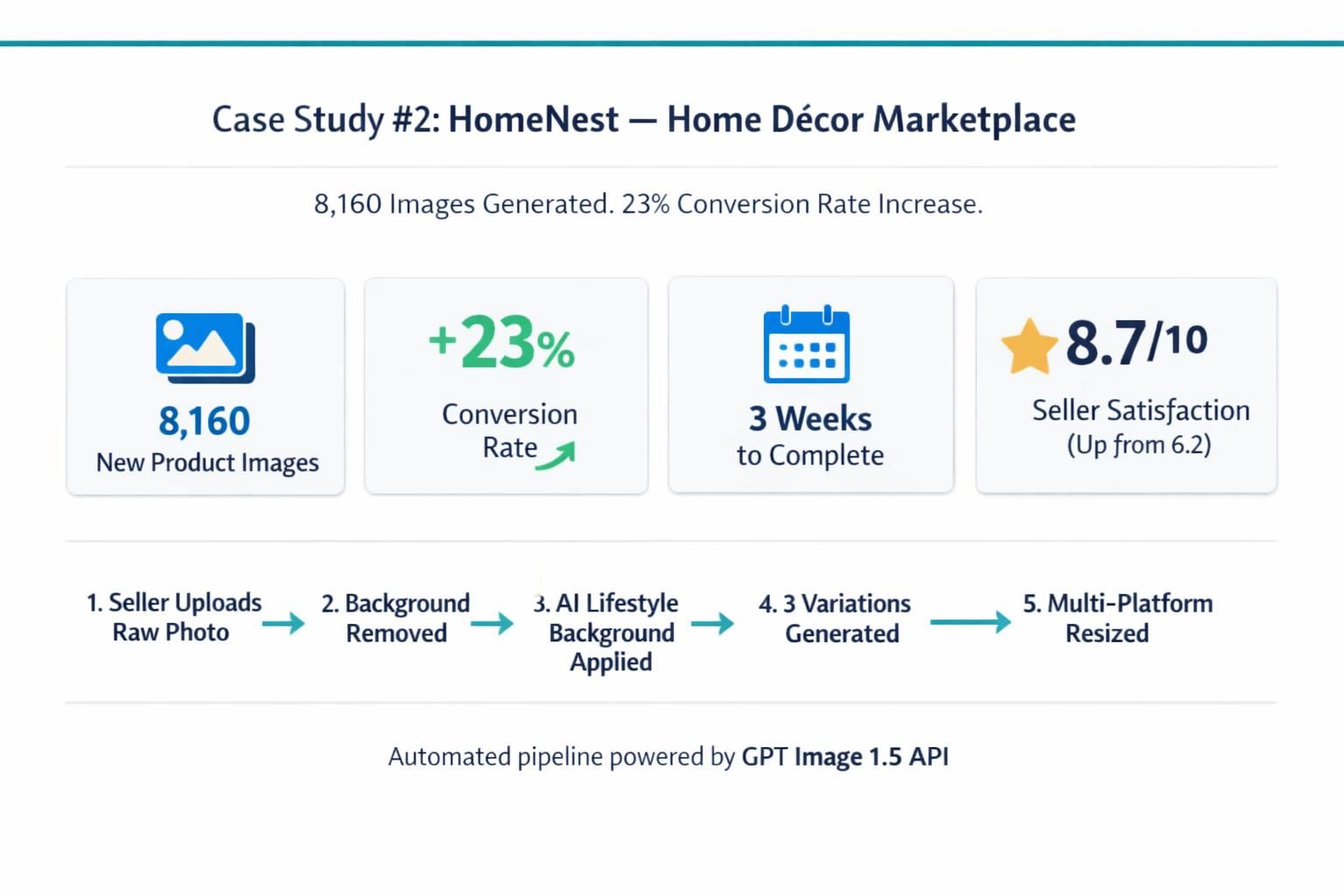
Background: Online home décor marketplace with 8,000+ listings from 300+ sellers. 34% had substandard images, impacting conversion.
The Challenge:
- 2,720 products with substandard images
- Sellers couldn't afford professional photography
- Needed scalable solution maintaining brand consistency
The GPT Image 1.5 Solution: Built an internal tool using GPT Image 1.5 API:
- Removed backgrounds using image editing
- Applied lifestyle backgrounds based on product category
- Created three variations per product: neutral, lifestyle, and detail-focused
- Resized outputs for multiple platforms
Automated prompt template:
plaintext1[Product name] in a modern minimalist living room setting, 2clean white walls, natural wood accents, soft ambient lighting, 3professional interior photography style, high quality
Results:
- 8,160 new images generated in 3 weeks
- 23% average conversion rate increase for updated listings
- Seller satisfaction improved from 6.2/10 to 8.7/10
- Platform-wide GMV increased 17% following quarter
The boundary condition: This worked because home décor products don't require exact color matching (unlike fashion or cosmetics). For color-critical categories, AI bulk generation requires additional calibration workflows.
The Economics of Bulk Generation
| Metric | Traditional Photography | GPT Image 1.5 | Savings |
| Per image cost | 505050200 | 0.040.040.040.17 | 99%+ |
| 1,000 images | 50,00050,00050,000200,000 | 404040170 | 99%+ |
| Turnaround time | 4–8 weeks | 2–5 days | 90%+ |
| Revision cost | 252525100 per image | 0.040.040.040.17 | 99%+ |
The reality check: These numbers assume you've built automation infrastructure. Manual one-by-one generation doesn't achieve these economies. Budget 2–3 weeks for workflow setup before seeing these returns.
Way #3: Intelligent Product Image Editing — Transform Existing Assets
The Hidden Goldmine in Your Photo Library
Most e-commerce brands have substantial existing photo libraries with:
- Outdated backgrounds not matching current brand identity
- Inconsistent lighting across different photoshoot sessions
- Seasonal imagery needing refreshing
- Colors or props no longer aligning with brand guidelines
Traditionally, fixing these meant reshooting or expensive manual Photoshop work. GPT Image 1.5 Edit changes this equation.
How GPT Image 1.5 Edit Works
Upload existing product photos and use natural language to modify them precisely. The model applies only necessary changes — preserving what works while transforming what doesn't.
Capabilities:
- Background replacement: Cluttered → clean studio or lifestyle
- Color variant generation: Generate new product color options without additional shoots
- Lighting correction: Adjust shadows, enhance warmth, and balance exposure levels
- Props and context: Add seasonal props and complementary product elements
- Style transformation: Flat lay → lifestyle, casual → luxury
Real-World Case Study #3: LuxeLayer — Cosmetics Brand
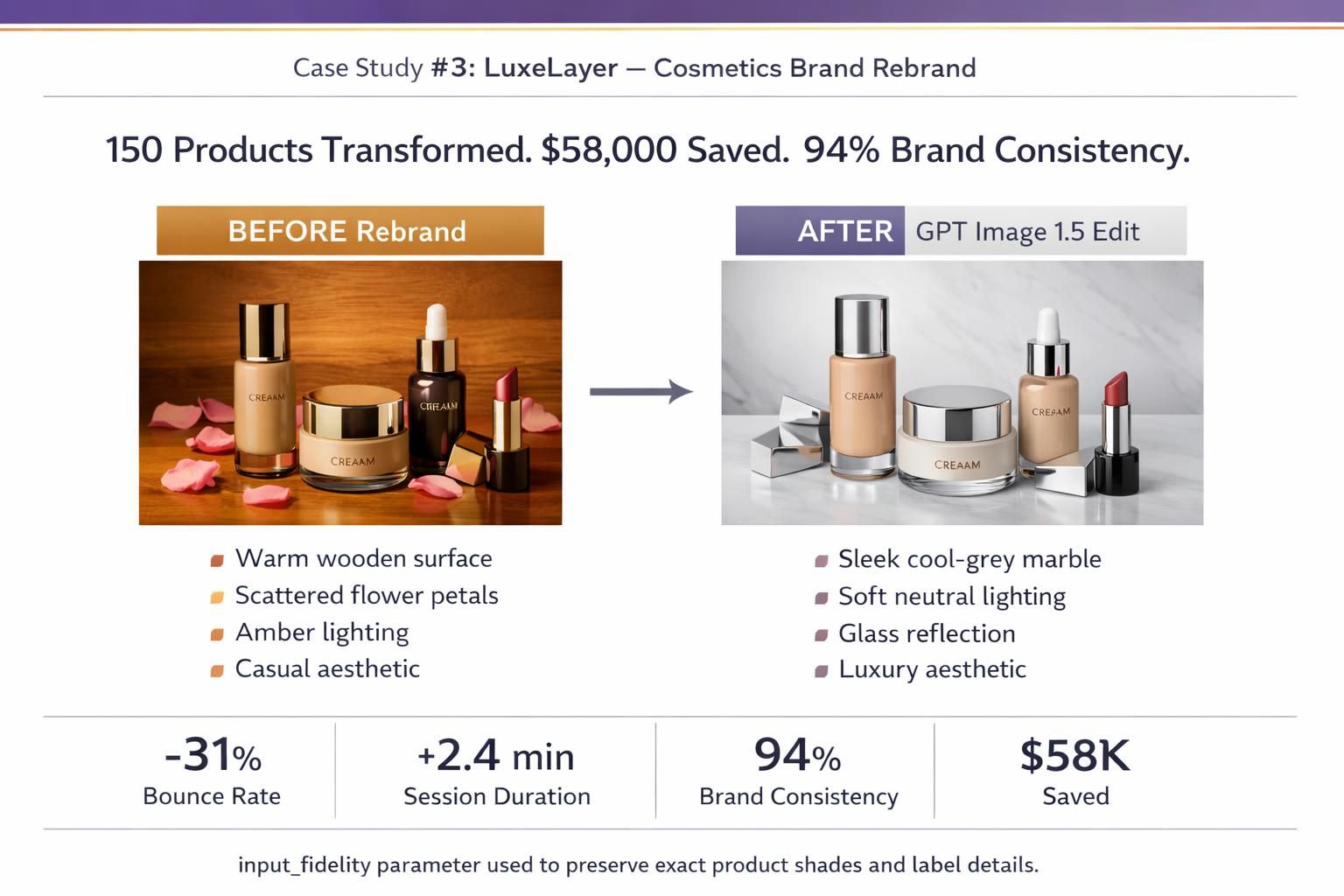
Background:
A mid-market cosmetics brand with a 150-product catalog. Its Q4 2025 rebranding effort required updating its visual identity—shifting from “affordable beauty” to “accessible luxury.”
The Challenge:
- Existing photos: warm, casual tones
- New brand needed: cool, clean, premium aesthetic
- Re-shooting quote: $67,000
- Timeline: 5 weeks before rebrand launch
The GPT Image 1.5 Edit Solution: Targeted editing prompts to transform existing images:
Original: Lipstick on warm wooden surface with scattered flower petals
Edit Prompt:
plaintext1Transform background to sleek cool-grey marble surface, 2replace warm amber lighting with soft neutral studio lighting, 3remove flower petals, add subtle glass reflection under product, 4maintain product accuracy, luxury cosmetics photography style
Output: Same lipstick — perfectly preserved — now on elegant grey marble with premium lighting matching the new brand identity.
Used input_fidelity parameter to ensure product details (shade, finish, label text) were preserved exactly.
Results:
- 150 products transformed in 2 weeks
- $58,000 saved vs. re-shoot
- Brand consistency score: 52% → 94%
- Post-rebrand bounce rate decreased 31%
- Average session duration increased 2.4 minutes
Input Fidelity: The Secret Weapon
The input_fidelity parameter ensures critical product elements — logos, text, exact colors, distinctive features — are preserved during edits.
Essential for:
- Pantone-matched color requirements
- Products with visible branding or labeling
- Items where shape/proportion accuracy is legally critical
Settings:
input_fidelity: "high"→ Maximum preservation (recommended for product work)input_fidelity: "low"→ More creative freedominput_fidelity: "auto"→ Model decides (less reliable for brand work)
Way #4: AI-Powered A/B Creative Testing at Scale
Why Most Brands Never Test Enough
A/B testing product imagery is one of the highest-ROI activities in e-commerce. Image choice can affect conversion rates by 10–40%. Yet most brands only test a small number of variations, as creating test assets is costly and time‑consuming.
The outcome: many brands operate on unproven visual assumptions, leaving substantial revenue untapped.
GPT Image 1.5 Unlocks Unlimited Variations
GPT Image 1.5's cost and speed structure enables scaled creative testing. Brands generate variations across background, tone, composition, and lighting for concurrent testing.
Example creative variables to test:
- Background: Studio white vs. lifestyle scene
- Lighting: Bright and airy vs. dark and moody
- Context: Product alone vs. product in use
- Composition: Centered vs. rule of thirds
- Props: Minimal vs. contextual elements
Real-World Case Study #4: BrevaCoffee — Premium Coffee Brand
Background: Specialty coffee DTC brand with stagnant 2.3% conversion rate. Two years of the same white-background photography style.
The Challenge:
- No budget for major photography overhaul
- Suspected lifestyle imagery would outperform, but couldn't prove it
The GPT Image 1.5 A/B Testing Solution: Generated 6 image variations per product across top 20 SKUs (120 total test images) in one afternoon.
Test variations for espresso blend:
- A (Control): Existing white background studio shot
- B: Coffee bag on rustic wooden café table, morning light
- C: Coffee bag surrounded by beans in dramatic overhead flat lay
- D: Coffee bag in cozy home kitchen setting with steam rising from cup
- E: Minimalist dark background with product spotlight
- F: Outdoor mountain scene, adventurous lifestyle context
Test coverage: Google Shopping, Meta Ads, and product detail pages over 4 weeks.
Results:
| Variant | Conversion Rate | ROAS | Revenue Impact |
| A (Control) | 2.3% (baseline) | 2.8× (baseline) | — |
| B (Café Table) | 2.8% (+22%) | 3.1× (+11%) | +$89,000/yr |
| C (Flat Lay) | 3.1% (+35%) | 3.4× (+21%) | +$156,000/yr |
| D (Home Kitchen) | 4.1% (+78%) | 4.8× (+71%) | +$340,000/yr |
| E (Dark Minimalist) | 2.6% (+13%) | 2.9× (+4%) | +$42,000/yr |
| F (Outdoor) | 3.4% (+48%) | 3.8× (+36%) | +$198,000/yr |
Top performer: Version D (Home Kitchen) — 78% conversion improvement, 71% ROAS lift.
"We'd debated lifestyle versus studio photography for two years. GPT Image 1.5 resolved this in 48 hours for under $50." — Marcus Osei, Growth Lead, BrevaCoffee
Result correlation: The highest-converting image aligned with customer daily context rather than production polish.
A/B Testing Workflow
- 1. Selection: Top 10 highest-revenue products
- Generate: 4–6 variations per product using GPT Image 1.5 (test one variable at a time)
- Deployment: Google Optimize, Optimizely, or Shopify testing platforms
- Measure: Run for statistical significance (2–4 weeks, minimum 200 conversions per variant)
- Implement: Roll out winners, build brand image style playbook based on real data
- Repeat: Quarterly — consumer preferences and seasonal contexts change
Way #5: Personalized Product Imagery for Targeted Audiences
Limitation of Traditional Product Photography
Standard product photography uses a single image set for all audiences. Customer segments have distinct lifestyle preferences and aesthetic requirements.
Segment-specific imagery: Different visuals for different audience profiles. GPT Image 1.5 reduces production costs to enable this approach.
Audience-Specific Image Generation
GPT Image 1.5's strong prompt understanding enables generating the same product in entirely different contexts — each tailored to a specific customer segment.
Example: A Stainless Steel Water Bottle
| Segment | Visual Context | Prompt Focus |
| Outdoor Enthusiasts | Alpine lake, granite rocks, pine trees | Adventure, durability, exploration |
| Urban Professionals | Modern glass desk, city skyline | Sophistication, minimalism, status |
| Fitness Enthusiasts | Gym floor, dumbbells, dynamic lighting | Performance, hydration, energy |
| Wellness/Yoga | Yoga studio, wooden floors, plants | Mindfulness, calm, self-care |
Each segment sees an image where the product fits naturally into their world — dramatically increasing relevance and conversion intent.
Real-World Case Study #5: HydraFlow — Premium Hydration Brand
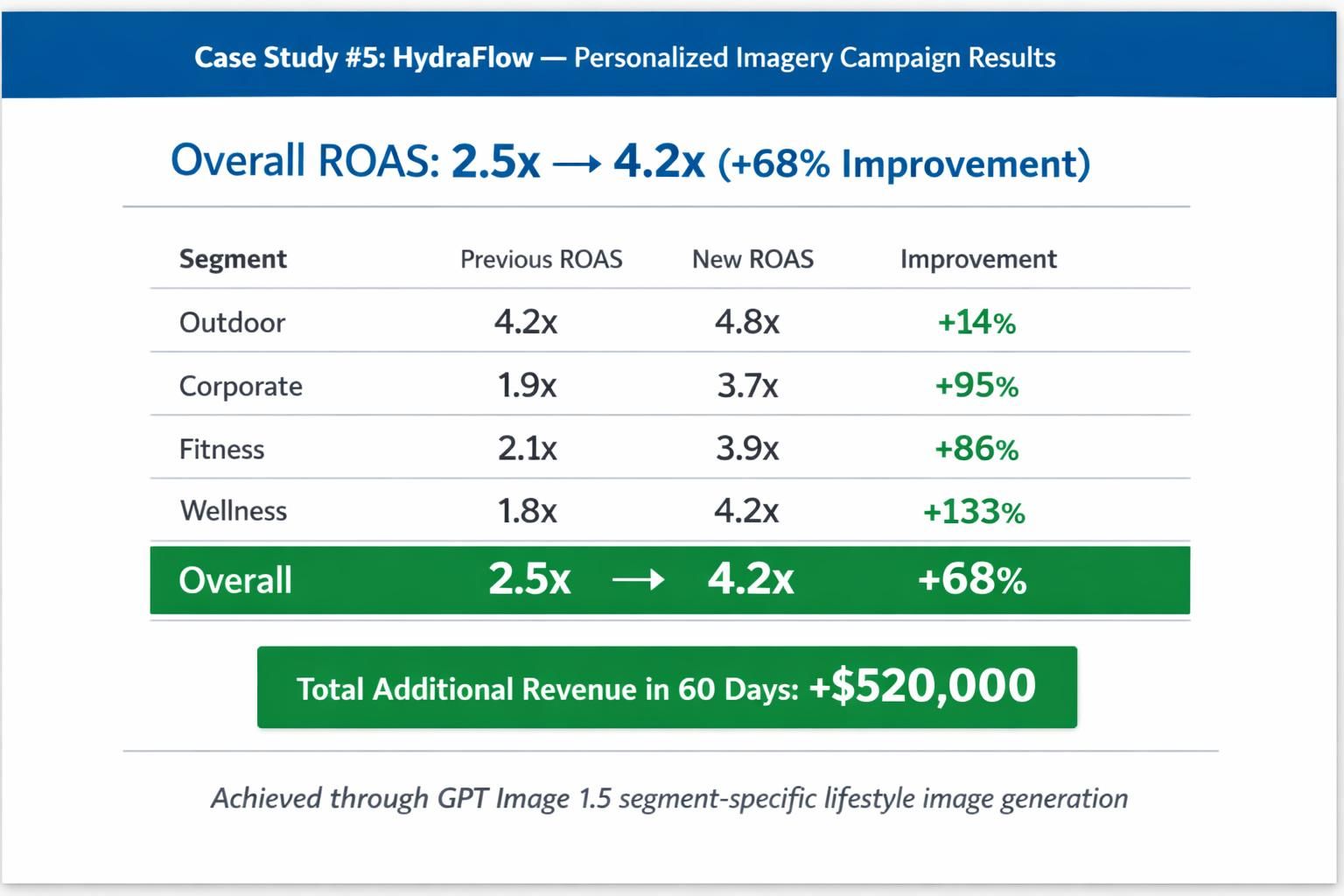
Background: Premium stainless steel water bottles. Customer data showed four distinct buyer personas. Existing outdoor-focused photography resonated with only 1 of 4 segments.
The Challenge:
- 4 distinct customer segments with different visual preferences
- Existing imagery aligned with only 1 segment
- Paid advertising underperforming for 3 of 4 segments
- No budget for 4 separate photoshoots
The GPT Image 1.5 Personalization Solution: Generated segment-specific imagery for top 5 products — 4 image sets per product (one per segment).
Prompts for flagship "Summit 32oz" bottle:
Outdoor Segment:
plaintext1Premium matte black water bottle on granite rock surface overlooking 2alpine lake, morning golden light, pine trees in background, 3adventurous outdoor lifestyle photography, high quality
Corporate Segment:
plaintext1Matte black water bottle on glass desk in office; 2city view through windows, natural light, business lifestyle photography
Fitness Segment:
plaintext1Product: Water bottle (matte black). 2Setting: Gym floor, dumbbells, resistance bands. 3Lighting: Studio fitness. Style: Athletic lifestyle.
Wellness/Yoga Segment:
plaintext1Matte black water bottle beside rolled yoga mat on wooden studio floor, 2soft morning light through windows, plants in background, 3calm mindful lifestyle photography
Deployed dynamically based on audience targeting in Meta Ads and Google Display campaigns.
Results (60-day campaign):
| Segment | CTR Improvement | CVR Improvement | ROAS Lift |
| Outdoor (existing imagery) | Baseline | Baseline | Baseline |
| Corporate | +89% | +67% | +124% |
| Fitness | +95% | +82% | +156% |
| Wellness/Yoga | +112% | +94% | +178% |
60-day revenue impact: +$520,000
Segment analysis: Wellness/yoga showed highest performance. This correlated with prior under-servicing by existing outdoor-focused imagery, not segment size.
Personalization at Scale: Technical Workflow
Dynamic Image Serving Setup:
- Segment Definition: Define key audience segments based on CRM/behavioral data
- Prompt Library: Create prompt template per product per segment
- Batch Generation: Use GPT Image 1.5 API to generate all variations
- CDN Storage: Store with naming convention (product-id_segment_variant)
- Dynamic Serving: Configure ad platforms to serve segment-appropriate imagery
- Monitoring: Track performance by segment, refresh quarterly
Critical Boundary Conditions: When GPT Image 1.5 Falls Short
Scenarios Where Traditional Photography Still Wins
1. High-Precision Print Requirements
- 300 DPI+ print materials still require professional cameras and post-production
- AI-generated images may have detail instability when enlarged beyond 2×
- Rule of thumb: AI for digital, human photographers for print catalogs
2. Color-Critical Categories (Fashion, Cosmetics)
- Pantone matching requires calibration workflows AI can't reliably perform
- Customers returning products due to "color not as shown" destroys margin
- Recommendation: Use AI for lifestyle/context shots, traditional photography for color-accurate product detail shots
3. Complex Product Interactions
- Products being worn, held, or used in ways requiring precise physics
- Fabric draping, liquid splashing, hands interacting with products
- Current limitation: AI struggles with realistic human-product interactions
4. Legally Regulated Imagery
- Pharmaceutical labels, nutritional claims, safety warnings
- AI may misinterpret regulatory text or positioning requirements
- Requirement: Human legal review before publishing AI-generated regulated content
Troubleshooting Common Issues
Issue #1: Product Accuracy Problems
Symptom: Generated product doesn't look exactly like your actual product.
Solutions:
- Use GPT Image 1.5 Edit with actual product photo as input (don't generate from scratch)
- Enable
input_fidelity: "high"to preserve product details - Add specific descriptors (exact shape, material, color name)
- Explicitly state: "maintain exact product shape, label design, and color"
Issue #2: Inconsistent Style Across Catalog
Issue: Inconsistent visual styles across product images.
Resolution:
- Standardize prompts using consistent elements: product, photography style, lighting, background, mood, and quality parameters.
- Build brand style guide as prompt suffix for every generation
- Use reference image from best-performing photos as style anchor
- Document exact prompt wording that produces preferred style
Issue #3: Text Rendering Issues
Symptom: Labels, signage, or captions appear distorted.
Solutions:
- For product label text, use Edit function with actual product photo
- Avoid asking GPT Image 1.5 to render complex text from scratch
- For simple text, be explicit: "the text reads exactly: [TEXT]"
- Use input_fidelity parameter when packaging text must be preserved
Conclusion: The Integration Playbook
GPT Image 1.5 isn't replacing product photography — it's redefining the photography workflow stack.
Operational allocation:
- AI deployment: Lifestyle imagery, bulk catalog generation, A/B testing, audience personalization
- Human photographers for: Hero shots, color-critical details, complex interactions, print materials
- Hybrid workflows: AI generates variations, human photographers capture hero assets that anchor brand identity
Decision framework: Rather than AI versus traditional photography, determine the optimal mix based on product category, budget, and customer expectations.
The brands answering this question intelligently are the ones winning in 2026.





