

In 2026, the shift from creative trials to professional automation is finished. Full-stack developers must now master the integration of video API systems. This skill is no longer optional. It is essential for creating fast, AI-powered applications.
The industry has matured past simple prompting. Modern integration focuses on pipeline reliability and cost-efficiency. Choosing the right backbone for your video features requires balancing latency against fidelity.
When architecting your solution, consider these three constraints:
- Cost-per-second: Essential for scaling B2C applications.
- Creation Speed: Fast loading keeps users engaged with live apps.
- Visual Quality: High detail is vital for professional ads or films.
Security comes first. You must use API keys to stop unauthorized access and cost spikes. Keep these keys safe in environment variables. Never put keys in your public code or version control systems.
Architecting the Asynchronous Flow: "10-Minute" Setup
In the world of full-stack development, standard REST patterns usually involve a request and an immediate response. AI video creation uses a lot of power. It often takes minutes to finish one high-quality clip. Do not use simple "await" logic in your frontend code. This is a bad move. It causes timed-out links and frozen apps; and break the use experience.
To build a production-grade application, you must implement a robust Post-Poll-Push workflow that respects the asynchronous nature of heavy compute.
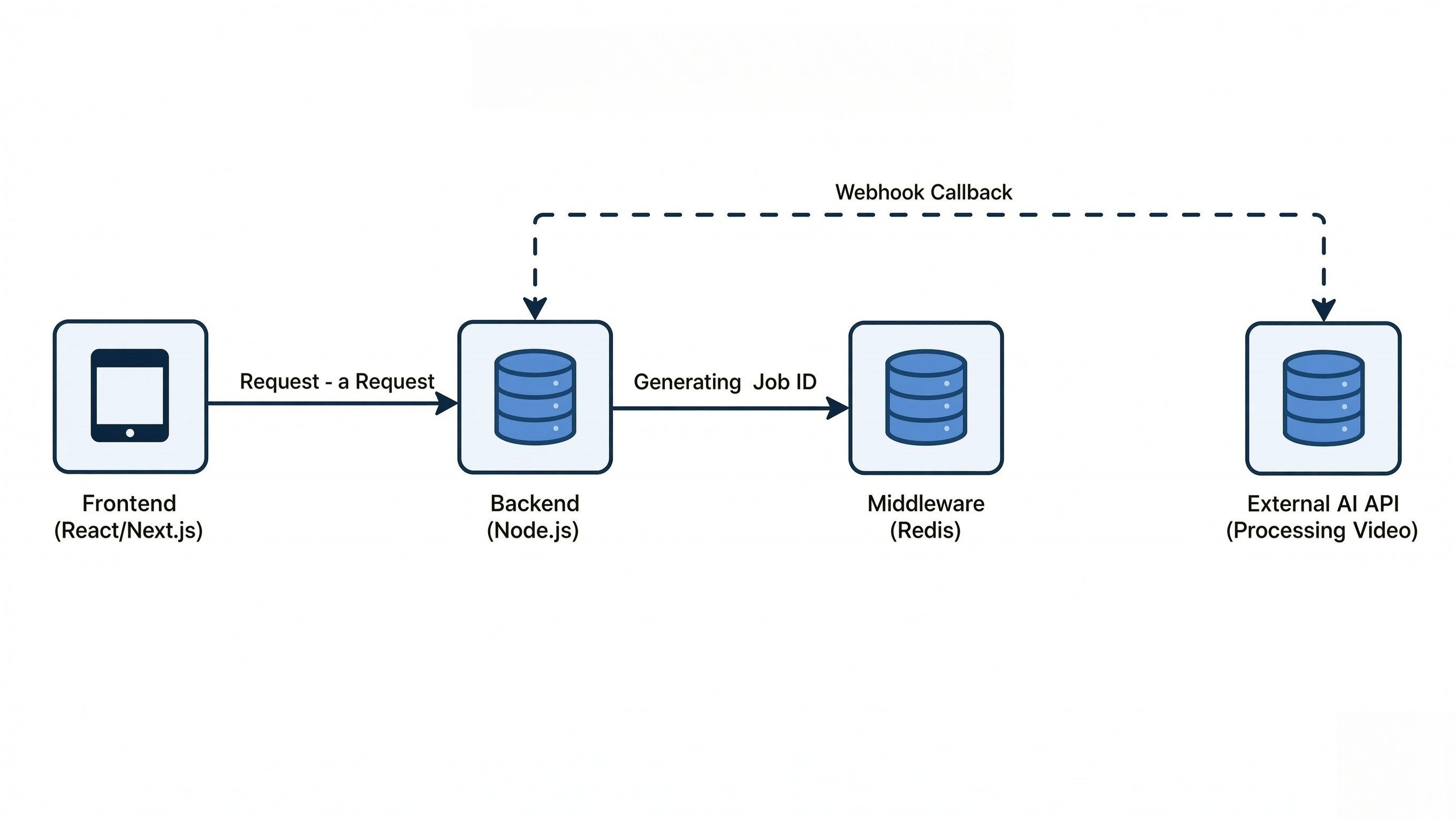
The Pro-Pattern: Implementing the Workflow
Effective SDK setup starts with keeping tasks separate. Move video processing to a different worker. This keeps your main app fast and smooth. Your main thread will stay open to make sure your request data is exact. Following the "lean payload" rule, you should host your assets externally and pass only the reference URLs to the endpoint.
Step 1: The Request (Payload Optimization)
Start with a clear JSON payload and send it through a POST /v1/videos request. To keep things steady, try the cURL examples from the official docs first. Test these in Postman before you start writing any actual code for your app.
- Key Parameters: Prompt, aspect ratio, and resolution.
- Optimization: Keep your payloads lean. Avoid sending heavy Base64 data; use URLs for source images instead.
Kling API Implementation Example:
When using the Kling 3.0 model for an image-to-video task, your payload should focus on tokenizing the prompt and providing high-quality source URLs.
Example JSON Payload:
JSON
plaintext1{ 2 "model": "kwaivgi/kling-v3.0-pro/text-to-video", 3 "prompt": "A cinematic shot of a robotic hand assembling a circuit board, high-tech laboratory background, 4k, highly detailed.", 4 "negative_prompt": "blurry, low quality, distorted anatomy", 5 "aspect_ratio": "16:9", 6 "image_url": "https://example.com/image.jpg", 7 "duration": 5 8}
cURL Example for Testing:
You can import this directly into your Postman collection to verify your API Keys and connectivity, taking Atlas Cloud's model API as an example:
Bash
plaintext1curl -X POST "https://api.atlascloud.ai/api/v1/model/generateImage" \ 2 -H "Content-Type: application/json" \ 3 -H "Authorization: Bearer YOUR_API_KEY" \ 4 -d '{ 5 "model": "kling 3.0", 6 "prompt": "A futuristic city skyline at sunset, cyberpunk aesthetic.", 7 "aspect_ratio": "16:9" 8 }'
It is better to send image URLs instead of Base64 strings. Megabytes are turned to bytes for the request size. By doing this, the "413 Payload Too Large" error is avoided. It also makes sure your data gets to the Kling engine quickly. The whole transmission stays fast and clean.
Step 2: The Middleware Layer
After the API accepts your request, you get a job_id back. Save this ID in a fast database like Redis or Supabase. This helps your backend check the video status without asking the AI provider too many times. It is a smart way to stay under your rate limit.
Kling API Implementation Example:
When you submit a request to Kling, the response includes a task_id and an initial status. Your middleware should capture this and map it to your internal user_id.
Kling API Response (JSON Payload):
JSON
plaintext1{ 2 "code": 0, 3 "message": "success", 4 "data": { 5 "task_id": "v_1234567890abcdefg", 6 "task_status": "submitted" 7 } 8}
SDK Implementation (Node.js + Redis):
Using a fast key-value store like Redis ensures that your application can handle status lookups in sub-millisecond time.
JavaScript (Based on Redis v4)
plaintext1// Step 2 logic: After the POST request to Klingconst response = await klingClient.createVideo(payload); 2 3if (response.data.task_id) { 4 const { task_id } = response.data; 5 6 // Store the ID in Redis with a 24-hour TTL// Key: video_job:[task_id] | Value: user_id or internal metadataawait redis.set(`video_job:${task_id}`, JSON.stringify({ 7 userId: currentUser.id, 8 status: 'processing', 9 createdAt: Date.now() 10 }), 'EX', 86400); 11 12 console.log(`Task ${task_id} persisted for User ${currentUser.id}`); 13}
Why this matters for scaling:
- State Management: If the user refreshes their browser, your backend checks Redis first rather than making a costly API call to Kling.
- Rate Limit Protection: By storing the job state locally, you can implement a "cooldown" period for status checks, ensuring you don't hit Kling's GET request limits.
- Webhook Verification: When the notification finally hits your server, check the task_id against your Redis database right away. This tells you exactly which user to alert.
Step 3: Webhooks vs. Long-polling
While long-polling is easier to set up, Webhooks are the industry standard for 2026. Webhooks reduce server load by up to 90% because your server sits idle until the AI provider "pushes" the completed video data back to you.
Kling API Implementation Example:
To use Webhooks with Kling, you must provide a callback_url in your initial JSON payload. Your server must be prepared to receive an incoming POST request with the final video metadata.
The Webhook Payload:
JSON
plaintext1{ 2 "task_id": "v_1234567890abcdefg", 3 "task_status": "completed", 4 "task_result": { 5 "videos": [ 6 { 7 "id": "vid_98765", 8 "url": "https://cdn.atlascloud.ai/videos/abc123.mp4", 9 "duration": "5.0" 10 } 11 ] 12 } 13}
SDK Implementation (Node.js/Express Listener):
Your listener should be lightweight and secure. It validates the task against your Redis store and then triggers the final delivery.
JavaScript
plaintext1// A dedicated endpoint to handle Kling callbacks 2app.post('/api/webhooks/kling', async (req, res) => { 3 const { task_id, task_status, task_result } = req.body; 4 5 // 1. Verify this task exists in your persistence layer (Step 2)const jobData = await redis.get(`video_job:${task_id}`); 6 if (!jobData) return res.status(404).send('Task not found'); 7 8 if (task_status === 'completed') { 9 const videoUrl = task_result.videos[0].url; 10 11 // 2. Push notification to the user via WebSockets or Emailconsole.log(`Success! Video for Task ${task_id} is ready at ${videoUrl}`); 12 13 // 3. Update internal DB and clean up temporary Redis keyawait db.videos.update({ where: { taskId: task_id }, data: { url: videoUrl, status: 'ready' } }); 14 await redis.del(`video_job:${task_id}`); 15 } 16 17 // Always return a 200 OK immediately to acknowledge receipt 18 res.status(200).send('ACK'); 19});
Comparison for Scalability:
| Feature | Long-Polling | Webhooks (Recommended) |
| Server Load | High: Constant pings drain resources | Minimal: Event-driven; server sleeps until called |
| Latency | Variable: Dependent on your polling interval | Near-instant: Notification sent upon completion |
| Scalability | Difficult: Becomes a bottleneck at 100+ tasks | Highly Scalable: Handles thousands of concurrent tasks |
By adopting this "Push" architecture, you ensure your SDK implementation remains responsive even during high-traffic periods, allowing your infrastructure to scale horizontally without multiplying your API overhead.
Software Design: Real-Time Rendering Realities
While "Real-time rendering" is a common marketing term, in a developer's context, it refers to providing the user with immediate feedback.
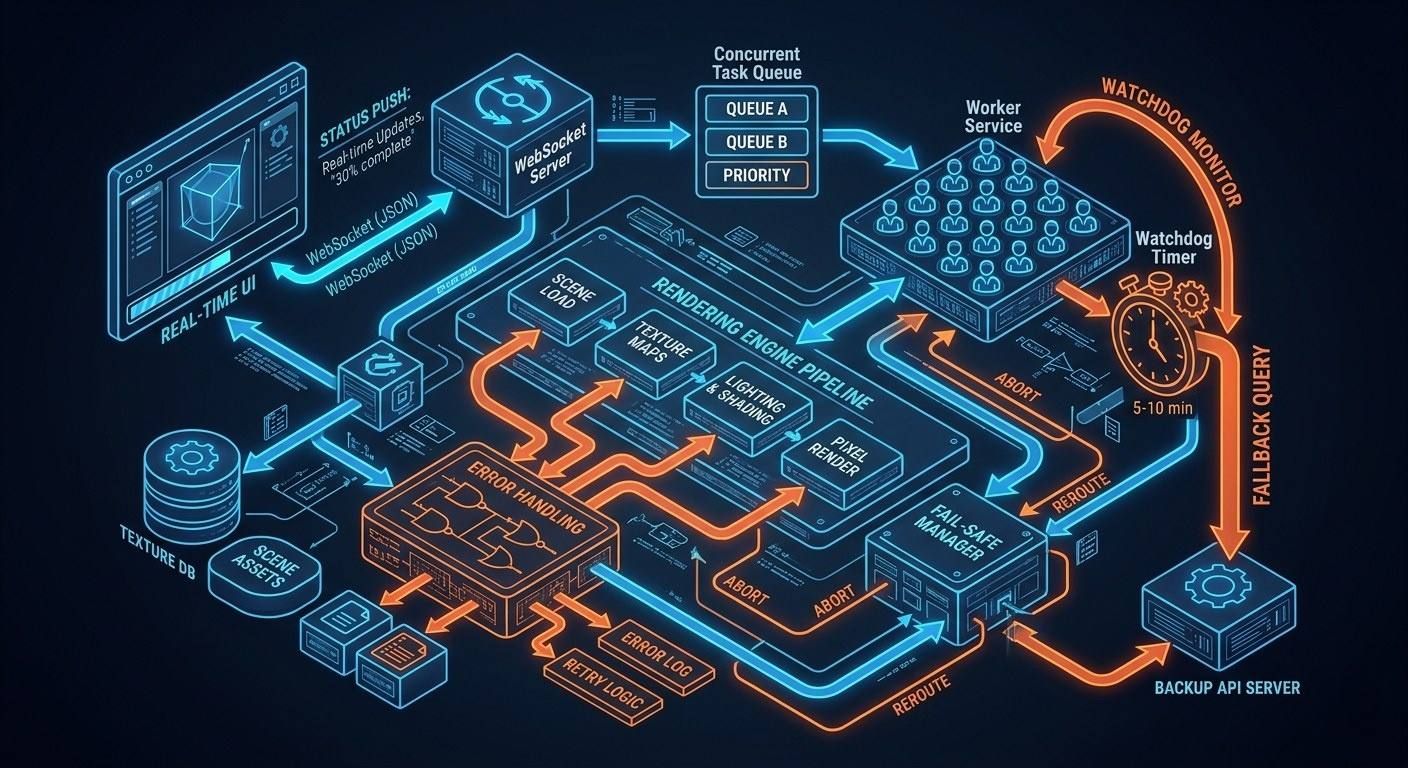
- Status Updates: Use WebSockets to send progress alerts like "30% done" straight to the UI.
- Fail-Safes: Put a watchdog timer in your worker service. If the webhook takes too long—over 5 or 10 minutes—the system must manually check the API status as a backup.
If you use this setup, your AI features will stop being slow. They will become fast and dependable instead. Your system can manage thousands of tasks at once. It will stay stable even under a heavy load. This makes your app feel professional and strong.
Set Up "Safety-First" Error Logic
In a production environment, your SDK setup is only good if it handles errors well. AI video tools fail in ways that normal APIs do not. You need a smart plan for these breaks to keep the user experience smooth.
Handling Rejections: Technical vs. Policy
It is vital to know the difference between a service crash and an app rejection. Once you send your JSON data, the API gives back specific codes. These codes tell you exactly what to do next. Pay close attention to these signals to fix issues fast.
- Technical Errors (500/503): These indicate server-side instability. The correct protocol is to log the incident and alert the user of a temporary delay.
- Safety Triggers (400/422): These occur when a prompt violates safety guidelines. In these cases, retrying will not help; you must provide clear feedback to the user to adjust their input.
To keep your system safe and follow rate limits, use one main request handler. This setup stops endless loops by keeping track of how many times you try again. It ensures your app stays stable even when the API is busy:
plaintext1/** 2 * Executes a video generation request with built-in safety 3 * and managed retry logic. 4 */ 5async function safeVideoRequest(payload, attempt = 1) { 6 const MAX_ATTEMPTS = 5; 7 8 try { 9 const response = await aiClient.post('/generate', payload); 10 return response.data; 11 } catch (error) { 12 const status = error.response?.status; 13 const errorData = error.response?.data; 14 15 // 1. Policy Rejection: Safety violation. Do NOT retry. 16 if (status === 422 && errorData.reason === 'safety_violation') { 17 throw new Error(`Content Flagged: Please revise your prompt to meet safety guidelines.`); 18 } 19 20 // 2. Rate Limiting: Respect "Retry-After" headers. 21 if (status === 429 && attempt <= MAX_ATTEMPTS) { 22 const waitTime = error.response.headers['retry-after'] || Math.pow(2, attempt); 23 console.warn(`Rate limit hit. Retrying attempt ${attempt} in ${waitTime}s...`); 24 25 await new Promise(resolve => setTimeout(resolve, waitTime * 1000)); 26 return safeVideoRequest(payload, attempt + 1); 27 } 28 29 // 3. Technical Error: Server-side instability (5xx). 30 if (status >= 500 && attempt <= MAX_ATTEMPTS) { 31 logger.error(`Upstream Error (${status}). Attempting retry ${attempt}...`); 32 33 const backoffDelay = Math.pow(2, attempt) * 1000; 34 await new Promise(resolve => setTimeout(resolve, backoffDelay)); 35 return safeVideoRequest(payload, attempt + 1); 36 } 37 38 // Fallthrough: Max attempts reached or unhandled error 39 throw new Error(errorData?.message || 'The AI engine is currently unreachable.'); 40 }
Track your retries to make sure the process stops eventually. This keeps your memory clean and prevents endless loops. Don't just show a basic "error" alert. Your system should tell if a prompt is "too risky" 422 or if the API is just "too busy" 429 right now.
Preventing unnecessary retries on safety-flagged content saves valuable compute cycles and prevents your API key from being flagged for "spamming" invalid requests.
The Retry Logic and Rate Limiting
Don't get blocked for hitting the server too hard. You need to watch those rate limit headers closely. Use a simple backoff strategy. Wait longer between attempts, such as 1s, 2s, or 4s. Verify this by simulating "429 Too Many Requests" errors in Postman with cURL.
Aspect Ratio Transformation
To achieve high-quality Real-time rendering feel without "black bar" letterboxing, you must programmatically map UI selections to valid API parameters.
A clean mapping utility for UI-to-API parameter synchronization:
plaintext1/** 2 * Map UI selections to valid API parameters to prevent letterboxing 3 */ 4const ASPECT_RATIO_MAP = { 5 'TikTok': { ratio: '9:16', resolution: '720x1280' }, 6 'YouTube': { ratio: '16:9', resolution: '1280x720' }, 7 'Instagram': { ratio: '1:1', resolution: '1024x1024' } 8}; 9 10const getModelParams = (platform) => { 11 const config = ASPECT_RATIO_MAP[platform] || ASPECT_RATIO_MAP['YouTube']; 12 return { 13 aspect_ratio: config.ratio, 14 resolution: config.resolution 15 }; 16};
By automating this mapping, you ensure the AI model generates native pixels for the intended platform, preserving visual integrity and Webhooks efficiency.
Scaling & Performance Optimization
Scaling AI video features requires more than just high-speed Real-time rendering; it demands a strategic approach to resource management.
Security: Signed URLs and Watermarks
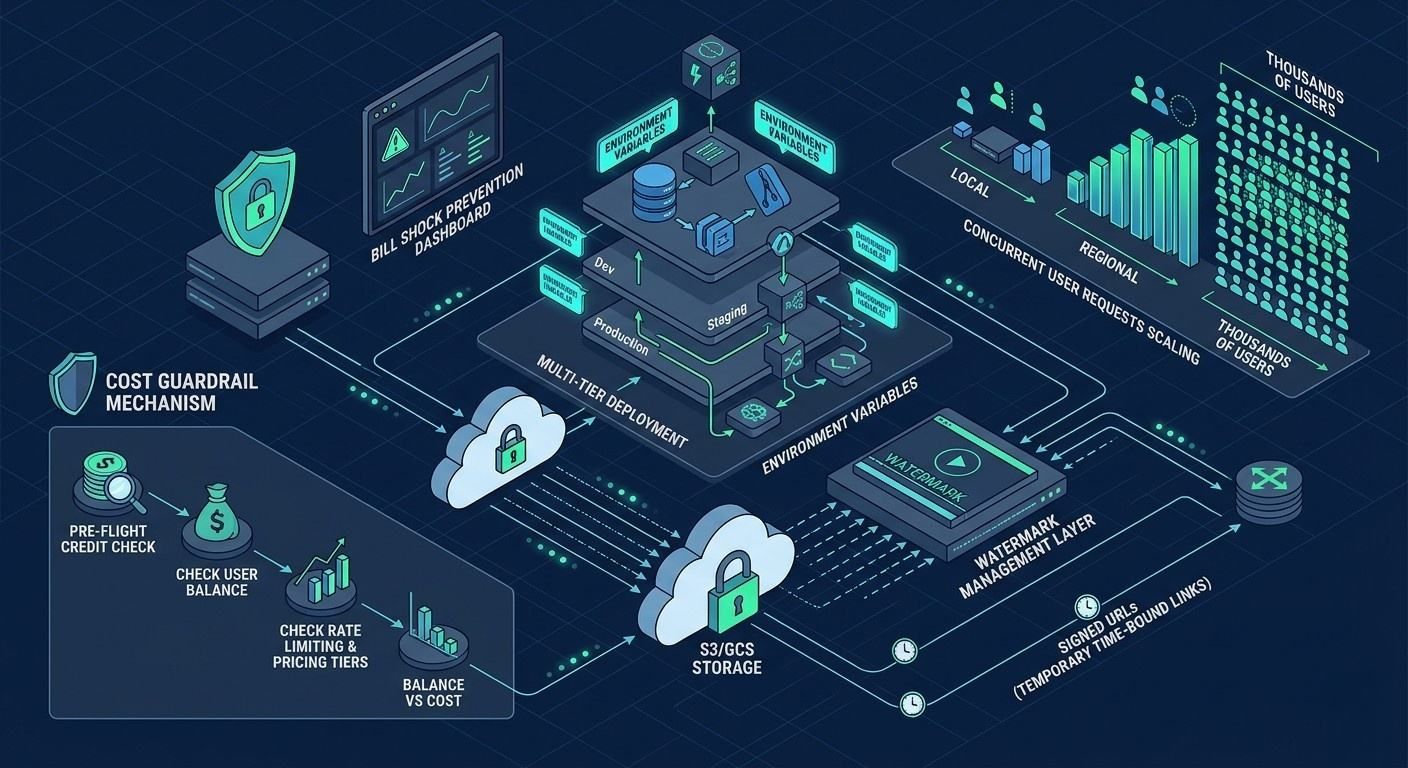
Delivering heavy video assets (often exceeding 100MB) poses a security risk if your storage buckets are public. Utilize S3 or GCS Signed URLs within your JSON payload responses. This generates a temporary, time-bound link that allows the client to download the video without exposing your master storage credentials.
Additionally, ensure your pipeline accounts for Watermark Management. Most enterprise APIs, such as those detailed in the Google Gemini Video docs, include mandatory safety watermarks to comply with AI transparency standards.
Resource and Cost Optimization
To prevent "bill shock" during viral traffic spikes, implement a multi-tier deployment strategy. You can test these configurations using different environment variables in your Postman collection.
| Environment | Resolution | Intent | Cost Impact |
| Development | 720p | Logic testing / UI Layout | Low |
| Staging | 720p | Integration & QA | Low |
| Production | 1080p+ | Final User Delivery | High |
Implementing Cost Guardrails
Check your credits before you send a new request. You can use cURL to test this. Look at the balance first. Compare it to the pricing and limits of the model. This stops your API costs from getting out of control. It keeps your app profitable while still giving a high-quality experience.
Conclusion: The "Ready-to-Ship" Checklist
Getting AI video to work well takes more than just a working SDK. You need to do more than link the code. When you move from your own computer to a live site, your setup is key. The best way to stop crashes is to fix your infrastructure. It also keeps your data safe from hackers before you go live.
Final Technical Validation
Before going live, verify your integration against this "Ready-to-Ship" checklist to ensure all systems are optimized for Real-time rendering feedback and stability:
- Environment Variables Check: Ensure your Authentication (API Keys) are moved from hardcoded strings to secure environment variables. Never commit your .env files to version control.
- Webhook Listener Testing: Try Ngrok to test your endpoint. See if it stays steady when lots of JSON data hits it at the same time.
- Storage Bucket Permissions: Make sure your account can save files to S3 or GCS. Block all public access and use Signed URLs for safety.
- Rate Limiting Resilience: Run a quick stress test in Postman. Check that your app handles "429 Too Many Requests" without falling apart or crash
Deployment Quick-Reference
For a final sanity check, use these cURL examples to verify your endpoint connectivity:
| Test Phase | Tooling | Success Metric |
| Connectivity | cURL | 200 OK on /v1/health |
| Logic | Postman | Valid job_id returned |
| Webhooks | CLI | Log shows status: "completed" |
By meticulously following these steps, you ensure that your video generation pipeline is not only powerful but also scalable and secure for the 2026 landscape. Happy coding!
FAQ
Why is Redis preferred over a standard SQL database for Step 2?
AI video tasks are ephemeral and high-frequency. Using Redis provides sub-millisecond latency for status lookups and automatic TTL management, preventing your primary database from being bogged down by transient "processing" logs.
How do I handle Webhook security without a static IP?
Most providers now use HMAC signatures. Forget about IP whitelisting. Just use your secret key to verify the x-ai-signature header. This makes sure the data is legit and wasn't changed while it was moving across the web.
Is 720p enough for the Development environment?
Yes. Since 1080p+ generation incurs higher costs and longer wait times, using 720p for integration testing ensures your Post-Poll-Push logic works without draining your API credits during the debugging phase.





