Native audio generation in AI video has changed the production workflow for good. Until recently, generating video with AI meant producing a silent clip and then sourcing, editing, and syncing audio in a separate step. That additional step added time, cost, and complexity -- and the results were often imperfect. In 2026, three leading models now generate synchronized audio alongside their video output in a single pass: Veo 3.1 from Google DeepMind, Kling 3.0 from Kuaishou, and Vidu Q3 from Shengshu Technology.
This comparison guide breaks down exactly how each model handles audio -- quality, language support, synchronization accuracy, pricing, and practical use cases. Whether you are a developer building a content pipeline, a marketer producing ads at scale, or a filmmaker exploring AI-assisted pre-production, this guide will help you choose the right audio-capable model for your workflow.
*Last Updated: February 28, 2026*
See these models compared side by side:
Audio-Capable Models at a Glance
| Feature | Veo 3.1 | Kling 3.0 | Vidu Q3 |
|---|---|---|---|
| Developer | Google DeepMind | Kuaishou | Shengshu Technology |
| Native Audio | Yes | Yes | Yes |
| Audio Languages | English-centric | English, Chinese, Japanese, Korean, Spanish | English-centric |
| Lip Sync | Contextual | Multilingual lip sync | Contextual |
| Audio Type | Ambient + dialogue | Ambient + multilingual dialogue | Ambient + dialogue |
| Max Duration | 8 seconds | 10 seconds | 16 seconds |
| Max Resolution | 720p | 1080p | 1080p |
| Atlas Cloud Price | $ 0.09/sec (Fast) / $ 0.18/sec (Std) | $ 0.095/sec (Pro) | $ 0.06/sec |
| Per 8s Clip Cost | $ 0.72 (Fast) / $ 1.44 (Std) | $ 0.76 | $ 0.48 |
| Best Audio Strength | Ambient soundscapes | Multilingual dialogue | Balanced audio-visual sync |
How Native Audio Works in AI Video
Before diving into each model, it helps to understand what "native audio" actually means in this context. Traditional AI video models produce silent video files. Audio -- whether ambient sound, music, dialogue, or sound effects -- must be generated separately using a different tool or sourced from a library, then manually synchronized with the video in post-production.
Native audio models generate the audio track as part of the same inference process that creates the video. The model reads the text prompt, generates visual frames, and simultaneously produces an audio track that is contextually aligned with the visual content. A beach scene gets wave sounds. A person speaking gets lip-synced dialogue. A city street gets traffic noise. The audio is baked into the output file -- no additional API call, no post-sync step.
This matters because:
- It eliminates an entire production step. Teams no longer need to find, edit, and sync audio separately.
- Sync accuracy is higher. Because audio and video are generated together, temporal alignment is more natural than bolting audio onto video after the fact.
- Cost drops. No need for separate audio generation APIs, stock audio licenses, or audio editing tools.
- Iteration is faster. A single API call produces a complete asset, ready for review.
Veo 3.1: Cinematic Ambient Audio
Audio Capabilities
Veo 3.1 approaches audio the way a sound designer would approach a film set. Its strength is ambient, environmental audio that feels like it was captured on location alongside the video. Prompt a Norwegian fjord at sunrise, and the output includes wind, water lapping against rocks, and distant birdsong. Prompt a busy Tokyo intersection, and the output delivers traffic noise, pedestrian chatter, and crossing signal tones.
The model processes audio context clues in the prompt and generates soundscapes that match the visual environment. This is not random noise layered onto video -- it is contextually aware generation that responds to specific elements in the scene.
Dialogue handling: Veo 3.1 can generate spoken audio when prompted, but its strength is clearly in environmental and ambient sound rather than multilingual dialogue. The model handles English-centric speech reasonably well, but it does not have the explicit multilingual lip sync capability of Kling 3.0.
Audio quality: The audio output from Veo 3.1 is clean, without obvious artifacts or digital noise. The frequency range is natural-sounding, and ambient elements blend smoothly. In our testing, the audio quality consistently matched the high cinematic quality of the video output.
Veo 3.1 Audio Strengths
- Best-in-class ambient soundscapes that feel like field recordings
- Clean, artifact-free audio output
- Strong contextual awareness -- audio elements match visual elements precisely
- Professional-grade cinematic quality at $0.09/second (Fast) or $0.18/second (Standard)
- Excellent for brand content, nature footage, and atmospheric pieces
Veo 3.1 Audio Limitations
- English-centric -- limited multilingual dialogue capability
- No explicit language selection parameter
- 8-second maximum limits the complexity of audio narratives
- Ambient sound is the strength -- dialogue and speech are secondary
Veo 3.1 Code Example
plaintext1```python 2import requests 3import time 4 5 6API_KEY = "your-atlas-cloud-api-key" 7BASE_URL = "https://api.atlascloud.ai/api/v1" 8 9 10# Veo 3.1 with audio-rich prompt 11response = requests.post( 12 f"{BASE_URL}/model/generateVideo", 13 headers={ 14 "Authorization": f"Bearer {API_KEY}", 15 "Content-Type": "application/json" 16 }, 17 json={ 18 "model": "google/veo3.1/text-to-video", 19 "prompt": "Close-up of a barista pouring steamed milk into a latte, " 20 "espresso machine hissing in the background, soft jazz " 21 "playing in a cozy cafe, warm morning light through windows", 22 "duration": 8, 23 "resolution": "1080p" 24 } 25) 26 27 28result = response.json() 29 30 31while True: 32 status = requests.get( 33 f"{BASE_URL}/model/prediction/{result['request_id']}/get", 34 headers={"Authorization": f"Bearer {API_KEY}"} 35 ).json() 36 if status["status"] == "completed": 37 print(f"Video with audio: {status['output']['video_url']}") 38 break 39 time.sleep(5) 40```
Kling 3.0: Multilingual Dialogue Leader
Audio Capabilities
Kling 3.0 takes a fundamentally different approach to audio. Where Veo 3.1 excels at ambient soundscapes, Kling 3.0 is built around multilingual dialogue generation with lip synchronization. The model natively supports audio generation in five languages -- English, Chinese, Japanese, Korean, and Spanish -- with accurate lip movements that match the generated speech.
This is not a simple text-to-speech layer overlaid onto video. The model generates the character's facial movements, mouth shapes, and timing simultaneously with the audio track. The result is a character who appears to genuinely speak the language specified in the prompt.
Dialogue handling: This is Kling 3.0's defining audio feature. Specify a language in the prompt, and the model generates a character speaking that language with appropriate lip sync. In testing, Spanish-language prompts produced convincing results with natural mouth movements and cadence. Japanese and Korean outputs were similarly impressive, with culturally appropriate body language accompanying the speech.
Ambient audio: Kling 3.0 also generates ambient and environmental audio, though this is secondary to its dialogue capabilities. Background sounds are present and contextually appropriate, but they lack the cinematic depth of Veo 3.1's soundscapes.
Audio quality: The speech audio is clear and natural-sounding. There is occasional artifacting in complex scenes with both dialogue and heavy ambient sound, but for dialogue-focused content, the quality is production-ready.
Kling 3.0 Audio Strengths
- Multilingual dialogue in 5 languages with accurate lip sync
- Culturally appropriate speech cadence and body language
- Strong character-focused audio -- ideal for talking-head content
- Longest duration among the three at 10 seconds
- Excellent for multilingual marketing and global content
Kling 3.0 Audio Limitations
- Premium pricing at $0.095/second (Pro)
- Ambient audio quality is below Veo 3.1's cinematic standard
- Very strict content moderation can flag innocent prompts
- Language quality varies -- English and Chinese are strongest
Kling 3.0 Code Example
plaintext1```python 2import requests 3import time 4 5 6API_KEY = "your-atlas-cloud-api-key" 7BASE_URL = "https://api.atlascloud.ai/api/v1" 8 9 10# Kling 3.0 with multilingual dialogue prompt 11response = requests.post( 12 f"{BASE_URL}/model/generateVideo", 13 headers={ 14 "Authorization": f"Bearer {API_KEY}", 15 "Content-Type": "application/json" 16 }, 17 json={ 18 "model": "kwaivgi/kling-v3.0-pro/text-to-video", 19 "prompt": "A professional female presenter speaking in Spanish, " 20 "looking directly at camera, modern office background, " 21 "warm studio lighting, corporate presentation style", 22 "duration": 10, 23 "resolution": "1080p" 24 } 25) 26 27 28result = response.json() 29 30 31while True: 32 status = requests.get( 33 f"{BASE_URL}/model/prediction/{result['request_id']}/get", 34 headers={"Authorization": f"Bearer {API_KEY}"} 35 ).json() 36 if status["status"] == "completed": 37 print(f"Video with audio: {status['output']['video_url']}") 38 break 39 time.sleep(5) 40```
Vidu Q3: Balanced Audio-Visual Generation
Audio Capabilities
Vidu Q3 from Shengshu Technology positions itself between Veo 3.1's ambient focus and Kling 3.0's dialogue specialization. The model generates synchronized audio that covers both environmental soundscapes and basic speech, offering a balanced approach to audio generation.
Dialogue handling: Vidu Q3 generates speech audio with reasonable lip sync accuracy. It is primarily English-centric, without Kling 3.0's multilingual capabilities. The speech output is clear and natural, though it does not reach the linguistic sophistication of Kling 3.0's five-language support.
Ambient audio: Environmental sound generation is competent and contextually aware. The model reads scene descriptions in prompts and generates appropriate background audio. Quality sits between Kling 3.0's functional ambient audio and Veo 3.1's cinematic soundscapes.
Audio quality: The overall audio output is clean and usable for production. Vidu Q3's strength is consistency -- the audio quality is reliable across different prompt types, without the occasional brilliance or inconsistency that can characterize more specialized models.
Vidu Q3 Audio Strengths
- Balanced approach covering both dialogue and ambient audio
- Consistent quality across different content types
- Mid-range pricing at $0.06/second
- Good value for teams needing both speech and environmental audio
- Clean, artifact-free output suitable for production use
Vidu Q3 Audio Limitations
- English-centric -- lacks multilingual dialogue capability
- Audio quality does not reach the cinematic heights of Veo 3.1
- Lip sync accuracy is below Kling 3.0's multilingual standard
- 16-second maximum duration
- Less established ecosystem compared to Veo and Kling
Vidu Q3 Code Example
plaintext1```python 2import requests 3import time 4 5 6API_KEY = "your-atlas-cloud-api-key" 7BASE_URL = "https://api.atlascloud.ai/api/v1" 8 9 10# Vidu Q3 with balanced audio prompt 11response = requests.post( 12 f"{BASE_URL}/model/generateVideo", 13 headers={ 14 "Authorization": f"Bearer {API_KEY}", 15 "Content-Type": "application/json" 16 }, 17 json={ 18 "model": "shengshu/vidu-q3/text-to-video", 19 "prompt": "A young man unboxing a new smartphone at a desk, " 20 "speaking excitedly about the features, natural room " 21 "lighting, casual vlog style, ambient room sounds", 22 "duration": 8, 23 "resolution": "1080p" 24 } 25) 26 27 28result = response.json() 29 30 31while True: 32 status = requests.get( 33 f"{BASE_URL}/model/prediction/{result['request_id']}/get", 34 headers={"Authorization": f"Bearer {API_KEY}"} 35 ).json() 36 if status["status"] == "completed": 37 print(f"Video with audio: {status['output']['video_url']}") 38 break 39 time.sleep(5) 40```
Head-to-Head Audio Comparison
Audio Quality Rankings by Category
| Category | 1st Place | 2nd Place | 3rd Place |
|---|---|---|---|
| Ambient/Environmental | Veo 3.1 | Vidu Q3 | Kling 3.0 |
| Dialogue (English) | Kling 3.0 | Vidu Q3 | Veo 3.1 |
| Multilingual Speech | Kling 3.0 | -- | -- |
| Lip Sync Accuracy | Kling 3.0 | Vidu Q3 | Veo 3.1 |
| Sound Effects | Veo 3.1 | Vidu Q3 | Kling 3.0 |
| Overall Audio-Visual Sync | Veo 3.1 | Kling 3.0 | Vidu Q3 |
| Audio Consistency | Vidu Q3 | Veo 3.1 | Kling 3.0 |
Pricing Comparison
| Model | Cost/Second | 8s Clip | 10s Clip | 100 Clips (8s) |
|---|---|---|---|---|
| Vidu Q3 | $0.06 | $0.48 | $0.60 | $48.00 |
| Veo 3.1 Fast | $0.09 | $0.72 | N/A (8s max) | $72.00 |
| Kling 3.0 Pro | $0.095 | $0.76 | $0.95 | $76.00 |
At scale, the pricing differences become significant. A team producing 500 clips per month would spend $240 with Vidu Q3, $360 with Veo 3.1 Fast, or $380 with Kling 3.0 Pro. The question is whether Kling 3.0's multilingual dialogue justifies the premium over Veo 3.1's cinematic ambient audio or Vidu Q3's balanced approach.
Duration and Resolution
| Model | Max Duration | Max Resolution | Frame Rate |
|---|---|---|---|
| Vidu Q3 | 16 seconds | 1080p | 24fps |
| Kling 3.0 | 10 seconds | 1080p | 30fps |
| Veo 3.1 | 8 seconds | 720p | 24fps |
Vidu Q3 leads in duration at 16 seconds, while Kling 3.0 has a clear advantage in resolution. For dialogue-heavy content, those additional seconds allow for more complete sentences and more natural pacing.
How to Access These Models via Atlas Cloud API
All three audio-capable video models are available through a single Atlas Cloud API key. There is no need to maintain separate accounts with Google, Kuaishou, and Shengshu.
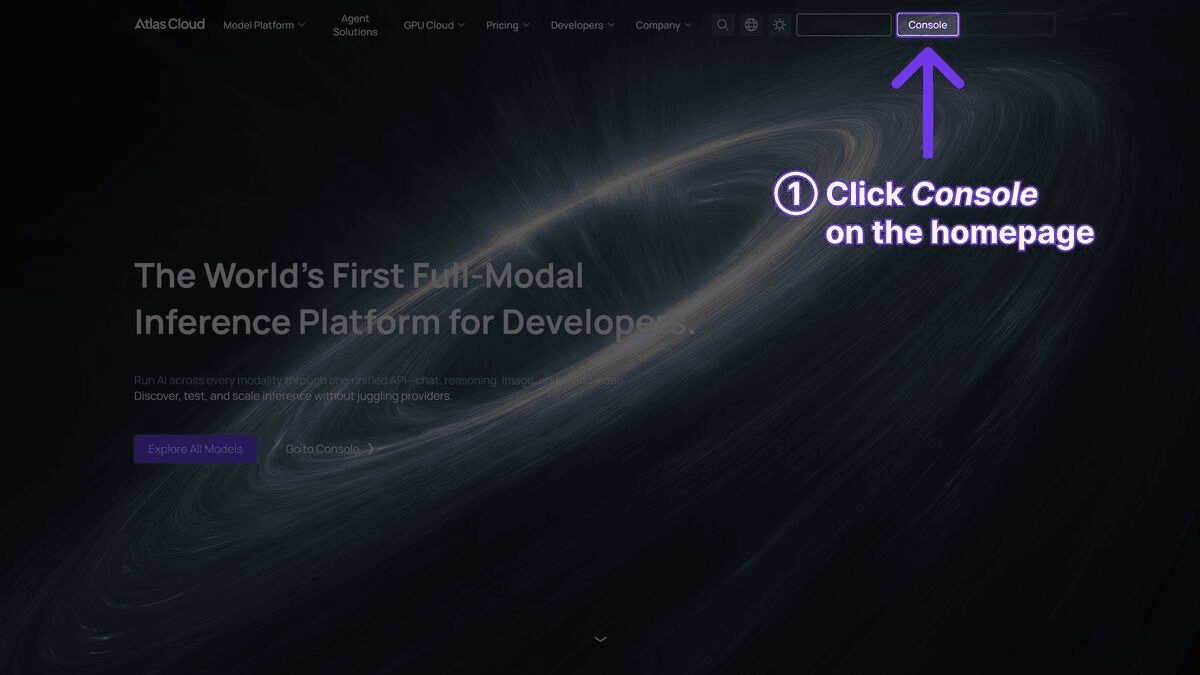
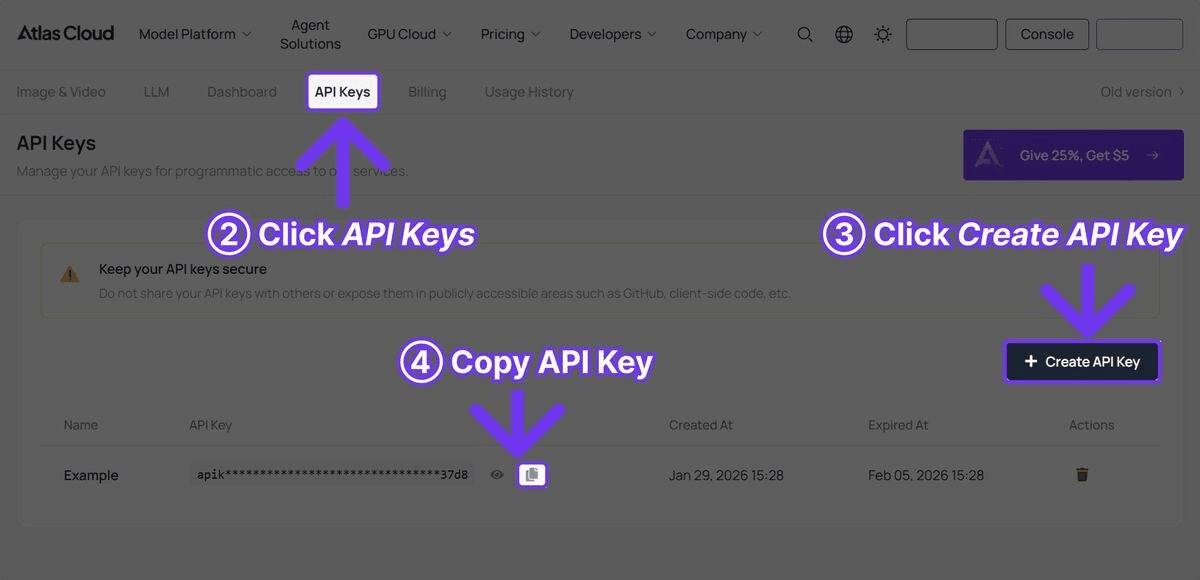
Step 1: Get Your API Key
Register at Atlas Cloud and navigate to the API Keys tab.
Step 2: Compare All Three Models
Here is a complete Python script that generates video with audio from all three models using the same prompt, making it easy to compare results:
plaintext1 2```python 3import requests 4import time 5 6 7API_KEY = "your-atlas-cloud-api-key" 8BASE_URL = "https://api.atlascloud.ai/api/v1" 9HEADERS = { 10 "Authorization": f"Bearer {API_KEY}", 11 "Content-Type": "application/json" 12} 13 14 15PROMPT = ("A street musician playing acoustic guitar on a cobblestone " 16 "sidewalk at golden hour, passersby dropping coins, warm natural " 17 "lighting, documentary style") 18 19 20models = { 21 "Veo 3.1": { 22 "model": "google/veo3.1/text-to-video", 23 "duration": 8 24 }, 25 "Kling 3.0": { 26 "model": "kwaivgi/kling-v3.0-pro/text-to-video", 27 "duration": 10 28 }, 29 "Vidu Q3": { 30 "model": "shengshu/vidu-q3/text-to-video", 31 "duration": 8 32 } 33} 34 35 36request_ids = {} 37 38 39for name, config in models.items(): 40 response = requests.post( 41 f"{BASE_URL}/model/generateVideo", 42 headers=HEADERS, 43 json={ 44 "model": config["model"], 45 "prompt": PROMPT, 46 "duration": config["duration"], 47 "resolution": "1080p" 48 } 49 ) 50 result = response.json() 51 request_ids[name] = result["request_id"] 52 print(f"Submitted {name}: {result['request_id']}") 53 54 55# Poll all three 56completed = {} 57while len(completed) < len(request_ids): 58 for name, rid in request_ids.items(): 59 if name in completed: 60 continue 61 status = requests.get( 62 f"{BASE_URL}/model/prediction/{rid}/get", 63 headers={"Authorization": f"Bearer {API_KEY}"} 64 ).json() 65 if status["status"] == "completed": 66 completed[name] = status["output"]["video_url"] 67 print(f"{name} done: {status['output']['video_url']}") 68 time.sleep(5) 69 70 71print("\nAll videos generated. Compare the audio quality:") 72for name, url in completed.items(): 73 print(f" {name}: {url}") 74```
When to Choose Each Model
Choose Veo 3.1 for Audio When:
- The content is atmospheric or environmental. Nature documentaries, travel content, brand films, real estate walkthroughs -- any scenario where the ambient soundscape is more important than dialogue.
- Budget is a primary constraint. At $0.09/second (Fast), Veo 3.1 is an affordable option with cinematic quality. Teams producing hundreds of clips monthly will see significant savings.
- Cinematic quality is the priority. The combination of Veo 3.1's visual polish and its ambient audio quality produces content that looks and sounds like it was professionally produced.
- You do not need multilingual dialogue. If the audio requirement is environmental rather than conversational, Veo 3.1 is the clear choice.
Choose Kling 3.0 for Audio When:
- The content requires characters speaking in multiple languages. This is Kling 3.0's defining feature. No other model generates multilingual dialogue with lip sync at this level.
- Lip sync accuracy is critical. For talking-head videos, explainer content, or any scene where a character speaks directly to camera, Kling 3.0's lip sync is the most accurate available.
- You need longer clips with multilingual audio. Kling 3.0's 10-second maximum with five-language support provides flexibility that Veo 3.1's 8-second limit cannot match.
- The project targets a global audience. Five-language support means a single workflow can produce content for English, Chinese, Japanese, Korean, and Spanish-speaking markets.
Choose Vidu Q3 for Audio When:
- You need a balance of dialogue and ambient audio. Vidu Q3 handles both competently without excelling in either, making it a versatile middle ground.
- Mid-range budget with quality requirements. At $0.06/second, Vidu Q3 is the most affordable of the three native audio models -- cheaper than Veo 3.1 Fast ($0.09/sec) and below Kling 3.0 Pro ($0.095/sec).
- Consistency matters more than peak quality. Vidu Q3 produces reliably good audio across different prompt types, which is valuable for automated pipelines where manual review is impractical.
- The project is English-only with moderate audio needs. For English dialogue with decent ambient sound at a reasonable price, Vidu Q3 is a solid option.
Audio Prompting Tips
Getting the best audio from these models requires specific prompting techniques. Here are strategies that work across all three:
1. Be Explicit About Sound Sources
The models generate audio based on sound cues in the prompt. The more specific you are, the better the result.
- Effective: "Rain hitting a tin roof, distant thunder rumbling, a cat purring on a windowsill"
- Less effective: “Rainy day with a cat”
2. Separate Visual and Audio Descriptions
Structure prompts so that visual and audio elements are clearly described. This helps the model give appropriate weight to both.
- Effective: "A chef slicing vegetables on a wooden cutting board -- the crisp sound of knife on celery, sizzling oil in a nearby pan, kitchen ventilation humming"
- Less effective: “A chef cooking in a kitchen”
3. Specify Dialogue Language for Kling 3.0
When using Kling 3.0 for multilingual content, explicitly state the language and context:
- "A Japanese tour guide explaining a temple's history in Japanese, speaking clearly and enthusiastically"
- "A Spanish news anchor reading headlines in formal Spanish, professional studio setting"
4. Use Audio Mood Descriptors
Words that describe the audio atmosphere help all three models:
- "Quiet, intimate ambiance" vs. "Loud, bustling atmosphere"
- "Muffled sounds through a window" vs. "Crisp, close-up audio"
- "Echo in a cathedral" vs. “Deadened studio acoustics”
5. Keep Within Duration Limits
Audio narratives need to fit within the model's time limit. Do not prompt for a 30-second monologue on an 8-second model. Design audio elements that work within the constraint:
- One short sentence of dialogue (Kling 3.0)
- One ambient sound scene (Veo 3.1)
- One brief audio moment (Vidu Q3)
Audio Limitations to Be Aware Of
Across All Models
- Music generation is limited. None of these models reliably generate complex music. Ambient musical elements (soft jazz, distant radio) work, but do not expect a full orchestral score.
- Audio mixing is automatic. You cannot control the relative volume of dialogue vs. ambient sound vs. effects. The model makes these decisions internally.
- No audio-only output. These models generate video with audio. If you need audio-only generation, dedicated audio AI tools are a better fit.
- Duration limits audio narrative. At 8-10 seconds, the audio track is necessarily brief. Complex audio stories or extended dialogue are not feasible in a single generation.
Model-Specific Limitations
- Veo 3.1: Dialogue is secondary to ambient sound. Do not rely on it for speech-heavy content.
- Kling 3.0: Strict content moderation can flag prompts unexpectedly, including some innocent audio scenarios.
- Vidu Q3: Neither ambient sound nor dialogue reaches the peak quality of the other two models. It is a generalist, not a specialist.
Frequently Asked Questions
Can I disable audio generation?
Audio is generated natively as part of the video output. If you need silent video, you can strip the audio track in post-processing using any standard video editing tool or FFmpeg command.
Which model has the best audio-visual sync?
In our testing, Veo 3.1 produces the tightest overall audio-visual synchronization for ambient and environmental content. Kling 3.0 leads for dialogue lip sync specifically. Vidu Q3 is consistently good but does not lead in either category.
Can I generate audio in languages other than the five Kling 3.0 supports?
Currently, only Kling 3.0 offers explicit multilingual audio generation, and it is limited to English, Chinese, Japanese, Korean, and Spanish. Other languages may produce results, but accuracy is not guaranteed.
Do I need a separate API for audio?
No. Audio is included in the video output automatically. There is no separate audio API endpoint, no additional parameter to enable audio, and no extra cost for audio generation. The video file produced by the API contains both tracks.
Is the audio quality good enough for commercial use?
Yes, for most commercial applications. The audio from all three models is clean, contextually appropriate, and production-usable. For high-end broadcast or theatrical distribution, you may want to enhance or replace the audio in post-production, but for social media, web content, marketing, and advertising, the native audio is sufficient.
Verdict
The "best" audio-capable AI video model depends entirely on what kind of audio your project requires.
Vidu Q3 is the most affordable audio-capable model at $0.06/second and offers the longest clips at 16 seconds. It handles both dialogue and ambient audio competently, making it a solid default for mixed content types.
Veo 3.1 is the winner for cinematic ambient audio. If your content is environmental, atmospheric, or brand-focused, and you do not need multilingual dialogue, Veo 3.1 delivers the highest audio-visual quality starting at $0.09/second (Fast) or $0.18/second (Standard).
Kling 3.0 is the only choice for multilingual dialogue with lip sync. If your workflow requires characters speaking in multiple languages with accurate mouth movements, there is no alternative at this quality level. The pricing ($0.095/sec for Pro) is justified for this specific capability.
The practical recommendation: use all three. A single Atlas Cloud API key gives you access to every model. Use Veo 3.1 for your atmospheric and brand content. Use Kling 3.0 when you need multilingual speakers. Use Vidu Q3 for general-purpose content where both speech and environment matter. One account, one balance, three audio-capable models, and the flexibility to choose the right tool for each project.





