In 2026, the novelty of generating a single video clip via a chat box has faded for the enterprise. While "prompt engineering" was the buzzword of last year, businesses have realized that true ROI lies in Workflow Engineering. Relying on manual web interfaces for tools like Veo, Kling, or Vidu presents significant hurdles at scale:
- Inconsistency: Lack of "seed" control leads to disjointed brand visuals.
- Manual Labor: High headcount required for repetitive clicking and downloading.
- Single Point of Failure: You are stuck if that one model goes down or has weird bugs.
Businesses that use automatic workflows cut their production time by 40% over doing everything by hand.
To solve this, the Atlas Cloud AI Video API serves as a vital orchestration layer. Stop juggling separate prompts. Developers can now use AI Video API Workflows to link different models into one automated system. This change turns video creation from a hit-or-miss project into a steady, scalable business operation.
Why Build Workflows? The API Advantage
Transitioning from manual prompting to AI Video API Workflows offers a competitive edge that goes beyond simple automation. By leveraging the Atlas Cloud API, organizations can move from experimental content creation to a standardized production line.
Multi-Model Orchestration
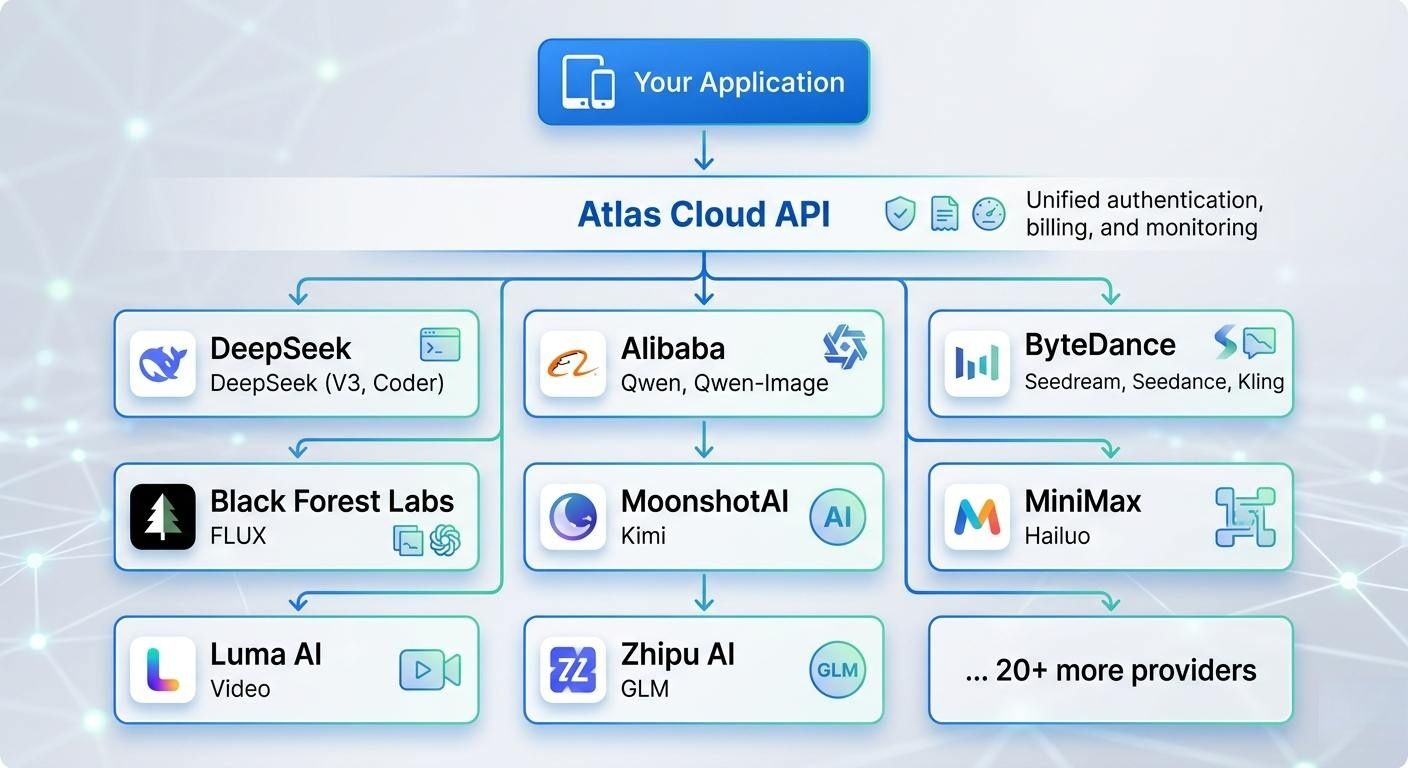
One of the most significant advantages of using a unified API is the ability to perform multi-model orchestration. Different AI models excel at different tasks; for instance, Vidu Q3 is renowned for its high-fidelity cinematic aesthetics, while Google’s Veo 3.1 is optimized for temporal consistency and complex story-driven narratives.
Through Atlas Cloud, developers can swap these models within the same codebase. You can use Vidu for visual B-roll and switch to Veo for character-focused scenes without rewriting your entire integration. This flexibility ensures your workflow always utilizes the best tool for the specific creative requirement.
For example: Python Code Snippet
plaintext1import requests 2 3def generate_video_content(prompt, model_type="vidu-q3"): 4 """ 5 Generate video using either Vidu Q3 (Cinematic) or Veo 3.1 (Narrative) 6 through the unified Atlas Cloud endpoint. 7 """ 8 url = "https://api.atlascloud.ai/v1/video/generate" 9 headers = { 10 "Authorization": "Bearer YOUR_API_KEY", 11 "Content-Type": "application/json" 12 } 13 14 payload = { 15 "model_id": model_type, # Switch between "vidu-q3" or "veo-3.1" 16 "prompt": prompt, 17 "resolution": "1080p", 18 "aspect_ratio": "16:9", 19 "parameters": { 20 "motion_bucket": 127 if model_type == "vidu-q3" else 5, 21 "creative_scale": 0.8 22 } 23 } 24 25 response = requests.post(url, json=payload, headers=headers) 26 return response.json() 27 28# Example 1: Use Vidu Q3 to film a cinematic B-roll scene 29cinematic_shot = generate_video_content("Cinematic drone view of a city from the future", "vidu-q3") 30 31# Example 2: Use Veo 3.1 for a steady character scene with clear details 32narrative_shot = generate_video_content("A person sipping coffee and staring out a window at the rain", "veo-3.1")
Speed and Scalability
Moving from hand-editing to automated video building changes everything for how much you can make. It used to take people almost two weeks of hard work to finish one high-quality campaign. With these new digital workflows, you can get that same job done in less than thirty minutes.
| Metric | Manual Production | API-Driven Workflow |
| Average Turnaround | 13 Days | 27 Minutes |
| Output Volume | 1–5 videos/week | 1,000+ videos/hour |
| Human Intervention | Required at every step | Approval-only basis |
Cost Efficiency and the "Innovation Tax"
When companies choose to build their own internal models, they often fall victim to the "Innovation Tax"—the high cost of hardware and the rapid obsolescence of AI architectures. By leveraging the Atlas Cloud API, businesses avoid these capital expenditures.
- Lower Costs: There is no need to buy or fix pricey GPU hardware.
- Always Fresh: New models get added to the API as they come out. This means your setup stays up to date without any extra work.
- Clear Spending: Pay-as-you-go rates are better than the messy, high costs of doing your own research.
| Model Name | Price/Sec $ | Input Types | Output Duration | Resolution | Native Audio |
| Veo | 0.05 ~ 0.2 | Text, Image | 4-8s | 1080P, 720P | Yes |
| Vidu | 0.034 ~ 0.4 | T2V, I2V | 5-16s | 1080p | Yes |
| Kling | 0.071 ~ 0.143 | Text, Image, Video | 5-10s | 720p | Yes (except Kling O1) |
| Seedance | 0.101 ~ 0.127 | Text, Image, Video, Audio | 4-15s | 480p-1080p, 2k | Yes |
| Wan | 0.054 ~ 0.068 | Text, Image, Video, Audio | 5-10s | 1080P, 720P | Yes (except wan 2.5) |
Check Prices: Rates can change, so please visit the official site for the most current costs.
Using an API means you treat AI video like a simple, scalable tool. It lets brands stay active on every platform without a lot of extra work or high costs.
See how Atlas Cloud lets you use over 300 AI models through one easy-to-use API
Image and video generation tasks run asynchronously because they take longer to process:
- You send a POST request to submit a generation task
- Atlas Cloud returns a prediction ID in data.id immediately
- You poll the /api/v1/model/prediction/{id} endpoint to check task status
- Once completed, you receive the output URL(s) in data.outputs
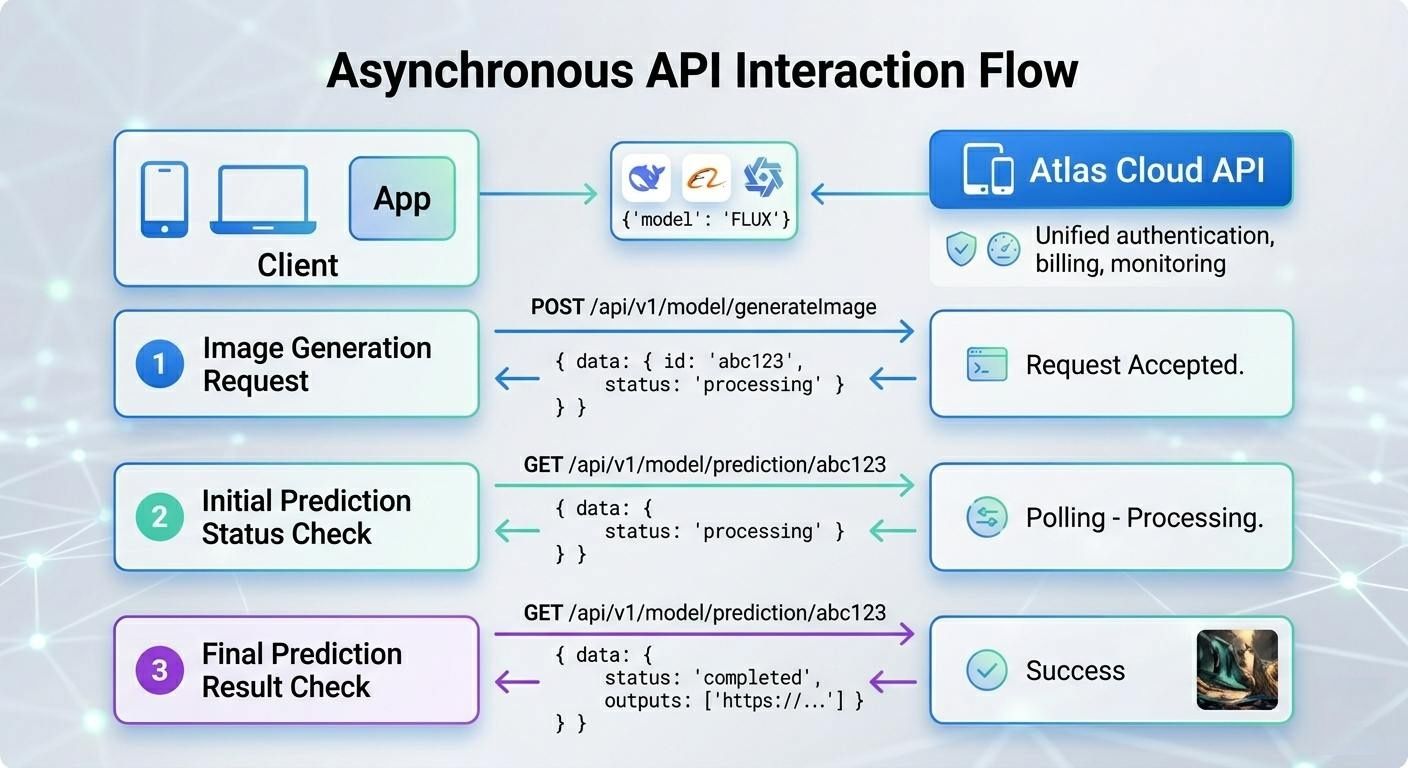
Submitting a media request to Atlas Cloud won't give you a result right away. Instead, you get a unique prediction ID. This ID lets you monitor the status of your task and download the file once the system finishes it.
All generation tasks outside of text models follow this asynchronous flow. The process to create high-quality images or videos is intensive and might take several minutes.
For example: submit a video generation task
plaintext1response = requests.post( 2 "https://api.atlascloud.ai/api/v1/model/generateVideo", 3 headers={ 4 "Authorization": "Bearer your-api-key", 5 "Content-Type": "application/json" 6 }, 7 json={ 8 "model": "kling 3.0", 9 "prompt": "Ocean waves crashing on a rocky shore at sunset" 10 } 11) 12 13data = response.json() 14prediction_id = data["data"]["id"]
Use the prediction ID to check the task status and retrieve the output:
plaintext1import requests 2import time 3 4def wait_for_result(prediction_id, api_key, interval=5, timeout=300): 5 """Poll for generation result with timeout.""" 6 url = f"https://api.atlascloud.ai/api/v1/model/prediction/{prediction_id}" 7 elapsed = 0 8 while elapsed < timeout: 9 response = requests.get( 10 url, 11 headers={"Authorization": f"Bearer {api_key}"} 12 ) 13 result = response.json() 14 status = result["data"]["status"] 15 16 if status == "completed": 17 return result["data"]["outputs"][0] 18 elif status == "failed": 19 raise Exception(f"Generation failed: {result['data'].get('error')}") 20 21 print(f"Status: {status} ({elapsed}s elapsed)") 22 time.sleep(interval) 23 elapsed += interval 24 25 raise TimeoutError(f"Task did not complete within {timeout}s") 26 27# Usage 28output = wait_for_result("your-prediction-id", "your-api-key") 29print(f"Result: {output}")
Polling Best Practices
- Start with longer intervals: Use 5-second intervals for video generation, 2-second intervals for image generation
- Set a timeout: Always set a maximum wait time to avoid infinite polling
- Handle failures gracefully: Check for failed status and handle errors appropriately
- Log progress: Print status updates so users know the task is still running
3 High-Value Workflow Blueprints
The true power of AI Video API Workflows is realized when the API functions as a "Lego brick" within a larger technical stack. Connecting the Atlas Cloud API to your existing business software turns small tests into massive production lines. This shift helps companies scale up their output quickly. Below are three powerful strategies that teams are using throughout 2026.
The "Zero-Touch" Global Localizer (T2V Edition)
Adapting content for global markets used to slow down major brands. This new method avoids the glitches of linking separate audio and video files. Instead, it uses advanced Text-to-Video tools to handle scripts and visual details at the same time.
- The Logic: Video Script (English) → LLM Translation (e.g., Spanish) → Atlas Cloud API (vidu/q3-pro/text-to-video) with Native Audio Sync.
- Value: This changes everything for online learning sites. You no longer have to fix old videos with messy edits. Instead, you create a fresh version where the person's voice, lip sync, and room sounds all match the new language perfectly from the start.
With the vidu/q3-pro/text-to-video model, you can create a clip that has both video and matching sound. You just need to turn on the generate_audio setting. This simple step ensures the visuals and audio are made together at once.
Python
plaintext1import requests 2 3def generate_localized_lesson(translated_script, target_style="general"):""" 4 Generates a localized educational video with native audio synchronization 5 using the Vidu Q3-Pro model on Atlas Cloud. 6 """ 7 url = "https://api.atlascloud.ai/v1/video/generate" 8 headers = { 9 "Authorization": "Bearer YOUR_ATLAS_CLOUD_KEY", 10 "Content-Type": "application/json" 11 } 12 13 payload = { 14 "model_id": "vidu/q3-pro/text-to-video", 15 "prompt": f"A professional instructor in a clean studio setting, speaking clearly to the camera: {translated_script}", 16 "parameters": { 17 "resolution": "1080p", 18 "duration": 15, # Vidu Q3-Pro supports up to 16s"generate_audio": True, # Enables native synchronized speech"style": target_style, # 'general' for realistic, 'anime' for stylized"movement_amplitude": "medium" 19 } 20 } 21 22 response = requests.post(url, json=payload, headers=headers) 23 return response.json() 24 25# Example: Generating a Spanish version of a safety training clip 26lesson_es = generate_localized_lesson( 27 "Bienvenidos a su entrenamiento de seguridad. Hoy aprenderemos sobre protocolos de emergencia." 28)
Programmatic Ad Engine
Good marketing depends on having many options. You do not need to film just one single ad anymore. Now, you can create hundreds of custom versions by using live data.
- The Logic: CRM Trigger (New Product) → Image-to-Video (via Seedance 2.0) → Dynamic Text Overlay → Automated Social Posting.
- Value: Brands can now create 500 custom ads for the same price as one standard video shoot. These clips can match a person's profile or even the local weather. This deep level of personal touch can boost sales by 25% over using the same basic video for everyone.
In this workflow, the API is triggered whenever a new product is added to your database. The system takes a static product photo and uses the seedance-2.0 endpoint to animate it into a cinematic commercial.
Python Example: Automating Product Commercials
plaintext1import requests 2 3def generate_programmatic_ad(product_image_url, brand_name):""" 4 Automates the generation of a 15-second product commercial 5 using the Seedance 2.0 Image-to-Video model. 6 """ 7 url = "https://api.atlascloud.ai/v1/video/generate" 8 headers = { 9 "Authorization": "Bearer YOUR_ATLAS_CLOUD_KEY", 10 "Content-Type": "application/json" 11 } 12 13 payload = { 14 "model_id": "seedance-i2v", # ByteDance's production-grade I2V model"input_image": product_image_url, 15 "prompt": f"A cinematic product commercial for {brand_name}. Slow dolly-out camera movement, professional studio lighting, soft bokeh background, high-end commercial aesthetic.", 16 "parameters": { 17 "duration": 15, # Seedance 2.0 supports up to 15-20s"resolution": "1080p", 18 "motion_bucket": 10, # High motion for dynamic feel"maintain_identity": True # Crucial for keeping product branding consistent 19 } 20 } 21 22 response = requests.post(url, json=payload, headers=headers) 23 return response.json() 24 25# Triggered by CRM event (e.g., New Product: "Aero-Running-Shoes") 26ad_task = generate_programmatic_ad( 27 "https://your-cms.com/assets/new-shoe-shot.jpg", 28 "AeroStride" 29)
The Content "Repurposer" (VOD to Shorts)
With the dominance of short-form video, repurposing long-form Video-on-Demand (VOD) is essential for maintaining social presence.
- The Logic: Long-form Video → AI Scene Detection → Vidu Q3-Mix for style transfer → 9:16 Auto-cropping.
- Value: This pipeline extracts the "viral" moments from webinars or podcasts and uses the Atlas Cloud API to apply cinematic styles or brand-consistent filters.
Python Example: VOD-to-Shorts Style Transfer
plaintext1import requests 2 3def repurpose_to_short(original_frame_url, target_prompt): 4 """ 5 Applies style transfer and character consistency to a VOD frame 6 to create a cinematic 9:16 short using Vidu Q3-Mix. 7 """ 8 url = "https://api.atlascloud.ai/v1/video/generate" 9 headers = { 10 "Authorization": "Bearer YOUR_ATLAS_CLOUD_KEY", 11 "Content-Type": "application/json" 12 } 13 14 payload = { 15 "model_id": "vidu/q3-mix/reference-to-video", 16 "input_image": original_frame_url, # Reference frame from VOD 17 "prompt": target_prompt, # e.g., "Cinematic 9:16 short, cyberpunk style" 18 "parameters": { 19 "aspect_ratio": "9:16", # Auto-crops/Reframes for mobile 20 "duration": 10, 21 "identity_lock": True, # Maintains speaker's facial landmarks 22 "style_strength": 0.85 # Balance between original and new style 23 } 24 } 25 26 response = requests.post(url, json=payload, headers=headers) 27 return response.json() 28 29# Example: Turning a webinar clip into a "Cinematic Tech" TikTok short 30short_video = repurpose_to_short( 31 "https://storage.atlascloud.ai/vod/webinar_frame_01.jpg", 32 "A professional speaker in a neon-lit futuristic studio, 1080p, cinematic lighting." 33)
By leveraging the Atlas Cloud API, you can instantly extract viral-ready clips from long-form webinars or podcasts. The Vidu Q3-Mix model handles the complex task of "Identity Locking," meaning your brand ambassador's face stays perfectly consistent even as you swap a boring office background for a cinematic, studio-quality aesthetic. This system allows a single piece of long-form content to feed your social media channels for weeks with zero additional filming.
You can find all the technical setup steps in the Atlas Cloud API Doc. Creating these custom tools helps teams keep their content fresh and local. This improves viewer interest without needing to hire more staff or increase the daily workload.
Technical Deep Dive: Implementation Essentials
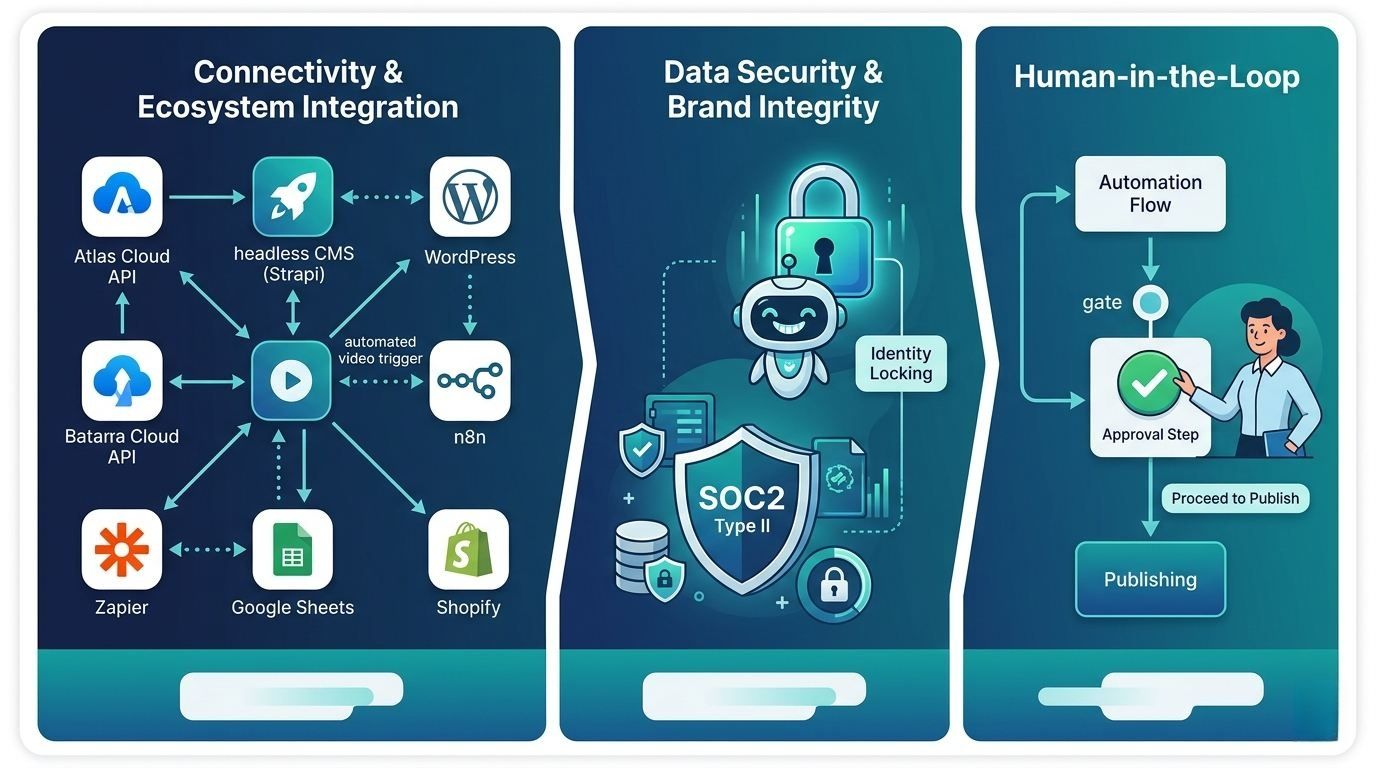
Setting up strong AI video systems takes more than just access codes. You need a clear plan to make everything work together. This strategy must find a good balance between automatic tasks, human checks, and keeping data safe.
Connectivity and Ecosystem Integration
The Atlas Cloud API fits easily into most modern software setups. For managing content, it connects directly to headless systems like Strapi or standard sites like WordPress. It also works with simple automation tools like n8n and Zapier. This means people who don't code can start making videos automatically. A new entry in a Google Sheet or a fresh Shopify product can trigger the process instantly.
Data Security and Brand Integrity
Safety is a top priority in any professional workspace. Atlas Cloud follows SOC2 Type II rules to keep your private data and files fully protected. To keep your brand looking right, the API uses "Identity Locking." This tool stops the AI from making mistakes or changing the look of your official mascots and speakers. It ensures your key characters stay the same in every single video you create.
The "Human-in-the-Loop" Layer
While automation is the goal, an approval gate is essential for quality control. A typical "Human-in-the-Loop" (HITL) architecture ensures that no content is published without verification.
| Workflow Stage | Action | Tooling |
| Generation | Automated Video Creation | Atlas Cloud API |
| Review | Internal Quality Check | Slack/Discord Webhooks |
| Approval | One-click "Pass/Fail" | Custom Admin Dashboard |
| Deployment | Final Publication | CMS API / Social Media API |
Using these key steps helps groups produce more video content while keeping it safe and top-tier. It also makes sure every piece of media fits your brand perfectly.
Future-Proofing: The 2026 Roadmap
AI video tech is moving past basic clips toward high-end work that follows real-world physics. To stay on top, you need a setup that can handle new updates quickly without needing to rebuild the whole system.
Native HD and Real-time Physics
The Atlas Cloud API has recently integrated support for the latest architecture updates, specifically Wan-2.7 and seedance 2.0. These models represent a significant leap in "World Simulation" capabilities.
Old versions often had trouble with how things fall or how liquids move. These new updates change that by adding:
- Spatial Consistency: Items keep their correct size and weight as they move around in 3D.
- Native HD Upscaling: The API sends back HD files directly, so you do not need extra software to fix the quality.
- Material Interaction: Improved rendering of light refraction and realistic fabric physics.
The Move Toward "Autonomous Creation"
The industry is currently transitioning from "trigger-based" generation—where a human or a specific CRM event starts a task—to "event-adaptive" video generation. In this model, the Atlas Cloud API monitors live data streams to generate content autonomously.
| Generation Phase | Trigger-Based (Current) | Event-Adaptive (Future) |
| Input Source | Manual Prompt / API Call | Live Data Feeds / Social Trends |
| Logic Type | Linear Scripting | Recursive AI Feedback Loops |
| Adaptability | Static Output | Real-time content adjustment |
Moving toward automated creation means systems can now "watch" for market trends. If a topic suddenly blows up on social media, the workflow can make and post a relevant video in seconds. By using the Atlas Cloud setup, companies do more than just follow the crowd. They stay ahead by using fast, high-quality storytelling that starts on its own.
FAQ
How does an AI Video API differ from a web-based generator?
While web-based generators (like the standard Kling or Vidu chat interfaces) are excellent for creative exploration, they are restricted by manual input and "one-off" results. An API allows for programmatic scaling, meaning you can trigger thousands of videos simultaneously via code.
| Feature | Web-Based Generator | Atlas Cloud API |
| Input Method | Manual Text/Image Upload | Automated JSON Payloads |
| Volume | One at a time | Parallel batch processing |
| Integration | Standalone | Connects to CRM, CMS, and Apps |
| Customization | Fixed UI options | Full control over metadata and seeds |
Can I use multiple models (like Vidu and Veo) in one workflow?
Yes. One of the primary advantages of the Atlas Cloud ecosystem is multi-model orchestration. With one simple setup, you can send a "Cinematic" task to Vidu Q3-Pro and a "Narrative" task to Veo 3.1 in the same run. This keeps you from being stuck with just one provider. It also makes sure you always pick the cheapest and best model for every job you do.
Is the content generated via Atlas Cloud API copyright-safe?
Content safety and ownership are central to the Atlas Cloud infrastructure. This platform uses models built on legal, licensed data and offers a secure SOC2 Type II setup. You keep all the commercial rights for everything you create. The API also has safety filters built right in. These tools make sure your work follows global rules for digital content and stays safe to use.





