AI image generation pricing in 2026 spans about a 5x range -- from USD0.01/image to USD0.054/image. For a team generating 100 images, that is the difference between USD1 and USD5.40. For a team generating 100,000 images per month, it is the difference between USD1,000 and USD5,400. At scale, choosing the right model for your budget is not a minor optimization -- it is a foundational business decision.
This guide ranks every major AI image generation API by cost, calculates what fixed budgets produce with each model, and provides practical guidance on when paying more is worth it and when cheap is genuinely good enough.
*Last Updated: February 28, 2026*
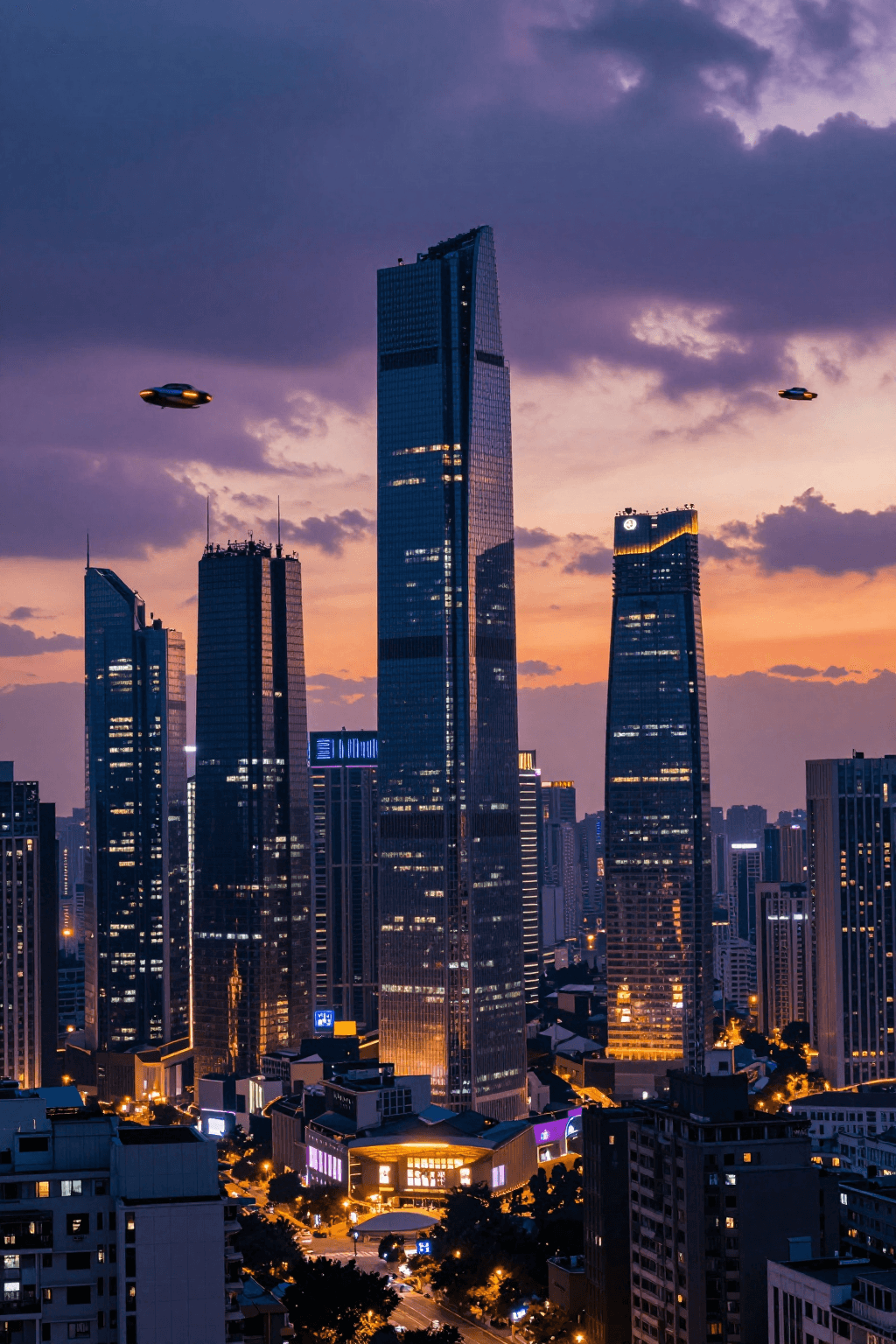
Here is an example of what the cheapest model can produce:
Complete Price Ranking: Cheapest to Most Expensive
| Rank | Model | Price/Image | Max Resolution | Speed | Quality Tier |
|---|---|---|---|---|---|
| 1 | [Z-Image Turbo](https://www.atlascloud.ai/models/z-image/turbo?utm_medium=article&utm_source=blog&utm_campaign=cheapest-ai-image-generation-api-2026) | USD0.01 | 1024x1024 | ~1s | Draft |
| 2 | [Nano Banana 2](https://www.atlascloud.ai/models/google/nano-banana-2/text-to-image?utm_medium=article&utm_source=blog&utm_campaign=cheapest-ai-image-generation-api-2026) | USD0.013 | 2048x2048 | ~5s | Production |
| 3 | [Seedream v5.0 Lite](https://www.atlascloud.ai/models/bytedance/seedream-v5.0-lite/sequential?utm_medium=article&utm_source=blog&utm_campaign=cheapest-ai-image-generation-api-2026) | USD0.032 | 2048x2048 | ~2s | Production |
| 4 | [Imagen 4 Ultra](https://www.atlascloud.ai/models/google/imagen-4-ultra/text-to-image?utm_medium=article&utm_source=blog&utm_campaign=cheapest-ai-image-generation-api-2026) | USD0.054 | 2048x2048 | ~8s | Premium |
The gap between cheapest and most expensive is about 5x per image. At 10,000 images/month, that is USD100 with Z-Image Turbo vs. USD540 with Imagen 4 Ultra.
What USD1 Gets You
The simplest way to understand pricing is to see what a single dollar produces with each model:
| Model | Images per USD1 | Resolution | Quality Level |
|---|---|---|---|
| Z-Image Turbo | 100 images | 1024x1024 | Good -- suitable for drafts, thumbnails, concepts |
| Nano Banana 2 | 76 images | 2048x2048 | Strong -- excellent for creative/artistic styles |
| Seedream v5.0 Lite | 31 images | 2048x2048 | Strong -- production-ready for most use cases |
| Imagen 4 Ultra | 18 images | 2048x2048 | Best -- highest photorealism available |
Z-Image Turbo produces 100 images for a dollar. Imagen 4 Ultra produces 18. The volume difference is big, but the quality difference is real. The question is whether that quality difference matters for your specific use case.
Monthly Cost Projections
1,000 Images/Month
| Model | Monthly Cost | Quality Notes |
|---|---|---|
| Z-Image Turbo | USD10 | Suitable for internal use, drafts, concepts |
| Nano Banana 2 | USD13 | Best for artistic and creative styles |
| Seedream v5.0 Lite | USD32 | Production quality at high resolution |
| Imagen 4 Ultra | USD54 | Maximum quality for every image |
10,000 Images/Month
| Model | Monthly Cost | Annual Cost |
|---|---|---|
| Z-Image Turbo | USD100 | USD1,200 |
| Nano Banana 2 | USD130 | USD1,560 |
| Seedream v5.0 Lite | USD320 | USD3,840 |
| Imagen 4 Ultra | USD540 | USD6,480 |
At 10,000 images/month, the annual cost difference between Z-Image Turbo (USD1,200) and Imagen 4 Ultra (USD6,480) is USD5,280. That delta funds a significant portion of other business operations.
100,000 Images/Month
| Model | Monthly Cost | Annual Cost |
|---|---|---|
| Z-Image Turbo | USD1,000 | USD12,000 |
| Nano Banana 2 | USD1,300 | USD15,600 |
| Seedream v5.0 Lite | USD3,200 | USD38,400 |
| Imagen 4 Ultra | USD5,400 | USD64,800 |
At this scale, the model choice has genuine P&L impact. The difference between Z-Image Turbo and Imagen 4 Ultra is USD52,800/year.
When Cheap Is Good Enough
Not every image needs to be generated by the most capable model. Here are concrete scenarios where cheaper models are not just acceptable but optimal:
Thumbnails and Previews
If images will be displayed at small sizes (under 400px) -- social media thumbnails, search result previews, email header images -- the quality difference between a USD0.01 and USD0.054 model is invisible at that display size. Z-Image Turbo's 1024x1024 output downscaled to thumbnail size is indistinguishable from Imagen 4 Ultra at the same display size.
Recommended: Z-Image Turbo (USD0.01)
Concept Exploration and Brainstorming
Say you're designing a landing page and you're not sure whether the hero image should be a cityscape, an abstract gradient, or a product flat-lay. You don't want to spend USD0.054 per attempt figuring that out. Instead, throw 30 variations at Z-Image Turbo for USD0.30 total, narrow it down to one direction, then generate the final version on Imagen 4 Ultra. Most of the "creative exploration" phase is just elimination -- and cheap models handle elimination perfectly.
Recommended: Z-Image Turbo (USD0.01) for exploration, then Imagen 4 Ultra for the final version
Internal Documentation
Product mockups for internal presentations, design documentation, and team communication. These images serve a functional purpose and will never be customer-facing.
Recommended: Z-Image Turbo (USD0.01) or Seedream v5.0 Lite (USD0.032)
High-Volume E-Commerce Catalogs
We've seen Shopify stores with 2,000+ SKUs that need 4-5 image variants each -- different backgrounds, lifestyle shots, size comparisons. That's 10,000 images. At USD0.032/image with Seedream v5.0 Lite, the whole catalog costs USD320. The output quality holds up on product listing pages. It won't match a professional studio shoot, but for the price of one studio session you can redo your entire catalog.
Recommended: Seedream v5.0 Lite (USD0.032)
Social Media Content
Daily social media posts, story images, and engagement content. The volume requirement and short content lifespan make premium pricing hard to justify.
Recommended: Seedream v5.0 Lite (USD0.032)
When to Pay More
There are legitimate scenarios where the cheapest model costs you more in the long run:
Hero Images and Landing Pages
The primary image on a landing page, product page, or marketing campaign is seen by thousands or millions of people. The quality of that single image directly affects conversion rates. An Imagen 4 Ultra image at USD0.054 that improves conversion by even 0.1% pays for itself many times over.
Recommended: Imagen 4 Ultra (USD0.054)
Premium Brand Assets
Luxury brands, real estate, automotive, and other high-value categories where visual quality directly correlates with perceived brand value. The cost difference between a USD0.01 image and a USD0.054 image is trivial relative to the value of brand perception.
Recommended: Imagen 4 Ultra (USD0.054)
Print-Ready Materials
Any image destined for print -- brochures, packaging, posters, large-format displays -- needs the highest resolution and detail quality. Artifacts and quality issues that are invisible on screen become obvious in print.
Recommended: Imagen 4 Ultra (USD0.054)
Client Deliverables
When you are generating images for clients who are paying for the output, the per-image cost is a tiny fraction of the project fee. Use the best model and charge appropriately.
Recommended: Imagen 4 Ultra (USD0.054)
The Smart Approach: Multi-Model Routing
The most cost-effective strategy is not picking a single model -- it is routing different requests to different models based on the use case. Here is what that looks like in practice:
plaintext1```python 2import requests 3import time 4 5API_KEY = "your_api_key_here" 6BASE_URL = "https://api.atlascloud.ai/api/v1" 7 8def select_model(use_case): 9 """Route to the cheapest model that meets quality requirements.""" 10 routing = { 11 "thumbnail": "z-ai/z-image-turbo/text-to-image", # USD0.01 12 "draft": "z-ai/z-image-turbo/text-to-image", # USD0.01 13 "social_media": "bytedance/seedream-v5.0-lite", # USD0.032 14 "product_catalog": "bytedance/seedream-v5.0-lite", # USD0.032 15 "blog_illustration": "google/nano-banana-2/text-to-image", # USD0.013 16 "hero_image": "google/imagen4-ultra/text-to-image", # USD0.054 17 "premium_brand": "google/imagen4-ultra/text-to-image", # USD0.054 18 } 19 return routing.get(use_case, "bytedance/seedream-v5.0-lite") 20 21def generate_image(prompt, use_case, width=1024, height=1024): 22 """Generate an image using the most cost-effective model for the use case.""" 23 model = select_model(use_case) 24 response = requests.post( 25 f"{BASE_URL}/model/prediction", 26 headers={"Authorization": f"Bearer {API_KEY}"}, 27 json={ 28 "model": model, 29 "input": { 30 "prompt": prompt, 31 "width": width, 32 "height": height 33 } 34 } 35 ) 36 request_id = response.json()["request_id"] 37 38 while True: 39 result = requests.get( 40 f"{BASE_URL}/model/prediction/{request_id}/get", 41 headers={"Authorization": f"Bearer {API_KEY}"} 42 ) 43 data = result.json() 44 if data["status"] == "completed": 45 return data["output"]["image_url"] 46 elif data["status"] == "failed": 47 raise Exception(data["error"]) 48 time.sleep(2) 49 50# Example usage 51thumbnail = generate_image( 52 "Modern smartphone on gradient background", 53 use_case="thumbnail" 54) # Costs USD0.01 55 56hero = generate_image( 57 "Photorealistic luxury watch on dark marble, dramatic lighting", 58 use_case="hero_image", 59 width=2048, 60 height=2048 61) # Costs USD0.054 62```
Cost Savings with Multi-Model Routing
Consider a marketing team generating 5,000 images/month with this distribution:
| Category | Volume | Single Model (Seedream v5.0 Lite) | Multi-Model Routing |
|---|---|---|---|
| Thumbnails | 1,500 | USD48 | USD15 (Z-Image Turbo) |
| Social media | 1,500 | USD48 | USD48 (Seedream v5.0 Lite) |
| Blog images | 1,000 | USD32 | USD13 (Nano Banana 2) |
| Hero images | 500 | USD16 | USD27 (Imagen 4 Ultra) |
| Total | 5,000 | USD160 | USD103 |
Multi-model routing saves USD57/month (USD684/year) while actually improving quality for hero images (upgraded to Imagen 4 Ultra). You spend less overall and get better results where they matter most.
How to Get Started
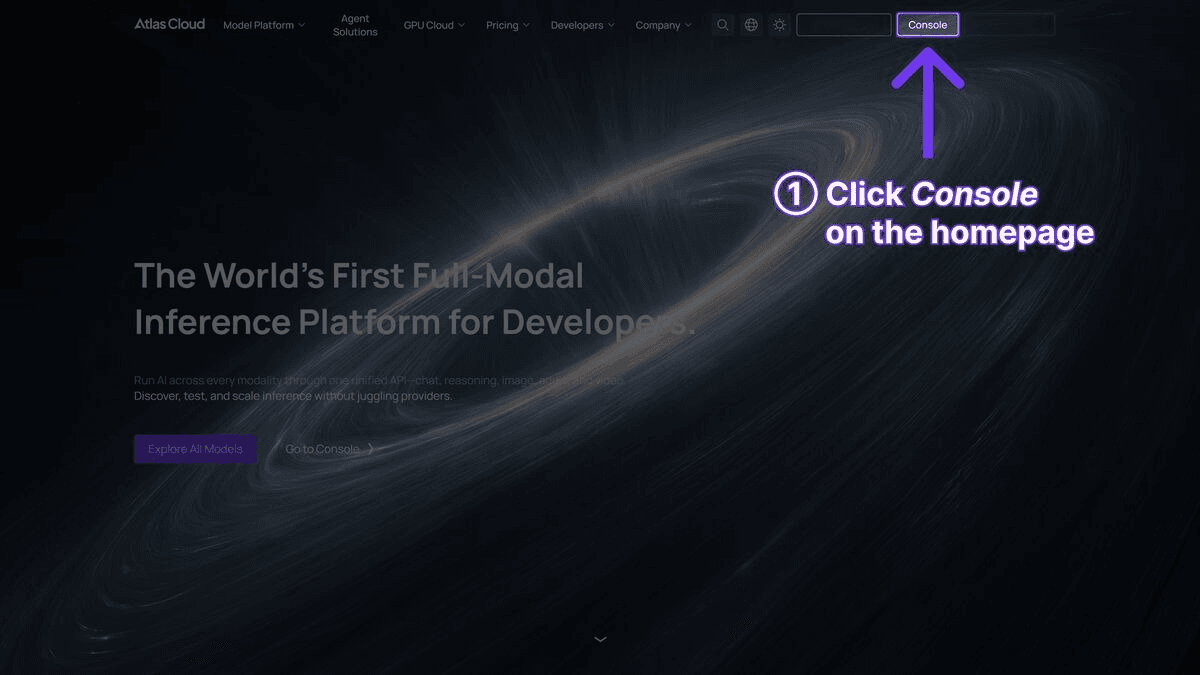
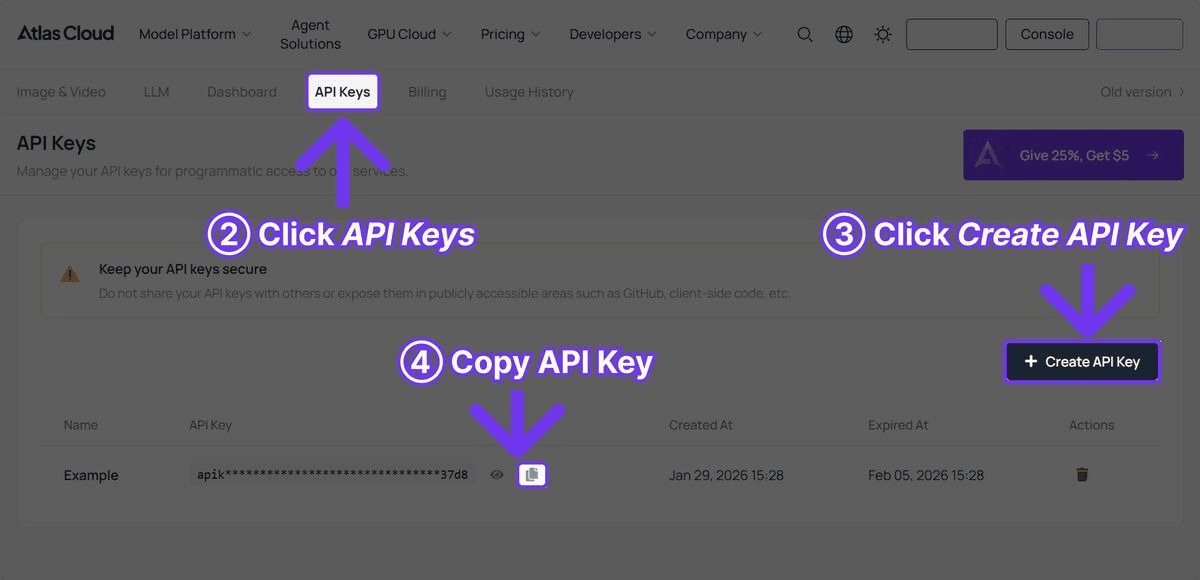
Step 1: Create Your API Key
Sign up at Atlas Cloud.
Step 2: Test the Cheapest Models First
Start at the bottom of the price range and work up. If Z-Image Turbo meets your needs, stop there. If not, try Nano Banana 2, then Seedream v5.0 Lite, and so on. There is no reason to pay for quality you do not need.
plaintext1```python 2import requests 3import time 4 5API_KEY = "your_api_key_here" 6BASE_URL = "https://api.atlascloud.ai/api/v1" 7 8# Test prompt across price tiers 9prompt = "Professional headshot of a business executive, neutral background, studio lighting" 10 11models = [ 12 {"id": "z-ai/z-image-turbo/text-to-image", "price": "USD0.01"}, 13 {"id": "google/nano-banana-2/text-to-image", "price": "USD0.013"}, 14 {"id": "bytedance/seedream-v5.0-lite", "price": "USD0.032"}, 15 {"id": "google/imagen4-ultra/text-to-image", "price": "USD0.054"}, 16] 17 18for model in models: 19 response = requests.post( 20 f"{BASE_URL}/model/prediction", 21 headers={"Authorization": f"Bearer {API_KEY}"}, 22 json={ 23 "model": model["id"], 24 "input": {"prompt": prompt, "width": 1024, "height": 1024} 25 } 26 ) 27 request_id = response.json()["request_id"] 28 print(f"{model['price']} - {model['id']}: {request_id}") 29```
Step 3: Calculate Your Break-Even
For each model you test, calculate whether the quality improvement justifies the cost increase:
plaintext1```python 2def cost_analysis(monthly_volume, model_prices): 3 """Compare monthly costs across models.""" 4 print(f"Monthly volume: {monthly_volume:,} images\n") 5 print(f"{'Model':<30} {'Price/img':>10} {'Monthly':>10} {'Annual':>12}") 6 print("-" * 65) 7 for name, price in model_prices.items(): 8 monthly = monthly_volume * price 9 annual = monthly * 12 10 print(f"{name:<30} USD{price:>8.3f} USD{monthly:>8.0f} USD{annual:>10.0f}") 11 12cost_analysis(5000, { 13 "Z-Image Turbo": 0.01, 14 "Nano Banana 2": 0.013, 15 "Seedream v5.0 Lite": 0.032, 16 "Imagen 4 Ultra": 0.054, 17}) 18```
Individual Model Value Analysis
Z-Image Turbo -- The Volume Champion
At USD0.01/image, Z-Image Turbo is purpose-built for scenarios where volume and speed take priority over maximum quality. One second generation time and 1024x1024 resolution make it the obvious choice for applications that need near-instant results at minimal cost.
Value verdict: Best value when quality requirements are moderate. The 1024x1024 resolution limit is the main constraint -- if your workflow requires 2048x2048, look at Seedream v5.0 Lite instead.
Nano Banana 2 -- The Budget Creative Choice
At USD0.013/image, Nano Banana 2 is surprisingly cheap for what it delivers. It has genuine artistic character that the other budget models lack, and at 76 images per dollar, it's hard to beat for creative and editorial work.
Value verdict: Worth it for creative content where you want visual style without paying premium prices. A solid middle ground between the raw speed of Z-Image Turbo and the polish of Imagen 4 Ultra.
Seedream v5.0 Lite -- The Sweet Spot
At USD0.032/image, Seedream v5.0 Lite delivers the best ratio of quality to cost for production workflows. The output is genuinely good -- and the 2048x2048 resolution and ~2 second generation time make it suitable for real production use.
Value verdict: The most cost-effective production-quality model. For teams generating thousands of images per month, this should be the default unless specific quality requirements demand a premium model.
Imagen 4 Ultra -- The Quality Ceiling
At USD0.054/image, Imagen 4 Ultra is the most expensive option but also produces the best photorealistic output available. The question is not whether it is good -- it is -- but whether your use case requires that level of quality.
Value verdict: Worth it for hero images, premium brand content, and print materials. Not worth it for thumbnails, social media content, or high-volume batch generation. Use it selectively for maximum impact.
Frequently Asked Questions
What is the cheapest AI image generation API available?
Z-Image Turbo at USD0.01/image. It spits out 1024x1024 images in about a second. If you need higher resolution (2048x2048) and better quality, Seedream v5.0 Lite at USD0.032/image is the cheapest option that actually looks professional.
Is the quality difference between cheap and expensive models noticeable?
Honestly, at thumbnail size or on a phone screen? Not really. I've shown people side-by-side comparisons of Z-Image Turbo vs Imagen 4 Ultra at 300px wide and most can't tell them apart. But zoom in to full resolution on a hero banner or print it on a brochure, and yes -- the difference is obvious. So it really comes down to where the image ends up.
How can I minimize image generation costs without sacrificing quality where it matters?
Route different jobs to different models. Thumbnails and internal drafts go to Z-Image Turbo (USD0.01). Product images and social posts go to Seedream v5.0 Lite (USD0.032). Your homepage hero shot goes to Imagen 4 Ultra (USD0.054). This kind of routing typically cuts costs 30-40% vs. running everything through one model.
Final Verdict
Z-Image Turbo at USD0.01/image is the cheapest AI image generation API in 2026. It is suitable for drafts, thumbnails, concepts, and any use case where 1024x1024 resolution is sufficient.
Seedream v5.0 Lite at USD0.032/image is the cheapest production-quality option. For teams that need 2048x2048 resolution and output that is genuinely ready for customer-facing use, this is the price floor.
The smart approach is multi-model routing. Use cheap models for low-value images and premium models for high-value images. This strategy costs less overall while delivering better quality where it matters.
All models are available through a single Atlas Cloud API key with unified billing.





