Product video is no longer optional for e-commerce and marketing. Platforms like Amazon, Shopify, TikTok Shop, and Instagram prioritize video content in their algorithms and search results. Listings with video see higher conversion rates, longer time on page, and better ad performance. The problem is that traditional product video production is slow and expensive -- a single 15-second product video can cost USD500 to USD2,000 when you factor in studio rental, equipment, talent, editing, and post-production.
AI video generation changes this equation entirely. With a product photo and a well-crafted prompt, you can generate a polished product video in under a minute for less than USD1. Scale that across an entire product catalog, and the savings are transformational.
This guide walks through the complete workflow for creating AI product videos at scale: choosing the right model, writing effective prompts, building batch processing pipelines, and optimizing costs. Every example uses the Atlas Cloud API and is production-ready.
*Last Updated: February 28, 2026*
See AI product video generation in action:
Why AI Product Videos Matter
The Business Case
The numbers make the case clearly:
| Metric | Without Video | With Video | Improvement |
| Conversion Rate | 2.5% | 4.8% | +92% |
| Time on Page | 45 seconds | 2+ minutes | +167% |
| Return Rate | 12% | 7% | -42% |
| Ad CTR | 1.2% | 3.1% | +158% |
| Social Engagement | Baseline | 3-5x higher | +300-500% |
Based on reported averages across major e-commerce platforms -- individual results will vary based on product category, audience, and implementation. Video lets customers see products in motion -- how a fabric drapes, how a gadget operates, how a cosmetic applies. This reduces uncertainty and drives purchases.
The Traditional Cost Problem
| Cost Component | Traditional Video | AI Video |
| Studio/Location | USD200-500/day | USD0 |
| Equipment | USD100-300/day | USD0 |
| Talent/Models | USD200-1,000/day | USD0 |
| Editing/Post | USD100-500/video | USD0 |
| Per Video Total | USD500-2,000 | USD0.14-0.57 |
| 100 Videos | USD50,000-200,000 | USD14-57 |
| Turnaround | 1-4 weeks | Minutes |
At the AI price point, product video becomes feasible for every SKU in a catalog -- not just hero products. A 500-product store that could only afford video for its top 20 products can now have video for every single listing.
Best Models for Product Videos
Not all AI video models are equally suited to product content. Based on extensive testing, these three deliver the best results for product video workflows:
Kling 3.0 Standard: Camera Control and Text Preservation
Why it works for product videos: Kling 3.0 Standard gives you strong camera control for product showcases -- specify a slow orbit, a dolly-in to highlight texture, a pan across a product lineup, or a zoom to detail. It also preserves on-screen text like brand names, price tags, and model numbers with high fidelity, which is critical for e-commerce content. Kling 3.0 Standard hits a good balance between quality and cost for product video workflows.
| Spec | Detail |
| Model ID | `kwaivgi/kling-v3.0-std/image-to-video` |
| Price | USD0.071/sec |
| Max Duration | 10 seconds |
| Best Feature | Camera controls + text preservation |
| Per 8s Video | USD0.57 |
Seedance v1.5 Pro: Quality and Versatility
Why it works for product videos: Seedance v1.5 Pro produces high visual quality at an affordable price point for product content. Its multi-reference input capability means you can provide multiple views of the same product, and the model will maintain consistency. The 15-second maximum duration is also the longest available, which is valuable for product demonstrations that need more time.
| Spec | Detail |
| Model ID | `bytedance/seedance-v1.5-pro/image-to-video` |
| Price | USD0.047/sec |
| Max Duration | 15 seconds |
| Best Feature | Multi-reference input, quality |
| Per 10s Video | USD0.47 |
Wan 2.6 Flash: Budget Volume Production
Why it works for product videos: At USD0.018/second, Wan 2.6 Flash is the cheapest model for generating product videos at volume. The quality is good enough for social media ads, marketplace listings, and internal marketing content. For teams with hundreds or thousands of SKUs that need video, Wan 2.6 Flash makes the economics work at any scale.
| Spec | Detail |
| Model ID | `alibaba/wan-2.6/image-to-video` |
| Price | USD0.018/sec |
| Max Duration | 10 seconds |
| Best Feature | Lowest price |
| Per 8s Video | USD0.14 |
How to Access the API
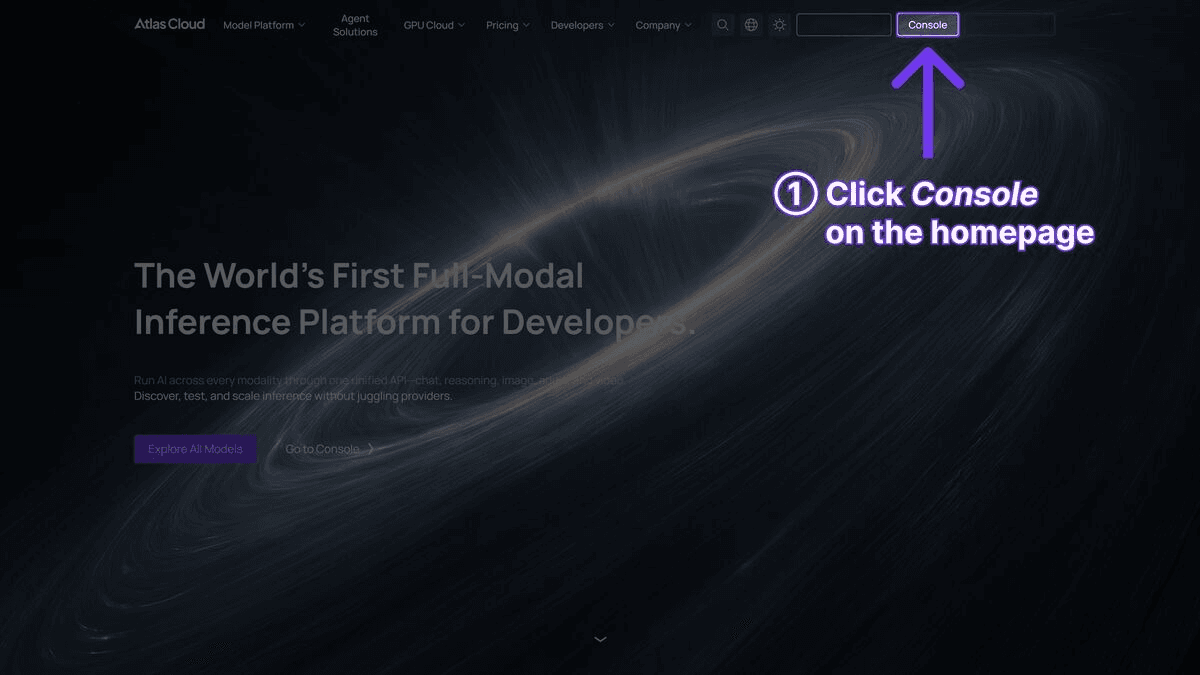
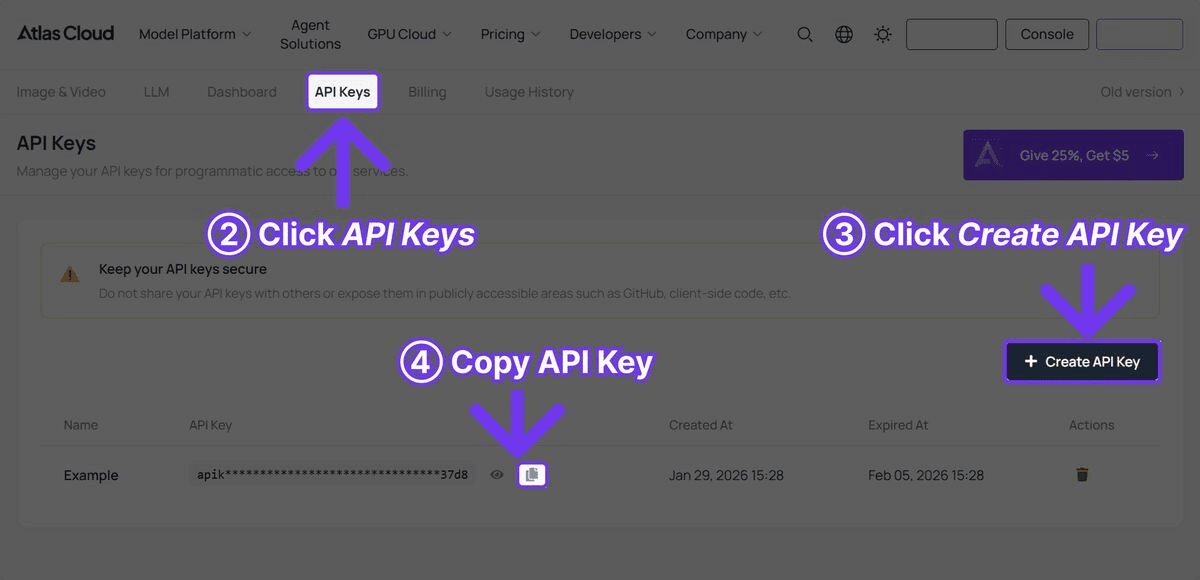
Step 1: Get Your API Key
Register at Atlas Cloud and navigate to the API Keys tab.
Step 2: Generate Your First Product Video
plaintext1```python 2import requests 3import time 4 5 6API_KEY = "your-atlas-cloud-api-key" 7BASE_URL = "https://api.atlascloud.ai/api/v1" 8 9 10response = requests.post( 11 f"{BASE_URL}/model/generateVideo", 12 headers={ 13 "Authorization": f"Bearer {API_KEY}", 14 "Content-Type": "application/json" 15 }, 16 json={ 17 "model": "kwaivgi/kling-v3.0-std/image-to-video", 18 "prompt": "Slow 360-degree rotation of the product on a clean " 19 "white surface, soft studio lighting creating elegant " 20 "reflections, premium commercial style, shallow depth " 21 "of field", 22 "image_url": "https://example.com/your-product-photo.jpg", 23 "duration": 8, 24 "resolution": "1080p" 25 } 26) 27 28 29result = response.json() 30 31 32while True: 33 status = requests.get( 34 f"{BASE_URL}/model/prediction/{result['request_id']}/get", 35 headers={"Authorization": f"Bearer {API_KEY}"} 36 ).json() 37 if status["status"] == "completed": 38 print(f"Product video: {status['output']['video_url']}") 39 break 40 time.sleep(5) 41```
Step 3: Download and Use
The response contains a `video_url` pointing to the generated video file. Download it and upload to your e-commerce platform, ad manager, or social media scheduler. The output is production-ready -- no additional editing required for most use cases.
Prompt Templates for Product Videos
Effective product video prompts follow a consistent structure: subject + motion + lighting + style. Here are tested templates for common product categories.
Cosmetics and Beauty
plaintext1``` 2Close-up of the cosmetic product being gently placed on a marble vanity, 3soft natural light from a nearby window, water droplets on the surface 4creating a fresh dewy atmosphere, luxury beauty commercial style, 5shallow depth of field 6``` 7 8 9``` 10A hand slowly opens the compact, revealing the product inside, soft 11golden hour lighting, rose petals scattered on a silk backdrop, premium 12beauty brand advertising style 13```
Technology and Electronics
plaintext1``` 2The device powers on with a soft glow, sitting on a dark matte surface, 3dramatic rim lighting highlighting the sleek edges, subtle reflections 4on the screen, premium tech commercial style, slow camera orbit 5``` 6 7 8``` 9Wireless earbuds being lifted from their charging case, clean studio 10lighting, the case sitting on a minimalist desk, shallow depth of field, 11modern technology advertisement style 12```
Fashion and Apparel
plaintext1``` 2The garment hangs on a minimal wooden hanger, gentle breeze creating 3natural fabric movement, soft diffused natural light, clean white 4background, premium fashion lookbook style 5``` 6 7 8``` 9Close-up of fabric texture and stitching detail, slow camera pan 10revealing craftsmanship, warm studio lighting, shallow depth of field 11on material details, luxury fashion commercial 12```
Food and Beverage
plaintext1``` 2Steam rising from a freshly prepared dish, slow camera dolly-in 3revealing textures and garnish, warm restaurant-style lighting, 4dark wood table surface, food photography commercial style 5``` 6 7 8``` 9A cold beverage bottle with condensation droplets, being lifted from 10an ice bucket, water droplets catching light, crisp clean commercial 11lighting, premium beverage advertisement 12```
Furniture and Home
plaintext1``` 2Morning sunlight streaming through sheer curtains onto the furniture 3piece, dust motes visible in the light, slow camera pan revealing the 4full piece, warm interior design magazine style 5``` 6 7 8``` 9The lamp switches on, casting a warm glow across a styled living room 10corner, revealing texture of the shade and base, cozy interior design 11photography style, shallow depth of field 12```
Jewelry and Accessories
plaintext1``` 2A luxury watch rotating slowly on dark velvet, dramatic spot lighting 3creating sparkle on metal surfaces, extreme close-up revealing 4craftsmanship details, high-end jewelry commercial style 5``` 6 7 8``` 9Sunlight catches the gemstone as it slowly rotates, creating prismatic 10light refractions, clean dark background, macro lens perspective, 11luxury jewelry advertisement 12```
Batch Processing Script
For teams with large product catalogs, manual API calls are impractical. Here is a complete Python script for batch processing multiple products:
plaintext1```python 2import requests 3import time 4import json 5import os 6from concurrent.futures import ThreadPoolExecutor, as_completed 7 8 9API_KEY = "your-atlas-cloud-api-key" 10BASE_URL = "https://api.atlascloud.ai/api/v1" 11HEADERS = { 12 "Authorization": f"Bearer {API_KEY}", 13 "Content-Type": "application/json" 14} 15 16 17# Define your product catalog 18products = [ 19 { 20 "name": "Wireless Headphones Pro", 21 "image_url": "https://example.com/products/headphones.jpg", 22 "category": "tech", 23 "prompt": "The headphones rotate slowly on a dark matte surface, " 24 "dramatic rim lighting highlighting premium materials, " 25 "subtle LED glow, tech commercial style" 26 }, 27 { 28 "name": "Organic Face Serum", 29 "image_url": "https://example.com/products/serum.jpg", 30 "category": "beauty", 31 "prompt": "The glass bottle sits on a marble surface with " 32 "botanical ingredients scattered around, soft natural " 33 "light, a drop of serum falls in slow motion, luxury " 34 "skincare commercial style" 35 }, 36 { 37 "name": "Canvas Sneakers", 38 "image_url": "https://example.com/products/sneakers.jpg", 39 "category": "fashion", 40 "prompt": "The sneaker sits on a concrete surface, gentle camera " 41 "orbit revealing all angles, urban natural lighting, " 42 "lifestyle fashion advertisement style" 43 } 44] 45 46 47# Configuration 48MODEL = "bytedance/seedance-v1.5-pro/image-to-video" # Best quality 49DURATION = 8 50RESOLUTION = "1080p" 51MAX_CONCURRENT = 5 # Limit concurrent requests 52OUTPUT_DIR = "product_videos" 53 54 55os.makedirs(OUTPUT_DIR, exist_ok=True) 56 57 58 59def submit_video(product): 60 """Submit a video generation request.""" 61 response = requests.post( 62 f"{BASE_URL}/model/generateVideo", 63 headers=HEADERS, 64 json={ 65 "model": MODEL, 66 "prompt": product["prompt"], 67 "image_url": product["image_url"], 68 "duration": DURATION, 69 "resolution": RESOLUTION 70 } 71 ) 72 result = response.json() 73 return { 74 "name": product["name"], 75 "request_id": result["request_id"] 76 } 77 78 79 80def poll_result(job): 81 """Poll for video generation result.""" 82 request_id = job["request_id"] 83 name = job["name"] 84 85 86 while True: 87 status = requests.get( 88 f"{BASE_URL}/model/prediction/{request_id}/get", 89 headers={"Authorization": f"Bearer {API_KEY}"} 90 ).json() 91 92 93 if status["status"] == "completed": 94 video_url = status["output"]["video_url"] 95 # Download the video 96 video_data = requests.get(video_url).content 97 safe_name = name.lower().replace(" ", "_") 98 filepath = os.path.join(OUTPUT_DIR, f"{safe_name}.mp4") 99 with open(filepath, "wb") as f: 100 f.write(video_data) 101 return { 102 "name": name, 103 "status": "success", 104 "file": filepath, 105 "url": video_url 106 } 107 108 109 if status["status"] == "failed": 110 return { 111 "name": name, 112 "status": "failed", 113 "error": status.get("error", "Unknown error") 114 } 115 116 117 time.sleep(5) 118 119 120 121def process_catalog(products): 122 """Process entire product catalog with concurrency control.""" 123 results = [] 124 125 126 # Submit all jobs 127 print(f"Submitting {len(products)} video generation jobs...") 128 jobs = [] 129 for product in products: 130 job = submit_video(product) 131 jobs.append(job) 132 print(f" Submitted: {job['name']} -> {job['request_id']}") 133 134 135 # Poll for results concurrently 136 print(f"\nPolling for results...") 137 with ThreadPoolExecutor(max_workers=MAX_CONCURRENT) as executor: 138 futures = { 139 executor.submit(poll_result, job): job 140 for job in jobs 141 } 142 for future in as_completed(futures): 143 result = future.result() 144 results.append(result) 145 if result["status"] == "success": 146 print(f" Done: {result['name']} -> {result['file']}") 147 else: 148 print(f" Failed: {result['name']} -> {result['error']}") 149 150 151 # Summary 152 successful = [r for r in results if r["status"] == "success"] 153 failed = [r for r in results if r["status"] == "failed"] 154 cost = len(successful) * DURATION * 0.047 # Seedance v1.5 Pro pricing 155 156 157 print(f"\n--- Batch Complete ---") 158 print(f"Successful: {len(successful)}/{len(products)}") 159 print(f"Failed: {len(failed)}/{len(products)}") 160 print(f"Estimated cost: USD{cost:.2f}") 161 print(f"Output directory: {OUTPUT_DIR}") 162 163 164 return results 165 166 167 168if __name__ == "__main__": 169 results = process_catalog(products) 170 171 172 # Save results log 173 with open(os.path.join(OUTPUT_DIR, "results.json"), "w") as f: 174 json.dump(results, f, indent=2) 175```
This script handles:
- Concurrent submission of multiple video generation requests
- Parallel polling for results with configurable concurrency
- Automatic download of completed videos to a local directory
- Error handling for failed generations
- Cost tracking and summary reporting
- Results logging for audit and troubleshooting
To use this with your own catalog, replace the `products` list with your actual product data. Each product needs a `name`, `image_url`, and `prompt`. You can also swap the `MODEL` variable to try different models -- `kwaivgi/kling-v3.0-std/image-to-video` for camera controls and text preservation, or `alibaba/wan-2.6/image-to-video` for budget production.
Cost Analysis: Traditional vs. AI Video
Here is what the cost comparison looks like for a real-world product catalog:
Small Store: 50 Products
| Approach | Cost | Time | Notes |
| Traditional video | USD25,000-100,000 | 4-8 weeks | Studio, talent, editing |
| Seedance v1.5 Pro (quality) | USD18.80 | ~30 minutes | USD0.047/sec x 8s x 50 |
| Wan 2.6 Flash (budget) | USD7.20 | ~30 minutes | USD0.018/sec x 8s x 50 |
| Kling 3.0 Std (camera) | USD28.40 | ~30 minutes | USD0.071/sec x 8s x 50 |
Medium Store: 500 Products
| Approach | Cost | Time | Notes |
| Traditional video | USD250,000-1,000,000 | 3-6 months | Usually only top 50 done |
| Seedance v1.5 Pro | USD188.00 | ~3 hours | All 500 products covered |
| Wan 2.6 Flash | USD72.00 | ~3 hours | All 500 products covered |
| Kling 3.0 Std | USD284.00 | ~3 hours | All 500 products covered |
Large Store: 5,000 Products
| Approach | Cost | Time | Notes |
| Traditional video | Not feasible | -- | No studio does this at scale |
| Seedance v1.5 Pro | USD1,880.00 | ~1 day | Fully automated batch |
| Wan 2.6 Flash | USD720.00 | ~1 day | Fully automated batch |
| Kling 3.0 Std | USD2,840.00 | ~1 day | Fully automated batch |
The economics speak for themselves. AI product video is not a marginal improvement over traditional production -- it is a different order of magnitude in both cost and speed. A 5,000-SKU store can have video for every product for less than the cost of a single traditional product video shoot.
Tips for Best Results with Product Shots
Preparing Source Images
The quality of AI product videos is directly tied to the quality of the source product photography. Here are the preparation steps that make the biggest difference:
-
Use clean, white or neutral backgrounds. This gives the model the most flexibility in generating motion and camera effects. Busy backgrounds can cause artifacts or unpredictable animation.
-
Shoot at high resolution. 1024x1024 pixels minimum. Higher resolution source images produce sharper video output. The investment in quality photography pays off across every generated video.
-
Ensure even, professional lighting. Studio-quality lighting with minimal harsh shadows translates to better video. The model preserves the lighting characteristics of the source image, so poor lighting in the photo means poor lighting in the video.
-
Show the complete product. Avoid cropped or partially visible products. The model needs to see the full product to generate convincing rotation, movement, and reveal animations.
-
Remove backgrounds when possible. Products on transparent or solid white backgrounds give the AI model the most creative freedom. Tools like remove.bg or Photoshop's background removal work well for this preparation step.
Prompt Engineering for Products
-
Start with the motion, not the product. The model already sees the product in the image. Your prompt should focus on what happens -- the rotation, the reveal, the camera movement -- rather than describing what the product looks like.
-
Specify camera movement explicitly. "Slow 360-degree orbit," "dolly-in from medium to close-up," "tracking shot from left to right" -- these specific directions produce more controlled results than vague descriptions.
-
Include lighting descriptors. "Studio lighting," "rim lighting," "soft diffused light," "dramatic spot lighting" -- these terms guide the model's rendering of light interactions with the product surface.
-
Add style references. "Premium commercial style," "luxury advertising aesthetic," "Apple product launch style" -- these contextual cues help the model match the visual tone of professional advertising.
-
Keep it simple. One product, one motion, one mood. Do not try to pack multiple actions or scenes into a single generation. Simple, focused prompts consistently produce better results than complex ones.
Post-Generation Optimization
-
Generate multiple variations. Run the same product with 2-3 different prompts and select the best. At USD0.14-0.57 per video, generating extras is cheap insurance for quality.
-
Test different models. The same product photo may look best with different models. Camera-heavy reveals work well with Kling 3.0 Std. Quality-focused hero shots work well with Seedance v1.5 Pro. Volume runs work well with Wan 2.6 Flash.
-
Add branding in post. While some models preserve text from source images, it is generally more reliable to add brand overlays, logos, and text in post-production using standard video editing tools.
-
Batch by category. Products in the same category often share prompt structures. Process cosmetics together, electronics together, and fashion together. This allows you to optimize prompts per category and maintain visual consistency across the catalog.
Advanced: Multi-Model Pipeline
For teams that want the best of each model, here is a multi-model pipeline approach:
plaintext1```python 2import requests 3import time 4 5 6API_KEY = "your-atlas-cloud-api-key" 7BASE_URL = "https://api.atlascloud.ai/api/v1" 8HEADERS = { 9 "Authorization": f"Bearer {API_KEY}", 10 "Content-Type": "application/json" 11} 12 13 14 15def generate_product_video(image_url, prompt, model, duration=8): 16 """Generate a single product video.""" 17 response = requests.post( 18 f"{BASE_URL}/model/generateVideo", 19 headers=HEADERS, 20 json={ 21 "model": model, 22 "prompt": prompt, 23 "image_url": image_url, 24 "duration": duration, 25 "resolution": "1080p" 26 } 27 ) 28 result = response.json() 29 request_id = result["request_id"] 30 31 32 while True: 33 status = requests.get( 34 f"{BASE_URL}/model/prediction/{request_id}/get", 35 headers={"Authorization": f"Bearer {API_KEY}"} 36 ).json() 37 if status["status"] == "completed": 38 return status["output"]["video_url"] 39 if status["status"] == "failed": 40 return None 41 time.sleep(5) 42 43 44 45# Strategy: Use different models for different video types 46product_image = "https://example.com/products/smartwatch.jpg" 47 48 49# 1. Hero video with Seedance v1.5 Pro (highest quality) 50hero_video = generate_product_video( 51 image_url=product_image, 52 prompt="Cinematic slow reveal of the smartwatch, dramatic lighting " 53 "with soft bokeh background, premium luxury commercial style, " 54 "camera slowly orbiting to reveal all angles", 55 model="bytedance/seedance-v1.5-pro/image-to-video", 56 duration=10 57) 58print(f"Hero video: {hero_video}") 59 60 61# 2. Product rotation with Kling 3.0 Std (camera control + text preservation) 62rotation_video = generate_product_video( 63 image_url=product_image, 64 prompt="Smooth 360-degree rotation on a clean surface, studio " 65 "lighting highlighting material textures and screen display, " 66 "product showcase style", 67 model="kwaivgi/kling-v3.0-std/image-to-video", 68 duration=8 69) 70print(f"Rotation video: {rotation_video}") 71 72 73# 3. Quick social media clip with Wan 2.6 Flash (budget) 74social_video = generate_product_video( 75 image_url=product_image, 76 prompt="Dynamic quick reveal with energetic camera movement, " 77 "vibrant lighting, trendy social media advertisement style, " 78 "9:16 vertical format", 79 model="alibaba/wan-2.6/image-to-video", 80 duration=5 81) 82print(f"Social video: {social_video}") 83 84 85# Total cost: USD0.47 + USD0.57 + USD0.09 = USD1.13 for 3 videos 86print("\nTotal estimated cost: USD1.13 for 3 product videos") 87```
This pipeline produces three distinct videos for one product:
- A hero video using Seedance v1.5 Pro for the product detail page
- A rotation video using Kling 3.0 Std for marketplace listings
- A social clip using Wan 2.6 Flash for Instagram/TikTok ads
Total cost: approximately USD1.13 for three production-ready product videos.
Frequently Asked Questions
What image format works best for product video input?
PNG with transparent or white background produces the most consistent results. High-quality JPEG also works well. Avoid heavily compressed images, WebP with transparency issues, or images below 512x512 resolution.
Can I use AI product videos for Amazon and Shopify listings?
Yes. AI-generated product videos are accepted on both Amazon and Shopify. The output is standard MP4 video that meets the format requirements of these platforms. Be aware of each platform's specific video guidelines regarding resolution, duration, and content policies.
Do I need to disclose that videos are AI-generated?
Disclosure requirements vary by jurisdiction and platform. Some platforms and regions require disclosure of AI-generated content. We recommend checking the specific policies of each platform where you plan to publish and complying with applicable regulations.
How does quality compare to traditional product video?
For standard product showcases -- rotations, reveals, detail close-ups -- AI-generated video is production-ready for e-commerce and social media. For high-end brand campaigns requiring precise art direction, complex multi-product scenes, or talent interaction, traditional production may still be preferred. The practical approach is using AI for catalog-wide coverage and traditional production for hero content.
Can I generate vertical (9:16) videos for social media?
Yes. Include "9:16 vertical format" in your prompt and adjust the resolution parameters accordingly. Most models support vertical aspect ratios suitable for TikTok, Instagram Reels, and YouTube Shorts.
Verdict
AI product video generation has reached the point where it is not just viable -- it is the rational choice for e-commerce and marketing teams at any scale. The cost difference between traditional production and AI generation is not 2x or 5x. It is 100x to 1,000x. A complete product catalog of 500 items can be covered in video for under USD100 in a single afternoon.
The recommended workflow for most teams:
- Choose your primary model -- Seedance v1.5 Pro for quality, Kling 3.0 Std for camera controls and text preservation, or Wan 2.6 Flash for budget.
- Build the batch processing pipeline using the script in this guide.
- Generate video for your full catalog and upload to your e-commerce platform.
- Iterate on prompts based on performance data from your listings.
One API key, three specialized models, and a complete product video catalog for a fraction of traditional video costs. That is the value proposition of AI product video generation on Atlas Cloud.
────────────────────────────────────────────────────────────





