Prompt quality is the single biggest determinant of whether a Nano Banana 2 generation looks like a photograph of an actual collectible or a blurry, generic 3D render. After testing hundreds of prompt variations across figurines, character art, product mockups, and stylized illustrations, the pattern is unmistakable: specific, structured prompts with material descriptions, lighting cues, and compositional context produce outputs that are ready for sharing and commercial use. Vague, one-line prompts produce unpredictable results that rarely match what was intended.
This guide contains 15+ of the best Nano Banana 2 prompts, organized by category and tested extensively. Each prompt is ready to copy and paste, with an explanation of why it works and what makes it effective. Whether you are building an app that generates figurines on demand, creating social media content, or exploring the model for product visualization, these prompts provide a reliable starting point.
*Last Updated: February 28, 2026*
Here are examples of what Nano Banana 2 can generate:
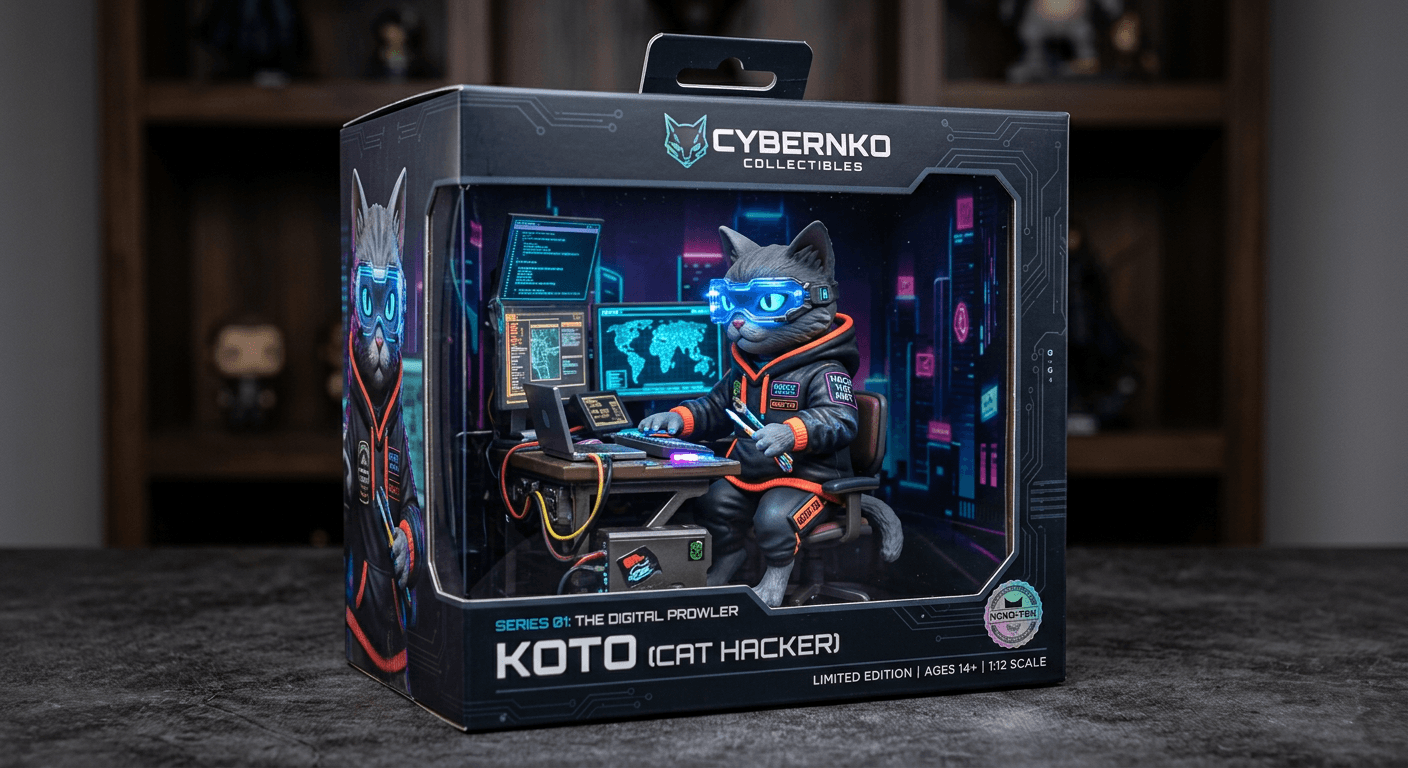
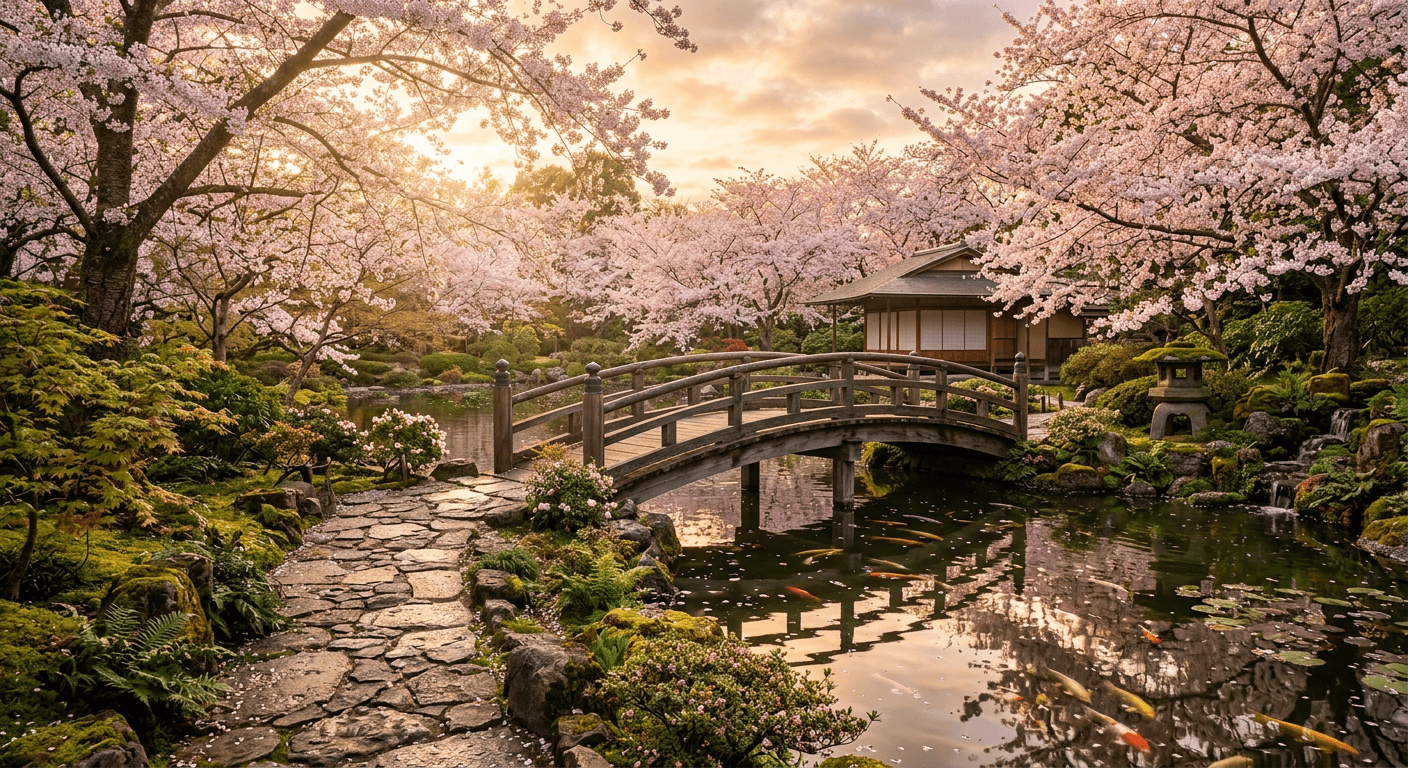
Access Nano Banana 2 on Atlas Cloud for USD0.013 per image.
The Nano Banana 2 Prompt Formula
Before diving into specific prompts, it is important to understand the structure that consistently produces the best results. Every high-performing Nano Banana 2 prompt follows this general formula:
plaintext1``` 2[Subject/Character] + [Style/Format] + [Material/Finish] + 3[Accessories/Details] + [Packaging/Context] + [Lighting/Photography Style] 4```
Key Principles for Effective Nano Banana 2 Prompts:
These principles emerged from extensive testing and apply across all categories:
- Specify the output format explicitly. "3D collectible figurine in blister packaging" performs dramatically better than "a figurine." The model needs to know whether you want an action figure, vinyl toy, Nendoroid-style figure, or display piece.
- Describe materials and surface finishes. Nano Banana 2 excels at material differentiation. Terms like "glossy painted plastic," "matte vinyl," "metallic chrome," and "translucent resin" produce distinct and convincing material treatments.
- Include packaging and display context. The packaging is half the magic. Specify blister packs, box art, cardboard backing, display pedestals, or collector shelves to anchor the output in a realistic product context.
- Use photography and lighting language. "Product photography," "studio lighting," "soft box illumination," and "macro lens" push outputs toward a polished, professional quality that looks like an actual product photo.
- Reference real-world toy brands and styles. "Funko Pop style," "Hot Toys level detail," or "vintage Kenner figure" give the model strong stylistic anchors. These references are among the most effective techniques for achieving consistent, targeted results.
Category 1: 3D Figurines (Prompts 1-5)
Prompt 1: Classic Collectible Figurine
plaintext1``` 23D collectible figurine of a medieval knight in full plate armor with gold 3trim, sealed in clear blister packaging with illustrated cardboard backing, 4hand-painted metallic details, miniature sword and shield accessories 5included in package, product photography with studio lighting on clean 6white background, sharp macro lens detail 7```
This prompt hits all the key elements of the figurine formula: explicit format (collectible figurine), materials (hand-painted metallic details), packaging (blister pack with cardboard backing), accessories (sword and shield), and photography style (studio lighting, macro lens). The medieval knight subject gives the model a rich set of visual references to draw from -- armor textures, heraldic details, weapon forms. This prompt produces excellent results approximately 9 out of 10 times.
Best settings: 1K or 2K, 1:1 aspect ratio
Prompt 2: Pop Culture Vinyl Toy
plaintext1``` 2Matte vinyl collectible toy figure of a robot DJ wearing oversized 3headphones and a leather jacket, turntable accessory at its feet, 4displayed on minimalist white pedestal, Funko Pop proportions with 5oversized head and small body, rose gold and midnight blue color scheme, 6soft gradient background, clean product photography aesthetic 7```
The Funko Pop reference is powerful here. It tells the model exactly what proportions to use -- oversized head, small body, simplified features -- and the model renders this style with high consistency. The specific color scheme (rose gold and midnight blue) prevents the model from defaulting to generic primary colors. The pedestal display context, rather than blister packaging, gives a different but equally polished presentation.
Best settings: 1K or 2K, 1:1 aspect ratio
Prompt 3: Anime-Style Action Figure
plaintext1``` 2Highly detailed anime-style action figure of a female mecha pilot in 3a white and red flight suit, dynamic action pose with one arm extended, 4translucent green visor on helmet, multiple points of articulation visible, 5displayed in premium collector box with window panel showing figure, 6Japanese text on packaging, Bandai model kit aesthetic, professional 7product photography with dramatic rim lighting 8```
The Bandai reference anchors this firmly in the Japanese action figure tradition -- precise engineering, dynamic poses, and premium packaging. The translucent visor detail tests Nano Banana 2's material rendering, and it handles it well. Japanese text on the packaging adds authenticity, as the model renders stylized characters convincingly even without specific text content. This prompt benefits from the dynamic pose instruction, which breaks the static default.
Best settings: 1K or 2K, 9:16 aspect ratio
Prompt 4: Chibi Fantasy Character
plaintext1``` 2Adorable chibi-style figurine of a dragon tamer with a tiny dragon perched 3on their shoulder, oversized eyes, small body with detailed flowing cape, 4the dragon has iridescent scales that catch the light, both figures on 5a rocky base with painted grass details, displayed without packaging on 6a clean surface, warm soft lighting from above, collectible miniature 7painting quality, shallow depth of field 8```
Chibi proportions work exceptionally well with Nano Banana 2. The oversized eyes and small body instruction produces consistently charming results. The dual-figure composition (tamer and dragon) tests the model's ability to handle multiple subjects, and the iridescent scales add a material challenge that Nano Banana 2 handles better than most models. Removing the packaging and using a painted base instead gives this more of a tabletop miniature feel.
Best settings: 1K or 2K, 1:1 aspect ratio
Prompt 5: Retro Vintage Action Figure
plaintext1``` 2Vintage 1980s style action figure of a space commander in a silver 3spacesuit with orange accents, stiff pose with limited articulation, 4sealed in yellowed blister packaging with retro illustrated card 5backing featuring stars and planets, slightly weathered packaging 6edges, nostalgic toy store display feel, warm tungsten lighting, 7product photography with slight film grain 8```
This prompt leans into nostalgia by asking for period-specific details -- stiff pose, limited articulation, yellowed packaging, retro card art. Nano Banana 2 interprets these aging and era cues with surprising accuracy. The film grain and warm lighting reinforce the vintage feel. This style has strong engagement on social media because it triggers nostalgia while still looking like a fresh photograph.
Best settings: 1K or 2K, 1:1 aspect ratio
Category 2: Character Art (Prompts 6-9)
Prompt 6: Semi-Realistic Fantasy Portrait
plaintext1``` 2Semi-realistic 3D rendered portrait of an elven ranger, sharp angular 3features, silver hair braided with small leaves, wearing dark green 4leather armor with intricate tooling, bow slung across back, forest 5background with volumetric light rays filtering through canopy, 6Pixar-meets-Lord-of-the-Rings aesthetic, cinematic color grading 7with warm highlights and cool shadows, medium close-up composition 8```
Moving beyond figurines, this prompt demonstrates Nano Banana 2's ability to render semi-realistic characters with cinematic quality. The "Pixar-meets-Lord-of-the-Rings" reference is a powerful stylistic anchor that tells the model to blend animated approachability with high-fantasy detail. The lighting description (volumetric rays, warm highlights, cool shadows) pushes the output toward professional concept art quality.
Best settings: 1K or 2K, 1:1 or 9:16 aspect ratio
Prompt 7: Cyberpunk Character Design
plaintext1``` 2Full-body character design sheet of a cyberpunk street samurai, front 3and three-quarter view, neon-lit augmented eyes, asymmetric hairstyle 4with shaved side, tactical jacket with glowing circuit patterns, cybernetic 5left arm with exposed chrome mechanics, utility belt with tech gadgets, 6dark urban background with rain and neon reflections, character design 7concept art style, clean lines, professional game art quality 8```
Character design sheets are a practical application beyond social sharing. This prompt requests multiple views and specific design elements, which Nano Banana 2 handles with reasonable consistency. The cyberpunk aesthetic plays to the model's strengths in material rendering -- chrome, glowing circuits, wet surfaces with reflections. The "character design concept art style" instruction keeps the output structured rather than illustrative.
Best settings: 1K or 2K, 16:9 aspect ratio
Prompt 8: Cartoon Mascot
plaintext1``` 2Cute cartoon mascot character of a round penguin wearing a tiny chef 3hat and apron, holding a spatula, simple geometric shapes, bold black 4outlines, flat color fills with subtle shading, cheerful expression 5with rosy cheeks, standing on a small ice cream sundae base, vector 6illustration style, bright pastel color palette, clean white background 7```
Nano Banana 2 handles the shift to flat, vector-style illustration surprisingly well. This prompt style is useful for teams generating mascot concepts, app icons, sticker sets, or brand characters. The explicit instruction for "simple geometric shapes" and "bold black outlines" prevents the model from defaulting to its more detailed 3D rendering style. The result is clean, immediately usable artwork.
Best settings: 1K or 2K, 1:1 aspect ratio
Prompt 9: Stylized Portrait Series
plaintext1``` 2Stylized 3D portrait bust of a jazz musician, exaggerated proportions 3with slightly oversized head and hands, wearing a porkpie hat and 4round sunglasses, playing a miniature saxophone, rich mahogany skin 5tones with warm studio lighting, subtle smoke wisps in background, 6sculpted clay aesthetic with visible texture, museum display lighting, 7artistic collectible quality 8```
The "sculpted clay aesthetic" instruction is worth highlighting. This tells Nano Banana 2 to render the character as though it were a physical sculpture with visible material texture, which produces a distinctive look that sits between figurine and fine art. The exaggerated proportions prevent the output from trying to be photorealistic and instead embrace a characterful, artistic quality.
Best settings: 1K or 2K, 9:16 aspect ratio
Category 3: Product Shots & Mockups (Prompts 10-12)
Prompt 10: Tech Product Concept
plaintext1``` 2Sleek wireless earbuds floating in mid-air, matte black with brushed 3gold accents, charging case open below showing magnetic charging 4contacts, ambient particles of light surrounding the earbuds, 5dark gradient background with subtle blue glow, premium tech product 6photography, Apple-style minimalist presentation, professional 7studio lighting with soft reflections on surface 8```
Nano Banana 2's material rendering capabilities extend well into product visualization. This prompt demonstrates how the model handles complex material combinations (matte black, brushed gold, magnetic contacts) and floating product compositions. The Apple reference anchors the minimalist aesthetic. While not a replacement for professional 3D rendering for final product launches, outputs from this prompt are more than adequate for concept presentations, pitch decks, and social media teasing.
Best settings: 1K or 2K, 1:1 aspect ratio
Prompt 11: Food & Beverage Product
plaintext1``` 2Artisan chocolate truffle collection in an open luxury gift box, 3six truffles with different finishes -- dark chocolate gloss, white 4chocolate drizzle, gold leaf accent, cocoa powder dusted, raspberry 5ganache, and caramel swirl -- each in individual paper cups, black 6velvet lining visible, shallow depth of field focusing on front row, 7warm overhead lighting with soft shadows, gourmet food photography 8style, rich and indulgent color palette 9```
Food products present a unique challenge because viewers immediately detect when something looks artificial. Nano Banana 2 produces convincing food textures -- the gloss of chocolate, the matte of cocoa powder, the translucent quality of caramel. Six distinct finishes in one image tests the model's ability to differentiate materials within a single generation, and it performs well. This type of output is useful for menu design concepts, packaging mockups, and marketing materials.
Best settings: 1K or 2K, 16:9 aspect ratio
Prompt 12: Sneaker Design Concept
plaintext1``` 2Futuristic sneaker design concept, high-top silhouette with 3translucent sole revealing internal air cushion mechanism, upper 4made of woven carbon fiber texture in midnight blue, iridescent 5heel counter, floating lace system with magnetic closures, side 6profile view on reflective dark surface, dramatic studio lighting 7with colored gels creating orange and teal highlights, sneaker 8culture photography style, hyper-detailed render 9```
Sneaker design is one of the most popular product visualization use cases in AI image generation. This prompt demonstrates Nano Banana 2's handling of complex material layering -- carbon fiber weave, translucent materials, iridescent surfaces, and metallic hardware. The specific camera angle (side profile) and surface (reflective dark) follow sneaker photography conventions. Outputs from prompts like this are used in design exploration, social media content, and concept presentations.
Best settings: 1K or 2K, 16:9 aspect ratio
Category 4: Landscapes & Environments (Prompts 13-15)
Prompt 13: Miniature Diorama
plaintext1``` 2Detailed miniature diorama of a Japanese autumn garden, tiny maple 3trees with red and orange leaves, small wooden bridge over a pebble 4stream, miniature stone lantern, moss-covered ground, tilt-shift 5photography effect making real scenery look tiny, warm golden hour 6lighting, extremely detailed at miniature scale, displayed on wooden 7base with glass dome cover, museum-quality miniature art 8```
This prompt plays to Nano Banana 2's unique strength at the intersection of miniatures and environments. The diorama format -- with its base, glass dome, and miniature scale -- connects to the model's figurine capabilities while expanding into environment rendering. The tilt-shift photography reference reinforces the miniature scale. Diorama-style outputs have strong engagement because they combine the appeal of tiny things with rich environmental detail.
Best settings: 1K or 2K, 1:1 aspect ratio
Prompt 14: Fantasy Environment Concept
plaintext1``` 2Floating island in a sunset sky, cascading waterfalls pouring off 3the edges into clouds below, ancient stone ruins covered in 4bioluminescent vines on the island surface, a single massive tree 5at the center with golden leaves, small birds circling the canopy, 6volumetric clouds and god rays, fantasy concept art style, rich warm 7color palette with deep purples and golds, digital painting quality, 8wide establishing shot composition 9```
Pure environment art is not Nano Banana 2's primary strength -- Imagen 4 Ultra produces more photorealistic landscapes. But for stylized, fantasy-influenced environment concepts, Nano Banana 2 delivers surprisingly appealing results. The bioluminescent vines and floating island are fantastical elements that benefit from the model's stylized rendering. This prompt style is useful for game concept art, book cover backgrounds, and creative social media content.
Best settings: 1K or 2K, 16:9 aspect ratio
Prompt 15: Isometric Room Scene
plaintext1``` 2Isometric view of a cozy study room, warm wooden desk with open 3books and a steaming coffee mug, floor-to-ceiling bookshelves filled 4with colorful books, vintage globe on corner table, soft reading lamp 5casting warm pool of light, rain visible through window, cat curled 6up on armchair, low-poly 3D render style with clean geometry, 7soft pastel color palette, detailed miniature scene, isometric game 8art aesthetic 9```
Isometric scenes are popular for social media and game-related content. Nano Banana 2's understanding of 3D space and material properties makes it well-suited for this style. The "low-poly 3D render" instruction keeps the geometry clean rather than photorealistic, which is the appropriate aesthetic for isometric scenes. The details -- steaming coffee, rain on window, sleeping cat -- add warmth and life that drives engagement.
Best settings: 1K or 2K, 1:1 aspect ratio
Simple vs. Detailed Prompts: A Comparison
Understanding why detailed prompts matter requires seeing the difference in practice.
Simple Prompt
plaintext1``` 2A knight figurine 3```
This produces a generic knight figure with random armor style, undefined material finish, no packaging context, default lighting, and inconsistent quality across generations. The model fills in all the gaps with whatever it defaults to, which varies unpredictably.
Detailed Prompt
plaintext1``` 23D collectible figurine of a Teutonic knight in white surcoat over 3chainmail, iron cross heraldry on chest, hand-painted matte finish 4with metallic silver armor highlights, shield and mace accessories 5on sprue beside figure, sealed in clear blister pack with illustrated 6medieval manuscript-style card backing, product photography with 7soft studio lighting, shallow depth of field, clean white background 8```
The detailed version specifies the historical knight type (Teutonic), armor composition (surcoat over chainmail), heraldry (iron cross), material finish (hand-painted matte with metallic highlights), accessories (shield, mace, on sprue), packaging style (blister pack with manuscript-style card), and photography approach (soft studio, shallow depth of field). The result is dramatically more controlled, more visually striking, and more consistent across multiple generations.
The detailed prompt takes 30 seconds longer to write but produces results that are usable on the first or second try, rather than requiring 10+ regenerations with the simple prompt.
Common Mistakes to Avoid
1. Overloading with Conflicting Styles
Bad: “Photorealistic figurine in cartoon style with watercolor finish”
This gives the model three conflicting style directions. Pick one aesthetic and commit to it. If you want a figurine, specify whether it should be photorealistic, stylized, or cartoonish -- not all three.
2. Ignoring Material Descriptions
Bad: “A robot figurine with cool details”
"Cool details" means nothing to the model. Specify the materials: "brushed stainless steel body with matte black joints, glowing blue LED eyes, clear acrylic chest panel revealing internal circuit board." Material specificity is one of Nano Banana 2's greatest strengths -- failing to use it is leaving quality on the table.
3. Forgetting Scale Context
Bad: “A dragon”
Without scale context, the model doesn't know whether to render a massive creature filling the frame or a tiny figurine. Add context: "miniature dragon figurine approximately 4 inches tall on a display base" or "large dragon filling the entire frame, close-up of head and scales."
4. Using Vague Color Descriptions
Bad: “Colorful outfit”
Specify the colors: "cobalt blue jacket with crimson accents and gold buttons." Nano Banana 2 renders specific color combinations with high accuracy, but defaults to muddy, generic palettes when given vague instructions.
5. Neglecting Lighting
Bad: Omitting any lighting description entirely.
Lighting is one of the most impactful elements in determining output quality. Even a simple addition like "studio lighting" or "warm golden hour light" significantly improves the result. For figurines, "product photography lighting" or "soft box illumination" produces the most polished output.
How to Access the Nano Banana 2 API
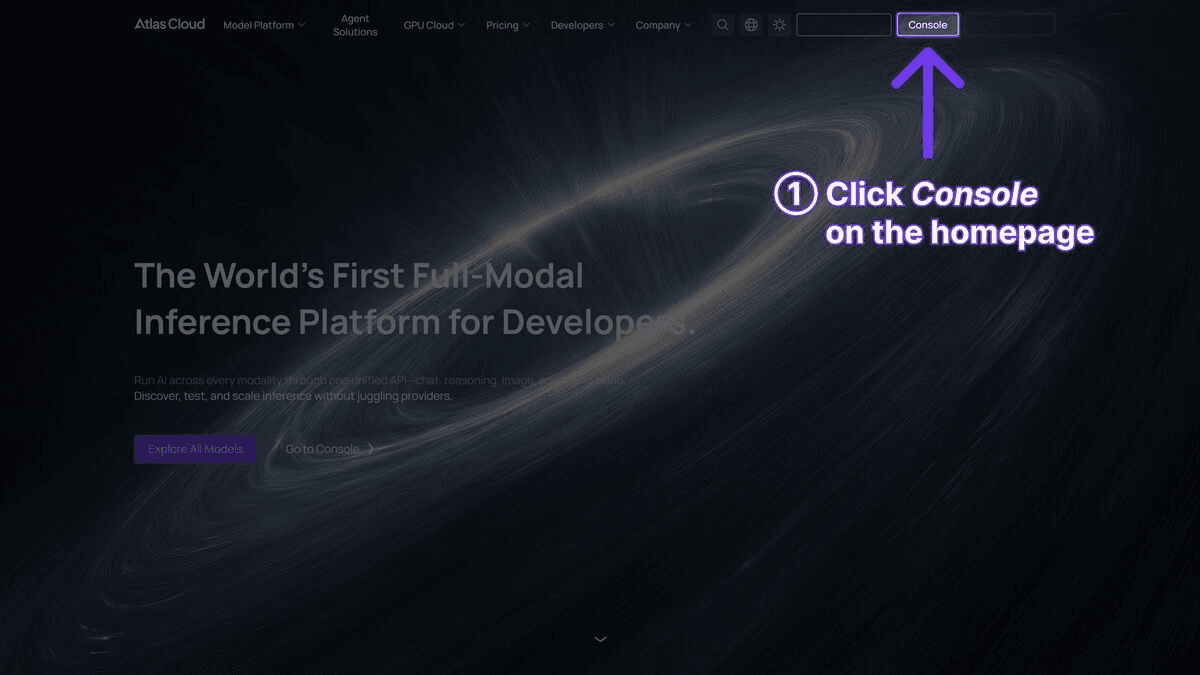
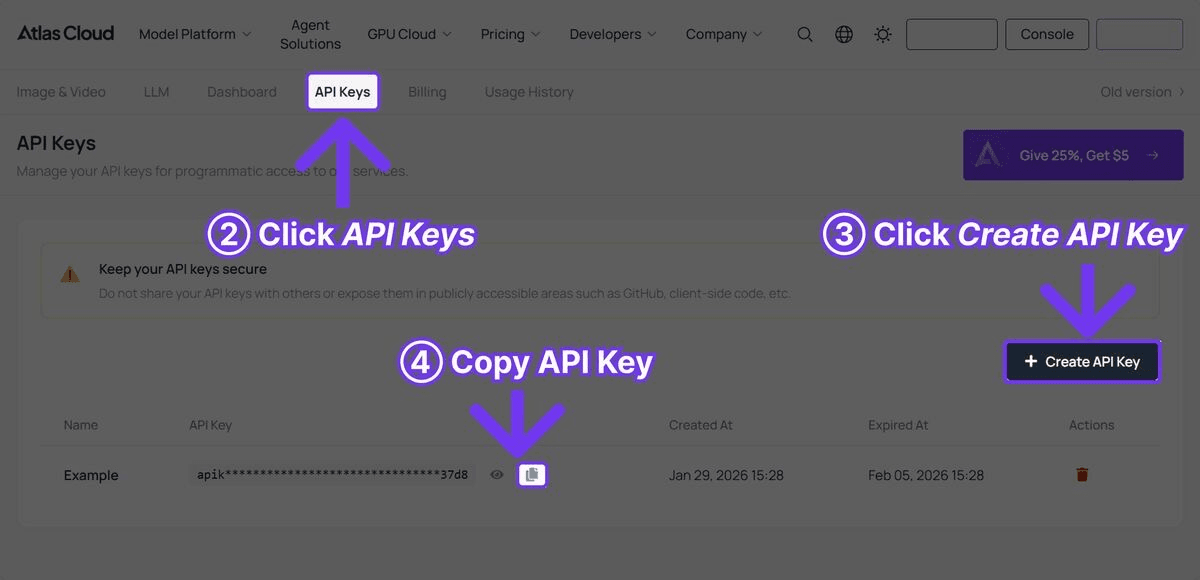
Step 1: Get Your API Key
Sign up at Atlas Cloud to get your free API key.
Step 2: Generate Images with Your Prompts
Here is a complete Python example showing how to use these prompts with the Nano Banana 2 API through Atlas Cloud:
plaintext1```python 2import requests 3import time 4 5API_KEY = "your-atlas-cloud-api-key" 6BASE_URL = "https://api.atlascloud.ai/api/v1" 7 8# Define prompt -- use any of the prompts from this guide 9prompt = """3D collectible figurine of a cyberpunk hacker in a hooded 10jacket with glowing circuit patterns, multiple monitors and keyboards 11as miniature accessories, seated pose on a desk-shaped base, neon green 12and dark purple color scheme, sealed in premium collector box with 13transparent window panel, product photography with dramatic colored 14lighting, sharp detail""" 15 16# Generate image 17response = requests.post( 18 f"{BASE_URL}/model/generateImage", 19 headers={ 20 "Authorization": f"Bearer {API_KEY}", 21 "Content-Type": "application/json" 22 }, 23 json={ 24 "model": "google/nano-banana-2/text-to-image", 25 "prompt": prompt, 26 "width": 1024, 27 "height": 1024 28 } 29) 30 31result = response.json() 32 33# Poll for results 34while True: 35 status = requests.get( 36 f"{BASE_URL}/model/prediction/{result['request_id']}/get", 37 headers={"Authorization": f"Bearer {API_KEY}"} 38 ).json() 39 if status["status"] == "completed": 40 print(f"Image URL: {status['output']['image_url']}") 41 break 42 time.sleep(3) 43``` 44 45To batch-generate multiple prompts: 46 47```python 48import requests 49import time 50 51API_KEY = "your-atlas-cloud-api-key" 52BASE_URL = "https://api.atlascloud.ai/api/v1" 53HEADERS = { 54 "Authorization": f"Bearer {API_KEY}", 55 "Content-Type": "application/json" 56} 57 58prompts = [ 59 "3D figurine of a pirate captain with treasure chest accessory, blister packaging, studio lighting", 60 "Chibi-style vinyl toy of a space explorer with helmet, matte white finish, pedestal display", 61 "Vintage 1980s action figure of a jungle adventurer, yellowed blister pack, retro card art", 62] 63 64# Submit all prompts 65request_ids = [] 66for prompt in prompts: 67 response = requests.post( 68 f"{BASE_URL}/model/generateImage", 69 headers=HEADERS, 70 json={ 71 "model": "google/nano-banana-2/text-to-image", 72 "prompt": prompt, 73 "width": 1024, 74 "height": 1024 75 } 76 ) 77 request_ids.append(response.json()["request_id"]) 78 79# Poll for all results 80results = {} 81while len(results) < len(request_ids): 82 for rid in request_ids: 83 if rid in results: 84 continue 85 status = requests.get( 86 f"{BASE_URL}/model/prediction/{rid}/get", 87 headers={"Authorization": f"Bearer {API_KEY}"} 88 ).json() 89 if status["status"] == "completed": 90 results[rid] = status["output"]["image_url"] 91 print(f"Completed: {results[rid]}") 92 time.sleep(3) 93```
Prompt Approach Comparison
| Approach | Quality | Speed | Best For |
| Simple (e.g., "a knight figurine") | Low -- unpredictable, generic output | Fast to write, but requires many regenerations | Quick concept exploration, brainstorming |
| Detailed (e.g., subject + materials + lighting + packaging) | High -- consistent, polished results | 30 seconds to write, usable on first or second try | Social media content, client presentations, product mockups |
| Formula-based (subject + style + material + accessories + packaging + lighting) | Highest -- repeatable, production-ready | 1-2 minutes to write, but near-zero regenerations needed | Commercial use, app integrations, batch generation pipelines |
The simple approach works for initial exploration but wastes time on regenerations. The formula-based approach takes more effort upfront but pays off immediately in output consistency. For most users, detailed prompts with 3-4 of the formula elements hit the practical sweet spot -- enough specificity for good results without spending minutes on every prompt.
Frequently Asked Questions
What is the optimal prompt length for Nano Banana 2?
The sweet spot is 40-80 words. Prompts under 20 words produce generic, unpredictable results because the model fills in too many gaps on its own. Prompts over 100 words can cause the model to deprioritize certain elements, leading to inconsistent output. The best-performing prompts in this guide average around 50-60 words -- enough to specify subject, style, materials, context, and lighting without overwhelming the model.
How do I get a consistent style across multiple generations?
Consistency comes from anchoring your prompts with the same style references, material descriptions, and lighting setup. For example, if you want a series of figurines with the same aesthetic, keep the packaging type ("sealed in clear blister packaging"), material finish ("hand-painted matte vinyl"), and photography style ("product photography with soft studio lighting") identical across all prompts. Only change the subject and its unique details. Using a specific brand reference like "Funko Pop style" or "Nendoroid aesthetic" across a series also helps maintain visual cohesion.
Can I use negative prompts with Nano Banana 2?
Nano Banana 2 does not support a dedicated negative prompt parameter through the Atlas Cloud API. Instead, guide the model by being explicit about what you want rather than what you do not want. For example, instead of trying to exclude "blurry" or "low quality," specify "sharp macro lens detail, product photography, studio lighting" -- this positively steers the model toward the quality level you are targeting. Explicit positive instructions consistently outperform attempts at exclusion.
What is the best aspect ratio for figurine prompts?
For standalone figurines and collectible toy shots, a 1:1 aspect ratio produces the best results. The square format gives the model balanced space to render the figure, packaging, and background without cropping. For character sheets or action poses with horizontal elements, 16:9 works well. For tall figures, standing poses, or portrait-style compositions, 9:16 is the better choice. Resolution options include 1K, 2K, and 4K. When in doubt, start with 1K or 2K at 1:1 -- it is the most reliable default for Nano Banana 2.
Verdict
Nano Banana 2 prompt engineering follows a clear, repeatable formula: specify the format, describe materials, add packaging or display context, and include lighting and photography instructions. The 15+ prompts in this guide cover the most popular categories -- figurines, character art, product shots, and environments -- and each has been tested for consistency and quality.
The biggest mistake new users make is writing vague prompts and expecting the model to fill in the gaps intelligently. It won't. Every detail you leave unspecified is a detail the model will randomize, and randomization rarely produces optimal results. Take the 30 extra seconds to write a specific prompt, and you will save yourself 10 regeneration attempts.
Start with the prompts in this guide, adapt them to your specific needs, and iterate from there. Nano Banana 2 is available on Atlas Cloud.
────────────────────────────────────────────────────────────





