Seedance 2.0 has quickly become one of the most advanced AI video generation models available today.
From multi-shot cinematic sequences to highly controllable scene generation, it has been widely adopted by creators, startups, and AI-native products.
But there is one big problem:
Accessing Seedance 2.0—and understanding its pricing—is highly complex.
- The official API is not public for individuals
- Pricing is based on a complex token formula
- Third-party providers offer access—but cost structures vary wildly
So, the real question is:
Where should you use Seedance 2.0—and which option offers the best value?
Official Seedance 2.0 Pricing
Seedance 2.5 has been announced. See the Seedance 2.5 updates for potential pricing implications.
Important Note: The Seedance 2.0 API is currently for enterprise users only. Individual accounts cannot access it directly. All prices below are based on official enterprise pricing.
The cost to generate 1 second of video depends on:
- Resolution (480p / 720p)
- Output Aspect Ratio (16:9)
- Whether an input video is included (Image-to-Video / Video-to-Video)
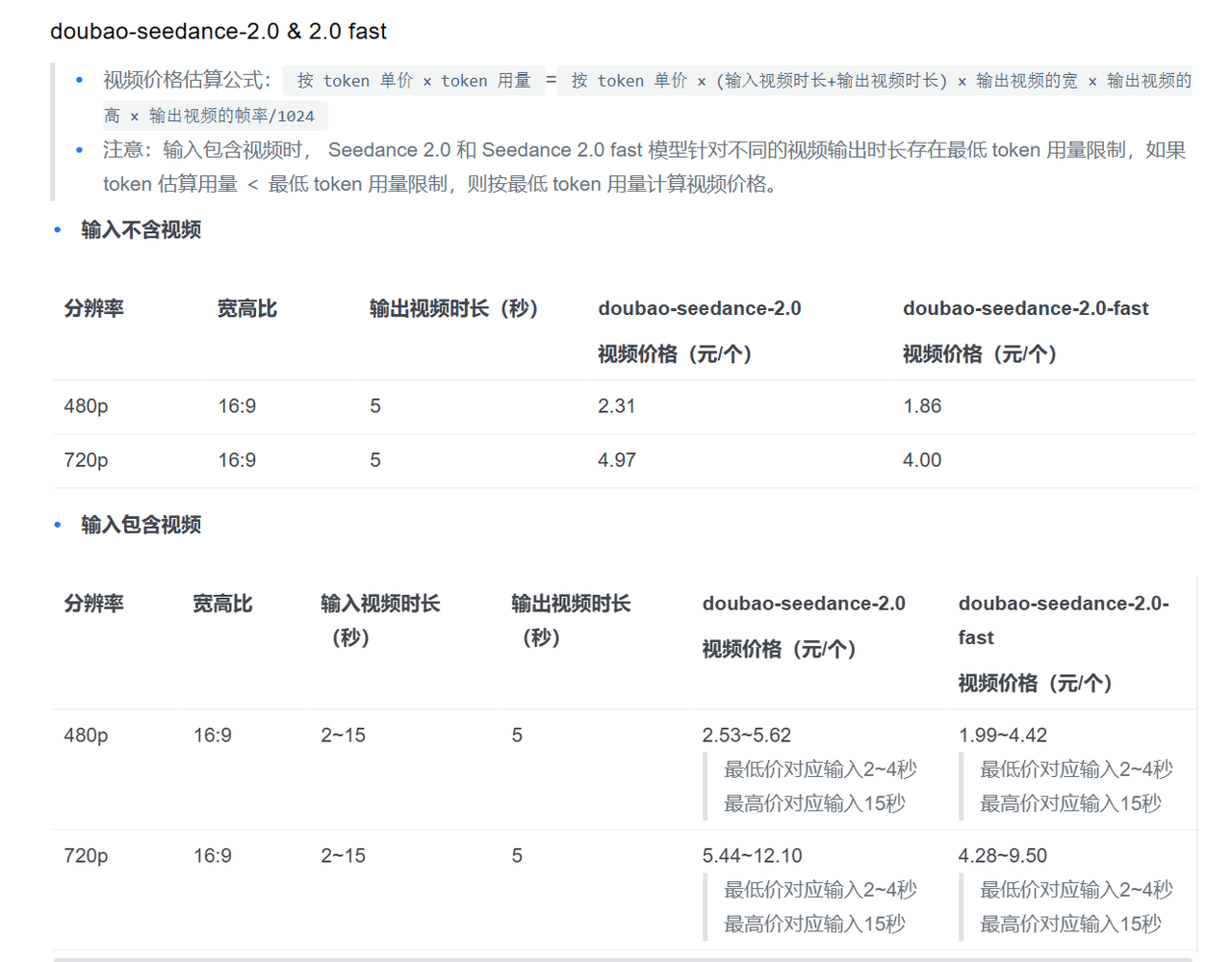
- Input does not include video
| Resolution | Ratio | 1s Video Output (Seedance 2.0) | 1s Video Output (Seedance 2.0 Fast) |
|---|---|---|---|
| 480p | 16:09 | ¥0.46 (~$0.06) | ¥0.37 (~$0.05) |
| 720p | 16:09 | ¥0.99 (~$0.14) | ¥0.80 (~$0.11) |
- Input includes video (2–15s input, 1s output)
| Resolution | Ratio | Input Duration | 1s Video Output (Seedance 2.0) | 1s Video Output (Seedance 2.0 Fast) |
|---|---|---|---|---|
| 480p | 16:09 | 2s | ¥0.51 (~$0.07) | ¥0.40 (~$0.06) |
| 480p | 16:09 | 15s | ¥1.12 (~$0.15) | ¥0.88 (~$0.12) |
| 720p | 16:09 | 2s | ¥1.09 (~$0.15) | ¥0.86 (~$0.12) |
| 720p | 16:09 | 15s | ¥2.42 (~$0.33) | ¥1.90 (~$0.26) |
⚡Note: Prices are based on minimum token consumption, so even very short videos have a base cost.
Third-Party API Providers: Kie.ai vs Atlas Cloud
Due to limited direct access, most users rely on third-party platforms.
We compare two main options:
- Kie.ai
- Atlas Cloud
Per-Second Pricing Comparison (Standardized)
| Platform | Est. Cost (480p) | Est. Cost (720p) | Billing Type |
|---|---|---|---|
| Official Benchmark | ~$0.05–0.06/s | ~$0.11–0.14/s | Token-based |
| Kie.ai | ~$0.05–0.09/s | ~$0.125–0.205/s | API / Usage-based |
| Atlas Cloud (Fast) | ~$0.08/s | ~$0.13/s | Per-second |
| Atlas Cloud | ~$0.1 | ~$0.20+ | High-quality tier |
Beyond Price: The Real Differences
1. Pricing Transparency
- Official → Complex token formula
- Kie.ai → Pricing is somewhat abstracted
- Atlas Cloud → Clear per-second billing
Transparent pricing = Easier to scale and control costs
2. Performance and Scalability
| Feature | Kie.ai | Atlas Cloud |
|---|---|---|
| Batch Generation | Limited | ✅ |
| High Concurrency | Medium | High |
| Stability | Standard | Enterprise-grade |
This is critical for:
- AI Products
- SaaS Tools
- Content processing pipelines
3. Model Tier Strategy
Atlas Cloud introduces a key advantage:
- Fast Tier → The cheapest option
- Pro Tier → Highest quality
👉 This enables:
Optimize costs + scale quality on a single platform
What if price isn't the only advantage?
Let's be honest:
In some cases:
- Kie.ai pricing ≈ close to official
- Atlas Cloud Pro tier ≈ more expensive
So, why would someone choose a more costly option?
Seedance vs Other Models
Even between platforms, Seedance 2.0 is competing with models like:
- Runway
- Pika
- Sora-like models
| Model | Quality | Consistency | Typical Cost |
|---|---|---|---|
| Seedance 2.0 | ⭐⭐⭐⭐ | ⭐⭐⭐⭐ | Medium |
| Runway | ⭐⭐⭐ | ⭐⭐ | Medium |
| Pika | ⭐⭐ | ⭐ | Low |
The Real Trade-off
Lower cost tools often mean:
- Poorer frame consistency
- Less cinematic quality
- Limited scene control
Re-framing Value
If price isn't the absolute lowest:
Then the product must win on quality, stability, and scalability
And this is where premium platforms stand out.
Why Atlas Cloud might be the premium alternative
Atlas Cloud doesn't just try to win on price, as that's a meaningless race. Instead, it takes a different approach.
No Forced Subscription
You don't have to lock into monthly plans. Many platforms lock you into $50 or $200 monthly packages, whether you use them or not. Atlas Cloud uses a pay-as-you-go model. You only pay when you actually generate a video. This is crucial for small teams with tight cash flow or early-stage projects. You only spend a few dollars to test, with no surprise charges at the end of the month.
Enterprise-Grade Performance without the Red Tape
High concurrency isn't just a buzzword. If you've ever tried to generate 10 videos at once with a cheap provider, you know what happens: queues get long, requests time out, or the service becomes unresponsive. Atlas Cloud's infrastructure is designed to handle real loads. Stable inference means generation tasks don't get interrupted for no reason. Optimized infrastructure means less waiting. You send the request, it comes back, no extra hassle.
Developer Experience that stays out of your way
Clear APIs should be a given. But if you've tried some video generation endpoints, you've seen missing documentation, vague error messages, and ever-changing authentication. Atlas Cloud keeps it simple. Predictable billing means you know the exact cost before you click send. Simpler integration means you can go from sign-up to your first call in ten minutes. This is vital when you are in a rush to launch your product.
Flexible Strategy without platform switching
This is the most interesting part. You can start with the Fast tier—low price, great for prototyping, internal testing, or drafts. When you need higher quality (for example, for delivery to clients or making marketing videos), just switch to the Pro tier. Same API, same account, same billing. No need to migrate anything, no need to export assets and re-upload. Just change one parameter and keep working.
Many teams switch between different providers every week, starting with cheap options for testing, only to find quality doesn't meet production requirements, and then having to rebuild integration when they move to premium solutions. Atlas Cloud lets you stay within the same system from day one. Low-cost prototyping, high-quality scale-up. No migration pain.
Final Recommendation
Let's cut through the noise.
If you are just exploring—curious about what Seedance 2.0 can do, perhaps just for fun or generating a few clips for social media—choose Kie.ai. It is easy to start, and the pricing is straightforward enough for low volume. You don't need to worry about concurrency or infrastructure; just sign up, top up, and start generating. For casual exploration, it works well.
If you can somehow get official enterprise access, that's great. But most people can't. Enterprise channels are slow, require negotiation, and involve long commitments. Unless you are a large enterprise with a dedicated procurement team, don't waste your time. That option is primarily for companies with heavy processes.
Now, if you are building a real product, service, or need a content processing pipeline that runs continuously every day without needing constant supervision, Atlas Cloud is the smarter choice.
Still deciding between 2.0 and 2.5? Our Seedance 2.5 vs 2.0 guide walks through the differences so you can choose the right version for your production workflow.
FAQ
If a generation fails, do I still pay?
That depends on the provider. Official enterprise pricing usually only charges for successful generations. Some third-party platforms do the same. Others charge for attempts, even if the result is useless or timed out. Be sure to read the fine print. It is worth mentioning that Atlas Cloud does not charge for failed generations. Kie.ai has retry policies, but check their latest terms. Nothing is more annoying than paying for a black screen.
What resolution should I use for product videos?
It depends on where the video is displayed. For social media feeds or quick tests, 480p is sufficient and costs less. For product landing pages or client presentations, use 720p. The quality improvement is noticeable, especially when there is text or fine detail in the scene. Some providers offer 1080p or higher, but currently, Seedance 2.0 itself supports up to 720p, so don't pay extra for resolutions the model can't achieve.
Do I have to provide an input video every time?
No. You can generate from text alone, which is cheaper and faster. But providing a 2 to 15-second input video gives the model more reference; generated outputs are often more stable, and you can better control scene transitions. For example, if you want to extend an existing clip or change the style, an input video is the preferred choice. If you are starting from scratch, text-to-video works quite well.
What is the typical latency for generating a 5-second video?
Fast-tier providers usually return a 5-second video in 20 to 40 seconds. Pro tiers may take longer—60 to 90 seconds—because they perform more inference steps for higher quality. The official enterprise API is somewhere in between, depending on your concurrency limits. If you need real-time or near-real-time generation, no one can do that yet. But for batch processing or interactive tools where a user can wait for a minute, it works perfectly.





