The economics of AI image generation have shifted dramatically. In early 2024, generating a single AI image through a commercial API cost anywhere from USD0.04 to USD0.20. By early 2025, competition among model providers drove average prices down to the USD0.03-0.08 range. Now, Z-Image Turbo has broken through a psychological barrier -- USD0.01 per image. One cent. That is not a promotional rate or a limited-time offer. It is the standard price for an open-source model that generates images in roughly one second.
For development teams, content creators, and businesses that need images at scale, this changes the math entirely. A workflow that previously cost USD300 for 10,000 images now costs USD100. Prototyping costs become negligible. Bulk generation pipelines become viable for use cases that were previously too expensive to justify.
*Last Updated: February 28, 2026*
Z-Image Turbo at a Glance
| Feature | Detail |
| Model | Z-Image Turbo |
| Developer | Open Source Community |
| Model ID | `z-image/turbo/text-to-image` |
| Price per Image | USD0.01 |
| Max Resolution | 2048*2048 |
| Generation Speed | ~1 second |
| License | Open Source |
| Best For | Prototyping, bulk generation, cost-sensitive workflows |
Why Z-Image Turbo Matters
The Cheapest AI Image API Available
At USD0.01 per image, Z-Image Turbo is the most affordable AI image generation model available through any major API platform. To put that in perspective, here is how it compares to other models on Atlas Cloud:
| Model | Price per Image | Cost Multiple vs. Z-Image |
| Z-Image Turbo | USD0.01 | 1x (baseline) |
| Seedream v5.0 Lite | USD0.032 | 2.6x |
| Nano Banana 2 | USD0.072 | 5.6-7.2x |
| Imagen 4 Ultra | USD0.054 | 4-8x |
At scale, these differences are significant. A team generating 50,000 images per month would spend USD500 with Z-Image Turbo versus USD1,500-USD4,000 with other models. For use cases where the absolute highest fidelity is not required -- placeholder images, first-draft concepts, A/B testing variants, thumbnail generation, or dataset augmentation -- the cost savings are substantial without meaningful quality tradeoffs.
Open Source Transparency
Z-Image Turbo is built on open-source foundations, which matters for teams that care about model transparency, reproducibility, and avoiding vendor lock-in. The model weights and architecture are publicly available, meaning the behavior of the model can be inspected and understood. For enterprise teams with compliance requirements around AI-generated content, this transparency is a practical advantage, not just a philosophical one.
Sub-Second Generation
Speed is the other defining characteristic. Z-Image Turbo generates images in approximately one second at 2048*2048 resolution. This makes it suitable for real-time and near-real-time applications where latency matters -- interactive design tools, live content generation, chatbot integrations, and user-facing applications where a multi-second wait degrades the experience.
Key Features and Capabilities
Fast Prototyping and Ideation
Z-Image Turbo's combination of low cost and fast generation makes it ideal for the early stages of creative workflows. Designers and content teams can generate dozens of variations on a concept in minutes, narrowing down direction before committing to a premium model for final output. At USD0.01 per image, the cost of exploration is effectively zero.
A practical workflow looks like this: generate 20-30 concept variations with Z-Image Turbo (USD0.20-0.30 total), select the 2-3 best directions, then re-generate those with Flux 2 Pro or Imagen 4 Ultra for production-quality output. This approach saves both money and time compared to iterating directly on a premium model.
Bulk and Batch Generation
For teams that need large volumes of images -- training data augmentation, product catalog placeholders, social media content calendars, or testing visual pipelines -- Z-Image Turbo's economics are compelling. Some concrete examples:
- 10,000 product placeholder images: USD100 with Z-Image Turbo vs. USD300-800 with premium models
- Daily social media content (10 images/day, 365 days): USD36.50/year with Z-Image Turbo
- A/B testing (50 ad creative variants): USD0.50 total cost
- Training data augmentation (100,000 synthetic images): USD1,000 with Z-Image Turbo
These are not hypothetical scenarios. Teams actively building content pipelines, e-commerce platforms, and AI training workflows benefit directly from this pricing.
Supported Resolutions and Aspect Ratios
Z-Image Turbo supports resolutions up to 2048*2048. Common aspect ratios include:
- 1024x1024 (1:1) -- Social media posts, profile images, thumbnails
- 1024x768 (4:3) -- Blog illustrations, product shots
- 768x1024 (3:4) -- Portrait-orientation content, mobile-first designs
- 1024x576 (16:9) -- Blog headers, presentation slides, video thumbnails
- 576x1024 (9:16) -- Stories, vertical social media content
The 2048*2048 maximum resolution is lower than premium models like Flux 2 Pro and Imagen 4 Ultra, which support up to 2048x2048. For web-resolution content, social media, and digital applications, 2048*2048 is more than sufficient. For print-quality or large-format display needs, a higher-resolution model would be more appropriate.
Quality Characteristics
Z-Image Turbo produces images that are usable for most digital applications. The quality profile includes:
- Composition: Handles standard compositions well -- single subjects, simple backgrounds, product-style shots, and nature scenes
- Color accuracy: Prompt-specified colors are generally reproduced faithfully
- Style range: Supports photographic, illustration, concept art, and flat design styles
- Text rendering: Basic text rendering is possible but not a strength -- for typography-heavy images, Ideogram v3 or Flux 2 Pro would be better choices
- Fine detail: At 2048*2048, fine details like skin texture, intricate patterns, and subtle lighting effects are acceptable but not at the level of Imagen 4 Ultra
The honest assessment: Z-Image Turbo is not trying to compete with Imagen 4 Ultra on photorealism or Ideogram v3 on text rendering. It competes on price and speed, and it wins decisively on both. The quality is "good enough" for a wide range of production use cases, and that's precisely its value proposition.
How to Access Z-Image Turbo via Atlas Cloud API
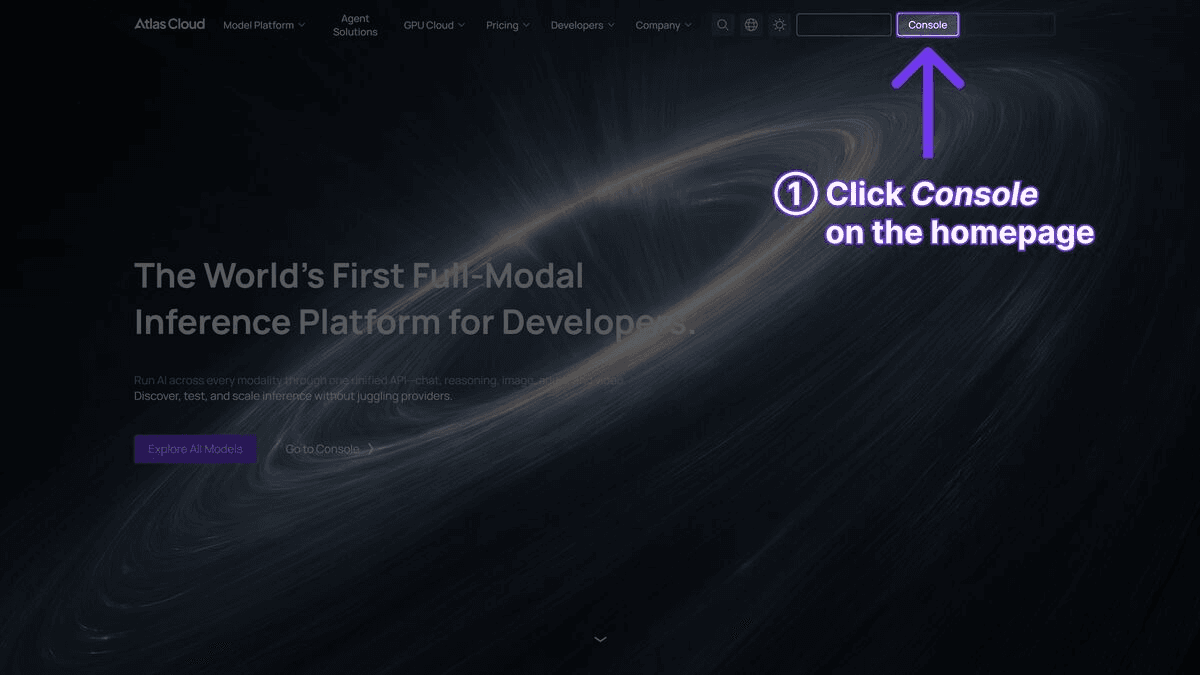
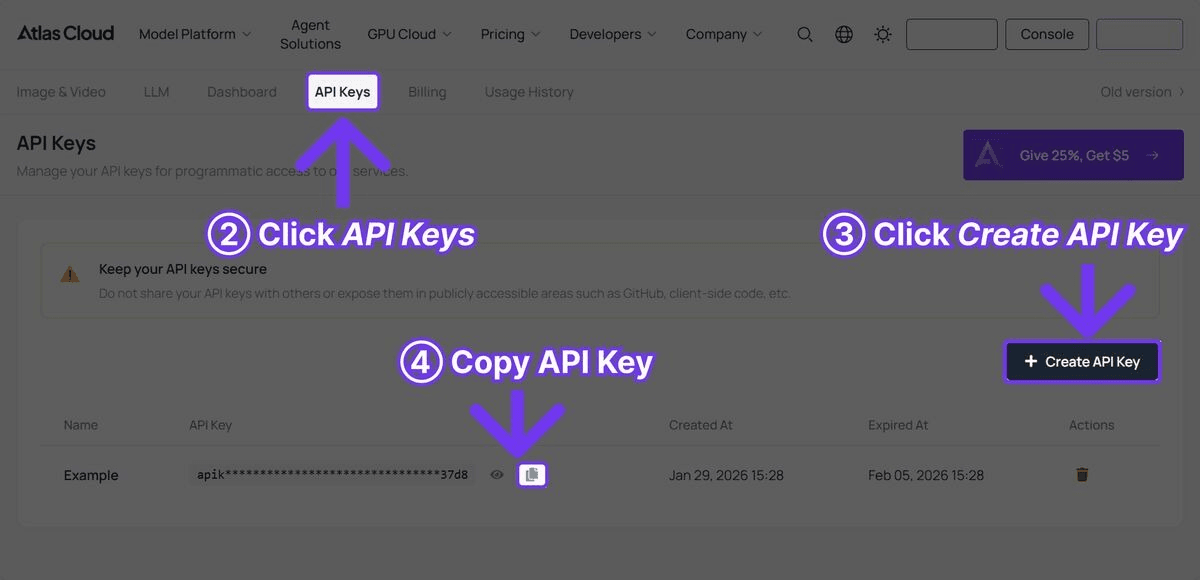
Step 1: Get Your API Key
Register at Atlas Cloud and create an API key from the console.
Step 2: Generate Your First Image
plaintext1```python 2import requests 3 4API_KEY = "your-atlas-cloud-api-key" 5BASE_URL = "https://api.atlascloud.ai/api/v1" 6HEADERS = { 7 "Authorization": f"Bearer {API_KEY}", 8 "Content-Type": "application/json" 9} 10 11# Generate an image with Z-Image Turbo 12response = requests.post( 13 f"{BASE_URL}/model/generateImage", 14 headers=HEADERS, 15 json={ 16 "model": "z-image/turbo/text-to-image", 17 "prompt": "Modern minimalist workspace with laptop, coffee cup, and succulent plant, soft natural lighting, clean white desk", 18 "width": 1024, 19 "height": 1024 20 } 21) 22 23result = response.json() 24print(f"Image URL: {result['output']['image_url']}") 25```
At USD0.01 per generation and approximately 1 second per image, you can iterate rapidly on prompts without worrying about cost.
Step 3: Batch Generation Example
For teams needing bulk generation, here is a pattern for generating multiple images efficiently:
plaintext1```python 2import requests 3import time 4 5API_KEY = "your-atlas-cloud-api-key" 6BASE_URL = "https://api.atlascloud.ai/api/v1" 7HEADERS = { 8 "Authorization": f"Bearer {API_KEY}", 9 "Content-Type": "application/json" 10} 11 12prompts = [ 13 "Professional headshot of a business executive, studio lighting, neutral background", 14 "Aerial view of a modern city skyline at sunset, warm golden tones", 15 "Fresh organic salad in a ceramic bowl, food photography style, natural light", 16 "Abstract geometric pattern in blue and gold, modern art style", 17 "Cozy reading nook with bookshelf, warm lamp light, autumn atmosphere" 18] 19 20results = [] 21 22for i, prompt in enumerate(prompts): 23 response = requests.post( 24 f"{BASE_URL}/model/generateImage", 25 headers=HEADERS, 26 json={ 27 "model": "z-image/turbo/text-to-image", 28 "prompt": prompt, 29 "width": 1024, 30 "height": 1024 31 } 32 ) 33 result = response.json() 34 results.append(result) 35 print(f"Image {i+1}/{len(prompts)}: {result['output']['image_url']}") 36 37# Total cost: 5 images x USD0.01 = USD0.05 38print(f"\nTotal images generated: {len(results)}") 39print(f"Estimated cost: USD{len(results) * 0.01:.2f}") 40```
Step 4: Polling for Async Results
If using async mode, poll the prediction endpoint for results:
plaintext1```python 2import time 3 4request_id = result["request_id"] 5 6while True: 7 status = requests.get( 8 f"{BASE_URL}/model/prediction/{request_id}/get", 9 headers={"Authorization": f"Bearer {API_KEY}"} 10 ).json() 11 12 if status["status"] == "completed": 13 print(f"Image URL: {status['output']['image_url']}") 14 break 15 elif status["status"] == "failed": 16 print(f"Generation failed: {status.get('error', 'Unknown error')}") 17 break 18 19 time.sleep(1) 20```
Practical Use Cases
E-Commerce Product Placeholders
Online stores launching new product lines often need placeholder images before professional photography is complete. Z-Image Turbo can generate hundreds of product-style images for catalog pages, allowing teams to build out the store infrastructure while final assets are still being produced. At USD0.01 per image, generating 500 placeholder product shots costs USD5.
Social Media Content at Scale
Social media managers maintaining multiple accounts across platforms need a constant stream of visual content. Z-Image Turbo enables a workflow where daily image content can be generated for under USD0.50/day, covering multiple platforms and post types. The speed also allows for same-day content creation responding to trending topics.
A/B Testing Ad Creatives
Performance marketing teams routinely test dozens of ad creative variants to optimize click-through rates. With premium models, generating 50 variants costs USD1.50-USD4.00. With Z-Image Turbo, the same test costs USD0.50. This lower cost encourages more extensive testing, which often leads to better-performing creatives.
AI Training Data Augmentation
Machine learning teams use synthetic images to augment training datasets, improving model performance on underrepresented categories. Generating 100,000 synthetic training images with Z-Image Turbo costs USD1,000 -- making large-scale data augmentation financially accessible for smaller teams and research groups.
Rapid UI/UX Prototyping
Design teams building application mockups need placeholder imagery that approximates final content. Z-Image Turbo generates visuals fast enough to integrate directly into the design iteration cycle, with cost so low that generating multiple options for every placeholder position is practical.
Z-Image Turbo vs. Premium Models: When to Use Which
The question is not whether Z-Image Turbo is "better" or "worse" than premium models. It is about using the right tool for the right job. Here is a practical decision framework:
Use Z-Image Turbo (USD0.01/image) when:
- The image is for internal use, prototyping, or early-stage exploration
- Volume matters more than absolute quality -- batch operations, data augmentation, placeholder content
- Speed is critical -- sub-second generation for real-time applications
- Budget constraints are tight and every dollar of image generation spend is scrutinized
- The final image will be displayed at web resolution (1024px or smaller)
Use Imagen 4 Ultra (USD0.054/image) when:
- Maximum photorealism is the top priority
- The image is a hero asset that will be closely scrutinized
- Color accuracy, lighting detail, and fine texture quality are non-negotiable
- The content involves nature, architecture, or premium brand imagery
The Hybrid Workflow
The most cost-effective approach for most teams is a hybrid workflow: use Z-Image Turbo for volume and iteration, then switch to a premium model for final production assets. Atlas Cloud makes this trivial because all models share the same API key, endpoint structure, and billing. The only change between models is the `model` parameter in the API call.
plaintext1```python 2# Same code, different model -- switch from Z-Image Turbo to Flux 2 Pro 3# Just change the model parameter 4 5# Draft/prototype phase - USD0.01/image 6draft_response = requests.post( 7 f"{BASE_URL}/model/generateImage", 8 headers=HEADERS, 9 json={ 10 "model": "z-image/turbo/text-to-image", 11 "prompt": "Luxury watch on dark marble surface, dramatic studio lighting", 12 "width": 1024, 13 "height": 1024 14 } 15) 16 17# Final production phase - USD0.03-0.05/image 18final_response = requests.post( 19 f"{BASE_URL}/model/generateImage", 20 headers=HEADERS, 21 json={ 22 "model": "black-forest-labs/flux-2-pro/text-to-image", 23 "prompt": "Luxury watch on dark marble surface, dramatic studio lighting", 24 "width": 1024, 25 "height": 1024 26 } 27) 28```
Prompt Tips for Z-Image Turbo
Getting the best results from Z-Image Turbo comes down to prompt clarity. Because the model is optimized for speed rather than interpretive complexity, straightforward and specific prompts tend to produce the best output.
Be Direct and Specific
Z-Image Turbo responds well to clear, concrete descriptions. Avoid overly abstract or poetic prompt language. Instead of "an ethereal dreamscape of consciousness," try "surreal landscape with floating islands, soft purple sky, glowing orbs."
Specify Lighting and Style
Explicitly stating lighting conditions and visual style improves consistency:
plaintext1``` 2Product photo of wireless earbuds on white background, soft studio lighting, 3commercial photography style, clean and minimal 4```
Keep Compositions Simple
Z-Image Turbo handles single-subject compositions and straightforward scenes best. Multi-subject compositions with complex spatial relationships may not resolve as cleanly as with premium models.
Use Standard Aspect Ratios
Stick to standard aspect ratios (1:1, 4:3, 16:9, 9:16) for the most predictable results. These are the ratios the model has been most extensively trained on.
Frequently Asked Questions
Is Z-Image Turbo really USD0.01 per image?
Yes. There are no hidden fees, no minimum commitments, and no subscription required. Each image generation costs exactly USD0.01 at standard resolution.
How does Z-Image Turbo quality compare to Flux 2 Pro or Imagen 4 Ultra?
Z-Image Turbo produces good quality images suitable for most digital applications at 2048*2048 resolution. It does not match the photorealistic detail of Imagen 4 Ultra or the versatility of Flux 2 Pro. The tradeoff is intentional -- Z-Image Turbo prioritizes speed and cost over maximum fidelity. For many use cases, the quality is more than sufficient.
Can I use Z-Image Turbo images commercially?
Z-Image Turbo is an open-source model, and Atlas Cloud imposes no additional restrictions beyond the model's license. Check the specific open-source license terms for your intended commercial application.
What is the maximum resolution?
2048*2048 is the maximum supported resolution. For higher resolutions (up to 2048x2048), consider Flux 2 Pro or Imagen 4 Ultra.
How fast is generation?
Approximately 1 second per image at 1024x1024. This is the fastest image generation available on the Atlas Cloud platform, making it suitable for real-time and interactive applications.
Do I need a separate API key for Z-Image Turbo?
No. Your Atlas Cloud API key provides access to Z-Image Turbo and all other models on the platform -- over 300 AI models including image generation, video generation, and language models. One key, one bill.
Verdict
Z-Image Turbo is available now on Atlas Cloud. The combination of USD0.01 pricing, sub-second generation, and open-source transparency makes it uniquely suited for high-volume, cost-sensitive, and speed-critical image generation workflows.
- Atlas Cloud Models Page: Try Z-Image Turbo interactively in your browser before writing code
- API Access: Sign up, get your API key, and start generating images programmatically
────────────────────────────────────────────────────────────





