Every designer who ships AI images has a version of this story. The client approved the ad. It went out. And somewhere down in the six-point legal line, the can says 12 fl 0z · brewd 18 huors.
Nobody caught it, because nobody reads the small print in a comp. The model that wrote it was, of course, one of the highly ranked ones.
That is the gap this article is about. Rankings measure which image people prefer when they glance at two of them side by side. Your job measures whether a file can go to a client without you opening Photoshop. Those are different questions, and in 2026 they have different answers.
So here is the short version, before anything else. The model that leads the text-to-image arena does not lead the editing arena. The top ten are separated by roughly seven percent of Elo and by an order of magnitude in price. And the only reliable way to pick is to run your own brief through several models at once and score them on one fixed rubric. That takes about twenty minutes. This is the protocol.
Key takeaways
- Across the top ten text-to-image models, Elo spans 1368 down to 1270. That is a 98-point spread, roughly 7 percent, while listed per-image prices across the same set differ by more than an order of magnitude.
- The text-to-image leader and the editing leader are not the same model. Rankings reshuffle by task, so a single "best AI image generator" answer is structurally wrong.
- Typography is still the cheapest, fastest disqualifier in 2026. A brand name, an overlay, and one line of small print will separate five models in a single round.
- A model page's headline price is a floor, not a quote. Quality tiers and resolution tiers change what you actually pay, so read the estimate on the run screen before you commit.
- Running one prompt through five models in parallel costs less than a coffee and tells you more than any comparison article, including this one.
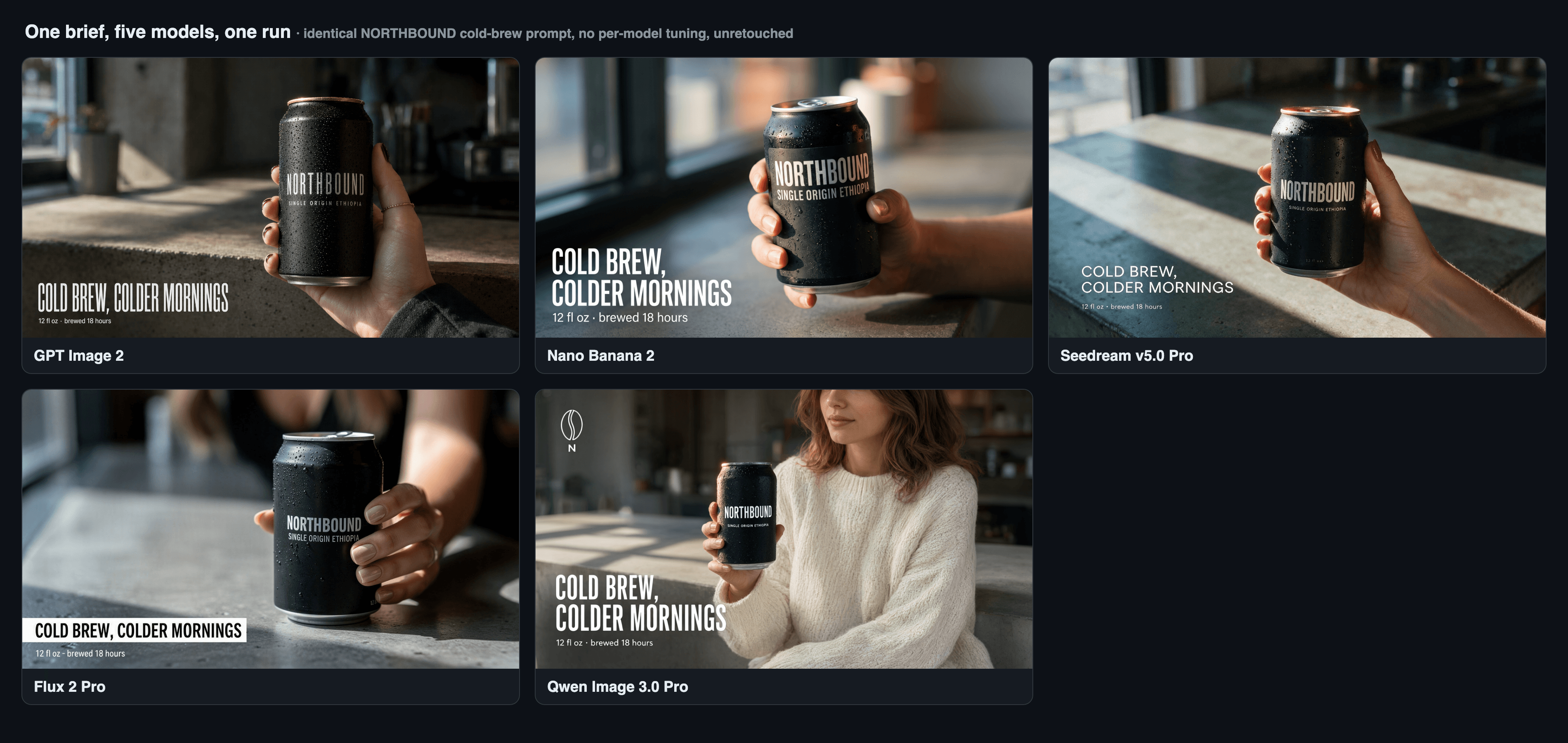
Five AI image generators given the identical ad brief: the same NORTHBOUND cold-brew prompt rendered by GPT Image 2, Nano Banana 2, Seedream v5.0 Pro, Flux 2 Pro and Qwen Image 3.0 Pro, unretouched and labelled
The whole article in one frame: one brief, five models, no retouching, no per-model prompt tuning. The differences show up in the label text and the overlay long before they show up in the photography. (Reve 2.1's live API was closed on this test run, so Flux 2 Pro fills the fifth panel; Reve's leaderboard analysis stands below.)
Why Most AI Image Generator Comparisons Fail You
Most AI image generator comparisons fail because they answer a ranking question when you have a delivery question. Arena Elo is built from blind pairwise votes: two images, one prompt, pick the one you like. That is a real signal about aesthetic preference. It is not a signal about whether a brand name is spelled correctly, whether an overlay landed where you asked, or whether the file can ship without a retouch pass.
Look at what the numbers actually say. In the text-to-image arena, GPT Image 2 (high) leads at 1368, followed by Reve 2.1 at 1321 and Nano Banana 2 at 1319, with Qwen-Image-3.0-Pro at 1284 and Seedream 5.0 Pro at 1280 further down the top ten (Artificial Analysis, August 2026). The tenth-placed model sits at 1270. So the entire top ten fits inside 98 points.
Now switch tasks. In the image editing arena, Reve 2.1 leads at 1263, MAI-Image-2.5 and GPT Image 2 (high) are tied at 1257, and Nano Banana 2 sits at 1250 (Artificial Analysis Image Editing Arena, August 2026). The text-to-image champion is no longer the champion. The whole top eight fits inside 18 points.
Two conclusions follow, and both are uncomfortable for the "best AI image generator 2026" genre. First, ranking order is task-dependent, so any single winner is an artifact of which board you happened to screenshot. Second, when models are that tightly bunched on preference, price becomes the deciding variable, and price is where the field is not bunched at all.
| Model | Text-to-image Elo | Editing Elo | Atlas listed page price | Elo bought per extra cent |
|---|---|---|---|---|
| GPT Image 2 (high) | 1368 (1st) | 1257 (tied 2nd) | from $0.009 / image | baseline, but token-billed |
| Reve 2.1 | 1321 (2nd) | 1263 (1st) | $0.24 / image | +37 Elo over Qwen for 80x the listed price |
| Nano Banana 2 | 1319 (3rd) | 1250 (6th) | $0.08 / image (1K) | +35 Elo over Qwen for ~27x |
| Qwen-Image-3.0-Pro | 1284 (8th) | 1250 (5th) | $0.003 / image | the cost floor of the shortlist |
| Seedream 5.0 Pro | 1280 (9th) | 1248 (7th) | $0.045 / image | -4 Elo vs Qwen for 15x |
Elo from Artificial Analysis, August 2026. Prices are the listed page prices on Atlas Cloud model detail pages, checked 19 August 2026.
Read the last column again. Reve 2.1 is genuinely excellent and it genuinely leads the editing board, but on the text-to-image side you are paying about eighty times the shortlist's floor price for a 2.9 percent Elo difference. That is not an argument against Reve. It is an argument against choosing by leaderboard.
Three failure points decide real briefs in 2026, and none of them is aesthetics:
- Text. Brand lettering on a product, an overlay headline, and small print. Models fail these in that order of difficulty.
- Spatial instructions. "Bottom-left of the frame" is a hard constraint that plenty of models treat as a suggestion.
- Hands and material. Fingers holding an object, condensation on cold metal, a specular rim on a matte surface.
One brief can stress all three at once. That is the entire trick.
The AI Image Generator Comparison Shortlist: Five Models, One Browser Tab
The shortlist is five current text-to-image models, one per family, chosen because they sit at different points on the price curve and win on different axes. Here is what each one is actually for.
| Model | Model ID | What it wins on | Listed page price | Resolution ceiling |
|---|---|---|---|---|
| GPT Image 2 | openai/gpt-image-2/text-to-image | Layout, typography, exact placement | from $0.009 / image (token-billed, three quality tiers) | up to 3840x2160, above 2560x1440 marked experimental |
| Nano Banana 2 | google/nano-banana-2/text-to-image | Photoreal product heroes, materials, light | $0.08 (1K) / $0.12 (2K) / $0.16 (4K) | 4K, ten aspect ratios |
| Seedream v5.0 Pro | bytedance/seedream-v5.0-pro/text-to-image | Dense layouts, multi-language type | $0.045 / image, two pixel tiers | 2048x2048, ~2848x1600 at 16:9 |
| Reve 2.1 | reve-ai/reve-2.1/text-to-image | Native 4K output, editing strength | $0.24 / image | 4K only, 18 ratios plus auto |
| Qwen Image 3.0 Pro | qwen-image-3.0-pro/text-to-image | Volume drafting at the cost floor | $0.003 / image | 512x512 to 2048x2048 |
All prices read from the Atlas Cloud model detail pages on 19 August 2026.
Worth knowing where the newest entry came from: Google launched Nano Banana 2 (technically Gemini 3.1 Flash Image) on 26 February 2026 as the default across Gemini and Search, positioning it as faster than the Pro model while producing more realistic images with richer textures (TechCrunch, February 2026). That is the pitch. Whether it holds on your brief is what Step 3 is for.
Two honest notes on scope. This round only covers models that live in one catalog and can be driven from one form, because that is what makes a same-prompt run possible in the first place. Midjourney is not here because it has no public API to drive. Anything else in your stack that lives behind its own tab still works with this protocol, it just costs you the extra tabs.
The reason five models can share one prompt and one run is that they share a catalog. Atlas Cloud's Model Explorer lets you pick up to ten models on the left, write one prompt once, and fire them in parallel, with the cost estimated before you generate and every run kept in history. It does not score anything for you and it does not contain models that are not in the catalog. Those two jobs stay yours.
Step 1: Write the One Brief Your AI Image Generator Comparison Runs On
Write one brief, use it verbatim on every model, and change nothing per model. A brief earns its place in this test if a weak model can fail it in a way you can see at thumbnail size. That means it needs a brand word rendered on a physical object, an overlay in a named corner, a line of small print, a human hand, and a material with a specular response.
Here is the brief. Copy it exactly.
text1Editorial product photograph, 16:9. A matte-black 12 oz cold-brew coffee can 2held in a woman's hand at center-right of frame, beaded with fresh condensation. 3The can label reads "NORTHBOUND" in bold condensed sans-serif, and directly 4below it in smaller letters "SINGLE ORIGIN ETHIOPIA". 5At the bottom-left of the frame, as a clean white overlay in condensed 6sans-serif: "COLD BREW, COLDER MORNINGS". 7Directly under that overlay, one line of small print: "12 fl oz · brewed 18 hours". 8Background: an out-of-focus concrete cafe counter, hard morning window light 9raking in from the left, cool shadows, one warm highlight along the can's rim. 10Shot on an 85mm lens at f/2, natural light, crisp label text, no lens distortion. 11
The brand is invented on purpose. Using a real brand name in a stress test drags trademark questions into what should be a technical exercise, and every provider handles that differently. NORTHBOUND costs you nothing and tests exactly the same rendering ability.
One rule that people will argue with: do not rewrite the prompt per model. Yes, every model has its own preferred phrasing, and yes, a tuned prompt beats an untuned one. What you are measuring here is out-of-the-box deliverability, which is the thing that actually decides whether a model saves you time on a Tuesday. Tune later, once you know which two models are worth tuning.
Step 2: Load All Five Models Into One AI Image Generator Comparison Run
Load all five models into a single run so the only variable is the model. Open the Atlas Cloud Model Explorer, stay on the Image task with the Text to Image subtype, and select the five model IDs from the shortlist table. Paste the brief into the prompt field once.
Settings, applied identically wherever the model allows it:
openai/gpt-image-2/text-to-image: quality high, 16:9, 2048x1152google/nano-banana-2/text-to-image: resolution 2k, ratio 16:9bytedance/seedream-v5.0-pro/text-to-image: size 2048x1152reve-ai/reve-2.1/text-to-image: ratio 16:9 (this model outputs 4K only)qwen-image-3.0-pro/text-to-image: size 2048x1152, prompt expansion off
Two of those deserve a sentence. Turn Qwen's prompt expansion off, because it is on by default and it silently rewrites your brief into a longer one. Leave it on and you are no longer comparing five models on one prompt, you are comparing four models on your prompt and one model on a prompt it wrote for itself. And 2048x1152 is a deliberate number for Seedream: its 1.5K billing tier covers outputs up to 2.36 million pixels, and 2048x1152 lands at 2,359,296. One notch wider and you tip into the higher tier for a frame you are only using as a test.
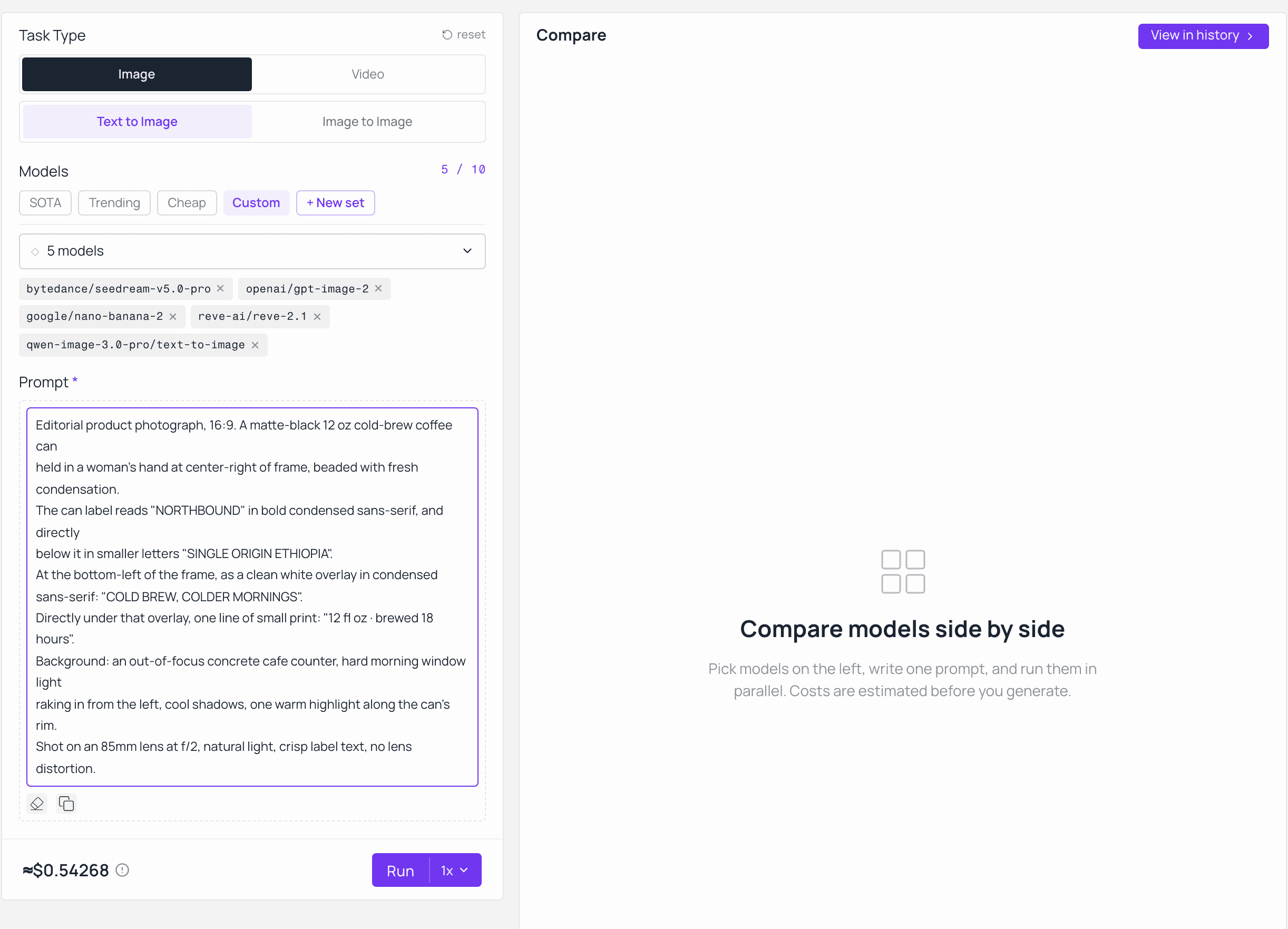
Model Explorer on Atlas Cloud with five text-to-image models selected under the SOTA set and the per-run cost estimated before generating
Five models on the left, one prompt field, one run. The cost estimate appears before you generate, which matters more in the next step than it looks like here.
Fire it once. All five come back into the same view, which is the point: you are looking at them at the same scale, at the same moment, with none of the "well, this one was from last week" drift that ruins informal comparisons.
Step 3: Score the Five Outputs on a Fixed AI Image Generator Comparison Rubric
Score on a fixed rubric before you look at which model made which image, because otherwise you will score the brand and not the file. Four axes, 25 points each, 100 total. Copy this table and add one row per model.
| Axis | What a 25 looks like | What costs points | The 30-second check |
|---|---|---|---|
| Typography accuracy | NORTHBOUND, SINGLE ORIGIN ETHIOPIA, the overlay line and the small print are all letter-perfect | Any transposed character, dropped word, invented word, or doubled letter | Zoom to 200 percent and read each string out loud against the brief |
| Prompt adherence | Overlay sits bottom-left, can is center-right, 16:9, light rakes from the left | Overlay drifting to another corner, wrong hand position, invented extra objects | Split the frame into thirds and check each named element against its named position |
| Photorealism | Hand anatomy holds up, condensation reads as water not as noise, matte black stays matte with one warm rim | Extra or fused fingers, plastic skin, an everything-glows look, a rim light on every edge | Look at the fingers first, then the can edge, then the background falloff |
| Ship-as-is | You would send this to a client with zero retouching | Anything that needs a text fix, a clone-stamp, or a re-crop | Ask honestly: would you open this in Photoshop before sending it? |
Typography is where the round is usually decided, so give it a dedicated look rather than folding it into a general impression. Crop the small-print line out of all five outputs at the same scale and put them next to each other. At that magnification the differences stop being subjective.
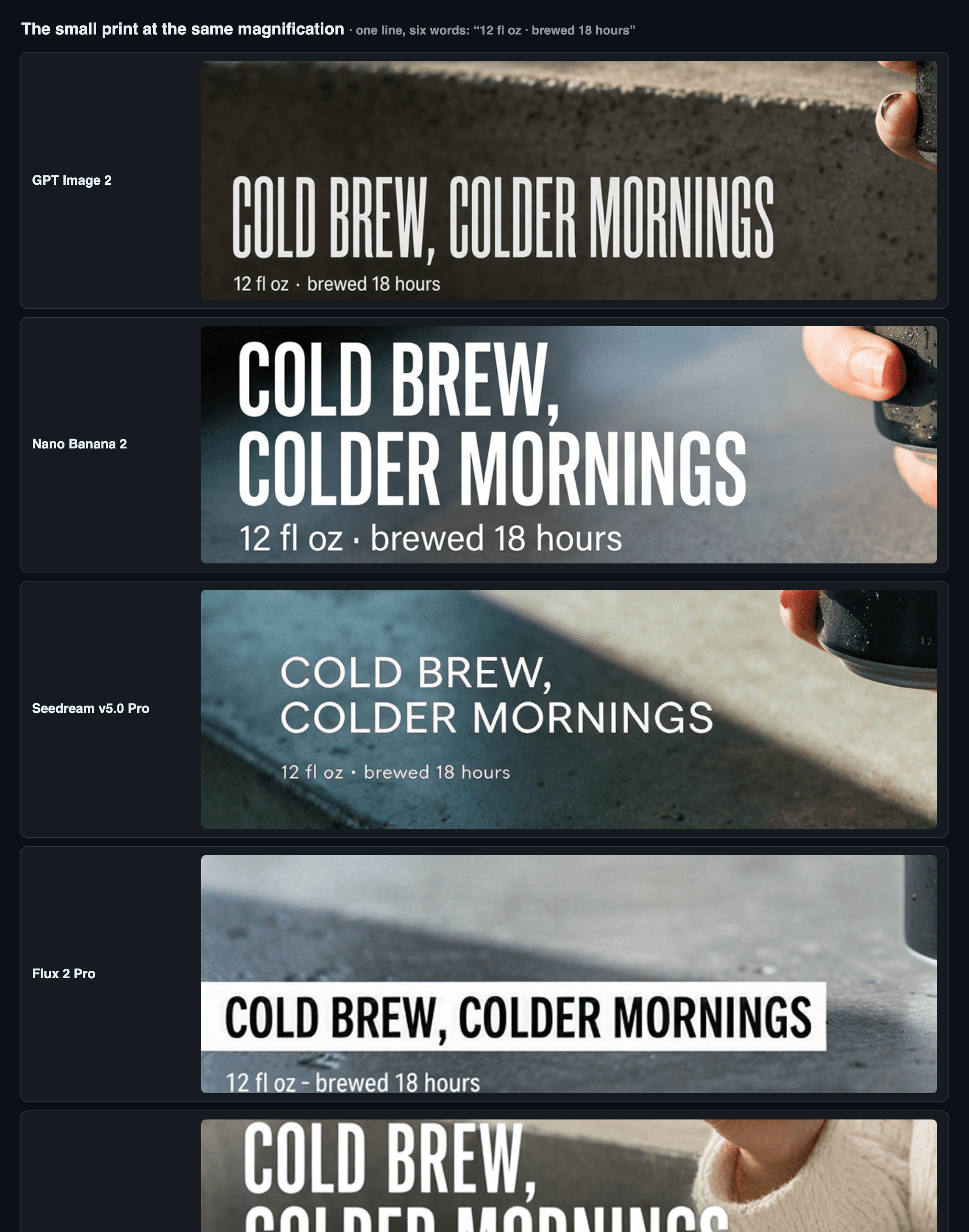
The single line of small print cropped at identical scale from each of the five model outputs, stacked for character-by-character comparison
The same six words, cropped from all five outputs at the same magnification. This crop, not the overall aesthetics, is what separates a comp from a deliverable.
One thing this rubric will not tell you: how each model behaves when you tune the prompt to its taste. That is a second round, and you only run it on the top two.
Step 4: Push the AI Image Generator Comparison Winner Through Edit and Motion
Test the winner downstream, because a good first frame is worth less than a frame you can revise. Two follow-ups take about five more minutes and change the answer surprisingly often.
The edit test. Take your highest-scoring output and ask a dedicated edit model to change exactly one thing while leaving everything else untouched. This is the task where the arena rankings reshuffle, so do not assume the text-to-image winner also wins here. Use google/nano-banana-2/edit at resolution 2k with your winning frame as the single reference image. It accepts up to 14 reference images, but for a surgical edit one is correct.
text1Using the provided image, change only the small print line to read 2"12 fl oz · brewed 24 hours". Keep the exact same can, hand, label typography, 3composition, lighting direction, shadows and grain. Do not redraw the subject, 4do not restyle the image, do not move any element. 5
Grade it on one question: did anything move that you did not ask to move? A model that quietly re-renders the whole scene to change six characters is not an editing tool, it is a second generation wearing an editing label.
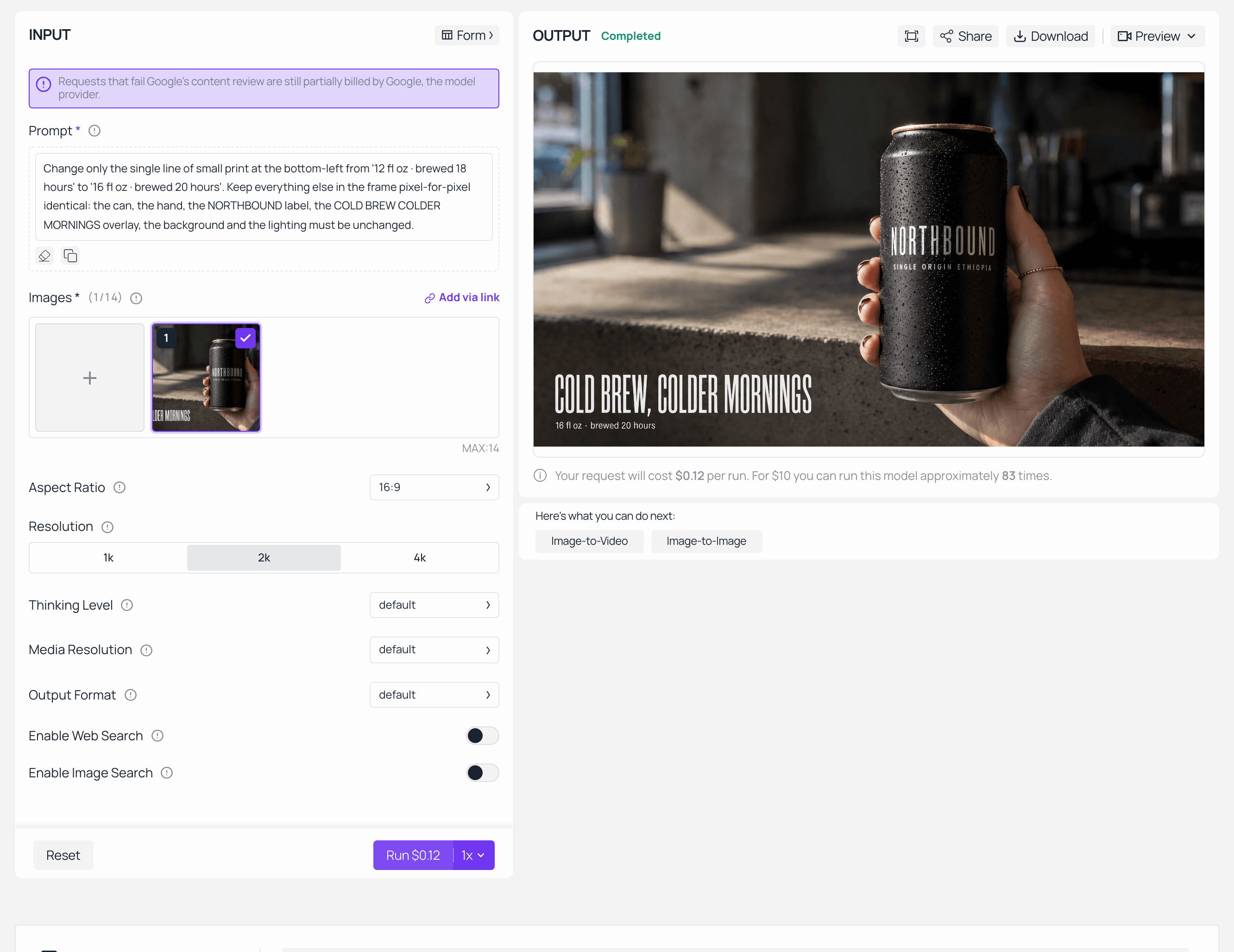
Nano Banana 2 Edit on Atlas Cloud with the winning frame loaded as a single reference and the revised small print returned in the output panel
One reference image in, one changed line out. Everything else in the frame should be pixel-for-pixel where you left it.
The motion test. If your ad set includes a moving version, the winning still is also your first frame. Use kwaivgi/kling-v3.0-turbo/image-to-video at 5 seconds, 720p, with the winning frame as the input image. That model accepts 3 to 15 seconds and defaults to 1080p, so drop both for a test.
text1Subtle live-photo motion: condensation beads slowly slide down the can, 2the hand holds steady, morning light shifts almost imperceptibly across the 3label. Locked-off camera, no zoom, no pan, text stays perfectly readable. 4
Check that the duration field actually reads 5 before you submit. Video forms have a habit of showing a value you dragged to while still holding the default underneath.
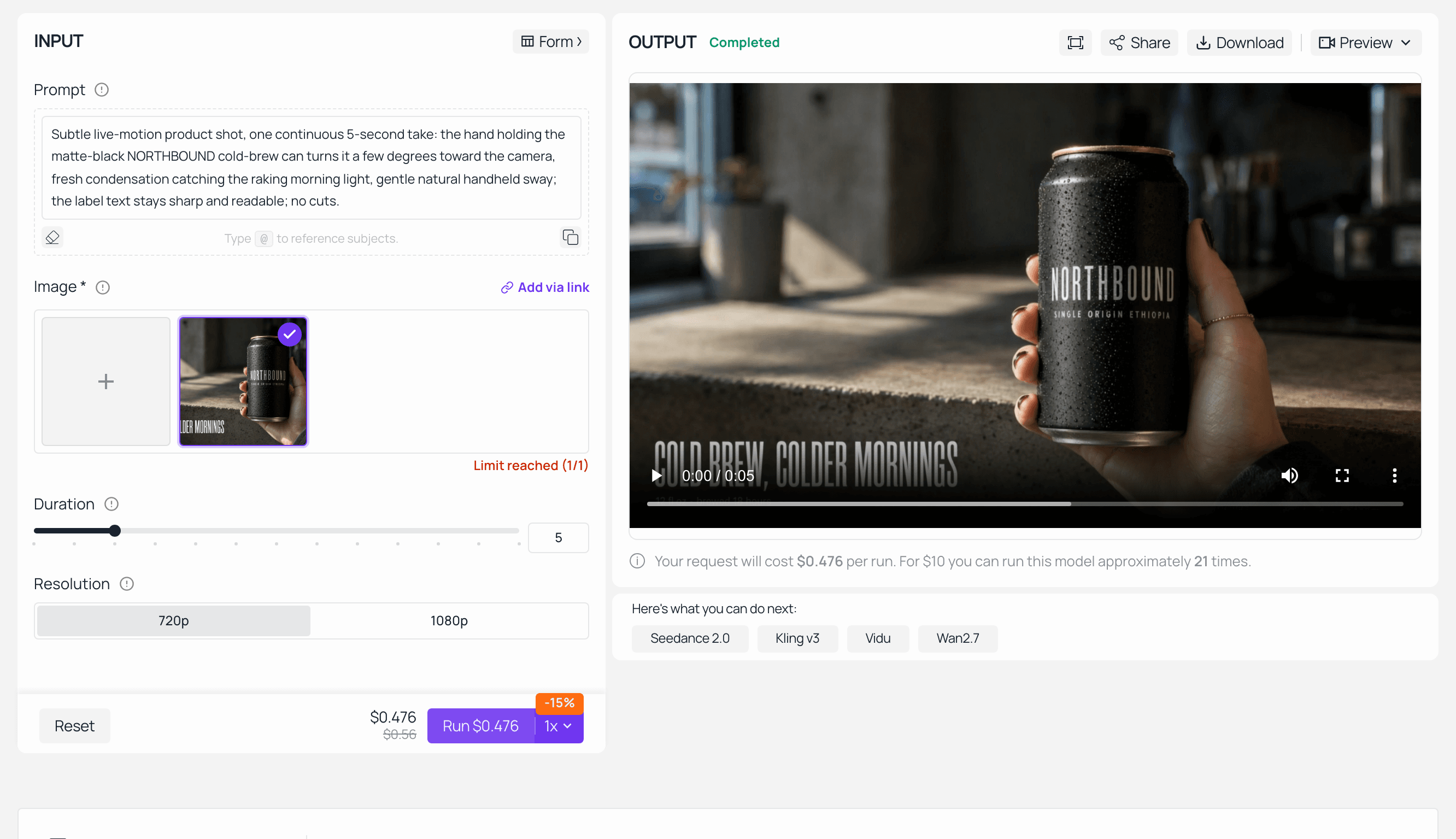
Kling v3.0 Turbo image-to-video on Atlas Cloud with the winning frame as the first frame, 5 seconds at 720p, finished clip in the output panel
The still becomes the first frame. What you are watching for is whether the label text survives the motion or dissolves into mush by second three.
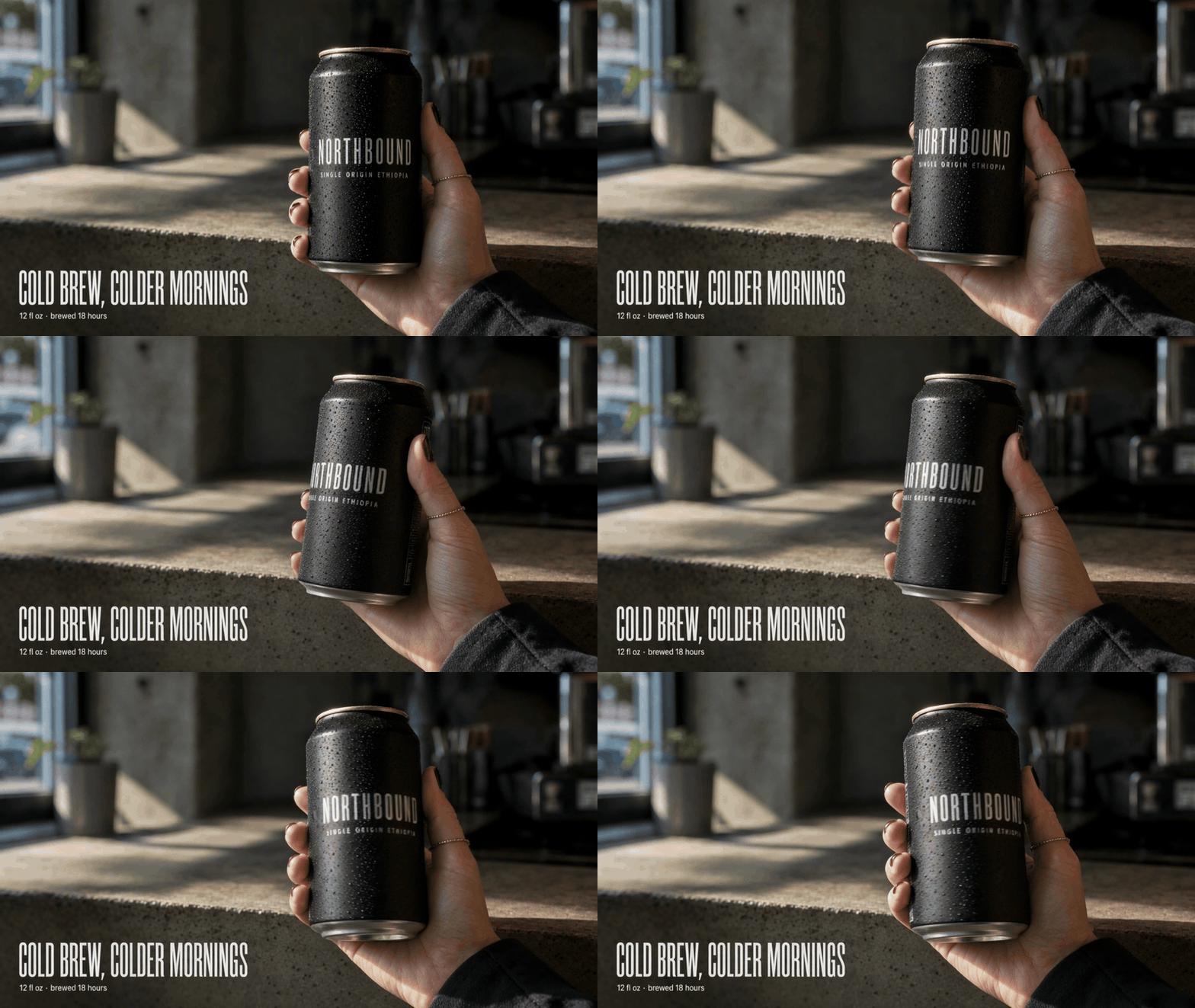
Five-second animated version of the winning comparison frame, shown here as a silent GIF
The winner in motion. Text that held up as a still does not automatically hold up in frame 60, which is a cheap thing to find out now and an expensive thing to find out after the edit is locked.
What This AI Image Generator Comparison Costs (and the Licensing Fine Print)
At listed page prices, the whole protocol lands under a dollar. Here is the itemised floor, using the prices read from each model's detail page on 19 August 2026.
| Job | Model | Setting | Listed page price |
|---|---|---|---|
| Text-to-image x1 | GPT Image 2 | quality high, 2048x1152 | from $0.009, token-billed |
| Text-to-image x1 | Nano Banana 2 | 2K, 16:9 | $0.12 |
| Text-to-image x1 | Seedream v5.0 Pro | 2048x1152 (1.5K tier) | $0.045 |
| Text-to-image x1 | Reve 2.1 | 4K, 16:9 | $0.24 |
| Text-to-image x1 | Qwen Image 3.0 Pro | 2048x1152 | $0.003 |
| Edit x1 | Nano Banana 2 Edit | 2K, one reference | $0.08 |
| Image-to-video x1 | Kling v3.0 Turbo | 5s, 720p, at $0.095/second | $0.475 |
| Floor total | ≈ $0.97 |
Now the caveat that makes this table a floor rather than a bill. A headline price on a model page is the cheapest configuration of that model, not a quote for yours. GPT Image 2 lists from $0.009 per image, but it bills by tokens and ships three quality tiers with medium as the default. Running it at quality high on a wide 2K frame is not the same purchase as the headline, and the only number that reflects your actual configuration is the estimate on the run screen. The same logic applies to resolution tiers everywhere else: Nano Banana 2 doubles from $0.08 at 1K to $0.16 at 4K, and Seedream bills across two pixel tiers.
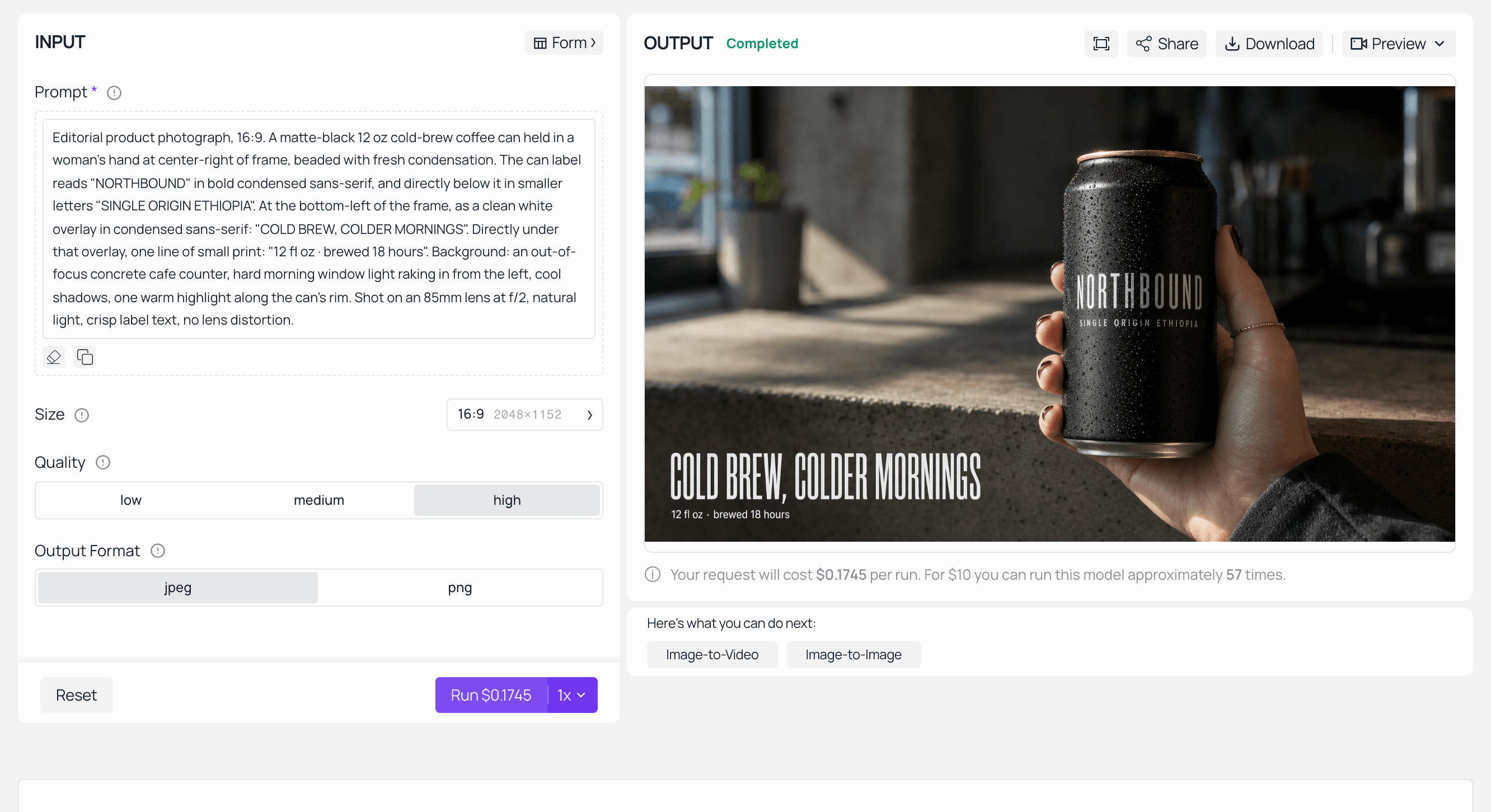
The GPT Image 2 playground on Atlas Cloud with quality set to high and a 16:9 2K frame, showing the run estimate next to the completed result
Same model, same page, quality set to high. The estimate on the run control is the number that matters, and it is the one nobody screenshots.
The obvious saving follows from the price spread. Do not run composition drafts on your most expensive model. Iterate the framing and the copy on the cost floor, where google/nano-banana-2-lite/text-to-image-developer sits at $0.028 per image at 1K and Qwen Image 3.0 Pro sits at $0.003, then send only the frame you have committed to through the expensive tier. Twenty drafts on the floor plus one final at 4K costs less than three finals.
On commercial use and brand names. Two separate things get confused here. The first is licensing: commercial terms differ by model provider, and the platform you run a model on does not override the provider's terms, so check them per model before a file goes to a paying client. The second is trademark, which is why the can in this test says NORTHBOUND. Prompting a real brand's marks into a stress-test image imports a rights question you did not need to have. An invented brand tests the identical rendering ability at zero risk. None of this is legal advice, and if the deliverable is going into paid media, your client's legal team gets the final read.
AI Image Generator Comparison: Frequently Asked Questions
Which AI image generator is best in 2026?
There is no single answer, and the arena data shows why: the text-to-image leader (GPT Image 2 high, 1368) is not the editing leader (Reve 2.1, 1263). Split the question by task. Text and layout: GPT Image 2. Photoreal product heroes and fast iteration: Nano Banana 2. Dense multi-language layouts: Seedream v5.0 Pro. Native 4K: Reve 2.1. Volume drafting: Qwen Image 3.0 Pro.
Is a same-prompt AI image generator comparison actually fair?
Not entirely, and the objection is legitimate. Every model has phrasing it responds to best, so an untuned prompt undersells some models more than others. What a same-prompt run measures is out-of-the-box deliverability, which is the number that predicts your day-to-day time cost. Run it first to get to a top two, then write a tuned prompt per finalist and run a second round on just those.
Why does my image model cost more than its listed price?
Because listed prices are the cheapest configuration, not a quote. Three things push the real number up: quality tiers (GPT Image 2 has low, medium and high, and bills by tokens), resolution tiers (Nano Banana 2 runs $0.08 at 1K, $0.12 at 2K, $0.16 at 4K), and pixel-count tiers (Seedream bills across two). Read the estimate on the run screen before you submit, every time.
Which AI image generator handles text and typography best?
On aggregate preference, GPT Image 2 (high) leads the text-to-image arena at 1368 Elo and is generally the pick when readable type, ordered panels or exact placement decide the image. But aggregate is not your brief. Crop the small-print line out of every candidate at the same magnification and read it character by character. Thirty seconds of that beats any ranking for your specific job.
Do I need five separate accounts to run an AI image generator comparison?
No. Models that share a catalog can share a run. In the Model Explorer linked earlier you select up to ten models, write the prompt once, see the estimate before generating, and get every result back in one view with the run saved to history. Models outside that catalog, Midjourney being the obvious one, still need their own tab and their own run.
Can I use these AI-generated images commercially?
Usually yes, but the terms come from the model provider and they are not identical across providers, so verify per model before delivery rather than assuming the platform's terms cover it. Separately, avoid prompting real trademarks into test images. Use an invented brand name, as this protocol does, and keep the rights question out of your workflow entirely.
Sources: Artificial Analysis Text-to-Image Arena and Image Editing Arena, Elo figures read August 2026. Model launch context from TechCrunch, February 2026. All model prices read from Atlas Cloud model detail pages on 19 August 2026 and subject to change.





