The edit comes back wrong. Not broken, just wrong. You asked it to take the delivery van out of the driveway and it left a smear of tarmac where the wheels were. So you rewrite the prompt. Then you rewrite it again. Nobody tells you that the problem might be the model, not the sentence.
That is the gap this list is built around. We tested ten tools looking for the best AI photo editor, and the question we kept returning to was what happens on the second attempt. Every price, credit allowance and watermark policy below was read on each company's own pricing or help pages in September 2026.
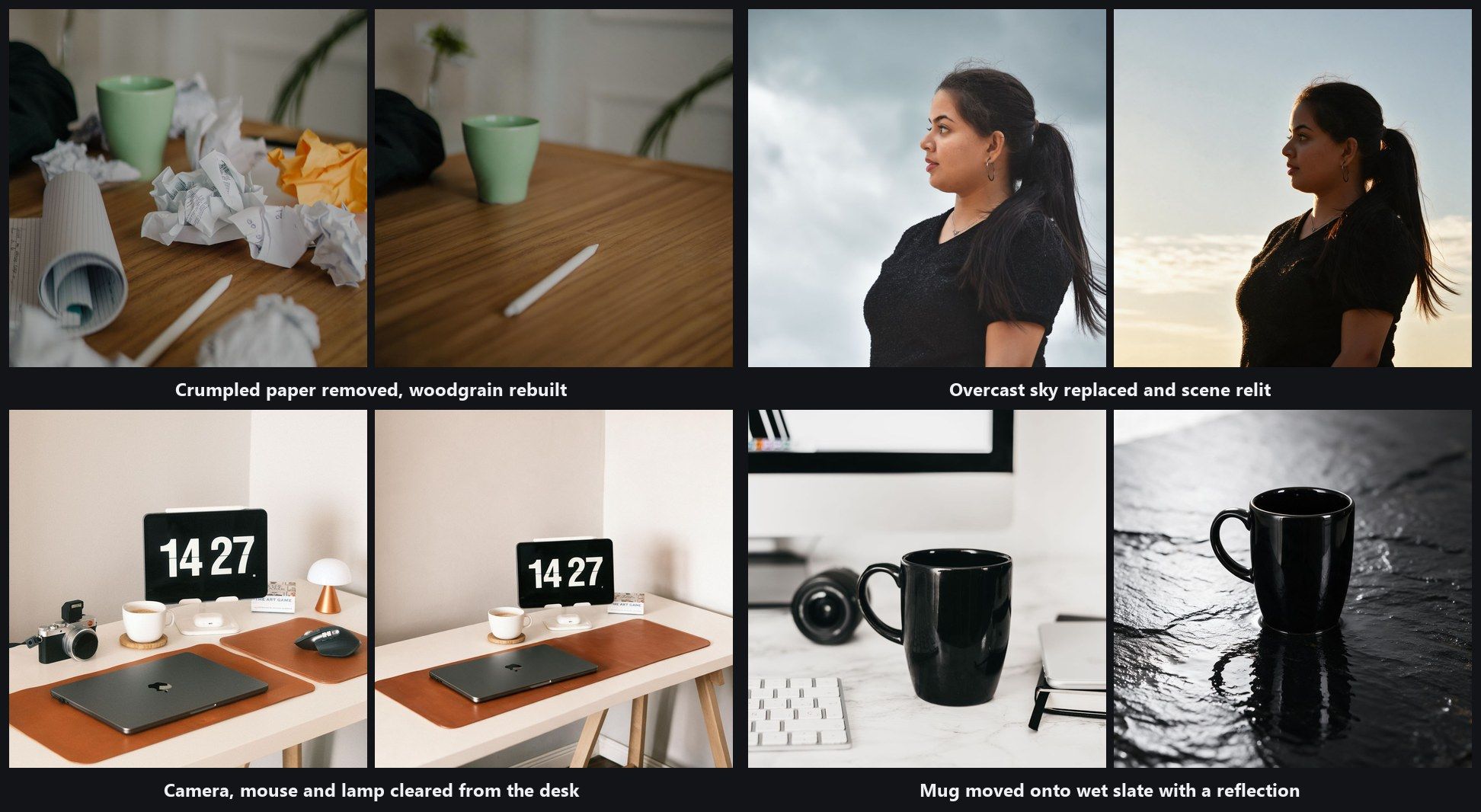
Key Takeaways
- Atlas Cloud'sImage Edit workspacetakes an uploaded photo and a written instruction, and the model that runs the edit is a dropdown you control.
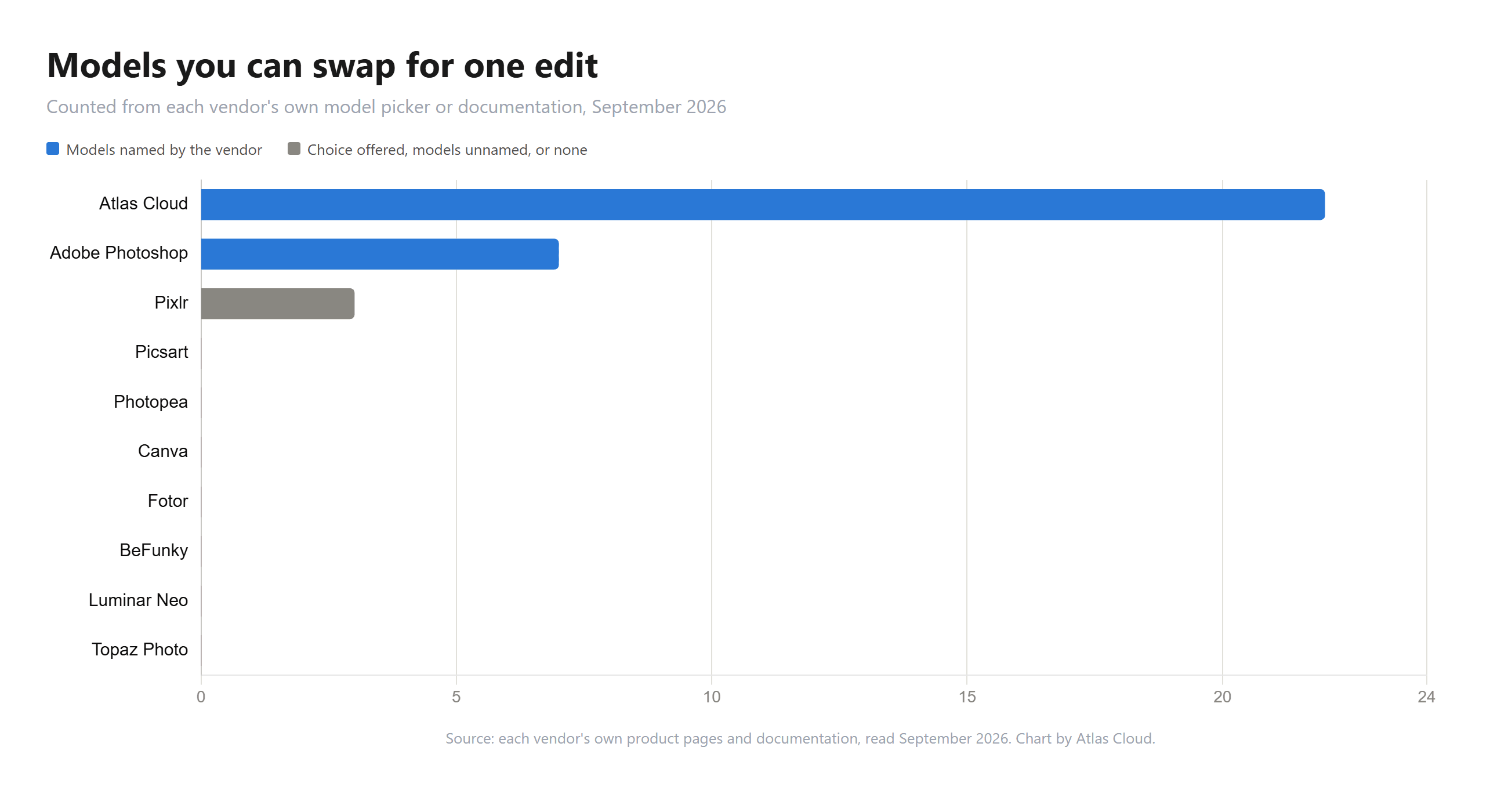
- Adobe puts a model picker in Photoshop too, listing Firefly and partner models. Six of the ten tools we tested offer no model choice at all.
- Fotor states plainly that free exports are watermarked. Canva's watermark rule covers premium design elements and says nothing specific about AI output.
- Photopea's homepage says files never leave your device. Its own API page says AI requests go to a server.
- If uploading is the part you want to avoid, Atlas runs four editors inside the browser tab with no account and no daily cap.
AI Photo Editor Comparison Table
Atlas Cloud and Adobe both publish a picker with the model names printed beside it. Pixlr says you can choose from three models and names none of them. Topaz offers version choices inside its own tools, which is a narrower kind of switch. Six publish no choice at all, and one of those six, Fotor, lists five model names as a capability without describing anywhere to select them.
Watermark policy is published even more thinly. Fotor and BeFunky say it outright. Canva draws its line around premium design elements. Adobe stamps nothing visible and attaches provenance metadata instead, Topaz simply disables export during its trial, and four companies say nothing about watermarks on any page we could read. Entry prices run from US$1.99 a month at Pixlr, billed yearly, to US$25 a month at Topaz on an annual commitment. That is close to a twelvefold spread for software doing the same category of work, and Luminar Neo sits outside it entirely at US$129 paid once.
| Tool | Best for | Free tier | Entry paid plan | Models you can swap | Free output watermarked |
|---|---|---|---|---|---|
| Atlas Cloud | Choosing which model runs each edit | Four browser tools, no account, no watermark | Billed per edit, no monthly seat | 22 in the Image Edit picker | No |
| Adobe Photoshop | Retouching with layers and masks | A limited number of free daily generations | US$19.99 a month, Photography plan | 7 named, Firefly plus partner models | No visible mark, invisible Content Credentials |
| Pixlr | The cheapest subscription here | 20 credits to start, 7 day trial of 250 | US$1.99 a month billed yearly | 3, none of them named | Not stated on vendor pages |
| Picsart | Editing inside a social content app | No free column on the pricing page | US$10.5 a month, Pro billed yearly | None published | Not stated on vendor pages |
| Photopea | PSD files in a browser tab | No published cap, same as paid | US$5 a month | None, one provider named | Not stated on vendor pages |
| Canva | Cutouts that land in a design | Up to 20 Standard or Premium AI uses | US$144 a year, Canva Pro | None for photo editing | Premium elements only |
| Fotor | The cheapest yearly plan | Limited free credits | US$47.99 billed yearly | 5 named, no picker published | Yes, stated on the pricing page |
| BeFunky | Preset driven quick edits | AI tools sit behind Plus | US$83.88 a year, Plus billed yearly | None published | Yes, on subscriber features |
| Luminar Neo | A one time desktop purchase | 7 day trial, no credit card | US$129 paid once | None | Not stated on vendor pages |
| Topaz Photo | Keeping the job on your own machine | Free trial that cannot export | US$199 a year | Version choice inside 2 tools | No mark, trial blocks export instead |
Where our own workspace stops: the models run on servers, so the file goes up. One edit runs at a time, and there is no layer stack. Those limits get their own paragraphs below.
How We Tested Every AI Photo Editor on This List
Nobody here got a questionnaire. We read what each company publishes about its own product, on its own domain, during September 2026, and we treated marketing headlines, help articles and pricing tables as separate claims that have to agree with each other. One company's pages contradict each other outright, and that case is written up below instead of quietly resolved. Where a page would not render its own prices as text, we read the price objects the page ships to the browser instead of quoting a third party.
Four criteria decided the ranking:
- Model control. Can you choose which AI model performs the edit, and how many are offered?
- What the free tier actually returns. Resolution, watermark, export format, and how quickly it stops.
- Price transparency. Whether a published number exists at all, and whether credits convert into edits in a way a buyer can calculate.
- Honest limits. Whether the company publishes the ceilings on its own tool.
Model control carried the most weight, and the reason is practical, not technical. The other three describe the deal you are offered before anything goes wrong. Model control describes what happens after it does. An editor with one model gives you a rewritten prompt as the only recovery path, and after four or five attempts most people go looking for a different tool and start the upload again.
Disclosure: Atlas Cloud publishes this article and operates the tool ranked first. Nothing here was paid for and no vendor was given a preview. Every competing product is described from figures those companies publish themselves, apart from the user ratings, which come from Trustpilot, the App Store and Google Play.
1. Atlas Cloud: Best AI Photo Editor Overall
Drop a photo into Image Edit, type what you want changed in plain English, and pick the model that runs it. The reference slot on the Atlas Cloud platform is labelled Image to edit and it is required, so this is an editor, not a prompt box that invents pictures from nothing.
Open the Image Edit workspace and the Models selector sits directly above the upload box.
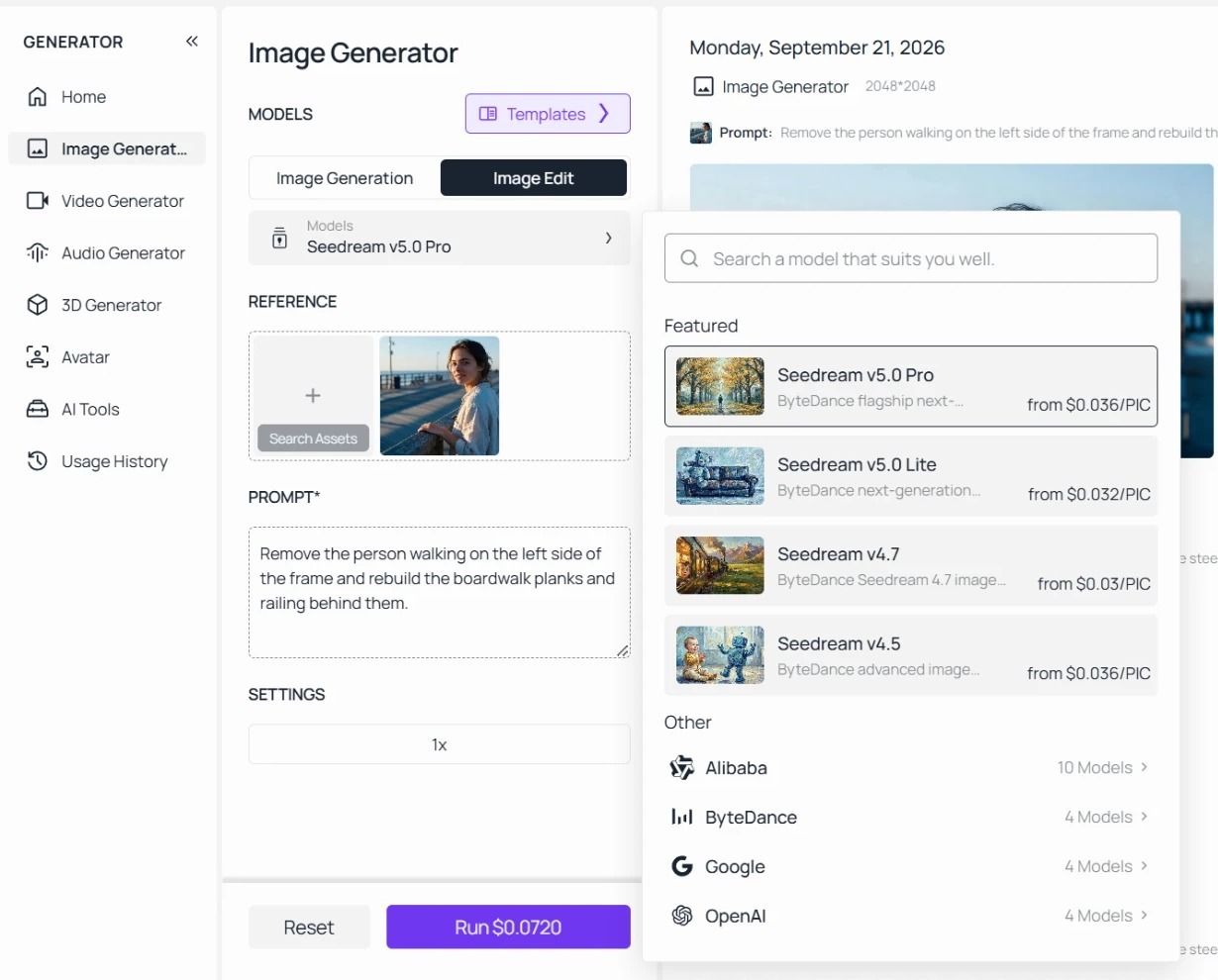
Why it stands out: The same photo can go through a different model without leaving the page or uploading again. When a background replacement comes back with the subject's hair fused into the new sky, the next attempt does not have to be a reworded prompt. It can be a different model working from the same instruction. That single behaviour is what separates an editing workspace from an editing button.
Best for: Anyone whose edits fail in ways a prompt rewrite does not fix. Product photography, retouching that has to preserve an exact subject, and anything where you already suspect one model handles your kind of image better than another.
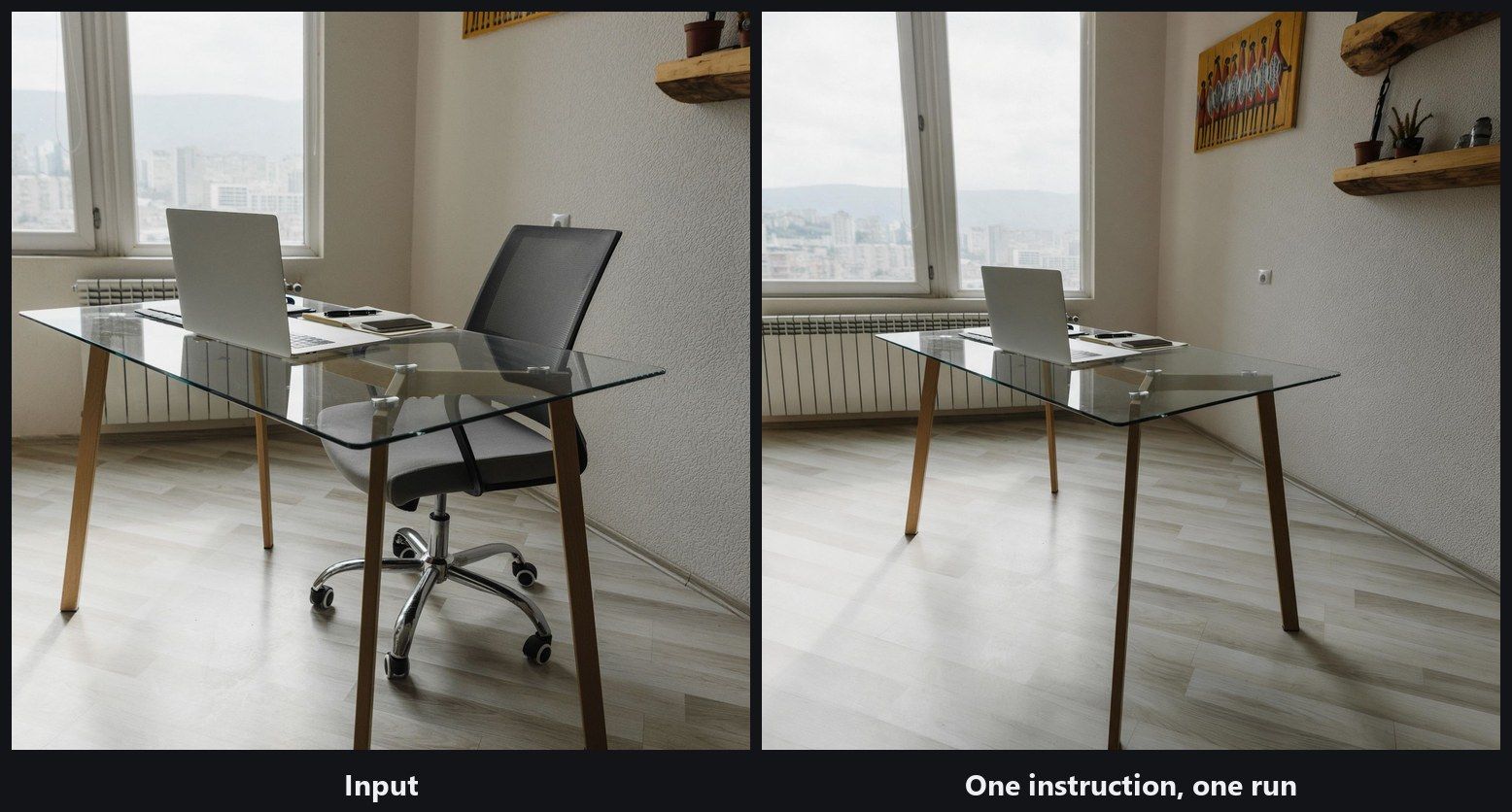
The chair is gone, the floorboards run through where its base was, and the radiator behind it is continuous. Look at the right edge, though. The frame is wider than the one we handed over, and a shelf and a picture that were outside the original crop have appeared. Nobody asked for that. It is the same lesson the model comparison teaches: inspect the parts of the picture your instruction never mentioned.
Fits: People who want to choose the model and pay for the edits they run. Not for you if : you want layers, masks and a brush, because this is an instruction box and there is no canvas.
2. Adobe Photoshop: Best AI Photo Editor for Professional Retouching
Photoshop puts its AI inside a full editing stack. You make a selection with a brush, run Generative Fill on that selection alone, and keep the result on its own layer. Adobe also does something the rest of this list mostly does not: it tells you which model is doing the work.
Adobe's own documentation, updated on 15 September 2026, instructs you to "select an Adobe Firefly model or a partner AI model from the model picker," and lists seven. Three are Firefly models. Four come from other labs, including FLUX.2 pro and two Gemini builds carrying Google's Nano Banana models.
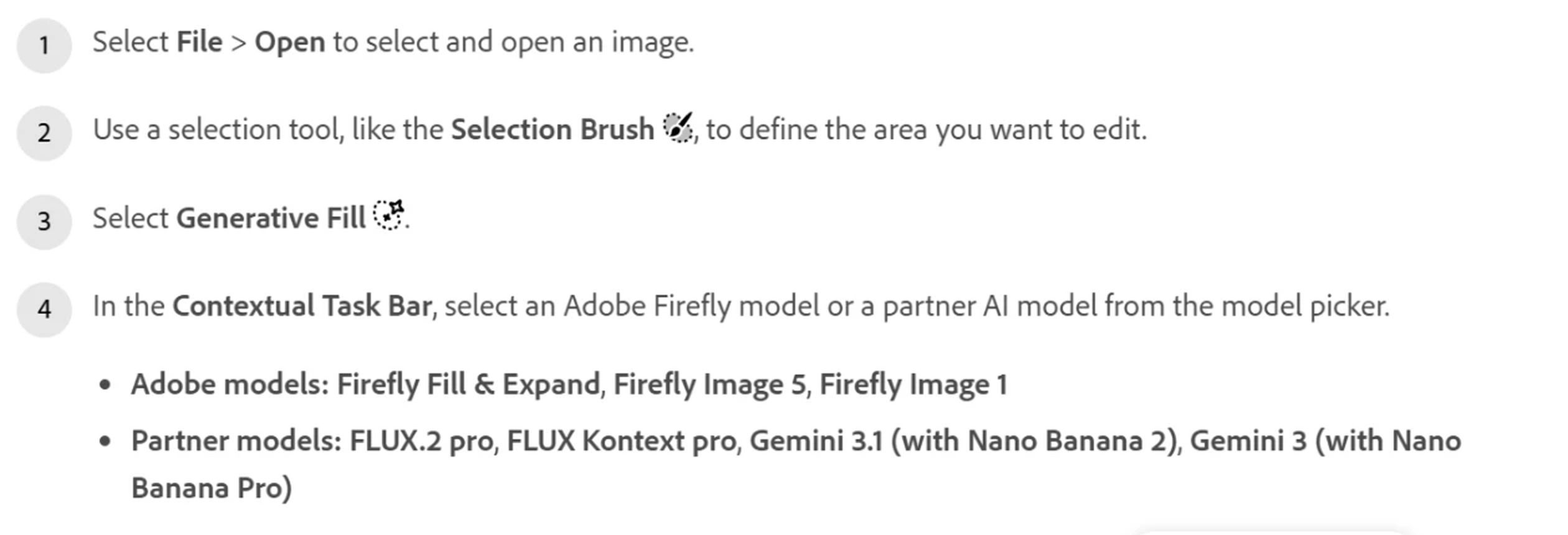
Screenshot from Adobe's official Photoshop help documentation, September 2026.
Where the free tier stops you: Adobe describes "a limited number of free daily generations across all generative AI features" and publishes no number for it. The paid ceilings are printed: the base Photoshop plan carries 25 monthly generative credits, and the Photography plan carries 1,000. Run out mid month and Adobe's FAQ answer is to buy more, either as an add-on or as a plan upgrade, which you can do from the Generative Credits Usage panel inside Photoshop.
Nothing gets stamped on the picture. Adobe attaches Content Credentials, which its help pages describe as metadata you inspect by hovering a small icon. Adobe's Content Authenticity site adds that the file is also "invisibly watermarked" so those credentials survive a screenshot. That is a provenance signal, and it is the opposite of what a free tier watermark usually means.
What one usable edit actually costs: The Photography plan is US$19.99 a month and includes Photoshop, Lightroom and those 1,000 monthly credits. If a generation spends one credit, that is roughly two cents an attempt, which is the cheapest per-attempt figure in this comparison. The catch is that you buy the whole month up front.
What users report: The Photoshop mobile app holds 4.5 stars from 94K App Store ratings. Adobe's corporate listing on Trustpilot sits at 1.1 stars from 7,479 reviews, with Trustpilot's own banner noting the company has not recently invited reviews and that the sample may not be representative. Two very different populations are answering two very different questions.
Where it falls short for photo editing: Partner models arrive and leave on somebody else's schedule. Adobe's own note on that same page says Google is deprecating Gemini 2.5 with Nano Banana from 2 October 2026, and that Photoshop begins removing support with the September 2026 build. A model you tuned your workflow around can be retired out from under you.
Fits: Retouchers who need selections, layers and masks around the AI step. Not for you if : you want to run one edit occasionally without a monthly subscription underneath it.
3. Pixlr: Best AI Photo Editor on a Small Budget
Pixlr is the cheapest way onto this list. Its Plus plan works out at US$1.99 a month billed yearly, which is under a fifth of what Picsart charges and roughly a twelfth of what Topaz charges per month.
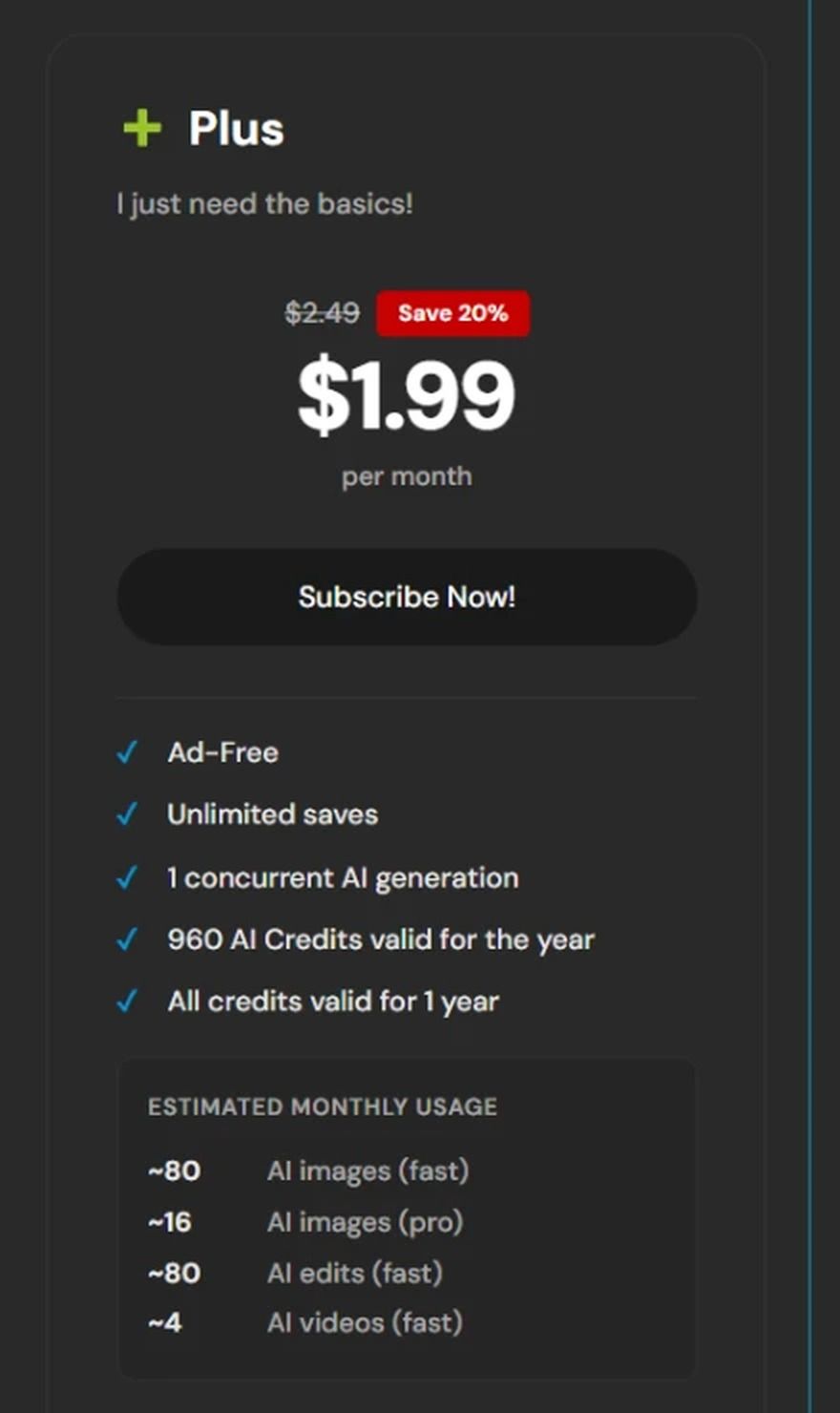
Screenshot from Pixlr's official pricing page, September 2026.
Where the free tier stops you: New accounts get 20 credits, enough for 20 images. A seven day trial adds 250 AI credits. After that the Plus plan publishes its allowance annually rather than monthly: 960 AI credits valid for the year, which the page itself estimates at about 80 fast images and 80 fast edits a month.
What one usable edit actually costs: 960 credits a year against US$1.99 a month works out near two and a half cents an attempt, close to Adobe's implied rate at a tenth of the commitment. Where it gets expensive is volume, because the page's own estimate of 80 edits a month is a small bucket for anyone working through a catalogue.
What users report: 3.5 stars from 1.21M Google Play reviews, one of the largest samples in this comparison, against 4.3 stars from 5.2K App Store ratings. Its Trustpilot listing shows 2.0 stars from 180 reviews.
Where it falls short for photo editing: Pixlr says its Generative Fill lets you "choose from three different AI models, each providing unique outputs," and names none of the three anywhere on that page. Model choice you cannot identify is hard to use deliberately. You can tell an output changed without knowing what to ask for next time.
Fits: Occasional edits on a budget that has to stay small. Not for you if: you need to know which model produced the result you liked.
4. Picsart: Best AI Image Editor for Social Posts
Picsart is built around the post rather than the photograph. The AI editing tools sit beside collage layouts, sticker libraries and video trimming, and the whole thing is tuned for output that goes straight to a feed. As a best AI image editor for social content it is hard to beat on breadth.
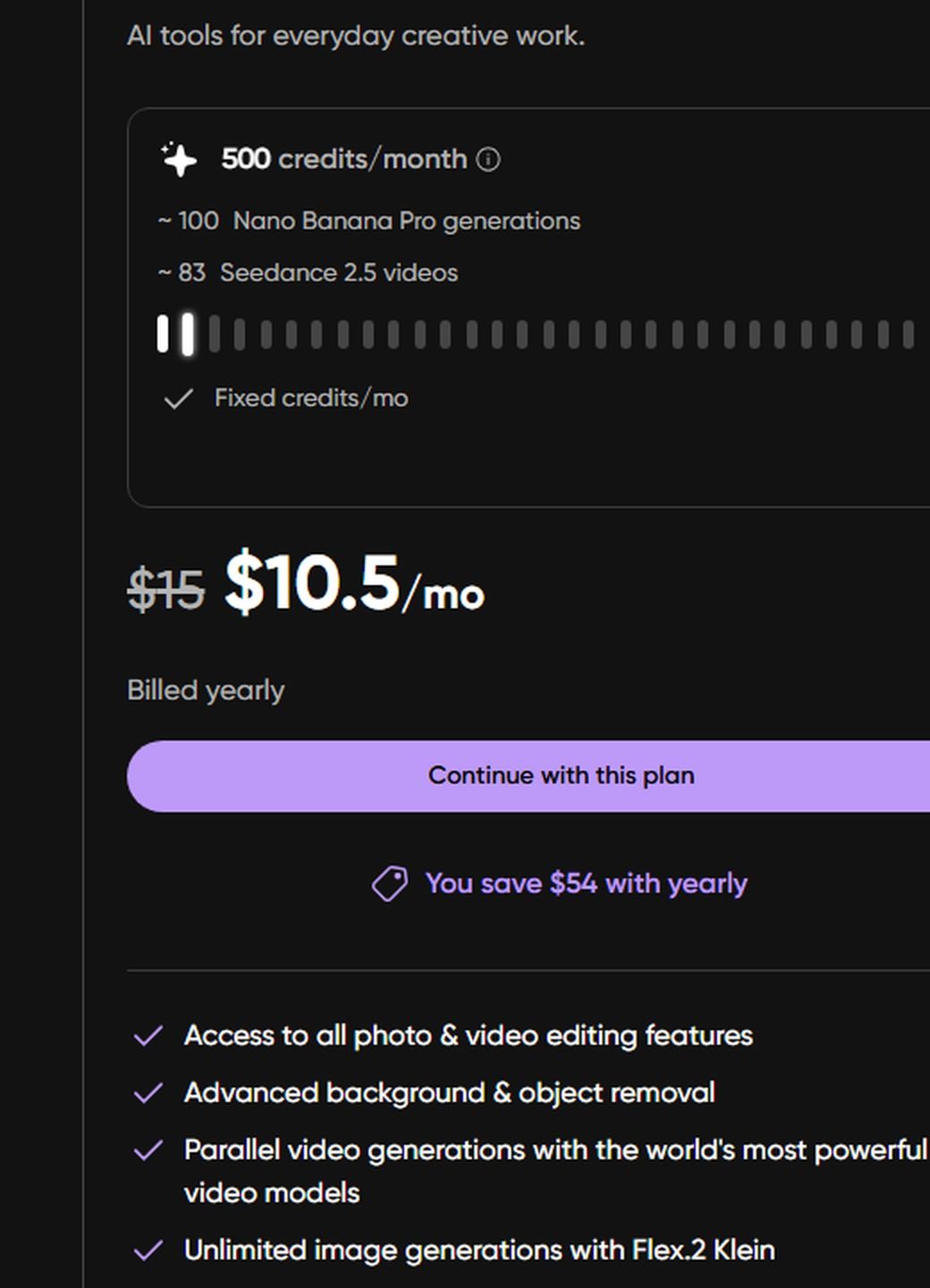
Screenshot from Picsart's official pricing page, September 2026.
Where the free tier stops you: The pricing page has no free column at all, only Pro and Ultra. Individual tool pages advertise free trials with no published allowance attached, so the free ceiling is whatever the trial decides.
What one usable edit actually costs: Pro is US$10.5 a month billed yearly, marked down from a struck-through US$15, and includes roughly 100 Nano Banana Pro generations plus 100 GB of storage. That works out near eleven cents a generation, the highest implied per-attempt rate among the subscription tools here.
What users report: 4.0 stars from 12.1M Google Play reviews, a sample second only to Canva's.
Where it falls short for photo editing: The pricing page counts your allowance in Nano Banana Pro generations, which means a third-party model is running your edit. The AI Replace help article never names it, and offers no way to pick a different one. You get the model's identity as a billing unit and not as a control. If your immediate job is a cutout, our AI background remover roundup covers Picsart against nine tools built for that one task.
Fits: Social creators who want editing, layout and video in one subscription. Not for you if: the photograph itself is the deliverable.
5. Photopea: Best Free AI Photo Editor for PSD Files
Photopea opens a PSD in a browser tab, with layers, masks and adjustment layers intact, and asks for nothing. Its own blog states that between the free and paid versions "there is absolutely no difference." Almost nothing else in this category makes that claim.
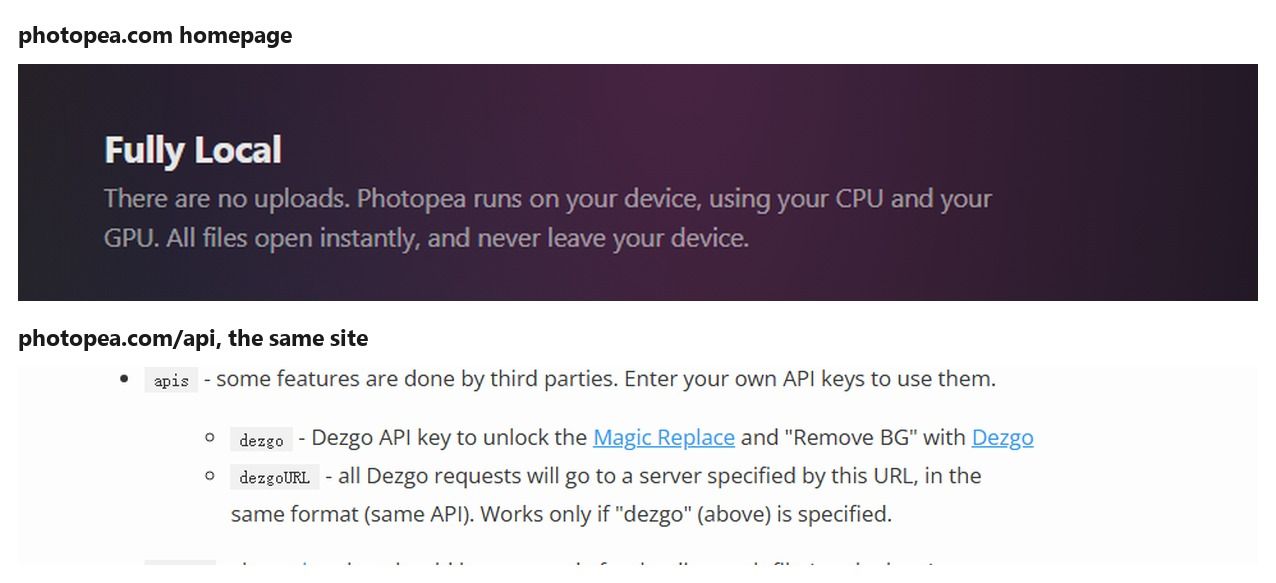
Screenshots from Photopea's official homepage and API documentation, September 2026.
Where the free tier stops you: It mostly does not. The paid tier removes advertising and supports development, and the feature set is the same. The practical ceiling is the AI side, which is thin next to everything else Photopea does.
What one usable edit actually costs: US$5 a month, and you are paying for an ad-free session, not for generation capacity.
What users report: 2.4 stars from 114 Trustpilot reviews on a profile Trustpilot marks as unclaimed. There is no official App Store or Google Play listing, so the mobile rating samples other tools lean on do not exist here.
Where it falls short for photo editing: The privacy promise does not extend to the AI. Photopea's homepage says "There are no uploads. Photopea runs on your device," and its privacy page repeats that files "are never sent anywhere." Then its own API documentation says "all Dezgo requests will go to a server specified by this URL." Both sentences are Photopea's. Ordinary editing stays local and the AI features do not, and the site never reconciles the two in one place.
Fits: Anyone who wants a real layered editor for free, with AI as a side feature. Not for you if: you assumed the local processing promise covered the AI tools too.
The Other Five AI Photo Editors Worth Knowing
These five lost the upper half on one of two grounds. Either the AI is a fixed feature with no model named anywhere, or the product solves a narrower problem than the phrase best AI photo editor implies. Several are excellent at that narrower problem. Enhancing, upscaling and editing get marketed as one thing and behave as three, which we worked through separately in our photo enhancer versus upscaler comparison.
| Tool | Free tier | Entry paid plan | Named AI models | Largest published rating sample |
|---|---|---|---|---|
| Canva | Up to 20 Standard or Premium AI uses | US$144 a year | None for editing | 4.8 from 27M Google Play reviews |
| Fotor | Limited free credits | US$47.99 billed yearly | 5 named, no picker | 4.3 from 731K Google Play reviews |
| BeFunky | AI tools need Plus | US$83.88 a year | None | 3.7 from 211K Google Play reviews |
| Luminar Neo | 7 day trial, no card | US$129 paid once | Stable Diffusion, in a 2023 post | 4.6 from 6,930 Trustpilot reviews |
| Topaz Photo | Trial that cannot export | US$199 a year | 7 generative tools | 3.7 from 56,535 Trustpilot reviews |
6. Canva
Canva's free plan includes up to 20 uses of Standard or Premium AI tools, and Pro raises that to 200 premium uses for US$144 a year. Magic Studio covers editing, and Canva's marketplace does list DALL·E and Imagen, but those sit in Magic Media for generating pictures from text. For editing an uploaded photo, no model is named and none can be chosen. Canva's watermark rule covers premium design elements rather than AI output, so the answer for AI specifically is simply unpublished.
7. Fotor
Fotor is the clearest watermark statement in this comparison, listing "Watermarked JPG, PNG & PDF Exports" on the free Basic plan and watermark-free output on paid tiers. Pro is US$47.99 billed yearly for 1,200 credits a year, around four cents a credit. Its editor page names five models it runs, including Nano Banana, Seedream, FLUX and Qwen, and describes no place to select among them. Naming the engines without exposing the switch is the pattern this whole list keeps hitting.
8. BeFunky
BeFunky is honest about what the watermark means: support documentation updated in July 2026 says it "appears to indicate that this certain effect/feature is available only to BeFunky subscribers." The AI tools, including its background remover and photo enhancer, sit behind Plus at US$83.88 a year. Pro is US$149.88 a year and includes 5,000 credits a month, which works out at half a cent a credit and makes it the cheapest per-attempt allowance in this whole comparison. Volume editors should look here before they look at the tools with better model stories.
9. Luminar Neo
Skylum sells Luminar Neo as a one time US$129 purchase for desktop use on two devices, which makes it the only perpetual licence left in this comparison. Its trial runs seven days with no card required. The generative tools are branded GenErase, GenSwap and GenExpand, and the only model Skylum ever named publicly was Stable Diffusion, in a 2023 announcement. The 2026 posts name nothing. It carries 4.6 stars from 6,930 Trustpilot reviews, the highest Trustpilot score in this comparison.
10. Topaz Photo
Topaz runs the work on your own machine by default, with cloud rendering offered as an option you can ignore. It now sells at US$199 a year instead of a perpetual licence, and the product name in its own structured data has dropped the AI suffix to read simply Topaz Photo. The free trial is unusually blunt: the documentation says it "has all the same functionality as the paid version except there is no possibility to export in Trial mode." No watermark, because nothing leaves the app.
Its seven generative tools each target a specific defect, and two of them let you pick a version, with the docs noting that "Recover Faces v3 is the newest model available." That is a choice between builds of one tool rather than a choice between labs. For pure resolution work, our free image upscaler roundup tests Topaz against nine alternatives.
Why Swapping Models Beats Swapping AI Photo Editors
Here is the thing nobody in the roundups says out loud. When a generative edit fails, the failure usually belongs to the model, and prompt rewriting is the slowest possible way to work around it. Glass and chrome break differently from hair. Sheer fabric breaks differently again. A model that nails one will quietly ruin another, with the same instruction and the same source file.
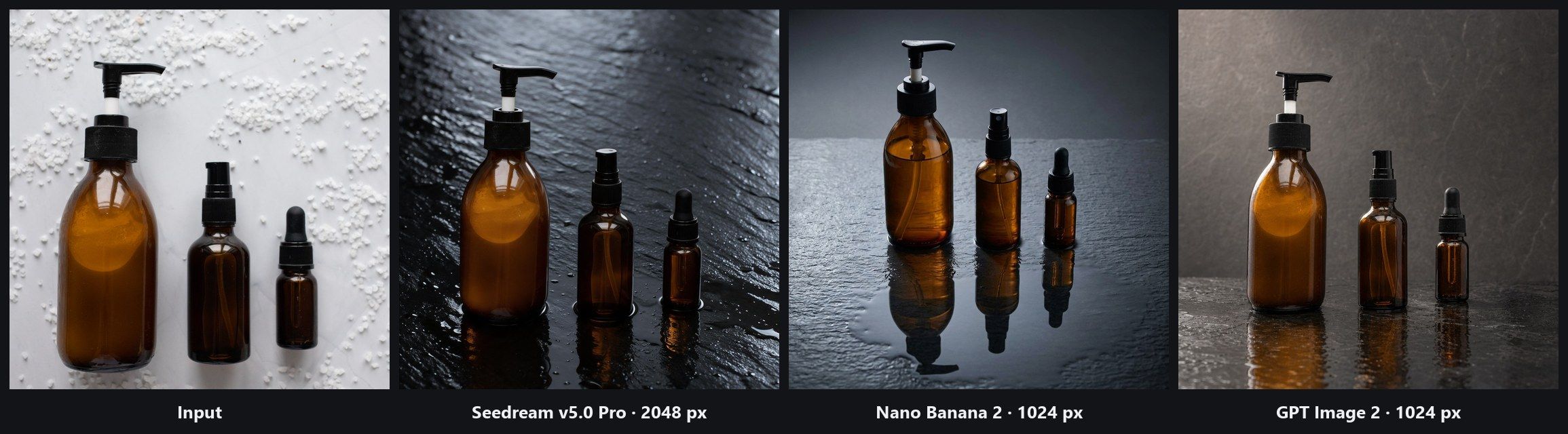
Three amber bottles, one instruction, three models, run on 21 September 2026. Every model cleared the scattered granules and moved the bottles onto wet slate, and from there they part company. Seedream v5.0 Pro returned 2048 pixels and the roughest, most convincing stone, with a faint pale ring where each base meets the surface. Nano Banana 2 returned 1024 pixels, built the longest mirror reflections of the three, and quietly recoloured the large black pump head to white. GPT Image 2 also returned 1024 pixels, produced the warmest studio lighting, and kept every cap black.
Read that last one again. The failure worth catching was not the reflection anybody asked about. It was a component that changed colour while the model was busy doing what it was told.
Count the recovery paths instead of the features. Photoshop hands you seven models and a subscription underneath them. Topaz lets you step back to an older build of its own tool rather than across to a different lab. Pixlr claims three and will not say which. For most of the rest, the second attempt is the same model with a different sentence, which is the slowest door out of a bad edit.
The interesting case is the overlap. Photoshop's partner list includes Gemini builds carrying Nano Banana 2, and Nano Banana 2 Edit sits in the Image Edit picker as well. Same model, two billing structures. One counts against a monthly credit pool you bought in advance. The other charges for the run you actually made.
What to do instead: Before you rewrite a prompt for the third time, change the model and resend the original instruction unchanged. Keep the wording fixed so the comparison means something. If the second model fixes it, you have learned something reusable about your material, and material types repeat far more often than individual photos do.
What Does Reddit Say About the Best AI Photo Editor?
Search the phrase itself on Reddit and you mostly get app giveaways. The conversation worth reading sits in two places: r/photoshop, where people who edit for a living complain about the tool they pay for, and the model subreddits, where the highest scoring posts are nearly all the same shape.
Model choice came from users, not from marketing. Adobe's own staff post to the subreddit announcing partner models opens by saying so: "Since the initial release of Generative Fill, we've heard many requests to integrate additional models to give users more choice and flexibility when editing." That post added Gemini and FLUX models in September 2025. The list then grew enough that Adobe had to prune it: the 27.7 beta release notes say "a curated set of models replaces the previous long scrolling list."
The failure people describe is not one bad result. It is a dozen. A designer asked the subreddit for help with a print job, then came back with the outcome: "I tried generative fill a dozen times and never got anything useable. I spent about an hour and a half trying different techniques I found via Google, and got close, but they all looked off. Finally I just ran out of time and had to send them on to print as-is." Ninety minutes, one model, nothing shipped.
Sometimes the model simply says no. A comparison thread in r/StableDiffusion put twelve edits through Google's Nano Banana alongside an open alternative, and the tester explained the missing panels bluntly: "the answer is BLOCKED CONTENT, BLOCKED CONTENT, and BLOCKED CONTENT. Nano Banana denied 7 out of 12 image generations." Their verdict was to drop the model rather than keep fighting it. This is the case a prompt rewrite cannot touch. A refusal is not a bad result you can nudge. Another model is the only move that changes anything.
Swapping models is already the native literacy. The top posts across r/ChatGPT, r/singularity, r/Bard and r/GeminiAI are not tutorials or reviews. They are two images side by side, same prompt, different model. One comparison of two versions of the same Google model cleared 12,000 upvotes. Readers of those subreddits have internalised that the prompt is the constant and the model is the variable. Most photo editors are built the other way round.
| What comes up repeatedly | Where it comes from |
|---|---|
| Model choice was a user request | Adobe staff post announcing partner models |
| The picker grew long enough to need curating | Photoshop 27.7 beta release notes |
| Failure means many attempts, not one bad output | Help thread that ended with an unedited print job |
| A refused edit cannot be prompted around | Comparison thread, 7 of 12 generations blocked |
| Same prompt, two models is the dominant post format | Top posts across four AI subreddits |
| Latency and credits bite together | Generative Fill performance thread, 5 to 7 seconds a fix |
That last row is a quieter complaint but a persistent one. A thread on Generative Fill performance clocks five to seven seconds even for tiny wall blemishes, and the frustration is pointedly about having bought credits on top of a subscription. Meanwhile the highest scoring artwork in r/photoshop routinely leads with a line like "Once again, zero gen AI. No generative fill." When a tool's most engaged users start advertising that they did not use its headline feature, the gap is not in the model. It is in how much control the workflow hands back.
What an AI Photo Editor for Ecommerce Actually Costs per Product Shot
An AI photo editor for ecommerce carries the highest cost per click of any keyword we track in this category, which tells you something about the budgets involved. It also means the honest question is not which subscription is cheapest. It is how many attempts one shippable product image takes, and what each attempt costs once you divide the plan by its allowance.
Subscription tiers hide that arithmetic, so here it is exposed. Adobe's Photography plan is US$19.99 a month and includes 1,000 monthly generative credits. Fotor Pro is US$47.99 billed yearly for 1,200 credits a year. Canva Pro is US$144 a year and the AI allowance is counted in uses rather than credits, up to 200 uses of premium AI tools. Divide each plan by its own allowance and the cost of one generation lands in a narrow band. The plans are not priced that differently per attempt. What differs is how many attempts you are allowed before the month runs out.
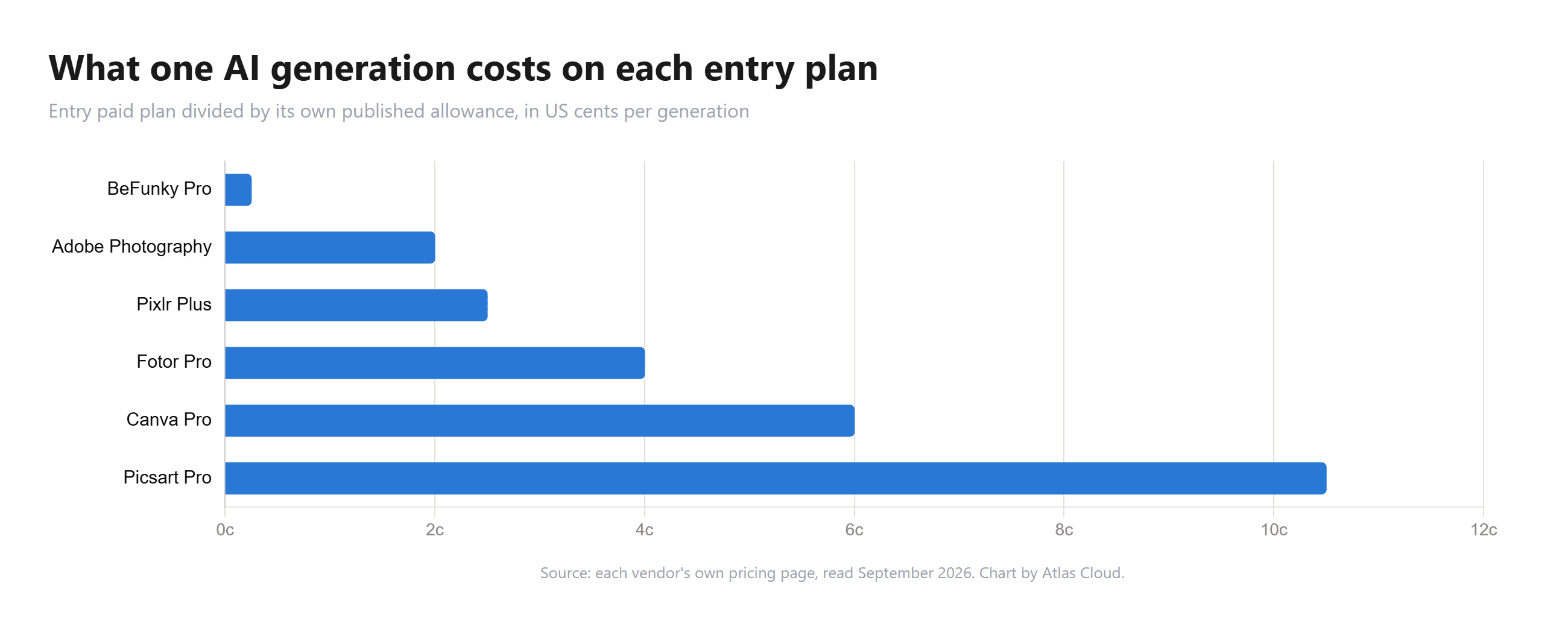
Product photography is exactly the workload that burns attempts. A model that renders a plausible shadow under a ceramic mug may flatten the reflection under a glass bottle, and the fix is rarely a better sentence. A catalogue of 200 SKUs at three attempts each is 600 generations, which clears Fotor's yearly allowance in four months and clears Canva's premium AI allowance in a single month.
There is a second cost nobody prices. Rerunning the same image through a different model inside one workspace costs another edit. Rerunning it in a different product costs another subscription.
Frequently Asked Questions
What Is the Best AI for Editing Photos?
There is no single winner, and our own test says so. One product photo, one instruction, three models, run on 21 September 2026. Seedream v5.0 Pro gave the most convincing stone texture and the largest file. Nano Banana 2 built the longest reflections and recoloured a black pump head to white. GPT Image 2 produced the warmest lighting and kept every cap correct. Match the model to the material in front of you, then keep the other two for when it fails.
What Is the Best AI Photo Editor?
Atlas Cloud's Image Edit workspace ranks first on this list because the model that runs your edit is a dropdown you control and you pay for the runs you make. Adobe Photoshop is the better answer if you need selections, layers and masks wrapped around the AI step, and it carries a seven model picker of its own. Choose between the two on whether you want an editing canvas or a per run workspace.
Can AI Edit Photos?
Yes, and the useful question is which edits survive inspection. Removing an object and rebuilding the background behind it holds up. Replacing a surface and relighting a scene holds up. What slips is the detail nobody mentioned in the instruction: our run produced a silver pump head on a bottle whose cap had been black in every other frame. Check the parts you did not ask it to touch.
Can AI Edit Multiple Photos at Once?
Not in the Image Edit workspace, which takes one image per run. Batch capacity is where the subscription tools separate: BeFunky Pro publishes 5,000 credits a month, Fotor Pro 1,200 credits a year, and Canva Pro up to 200 uses of premium AI tools. A per run workspace charges per picture instead, and the model picker prints a from price against each entry, starting at US$0.03 for Seedream v4.7 and rising to US$0.08 for Nano Banana 2. Our three test runs on 21 September 2026 were charged US$0.0720, US$0.0800 and US$0.0729.
Conclusion
Reading ten pricing pages back to back turned up something none of us expected to be the headline. The models are no longer the secret. Fotor prints five model names on its editor page, Picsart bills you in Nano Banana Pro generations, and Adobe lists its partner labs by name in the help docs. What almost nobody hands over is the switch. You are told which engine is running and given no way to change it, which is a strange place for this category to have landed.
So pick on recovery, not on features. If your edits usually work the first time, the cheapest plan that fits your volume is the right answer, and BeFunky's credit maths or Pixlr's US$1.99 tier will stretch further than the tiers sold on feature counts. If your edits fail on reflections, fabric or fine hair, buy the ability to try a second model on the same file, because that is the only thing that shortens the loop. The best AI photo editor for you is the one that gives you a second move when the first one comes back wrong.





