Burning 20 minutes troubleshooting CUDA out-of-memory errors on a local GPU setup highlights why selecting where to run wan 3.0 matters. Evaluating the best places to run wan 3.0 comes down to one rule: select your platform based on your engineering capacity and clip volume rather than hype.
Developers and teams building software require API endpoints like Alibaba Cloud or Atlas Cloud, commercial agencies need Yapper Prime for immediate turnarounds, node builders belong on ComfyUI via official Partner Nodes documentation, and rapid experimenters benefit from PolloAI.
Wan 3.0 Access Channels Decision Matrix: Which Wan 3.0 Platform Is Right for You?
This wan 3.0 platform comparison maps core operational metrics across primary channels:
| Channel | Target User | Deployment Friction | Pricing Structure | Primary Trade-off |
| ComfyUI | Pipeline builders | Medium | Free open-source | High hardware requirement |
| Yapper Prime | Commercial pros | Low | Tiered credits | Higher cost per minute |
| PolloAI | High-volume creators | Low | 10-day unlimited (PRO/ULTRA) | Restricted 1080p long-take utility |
| Alibaba Cloud | SaaS founders | High | Pay-per-second (with limited-time promos) | Requires backend integration |
| Atlas Cloud | Developers & Teams | Low | Pay-as-you-go API | Programmatic dependency only |
Comparing these wan 3.0 access channels reveals that optimizing wan 3.0 generation speed requires balancing cloud infrastructure fees against local GPU maintenance.
ComfyUI Partner Nodes: Unlocking Full Node Control Without Heavy Local VRAM
Staring at a CUDA out-of-memory error after waiting 45 minutes for a video render is a common frustration for creators attempting local inference. Generating native 30-second clips at 1080p requires significant hardware, typically demanding 24GB or more of local VRAM. The August 28 ComfyUI update addresses this hardware wall by integrating cloud-backed execution nodes directly into the local canvas.
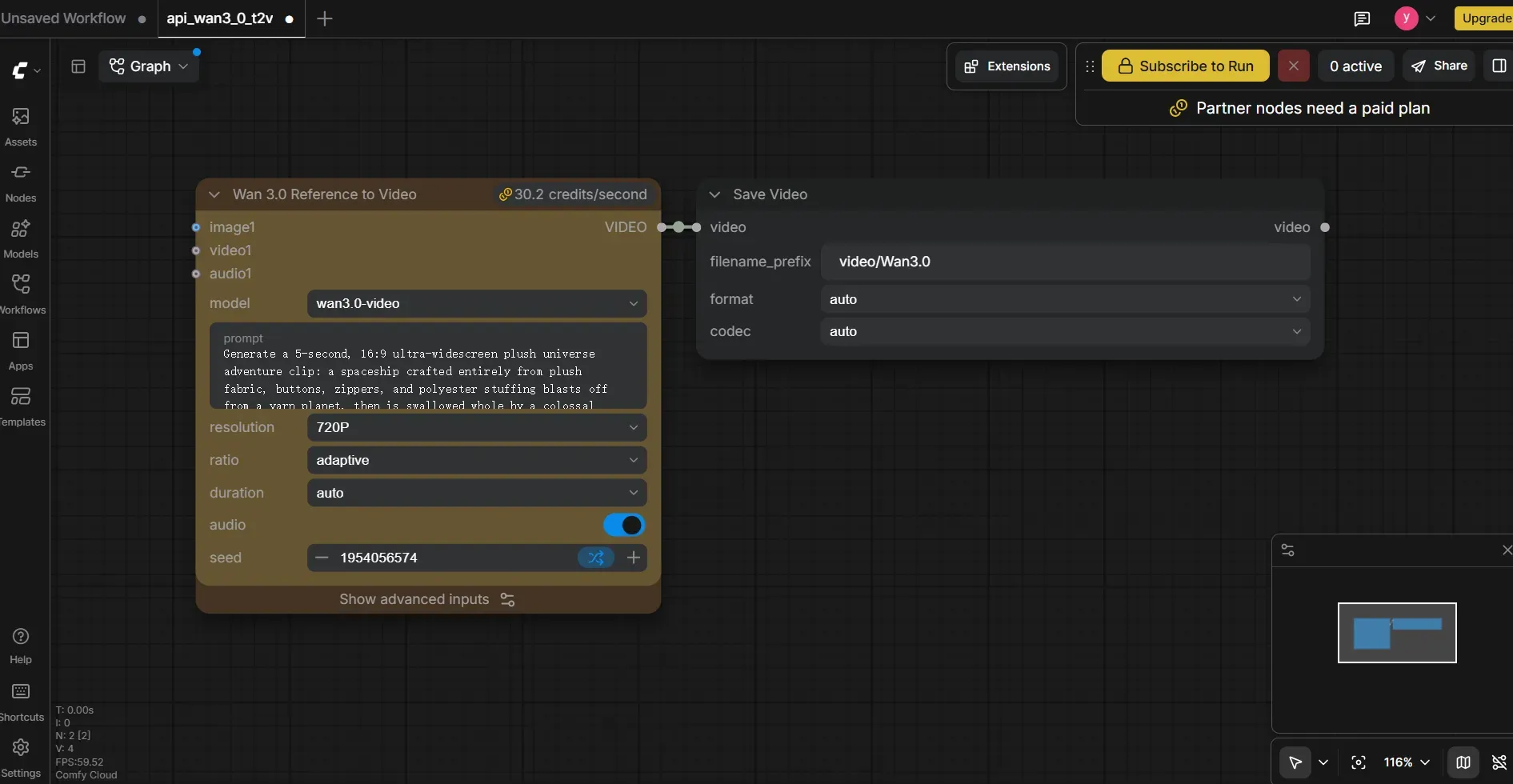
Through official ComfyUI Partner Nodes, a wan 3.0 comfyui setup offloads heavy model processing to remote cloud GPUs. Input frames pass through a LoadImage node into specialized blocks like Wan3ImageToVideoApi or Wan3ReferenceToVideoApi. These nodes package user prompts, reference images, and duration settings into JSON payloads that execute remotely before returning a finalized clip to a SaveVideo node.
Local GPU vs Cloud ComfyUI Infrastructure
Evaluating a local gpu vs cloud comfyui deployment reveals clear operational trade-offs across hardware, setup speed, and pipeline maintenance:
| Evaluation Metric | Local GPU Execution | Cloud API Partner Nodes |
| VRAM Requirement | 24GB+ (RTX 3090/4090) | Under 4GB (Runs on low-spec devices) |
| Execution Route | Local CUDA tensors | Remote API payload over HTTPS |
| Billing Model | Hardware purchase & power | Pay-per-second credit consumption |
| Asset Handoff | Direct local file paths | Local image to cloud URL conversion |
| Failure Point | VRAM spill & driver crashes | API auth, credit limits, & network latency |
Pipeline Control and Hidden Dependencies
Building a node-based wan 3.0 workflow enables custom visual pipelines. Creators can condition generations with up to 10 image references, audio tracks, and custom prompt structures inside a single visual graph.
However, running a comfyui partner nodes wan 3.0 pipeline introduces operational realities that typical SaaS reviews miss:
- Remote Execution Reality: Model checkpoint files do not sit inside your local
models/checkpointsdirectory; all heavy matrix math runs on remote cloud clusters. - Network Handoff Overhead: Input images must be serialized and uploaded to remote cloud storage before inference begins, adding upload network latency to every run.
- Node Schema Drift: Unannounced custom node updates can rename parameter fields or alter polling timeout logic, instantly breaking saved JSON graphs.
- Credit Burn Scaling: Standard
wan3.0-videoruns cost 15.09 credits/sec (480p) to 60.35 credits/sec (1080p), jumping to 84.48 credits/sec on thewan3.0-video-primetier. Prototyping prompts at 480p prevents unnecessary credit spend before committing to 1080p exports, especially alongside Comfy's 30% discount through September 30, 2026.
Adopting a comfyui cloud api wan 3.0 setup gives low-spec rigs access to high-tier video synthesis, provided creators pin specific node Git commits to preserve workflow stability.
Yapper: High-Speed Renders and Native 30-Second Commercial Workflows
Commercial workflows demand immediate iteration rather than queue delays. The yapper prime wan 3.0 implementation tackles this latency bottleneck by offering an accelerated inference engine designed specifically for rapid commercial asset creation.
Acceleration Metrics and Turnaround Trade-Offs
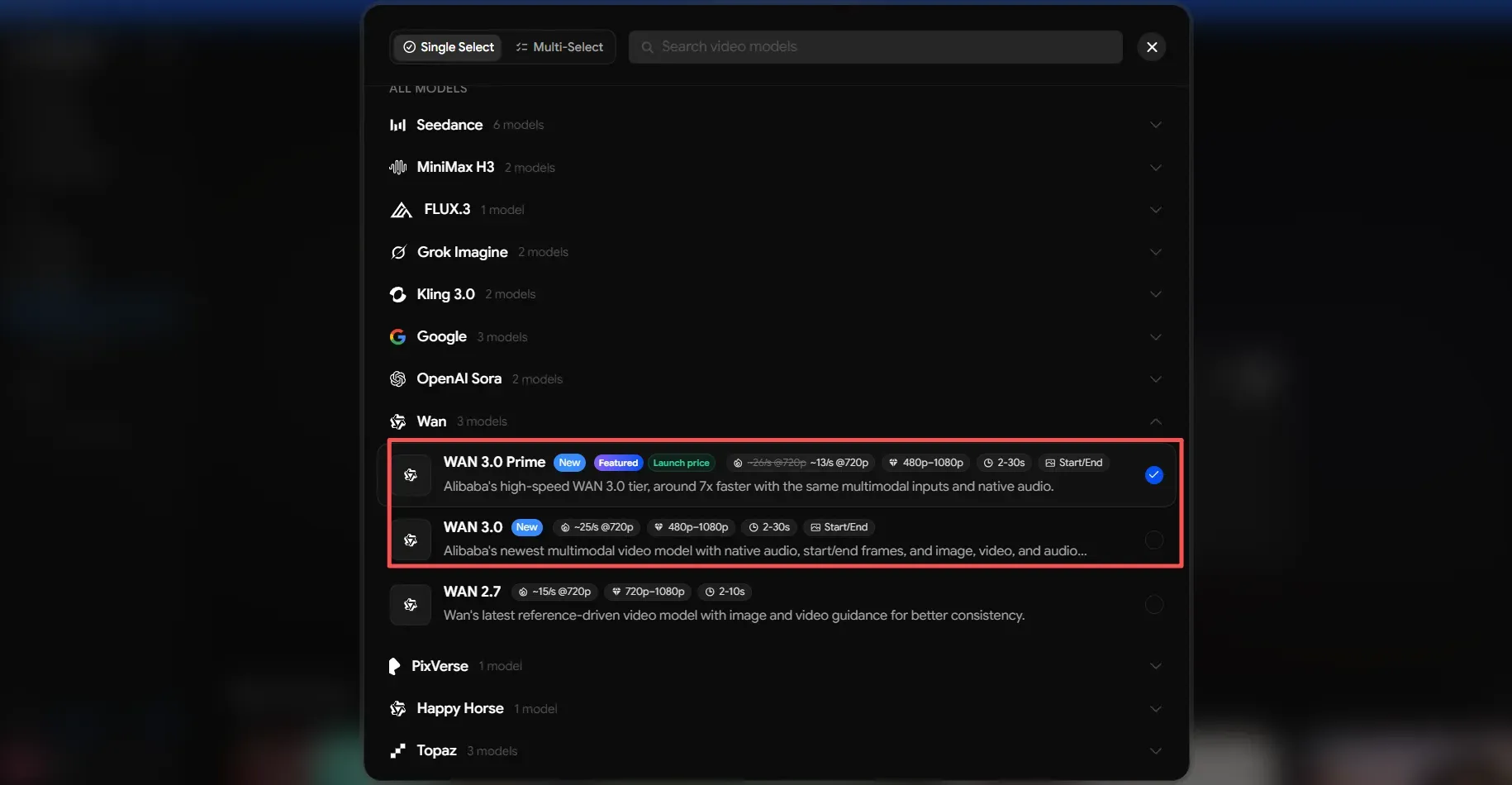
By leveraging optimized server-side inference, wan 3.0 prime speed achieves up to a 7x generation speed boost over standard open-source web queues. This operational throughput makes it the fastest way to run wan 3.0 when generating continuous 30 second wan 3.0 generation clips in a single pass without manual frame stitching.
Yapper Wan 3.0 Prime vs Wan 3.0 Standard:
| Feature / Metric | Wan 3.0 Standard Tier | Wan 3.0 Prime Tier |
| Inference Speed | Standard queue processing (~25s/s @720p) | ~7x Accelerated engine (~13s/s @720p) |
| Max Shot Length | Up to 30s continuous | Up to 30s continuous |
| Supported Resolutions | 480p, 720p, 1080p | 480p, 720p, 1080p |
| Credit Burn Rate | Base credit cost (390 credits / 16s) | Premium credit cost (~1.4x base rate) |
| Target Use Case | Budget-conscious testing & drafts | Time-sensitive commercial deliverables |
Credit Economics and SaaS Limitations
Generating long-take video via Yapper relies on a steep duration-based credit model rather than a fixed flat fee. Evaluating Yapper pricing requires factoring in total credit burn per clip:
- 30-Second Credit Cost: Rendering a full 30-second Wan 3.0 take consumes 730 credits compared to 250 credits for 10s and 390 credits for 16s.
- Plan Yield Limits: On the Personal Plan $25/mo for 3,000 credits, teams can produce roughly 4 full 30-second clips per month, making it better suited for final production exports than early prompt experimentation. High-volume studios will need the Max Plan $150/mo for 22,500 credits to hit ~30 long-form outputs.
- Real-World Queue Latency: Yapper multi-shot inputs easier, although during peak traffic hours, average queue rendering durations are between 10 and 14 minutes each batch.
- Tiered Concurrency Caps: Shared workspace limits scale from 4 concurrent tasks on Starter up to 40 simultaneous generations on the Max tier.
For creative agencies on tight deadlines, Yapper Prime trades ComfyUI’s graph control for pure execution speed. By pairing Alibaba’s ~7x faster Prime tier with a simple Web UI, it provides a plug-and-play setup for 30-second scene generation.
PolloAI: High-Volume Creative Testing and The 10-Day Unlimited Plan
When rapid visual experimentation requires dozens of trial renders, pay-per-credit SaaS platforms quickly become cost-prohibitive for creative teams and independent video editors.
Unlimited Access Mechanics for High-Volume Renders
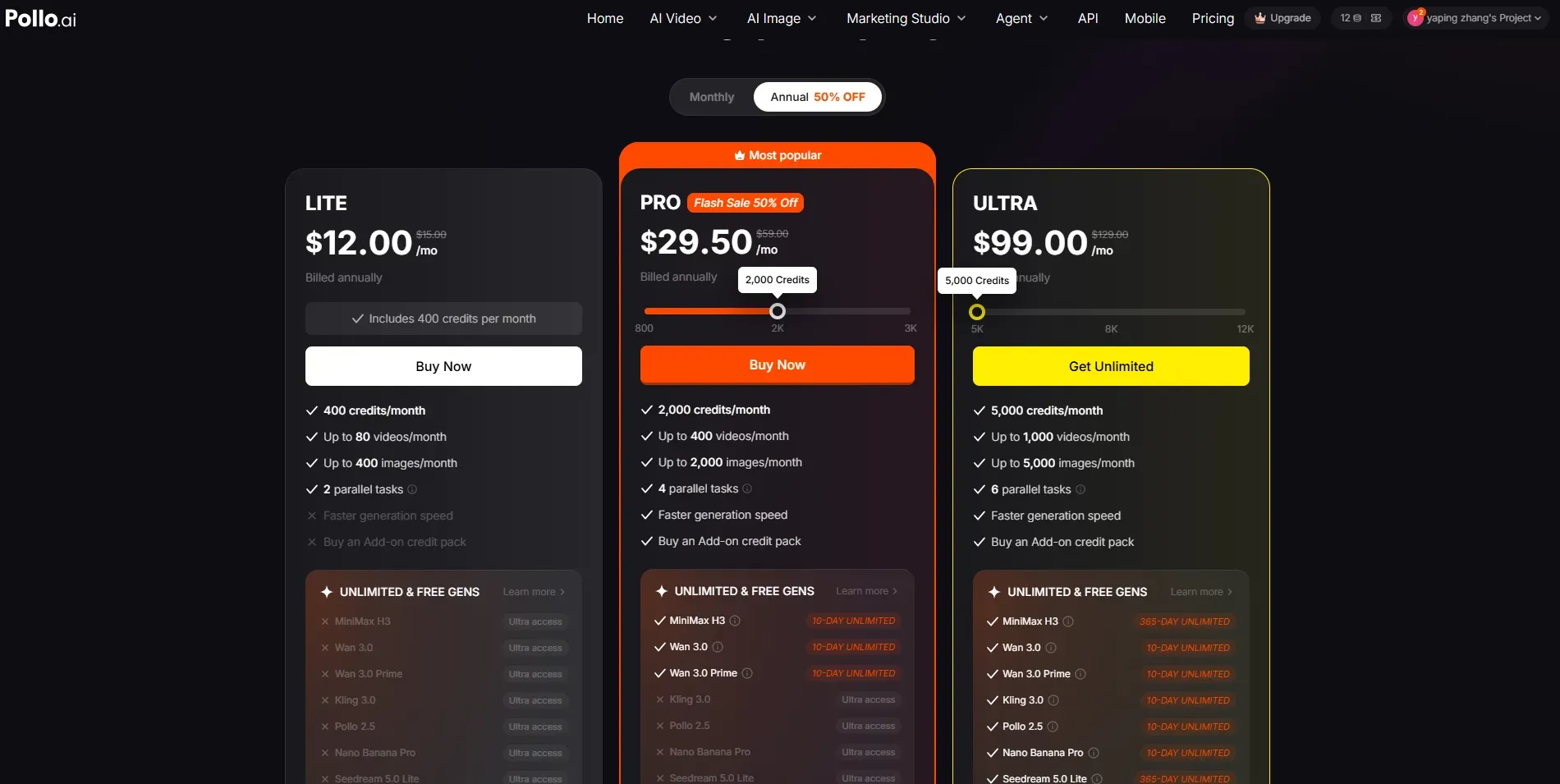
Rather than selling standalone temporary passes, PolloAI unlocks 10-day uncapped rendering for specified models including both Wan 3.0 and Wan 3.0 Prime when upgrading to its paid tiers:
Plan Requirements: The PRO tier ($29.50/mo) grants 2,000 monthly credits plus 10 days of unlimited Wan 3.0 access with up to 4 parallel tasks. The ULTRA tier ($99/mo) expands this to 5,000 credits and 6 parallel tasks.
Note: Unlimited Wan 3.0 Prime generations just for 5s/480P/720p
Purchasing a polloai 10 day pass gives content creators a dedicated execution window to run high volume ai video generation without counting individual credit costs per render.
Executing a polloai wan 3.0 unlimited session allows creators to test prompt variations, camera movements, aspect ratios, and lighting settings before committing to a final production render.
| Operational Metric | Standard Pay-Per-Credit Plan | PolloAI 10-Day Unlimited Mode |
| Generation Cap | Fixed credits per monthly billing cycle | Uncapped generation volume in active 10-day window |
| Queue Handling | Priority generation queue | Dynamic queue deprioritization during peak hours |
| Target Workflow | Final production asset export | Rapid prompt & visual concept testing |
| Cost Dynamics | Fixed credit burn per video render | Marginal cost approaches zero as volume rises |
Motion Tracking Performance and Documented Platform Quirks
While high-frequency volume testing accelerates creative iteration, evaluating Wan 3.0 outputs on PolloAI reveals clear operational trade-offs between rendering throughput, platform queue management, and foundation model fidelity.
Documented operational quirks and model behavior during high-volume generation include:
- Motion Smearing on Fast Camera Pans: Rapid camera rotations in Wan 3.0 can cause background textures to bleed into moving foreground subjects—a known foundation model constraint that requires prompt adjustments to moderate camera pan speed.
- Physics Trajectory Edge Cases: Complex liquid dynamics, splash effects, or dense particle interactions in Wan 3.0 occasionally lose physical coherence midway through a 10-second clip generation.
- Queue Prioritization Throttle: During peak server traffic hours, back-to-back unlimited generation requests experience dynamic queue deprioritization on PolloAI to maintain platform stability for paid credit users.
- Resolution Scaling Artifacts: Upscaling raw draft clips directly within the web dashboard can occasionally introduce minor edge flickering along high-contrast boundaries.
For creative directors building early storyboards, leveraging PolloAI’s 10-day unlimited window offers a highly predictable cost structure before committing final prompts to production pipelines.
Alibaba Cloud Direct API: Enterprise Scalability & Pay-Per-Second Economics
Wiring a third-party SaaS wrapper into an enterprise pipeline often leads to sudden API rate-limit throttles and 300 percent price markups on raw GPU inference. Building commercial applications on direct infrastructure eliminates intermediary fees and provides guaranteed throughput for production software.
Pay-Per-Second Pricing and Resolution Tiers
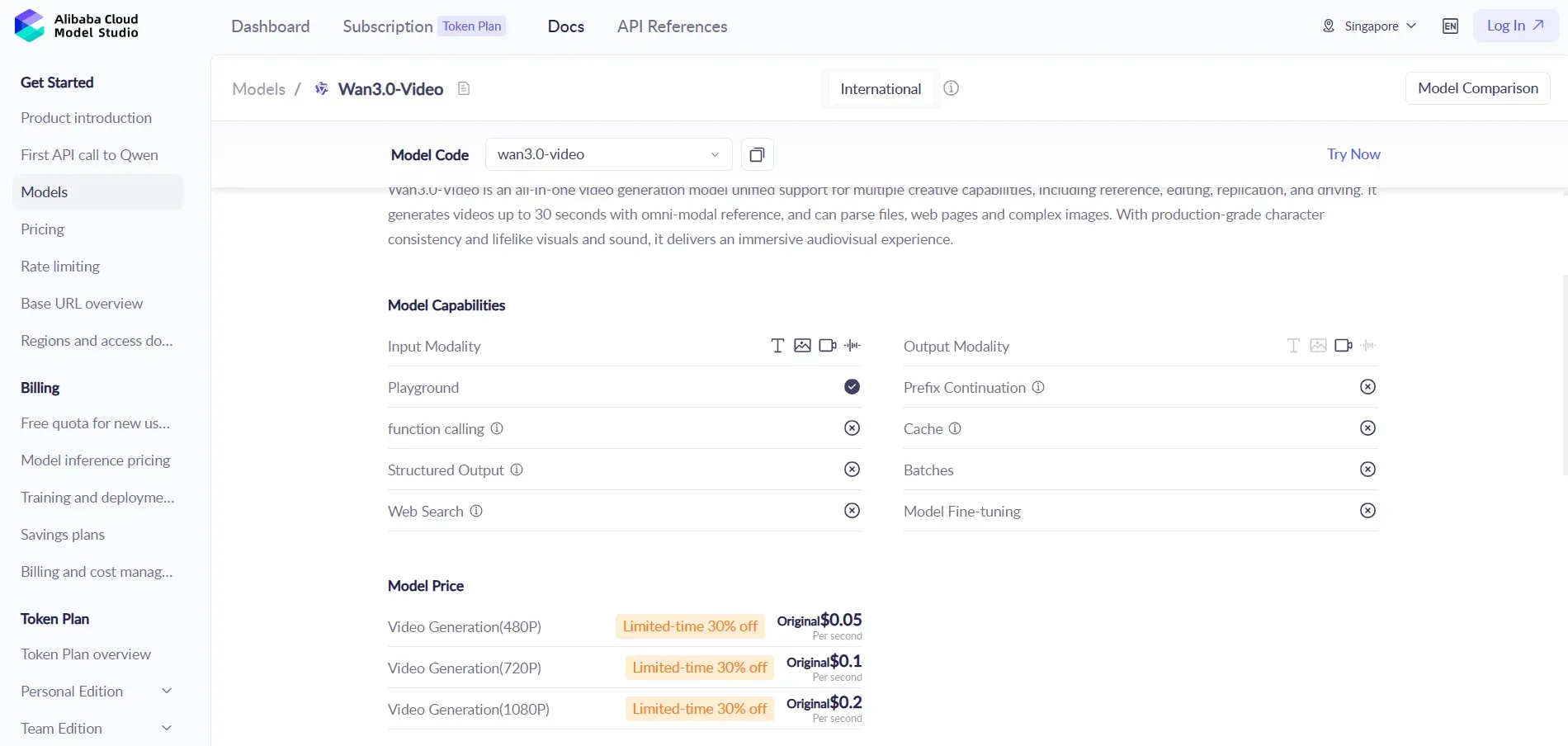
The official Alibaba Cloud Model Studio endpoint charges strictly per second of generated video rather than enforcing fixed monthly subscription tiers. Understanding wan 3.0 api pricing requires evaluating output resolution against production requirements:
| Output Resolution | Standard Pay-Per-Second Cost | 30s Clip Total | Primary Developer Application |
| 480P | $0.05 / sec | $1.50 | Rapid concept testing and UI previews |
| 720P | $0.10 / sec | $3.00 | Web publishing and social media feeds |
| 1080P | $0.20 / sec | $6.00 | Master exports for commercial broadcasting |
Calculating the exact wan 3.0 pay per second cost allows software teams to pass transparent, usage-based billing directly to end users without risking negative margin drift.
Omni-Reference Document Processing and Developer Integration
Deploying the alibaba cloud wan 3.0 api provides access to specialized multimodal input structures that standard web generators lack. Through an omni-reference document to video api request, developers can pass raw PPTX, PDF, or DOC file URLs directly into the media payload array. The underlying model parses slide layouts and text context automatically to generate animated product walkthroughs without requiring manual image cropping.
However, executing a smooth wan 3.0 developer integration requires managing specific API backend constraints:
- Asynchronous Polling Infrastructure: Video synthesis requests require the
X-DashScope-Async: enableheader, returning a task ID that webhooks or polling workers must track until completion. - Reference Media Budgeting: Combining video references with text prompts bills for both the input video reference duration and the final generated output seconds.
- Payload Routing Rules: Attaching document files or web URLs automatically switches the model into reference mode, which overrides explicit image-to-video flags and requires clean JSON payload construction.
For SaaS founders building custom video tools, direct cloud API endpoints deliver predictable scaling without consumer UI overhead.
Alternative Cloud Infrastructure: Atlas Cloud Wan 3.0 API
For developers looking for simplified endpoint management, flexible concurrency limits, or competitive pay-as-you-go pricing without navigating enterprise cloud console complex setups, Atlas Cloud provides a streamlined API host for the model.
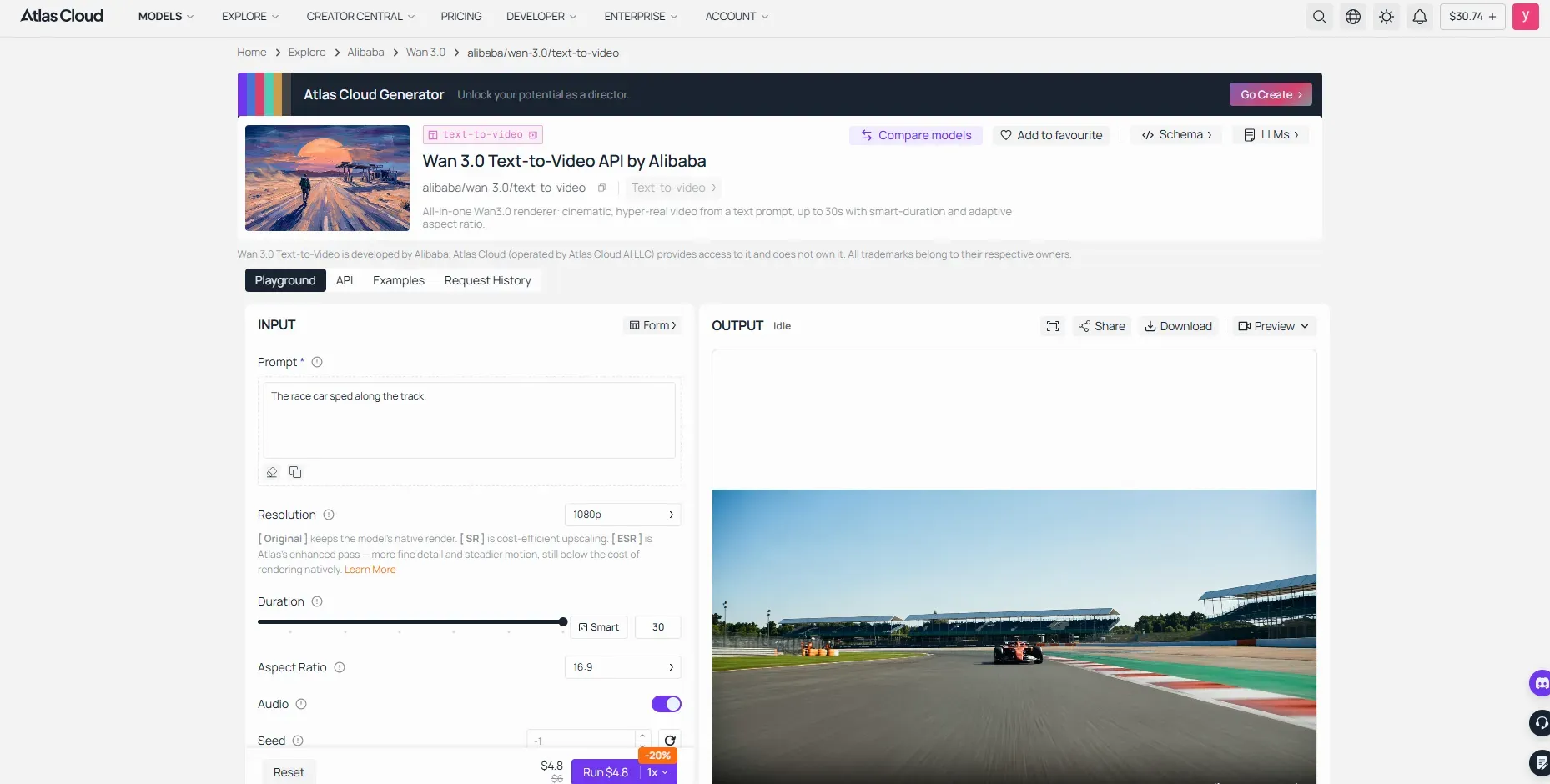
By integrating the Atlas Cloud Wan 3.0 API, engineers can access standardized REST and Python SDK endpoints for 1080p generation, lowering integration friction while maintaining low-latency queue execution for video SaaS applications.
Cost and Speed Comparison: Calculating Total Cost of Ownership (TCO)
Surprise credit depletion on cloud platforms often catches video production leads off guard when scaling up rendering jobs. A studio producing 100 30-second marketing clips at 1080p resolution generates 3,000 total seconds of video output. Calculating the true financial commitment across different access options requires factoring in raw compute charges, subscription limits, electrical power draw, and rendering latency.
Evaluating a wan 3.0 tco breakdown reveals significant cost variances when comparing direct pay-per-second API endpoints against time-limited subscription passes and local hardware workflows.
100-Clip Production Cost Benchmark (30s Clips at 1080P)
| Operational Metric | PolloAI (PRO Tier) | Alibaba Cloud API | Yapper Prime | ComfyUI Cloud | Atlas Cloud |
| Billing Model & Rate Structure | $29.50/mo (2,000 credits) 10-day unlimited restricted to 5s 480/720p | $0.20/sec (Promo: $0.14/sec) | $25/mo promo rate $35, 3,000 monthly credits | $28/mo Creator tier 7,400 credits; 1080p rate: 60.35 credits/sec | ~$0.16/sec (20% OFF) |
| Per-Clip Cost (30s @ 1080P) | $0.88 – $7.96 (60 to 540 credits/clip) | $4.20 – $6.00 (Direct pay-per-second) | $6.25 – $12.50 (750 to 1,500 credits/clip) | ~$6.85 (1,810.5 credits/clip) | $4.8 (Direct pay-per-second) |
| Total Cost (100 Clips) | $88.50 – $796.50 | $420.00 – $600.00 | $625.00 – $1,250.00 | ~$685.20 | ~$480 |
| Primary Constraint & Operational Reality | 10-day unlimited cannot be used for 1080p 30s exports; forces credit consumption based on generation settings. | Pay-as-you-go REST API without UI monthly limits; ideal for automated, zero-queue server pipelines. | Fastest turnaround with 7x acceleration engine, but carries high per-second credit burn rates for 1080p long takes. | Unlocks full graph customization and multi-reference conditioning, but offloaded GPU runs burn credits quickly at 1080p. | Programmatic REST/SDK access; eliminates SaaS Web UI wrapper markups |
Comparing Wan 3.0 deployment routes demonstrates that the most cost-effective path depends heavily on output resolution and delivery architecture. For early visual prototyping, time-limited unlimited tiers keep low-resolution draft costs negligible. However, when exporting master 30-second 1080p deliverables, direct Alibaba Cloud API integration provides predictable per-second rates $4.20 to $6.00 per clip, undercutting consumer Web UIs like Yapper Prime $6.25 to $12.50 and ComfyUI Cloud $6.85 that append SaaS margin markups.
The optimal deployment path comes down to engineering integration versus immediate convenience. Product teams build on direct API endpoints to lock in lower unit costs and automated backend scaling. Creative studios, by contrast, willingly pay higher SaaS credit markups for instant Web UI acceleration or ready-to-use ComfyUI graph controls.
Final Verdict & Selection Checklist: Choosing Your Ideal Wan 3.0 Stack
Matching your production bottlenecks directly to the right execution platform prevents wasted subscription credits, broken deployment pipelines, and delayed client deliverables.
Persona-Based Platform Matching
Selecting the best wan 3.0 stack depends on whether your team priority centers on raw backend code control, visual pipeline node chaining, or high-speed credit turnarounds. This wan 3.0 deployment guide maps four common production profiles directly to their optimal access channels:
| Production Profile | Recommended Access Channel | Core Selection Criteria |
| Indie Developer / SaaS Founder | Alibaba Cloud Direct API / Atlas Cloud | Programmatic REST/SDK access, transparent pay-per-second rates, and clean JSON payload integration for video apps. |
| Node Power-User | ComfyUI Partner Nodes | Complete ControlNet, LoRA, and visual graph control offloaded to cloud GPUs without local VRAM limits. |
| Commercial Agency | Yapper Prime | Prioritizes 7x accelerated render queues and 30-second single-pass takes for tight deadlines. |
| High-Volume Prototyper | PolloAI | Uses 10-day unlimited windows for rapid low-res (5s 480/720p) prompt testing before final export. |
Wan 3.0 Deployment Checklist
Run through these technical and cost checks before committing to an architecture:
- Node Flexibility vs. Turnaround Speed: Opt for ComfyUI if you need complex visual graph logic and multi-reference conditioning; choose turnkey Web UIs like Yapper Prime if client deadlines demand 7x accelerated queue processing.
- API Unit Costs vs. SaaS Markups: Direct API endpoints offer predictable pay-per-second rates ($0.05–$0.20/s depending on resolution/tier) without the subscription markups added by consumer wrappers.
- Prototyping vs. Master Export Restrictions: Time-limited unlimited plans (like PolloAI’s) are ideal for 5-second low-resolution prompt drafting, but full 30-second 1080p exports consume primary credit pools across all SaaS channels.
Next Steps for Production Execution
To turn this wan 3.0 workflow recommendation into finished commercial video assets, start by mastering camera movement, sound syntax, and multi-shot character consistency in our Wan 3.0 prompt engineering guide. If you are currently deciding between competing foundation architectures, review our Wan 3.0 vs Seedance 2.5 benchmark analysis to evaluate native 1080p performance and long-take consistency before launching your next video campaign.