
Prompting "8k hyperrealistic raw selfie" almost always produces a plastic face with unrealistically symmetrical lighting. Generative models interpret vague buzzwords by pulling from polished stock photos, triggering artificial smoothing.
To generate a photorealistic AI selfie, you must replace descriptive adjectives with structured key-value parameters. To eliminate descriptive clutter, focus your prompts on four concrete physical factors:
Core Formula: Realism = Subject Imperfections + Lens Flaws + Lighting Asymmetry
Quick Key Takeaways Overview:
- The Core Problem: Vague descriptive prompts trigger AI smoothing, yielding unnatural, overly polished plastic selfies.
- The Solution: Replacing adjectives with structured key-value parameters across subject features, camera optics, lighting, and sensor imperfections.
- The Standard Framework: Utilizing the Master JSON Schema isolates camera mechanics from facial geometry, preventing parameter bleed.
Specifying real mobile hardware optics ensures your authentic mobile phone selfie AI renders match true smartphone camera output without artificial gloss.
The Complete Master JSON Schema for Hyper Realistic AI UGC Selfies
Single-string text prompts fail when generating consistent user-generated content because modifying one subject descriptor often alters background lighting or camera optics unpredictably. Utilizing a production-grade GPT Image 2.5 JSON schema eliminates this cross-parameter bleed by establishing explicit structural boundaries between physical facial features, camera mechanics, and ambient room geometry.
Below is the complete, multi-nested template designed to generate camera-authentic assets for marketing campaigns and creative testing.
plaintext1{ 2 "subject_profile": { 3 "demographics": "Age, gender, and ethnicity, e.g., 28-year-old woman", 4 "pose_and_gesture": "Casual stance or phone hold, e.g., handheld selfie, leaning forward", 5 "expression": "Micro-expressions, e.g., unposed half-smile, subtle eye squint", 6 "skin_texture_and_finish": { 7 "surface_finish": "Skin render base, e.g., natural matte skin with visible pores", 8 "imperfections": [ 9 "Flaw 1, e.g., minor blemishes", 10 "Flaw 2, e.g., subtle cheek redness" 11 ], 12 "specular_control": "Reflectivity limits, e.g., low-shine highlights, no oily sheen" 13 } 14 }, 15 "environment_and_clutter": { 16 "location": "Scene setting, e.g., messy car interior, outdoor cafe patio", 17 "background_artifacts": [ 18 "Clutter item 1, e.g., seatbelt strap", 19 "Clutter item 2, e.g., unmade duvet" 20 ], 21 "composition": "Framing and angle, e.g., off-center vertical orientation" 22 }, 23 "lighting_and_exposure": { 24 "primary_source": "Light source, e.g., unfiltered side window daylight, direct phone flash", 25 "exposure_behavior": "Dynamic range limits, e.g., blown-out background window highlights", 26 "shadow_contrast": "Shadow definition, e.g., hard shadow lines under jawline" 27 }, 28 "camera_and_post_processing": { 29 "device_optics": "Lens type and distortion, e.g., front camera with 23mm wide-angle distortion", 30 "sensor_noise": "ISO grain level, e.g., heavy noise in dark shadow zones", 31 "compression_artifacts": "Export flaws, e.g., mild JPEG compression softening digital edges" 32 } 33}
To deploy this replicable prompt template effectively, organize your input using strict key-value types to control how the image generator interprets each parameter block.
Schema Field Directory
| Top-Level Key | Child Field | Value Type | Functional Role |
| subject_profile | skin_imperfection_matrix | Array [String] | Overrides default model facial smoothing algorithms |
| camera_and_hardware | focal_length_mm | Float | Sets wide-angle facial proportion distortion |
| lighting_and_exposure | blown_out_highlights | Boolean | Forces authentic digital exposure clipping on skin |
| environment_and_clutter | background_objects | Array [String] | Generates non-staged organic background noise |
| post_processing_imperfections | chromatic_aberration | Float | Simulates low-cost plastic mobile lens color fringing |
Structuring a structured image prompt with numerical floats and explicit booleans isolates camera hardware parameters from subject aesthetics. Standard prompt guides often omit float ranges, causing creators to accidentally trigger extreme image distortion or complete render failure.
For instance, keeping lens_smudge_intensity between 0.10 and 0.30 preserves subject clarity while successfully stripping away synthetic AI gloss. Similarly, setting focal_length_mm to 23.0 accurately replicates the minor optical stretching typical of front-facing smartphone camera modules. This granular control gives marketers a balanced imperfection matrix that maintains visual stability across high-volume ad creative iterations.
Step by Step Prompt Breakdown: Engineering Smartphone Imperfections into GPT Image 2.5
Building an authentic selfie prompt requires systematically applying real-world physical limitations across four structural categories inside your JSON schema. Isolating these parameters prevents default model biases from overwhelming your image generation call.
Subject Demographics and Micro Imperfections
Default image generator weights lean heavily toward symmetrical faces and hyper-polished studio features. Forcing a non-model appearance requires explicitly declaring asymmetry metrics and skin surface details inside the JSON structure. Setting parameters for uneven cheek positions, faint forehead creases, and subtle peach fuzz disrupts default facial smoothing. Candid GPT Image 2.5 portraits work best with relaxed expressions, such as a subtle squint or half-smile. Specifying raw skin features like visible pores and minor cheek redness overrides default AI airbrushing, giving the subject genuine texture.
To see this parameter framework in action, let's test it with a real GPT Image 2.5 generation call:
Note: All image generations in this article used Atlas Cloud's GPT Image 2.5 Sunburst Text-to-Image model.
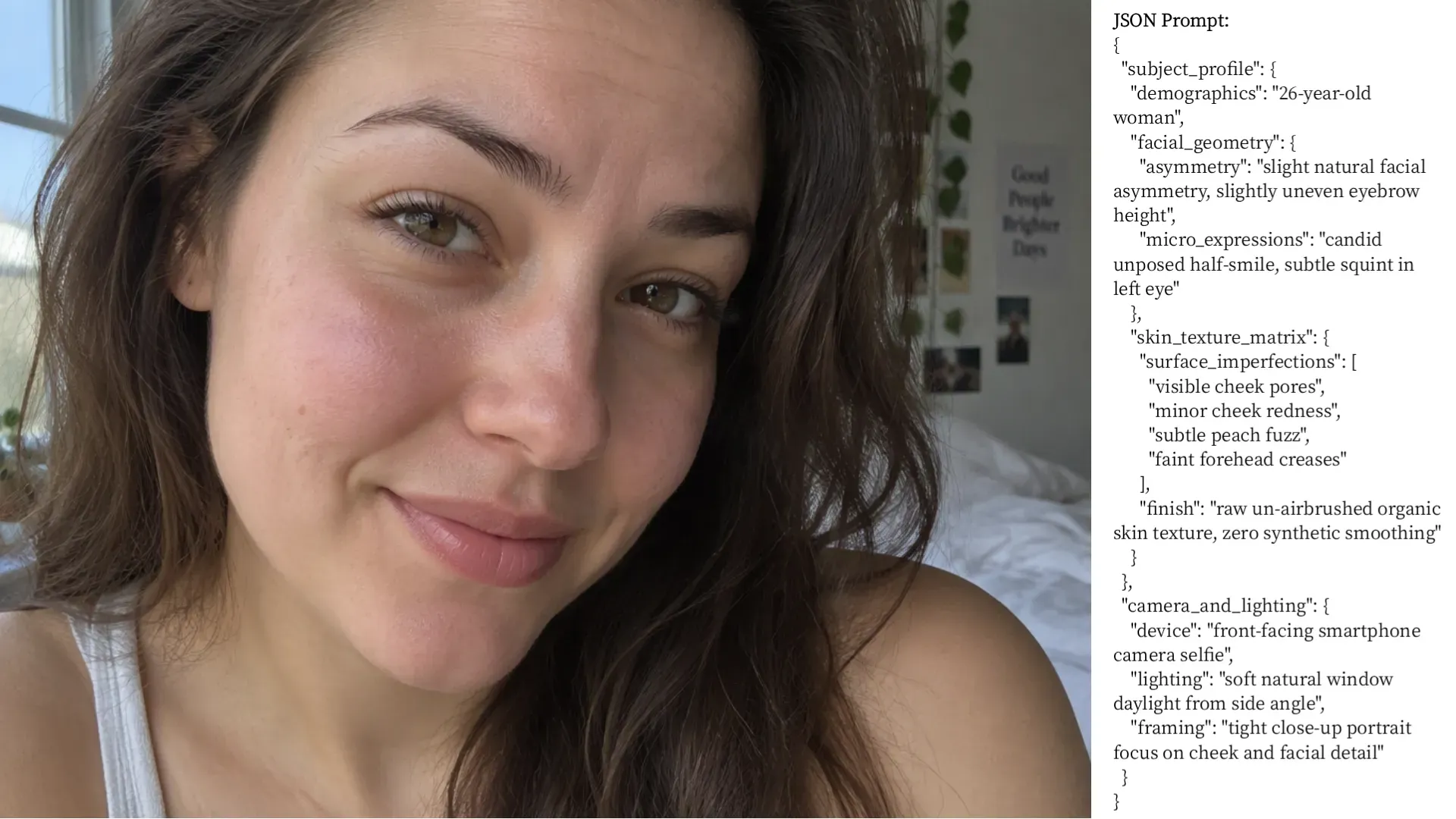
Output Breakdown & Case Analysis:
- Asymmetry & Expression: Adding natural asymmetry gives the subject an unposed brow offset and casual smile, avoiding rigid, perfectly symmetrical AI geometry.
- Skin Texture: Targeting pores and minor redness forces genuine skin grain and subtle flush across the nose and cheeks, overriding aggressive default smoothing.
- Lighting & Optics Isolation: Defining side window daylight causes realistic shadow falloff across the face without over-smoothing skin micro-details.
Mobile Camera Hardware and Lens Characteristics
Real mobile photos are defined by the physical hardware limits of compact camera sensors. Standard front camera modules feature short focal lengths that warp facial features at close physical range. Injecting front-facing camera lens distortion into your schema forces the generator to expand the nose bridge slightly and compress ear proportions, accurately mimicking true optical perspective. Define mobile lens focal depth by setting aperture values near f/1.9 to create realistic background blur. Specifying an arm length subject distance alongside subtle smartphone camera noise stops the model from rendering perfectly clean studio glass optics.
To demonstrate how camera optics alter spatial geometry, here is a test render applying the mobile hardware JSON block:
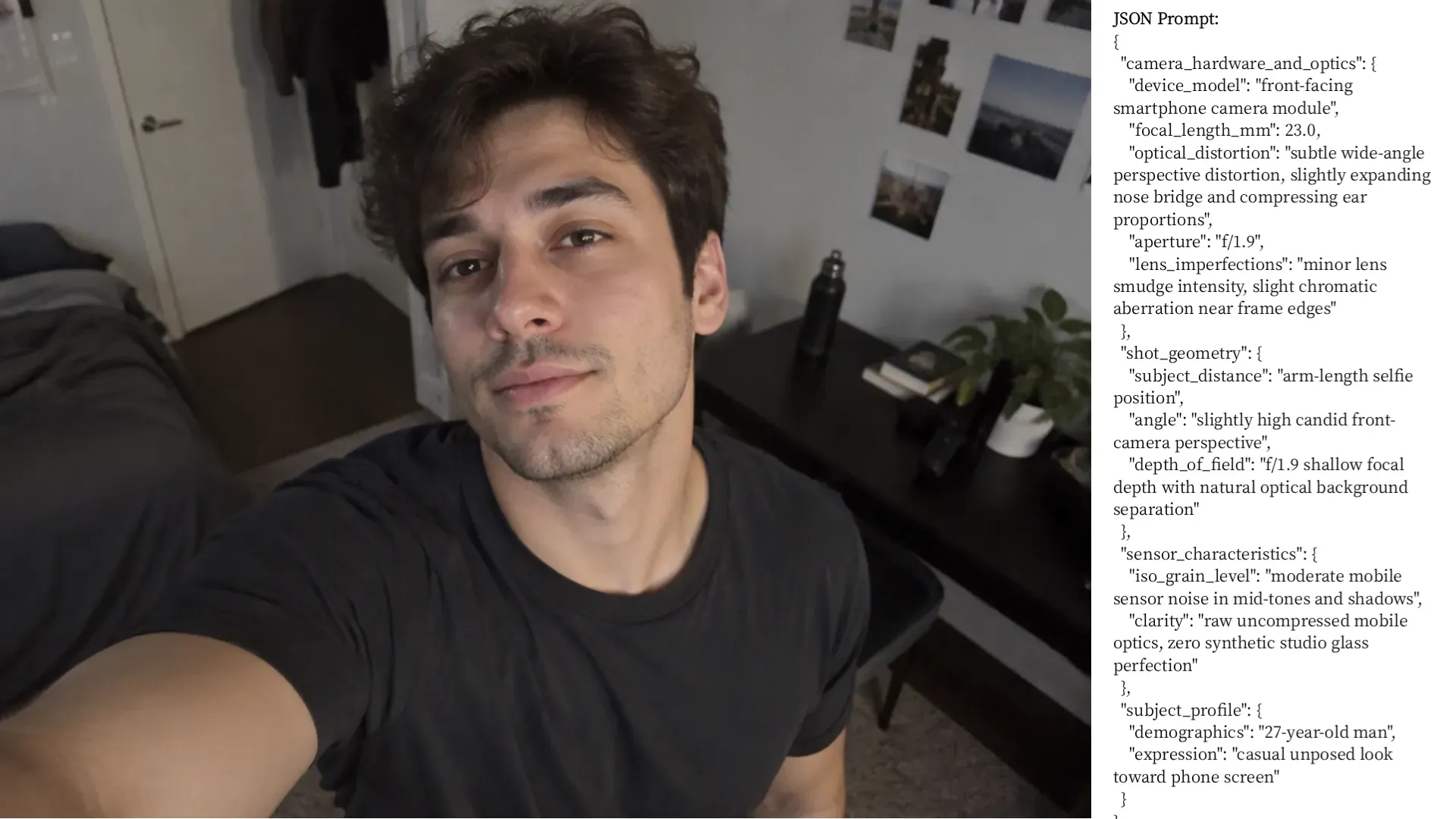
Output Breakdown & Optical Analysis:
- Arm-Length Wide Geometry: The 23mm optics naturally elongate the forequarter arm in the bottom-left frame while holding true facial proportions at center.
- Optical Depth Falloff: Setting f/1.9 creates a smooth optical drop-off across background clutter rather than relying on an aggressive, artificial edge mask.
- Indoor Shadow Grain: Moderate ISO noise is visibly preserved across shadow zones—such as the dark T-shirt and dim background corners stripping away synthetic studio polish under low indoor light.
Real World Environment Clutter and Context
Clean, perfectly centered background compositions immediately flag an image as synthetic. Constructing a candid environment setup means intentionally diluting scene composition with everyday contextual clutter. Define background object arrays containing unmade bed frames, tangled charging cables, half-empty coffee cups, or random street pedestrians. An authentic lifestyle background places the subject slightly off-center inside a messy car interior, home office, or casual coffee shop. Generating an ambient clutter AI image shifts visual focus away from the subject face, anchoring the photograph in believable daily surroundings.
To see how environmental noise breaks synthetic perfection, here is a test render using clutter JSON parameters:
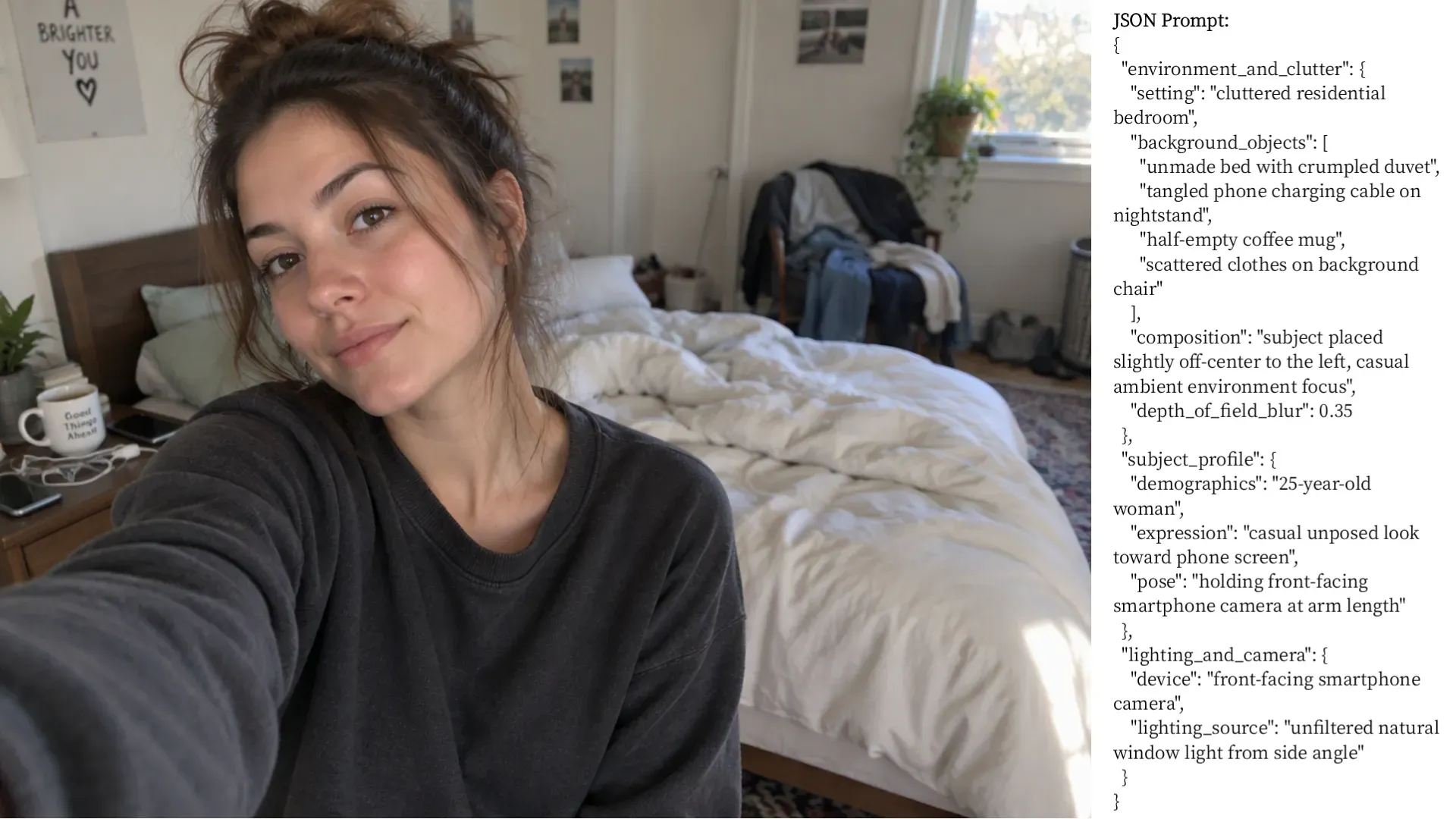
Output Breakdown & Optical Analysis:
- Off-Center Composition: Pushing the subject left exposes the room setup on the right side of the frame.
- Background Details: The JSON array successfully renders a messy bed, nightstand items, and draped clothing instead of a clean background.
- Window Sunlight: Unfiltered side light creates soft highlights on the white sheets without washing out room details.
Exposure Flaws and Post Processing Noise
Professional studio setups distribute illumination evenly, whereas small mobile sensors struggle in high-contrast environments. Achieving realistic exposure clipping AI in daylight or low-light scenes requires declaring hard shadow lines under the chin or blown-out window highlights behind the subject. Set ISO sensor grain parameters to higher values to simulate compact camera sensors operating in dark ambient settings. Introducing natural lighting imperfections AI photo settings alongside mild JPEG compression artifacts softens sharp digital edges. This combination replicates the typical compression applied by mobile social messaging apps during image uploads.
To test how exposure limits and sensor noise break digital perfection, here is a render using post-processing JSON parameters:
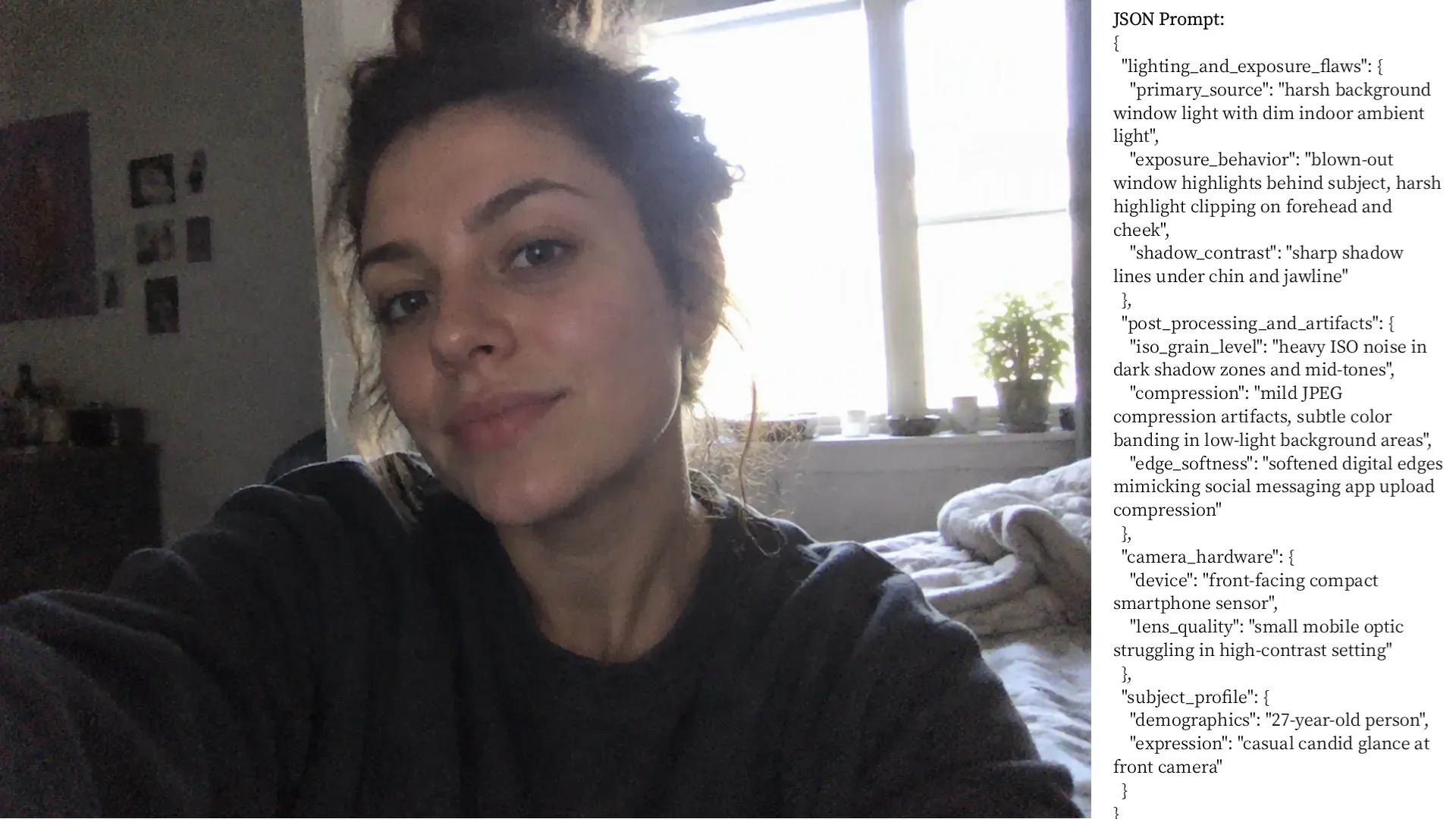
Output Breakdown & Exposure Analysis:
- Window Highlight Clipping: Unfiltered backlight completely blows out the window frame, capturing how small phone sensors struggle with high-contrast indoor scenes.
- Shadow Noise: Heavy ISO grain fills the dark sweater and unlit left wall, replacing clean studio shadows with realistic low-light noise.
- Hair Rim Lighting: Intense backlight bleeds through the loose hair strands on the right, softening edge contrast without artificial digital blur.
Three Ready to Use UGC JSON Prompt Templates for E-Commerce and Ad Creatives
Direct-to-consumer ad teams rely on consistent, believable base images for creative testing across paid social channels. Deploying standardized JSON structures ensures that every asset generated fits directly into a high-converting marketing framework without requiring manual retouching. Below are three copy-pasteable configurations built for performance creative use cases, complete with specific camera and environmental settings.
Template 1: The Casual Car Interior Selfie
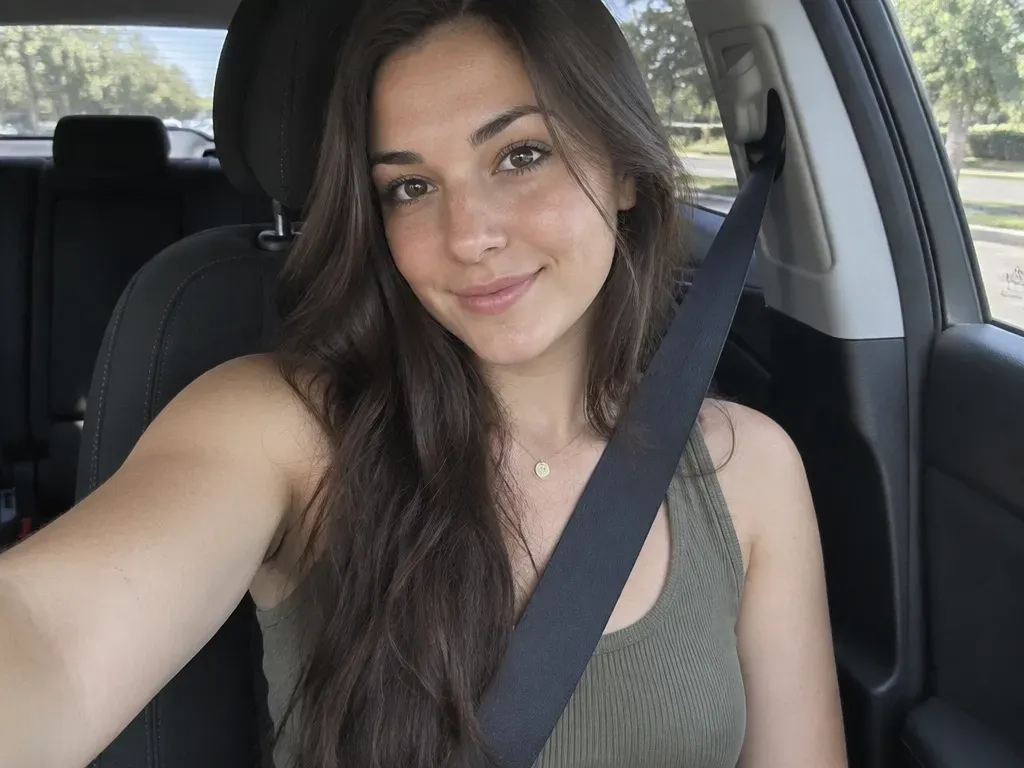
Driving high conversion rates on paid social platforms requires matching real user video formats. Car interiors provide built-in directional lighting through side windows, making them ideal for high-converting asset variations. Integrating this configuration into your AI UGC creator workflow produces realistic stills suitable for static ads or testimonial overlays. This car selfie AI prompt configuration balances side-window daylighting with natural torso positioning. Use this JSON structure when building assets for D2C video ad avatar stills:
plaintext1{ 2 "subject_profile": { 3 "age": "26", 4 "expression": "relaxed slight smile", 5 "skin_detail": "subtle freckles, natural skin texture" 6 }, 7 "scene_environment": { 8 "location": "driver seat inside stationary modern vehicle", 9 "props": ["black fabric seatbelt across torso", "headrest behind head"], 10 "window_reflection": "faint exterior trees visible in glass" 11 }, 12 "camera_settings": { 13 "device": "front-facing smartphone camera", 14 "angle": "arm length high angle", 15 "lens_distortion": "23mm subtle wide angle distortion" 16 }, 17 "lighting_and_exposure": { 18 "source": "natural daylight entering through driver side window", 19 "shadow_ratio": "soft directional shadow on passenger side of face" 20 } 21}
Template 2: The Bathroom Mirror Selfie with Direct Flash
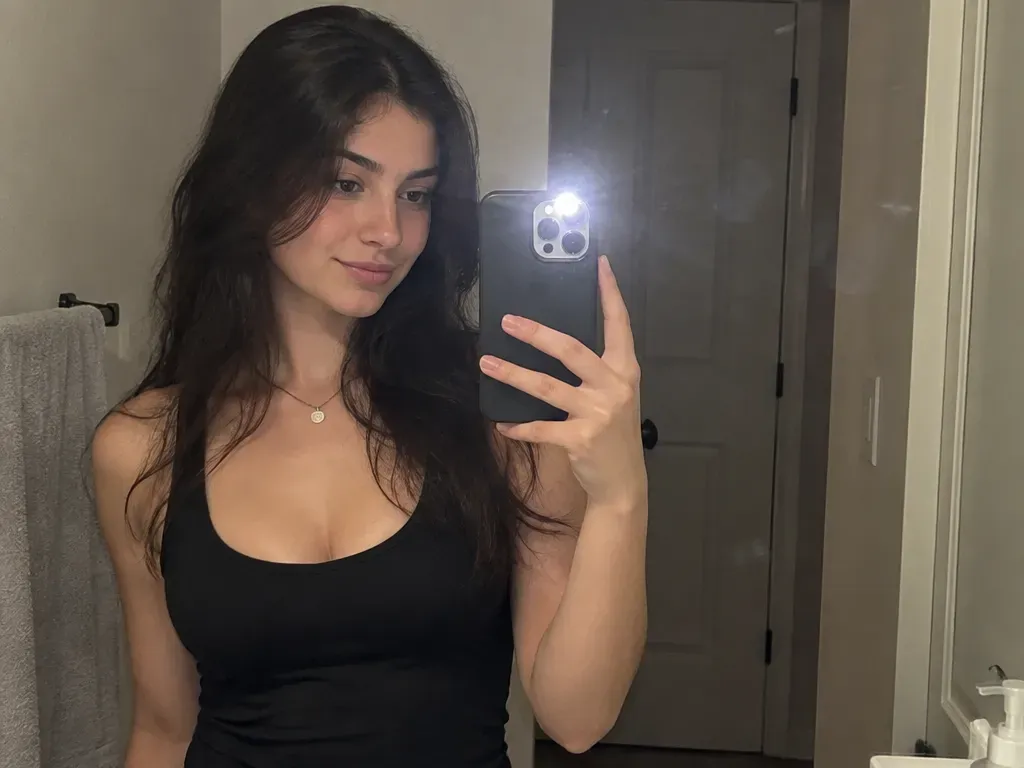
Mirror selfies stripped of professional studio illumination deliver strong organic click-through rates on TikTok and Instagram feeds. This mirror selfie AI JSON configuration injects direct flash lighting AI photo artifacts, fingerprint smudges on glass, and imperfect room framing. The direct flash setting causes natural highlight clipping on the forehead while throwing hard shadows onto the background wall. Use this layout to generate an authentic social media asset that feels uploaded directly from a personal mobile camera roll:
plaintext1{ 2 "subject_profile": { 3 "pose": "holding phone up in front of chest", 4 "expression": "neutral subtle grin", 5 "eye_direction": "looking at phone screen reflection" 6 }, 7 "environment_clutter": { 8 "location": "residential bathroom mirror", 9 "imperfections": [ 10 "minor glass fingerprint smudges", 11 "unfocused door frame in background" 12 ] 13 }, 14 "lighting_setup": { 15 "primary": "diffused LED phone flash reflection with soft lens bloom", 16 "bounce_lighting": "directional flash bounce illumination across face and chest", 17 "exposure_behavior": "balanced mirror reflection exposure without harsh center burn" 18 }, 19 "framing_and_aspect": { 20 "composition": "slightly off-center vertical orientation", 21 "crop": "upper torso and head fully visible" 22 } 23}
Template 3: The Golden Hour Outdoor Café Candid

Performance marketers needing lifestyle imagery often struggle with overly saturated outdoor stock photos that instantly look like commercial advertisements. Generating a golden hour UGC photo with controlled backlighting balances warm tones with real-world table clutter. Incorporating realistic lens flare and sunburst optics into your lighting schema creates soft hair rim lighting while maintaining skin texture. This layout creates a hyper-realistic AI lifestyle photo optimized for generating organic social media AI images:
plaintext1{ 2 "subject_profile": { 3 "demographics": "28 year old female", 4 "posture": "leaning slightly forward on outdoor wooden table", 5 "expression": "candid mid-talk smile" 6 }, 7 "background_elements": { 8 "location": "outdoor café patio", 9 "table_clutter": ["half-filled iced coffee glass with condensation", "open silver laptop"], 10 "depth_of_field": "soft background bokeh blur on street background" 11 }, 12 "lighting_and_optics": { 13 "source": "late afternoon low angle sun behind subject", 14 "optical_effects": ["subtle lens flare in upper corner", "warm rim lighting on hair"] 15 } 16}
The Parameter Swap Matrix: Customizing Realism Variables in Seconds
Iterating on creative assets often breaks prompt performance when narrative edits alter surrounding text context. Utilizing a modular variable swap matrix allows creators to adjust scene parameters while maintaining complete schema integrity. By swapping isolated key-value pairs inside your structured prompt, you can rapidly generate distinct campaign variations without introducing unwanted visual artifacts or model drift.
Understanding key GPT Image 2.5 parameters enables precise control over lighting, focal length, and surface noise. Rather than rewriting an entire prompt to modify an environment or camera angle, you simply update the designated array or string field. The JSON prompt breakdown below outlines standardized value inputs and their direct visual impact on rendered outputs.
Modular Realism Variables Lookup Table
| JSON Field Name | Options / Allowed Values | Visual Impact on Output |
| lens_type | "front_facing_wide", "telephoto_portrait", "ultra_wide" | Controls facial proportion and edge distortion |
| lighting_source | "overhead_fluorescent", "direct_sunlight", "phone_screen_glow" | Changes shadow harshness and color temperature |
| skin_detail | "raw_unfiltered", "slight_freckles", "visible_pores" | Dictates micro-texture and removes artificial smoothing |
| camera_grain | "none", "low_daylight", "high_iso_night" | Adds authentic sensor noise to eliminate digital polish |
Deploying these customizable AI prompts across high-volume creative testing pipelines eliminates trial-and-error generation calls. Replacing generic descriptive adjectives with explicit key values ensures predictable camera behaviors, consistent facial geometry, and accurate optical depth across every generated asset in your ad library.
Common Pitfalls: How to Eliminate AI Gloss and Prevent Prompt Drift
Failed generations often stem from contradictory prompt tokens or malformed code syntax. When performing GPT Image 2.5 troubleshooting, resolving output flaws requires fixing structural data formatting and stripping out legacy prompt buzzwords that force default model smoothing.
Banned Buzzwords That Ruin JSON Performance
Including qualitative aesthetic buzzwords forces the model to sample stock photography datasets, introducing plastic skin texture and artificial studio lighting. To eliminate AI gloss, remove the following phrases from your JSON string values:
photorealistic8k resolutiontrending on artstationhyper-detailed
Fixing JSON Syntax Errors and Structural Drift
Preventing API parsing failures and unexpected image degradation requires strict code execution. Standard JSON syntax errors occur when single quotes or extra commas corrupt the input payload. Use this syntax checklist before executing your request:
- Double Quotes: Enclose all keys and string values in standard double quotes. Single quotes cause instant API rejections.
- No Trailing Commas: Remove commas after the final key-value pair in any object or array.
- Closed Brackets: Ensure every opening brace and bracket has a corresponding closing partner.
- Explicit Booleans: Write boolean flags in lowercase rather than Python-style capitalized terms.
To prevent AI prompt drift during iterative generation calls, avoid overloading a single schema with conflicting instructions. If an output exhibits unnatural facial symmetry, explicitly declare asymmetrical facial parameters in your subject profile rather than relying on generic negative prompts. Correcting these structural flaws ensures repeatable, camera-authentic assets across every generation run.
Scaling Your Workflow: Integrating GPT Image 2.5 Stills into Marketing Funnels
Generating static images is only the first stage of an optimized AI UGC creator workflow. Performance marketing teams scale video ad production by piping these photorealistic assets directly into generative video engines and avatar lip-sync tools like HeyGen, Creatify, or CapCut. Converting a single base portrait into an authentic D2C ad creative requires preserving character facial geometry across multiple camera angles, gestures, and lighting setups. When scaling these creative pipelines for automated batch generation, teams should monitor GPT Image 2.5 rate limits alongside API cost optimization models to maintain cost efficiency.
Production Pipeline: From JSON Schema to Video Ad
plaintext1[GPT Image 2.5 JSON Engine] -> [High-Res Base Still] -> [Image-to-Video Animation / Lip-Sync] -> [Final Video Ad Asset]
This setup turns one prompt into dozens of tested video hooks, streamlining rapid creative iterations.
Best Practices for Scalable Asset Libraries
Building a brand-specific JSON prompt library reduces iteration cycles and maintains visual cohesion across campaigns. Implement these core guidelines during asset production:
- Lock Subject Profiles for Consistency: Retain exact values for
subject_profilekeysethnicity,facial_asymmetry,skin_imperfection_matrixwhile swappingcamera_and_hardwareangles to generate matching side-profile and frontal shots. - Prepare Stills for Video Ingestion: Ensure generated images maintain a 9:16 aspect ratio with neutral head positioning. This provides optimal tracking keypoints for AI avatar generation workflow tools during facial animation.
- Version-Control Prompt Repositories: Store verified JSON payloads in shared code repositories. This allows creative teams to deploy realistic social media AI campaigns rapidly without re-engineering base prompt structures for every new SKU launch.





