You paste one 5-second ad prompt, change only the model name, and the output suddenly feels like a different brief. The product shape drifts. The shot ignores the cut list. The voice sounds useful in one run and disposable in the next.
That is why minimax h3 vs ltx 2.3 should be tested like a production risk question, not a fan debate. This article uses 3 repeatable cases: a mixed-media laundromat scene, a product image-to-video ad, and a dialogue clip where audio matters.
The short answer: start with MiniMax H3 when references, shot continuity, and native audio are central. Start with LTX 2.3 when you want fast prompt iteration, open workflow control, native vertical options, and extend-style production tasks. Then measure cost per usable clip, because a cheap failed run is still a failed run.
Key takeaways
- H3 fits complex multimodal scenes and native audio tests.
- LTX 2.3 fits open workflows, I2V, extend, and vertical production.
- Match prompt, ratio, duration, audio state, and seed before judging.
- Compare accepted clips, not single frames or spec sheets.
- Atlas Cloud keeps the model pages and billing trail in one place.
Why MiniMax H3 vs LTX 2.3 Is Hot, and Why Quick Tests Fail
MiniMax launched H3 on July 31, 2026, describing it as a general multimodal video model that can use text, image, video, and audio context, generate up to 15 seconds, reach 2K, and produce native stereo sound in the same pass (MiniMax Research, July 2026).
LTX 2.3 arrived earlier in 2026 with a different pull. Lightricks emphasized a rebuilt VAE for fine detail, stronger prompt understanding, improved image-to-video motion, cleaner audio, native portrait generation, and LTX Desktop plus ComfyUI workflows (LTX Blog, February 2026).
The current search results lean heavily on spec tables and isolated creator tests. Useful, but incomplete. A creator making ads, product clips, or dialogue scenes needs to know what breaks first:
| Test risk | Why it matters | What to record |
|---|---|---|
| Prompt adherence | The model may ignore shot count, props, or action order. | Which instructions survived the final clip |
| Motion continuity | A nice still frame can hide a bad transition. | Watch at normal speed and scrub the last second |
| Subject consistency | Products and people often drift during motion. | Shape, face, outfit, text, and material changes |
| Audio usefulness | Dialogue can be present and still unusable. | Lip timing, ambience, voice clarity, and noise |
Quick tests fail when teams change several variables at once. They compare 9:16 against 16:9, audio-on against audio-off, 4 seconds against 10 seconds, or a downloaded demo against a fresh run. The fix is simple: make the prompt identical, make the settings as close as each form allows, and track attempts.
MiniMax H3 vs LTX 2.3 Workflow Overview: Models, Pages and Prices
Run this comparison in one browser session so you are not switching accounts, invoices, or model libraries mid-test. On Atlas Cloud, the practical path is to open each model page, paste the same prompt, save the completed playground screenshot, and download the result.
Prices move, so treat the numbers below as page checks from August 28, 2026. The Atlas model library currently lists MiniMax H3 Text-to-Video, Image-to-Video, and Reference-to-Video from $0.32/gen. The LTX 2.3 Quality T2V and I2V pages currently show $0.002 per run at the default 121-frame setup.
| Model endpoint | Best use | Input type | Duration or frames | Resolution or aspect | Audio | Current Atlas price | Note |
|---|---|---|---|---|---|---|---|
| MiniMax H3 Text-to-Video | Complex scene prompts | Text | 5-15s shown on Atlas listing | 16:9, 9:16, 1:1, adaptive | Native audio available | From $0.32/gen | Use for Case 1 and dialogue backup |
| MiniMax H3 Image-to-Video | Product ad from a first frame | Image plus prompt | 5-15s shown on Atlas listing | Inherited or selected ratio | Audio can stay off for GIF tests | From $0.32/gen | Use when product shape matters |
| MiniMax H3 Reference-to-Video | Multi-reference identity or product tests | Reference image/video/audio plus prompt | 5-15s shown on Atlas listing | Depends on page controls | Audio can be part of the reference flow | From $0.32/gen | Use only if your references really help |
| LTX 2.3 Quality Text-to-Video | Fast prompt iteration and vertical tests | Text | num_frames=121 for about 5s at 24fps | landscape_16_9 or portrait options | generate_audio optional | $0.002 per run on page | Good baseline for same-prompt testing |
| LTX 2.3 Quality Image-to-Video | I2V motion and preservation checks | Image plus prompt | num_frames=121 for about 5s | landscape_16_9 or portrait options | generate_audio optional | $0.002 per run on page | Use for Case 2 |
| LTX 2.3 Quality Extend Video | Extending existing clips | Video plus prompt | Default num_frames=81, page allows more | Multiple presets | Optional | Check page before use | Mentioned here, not used in the 3-case chain |
Step 1: Run MiniMax H3 vs LTX 2.3 T2V With One Prompt
Open MiniMax H3 Text-to-Video and LTX 2.3 Quality Text-to-Video in the same browser session. Paste the exact same scene prompt into both.
text1A 5-second 16:9 live-action video inside a late-night self-service laundromat. Fluorescent lights flicker softly. Washing machines spin in the background, plastic laundry baskets sit near an old bench, and one red sock lies on the floor. Add subtle hand-drawn glowing blue line animation that curls around the machines like a quiet dream. Handheld phone footage, small natural camera shake, focus lag when moving close to reflective glass, exposure gently shifting under white fluorescent light. Keep the scene believable, slightly nostalgic, documentary-like, not polished advertising footage. Smooth motion with at least three viewpoint changes: wide entrance view, medium tracking shot past the machines, close detail on the red sock and glowing line. 2
Use H3 at 16:9, 5s or the nearest available duration, highest visible quality, and audio off for this GIF case. Use LTX 2.3 with resolution=landscape_16_9, num_frames=121, generate_audio=false, and a fixed seed if the page exposes it.
Step 2: Compare MiniMax H3 vs LTX 2.3 Output, Not Marketing Claims
Download both completed clips and review them side by side. Do not score from the prettiest still frame. Scrub the motion and ask whether the model followed the brief through the whole clip.
text1Score the same prompt on four practical checks: prompt adherence, motion continuity, subject consistency, and audio usefulness. For this silent GIF case, audio usefulness is marked not tested. 2
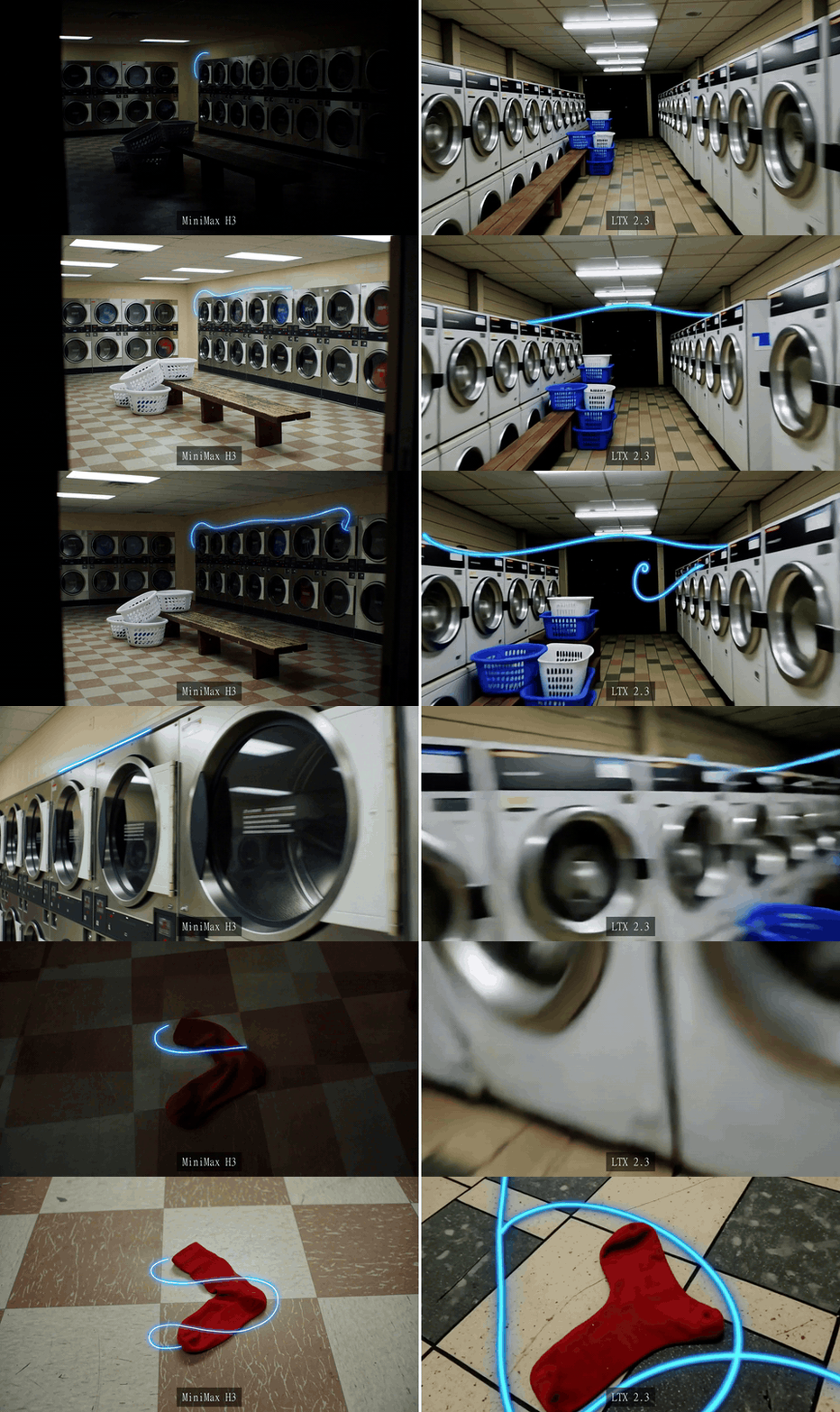
MiniMax H3 and LTX 2.3 real laundromat outputs playing side by side from the same prompt
Real same-prompt comparison from the Atlas test environment: MiniMax H3 is on the left and LTX 2.3 is on the right. Watch the character, spinning machines, red sock, blue line, and camera movement rather than judging a single frame.
Step 3: Run MiniMax H3 vs LTX 2.3 Product Motion With One Prompt
Product ads punish models that redraw the hero object. This case holds the matte-black earbud case, green LED, brushed-steel table, reflector, and hand movement constant, then asks both models to build the product shot from the same text brief.
text1A 5-second 16:9 live-action studio product video. A woman with shoulder-length brown hair and black sleeves slowly tilts a silver reflector beside a matte-black true-wireless earbud charging case centered on a brushed-steel table. Preserve the exact compact oval case shape, green LED position, black finish, and steel reflection. The camera starts at a three-quarter front view, slides left as the reflector catches the edge, then cuts to a close macro of the LED and case seam. Soft white studio light, realistic hands, gentle dust in the light, smooth commercial product motion, no text, no logo, no extra products. 2
Use MiniMax H3 Text-to-Video at 16:9 and 5 seconds. Use LTX 2.3 Quality Text-to-Video with resolution=landscape_16_9, num_frames=121, and generate_audio=false.
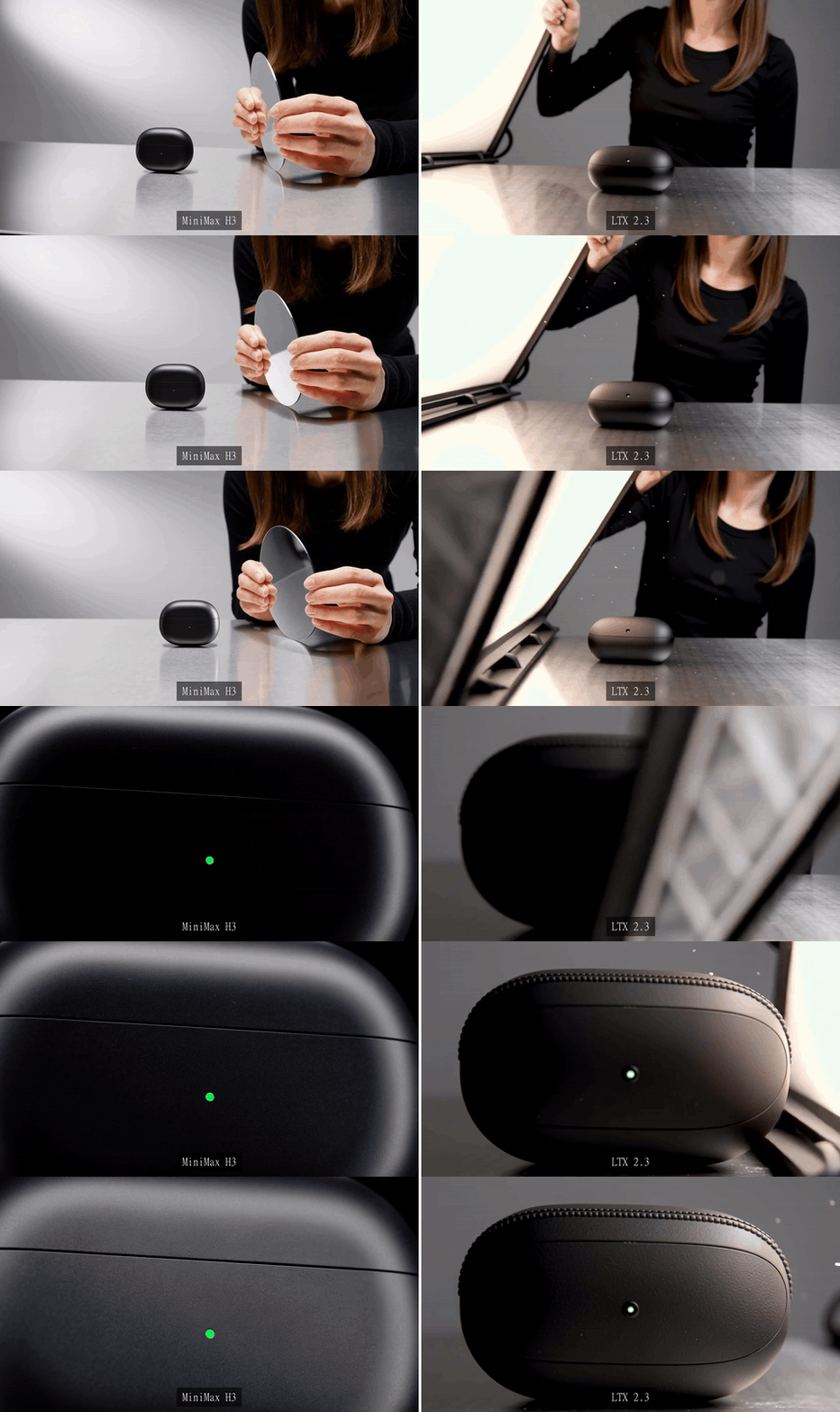
MiniMax H3 and LTX 2.3 real earbud studio outputs playing side by side from the same prompt
Real same-prompt product comparison from the Atlas test environment: MiniMax H3 is on the left and LTX 2.3 is on the right. Inspect the case silhouette, LED, reflection, hand motion, and reflector movement throughout the clip.
Step 4: Test MiniMax H3 vs LTX 2.3 Night-Train Dialogue Motion
This GIF isolates visual acting and continuity in a dialogue-style scene. Keep the original MP4 files separately when your final review also needs voice, carriage ambience, or lip-sync checks.
text1A 5-second 16:9 cinematic live-action scene inside a quiet late-night train carriage. A woman in her early thirties with a short black bob haircut, silver earrings, and a dark green trench coat sits by a rain-speckled window. City lights slide across the glass as the carriage gently sways. She turns toward an unseen passenger, silently forms the words "I think this is my stop," gives a small uncertain smile, stands, and reaches for the overhead rail. Keep the face, coat, and train interior consistent. Natural carriage light, soft rail vibration, realistic hand movement, no subtitles, no text, no logo. Camera begins medium close-up, shifts with the train, then holds as she rises. 2
Use MiniMax H3 Text-to-Video at 16:9 and 5 seconds. Use LTX 2.3 Quality Text-to-Video with resolution=landscape_16_9, num_frames=121, and generate_audio=false.
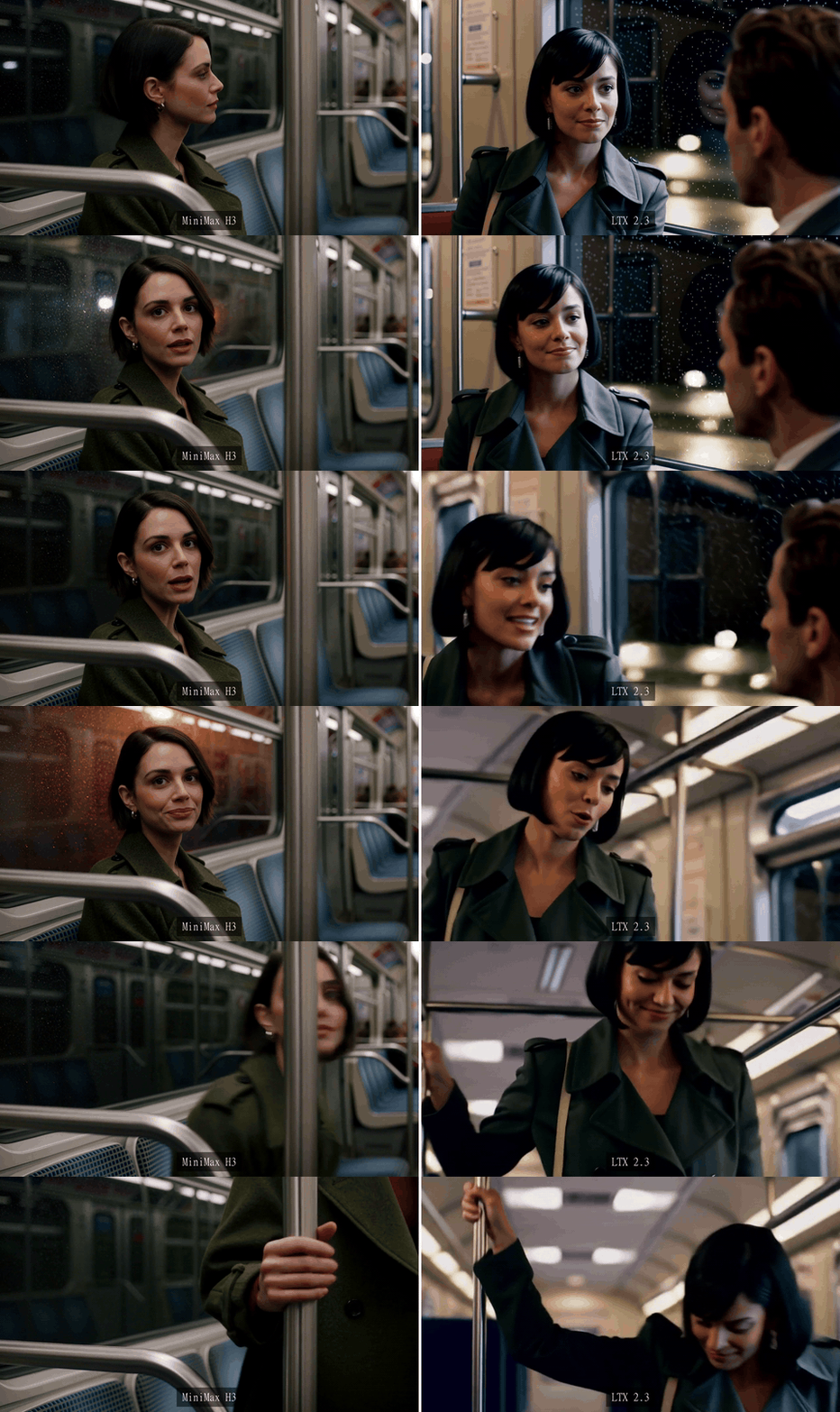
MiniMax H3 and LTX 2.3 real night-train outputs playing side by side from the same prompt
Real same-prompt night-train comparison from the Atlas test environment: MiniMax H3 is on the left and LTX 2.3 is on the right. Compare facial continuity, carriage motion, window reflections, and the stand-up action across the full clip.
Step 5: Record MiniMax H3 vs LTX 2.3 Cost Per Usable Clip
Write down every attempt, not only the accepted output. This is the part most public comparisons skip, and it is where the real production decision lives.
text1For each case, record: model, settings, listed price, attempts, accepted output, cost estimate, and failure reason. Count a rerun if the model ignores a required prop, drifts the product, loses a character identity, or produces unusable audio. 2
Use the price shown on the exact model page at the time of testing. For this August 28, 2026 check, H3 entries on the Atlas model library show from $0.32/gen, while LTX 2.3 Quality T2V and I2V pages show $0.002 per run for the default run state. If a discount label appears on your page, capture it in the screenshot and write it into your worksheet.
| Case | Model | Setting | Listed price checked | Attempts | Accepted output | Cost estimate | Failure reason to log |
|---|---|---|---|---|---|---|---|
| Laundromat mixed media | MiniMax H3 T2V | 16:9, 5s, audio off | $0.32/gen | 1 | Yes or no | attempts x price | Missing viewpoint, prop drift, weak glow attachment |
| Laundromat mixed media | LTX 2.3 Quality T2V | 121 frames, landscape, audio off | $0.002/run | 1 | Yes or no | attempts x price | One-shot drift, missing prop, weak low-light continuity |
| Earbud studio motion | MiniMax H3 T2V | 16:9, 5s, audio not scored | $0.32/gen | 1 | Yes or no | attempts x price | Product shape, LED, reflection, or extra object changed |
| Earbud studio motion | LTX 2.3 Quality T2V | 121 frames, landscape, audio off | $0.002/run | 1 | Yes or no | attempts x price | Product redraw, static motion, reflection mismatch |
| Night-train dialogue motion | MiniMax H3 T2V | 16:9, 5s, audio not scored | $0.32/gen | 1 | Yes or no | attempts x price | Face drift, weak acting beat, lost identity |
| Night-train dialogue motion | LTX 2.3 Quality T2V | 121 frames, landscape, audio off | $0.002/run | 1 | Yes or no | attempts x price | Face drift, timing, carriage-motion mismatch |
Run one variation only after this table is filled. If your team needs TikTok, Reels, or Shorts, run a fresh 9:16 test instead of cropping the 16:9 output. If you need multiple product photos, character references, or voice samples, test H3 Reference-to-Video. If you need to extend an existing clip or wire a local ComfyUI workflow, test LTX 2.3 extend and local settings separately.
The legal note is short but important. The MiniMax H3 model card lists 33B parameters, the MiniMax H3 Community License, and an application path for the USA, EU, UK, and South Korea (Hugging Face, August 2026). Read the current license before deploying open weights in those regions. LTX 2.3 also has open-weight and desktop workflow claims, but commercial use still depends on its current license terms. This article is a production test plan, not legal advice.
For minimax h3 vs ltx 2.3, the clean decision method is the 3-case worksheet above: run matched prompts, preserve audio where audio matters, and compare cost per accepted clip.
Frequently Asked Questions
Is MiniMax H3 better than LTX 2.3?
It depends on the job. H3 is the first model to try when you care about multimodal context, reference-heavy generation, native audio, or complex shot instructions. LTX 2.3 is strong for teams that value open workflows, local control, fast iteration, I2V, extend, and native portrait production.
Is MiniMax H3 cheaper than LTX 2.3 on Atlas Cloud?
On the pages checked on August 28, 2026, Atlas lists MiniMax H3 entries from $0.32/gen, while LTX 2.3 Quality T2V and I2V pages show $0.002 per run at the default 121-frame state. The better metric is cost per usable clip after retries.
Does MiniMax H3 generate audio in the same pass?
MiniMax describes H3 as generating video with native stereo sound. For a fair test, use a dialogue prompt, keep the MP4, and judge lip sync, voice clarity, ambience, and whether the line matches the prompt.
Can LTX 2.3 make vertical videos for TikTok, Reels and Shorts?
LTX says 2.3 supports native portrait generation, including vertical video. Test vertical as a separate 9:16 run. Do not crop a horizontal comparison and call it a vertical model test.
Can I run MiniMax H3 locally in the United States or Europe?
Do not assume the open weights are automatically cleared for your region or use case. The MiniMax H3 model card points users in the USA, EU, UK, and South Korea to a license request path, so check the current terms first.
What prompt should I use to compare MiniMax H3 vs LTX 2.3 fairly?
Use one prompt that forces real decisions: exact props, 2 to 3 camera changes, a fixed aspect ratio, a target duration, and an audio state. The laundromat prompt in Step 1 works because it tests mixed style, low light, small objects, handheld motion, and continuity in one short clip.